
 简体中文
简体中文 English
Website review
This review may include AI-generated content and is not individually verified. Domain, certificate and other facts come from the observed data on this page.
What is OpenRA?
OpenRA is an open-source project that rebuilds classic real-time strategy games for modern computers. Its page describes it as recreating and modernizing titles such as Red Alert, Command & Conquer (Tiberian Dawn), and Dune 2000, with ongoing development shared through playtest releases and changelogs. You can find it at OpenRA.
What it actually is
It is not a single new game but a shared engine plus game rules for several classics. The project rebuilds those games so they run on current systems, with modern conveniences rather than a straight re-release. Development is community-driven, and the page notes community-led balance work alongside official changes.
What the page highlights
- Random map generators for Red Alert, Tiberian Dawn, and Dune 2000, usable in Skirmish and Multiplayer, with options for biome, player count, symmetry, and resources.
- A balance overhaul for skirmish and multiplayer, plus single-player campaign difficulty adjustments.
- Map editor improvements, including a Path Tiler tool for placing cliffs, beaches, and roads.
- A standalone Tiberian Dawn HD mod that can switch between remastered and classic artwork, audio, and music, with a stated goal of merging those features into core OpenRA later.
- Smaller additions such as a new mouse input mode, timed auto-save, bots that build expansion bases, and new missions for Red Alert and Tiberian Dawn.
Who it suits
| If you want | OpenRA fits when |
|---|---|
| To replay old C&C-style games on a modern PC | The rebuilt rules and engine are the point |
| Multiplayer or skirmish with generated maps | Random map generation and balance changes matter most |
| Map-making and modding | Editor tools and mod support are central |
| A polished commercial remaster | That is a different kind of product; this is a community project |
A practical next step
If you already own or remember these games, treat OpenRA as a way to play them again with modern matchmaking-era features and active balance changes. Start with a skirmish against bots using a generated map, then try multiplayer once you are comfortable with the controls and the current balance. If you mainly want the remastered visuals, check whether the Tiberian Dawn HD mod is still standalone at the time you download, since the page says integration into core OpenRA was planned for a later release.
How do I install and play OpenRA?
OpenRA is an open-source project that rebuilds classic real-time strategy games — Red Alert, Command & Conquer (Tiberian Dawn), and Dune 2000 — for modern systems. Installing it is closer to installing a normal desktop game than to setting up a development environment: you download a build, run the installer or extract the archive, and launch the game. The original game files are not required for the base experience, though the project does support using assets from the C&C Remastered Collection in its Tiberian Dawn HD mod.
H3 Where to get it
Go to the official site, OpenRA, and use its download section. Pick the build for your operating system (Windows, macOS, or Linux). The project publishes playtest builds alongside stable releases; the page's own notes describe a playtest with new random map generators for all three games, so if you want the newest features you may need to opt into a playtest rather than the default download. If you prefer a storefront, a Linux distribution package, or a Flatpak-style install, check whether your platform's package manager carries it — versions there can lag behind the official releases.
H3 First launch and setup
- Install or extract the download, then start the launcher. The launcher lists the supported games as separate mods, so choose Red Alert, Tiberian Dawn, or Dune 2000.
- Let it check for content. If you own the original games or the Remastered Collection, you can point OpenRA at those files for higher-fidelity assets and music. Otherwise the built-in free assets are enough to play.
- Set your display and input options. The project recently added an "Other RTS" mouse input mode, which is worth trying if the default controls feel wrong to you — it mimics the input conventions of other classic RTS titles.
- Turn on timed auto-save if you plan to play missions or skirmish matches, so a crash or a bad decision does not cost you the whole session.
H3 Choosing what to play
| Mode | Best for | What to expect |
|---|---|---|
| Single-player campaign | Learning the game, story | Difficulty has been adjusted to ease the learning curve, so it is a reasonable starting point |
| Skirmish vs. bots | Practising build orders | Bots now attempt to build expansion bases, so they pressure the map more than before |
| Multiplayer | Playing with friends or online | Balance has had a community-led overhaul; expect a different feel from the original games |
| Random map generator | Fresh maps without downloading any | Select biome, player count, symmetry and resources; works in skirmish and multiplayer |
H3 If you want to make maps
The map editor has seen continued UI improvements. The Path Tiler tool makes it easier to place cliffs, beaches, and roads, and newer tools build on the random map generator logic. If you only want to play, skip this; if you enjoy level design, it is the most direct way to contribute.
H3 Practical notes
- Performance is generally modest by modern standards, but very large multiplayer matches can still slow down on older hardware.
- Localisation support is still in progress, so non-English interfaces may be incomplete.
- Because OpenRA is community-maintained, features arrive through playtests first. If something in a playtest misbehaves, the stable release is the safer choice.
Your next step: download the build for your platform from OpenRA, launch the launcher, pick Red Alert or Tiberian Dawn, and start with a skirmish match against one bot on an easy setting before trying the campaign or multiplayer.
How does OpenRA compare to the original Command & Conquer games?
OpenRA is a free, open-source reimplementation of the classic Westwood RTS engines, not a remaster or a wrapper around the original game files. It rebuilds the games in a new engine so they run natively on modern systems, with modern conveniences added on top. The trade-off is that it plays like a modernised, rebalanced version of these games rather than a pixel-perfect reproduction of the 1990s originals.
What it covers: the site describes recreations of Red Alert, Tiberian Dawn (Command & Conquer), and Dune 2000, with the classic campaigns plus skirmish and multiplayer.
Where it differs from the originals
| Aspect | Original games | OpenRA |
|---|---|---|
| Engine | Original Westwood code, DOS/Windows era | New open-source engine, modern OS support |
| Balance | As shipped in the 1990s | Community-led balance overhauls for skirmish and multiplayer |
| Campaign difficulty | Original tuning | Adjusted to ease the learning curve |
| Multiplayer | LAN/dial-up era netcode | Online play with modern netcode and matchmaking-style lobbies |
| Maps | Hand-made originals | Built-in random map generators plus an improved map editor |
| Art and audio | Original assets | Original assets by default; optional remastered assets for Tiberian Dawn via a separate HD mod |
Practical differences worth knowing
- Random map generators. The current playtest adds generators for Red Alert, Tiberian Dawn, and Dune 2000: pick a biome, player count, symmetry, and resource settings, and play in skirmish or multiplayer. This is something the originals never had and it substantially extends replayability.
- Quality-of-life features. These include an "Other RTS" mouse input mode (for players used to right-click-command conventions), timed auto-save for missions and skirmish, and bots that build expansion bases. None of this exists in the originals.
- Campaign content. The site notes a new mission each for Red Alert and Tiberian Dawn, so the campaigns are not frozen copies — they have been extended.
- Dune 2000 specifics. New visual effects for Sonic Tanks and damaged structures, plus "bulk purchase" logic at the Starport, which changes how you buy units in that game.
- Remastered assets. Support for Command & Conquer Remastered Collection assets in Tiberian Dawn is feature-complete in the standalone Tiberian Dawn HD mod, letting you switch between remastered and classic artwork, audio, and music. At the time of the post, this had not yet been merged into core OpenRA Tiberian Dawn.
Who should pick which
- Play OpenRA if you want these games to run cleanly on a modern machine, want active online multiplayer with ongoing balance patches, or want random maps and a better editor.
- Play the originals (or a faithful remaster) if you want the exact 1990s balance, unit behaviour, and feel — competitive players of the original meta will notice differences.
- Play both if you are curious: OpenRA is a separate install and does not overwrite anything.
A useful next step: install OpenRA, play a skirmish match against a bot on a generated map to get a feel for the rebalanced units and modern controls, then try a campaign mission to judge the difficulty changes for yourself. If you specifically want the remastered visuals, look at the Tiberian Dawn HD mod rather than the default download.
Can I play OpenRA online with other people?
Yes. OpenRA includes multiplayer for its reworked Red Alert, Tiberian Dawn and Dune 2000, and the project's own update notes describe generated maps working in both Skirmish and Multiplayer. So online play with other people is a normal, supported part of the package rather than an extra.
H3 How it usually works in practice
- You pick a game (Red Alert, Tiberian Dawn or Dune 2000), then host or join a match, choose a map and set up teams and starting positions.
- Skirmish is you against computer bots; Multiplayer is the same match framework but with human opponents and allies.
- The new random map generators let a host pick a biome, player count, symmetry and resource settings, then generate a map for Skirmish or Multiplayer on the spot.
- Balance changes and bot behaviour are actively maintained, so the multiplayer side is treated as a first-class mode.
H3 What to expect as a newcomer If you have never played these games online, the practical hurdle is rarely the software and more often the pace. Veteran players know build orders and map timing, while the campaign difficulty adjustments and skirmish bots give you a lower-pressure place to learn hotkeys, unit counters and expansion timing first. A sensible path is: a few skirmish games against bots, then a cooperative or team match with people, then one-on-one.
H3 Practical considerations
- Match setup details, available maps and community etiquette live with the project and its community rather than in the game alone, so check the official site and its forum before your first online game.
- The Dune 2000 side has received a community-led balance overhaul, which is good news for fair matches but means old guides may be out of date.
- For the original games themselves, the official publisher sites remain the reference points for buying the classic titles: Electronic Arts.
H3 Your next step Install OpenRA, play one skirmish match against a bot on a generated map to confirm everything runs smoothly, then look for a hosted multiplayer game or ask on the project's forum for a beginner-friendly match. If you want company, team games are usually the gentlest introduction.
How do I create or edit maps in OpenRA?
OpenRA ships with its own map editor, and the playtest notes describe recent work aimed squarely at map makers: a Path Tiler tool for placing cliffs, beaches and roads, plus new tools that reuse the random map generator logic. You can also skip manual building entirely and let the generator produce a map for you.
Two routes to a new map
- Play the generator first. In the playtest described on the page, random map generators exist for Red Alert, Tiberian Dawn and Dune 2000. You pick a biome, player count, symmetry and resource details, and the result works in both Skirmish and Multiplayer. This is the fastest way to get a playable map, and a good way to study layouts before editing by hand.
- Open the map editor. Use it when you want a specific chokepoint, a scripted mission, or a faithful recreation of a layout. The Path Tiler tool is the part to learn early, since cliffs, beaches and roads are the terrain features that most often look wrong when placed tile by tile.
A practical starting workflow
- Generate a map with the settings you like, then open it in the editor and adjust rather than starting from blank terrain.
- Lay down cliffs, beaches and roads with Path Tiler before placing buildings, ore or resources.
- Check symmetry and starting positions for each player, then test in Skirmish against bots.
- For missions, use the timed auto-save setting mentioned in the notes so a long editing-and-testing session doesn't cost you progress.
Who this suits
| If you want to… | Best route |
|---|---|
| A quick balanced multiplayer map | Random map generator |
| A hand-tuned competitive layout | Generator as a base, then editor |
| A single-player mission | Editor, with auto-save on |
| Remastered-era visuals while building | Tiberian Dawn HD mod assets |
One caveat from the page: the C&C Remastered Collection asset support and the content manager that switches between remastered and classic artwork, audio and music currently live in the standalone Tiberian Dawn HD mod, with integration into core OpenRA still in progress. If you build maps expecting remastered assets in the base game, you may need that mod for now.
As a next step, read the release notes and changelog on OpenRA for the exact editor controls in your version, then share feedback on the project forum — the notes explicitly invite playtest feedback, and map-maker input is what drives these tools.
Which classic games does OpenRA support and can I use my original game files?
OpenRA rebuilds several classic Westwood real-time strategy games on a modern, cross-platform engine. The three main supported titles are:
- Command & Conquer: Red Alert — the most actively played and balanced of the set.
- Command & Conquer (Tiberian Dawn) — the original 1995 game, with a separate HD mod that can use remastered assets.
- Dune 2000 — including recent visual and Starport improvements.
There is also an active map-making and modding scene around these games, and the engine is designed so that community projects can build on the same foundation.
Do you need the original game files?
Yes, for the full experience. OpenRA is an open-source engine and does not ship the original artwork, music, or campaign content itself. To play, you generally need the data files from a legitimate copy of the original games. The project's own download and installation instructions explain which files are required for each title and how to point the engine at them. If you own the games on disc or through a digital store, you can typically use those assets.
An important exception is the separate Tiberian Dawn HD mod, which supports the Command & Conquer Remastered Collection assets. That mod lets you choose between remastered and classic artwork, audio, and music, and it is being merged into the core Tiberian Dawn experience over time.
A practical next step
If you are unsure whether you own compatible files, start with Red Alert: it has the largest player base, the most mature balance, and the clearest setup path. Check the official installation guide at OpenRA for the exact file requirements before you begin, then try a skirmish match against bots to confirm everything works.
 Fastly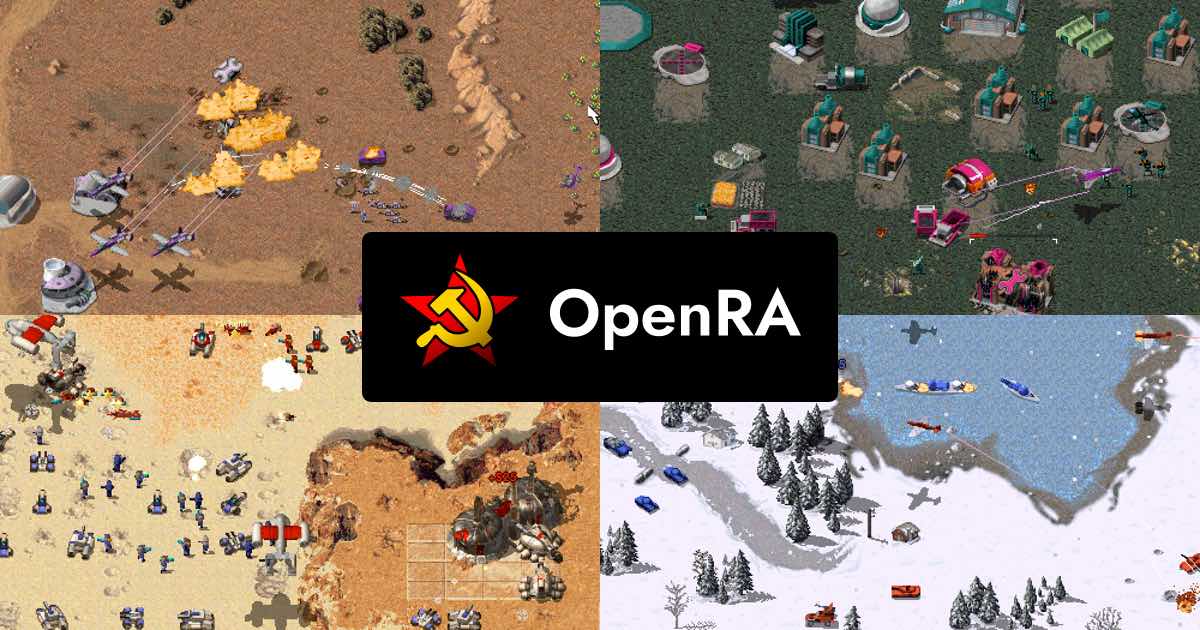
User reviews (0)