Website profiles · Technology insights · Alternatives

planedrift.app

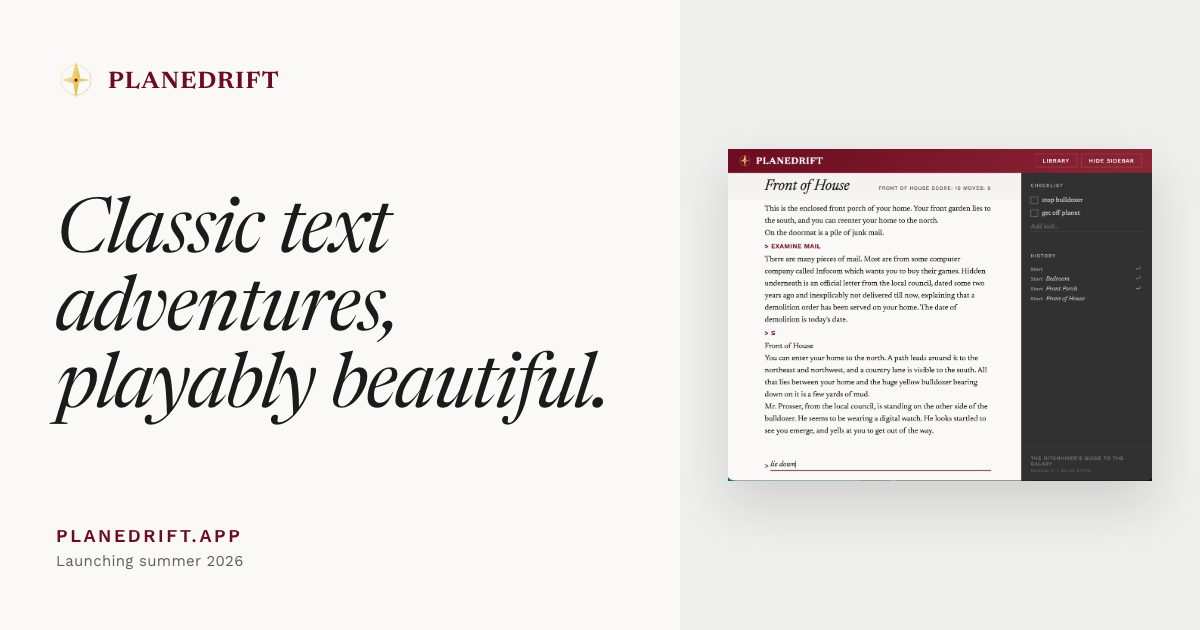
A calm, unhurried, pick-up-and-put-down way to indulge in classic Infocom interactive fiction. Play Zork I, II, III or bring your own Infocom story file — all in the browser.

No paid content found
Visit website
Profile views 0 Outbound visits 0 Normal
Planedrift Full homepage screenshot

At a glance

Category
Games & Board Games
Language
English
Paid-content signal
No paid content foundObserved
Registered
2026
Hosting
CloudflareInferred
HTTPS certificate trusted
PassedObserved
Last updated

Website review

This review may include AI-generated content and is not individually verified. Domain, certificate and other facts come from the observed data on this page.

What is Planedrift?

Planedrift is a browser-based player for classic Infocom text adventures. It runs Zork I, II and III directly in the page, and you can also open your own .z3 story file or resume a game you started earlier. The site's pitch is a "calm, unhurried, pick-up-and-put-down" way to read interactive fiction rather than a modern game with graphics or a score.

What it actually does

  • Plays Zork I–III without installing anything.
  • Loads your own .z3 files, so other Infocom-era stories in that format can be played too.
  • Auto-saves and rewinds, which suits short sessions and makes a wrong turn less punishing.
  • Searchable transcript, useful when you need to recall a clue or a room description from earlier.
  • Capture to-dos while you play, a small note-taking layer for puzzles you want to return to.
  • Light and dark themes with careful typography, aimed at long reading sessions.

Who it suits

Someone curious about text adventures who wants to try Zork on a lunch break, and returning players who want a comfortable reading environment rather than an emulator. If you want maps, hint systems or graphical remakes, this is a deliberately plainer tool.

A practical first step: start Zork I, play for ten minutes, and use the rewind once to see how forgiving the save model feels. If you enjoy that rhythm, the transcript search and to-do capture become genuinely useful on longer runs. For the wider catalogue of Infocom releases, the site points to the Obsessively Complete Infocom Catalog, and Wikipedia has background on Infocom if you want context on the games themselves.

Can I play Zork on Planedrift without downloading anything?

Yes. Planedrift runs Zork I, Zork II and Zork III directly in the browser, so you can start playing without installing anything or downloading a separate interpreter. The site presents them as a calm, pick-up-and-put-down way to revisit classic Infocom interactive fiction, with light and dark themes, auto-saves and rewinds, and a searchable transcript.

For other Infocom titles, Planedrift supports bringing your own story file with a .z3 extension — that part does require obtaining the file yourself. The site points to the Obsessively Complete Infocom Catalog and notes that the "Masterpieces of Infocom" releases are the versions Planedrift is tested against, so that's the safest choice if you go beyond the three Zork games.

A practical next step: open Planedrift and start Zork I to confirm the browser experience suits you. If you later want a different title, check that you have a .z3 file before expecting it to load. For background on the games themselves, the Wikipedia entry on Zork gives useful context on the series.

How do I load my own Infocom .z3 story file into Planedrift?

Open Planedrift in your browser, choose Bring your own, and select a .z3 story file from your device. Planedrift states that it plays story files ending in .z3, and that it is tested against the Masterpieces of Infocom versions of Infocom's games. If you have a different format, such as a .z5 file, it is not covered by that stated support.

A practical route:

  1. Obtain a .z3 file from a legitimate source; the Obsessively Complete Infocom Catalog is the archive Planedrift points to.
  2. On Planedrift, pick Bring your own.
  3. Choose the file and start playing. To continue later, use resume a previous game rather than opening the file again.
  4. Keep the original file somewhere safe; the browser copy is convenient, not a substitute for your own backup.

Because Planedrift auto-saves and offers rewinds, you can experiment with parser commands without fear of losing progress. That makes it a low-pressure way to try a story file you are unsure about.

One decision point: if you want the smoothest experience, use a Masterpieces of Infocom .z3 release, since those are the versions Planedrift is tested against. Files from other releases may still work, but any odd behaviour is more likely to come from version differences than from the game itself.

Does Planedrift save my progress automatically, and can I rewind a mistake?

Yes. Planedrift auto-saves your game, and it also offers rewinds, so a wrong turn or a mistyped command doesn't have to end the run.

In practice, that means you can close the browser mid-session and pick up where you left off, and when you realize you've done something regrettable — walked into a dark room without a light source, or spent a move you needed — you can step back rather than restart. The site pairs this with a searchable transcript, which helps when you're returning after a break and need to remember what you already tried.

Who this suits

  • Casual players: the pick-up-and-put-down framing fits short sessions; auto-save removes the "where was I?" problem.
  • First-time Infocom players: rewinding lowers the cost of experimentation, which matters in puzzle games that punish wasted moves.
  • Returning players: the transcript doubles as a personal log of mapped rooms and failed attempts.

A useful next step

Start with Zork I and treat rewinding as a learning tool rather than a crutch: when a puzzle fails, rewind one step and note in the transcript what changed. If you want more games afterward, the site points to the Obsessively Complete Infocom Catalog and notes that Planedrift plays .z3 story files, tested against the Masterpieces of Infocom releases — check that your file matches before loading it.

For broader context on the games themselves, Wikipedia covers the Zork series and Infocom's history.

Can I play text adventures on my phone during short breaks?

Yes. Planedrift runs in the browser, so on a phone you can open it, play a few moves during a short break, and put it down again — the page describes itself as a "calm, unhurried, pick-up-and-put-down" way to play classic Infocom interactive fiction. Auto-saves and rewinds mean you don't have to finish a puzzle in one sitting.

What suits short breaks

  • Built-in games: Zork I, II and III are ready to play without setup.
  • Your own stories: you can open a .z3 story file or resume a previous game.
  • Small-screen touches: light and dark themes, a searchable transcript, and the ability to capture to-dos while you play — handy if a break sparks something you need to remember later.
  • More games: the site points to the Obsessively Complete Infocom Catalog for other 1980s releases, noting the Masterpieces of Infocom versions are the ones Planedrift is tested against.

A practical routine

Treat a break as a handful of moves rather than a session: read the room description, try one or two commands, then stop. The transcript search helps you re-find a clue you saw earlier without scrolling. If you want a different flavour of short-session play, IFDB is a general catalogue of interactive fiction worth browsing for ideas.

One trade-off: text adventures reward note-taking and patient mapping, so very short breaks suit exploration and small puzzles better than long dungeon crawls.

Where can I find more Infocom games that work with Planedrift?

The page itself points to the Obsessively Complete Infocom Catalog, and specifically to its Masterpieces of Infocom releases, which are the versions Planedrift is tested against. Planedrift plays story files ending in .z3, so that extension is the practical filter when you browse.

What to look for

  • Masterpieces of Infocom versions first — these match what Planedrift is tested with, so you're less likely to hit compatibility quirks.
  • .z3 story files — anything ending in another extension (such as .z5 or .z8) is outside what the page says Planedrift plays.
  • The Zork trilogy is already built in (Zork I, II and III), so there's no need to hunt those down separately.

A sensible next step

Start with the catalog's Masterpieces releases, download a .z3 file, and open it through Planedrift's "Bring your own" option. If a game misbehaves, try a different release of the same title before assuming the game itself is the problem — the tested versions are the safest baseline.

For background on individual titles before you commit to one, the Interactive Fiction Database at IFDB is a useful place to read descriptions and player impressions.

Related questions

More questions →
What Is Planedrift and What Can You Do on It?

Planedrift is a browser-based player for classic Infocom text adventures. You can start Zork I, II, or III directly on the site, or open your own .z3 story file to play other Infocom titles. It is designed for calm, unhurried, pick-up-and-put-down sessions rather than long, demanding play.

What Planedrift offers

The site presents itself as a way to “indulge in classic Infocom interactive fiction” with a focus on readable presentation and convenience. Its main features, as described on the page, are:

  • Built-in Zork games — Zork I: The Great Underground Empire, Zork II: The Wizard of Frobozz, and Zork III: The Dungeon Master.
  • Bring your own game — open a .z3 story file or resume a previous game.
  • Nice fonts and colours — presentation is treated as part of the experience.
  • Light and dark themes — choose the reading style that suits you.
  • Auto-saves and rewinds — return to a session or step back when needed.
  • Searchable transcript — find earlier text in your play session.
  • Capture to-dos while you play — note tasks without leaving the game.

Playing the built-in Zork games

If you want to try classic interactive fiction without finding files yourself, this is the simplest path. The page lists Zork I, II, and III as ready-to-play options. Select one and begin; the site’s auto-save and rewind features are intended to make short sessions practical.

Loading your own Infocom story file

Planedrift plays story files ending in .z3. The page points to the Obsessively Complete Infocom Catalog as an archive of many Infocom releases from the 1980s. It specifically recommends looking for the Masterpieces of Infocom releases, which are the versions Planedrift is tested against.

To use your own game:

  1. Obtain a .z3 story file, for example from the Masterpieces of Infocom releases in that catalog.
  2. Use the “Bring your own” option on Planedrift.
  3. Open the .z3 file or resume a previous game.

The expected result is that the story runs in the browser with the same reading and session features as the built-in games. A common snag is file format: Planedrift is described as playing .z3 files, so other Infocom file types are not covered by the page.

Who it suits

Planedrift fits players who want short, low-pressure sessions with classic text adventures and appreciate readable typography, theme choices, and session tools like auto-save, rewind, transcript search, and in-game to-dos. If you already own Infocom .z3 story files, the bring-your-own option lets you use the same player for them.

Do you need to install anything to play on Planedrift, and is your progress saved?

No installation is needed. Planedrift runs classic Infocom text adventures directly in your browser, and your progress is kept through auto-saves and rewinds. You can close the tab and later resume a previous game from the load screen, which fits the site's stated "pick-up-and-put-down" design for short sessions.

How playing works without an install

Planedrift presents the games as browser pages. The three built-in titles are launched from the main page:

  • Zork I: The Great Underground Empire
  • Zork II: The Wizard of Frobozz
  • Zork III: The Dungeon Master

Selecting one starts play in the browser. There is no download, setup wizard, or local emulator described on the site.

Bringing your own story file

If you want a different Infocom adventure, Planedrift can open your own story file. The site states that it plays story files ending in .z3, and that you can either open a .z3 file or resume a previous game from the same screen.

For more titles, the site points to the Obsessively Complete Infocom Catalog and recommends the Masterpieces of Infocom releases, which are the versions Planedrift is tested against. In practice, that means: find a .z3 file from that catalog, open it in Planedrift, and play — still without installing anything.

Is progress saved?

Yes. The site lists auto-saves & rewinds among its features, and the load screen includes an option to resume a previous game. Together these cover the two things you need for interrupted play:

  • Auto-save: your position is recorded as you play, so you are not relying on remembering to save manually.
  • Rewind: you can step back, which is useful if you misread a room description or want to retry a puzzle.
  • Resume: returning to the site lets you continue a game you started earlier rather than beginning again.

The site does not describe save files you manage yourself or export, so treat the auto-save as the primary way progress is kept.

Other features while you play

The site's feature list is short and practical:

Feature What it gives you
Nice fonts & colours Readable presentation of the text
Light & dark themes Comfortable reading in different settings
Auto-saves & rewinds Resume games and undo mistakes
Searchable transcript Look back through what has been printed
Capture to-dos while you play Jot tasks without leaving the game

The searchable transcript is worth knowing about: in text adventures, important clues scroll away quickly, and being able to search the transcript means you can find that earlier mention of a key or a passage without replaying.

What this means for how you play

Because nothing is installed and progress persists, Planedrift suits short, interrupted sessions. You can play for ten minutes on a break, close the browser, and pick up from the auto-save later. The main conditions to keep in mind:

  • Your own games must be .z3 story files.
  • For extra titles, use the Masterpieces of Infocom releases from the Obsessively Complete Infocom Catalog, which the site says it is tested against.
  • Progress depends on the site's auto-save and resume features rather than on files you keep yourself.

If you want a zero-setup way to try Zork or replay a classic Infocom adventure in short sittings, Planedrift's browser-based, auto-saving approach covers that without installation.

How do you start playing Zork or load your own game on Planedrift?

Open planedrift.app and pick one of the three Zork titles on the main page to start playing immediately in your browser. To play something else, use the bring-your-own option to open a .z3 story file, or resume a previous game from the same load screen. No installation is involved for any of these paths.

Starting one of the built-in Zork games

The main page lists the three titles directly:

  • Zork I: The Great Underground Empire
  • Zork II: The Wizard of Frobozz
  • Zork III: The Dungeon Master

Selecting a title loads it into the browser player. From there you type commands as in the original games, and Planedrift handles presentation and saving around the session.

Loading your own story file

The bring-your-own option accepts a story file ending in .z3. Two ways to use it:

  1. Open a file you already have — choose the bring-your-own entry and point it at your .z3 file.
  2. Resume a previous game — the same load screen offers resuming a game you started earlier, so you don't need to keep the original file path in mind.

Planedrift states it is tested against the Masterpieces of Infocom releases. If a file you try doesn't behave as expected, that compatibility note is the first thing to check.

Finding more Infocom games

Infocom released many more text adventures through the 1980s, and Planedrift points to the Obsessively Complete Infocom Catalog as the archive for them. Look for the Masterpieces of Infocom releases there, since those are the versions Planedrift is tested against. Download a .z3 file from that catalog, then load it through the bring-your-own option.

What to expect once you're in

The player is built for short, unhurried sessions: light and dark themes, readable fonts and colours, auto-saves with rewinds, a searchable transcript, and the ability to capture to-dos while you play. That means you can stop mid-game and pick it up later without losing your place, and you can scroll back through what happened if you lose track of the story.

Quick reference

Goal Where to go What you need
Play Zork I, II or III Main page title list Nothing extra
Play your own game Bring-your-own option A .z3 story file
Continue an earlier session Load screen A previously started game
Get more games Obsessively Complete Infocom Catalog A .z3 file from a Masterpieces of Infocom release

If a game won't load, confirm the file ends in .z3 and comes from a Masterpieces of Infocom release before trying anything else.

What features does Planedrift offer while playing a text adventure?

Planedrift adds a small set of convenience features around classic Infocom interactive fiction: nice fonts and colours with light and dark themes, auto-saves and rewinds, a searchable transcript, and the ability to capture to-dos while you play. These apply while you're in a game — the site describes itself as a calm, unhurried, pick-up-and-put-down way to play, and the features are built around that idea rather than around changing the games themselves.

The features, and what each one does for you

Nice fonts and colours, with light and dark themes

The reading surface is styled rather than left as raw terminal text, and you can switch between a light and a dark theme. This matters most in a text adventure, where nearly all of your time is spent reading room descriptions and parser responses. If you play in the evening or in a dim room, the dark theme reduces glare; in daylight, the light theme may be easier on the eyes.

Auto-saves and rewinds

Planedrift saves your progress automatically, and you can rewind. For Infocom games this is a meaningful change: the original experience often punished a single bad move, and saving meant managing save files yourself. With auto-save plus rewind, you can step back from a dead end or an accidental death without restarting. The site also mentions resuming a previous game, which fits the pick-up-and-put-down framing — you can close the tab and come back later.

Searchable transcript

Everything the game has printed stays in a transcript you can search. In practice this is a memory aid: if a character mentioned a location twenty turns ago, or a puzzle hint scrolled past, you can search for the word instead of replaying. It also helps when you return to a game after a break and need to re-establish what you already know.

Capture to-dos while you play

You can note to-dos during play without leaving the game. Text adventures generate lots of small intentions — "come back with the lamp," "try opening the egg later" — and this keeps them in one place instead of on scrap paper.

How these fit together

Feature What it solves When it's most useful
Fonts, colours, light/dark themes Long stretches of reading Evening sessions, low-light rooms
Auto-saves and rewinds Costly mistakes, losing progress After a death or a wrong turn
Searchable transcript Forgetting earlier clues Returning after a break; large maps
To-do capture Scattered notes Multi-step puzzles with deferred goals

What to keep in mind

These are player-comfort features; they don't alter the games' puzzles or difficulty. The site's own description of what it plays is specific: Zork I, II and III are offered directly, and you can bring your own story file ending in .z3. For more Infocom titles, the site points to the Obsessively Complete Infocom Catalog and recommends the Masterpieces of Infocom releases, which it says are the versions Planedrift is tested against. So if a feature like rewind is central to how you want to play, check that your game is a .z3 file from a release the site is tested against before relying on it.

Which story file formats does Planedrift support?

Planedrift plays story files ending in .z3 — the Z-machine version 3 format used by most classic Infocom releases. You can open a .z3 file you already have, or resume a previous game, and the site also offers Zork I, II, and III ready to play. For anything beyond those three, you need to supply your own .z3 file.

What the .z3 format means in practice

Infocom's games were built for the Z-machine, a virtual machine with numbered versions. Version 3 covers the bulk of the 1980s catalog, which is why Planedrift standardizes on it. The practical consequence: a story file from a later Z-machine version (v5 or v8, for example) is not something the site claims to run. If you are unsure what you have, the file extension is the quickest signal — Planedrift's own wording is that it "plays story files ending in .z3."

Where to find compatible games

Planedrift points to the Obsessively Complete Infocom Catalog as the archive for the rest of Infocom's 1980s output. The site specifically recommends looking for the Masterpieces of Infocom releases, because those are the versions Planedrift is tested against. That testing note matters: a .z3 file from an untested source may load but behave unexpectedly, whereas the Masterpieces releases are the known-good baseline.

Opening a file or resuming a game

  1. Get a .z3 story file onto the device you're browsing from — from the catalog above, or a copy you already own.
  2. Use the "Bring your own" option on the site and open the file.
  3. To continue later, use the resume path for a previous game rather than re-opening the file.

Expected result: the story starts in the browser, with auto-saves and rewinds available as you play. The common snag is a file that isn't .z3 — check the extension before troubleshooting anything else.

What you get around the game itself

The player is built for short, unhurried sessions: light and dark themes, readable fonts and colors, auto-saves and rewinds, a searchable transcript, and the ability to capture to-dos while you play. Those features apply to any .z3 file you load, not just the bundled Zork titles.

If your goal is simply to try the format, start with Zork I — it's playable without sourcing a file. If you want a specific Infocom title, confirm it's a .z3 and prefer a Masterpieces of Infocom release before loading it.

Website Overview

The available information shows a mix of normal operation and configuration gaps. Depending on how the website is used, these gaps may affect secure access or the consistency of its public presentation.

Domain and Registration

The domain was registered less than a year ago and has limited historical evidence to assess. Transfer-protection status is present, helping reduce the risk of unauthorized domain transfers. The domain uses the common .app extension, which is not an independent safety signal.

DNS and Email

Nameservers are provided by Cloudflare, indicating managed DNS hosting. No CNAME was found; the observed records resolve directly to addresses. No MX record was found. A conventional explicit inbound-mail route is not configured. TXT records include verification markers for Google. Such markers may also remain after a service stops being used. DNSSEC signatures were not detected, so this additional DNS authenticity protection is not confirmed.

TLS and Certificates

The public key uses EC with 256 bits. The server supplied a complete certificate chain. No organization name is present in the certificate; the available fields are consistent with domain validation. The certificate was issued within the Google Trust Services cloud or CDN ecosystem. The certificate's total validity is about 90 days, consistent with a short renewal cycle.

HTTP and Browser Security

The response lacks these common security headers: HSTS, CSP, Permissions-Policy, clickjacking protection. CORS permits any origin to read this response. This is common for public resources; sensitive responses need narrower handling. No X-Powered-By header was found, reducing one common source of backend fingerprinting information. The cf-ray response header indicates a CDN or caching proxy in the delivery path. No obvious internal addresses or debug information were found in the headers.

Technology Stack Analysis

The public page identifies Cloudflare without precise versions, leaving fewer clues for version-specific scanning.

Search and Social Sharing

The meta description has 174 characters and may be shortened in search results. Twitter Card metadata is configured. The title has 56 characters, within a common display range. The observed directives allow indexing and link following. No Generator meta tag is publicly exposed.

Hosting and Email

DNSCloudflare
HostingCloudflare
EmailUnknown
Approximate IP geolocation (inferred; a CDN or proxy may differ from the origin server) Location unknown Inferred 104.21.60.39

Registration details

RDAP / WHOIS

RegistrarAutomattic Inc
Registered2026-04-09
Expires2027-04-09
Domain statusclient transfer prohibited
Nameserversarushi.ns.cloudflare.com、ezra.ns.cloudflare.com
DNSSECunsigned

DNS records

DNS

TypeNameValueTTLPriority
Aplanedrift.app104.21.60.39300—
Aplanedrift.app172.67.191.113300—
AAAAplanedrift.app2606:4700:3031::6815:3c27300—
AAAAplanedrift.app2606:4700:3031::ac43:bf71300—
NSplanedrift.apparushi.ns.cloudflare.com86400—
NSplanedrift.appezra.ns.cloudflare.com86400—
TXTplanedrift.appgoogle-site-verification=RxC5wsFr5hn9LRtVsB5igqpgjKEqUb3kjcQuFUbt9zw3600—

TLS and certificates

TLS / SSL

AssessmentNormal configuration
Supported protocolsTLSv1.2、TLSv1.3
Negotiated protocolTLSv1.3
Certificate subjectplanedrift.app
IssuerGoogle Trust Services
Valid until2027-01-07T07:37 · Remaining when checked: 73 days
Verification detailsCertificate trust: Passed · Hostname match: Passed

HTTP response headers

HTTP

HeaderValue
content-typetext/html; charset=utf-8
cache-controlpublic, max-age=0, must-revalidate
servercloudflare
x-content-type-optionsnosniff
referrer-policystrict-origin-when-cross-origin
access-control-allow-origin*

Identified technologies

Cloudflare

Pages, Search and Sharing

Meta descriptionA calm, unhurried, pick-up-and-put-down way to indulge in classic Infocom interactive fiction. Play Zork I, II, III or bring your own Infocom story file — all in the browser.
Canonical URLhttps://planedrift.app/
LanguageEnglish (default)
Twitter Cardsummary_large_image

Unknown

No sitemaps found

User reviews (0)

  • No reviews yet.