Website profiles · Technology insights · Alternatives

producerlibrary.carrd.co

the aim of this is create a kind of free compendium for music production, i'll try to avoid too many redundancies and aim for a very in depth but still practical level of detail.

No paid content found
Visit website
Profile views 8 Outbound visits 1 Normal
Tutorial Library Full homepage screenshot

At a glance

Category
Education & Learning
Language
English
Paid-content signal
No paid content foundObserved
Registered
2015
Hosting
CloudflareInferred
HTTPS certificate trusted
PassedObserved
Last updated

Website review

This review may include AI-generated content and is not individually verified. Domain, certificate and other facts come from the observed data on this page.

What is Tutorial Library?

Tutorial Library is a curated index of music-production tutorials, mostly YouTube videos, organized by topic rather than presented as original lessons. Its stated aim is a free, fairly deep but still practical compendium that avoids repeating the same beginner material across many sources.

What it covers

The library groups links under broad areas such as:

  • Effects: compression, sidechaining, clippers, limiters, saturation and distortion, EQ and phase, reverb, delay, panning and widening, creative FX
  • General mixing and mastering: mix balance, ear training, routing, bus processing, loudness and LUFS, mastering goals
  • Composition: melody, harmony, counterpoint, arrangement, song/project breakdowns
  • Ear training and microtonality
  • Sound design: subtractive, additive, FM, granular, modal, physical modelling, concatenative synthesis and wavetables

Who it suits

It is most useful if you already know the basics and want a structured route into specific subjects without hunting through YouTube yourself. A producer trying to understand why EQ affects phase, or how different sidechain methods behave, can jump straight to that cluster. Complete beginners may find the depth uneven, since the entries are links to external videos with varying teaching styles.

How to use it

Treat it as a syllabus, not a course. Pick one cluster, work through it in order, and apply each idea in a project before moving on. The site notes that the project has evolved into a monthly newsletter, so the Carrd page now functions more as an archive of curated links than an actively updated library.

How can I learn compression and dynamics for music production?

Use the Dynamics & Gain section of the Tutorial Library as your spine, then fill gaps with a general-purpose audio-education site. The library is a free, curated compendium of YouTube tutorials, organised into Effects, Composition, Sound Design and Technical Info, and its dynamics grouping is unusually well sequenced for self-study.

What the library actually covers

Its Dynamics & Gain list moves from concept to ear training to specific techniques:

  • A beginner's guide to compression (series)
  • How to hear drum compression
  • Hearing attack and release
  • Using clippers to get loudness
  • Overview of sidechain methods, plus maximum-accuracy sidechaining and sidechain compression, when and how
  • Dynamics and physical integrity
  • Limiter lookahead
  • Transfer functions deep dive
  • Saturation, distortion and waveshaping, including how distortion works and using saturation for peak control and harmonics

It also links adjacent topics — EQ, phase, and loudness/LUFS — which matter because compression decisions are usually really balance and level decisions.

A practical study order

  1. Understand the controls first. Attack, release, ratio, threshold, knee and makeup gain. Learn what each one does to the envelope before you try to hear it.
  2. Train your ears on drums. Drums expose compression better than pads or vocals because transients are obvious. Loop four bars and change one parameter at a time.
  3. Learn to hear attack and release specifically. This is the skill that separates people who can mix from people who can only preset.
  4. Move to sidechaining. Kick/bass ducking is the standard use; the library's "when and how" framing is the right question, because sidechaining everything is a common beginner error.
  5. Then clippers and limiters. Clipping and limiting are peak-control tools, not a substitute for good balance. Learn lookahead so you understand latency and transient loss.
  6. Then saturation and distortion. These change timbre and can control peaks at the same time, which is why they sit in the same section.

Where to go for structured fundamentals

  • Sound On Sound — long-running magazine with deep, technically careful explainers and archived workshops; good when you want the theory behind a technique.
  • iZotope — plugin maker with free guides and ear-training material on compression, EQ and loudness; useful for visual explanations of what you are hearing.
  • Ableton — free learning resources and tutorials, including compression and dynamics, with a strong electronic-production focus.
  • YouTube — where the Tutorial Library's links actually live; use it as the delivery layer, but treat the library's ordering as your syllabus.

Decision criteria

If you want breadth and a free path, work through the library's dynamics list in order. If you want a single authoritative explanation of a concept you keep failing to hear, go to Sound On Sound or iZotope for the written version and return to the video. If you learn best by doing, pick one compressor you already own and spend a week on drums only, changing one control per session.

A concrete next step: open the library, take the compression beginner series and the "how to hear drum compression" entry, and pair them with a four-bar drum loop in your DAW. Write down what you changed and what you heard each time — that log will teach you more than another hour of watching.

What tutorials are available for sound design and synthesis?

Sound-design and synthesis coverage is split into two areas: a Sound Design section that covers synthesis methods, and a separate Effects section that deals with processing tools like EQ, compression, saturation and reverb. If you want to build sounds from scratch, start with the synthesis methods; if you want to shape sounds you already have, the effects material is the more direct route.

Synthesis methods listed

  • Subtractive synthesis
  • Additive synthesis
  • FM synthesis, plus an in-depth FM series
  • Granular synthesis
  • Modal synthesis using EQs
  • Physical modelling basics and techniques
  • Concatenative synthesis
  • Wavetable masterclass
  • Recreating basic waveforms with FM

Related sound-shaping topics

The library also lists material on filters and EQ (including phase, linear vs minimum phase, and EQ cramping), reverb and delay (shaping reverb, advanced reverb, Haas delays, psychoacoustic panning), dynamics (compression, sidechaining, clippers, limiters, transfer functions), and saturation, distortion and waveshaping.

How to choose

If you want to… Start with
Build a patch from an init state Subtractive, then FM or wavetable
Understand a synth you already own Whatever method it uses, then the effects section
Get loudness and punch Dynamics, saturation, then general mixing
Create unusual textures Granular, concatenative, physical modelling

A practical next step: pick one method, work through its entries, then immediately apply it in a track before moving to the next. The library is a curated index of YouTube tutorials rather than a single course, so expect to jump between creators and revisit topics — the stated aim is depth without redundancy, which suits producers who already know basics and want targeted explanations.

For broader production context, Tutorial Library also links composition, harmony, counterpoint, arrangement and ear-training material, which is useful if your sound-design ideas stall at the arrangement stage.

How do I improve my mixing and mastering skills?

Improving mixing and mastering comes down to two things: training your ears and understanding the tools well enough to know when not to use them. A resource like Tutorial Library is a good example of a free, curated collection organized by topic — effects, composition, sound design, and technical info — which lets you target weak spots instead of watching random videos.

Build skills in this order

  1. Ear training first. You can't fix what you can't hear. Practice identifying level changes, frequency bands, and compression artifacts before diving into plugins.
  2. Mixing fundamentals. Gain staging, EQ, compression, and panning. Learn why each tool exists (e.g. EQ to shape distortion, compression for dynamics control) rather than memorizing presets.
  3. Space and depth. Reverb, delay, and stereo widening — these separate a flat mix from an immersive one.
  4. Mastering last. Mastering is about loudness targets (LUFS), translation across systems, and final tonal balance. It's a distinct skill from mixing, not an extension of it.

A practical routine

  • Pick one track you love and try to recreate its balance with your own material.
  • Mix at low volume so your ears stay fresh and problems surface.
  • Reference on multiple systems: monitors, headphones, phone speaker, car.
  • Take breaks every 45–60 minutes; fatigue makes everything sound fine.

Decision criterion

If you can't hear the difference a tool makes, you're not ready to use it. Spend a week on ear training for compression or EQ before touching a limiter. The Tutorial Library's structure — compression series, EQ series, ear training sections — reflects this progression, which is a sensible model to follow even if you use other sources.

Next step: Choose one weak area (say, compression), work through a dedicated series on it, then apply it to a single track and compare your result against a commercial reference at matched loudness.

What resources are there for composition and harmony?

For composition and harmony specifically, this library gathers a set of YouTube tutorials organised around melody, harmony, counterpoint, arrangement and ear training, rather than offering its own written lessons. The page is a curated index: it points you to external videos and groups them by topic, so the practical value is in the structure and the sequencing it suggests.

Composition and harmony topics covered

  • Melody: a five-step melody checklist, plus Ethiopian pentatonic scales as a source of alternative note sets.
  • Harmony: a multi-part series on chord progressions and harmony.
  • Counterpoint: a substantial cluster — counterpoint for arrangement, applied species counterpoint (series), imitative counterpoint (series), Schenkerian analysis (series), and Bach's puzzle canons.
  • Arrangement: arranging your music, an arrangement breakdown of a hyperglitch EP (series), and project breakdowns.
  • Ear training: an introduction to ear training and the major scale — useful groundwork before the harmony material, since recognising intervals and chords by ear makes progression study far more productive.

Who this suits

The counterpoint and Schenkerian analysis entries point to a fairly serious, theory-leaning listener. If you write electronic or experimental music and want to move past loop-based writing, the melody checklist and the harmony series are the natural entry points; the counterpoint material is where you go once you can already hear and identify basic harmonic movement. If you mainly want quick fixes, the arrangement breakdowns will be more immediately usable than the species counterpoint series.

A practical next step

Work in this order: ear training (major scale) → melody checklist → harmony series → counterpoint for arrangement. Pick one series at a time and apply each idea to a short piece you are already writing, rather than watching a whole series passively.

Two related resources are worth knowing as companions: Producers Monthly is the newsletter this project evolved into, so it may carry newer material, and YouTube is where the linked tutorials actually live, meaning you can check upload dates and channel context before committing to a long series.

How can I train my ears for music production?

Ear training for music production means building three separate skills: hearing what changed, naming what it is, and knowing whether it sounds good. The Tutorial Library is a curated index of YouTube tutorials organised by topic, with dedicated sections for Ear Training, Effects (compression, EQ, saturation, reverb), Composition, and Sound Design — useful as a structured reading list rather than a course you follow start to finish.

What to actually practise

Frequency recognition. Learn to place a boost or cut on a parametric EQ by ear before looking at the display. Start with wide boosts (6–10 dB) across the spectrum, then narrow them as you improve. The library's EQ section includes ear training material and a piece on why most EQs shift phase, which matters once you start hearing rather than just seeing your moves.

Dynamics. Compression is the hardest thing to hear at first because the effect is time-based. Train on attack and release specifically: set a slow attack, then a fast one, on the same drum loop, and describe the difference out loud. The library lists a beginners' compression series, a guide to hearing drum compression, and material on hearing attack and release — a sensible order to work through.

Space and panning. Reverb and delay decisions are easier to hear than to judge. Practise identifying pre-delay, decay length, and whether a source sits in front of or behind the mix. The library covers shaping reverb, advanced reverb explanation, Haas delays, and panning above/below the head — the last is a good demonstration of how much psychoacoustics affects perceived placement.

A practical routine

  • 10–15 minutes daily beats one long weekly session; pitch and frequency discrimination improve through repetition, not intensity.
  • Use reference tracks you know intimately. Alternate between your mix and the reference on the same loop, matched in loudness, and note one specific difference per pass.
  • Sing or hum what you hear before you touch a control. If you can reproduce an interval or a bassline, you have actually internalised it.
  • Keep a log of what you got wrong. Patterns in your mistakes (always missing 200–400 Hz, always misjudging release times) tell you what to drill next.

Where to start if you are new

Begin with the major scale and basic interval recognition, then move to chord quality (major, minor, diminished), then to progressions. The library's Ear Training section starts with an intro and the major scale; its Harmony section covers chord progressions and harmony, and the Composition area includes melody checklists and scale material such as Ethiopian pentatonic scales if you want to train outside the Western diatonic system.

For a broader structured curriculum with graded exercises, Musictheory.net offers free interval and chord drills, and Teoria provides similar exercises with a more classical emphasis. Neither teaches production-specific listening, so pair them with mix-focused practice.

A decision criterion

If you cannot yet tell a perfect fifth from a fourth, spend your time on pitch and interval drills first — mixing decisions depend on that foundation. If intervals are solid but compression still sounds like a mystery, go straight to dynamics training with drum loops. The library's organisation by topic lets you jump to whichever gap is currently costing you the most.

Related questions

More questions →
What Is the Tutorial Library on producerlibrary.carrd.co?

producerlibrary.carrd.co is a free, curated index of music production tutorials hosted on YouTube. It is built as a compendium rather than a course: the stated aim is to collect in-depth but still practical material while avoiding too much redundancy. It is useful if you want a structured map of what to learn across effects, composition, sound design, and technical topics — and it is not a place to watch videos directly, since the content lives on YouTube. The project has since evolved into a monthly newsletter at producersmonthly.substack.com, so the Carrd page functions mainly as the original library and archive.

What the library covers

The page organizes links under four main headings, each with subcategories.

Effects

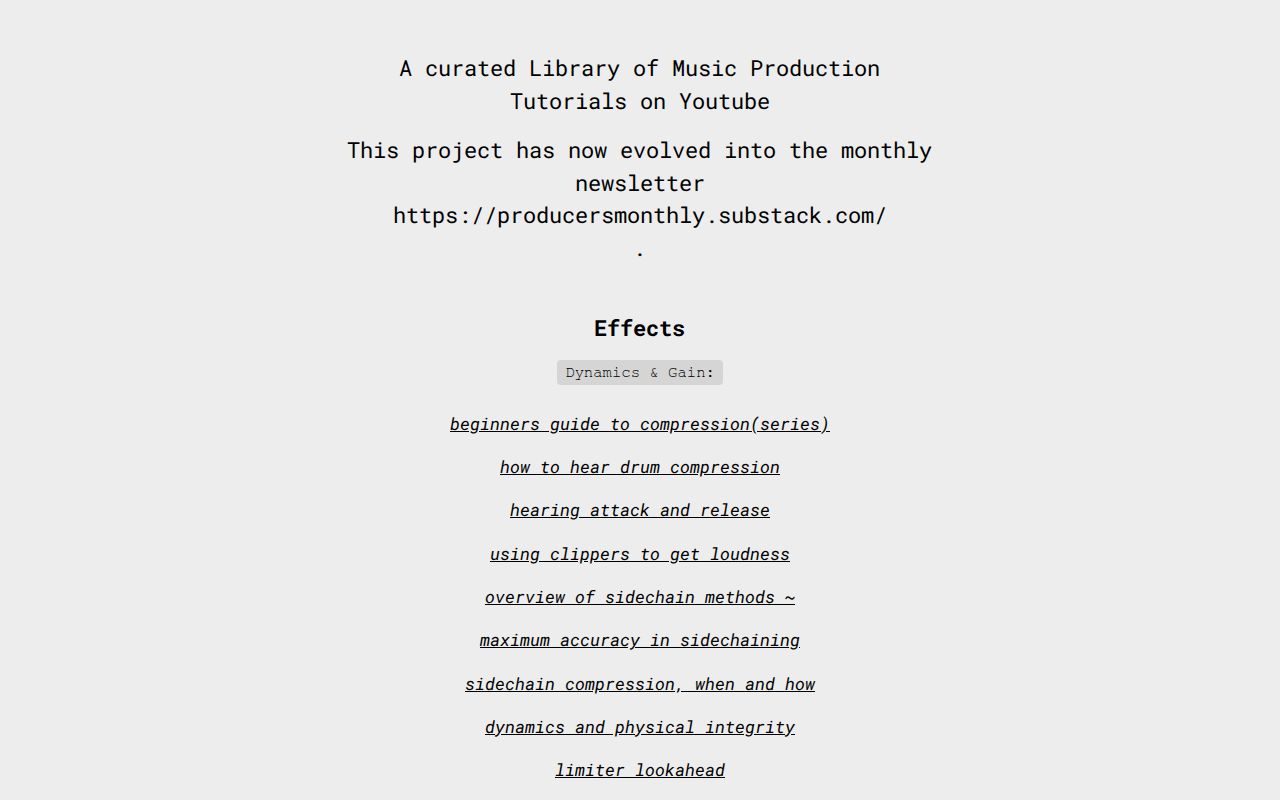
  • Dynamics & Gain: a beginner's guide to compression (series), how to hear drum compression, hearing attack and release, using clippers to get loudness, an overview of sidechain methods, maximum accuracy in sidechaining, sidechain compression when and how, dynamics and physical integrity, limiter lookahead, and a transfer functions deep dive.
  • Saturation, Distortion & Waveshaping: how distortion works, saturation for peak control and harmonics, and a three-part in-depth saturation/distortion tutorial series.
  • Filters & EQ: a beginner's guide to EQ (series), "EQ, why bother?", EQ ear training, EQ to shape distortion, linear phase vs. minimum phase, why most EQs shift phase, what phase is and when it matters, EQ cramping, and an EQ deep dive.
  • Reverbs, Delay & Space: how to shape a reverb, an advanced reverb explanation, different ways to use reverb in mixing, Haas delays, panning above/below the head using psychoacoustics, different panning and widening methods, and delay beyond echo and reverb.
  • Creative FX: thinking outside the box with FX.
  • General Mixing: The Art of Mixing (Dave Gibson), four traits of a good mix, ear training for mixing, basic routing terminology, phase in mixing, and bus processing and mix glue.
  • General Mastering: loudness and what LUFs are exactly, the three main goals of mastering, Spotify tech specs as an alternative to mastering, a Matt Davis mastering masterclass, and a Matt Davis workshop.

Composition

  • Melody: a 5-step melody checklist and Ethiopian pentatonic scales.
  • Harmony: chord progressions and harmony (series).
  • Counterpoint: counterpoint for arrangement, applied species counterpoint (series), imitative counterpoint (series), Schenkerian analysis (series), and Bach's puzzle canons.
  • Arrangement: arranging your music, arrangement of a hyperglitch EP (series), and Tracey Brakes' "My Twee Monsters" project breakdowns.
  • Ear Training: intro to ear training and the major scale.
  • Microtonality: a primer on microtonal stuff and an intro to microtonal in electronic music.

Sound Design

  • Synthesis Methods: subtractive synthesis, additive synthesis, FM synthesis, FM synthesis in depth (series), granular synthesis, modal synthesis with EQs, physical modelling basics, physical modelling techniques, concatenative synthesis, a wavetable masterclass, and recreating all basic waveforms with FM.

Technical Info

The page lists a "Technical Info" heading, though the excerpt does not detail its contents.

Who it is for

This library suits producers who already know they want to learn a specific topic and would rather follow a curated path than search YouTube blindly. The compression, EQ, and synthesis series are sequenced, so they work as a study plan. The counterpoint and Schenkerian analysis material is theory-heavy and aimed at readers comfortable with notation and classical concepts. If you want a single linear beginner course, this is not that — it is a reference map.

How to use it

  1. Open producerlibrary.carrd.co and pick the heading closest to your gap (Effects, Composition, Sound Design, or Technical Info).
  2. Choose a subcategory and start with any item labeled "beginners guide" or "intro" before the deep dives.
  3. Follow the linked YouTube videos in the order listed where a series is indicated.
  4. For ongoing material, subscribe to the newsletter at producersmonthly.substack.com, which is where the project moved.

Practical notes

  • The site itself hosts no video or audio; every entry is an outbound YouTube link, so playback and availability depend on the original channels.
  • The page does not state pricing for anything, and no payment or login details appear in the source. Treat the library as a free index of third-party videos, and check each linked channel for its own terms.
  • Because it is a curated list, some links may age out if a creator removes or reuploads a video. If a link fails, search the exact title on YouTube.
How to Use Ahrefs for Your First SEO Audit: A Step-by-Step Tutorial

If you're new to Ahrefs and want to run your first SEO audit, the fastest path is: open Site Explorer, enter your target URL, review the Overview for a health snapshot, then dig into Organic Keywords, Top Pages, and Site Audit to find specific problems. From there, build a short prioritized to-do list instead of trying to fix everything at once.

This tutorial walks through that workflow using a realistic starting scenario, explains what the numbers mean, and shows how to turn findings into actions.

Before You Start: Pick a Narrow Scope

A common beginner mistake is auditing an entire large website on day one. The reports become overwhelming, and you can't tell which issues matter.

Instead, choose one of these starting points:

  • A single important page (your homepage or a key product/service page)
  • A small site (under ~50 pages, e.g., a personal blog or small business site)
  • One section of a bigger site (e.g., /blog/)

For this tutorial, assume you're auditing a small business site with about 30 pages. The same steps scale up later.

You'll need an Ahrefs account to follow along. Ahrefs offers paid plans, and pricing and feature limits change over time, so check the current Pricing page for what's included in each tier before committing.

Step 1: Enter Your Target in Site Explorer

Site Explorer is Ahrefs' core tool for analyzing any website or URL.

  1. Open Site Explorer from the top navigation.
  2. In the search box, paste your domain (e.g., example.com).
  3. Choose the Exact URL or Domain mode depending on scope. For a full-site view, use Domain or Prefix; for a single page, use Exact URL.
  4. Press Enter.

You'll land on the Overview report. Don't try to absorb everything — focus on four numbers first.

Reading the Overview Snapshot

Metric What it tells you How to use it
Ahrefs Rank (AR) Relative strength of the site's backlink profile vs. others in the database Useful for comparing against competitors, not as a standalone goal
Organic traffic Estimated monthly visits from search A rough trend indicator, not exact analytics
Organic keywords Estimated number of keywords the site ranks for Shows breadth of visibility
Backlinks / Referring domains Total links and unique sites linking to you Referring domains matter more than raw backlink count

Important caveat: Ahrefs' traffic and keyword numbers are estimates based on its own data. They won't match Google Search Console or your analytics exactly. Treat them as directional, not absolute.

Step 2: See What You Already Rank For

Go to Organic Keywords in the left sidebar. This shows queries where your site appears in search results.

Sort by Traffic (descending) to see which pages bring the most estimated visitors. Then look for:

  • Keywords ranking in positions 4–15 — these are often the easiest wins. A small content or on-page improvement can push them onto page one.
  • Keywords with high volume but low position — potential opportunities if the topic is relevant.
  • Irrelevant keywords — if you rank for something off-topic, it may signal thin or mismatched content.

Write down 5–10 of the position 4–15 keywords. These become your first optimization targets.

Step 3: Find Your Best and Weakest Pages

Open Top Pages. This ranks your URLs by estimated organic traffic.

Look for two things:

  1. Your top performers — understand what topics and formats work. Can you create more content like this?
  2. Pages with traffic but poor rankings — these may need on-page fixes (title, headings, internal links).

If a page gets zero traffic and targets a topic you care about, it's a candidate for a rewrite or consolidation.

Step 4: Run a Technical Site Audit

Now move to Site Audit. This crawls your site and flags technical and on-page issues.

  1. Click Site Audit → New project.
  2. Enter your domain and set crawl settings (default is usually fine for a small site).
  3. Start the crawl and wait for it to finish.

Once complete, you'll see a Health Score and a list of issues grouped by category.

Which Issues to Fix First

Not all issues are equal. Prioritize in this order:

Priority Issue type Why it matters
1 Broken links (404s) Bad for users and crawl efficiency
2 Pages blocked from indexing They can't rank at all
3 Missing or duplicate title tags Directly affects click-through and relevance
4 Slow-loading pages Affects experience and rankings
5 Thin content Low value to users and search engines

Ignore low-impact warnings (like minor meta description length) until the big items are handled.

Step 5: Turn Findings Into a To-Do List

You now have raw data. Convert it into a short, actionable list. Example:

  1. Fix 3 broken links found in Site Audit.
  2. Rewrite title tags on 5 pages with duplicate titles.
  3. Improve 4 pages ranking in positions 6–12 by adding missing subtopics and internal links.
  4. Remove or update 2 thin pages with no traffic.

Keep the list to 5–10 items max for your first audit. Finishing a short list beats starting a long one.

Common Beginner Mistakes

  • Chasing every red flag. Site Audit flags many minor issues. Fix what affects rankings and users first.
  • Trusting estimates as exact numbers. Ahrefs data is modeled, not measured from your analytics.
  • Auditing a huge site too early. Start small to learn the interface.
  • Ignoring search intent. A page can be technically perfect but still fail if it doesn't match what searchers want.
  • Forgetting to re-crawl. After fixes, run Site Audit again to confirm improvements.

Where to Go Next

Once your first audit is done:

  • Compare with competitors using Site Explorer's Competing Domains and Content Gap reports.
  • Track keyword rankings over time with Rank Tracker.
  • Explore backlink opportunities in the Backlinks and Link Intersect reports.
  • Set up recurring Site Audit crawls so new issues surface automatically.

Your first audit isn't about perfection — it's about building a repeatable habit: enter a target, read the key reports, pick the highest-impact fixes, and act. Do that once a month and your site's health compounds.

Where to Find Updates and the Newsletter for the Tutorial Library

The Tutorial Library at producerlibrary.carrd.co has evolved into a monthly newsletter at https://producersmonthly.substack.com/. If you want ongoing updates, new tutorial picks, or the current version of this curated music production resource, the Substack newsletter is the place to go. The Carrd page remains the original index of YouTube tutorials, but it is no longer the active channel for new content.

What the Tutorial Library Is

The Tutorial Library is a curated compendium of music production tutorials hosted on YouTube. Its stated aim is to avoid redundancy and stay in-depth while remaining practical. Rather than producing original lessons, it collects and organizes existing videos by topic.

The project has since moved its ongoing output to the monthly newsletter, meaning the Carrd page functions as an archive or starting index rather than a live feed.

Where Updates Live Now

Channel What you get Status
producersmonthly.substack.com Monthly newsletter with updates and new content Active
producerlibrary.carrd.co Original curated index of YouTube tutorials Original index

If your goal is to keep up with the project, subscribe to the Substack. If your goal is to browse the existing catalog of tutorials by topic, the Carrd page still serves that purpose.

What Topics the Library Covers

The catalog is organized into broad categories, each with subtopics and linked tutorials:

  • Effects — dynamics and gain (compression, sidechaining, limiters, clippers), saturation/distortion/waveshaping, filters and EQ, reverb/delay/space, creative FX
  • General Mixing — mix fundamentals, ear training, routing, phase, bus processing
  • General Mastering — loudness and LUFS, mastering goals, Spotify tech specs, mastering masterclasses
  • Composition — melody, harmony, counterpoint, arrangement, ear training, microtonality
  • Sound Design — synthesis methods including subtractive, additive, FM, granular, modal, physical modelling, concatenative, and wavetable synthesis

This range means the library spans beginner-oriented explainers (for example, "beginners guide to compression" and "beginners guide to EQ") through to advanced material (for example, Schenkerian analysis, imitative counterpoint, and in-depth FM synthesis series).

How to Use It

  1. For updates: Go to https://producersmonthly.substack.com/ and subscribe to the monthly newsletter.
  2. For browsing the catalog: Open producerlibrary.carrd.co and pick a category that matches what you want to learn.
  3. For a specific skill: Use the subtopic groupings (for example, "Filters & EQ" or "Synthesis Methods") to jump directly to relevant tutorials rather than scanning the whole page.

The main practical point: the Carrd page is the index, and the Substack is where the project now lives going forward.

What Music Production Topics Does the Tutorial Library Cover?

The Tutorial Library at producerlibrary.carrd.co is a curated index of music production tutorials hosted on YouTube, organized into three main areas: Effects, Composition, and Sound Design, plus a Technical Info section covering general mixing and mastering. It is a link directory rather than a course — each entry points to an external video, and the site's stated aim is to be a free compendium that avoids redundancy while staying practical and in-depth. According to the site itself, the project has since evolved into a monthly newsletter at producersmonthly.substack.com.

Effects

This is the largest section, split into five sub-areas.

Dynamics & Gain

  • Beginner's guide to compression (series)
  • How to hear drum compression
  • Hearing attack and release
  • Using clippers to get loudness
  • Overview of sidechain methods, maximum accuracy in sidechaining, and sidechain compression — when and how
  • Dynamics and physical integrity
  • Limiter lookahead
  • Transfer functions deep dive

Saturation, Distortion & Waveshaping

  • How distortion works: saturation for peak control and harmonics
  • A three-part in-depth saturation/distortion tutorial series (credited to "sseb")

Filters & EQ

  • Beginner's guide to EQ (series)
  • EQ, why bother?
  • EQ ear training
  • EQ to shape distortion
  • Linear phase vs. minimum phase
  • Why most EQs shift phase, and what phase is and when it matters
  • EQ cramping
  • EQ deep dive

Reverbs, Delay & Space

  • How to shape a reverb
  • Advanced reverb explanation
  • Different ways to use reverb in mixing
  • Haas delays
  • Panning above/below the head using psychoacoustics
  • Different panning and widening methods
  • Delay beyond echo and reverb

Creative FX

  • Thinking out of the box with FX

Composition

Six sub-areas, moving from writing notes to full arrangements.

Sub-area Topics listed
Melody 5-step melody checklist; Ethiopian pentatonic scales
Harmony Chord progressions & harmony (series)
Counterpoint Counterpoint for arrangement; applied species counterpoint (series); imitative counterpoint (series); Schenkerian analysis (series); Bach's puzzle canons
Arrangement Arranging your music; arrangement of a hyperglitch EP (series); Tracey Brakes — "My Twee Monsters" project breakdowns
Ear Training Intro to ear training; the major scale
Microtonality Primer on microtonal stuff; intro to microtonal in electronic music

Sound Design

The synthesis methods section covers both classic and experimental approaches:

  • Subtractive synthesis
  • Additive synthesis
  • FM synthesis, plus an in-depth FM series and a tutorial on recreating all basic waveforms with FM
  • Granular synthesis
  • Modal synthesis with EQs
  • Physical modelling basics and techniques
  • Concatenative synthesis
  • Wavetable masterclass

Technical Info: General Mixing & Mastering

  • Mixing: The art of mixing (Dave Gibson); four traits of a good mix; ear training for mixing; basic routing terminology; phase in mixing; bus processing and mix glue
  • Mastering: Loudness and what LUFs are exactly; the three main goals of mastering; Spotify tech specs as an alternative to mastering; a Matt Davis mastering masterclass and workshop

How to Use This Index

Because the library is organized by category rather than by difficulty or software, the fastest approach is to pick the sub-area matching your current problem — for example, "why does my mix lose punch when I limit it" points to the Dynamics & Gain list, while "how do I write a countermelody" points to Counterpoint. Note that the site lists no pricing or login information for the linked videos; those terms are set by the external hosts, so check each video's own page. For ongoing updates, the site directs visitors to the Producers Monthly Substack newsletter.

Is the Tutorial Library suitable for beginners or advanced producers?

It serves both, but not in the same way. The Tutorial Library (producerlibrary.carrd.co) is a curated index of YouTube music production tutorials organized by topic, and its own stated aim is to be "a very in depth but still practical" free compendium while avoiding too much redundancy. Beginners can use it as a guided path through fundamentals like compression and EQ; advanced producers will get more from the specialized material on transfer functions, phase behavior, counterpoint, and synthesis methods. The main caveat: it is a library of links, not a structured course, so you have to choose your own entry point.

What the library actually is

The site describes itself as "a curated Library of Music Production Tutorials on Youtube." It notes that the project "has now evolved into the monthly newsletter" at producersmonthly.substack.com, so the Carrd page functions as the archived index while ongoing material moves to the newsletter.

That matters for expectations. You are not signing up for a syllabus with prerequisites and checkpoints. You are browsing a hand-picked reading list where someone has already filtered out weak or repetitive videos.

Why beginners can start here

The library explicitly includes entry-level series rather than assuming prior knowledge:

  • Effects / Dynamics & Gain: "beginners guide to compression (series)," "how to hear drum compression," "hearing attack and release"
  • Filters & EQ: "beginners guide to eq (series)," "eq, why bother?", "eq ear training"
  • General Mixing: "The art of mixing (Dave Gibson)," "four traits of a good mix," "basic routing terminology"
  • Ear Training: "intro to ear training," "the major scale"
  • Composition: "5 step melody checklist," "chord progressions & harmony (series)"

The beginner path is real, but it is implied rather than labeled. A sensible starting order would be ear training and basic routing first, then the compression and EQ series, then general mixing, then the more specialized effects material.

Why advanced producers also benefit

The same index goes well past fundamentals:

  • Effects: "Transfer Functions Deep Dive," "limiter lookahead," "linear phase vs minimum phase," "why most eqs shift phase," "EQ cramping," "sseb in-depth saturation/distortion tutorial 1–3"
  • Composition: "Counterpoint for arrangement," "Applied Species Counterpoint (series)," "Imitative Counterpoint (series)," "Schenkerian Analysis (Series)," "Bach's Puzzle Canons," "Ethiopian Pentatonic Scales"
  • Sound Design: "fm synthesis in depth (series)," "granular synthesis," "modal synthesis with eqs," "physical modelling techniques," "concatenative synthesis," "wavetable masterclass," "recreating all basic waveforms with FM"
  • Microtonality: "primer on microtonal stuff," "intro to microtonal in electronic music"

Topics like Schenkerian analysis or transfer functions are not beginner material. Their presence signals the library was assembled for people who want depth, not just quick tips.

How to judge whether it fits your level

Your situation Fit Suggested entry point
New to production Good, with guidance Ear training, basic routing, compression and EQ beginner series
Comfortable with basics, weak on mixing decisions Strong "Four traits of a good mix," phase in mixing, bus processing & mix glue
Focused on sound design Strong Synthesis Methods section, starting with subtractive then FM
Interested in theory and composition Strong Harmony series, then counterpoint and arrangement
Wanting a linear course with exercises Weak This is an index, not a curriculum

Practical limitations to know before you start

  • It is a link collection. Progress depends on how you sequence the videos yourself.
  • No stated pricing on the page. The description calls it a "free compendium," but the page evidence does not list prices or payment options, so treat cost claims as unconfirmed beyond that description.
  • The project has moved. New or ongoing material lives at the newsletter, so the Carrd page may not reflect the latest additions.
  • Depth varies by topic. Some areas have multi-part series; others are single videos.

If you want a self-directed, depth-oriented map of music production learning rather than a step-by-step course, this library fits. If you need someone to tell you exactly what to watch in what order, use the beginner entries above as your own sequence and treat the advanced topics as later destinations.

Website Overview

An established domain and managed infrastructure suggest continuity of operations and may support dependable delivery, although neither guarantees service quality.

Domain and Registration

Registered in 2015, this domain has about 11 years of history. That suggests continuity, although ownership and purpose may have changed. The registrar, MarkMonitor, Inc., specializes in corporate domain and brand management, suggesting attention to domain asset protection. Transfer-protection status is present, helping reduce the risk of unauthorized domain transfers. The domain uses the common .co extension, which is not an independent safety signal.

DNS and Email

Nameservers are provided by Cloudflare, indicating managed DNS hosting. MX records point to the Google Workspace email service. No CNAME was found; the observed records resolve directly to addresses. SPF and DMARC are configured. DKIM status is unknown. TXT records include verification markers for Google. Such markers may also remain after a service stops being used.

TLS and Certificates

The public key uses EC with 256 bits. The server supplied a complete certificate chain. No organization name is present in the certificate; the available fields are consistent with domain validation. The certificate was issued within the Google Trust Services cloud or CDN ecosystem. The certificate's total validity is about 90 days, consistent with a short renewal cycle.

HTTP and Browser Security

The response lacks these common security headers: HSTS, X-Content-Type-Options, Referrer-Policy, Permissions-Policy. No X-Powered-By header was found, reducing one common source of backend fingerprinting information. The cf-ray response header indicates a CDN or caching proxy in the delivery path. No obvious internal addresses or debug information were found in the headers. The Server header identifies cloudflare without an exact version.

Technology Stack Analysis

The public page identifies Cloudflare without precise versions, leaving fewer clues for version-specific scanning.

Search and Social Sharing

The meta description has 178 characters and may be shortened in search results. Twitter Card metadata is configured. The title has 16 characters, within a common display range. The observed directives allow indexing and link following. No Generator meta tag is publicly exposed.

Hosting and Email

DNSCloudflare
HostingCloudflare
EmailGoogle Workspace
Approximate IP geolocation (inferred; a CDN or proxy may differ from the origin server) Location unknown Inferred 104.18.40.34

Registration details

RDAP / WHOIS

RegistrarMarkMonitor, Inc.
Registered2015-04-30
Expires2028-04-29
Domain statusclientDeleteProhibited https://icann.org/epp#clientDeleteProhibited、clientTransferProhibited https://icann.org/epp#clientTransferProhibited、clientUpdateProhibited https://icann.org/epp#clientUpdateProhibited
Nameserverscrystal.ns.cloudflare.com、henrik.ns.cloudflare.com
DNSSECunsigned

DNS records

DNS

TypeNameValueTTLPriority
Aproducerlibrary.carrd.co104.18.40.34300—
Aproducerlibrary.carrd.co172.64.147.222300—
MXcarrd.coaspmx.l.google.com30010
MXcarrd.coalt1.aspmx.l.google.com30020
MXcarrd.coalt2.aspmx.l.google.com30030
MXcarrd.coaspmx2.googlemail.com30040
MXcarrd.coaspmx3.googlemail.com30050
NScarrd.cocrystal.ns.cloudflare.com86400—
NScarrd.cohenrik.ns.cloudflare.com86400—
TXTcarrd.cogoogle-site-verification=cZBLdfOjetEyJ2-TfwKjxqYWO7V9O85fBPICYbTRcis300—
TXTcarrd.cogoogle-site-verification=noby9wv6iwYFjpNOnO6386pgNR1hi56teInZIqYSCtk300—
TXTcarrd.cov=spf1 include:amazonses.com include:_spf.google.com ~all300—
DMARC_dmarc.carrd.cov=DMARC1; p=reject; rua=mailto:[email protected]; fo=1; pct=100; adkim=s; aspf=s300—

TLS and certificates

TLS / SSL

AssessmentNormal configuration
Supported protocolsTLSv1.2、TLSv1.3
Negotiated protocolTLSv1.3
Certificate subjectcarrd.co
IssuerGoogle Trust Services
Valid until2026-12-10T03:59 · Remaining when checked: 65 days
Verification detailsCertificate trust: Passed · Hostname match: Passed

HTTP response headers

HTTP

HeaderValue
content-typetext/html
cache-controlmax-age=0
servercloudflare
content-security-policyframe-ancestors https://carrd.com;
x-frame-optionsdeny

Identified technologies

Cloudflare

Pages, Search and Sharing

Meta descriptionthe aim of this is create a kind of free compendium for music production, i'll try to avoid too many redundancies and aim for a very in depth but still practical level of detail.
Canonical URLhttps://producerlibrary.carrd.co
LanguageEnglish (default)
Twitter Cardsummary_large_image
All bots 1 allowed · 0 disallowed
  • Allow/

User reviews (0)

  • No reviews yet.