
 publicapis.io
No paid content found
publicapis.io
No paid content found
Categories: Development
Discover over 1000 free public APIs for your next project. Browse REST APIs by category: weather, finance, AI, maps, social media, and more. Get API keys, code examples, and documentation.
 Visit website
 Updated: 2026-09-28 05:12
 Language: English (default)
 Access: Normal
 Profile views 0
 Outbound visits 0
Related questions
More questions →What Can You Actually Do With a Free Hosted REST API Like ReqRes?
A free hosted REST API like ReqRes gives you a real HTTP endpoint you can call immediately—no signup, no local server, no database setup. You get predictable JSON responses for users, resources, login, and registration, which makes it useful for front-end demos, integration tests, learning HTTP clients, and prototyping. What it is not is a production backend for your app: the data is shared, resets periodically, and you don't control the schema. If you need persistent, private data with auth and logs, that's where an account-based backend or a commercial licence comes in.
What "free REST API for testing and prototyping" actually means
The phrase sounds vague, so it helps to separate two things people often conflate:
- A mock/sample API — a public, hosted service with fixed or semi-fixed endpoints that return realistic-looking JSON. You don't own the data. It exists so you can point code at a URL and get a response.
- A real backend you configure — a service where you define collections, schemas, authentication, and logging, and where your data persists and belongs to you.
ReqRes's landing page describes both: a free REST API for testing and prototyping with real responses and no signup, plus an option to build your own backend with collections, auth, and logs at app.reqres.in. Those are different products with different trade-offs. The free public endpoints are the "point and go" part; the account-based backend is the "own your data" part.
What you can do with the no-signup public endpoints
1. Front-end demos without a backend
If you're building a UI and need data to render, you can fetch from a public endpoint instead of hardcoding arrays. This keeps your demo code closer to real fetch logic:
async function loadUsers(page = 1) {
  const res = await fetch(`https://reqres.in/api/users?page=${page}`);
  if (!res.ok) throw new Error(`HTTP ${res.status}`);
  const { data, total, page: current } = await res.json();
  return { users: data, total, page: current };
}
You get pagination fields, a data array, and support metadata—enough to build list views, loading states, and empty states.
2. Integration and contract tests
You can assert that your HTTP layer handles status codes, headers, and JSON shapes correctly. Typical checks:
GET /api/users/2returns200with adataobject.GET /api/users/23returns404(a non-existent user).POST /api/loginwith valid credentials returns a token; with missing fields returns400.
This is useful for testing your client wrapper, retry logic, error handling, and serialization—without spinning up your own server.
3. Learning HTTP clients and tooling
If you're new to fetch, Axios, curl, Postman, or HTTPie, a hosted API is a low-friction target. You can practice:
- Sending query parameters (
?page=2,?delay=3). - Setting headers and reading response headers.
- Handling
POST,PUT,PATCH,DELETE. - Observing status codes for success and failure.
4. Deliberate failure and latency testing
Endpoints that return 404 on purpose, or that accept a delay parameter, let you test how your app behaves when things go wrong or slow down. That's hard to do reliably against a happy-path local mock.
What the public endpoints are not good for
| Use case | Public sample endpoints | Account-based backend |
|---|---|---|
| Persistent, private data | No — shared and reset | Yes |
| Custom schema/collections | No | Yes |
| Authentication you control | Limited (demo login) | Yes |
| Request logs and debugging | No | Yes |
| Production traffic | Not intended | Depends on plan/licence |
| Team collaboration | No | Yes |
The key limitation: you don't own the data, and other people are hitting the same endpoints. Treat responses as illustrative, not authoritative.
When you'd move to an account-based backend
Consider app.reqres.in (collections, auth, logs) when any of these are true:
- You need your own collections and fields, not the fixed demo schema.
- You need data to persist between sessions and belong only to you.
- You need real authentication flows you can rely on in a demo or internal tool.
- You need request logs to debug what your client actually sent.
- You're working with a team and need shared, stable endpoints.
The trade-off is setup and, eventually, cost. The public endpoints require none; the backend requires an account and configuration.
Where pricing and licensing become relevant
The site signals a commercial licence and an upgrade path (with Stripe as the payment platform), but specific prices, plan tiers, and limits aren't stated here—so don't assume numbers. What you can reason about:
- Prototyping and learning → free public endpoints are usually enough.
- Internal tools, demos for clients, or anything you don't want reset → an account-based backend is the natural next step.
- Production or commercial use → check the licence terms and any paid plan, because "free for testing" and "free for commercial production" are not the same thing.
Before committing, read the current terms on the site rather than relying on secondhand summaries, since pricing and licence scope change.
A quick decision checklist
- Do you need data that persists and is private? If yes → account-based backend.
- Do you need a custom schema? If yes → account-based backend.
- Are you only testing HTTP behavior, UI rendering, or learning a client? If yes → free public endpoints.
- Will this touch real users or revenue? If yes → review the licence and any paid plan first.
- Do you need logs and team access? If yes → account-based backend.
If you answer "no" to 1, 2, 4, and 5, the free hosted API is likely all you need. If you answer "yes" to any of them, plan for the account-based path.
What Does a Postal Code API Return? Fields, Formats, and Common Use Cases
A postal code API returns structured location data for a given ZIP Code or Canadian postal code. A typical response includes the code itself, city, state or province, county, latitude/longitude, and — where available — ZIP+4 detail. More complete services add time zone, area codes, boundary geometry, and demographic fields. You send a code (or an address), and the API sends back a machine-readable record you can store, validate, or display.
This article explains what those responses contain, how requests are usually shaped, and where postal code data fits into real applications.
First, clear up the word "code"
The keyword "code" is overloaded, and that causes real confusion for developers:
- Postal code — the ZIP Code (U.S.) or postal code (Canada) that identifies a delivery area.
- API key — the credential you use to authenticate your requests. It is not postal data.
- Source code — the program you write to call the API.
When someone searches for "postal code API code," they usually want example request/response code for a postal code service. The rest of this article treats it that way.
What a postal code API actually returns
Response fields vary by provider and endpoint, but the core set is fairly consistent. A single-code lookup commonly returns:
| Field | Example | Notes |
|---|---|---|
| Postal code | 90210 |
The code you queried |
| City | Beverly Hills |
May be one of several acceptable place names |
| State / Province | CA |
Two-letter abbreviation |
| County | Los Angeles |
Useful for tax, territory, and reporting logic |
| Latitude / Longitude | 34.0901, -118.4065 |
Usually the centroid of the area |
| ZIP+4 | 90210-1234 |
Present only when a specific delivery segment is known |
| Time zone | America/Los_Angeles |
Helps with scheduling and display |
| Area codes | 310, 424 |
Regional phone context |
Richer datasets add 90+ fields: boundaries, population, income, elevation, and more. You rarely need all of them — request only what your application uses.
A representative JSON response
{
  "postal_code": "90210",
  "city": "Beverly Hills",
  "state": "CA",
  "county": "Los Angeles",
  "latitude": 34.0901,
  "longitude": -118.4065,
  "timezone": "America/Los_Angeles",
  "area_codes": ["310", "424"]
}
XML responses carry the same information in tag form. Choose based on what your stack parses most easily; JSON is the common default.
Common request patterns
Most postal code APIs support four patterns. Knowing which one you need prevents wasted calls.
1. Lookup by code
You have a code and want its details. This is the simplest and fastest call.
GET /lookup?code=90210
2. Reverse lookup by address
You have a street address and want to confirm or complete the code. This is the pattern behind checkout address validation.
GET /validate?street=...&city=...&state=...
3. Radius search
You have a center point and want all codes within a distance. Useful for store locators and delivery zones.
GET /radius?code=90210&miles=10
4. Batch validation
You have a file of addresses and want them cleaned in bulk. Batch endpoints trade latency for throughput and usually have their own limits.
Handling missing and ambiguous matches
Real data is messy. Plan for these cases:
- No match — the code doesn't exist or the address is malformed. Return a clear error rather than a silent empty object.
- Multiple matches — a city name may map to several codes, or a code may span several acceptable city names. Decide whether to pick the primary or return a list.
- Partial match — the street is valid but the ZIP+4 isn't. Fall back to the 5-digit code.
- Stale data — codes are added, retired, and reassigned. Refresh your dataset on a regular schedule.
A practical rule: validate at the point of entry, store the normalized result, and never re-derive it later from raw user input.
Practical use cases
- Checkout address validation — catch typos before shipping, reduce failed deliveries.
- Shipping zone lookup — map a code to a zone, carrier route, or rate table.
- Data enrichment — append county, coordinates, or demographics to existing records.
- Store and service locators — radius search to find nearby branches or coverage areas.
- Territory and tax logic — county and boundary data drive jurisdiction rules.
Licensing and data-source considerations
Postal code data originates with national authorities — USPS in the United States and Canada Post in Canada. Providers license and repackage it, which is why accuracy, update frequency, and field coverage differ between services. Before committing:
- Confirm the data source and how often it refreshes.
- Check whether ZIP+4 and boundary data are included or sold separately.
- Review usage limits and whether batch processing is allowed.
- Read the license terms for redistribution and storage.
Pricing and plan details change, so check the provider's current documentation rather than relying on secondhand figures.
Getting started
- Decide which request pattern you need (lookup, reverse, radius, or batch).
- Pick the fields you'll actually store.
- Write a small test call and inspect the raw response.
- Add error handling for no-match and ambiguous cases.
- Cache results where the same codes repeat.
A postal code API is ultimately a translation layer: you give it a code or an address, and it gives back structured location facts. Understand the fields, match them to your use case, and handle the messy edges — that's most of the work.
What Is OpenAPI-Generated API Documentation and How Does It Work?
OpenAPI-generated API documentation is reference documentation that is produced automatically from an OpenAPI description file rather than written by hand. You write (or generate) a machine-readable specification of your API — endpoints, parameters, request bodies, responses, schemas, and auth — and a documentation tool reads that file and renders a browsable, often interactive reference site. The spec becomes the single source of truth; the docs become a build artifact.
This differs from manually written docs in one fundamental way: with hand-written docs, the prose is the source of truth and the API is described separately. With spec-driven docs, the API description is the source, and every page, table, and code sample is derived from it.
How the workflow actually runs
A typical spec-driven documentation pipeline has five stages:
- Author or generate the spec. You either write an OpenAPI document by hand (YAML or JSON), or generate it from code annotations, framework metadata, or a design-first editor. Design-first means the spec is written before implementation; code-first means it is extracted from existing code.
- Validate and lint. The spec is checked against the OpenAPI schema and against style rules — consistent naming, required descriptions, no undocumented
4xxresponses, no orphaned schemas. - Bundle and transform. Multi-file specs are combined,
$refpointers are resolved, and the document is optionally split into per-tag or per-version outputs. - Render. A documentation tool converts the spec into HTML: an endpoint list, a sidebar of operations, parameter tables, response schemas, and a "try it" console.
- Publish and version. The rendered site is deployed, and each API version gets its own snapshot so consumers can read docs matching the version they call.
Steps 2 through 5 are usually automated in CI. If the spec fails validation, the docs build fails — which is the point.
Spec-driven vs. hand-written documentation
| Dimension | OpenAPI-generated | Hand-written |
|---|---|---|
| Source of truth | The spec file | The prose |
| Consistency with the API | High, if the spec is accurate | Drifts as the API changes |
| Effort per endpoint | Low after setup | Repeated for every endpoint |
| Narrative and tutorials | Weak; needs separate pages | Strong |
| Code samples | Generated per language from schemas | Written and maintained manually |
| Customization | Bounded by the tool's templates | Unlimited |
| Failure mode | Accurate spec, poor docs, or stale spec | Beautiful docs that describe an API that no longer exists |
The practical conclusion most teams reach: generate the reference, write the guides. Reference material is repetitive and mechanical, which is exactly what generation is good at. Conceptual explanations, migration notes, and tutorials carry judgment that a spec cannot express.
What you get out of the box
Generated reference pages commonly include:
- An operation list grouped by tag or path, with HTTP method and path.
- Parameter tables showing name, location (path, query, header, cookie), type, required flag, and description.
- Request and response schemas rendered as expandable trees, including nested objects and arrays.
- Authentication details pulled from the
securitySchemessection. - Interactive request consoles that let a reader send a real call from the browser.
- Generated code samples in several languages, derived from the same schemas.
- Multiple output formats, such as a static site, a single HTML file, or a mock server.
Because all of these come from one document, changing a field name in the spec updates the parameter table, the schema tree, and every code sample at once.
Where spec-driven documentation breaks down
Generation is not free. The trade-offs are real:
Spec quality becomes documentation quality. A field with no description produces a table row with an empty cell. A vague summary produces a vague heading. Tools can enforce presence of descriptions via linting, but they cannot enforce that the description is useful.
Customization has limits. If you need a page that does not map to an OpenAPI concept — a conceptual overview, a pricing explanation, a comparison of two endpoints — you write it outside the generator and link to it.
Not everything is expressible. Webhooks, streaming responses, long-polling behavior, and complex multi-step flows are awkward or impossible to describe fully in OpenAPI. Those need prose.
The spec can go stale. If the spec is maintained separately from the implementation, it drifts just like hand-written docs. The mitigation is to generate the spec from code, or to test the implementation against the spec in CI.
Interactive consoles need care. A "try it" button that hits a production API with real credentials is a security and rate-limit problem. Point it at a sandbox, or disable it.
Deciding whether to adopt it
Adopt spec-driven reference documentation if most of these are true:
- Your API has more than a handful of endpoints, or changes frequently.
- You ship client SDKs or code samples in more than one language.
- Multiple teams consume the API and need a consistent, always-current reference.
- You already have, or are willing to maintain, an OpenAPI description.
Stay with hand-written docs, or a hybrid, if:
- Your API is small and stable, and the reference fits on one page.
- Your documentation is mostly conceptual and contains little endpoint-level detail.
- You cannot commit to keeping the spec in sync with the implementation.
A reasonable middle path: generate the reference from the spec, and hand-write the getting-started guide, authentication walkthrough, and error-handling page. Link the two directions so readers can move from concept to endpoint and back.
A minimal starting checklist
- Produce one valid OpenAPI document for a single API version.
- Add a linter with rules for descriptions, operation IDs, and error responses.
- Wire the docs build into CI so a failing spec fails the build.
- Render the reference and review it as a reader, not as the author.
- Write the two or three conceptual pages the generator cannot produce.
- Version the published docs alongside the API version.
The core idea is simple: describe the API once, in a format both machines and humans can read, and let the reference documentation fall out of that description. Everything else — tooling, hosting, interactivity — is a detail on top of that decision.
How Search Engines Find, Crawl, and Rank Pages: A Practical SEO Workflow
Search engines work in three separate stages: discovery, crawling/indexing, and ranking. A page can fail at any one of them, and each failure has a different fix. If your page isn't showing up, the fastest path is to check the stages in order — don't jump straight to "ranking factors" before you've confirmed the page is even indexed.
This guide walks through each stage, what blocks it, and a step-by-step diagnostic sequence you can run with free tools.
Stage 1: Discovery — How Search Engines Find Your URLs
Before a search engine can crawl a page, it has to know the URL exists. There are four main discovery paths:
- Links from other sites (external backlinks)
- Internal links from pages already known to the search engine
- XML sitemaps you submit
- Redirects and canonical signals pointing to the URL
What blocks discovery
- Orphan pages: no internal links point to them, and no sitemap includes them. These are effectively invisible.
- Sitemap errors: a sitemap that lists non-canonical URLs, returns errors, or isn't referenced in
robots.txt. - Noindex on linked pages: if the only page linking to your target is itself excluded, the crawler may never follow the path.
Practical fix
- Add at least one contextual internal link from a page that is already indexed.
- Confirm the URL appears in your XML sitemap and that the sitemap is submitted.
- Check
robots.txtdoesn't disallow the path.
Stage 2: Crawling and Indexing — Getting the Page Stored
Crawling means the bot fetches the page. Indexing means the content is stored and eligible to appear in results. These are not the same thing — a page can be crawled but not indexed.
Common crawl blockers
| Blocker | Where it lives | Effect |
|---|---|---|
Disallow rule |
robots.txt |
Bot won't fetch the URL |
noindex meta tag |
Page <head> |
Page fetched but excluded from index |
X-Robots-Tag: noindex |
HTTP header | Same as above, applies to non-HTML files |
| Login wall / paywall | Server | Bot sees a different page than users |
| Slow or erroring server | Hosting | Crawl budget wasted, page may be dropped |
Common indexing blockers (page is crawled but not stored)
- Thin or duplicate content: near-identical to another URL on your site.
- Canonical tag pointing elsewhere: you're telling the engine "index that page instead."
- Soft 404: page returns 200 but looks empty or error-like.
- Wrong canonical chosen by the engine: often caused by conflicting signals (sitemap says A, canonical says B).
How to check index status
Use a site: query in the search engine (for example, site:example.com/page) as a rough check. It's not exact, but it tells you whether the URL is in the index at all. For a more structured view, use the search engine's own webmaster console if you have one — that's the authoritative source for coverage status.
Stage 3: Ranking — Why an Indexed Page Still Doesn't Appear
Once a page is indexed, ranking depends on relevance and authority signals. The main on-page levers:
Title and headings
- The title tag is still one of the strongest relevance signals. Put the primary topic near the front.
- H1 and subheadings should reflect what the page actually covers, not keyword-stuffed variants.
- Mismatch between title and body content is a common reason a page ranks for nothing.
Content depth and intent match
- Does the page answer the question the searcher is asking? A page about "search engines" that only defines the term will lose to a page that explains crawling, indexing, and ranking.
- Cover the subtopics a searcher would expect. Thin coverage on a broad topic rarely ranks.
Internal links and authority
- Internal links pass context and relative importance. A page with no internal links is treated as low priority.
- External backlinks still matter, but quality and relevance outweigh raw count.
Technical signals
- Mobile rendering: if the mobile version hides content, rankings suffer.
- Core Web Vitals: page experience is a tiebreaker, not a primary driver, but poor performance can hurt.
- HTTPS and clean URL structure: baseline expectations.
A Step-by-Step Diagnostic Sequence
Run these in order. Stop when you find the failure point.
- Is the URL in the index? Run
site:yourdomain.com/page. If nothing appears, go to step 2. If it appears, skip to step 5. - Is it blocked by robots? Check
robots.txtfor aDisallowrule matching the path. Check the page's meta robots and HTTPX-Robots-Tag. - Is it discoverable? Confirm the URL is in your sitemap and has at least one internal link from an indexed page.
- Is it canonicalized elsewhere? Check the
rel="canonical"tag. If it points to a different URL, that URL is the one being indexed. - Is it indexed but not ranking? Compare your title and H1 against the query. Check whether the page covers the subtopics the top results cover.
- Check backlinks and keyword position. Free tools like the ones on SmallSEOTools.com can give you a backlink overview and keyword position tracking. Treat these as directional signals, not precise measurements — free backlink and rank tools typically sample data and can differ from what a search engine's own console reports.
Common Misconceptions
"Submit the URL and it indexes instantly." Submission queues a crawl; it doesn't guarantee indexing or timing. Indexing can take hours to weeks depending on the site.
"Meta keywords help ranking." They've been ignored by major search engines for years. Don't spend time on them.
"I can guarantee a #1 ranking." No tool or service can guarantee a specific position. Rankings depend on competition, query, location, and personalization. Anyone promising a fixed position is overstating what's controllable.
"More backlinks always means better rankings." Low-quality or irrelevant links can be ignored or actively harmful. Relevance and trust matter more than volume.
"If it's indexed, it should rank." Indexing is eligibility, not promotion. A page can be indexed and still rank on page 10 because it's less relevant or less authoritative than competitors.
Quick Reference: Which Stage Is Failing?
| Symptom | Likely stage | First check |
|---|---|---|
URL not in site: results |
Discovery or crawling | robots.txt, internal links, sitemap |
| Crawled but not indexed | Indexing | Canonical tag, content uniqueness, meta robots |
| Indexed but ranks poorly | Ranking | Title/H1 match, content depth, internal links |
| Ranked, then dropped | Crawling or ranking | Server errors, content changes, lost links |
Work through the stages in order. Most "my page won't rank" problems turn out to be discovery or indexing problems, and those are usually the fastest to fix.
Website Overview
An active inbound-mail setup with incomplete authentication may leave the domain more open to impersonation. Provider hosting alone does not close that gap.
Domain and Registration
Transfer-protection status is present, helping reduce the risk of unauthorized domain transfers. The domain has about 4 years of registration history; its current configuration provides more context than age alone. The registrar is NameCheap, Inc., a widely used domain service provider. The domain uses the common .io extension, which is not an independent safety signal.
DNS and Email
The observed email authentication setup is incomplete: SPF is missing. Nameservers are provided by NS1, indicating managed DNS hosting. MX records point to the Google Workspace email service. No CNAME was found; the observed records resolve directly to addresses. TXT records include verification markers for Google. Such markers may also remain after a service stops being used.
TLS and Certificates
The public key uses EC with 256 bits. The server supplied a complete certificate chain. No organization name is present in the certificate; the available fields are consistent with domain validation. The certificate was issued by Let's Encrypt, commonly associated with automated certificate services. The certificate's total validity is about 89 days, consistent with a short renewal cycle.
HTTP and Browser Security
X-Powered-By exposes backend information: Next.js. The response lacks these common security headers: CSP, Referrer-Policy, Permissions-Policy, clickjacking protection. No obvious internal addresses or debug information were found in the headers. The Server header contains the custom value Netlify. No explicit CDN or WAF marker was found in the response headers.
Technology Stack Analysis
The public page identifies Next.js, Netlify without precise versions, leaving fewer clues for version-specific scanning.
Search and Social Sharing
The meta description has 188 characters and may be shortened in search results. Twitter Card metadata is configured. JSON-LD includes Organization data, helping describe the organization as an entity. The title has 61 characters, within a common display range. The observed directives allow indexing and link following.
 Hosting and Email
 NS1
NS1 Hosting
 Netlify
 Google Workspace
 Location
 Ashburn, Virginia, United States
 Pages, Search and Sharing
| Meta description | Discover over 1000 free public APIs for your next project. Browse REST APIs by category: weather, finance, AI, maps, social media, and more. Get API keys, code examples, and documentation. |
|---|---|
| Canonical URL | https://publicapis.io/ |
| Language | English (default) |
| Twitter Card | summary_large_image |
Social Sharing Preview
11 fields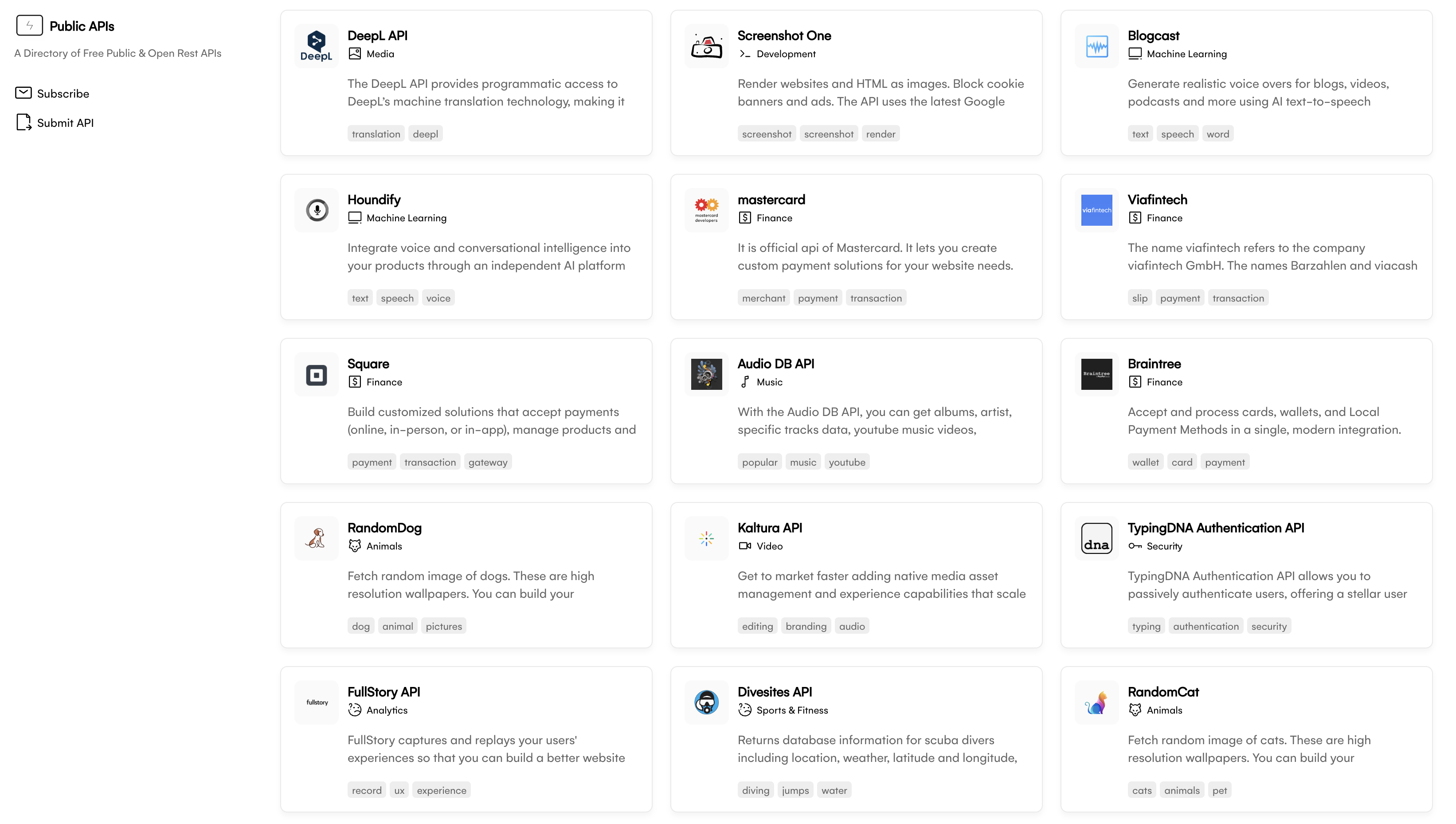
Sharing metadata
| og:url | https://publicapis.io/ |
|---|---|
| og:type | website |
| og:image | https://c1.tablecdn.com/pa/publicapis.png |
| og:title | Public APIs Directory — 1000+ Free Public APIs for Developers |
| og:site_name | Public APIs |
| og:description | Discover over 1000 free public APIs for your next project. Browse REST APIs by category: weather, finance, AI, maps, social media, and more. Get API keys, code examples, and documentation. |
| twitter:card | summary_large_image |
| twitter:site | @publicapis |
| twitter:title | Public APIs Directory — 1000+ Free Public APIs for Developers |
| twitter:creator | @publicapis |
| twitter:description | Discover over 1000 free public APIs for your next project. Browse REST APIs by category: weather, finance, AI, maps, social media, and more. Get API keys, code examples, and documentation. |
robots.txt (opens in a new tab)
11 rulesAll bots 1 allowed · 10 disallowed

 All bots

/
/admin/api/cancel/success/test-flow/sponsor-dashboard-test/sponsor-success/traffic-stats/sponsor-dashboard/review
No matching rules.
Sitemaps
1 Registration details RDAP / WHOIS
| Registrar | NameCheap, Inc. |
|---|---|
| Registered | 2022-04-11 |
| Expires | 2027-04-11 |
| Domain status | clientTransferProhibited https://icann.org/epp#clientTransferProhibited |
| Nameservers | dns1.p06.nsone.net、dns2.p06.nsone.net、dns3.p06.nsone.net、dns4.p06.nsone.net |
| DNSSEC | unsigned |
 DNS records
| Type | Name | Value | TTL | Priority |
|---|---|---|---|---|
| A | publicapis.io | 18.208.88.157 | 120 | — |
| A | publicapis.io | 98.84.224.111 | 120 | — |
| MX | publicapis.io | smtp.google.com | 3600 | 1 |
| NS | publicapis.io | dns1.p06.nsone.net | 3600 | — |
| NS | publicapis.io | dns2.p06.nsone.net | 3600 | — |
| NS | publicapis.io | dns3.p06.nsone.net | 3600 | — |
| NS | publicapis.io | dns4.p06.nsone.net | 3600 | — |
| TXT | publicapis.io | google-site-verification=r0bzKNQ534JR3X5TzjJO87WLx5_qBdswJIo09Tq-gE4 | 3600 | — |
| TXT | publicapis.io | google-site-verification=rqMT72tkQNoERKO0aCfNwa3SVNhdZQV9gLSHGAOGeec | 3600 | — |
| DMARC | _dmarc.publicapis.io | v=DMARC1; p=none; | 3600 | — |
 TLS and certificates
| Assessment | Normal configuration |
|---|---|
| Supported protocols | TLSv1.2、TLSv1.3 |
| Negotiated protocol | TLSv1.3 |
| Certificate subject | publicapis.io |
| Issuer | Let's Encrypt |
| Valid until | 2026-12-22T19:58 · Remaining when checked: 85 days |
| Verification details | Certificate trust: Passed · Hostname match: Passed |
 HTTP response headers
| Header | Value |
|---|---|
| content-type | text/html; charset=utf-8 |
| cache-control | public,max-age=0,must-revalidate |
| server | Netlify |
| strict-transport-security | max-age=31536000 |
| x-content-type-options | nosniff |
 Identified technologies
Recent Updates
- Website images
- Screenshots
- Network details
- Website Technologies
- Pages and Search Information
User reviews (0)