Website profiles · Technology insights · Alternatives

regexlearn.com

Learn Regex interactively, practice at your level, and test your own Regex.

No paid content found Multilingual
Visit website
Profile views 11 Outbound visits 14 Normal
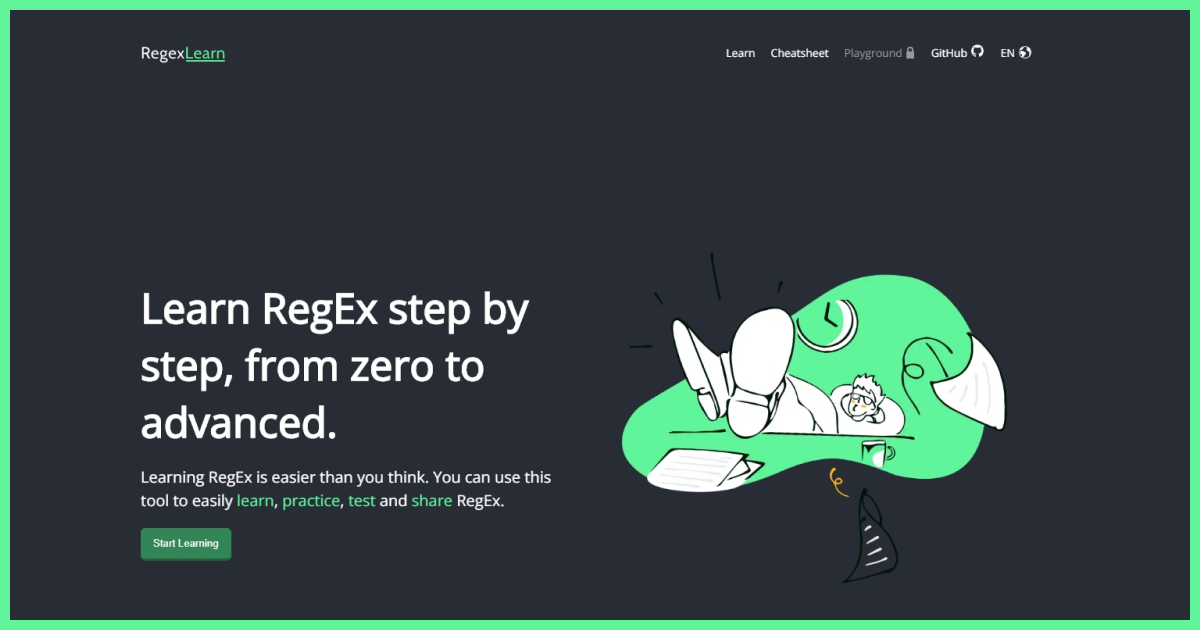
Regex Learn Full homepage screenshot

At a glance

Category
Education & Learning
Language
English
Paid-content signal
No paid content foundObserved
Registered
2021
Hosting
CloudflareInferred
HTTPS certificate trusted
PassedObserved
Last updated

Website review

This review may include AI-generated content and is not individually verified. Domain, certificate and other facts come from the observed data on this page.

What is Regex Learn?

Regex Learn is a free, open-source website for learning regular expressions through short lessons, a reference sheet, and hands-on testing tools. It is aimed at beginners who find regex intimidating, but its cheatsheet and playground remain useful for intermediate users who just need to check a pattern quickly.

The site is organized around four areas:

  • Learn — step-by-step lessons that introduce regex syntax in small pieces rather than dumping the whole language at once.
  • Cheatsheet — a single-page reference of patterns and symbols, useful when you know what you want to match but forget the exact syntax.
  • Playground — a place to build, validate and test a pattern against your own sample text.
  • Practice — level-based exercises; the page itself notes this section is still to come, so treat the learning and testing tools as the reliable core.

Regex appears in far more places than most people expect: Python, JavaScript, SQL, R, and analytics tools such as Google Analytics and Google Data Studio, as the site points out. That breadth is the main reason a general-purpose learning tool beats a language-specific tutorial — the syntax carries over even when the surrounding code does not.

A practical next step. If you have a concrete task, start in the Playground rather than the lessons. Paste in a real sample — a log line, a list of email addresses, a URL — and try to match it. When you get stuck, look up the one symbol you are missing in the Cheatsheet, then return to the Learn track to fill in the gaps. Working from a real example makes the abstract syntax stick faster than reading patterns in isolation.

How to choose between this and alternatives. Regex Learn suits you if you want a structured, no-signup path from zero and prefer learning by typing patterns yourself. If you would rather read a thorough prose reference alongside examples, Regular-Expressions.info is a long-standing option. If you want to test patterns against sample text without any lesson structure, Regex101 is the more common choice and explains each token as you type. Many people use Regex Learn to get oriented and then move to one of those for day-to-day work.

One caveat worth knowing: regex flavors differ. A pattern that works in JavaScript may behave differently in Python or in a command-line tool, so always test in the environment where the pattern will actually run.

How does the step-by-step learning path on Regex Learn work for someone starting from zero?

Regex Learn is built around a four-part loop: Learn → Cheatsheet → Playground → Practice. For a complete beginner, that loop is the main reason the site works — you read a concept, look it up, try it on real text, then drill it.

How the path is structured

Learn is the core sequence. The site's own framing is "step by step, from zero to advanced," so lessons are ordered by increasing complexity rather than grouped by topic. You meet literal characters and simple matching first, then move into the syntax that trips people up: quantifiers, character classes, groups, anchors, and lookarounds. Each lesson introduces one idea and asks you to apply it immediately instead of reading a long explanation first.

Cheatsheet is the reference layer. It collects patterns and symbols on a single page so you can check syntax without leaving the flow. This matters for beginners because regex notation is dense and easy to misremember — + versus *, \d versus [0-9], greedy versus lazy.

Playground is where you build and test a pattern against your own input text. It is the bridge between "I understand the lesson" and "I can write this myself."

Practice is listed on the page as coming "soon," so treat it as a planned feature rather than something you can rely on today. Until it arrives, the Playground is your practice surface.

A realistic first week

Stage What you do What it proves
Day 1–2 Work through early Learn lessons You can match literal text and simple patterns
Day 3–4 Re-check syntax in the Cheatsheet while continuing lessons You stop guessing at symbols
Day 5–7 Rebuild each lesson's pattern in the Playground on your own data You can apply regex outside the tutorial

A concrete scenario

Suppose you have a log file and want every timestamp. You would learn anchors and digit classes in the lessons, confirm the exact syntax on the Cheatsheet, then paste a few sample lines into the Playground and iterate until the pattern matches only what you want. That last step — testing against your own messy text — is where most of the learning happens, because tutorial examples are always cleaner than real data.

Decision criteria

Choose this path if you want short, interactive repetition and are willing to supply your own practice text for now. If you prefer a full written reference with deeper explanations of why patterns behave as they do, a documentation-style resource such as MDN Web Docs covers regular expressions in more depth. If you would rather learn through puzzles and challenges, Regex101 offers a tester with detailed match explanations and a community pattern library.

The practical next step: open the Learn section, finish the first three lessons, then immediately paste a snippet of your own text into the Playground and try to match one thing in it. That single habit — learn a concept, then apply it to your own data the same day — is what turns regex from something you read about into something you can use.

What is the best way to use the Cheatsheet for quickly looking up regex patterns and symbols?

Use the Cheatsheet as a one-page index you scan first, then verify in the Playground. Regex Learn describes its Cheatsheet as showing "all of the usages you need at once" so you can check patterns and symbols directly from one page — that makes it a lookup surface, not a tutorial. Regex Learn

A lookup routine that works

  1. Name the job before you scroll: "match a digit", "optional character", "start of line". Searching by intent is faster than reading the page top to bottom.
  2. Note the symbol, not just the meaning. Cheatsheets reward recognition; you want \d and + to become shapes you spot instantly.
  3. Paste the symbol into the Playground with a sample string and confirm the match. Reading a definition and seeing it fire on real text are different kinds of knowing.
  4. Keep the Cheatsheet open in a second tab while you write, and return to the Learn section only when a symbol keeps confusing you.

Where it fits, and where it doesn't The Cheatsheet suits people who already have a task in front of them: cleaning a column of messy text, writing a search-and-replace, or debugging a pattern someone else wrote. It's a poor first stop if you've never written a pattern, because a list of symbols doesn't explain why .* is greedy or when anchors change your result. Newcomers should work through the step-by-step Learn material first and treat the Cheatsheet as revision.

Two habits make it more useful than a printed reference:

  • Write the pattern in the target language's syntax. Regex flavours differ, and a symbol that works in one environment may behave differently in another.
  • Test against the awkward case, not the tidy one: empty strings, extra spaces, trailing punctuation. Cheatsheets show correct symbols; only your test data shows whether your pattern is correct.

Decision criterion: if you can state your goal in one sentence, go straight to the Cheatsheet and Playground. If you can't, spend ten minutes in the Learn section first — you'll look things up less often afterward.

How can I test and debug my own regular expressions using the Playground?

The Playground on Regex Learn is built for exactly that: writing a pattern, feeding it sample text, and seeing what matches before you commit the regex to real code. It sits alongside the site's step-by-step lessons and cheatsheet, so it works both as a scratchpad while learning and as a quick validation tool afterwards.

A practical workflow

  1. Paste a realistic sample of the text you need to process — log lines, form input, CSV rows — rather than a toy string. Edge cases only show up when the input looks like production data.
  2. Write the smallest pattern that could work, then run it.
  3. Add one construct at a time (a character class, then a quantifier, then a group) and re-run after each change. When a match breaks, you know which addition caused it.
  4. Test deliberately awkward cases: empty strings, extra whitespace, uppercase/lowercase variants, and values at the boundary of what you expect.
  5. Once it behaves, copy the final pattern into your code and re-test there — the Playground validates the pattern, not your language's string escaping.

What each part of the site is for

Section Best used for
Learn Building syntax knowledge from zero upward
Cheatsheet Looking up a symbol or pattern quickly on one page
Playground Building, validating and testing your own patterns
Practice Testing your knowledge with level-based exercises

Trade-offs to keep in mind

The Playground is a fast feedback loop and needs no setup, which makes it ideal for iterating on a pattern in isolation. It will not tell you how a pattern performs on a large dataset, and it cannot catch differences in how your target language handles escaping, Unicode, or flavour-specific features. For heavy debugging, pair it with a test in your actual codebase.

Regex Learn is free and open source, so if you want to see how the tooling itself is built or contribute, the project's repository is linked from the site.

A good next step: open the Playground, paste in a real sample from the task you are working on, and start with a pattern you already half-trust — then tighten it one piece at a time. If you are new to the syntax, run through the Learn section first and keep the Cheatsheet open in a second tab; Regex Learn covers all four in one place.

What practice exercises and tutorials does Regex Learn offer to match my current skill level?

Regex Learn offers a four-part path — Learn, Cheatsheet, Playground, and Practice — where the Practice section is the part designed to match your current skill level. According to the site, practice is organized into tutorials "based on your level," so you move from beginner material to more advanced exercises rather than working through one fixed set. The page also notes the Practice section as "Soon," meaning it is announced as forthcoming rather than fully available at the time of that page content.

What each section is for

  • Learn — step-by-step lessons from zero to advanced, with examples and tutorials for building up pattern knowledge.
  • Cheatsheet — a single-page reference of patterns and symbols, useful when you know roughly what you want but need the exact syntax.
  • Playground — build, validate, and test your own pattern, which is where you check whether a pattern actually does what you intended.
  • Practice — level-based tutorials and knowledge testing, intended to follow the learning part.

How to pick your starting point

If you are… Start with Then move to
New to regex Learn, from the first lessons Cheatsheet for quick lookups, Playground to test small patterns
Rusty but not new Cheatsheet to refresh syntax Playground for real patterns, Practice once available
Comfortable with basics Playground directly Practice at a higher level to find gaps

A practical next step

Pick one real task you already have — validating an email field, extracting dates from a log line, or renaming files in bulk — and build the pattern in the Playground. Compare it against the Cheatsheet when a symbol does not behave as expected. That loop of build, break, and fix teaches faster than reading patterns passively, and it tells you honestly which level of Practice material you belong in.

Regex Learn is an open-source project, so the lessons and reference material are free to use and open to community contributions. If you want a second explanation of a concept that is not clicking, a general-purpose reference such as MDN Web Docs covers regex syntax for JavaScript, and Python Documentation covers the re module if you work in Python.

How can I contribute to or support the open-source Regex Learn project?

Regex Learn is an open-source project, and the page invites community contributions and support. The concrete path it points to is its GitHub repository, which is where you would normally go to contribute code, report issues, suggest improvements, or help with translations and documentation. The site also has a "Become a Sponsor" section, which is the route it offers for financial support.

Practical ways to help

  • Contribute on GitHub. Start by browsing the repository's open issues and pull requests to see what maintainers actually need. Small, focused fixes (a typo, a clearer example, a broken link) are usually the easiest first contribution.
  • Improve content and translations. A step-by-step learning site lives or dies on clear examples, so adding or correcting explanations, cheatsheet entries, or localized text is high-value work.
  • Report bugs precisely. If a lesson, the Playground, or the Cheatsheet behaves unexpectedly, include the exact pattern, input, expected result and browser — that turns a vague report into something fixable.
  • Sponsor or share. If you cannot contribute time, the sponsorship option supports upkeep; sharing the site with a study group is a zero-cost way to help.

A realistic first step

Pick one small issue, comment that you would like to take it, and open a pull request with a narrow change. This is the standard open-source workflow and it keeps review effort low.

For comparison, other free learning resources take different approaches: regex101 focuses on a testing/debugging playground with explanations, while GitHub hosts the Regex Learn repository itself, where the contribution process actually happens. If you want structured lessons rather than a debugging tool, Regex Learn's own Learn and Practice sections are the relevant starting point.

Related questions

More questions →
What Are Open-Source UI Element Libraries and How Do They Differ From UI Frameworks?

An open-source UI element library is a collection of individual, ready-made interface pieces—buttons, cards, inputs, toggles, loaders—that you copy into your own project and adapt. A UI framework, by contrast, is a structured system of components, conventions, and often a theming layer that governs how your whole interface is built. The practical difference: an element library gives you a snippet; a framework gives you a way of working. If you need a polished button in ten minutes, reach for the element library. If you're building a 40-screen product with a team, you probably want the framework.

What "open-source UI element library" actually means

The term gets used loosely, so it helps to separate the parts:

  • Open-source: the code is publicly available, and the license tells you what you may do with it—copy, modify, redistribute, or use commercially.
  • UI element: a single, self-contained piece of interface, usually small enough to read in one sitting. A button with hover states, a pricing card, a search field.
  • Library: a browsable, searchable collection of those elements, typically contributed by many different people.

On a site like Uiverse, elements are shared by a community and written in plain CSS or Tailwind. You find one you like, copy the markup and styles, paste them into your project, and adjust colors, spacing, and text to fit. There's no package to install and no build step required—which is exactly the appeal, and also the source of most of the confusion.

Element library vs. UI framework: the core differences

Dimension Open-source UI element library UI framework / design system
Unit of reuse A single snippet you copy A component you import or call
Installation None; paste into your code Package install, config, sometimes a provider
Consistency Depends on you; each element may look different Enforced by shared tokens and APIs
Theming Manual edits per element Central theme/config file
Updates You own the copy; no upstream updates Version bumps bring fixes and changes
Accessibility Varies per contributor; must be checked Usually tested and documented
Best for Prototypes, landing pages, small sites, one-off needs Multi-page apps, teams, long-lived products
Learning curve Low—read the CSS Higher—learn the API and conventions

The table isn't a verdict. It's a map of trade-offs. Element libraries win on speed and freedom; frameworks win on consistency and maintenance.

Licensing and attribution: what to check before you paste

This is where people get into trouble, and it's worth slowing down for.

  1. Find the license. Every element or collection should state one. Common open-source licenses include MIT, Apache-2.0, and BSD. Some projects use copyleft licenses like GPL, which can impose obligations if you redistribute your code.
  2. Understand what the license permits. MIT and Apache-2.0 are permissive: you can typically use the code in commercial and closed-source projects. Copyleft licenses may require you to release derivative source under the same terms.
  3. Check attribution requirements. Permissive licenses usually require you to keep the copyright notice and license text somewhere in your project. That's a real obligation, not a formality.
  4. Look for per-element terms. On community sites, the site's overall terms and the individual contributor's stated wishes may differ. If a contributor asks for credit, honor it.
  5. When in doubt, ask or avoid. If a snippet has no license at all, you don't have clear permission to reuse it. Treat "no license" as "not open source," even if the code is publicly visible.

This article is general information, not legal advice. For commercial products with real exposure, have someone qualified review the licenses you're relying on.

How to use a community element in your project: a practical workflow

Here's a repeatable process that avoids most of the usual mess.

1. Start from a real need, not a browsing session

Decide what you need first—"a compact primary button with a loading state"—then search. Browsing aimlessly produces a pile of pretty snippets that don't fit together.

2. Copy the smallest version that works

Take the markup and the styles. Strip anything you don't need: demo wrappers, extra animations, decorative layers. Less code means fewer surprises.

3. Convert it to your conventions

If your project uses design tokens or CSS variables, replace hard-coded values:

/* Before: hard-coded */
.button { background: #4f46e5; border-radius: 8px; }

/* After: token-based */
.button { background: var(--color-primary); border-radius: var(--radius-md); }

This one step is what keeps a copied element from looking like a foreign object in your UI.

4. Check accessibility before you ship

Community elements vary widely here. Verify at minimum:

  • Keyboard focus is visible and the element is reachable by Tab.
  • Color contrast meets WCAG AA (4.5:1 for normal text).
  • Interactive elements use semantic HTML (<button>, not a clickable <div>).
  • Form inputs have associated labels.
  • Motion respects prefers-reduced-motion.

5. Test in context

Paste it into a real page with real content. Long labels, small screens, and dark mode break more copied elements than anything else.

6. Note where it came from

Keep a short comment or an internal credits file: source, license, date. Future you—and your legal reviewer—will be grateful.

Where element libraries genuinely shine

  • Prototypes and demos: you need something clickable today, not a design system.
  • Landing pages and marketing sites: a handful of distinctive elements, each custom.
  • Filling gaps: your framework lacks one specific component, and you don't want to build it from scratch.
  • Learning: reading well-made CSS is one of the fastest ways to improve.
  • Small projects: a personal site doesn't need a theming architecture.

Where they fall short

  • Consistency at scale: ten elements from ten contributors rarely look like one product.
  • Maintenance: you own every copy. When your design changes, you edit each one.
  • Accessibility debt: you inherit whatever the contributor did or didn't do.
  • No upstream fixes: a bug fixed in the original won't reach your copy.
  • Integration friction: different naming conventions, different units, different assumptions about resets.

When to choose which

Choose an element library when the scope is small, the timeline is short, or you need a few distinctive pieces rather than a whole system.

Choose a framework or design system when multiple people build multiple screens over months, when consistency is a product requirement, or when accessibility and theming need to be guaranteed rather than checked.

A hybrid works well for many teams: adopt a framework for the structural components—forms, navigation, layout—and borrow individual elements for the places where you want personality. Just route every borrowed element through the same token and accessibility checks, so it lands as part of your system rather than beside it.

The short version: open-source UI element libraries are a fast, flexible way to get good-looking interface pieces into a project. They are not a substitute for a design system, and the license and accessibility details are the part worth reading carefully.

How to Learn Regex Step by Step on Regex Learn

Regex Learn is a free, open-source site that teaches regular expressions through a step-by-step path from zero to advanced, with a cheatsheet, a playground for building and testing patterns, and a practice section for checking your knowledge. It suits beginners who want structured lessons plus hands-on testing, and anyone who prefers learning by doing rather than reading a reference manual. The site's own description frames the workflow as learn, practice, and test Regex in one tool.

Start with the Learn section

The homepage headline is "Learn Regex step by step, from zero to advanced," and the primary call to action is Start Learning. This is the intended entry point: work through the lessons in order rather than jumping around, since the sequence moves from basic syntax toward more advanced patterns.

Regex itself is described on the site as a string of characters created within the framework of Regex syntax rules, used for finding, matching, and editing data. The Learn section is where those rules are introduced progressively.

Keep the Cheatsheet open while you work

The Cheatsheet section shows all the usages you need at once on a single page, so you can look up a pattern or symbol without leaving your current task. The site describes it as a way to "explore all Regex patterns and symbols."

A practical habit: when a lesson introduces a symbol you don't recognize, check it against the cheatsheet immediately instead of memorizing it in isolation. The cheatsheet works as a reference layer on top of the lessons, not as a replacement for them.

Build and test patterns in the Playground

The Playground is for generating a Regex: you can build, validate, and test your own pattern there. This is the step where learning turns into doing.

A concrete way to use it:

  1. Pick a small, real task — for example, matching dates in a YYYY-MM-DD format inside a block of text.
  2. Write your pattern in the Playground.
  3. Run it against sample text and check whether it matches what you intended, including edge cases like a missing leading zero.
  4. Adjust the pattern and re-test until it behaves correctly.

Because the Playground validates and tests patterns, it doubles as a debugging space for patterns you write elsewhere.

Check your level with Practice

The Practice section is where you test your Regex knowledge with tutorials based on your level. Note that the site currently labels this section "Soon," so it may not be fully available yet. If it isn't open when you visit, treat the Playground as your practice ground: invent matching tasks and verify your patterns there.

Where Regex applies

According to the site, Regex can be used in programming languages such as Python, SQL, JavaScript, and R, as well as in Google Analytics and Google Data Studio, and throughout the coding process. That range is a useful reminder that the patterns you learn here transfer directly to whatever tool you actually work in.

If you want to go further

Regex Learn is an open-source project that welcomes community contributions and is free to use. The site notes that working on the project lets you hone your skills, study, and collaborate — a reasonable next step once the lessons are done and you want to read or write real patterns rather than exercises.

What Are Regular Expressions (Regex) and What Are They Used For?

Regular expressions (Regex or Regexp) are strings of characters written according to Regex syntax rules, used to find, match, and edit data. They work across programming languages and tools such as Python, SQL, JavaScript, R, Google Analytics, and Google Data Studio, and are applied throughout the coding process. If your task involves searching text, validating input, or transforming data at scale, Regex is the standard way to describe those patterns precisely.

What Regex Actually Is

A regular expression is a pattern, not a literal string. Instead of searching for one exact piece of text, you describe the shape of what you want: a sequence of digits, an email-like structure, a word at the start of a line. The Regex engine then scans your input and returns whatever matches that description.

That distinction matters. Searching for cat finds only cat. A Regex pattern can find cat, Cat, cats, or catalog depending on how you write it — and that flexibility is exactly why Regex is used everywhere text needs to be processed.

What Regex Is Used For

The core operations are finding, matching, and editing. In practice that covers a wide range of everyday tasks:

  • Searching — locating specific patterns inside large bodies of text or logs
  • Matching — checking whether input follows an expected format, such as a phone number or postal code
  • Editing — replacing or reformatting matched content in bulk
  • Extracting — pulling structured pieces (dates, IDs, URLs) out of unstructured text

Because these needs appear in nearly every language and analytics tool, Regex is a transferable skill rather than a language-specific one. A pattern you learn for JavaScript is largely readable in Python or SQL.

Where You Can Learn and Practice It

Regex Learn (regexlearn.com) is an interactive site built around exactly this progression — learn, reference, test, practice. Its own description frames the goal as going "step by step, from zero to advanced," and the site organizes that into distinct sections:

Section What it gives you
Learn Step-by-step lessons starting from zero
Cheatsheet All patterns and symbols on one page for quick reference
Playground A place to build, validate, and test your own Regex patterns
Practice Level-based exercises to test your knowledge (listed as "Soon" on the site)
Open Source A community-contributed project, free to use

The Cheatsheet is useful when you already know what you want but forget the exact symbol. The Playground is where you verify a pattern against real input before putting it into code — a step worth doing, since Regex errors are often silent.

How to Approach Learning Regex

The site's own framing is that "learning Regex is easier than you think," and the structure supports a practical order:

  1. Start with the Learn section to build familiarity with syntax rules from the beginning.
  2. Keep the Cheatsheet open as you go, so you can check symbols without breaking your flow.
  3. Move to the Playground and test each new pattern against your own sample text.
  4. Use Practice to confirm you can apply patterns without hints.

The key habit is testing in the Playground before trusting a pattern in production. A Regex that looks correct can match far more — or far less — than intended, and the only reliable check is running it against realistic input.

When Regex Is the Right Tool

Regex fits tasks where the pattern is describable but the exact text varies: form validation, log parsing, bulk find-and-replace, and data cleaning. It is less suited to parsing deeply nested structures like full HTML or JSON, where dedicated parsers are more reliable. For flat, pattern-based text work, though, it is usually the fastest path — and the skills transfer directly between the languages and tools listed above.

What Is Regex Learn and What Can You Do on It?

Regex Learn is a free, open-source website for learning regular expressions step by step, from zero to advanced. It combines four things in one place: a structured learning path, a reference cheatsheet, an interactive playground for building and testing patterns, and a practice section. It suits anyone who wants to learn regex by doing rather than only reading — beginners starting from scratch, and intermediate users who need a quick reference or a place to debug a pattern.

The four main sections

Section What it does When to use it
Learn Step-by-step lessons from zero to advanced Starting out or filling gaps in order
Cheatsheet All patterns and symbols collected on one page Looking up syntax quickly
Playground Build, validate, and test a regex pattern Writing or debugging a specific pattern
Practice Test your knowledge with tutorials based on your level After finishing the learning part

Learn

The core of the site is a progressive course. The site describes it as "step by step, from zero to advanced," so lessons build on each other rather than presenting regex as a single wall of syntax. This is the section to work through in order if you are new.

Cheatsheet

The cheatsheet puts all the usages you need on one page, so you can see patterns and symbols at once and check them directly without leaving the page. Use it as a lookup while working in the Learn or Playground sections, or as a standalone reference.

Playground

If you want to generate a regex, the Playground lets you build, validate, and test your pattern in one place. This is the section for a concrete task — for example, writing a pattern to match a date format or extract part of a string — where you want immediate feedback on whether it works.

Practice

Once you have completed the learning part, the practice section lets you test your regex knowledge with tutorials based on your level. Note that the site's own page marks this section as "Soon," so treat it as announced rather than fully available.

What regex is used for, according to the site

Regex (short for regular expressions) is a string of characters created within regex syntax rules. The site frames its purpose as managing data through commands like finding, matching, and editing. It lists Python, SQL, JavaScript, R, Google Analytics, and Google Data Studio as examples of languages and tools where regex applies, and notes it is used throughout the coding process.

Access and licensing

Regex Learn is an open-source project that welcomes community contributions and is free to use. The site also notes that working on the project is a way to hone your skills, study, and collaborate, and points to GitHub for contributing and supporting. The page shows a version number (v 2.36.0) and a sponsors section, indicating an actively maintained project.

How to decide if it fits your situation

  • Choose Regex Learn if you want a guided path from basics upward, plus a reference and a testing area in the same place, and you prefer learning by interacting with patterns.
  • Use only the Cheatsheet or Playground if you already know regex and just need a quick lookup or a place to test a pattern.
  • Look elsewhere if you need a full practice mode right now — the site's practice section is listed as coming soon — or if you want a course tied to one specific language's regex flavor, since the site presents regex generally across Python, SQL, JavaScript, R, and analytics tools.

A practical starting sequence: work through the Learn lessons in order, keep the Cheatsheet open for syntax you forget, and move to the Playground whenever you want to test a pattern against your own data.

What Are the Main Sections of Regex Learn?

Regex Learn is organized into four main sections: Learn, Cheatsheet, Playground, and Practice. Each one serves a different stage of working with regular expressions, so the right starting point depends on whether you are learning from scratch, looking something up, testing a pattern, or drilling your skills. Note that the Practice section is marked "Soon" on the site, so it is not yet available for use.

Learn

The Learn section is a step-by-step tutorial that takes you "from zero to advanced." It is the place to start if you have no prior regex experience, since it introduces the syntax rules and commands progressively rather than all at once.

Use it when you want structured instruction on how regex handles finding, matching, and editing strings. The site frames regex as a skill applicable across Python, SQL, JavaScript, R, Google Analytics, and Google Data Studio, so the Learn track is aimed at general regex literacy rather than one specific language.

Cheatsheet

The Cheatsheet collects all the regex patterns and symbols you need on a single page. Its purpose is quick reference, not instruction.

Reach for it when you already know roughly what you want but need to confirm the exact symbol or syntax. Because everything is on one page, it works well as a lookup tab while you are writing a pattern elsewhere.

Playground

The Playground is where you build, validate, and test your own regex patterns. If you want to generate a regex and check that it behaves as expected before using it in real code, this is the section for that.

The typical loop is: write a pattern, run it against sample input, and adjust until the matches are correct. This makes it the practical companion to the Learn section — you read a concept, then verify it yourself.

Practice

The Practice section is described as the next step after completing the learning material, letting you test your regex knowledge with tutorials based on your level. However, the site currently labels it "Soon," so you cannot use it yet. Plan on Learn, Cheatsheet, and Playground as the working sections for now.

Which Section Should You Start With?

Your situation Start here
New to regex, want structured lessons Learn
Know regex, need to check a symbol or pattern Cheatsheet
Have a pattern to build or debug Playground
Finished learning, want exercises Practice (not yet available)

Regex Learn is also an open-source project that accepts community contributions, so the sections above may expand over time. For day-to-day use, the practical path is Learn for concepts, Cheatsheet for recall, and Playground for testing — with Practice as a future option once it launches.

Website Overview

The available information shows a mix of normal operation and configuration gaps. Depending on how the website is used, these gaps may affect secure access or the consistency of its public presentation.

Domain and Registration

Transfer-protection status is present, helping reduce the risk of unauthorized domain transfers. The domain has about 5 years of registration history; its current configuration provides more context than age alone. The registrar is GoDaddy.com, LLC, a widely used domain service provider. The domain uses the common .com extension, which is not an independent safety signal.

DNS and Email

Nameservers are provided by Cloudflare, indicating managed DNS hosting. No CNAME was found; the observed records resolve directly to addresses. No MX record was found. A conventional explicit inbound-mail route is not configured. TXT records include verification markers for Google. Such markers may also remain after a service stops being used. DNSSEC signatures were not detected, so this additional DNS authenticity protection is not confirmed.

TLS and Certificates

The public key uses EC with 256 bits. The server supplied a complete certificate chain. No organization name is present in the certificate; the available fields are consistent with domain validation. The certificate was issued within the Google Trust Services cloud or CDN ecosystem. The certificate's total validity is about 90 days, consistent with a short renewal cycle.

HTTP and Browser Security

CORS permits any origin to read this response. This is common for public resources; sensitive responses need narrower handling. No X-Powered-By header was found, reducing one common source of backend fingerprinting information. All six checked browser-security headers are present. Their effectiveness still depends on the policy values and application behavior. The cf-ray response header indicates a CDN or caching proxy in the delivery path. No obvious internal addresses or debug information were found in the headers.

Technology Stack Analysis

The public page identifies Next.js, Google Tag Manager, Cloudflare without precise versions, leaving fewer clues for version-specific scanning.

Search and Social Sharing

No homepage canonical URL was detected. If duplicate URLs exist, consolidation may be less explicit. Twitter Card metadata is configured. The page declares 21 language or regional alternatives using hreflang. The title has 50 characters, within a common display range. A meta description is present, with 75 characters.

Hosting and Email

DNSCloudflare
HostingCloudflare
EmailUnknown
Approximate IP geolocation (inferred; a CDN or proxy may differ from the origin server) Location unknown Inferred 104.21.16.155

Registration details

RDAP / WHOIS

RegistrarGoDaddy.com, LLC
Registered2021-09-19
Expires2027-09-19
Domain statusclient delete prohibited、client renew prohibited、client transfer prohibited、client update prohibited
Nameserverslogan.ns.cloudflare.com、sofia.ns.cloudflare.com
DNSSECunsigned

DNS records

DNS

TypeNameValueTTLPriority
Aregexlearn.com104.21.16.155300—
Aregexlearn.com172.67.213.171300—
AAAAregexlearn.com2606:4700:3031::6815:109b300—
AAAAregexlearn.com2606:4700:3033::ac43:d5ab300—
NSregexlearn.comlogan.ns.cloudflare.com86400—
NSregexlearn.comsofia.ns.cloudflare.com86400—
TXTregexlearn.comgoogle-site-verification=u8Tj9585l9BXzgUORat_Mwm03Fi5i8Bw-BTS-GSMVMY300—

TLS and certificates

TLS / SSL

AssessmentNormal configuration
Supported protocolsTLSv1.2、TLSv1.3
Negotiated protocolTLSv1.3
Certificate subjectregexlearn.com
IssuerGoogle Trust Services
Valid until2026-12-25T20:15 · Remaining when checked: 82 days
Verification detailsCertificate trust: Passed · Hostname match: Passed

HTTP response headers

HTTP

HeaderValue
content-typetext/html; charset=utf-8
cache-controlpublic, max-age=0, must-revalidate
servercloudflare
strict-transport-securitymax-age=15552000
content-security-policydefault-src 'self'; script-src 'self' 'unsafe-inline' https://www.googletagmanager.com; style-src 'self' 'unsafe-inline' https://fonts.googleapis.com; img-src 'self' data: https://cdn.buymeacoffee.com https://www.googletagmanager.com; font-src 'self' https://fonts.gstatic.com; connect-src 'self' https://www.google-analytics.com https://*.google-analytics.com https://www.googletagmanager.com; frame-src https://www.youtube.com https://www.googletagmanager.com; object-src 'none'; base-uri 'self'; form-action 'self'; frame-ancestors 'none'; upgrade-insecure-requests
x-frame-optionsDENY
x-content-type-optionsnosniff
referrer-policystrict-origin-when-cross-origin
permissions-policycamera=(), microphone=(), geolocation=(), payment=(), usb=()
access-control-allow-origin*

Identified technologies

Next.jsGoogle Tag ManagerCloudflare

Pages, Search and Sharing

Meta descriptionLearn Regex interactively, practice at your level, and test your own Regex.
Canonical URLNot detected
LanguageEnglish (default) · Multilingual
Twitter Cardsummary_large_image
All bots 1 allowed · 0 disallowed
  • Allow/

User reviews (0)

  • No reviews yet.