
 简体中文
简体中文 English
Website review
This review may include AI-generated content and is not individually verified. Domain, certificate and other facts come from the observed data on this page.
What is Rember?
Rember is an AI-assisted flashcard tool built around a canvas workflow and spaced repetition. You tell it what you want to remember—by typing a topic, pasting text, dropping in URLs or YouTube videos, or capturing an AI chat—and it generates flashcards designed to follow established spaced-repetition best practices: testing deep understanding, keeping cards atomic and unambiguous, and avoiding yes/no questions. Cards can be reviewed inside Rember or exported to Anki, and review scheduling uses FSRS with options to pause, snooze, or undo reviews.
Who it suits
- Students and self-directed learners working through books, lectures, or videos who want to convert material into reviewable cards without writing each one by hand.
- Existing Anki users who want faster card creation but prefer to keep reviewing in Anki; the Anki add-on supports that split workflow.
- People who learn through AI chats, since an MCP integration lets you say "add to Rember" in Claude or ChatGPT conversations.
Trade-offs to weigh
The value depends on how much you trust generated cards. Rember's emphasis on card quality suggests it is targeting learners who care about well-formed questions rather than bulk output, but you should still expect to edit cards where a concept is nuanced. The canvas approach gives more control than one-click generation, at the cost of a more deliberate capture step. If you already have a settled Anki deck and review habit, the main gain is speed of authoring, not a new review system.
As a next step, pick one source you are currently studying—a chapter or a video—and test whether the cards Rember produces from it are ones you would actually keep, editing as needed. That single trial will tell you more than any feature list about whether the workflow fits how you learn.
How does Rember generate flashcards from sources like YouTube videos, PDFs, or AI chats?
Rember uses an AI canvas that turns whatever you give it—a topic name, a book reference, pasted text, a URL or YouTube video, or an AI chat—into flashcards built to spaced-repetition standards. You describe what you want to remember in natural language, and Rember generates the cards; you can then review them in Rember or export to Anki.
How the input-to-card flow works
- Capture: You point Rember at a source. The page lists typed concepts (e.g., "linear algebra basics"), book references (e.g., a specific method in a textbook), pasted text, dropped URLs and YouTube videos, and AI chats via an MCP integration.
- Instruct: You tell Rember in plain language what should become cards, which is where the "canvas" control comes in—you steer what gets extracted rather than accepting a blind dump.
- Generate: Rember produces cards following practices it says come from the spaced-repetition community: test deep understanding, keep cards atomic, make them unambiguous, and avoid yes/no questions. The page's own example contrasts a vague "What's the function of mitochondria?" with a sharper "Why are muscle cells packed with more mitochondria than other cell types?"
- Review: Study inside Rember, which uses FSRS scheduling with pause, snooze and undo, or send cards to Anki via an add-on if you'd rather keep your existing setup.
Practical reading of this
The quality claim is the part worth testing yourself. A model given a YouTube video or a PDF chapter can easily produce cards that look atomic but test trivia rather than understanding—so treat the "deep understanding" principle as a target to check, not a guarantee. The natural-language instruction step is your main lever: naming the concept you care about ("sample-average method") and the depth you want will shape output far more than dropping in a whole document.
For AI chats, the MCP route (saying "add to Rember" in a Claude or ChatGPT conversation) is the most distinctive feature: it captures a concept at the moment you understand it, which is when a good card is easiest to write. If you already live in Anki, the add-on path lowers the switching cost—generate in Rember, review where you're comfortable.
A concrete next step
Pick one source you've already worked through—a lecture video or a chapter PDF—and try two prompts: one broad ("make cards from this") and one specific ("make cards only on X, testing why and how"). Compare which set you'd actually want to review in a month. That tells you quickly whether Rember's generation matches your study style before you commit to its workflow.
Can I use Rember if I already review my flashcards in Anki?
Yes. Rember is designed to work alongside Anki rather than replace it. The site describes an Anki add-on workflow: you generate cards in Rember's AI canvas, then review them in Anki. Rember also integrates FSRS, the spaced-repetition scheduler Anki users already know.
What that looks like in practice
A realistic setup for a student or self-learner: you read a chapter, paste or reference the source in Rember, and describe in plain language what you want to remember. Rember produces candidate cards following spaced-repetition conventions such as atomic questions, unambiguous wording, and avoiding yes/no prompts. You keep reviewing in Anki, where your existing deck structure, add-ons, and review history live.
Trade-offs to weigh
| Consideration | What to expect |
|---|---|
| Card creation | Faster drafting from PDFs, YouTube, pasted text, or AI chats; you still need to check each card for accuracy and scope |
| Reviewing | Stays in Anki, so your habits and stats carry over |
| Control | The canvas is meant to give you precise say over what becomes a card, but AI-generated cards can be vague or over-broad and need editing |
| Setup | The site says no setup is needed; expect some initial tuning of how cards are exported and tagged into your decks |
A practical next step
Pilot with one topic before committing. Take a single chapter or lecture, generate a small batch of cards in Rember, import them into a test deck in Anki, and review for a week. If the cards feel atomic and unambiguous, expand; if you find yourself rewriting most of them, adjust your instructions in the canvas or keep Rember for drafting only.
For background on why card phrasing matters, the spaced-repetition community's guidance is widely documented; Anki Manual covers scheduling and card design conventions that pair naturally with this workflow.
How does Rember's FSRS spaced repetition scheduling compare to other flashcard apps?
Rember uses FSRS (Free Spaced Repetition Scheduler) as its scheduling engine, and the site states you can pause, snooze, or undo reviews. So on the core algorithm, Rember is not doing something proprietary: it adopts the same modern scheduler that several serious flashcard tools now offer, and it emphasizes low setup ("Rember's settings are car..." in the page excerpt, i.e. minimal configuration).
What that means in practice
FSRS differs from older SM-2-style scheduling mainly in how it models memory: it estimates difficulty and stability per card and adjusts intervals from your review history, rather than applying fixed multipliers. The practical effect is usually fewer redundant reviews on easy cards and more timely ones on cards you keep forgetting — but only if you review consistently and the cards themselves are well made.
Rember's stated differentiator is upstream of scheduling: it generates cards following spaced-repetition best practices (atomic, unambiguous, testing deep understanding, avoiding yes/no questions) and lets you review either inside Rember or in Anki. That matters because FSRS cannot rescue a vague or multi-part card; a bad prompt produces noisy review data and poor intervals regardless of the scheduler.
How it compares, by use case
| Situation | Rember's fit | Trade-off to weigh |
|---|---|---|
| You want FSRS without tuning parameters | Strong: FSRS built in, minimal setup, pause/snooze/undo | Less visibility into fine-grained scheduler settings than a dedicated SRS tool |
| You already live in Anki | Reasonable: generate in Rember, review in Anki via the add-on | You are maintaining two tools; the scheduling you actually experience is Anki's |
| You capture from PDFs, YouTube, AI chats | Strong: AI canvas accepts those inputs plus an MCP integration for Claude/ChatGPT | Card quality still needs your review before you trust the intervals |
| You want a mature, long-established ecosystem | Weaker: Rember is positioned around its AI workflow | Anki has a far larger add-on and shared-deck ecosystem; see Anki |
For a concrete scenario: a student working through a reinforcement-learning textbook could paste the relevant section, ask for cards on the sample-average method, edit the generated prompts so each tests one idea, then review in Rember. If they already have years of Anki history, exporting to Anki keeps their existing FSRS review data and intervals intact rather than starting fresh — that continuity is usually the deciding factor, not the algorithm itself.
Decision criterion
Choose Rember for the card-creation workflow and accept FSRS as a sensible default you don't need to tune. Choose Anki (or keep it) if your priority is scheduler control, existing review history, or a large add-on ecosystem. If you are unsure, generate a small batch of cards in Rember, review them for a couple of weeks, and check whether the intervals feel right for how well you actually recall them.
What makes a Rember-generated flashcard high quality, and how does it avoid yes/no questions?
Rember's quality standard is not "the AI writes cards for you" but "the AI writes cards that follow spaced-repetition craft rules." According to the page, Rember generates flashcards following the best practices the spaced-repetition community has developed over three decades, and it names four rules: test deep understanding, make it atomic, make it unambiguous, and avoid yes/no questions. A high-quality Rember card is therefore one that forces you to retrieve a specific fact or relationship, contains only one idea, cannot be read two ways, and requires more than a one-word yes or no.
How the yes/no rule is handled in practice
The page's own example shows the pattern. A weak card asks "What's the function of mitochondria?" and answers "Generating energy for the cell." The improved card asks "Why are muscle cells packed with more mitochondria than other cell types?" with the answer "Mitochondria generate energy, which muscles need for contraction." The rewrite does two things at once: it turns a definition lookup into a causal explanation, and it makes the answer a sentence you must reconstruct rather than a label you can guess. That is the concrete mechanism for avoiding yes/no questions—rephrase the prompt as a "why," "how," or "compare" question whose answer carries content. The same logic applies to cards you edit yourself: if the answer could be "yes," rewrite the prompt until it can't.
What this means for your workflow
The AI canvas is where quality is controlled. You give natural-language instructions about what you want to remember, and the canvas lets you decide precisely what becomes a card, drawing on typed concepts, book references, pasted text, URLs and YouTube videos, or captured AI chats. Review happens either inside Rember or in Anki, and Rember integrates FSRS with pause, snooze and undo. The trade-off is that generation quality still depends on your instructions and your editing: a vague prompt yields vague cards, and the four rules are most useful as a checklist you apply to the output, not a guarantee you can skip.
A practical next step: take one topic you are studying, ask Rember for cards, then audit each card against the four rules and rewrite any that fail the yes/no or atomicity test before reviewing. For background on why atomic, retrieval-focused cards work, see SuperMemo and Anki.
Is Rember suitable for serious learners preparing for exams or deep study, and what inputs does it support?
Yes. Rember is explicitly aimed at "serious learners," and its card-writing rules are built for exam-level and deep study rather than casual trivia. It generates flashcards that test understanding instead of recall of isolated facts—compare "What's the function of mitochondria?" with "Why are muscle cells packed with more mitochondria than other cell types?" The second forces you to connect structure to function, which is the kind of question that holds up under exam pressure.
What it supports as input
According to the site, Rember works with "any input," with these specific entry points:
- Typed concepts — e.g. "linear algebra basics"
- Book references — e.g. a named method from a specific textbook
- Pasted text from anywhere
- URLs and YouTube videos
- AI chats — via an MCP integration, so you can say "add to Rember" inside Claude or ChatGPT
- PDFs — listed among the supported sources on the page
You direct the AI canvas in natural language, so you keep control over what becomes a card rather than accepting a bulk dump.
Why it suits deep study
Three design choices matter for exam prep:
- Card quality rules. Rember follows spaced-repetition community practice: atomic cards, unambiguous wording, no yes/no questions, and prompts that test understanding. Poorly written cards are the main reason spaced repetition fails, so this is the feature that matters most.
- FSRS scheduling. Reviews use FSRS, and you can pause, snooze, or undo them—useful when an exam date shifts or a topic drops out of scope.
- Anki compatibility. You can generate cards in Rember and review them in Anki, or study directly in Rember. If you already have an Anki workflow, you don't have to abandon it.
Trade-offs to weigh
The site describes a waitlist and a "book a call" route rather than open sign-up, so access may not be immediate. The AI canvas also assumes you'll give it direction; if you want zero-effort automatic deck generation from a textbook, the natural-language instruction step adds work. And because cards are generated, you should still skim them before trusting them—especially for technical material where a subtly wrong card is worse than no card.
Practical next step
Pick one topic you're currently studying and test the pipeline end to end: feed a chapter PDF or a lecture video, write a one-line instruction ("atomic cards on [topic], test mechanisms not definitions"), then review the output in Anki for a week. If the cards survive a week of FSRS reviews without feeling ambiguous, the workflow fits your exam prep. For background on why atomic, understanding-focused cards outperform fact lists, see SuperMemo and Anki.
 Cloudflare
 Vercel
 Google Workspace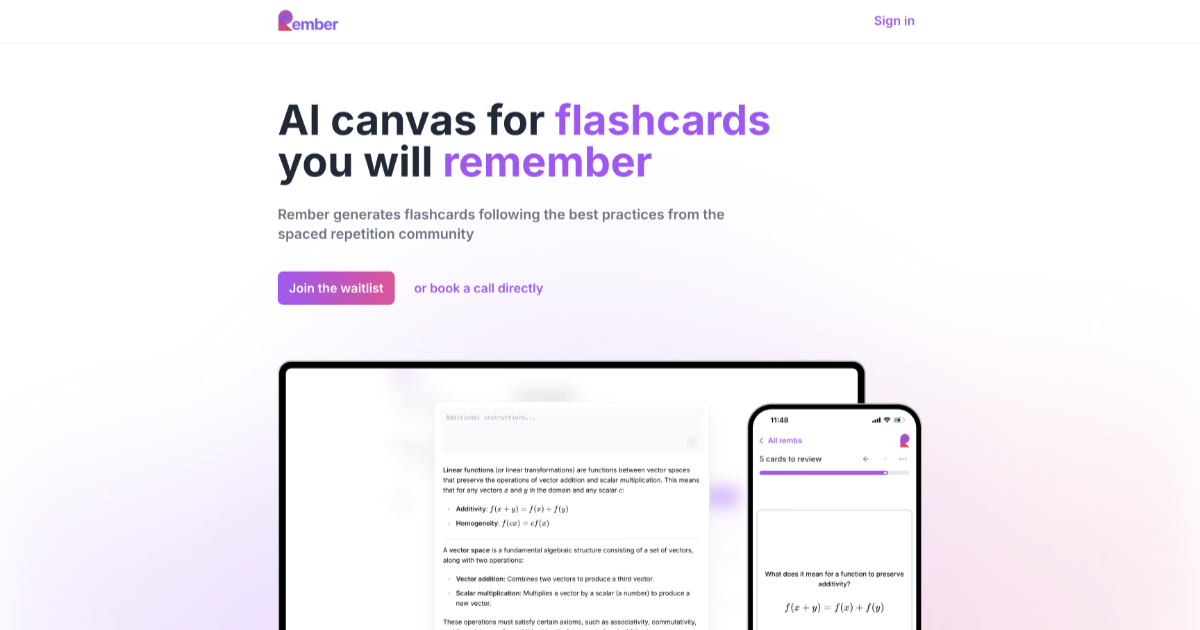

User reviews (0)