
 Visit website
 Updated: 2026-09-23 11:12
 Language: English (default)
 Access: Normal
 Profile views 1
  Outbound visits 0
 Website Review
What is Play Online?
Play Online is a browser-based retro game portal: you pick a console or computer platform, then choose a game and play it in your browser through emulation. It doesn't sell hardware or downloads; it's a convenience front end for quick, no-install sessions.
What it covers
The platform list is unusually broad for a site like this, spanning several eras and manufacturers:
- Sony: PlayStation (PS1/PSX)
- Nintendo: NES, SNES, N64, DS, Game Boy Color, Game Boy Advance
- Sega: Genesis/Mega Drive, Master System, CD/Mega-CD, Game Gear, 32X, Saturn
- Atari: 2600, 7800, Jaguar
- Computers: MS-DOS/Windows 3.1, Amiga, MSX/MSX2, Amstrad CPC/GX4000, Sharp X68000
- Other hardware and engines: 3DO, Neo-Geo AES/MVS, TurboGrafx/PC Engine, NEC PC-FX, arcade machines, OpenBOR
Who it suits
- Someone who wants a five-minute nostalgia hit without configuring an emulator.
- People curious about less common systems (PC-FX, X68000) they'd otherwise never try.
- Casual players who don't mind browser controls and aren't chasing pixel-perfect accuracy.
Trade-offs to expect
Browser emulation is the weakest link. Later hardware such as Saturn, N64 and DS tends to run less smoothly than 8- and 16-bit systems, and keyboard or touch controls are a poor substitute for a gamepad. Save states and progress may not persist reliably between visits, and library completeness varies by platform.
A practical next step
Start with a 16-bit or 8-bit title you already know well — a Genesis or NES game — to judge how the site feels before investing time in a longer game. If you want a comparison point for browser emulation, Internet Archive hosts a large playable software collection, and EmulatorGames.net uses a similar pick-a-platform structure.
How do I play retro games on this site without installing anything?
You don't install anything: pick a platform, then pick a game, and it runs in the browser tab. That's the whole model on Play Online 🕹️ — the page is a launcher, not a download store.
Playing without installing
- Open the site and choose a system from the platform list (PlayStation/PSX, MS-DOS, Amiga, SEGA Genesis, SNES, Game Boy Advance, Atari 2600, Neo-Geo, arcade, and others).
- Browse that system's game list and click a title.
- The emulator loads in the page. Most browser emulators start when you click the game area, because browsers block sound and keyboard input until you interact.
- Play with your keyboard; many browser emulators also accept a connected gamepad.
Practical things that decide whether it feels good
- Keyboard mapping. Arrows or WASD for movement, plus a few action keys, is typical. Find the emulator's control menu before you start, or you'll be guessing mid-game.
- Save states. Browser emulators usually let you snapshot progress in the tab. Useful for long games, but treat it as session-bound unless the site clearly stores it.
- Performance. Older 8- and 16-bit systems run smoothly on modest laptops. PlayStation-era and N64-era titles are heavier and depend on your CPU and browser.
- Mobile. Touch controls appear on many browser emulators, but action games with precise timing are frustrating on a phone. A Bluetooth controller helps a lot.
- Legal footing. The site hosts emulators and game files; whether a specific title is lawful to play depends on your region and the rights holder. That's your call, not something the launcher resolves.
A quick decision guide
| Your situation | Sensible approach |
|---|---|
| Want a five-minute nostalgia hit | Pick an arcade or Atari 2600 title; loads fast, simple controls |
| Want to actually finish a game | Choose a system with save states, and keep the tab open |
| Playing on a work laptop | Stick to 8/16-bit systems; lighter on CPU, no install trail |
| Playing on a phone | Use a controller, or choose turn-based/slower games |
If you're new to this, start with one arcade game to test your keyboard setup, then move to a longer console title once the controls feel natural. For a broader catalog beyond this launcher, Internet Archive hosts a large legal-emulation collection, and EmulatorGames.net is another browser-based option with a similar no-install approach.
Which platforms or consoles are supported for emulation?
Retrogames.onl supports a broad spread of consoles and home computers, grouped by the platform names listed on the site:
- Sony: PlayStation (PS1/PSX)
- Nintendo: NES, SNES, Nintendo 64, Nintendo DS, Game Boy Color, Game Boy Advance
- SEGA: Genesis/Mega Drive, Master System, CD/Mega-CD, Game Gear, 32X, Saturn
- Atari: 2600, 7800, Jaguar
- SNK: Neo-Geo (AES/MVS)
- NEC: TurboGrafx/PC Engine, PC-FX
- Computers: MS-DOS/Windows 3.1, Amiga, MSX/MSX2, Amstrad CPC/GX4000, Sharp X68000
- Arcade and engines: Arcade machines, OpenBOR
If you want to browse the catalog, start from the platform list on Play Online 🕹️ and pick the console you care about. For example, someone wanting 16-bit console games would choose Genesis/Mega Drive or SNES, while someone interested in European home computers would head to Amstrad or MSX.
A practical note: the site presents these as emulated platforms, so performance and control quality can vary by system and browser. Try one game per platform before deciding where to spend your time.
Can I play PlayStation 1 or SEGA Genesis games directly in my browser?
Yes. Play Online 🕹️ lists PlayStation (PS1/PSX) and SEGA Genesis / Mega Drive among its browser-based platforms, alongside systems like SNES, Game Boy Advance, Atari 2600, Neo-Geo, Amiga, MS-DOS and arcade machines. You pick a platform from the menu, then choose a game — no download or install described on the page.
What to expect in practice
- PlayStation 1: The heaviest of the two. Expect longer load times, larger in-browser downloads, and possible audio or frame-rate hiccups on older laptops. Games with 3D graphics and CD audio are the most demanding.
- SEGA Genesis / Mega Drive: Generally lighter and smoother in a browser. 2D sprites, chiptune audio and quick input response make it a better first test of whether the site works well on your machine.
Quick comparison
| PS1 | Genesis / Mega Drive | |
|---|---|---|
| Typical load | Slower | Faster |
| Performance risk | Higher (3D, CD audio) | Lower |
| Best for | RPGs, 3D-era classics | Platformers, shoot-'em-ups, fighting games |
A useful next step
Start with a Genesis title you know well — a Sonic game or a fighting game — to check input lag and sound. If that feels responsive, move on to PS1. If both stutter, try a lighter listed system such as NES or Game Boy Color to confirm the problem is your device or connection rather than the specific emulator.
Decision criteria
- Just want to try something now? Genesis is the safer entry point.
- Chasing a specific PS1 title? Go straight to it, but budget patience for loading.
- On a phone or low-end laptop? Stick to 8- and 16-bit systems.
- Need save states or controller mapping? Check what the in-game menu offers before committing to a long RPG session.
Keep in mind that browser emulation runs on your own hardware, so performance depends far more on your device than on the site itself. For systems not covered there, Internet Archive hosts a separate browser emulation collection.
What should I do if a game runs slowly or controls don't respond?
If a game stutters, lags, or ignores your input in a browser-based emulator, the cause is almost always one of three things: the emulation load on your device, the browser tab itself, or how the controls are mapped. Work through the fixes below in order — most problems are solved by the first two.
Quick fixes to try first
- Reload the page and relaunch the game. Emulator sessions can get stuck after a tab has been backgrounded or after a save-state load.
- Close other tabs and apps. Browser emulation is CPU- and memory-hungry, especially for disc-based systems.
- Click once inside the game area. Keyboard input often only registers after the canvas has focus.
- Test your keyboard separately. If arrow keys scroll the page instead of moving your character, the emulator doesn't have focus or the page's key handling is being intercepted.
- Try a different browser. Chrome, Firefox, Edge and Safari handle canvas rendering and gamepad APIs differently.
Match the fix to the symptom
| Symptom | Likely cause | What to try |
|---|---|---|
| Constant low frame rate | Device too slow for that system | Switch to a lighter platform or a different title |
| Smooth, then sudden stutter | Background tab, thermal throttling, or memory pressure | Close tabs, plug in power, lower screen brightness |
| Buttons do nothing | Emulator canvas not focused | Click the game window, then retry |
| Some keys work, others don't | Key mapping conflict or browser shortcut | Remap controls in the emulator menu |
| Gamepad ignored | Controller not connected before page load | Connect the pad, then reload the page |
| Only one game misbehaves | Title-specific emulation issue | Try another game on the same platform to confirm |
On retrogames.onl specifically
The site is an index of platforms rather than a single emulator: you pick a system from categories such as PlayStation (PS1/PSX), MS-DOS, Amiga, SEGA Genesis/Mega Drive, SNES, Game Boy Advance, Atari, Neo-Geo, Arcade, TurboGrafx/PC Engine, MSX and others, then choose a game from that platform's list. That structure is useful for troubleshooting, because it lets you isolate the problem. If one PlayStation title runs badly but another runs fine on the same device, the issue is the title, not your setup. If every system stutters, the bottleneck is your hardware or browser.
Heavier systems — Saturn, Nintendo 64, DS, 3DO, Neo-Geo — generally demand more from a browser than 8- and 16-bit consoles like the NES, Master System or Atari 2600. If you're on an older laptop or a phone, starting with a lighter platform is a reasonable way to confirm that emulation works at all before blaming the site.
For a second opinion on whether a specific game is known to run poorly, Play Online 🕹️ lists games by platform so you can compare a few titles under the same emulator. Broader emulation help and per-system compatibility notes are available at Emulation General Wiki, and browser-specific performance advice at MDN Web Docs.
When to give up on the browser
If a game still stutters after closing tabs, switching browsers and remapping controls, the emulator core or the title itself is probably the limit. In that case, a desktop emulator with the same game file usually performs far better — the trade-off is setup time and the need to source ROMs legally in your region.
Are the games and emulators on this site free to use?
Yes — everything on Play Online 🕹️ is presented as free browser-based play. There are no pricing signals, subscription tiers, or payment prompts on the page; you pick a platform, pick a game, and it runs in the page. Nothing needs to be installed or bought.
H3: What "free" covers here
- Playing in the browser: free. The site is a front end that loads emulators and ROMs into your browser, so the cost to you is zero.
- The emulator cores: these are almost always open-source projects (written by hobbyist developers and released for anyone to use). The site isn't selling them to you.
- The games: this is where "free" gets complicated. Most titles in the catalogue — PlayStation, SEGA, Nintendo, Atari, Neo-Geo, arcade — are commercial games that were never released as freeware. They're free to access here, not free in a legal or licensing sense.
H3: The practical trade-off If your goal is simply to revisit a game from your childhood without hunting down hardware, this site removes every barrier: no account, no download, no cost. If your goal is to support the people who made those games, or to own something you can keep, browser emulation isn't that. Save states and progress typically live in your browser session, so clearing site data can wipe them.
H3: A sensible way to decide
- Try a game you already know well first, to judge whether the controls and frame rate feel right on your device.
- Treat it as a convenience layer for casual play, not as a collection you own.
- For anything you genuinely love, consider legitimate re-releases on modern platforms or official mini-console collections — those come with proper licensing and stable saves.
A useful next step: open the platform list, start with a lightweight system like Atari 2600 or NES to test performance, then move to heavier ones such as PlayStation or Nintendo 64 only if the first run felt smooth.
 Hosting and Email
 Cloudflare
 Hosting
 Zoho Mail
 Location
 Pages, Search and Sharing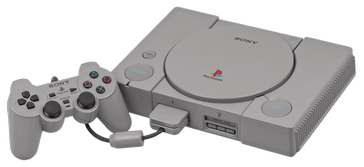


 mediapartners-google

 Registration details

 Identified technologies
User reviews (0)