Website profiles · Technology insights · Alternatives

riseshot.com

Create digital mockup in seconds, for free, right in your browser. Free to use mockups in both personal or commercial projects. The Best Online Mockup Generator For Your Next Project.

No paid content found
Visit website
Profile views 2 Outbound visits 1 Normal
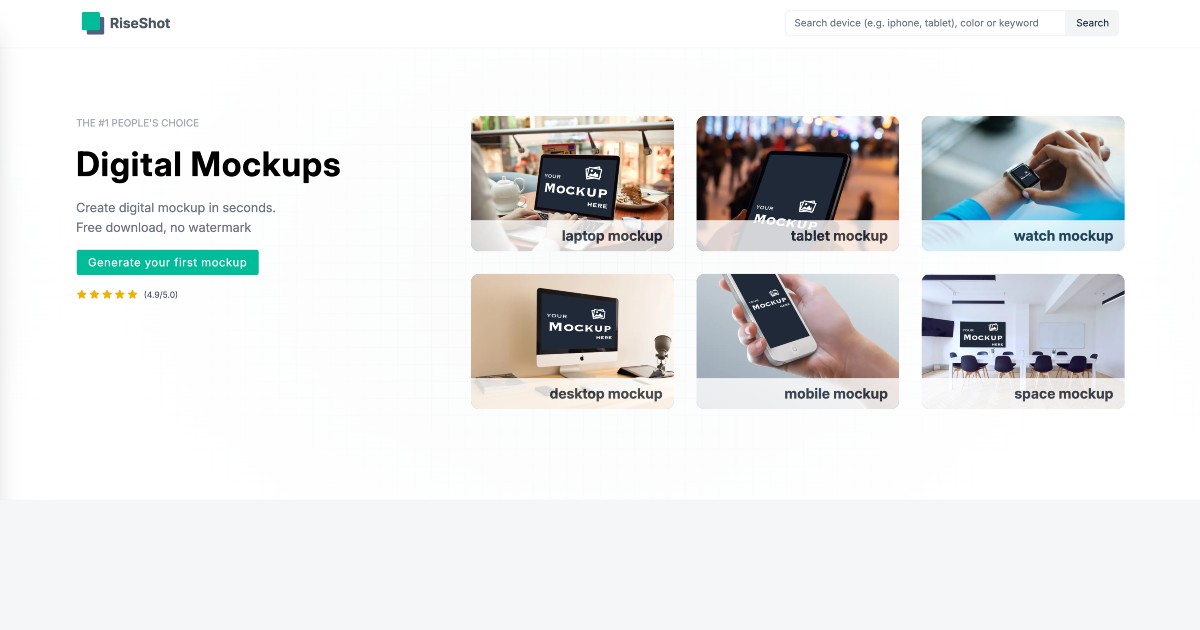
Digital Mockups Library. High-Res, Free, No Watermark Full homepage screenshot

At a glance

Category
Design & Creativity
Language
English
Paid-content signal
No paid content foundObserved
Registered
2016
Hosting
VercelInferred
HTTPS certificate trusted
PassedObserved
Last updated

Website review

This review may include AI-generated content and is not individually verified. Domain, certificate and other facts come from the observed data on this page.

What is RiseShot?

RiseShot is a browser-based digital mockup generator. You upload an image and place it into device and scene templates — laptop, desktop, tablet, mobile, watch and "space" mockups — to produce presentation-ready visuals of your design. The site states that no software download or account signup is needed, that generation takes seconds, and that downloads are high-resolution (4K) with no watermark. It also states the mockups are free for personal and commercial use, with attribution appreciated but not required.

Who it suits

  • Designers and developers who need quick portfolio or case-study shots of an app or website.
  • Marketers and social media creators producing promo graphics without a full design suite.
  • Small teams and freelancers who want presentable client previews without buying stock mockup packs.
  • Anyone who needs a one-off mockup and would rather not install Photoshop or learn a template workflow.

How it fits into a real workflow

Suppose you have just finished a landing page design and need three images for a portfolio entry: a laptop view, a phone view and a wide desktop view. With a browser tool, the usual path is: export your design as a flat image, upload it, pick the device or scene template, then download. The main trade-off is control. Template-based generators are fast and consistent, but you generally cannot reposition the device, change the lighting, or match a very specific angle the way you can with layered mockup files in an image editor.

Practical checks before committing:

  • Match the template's aspect ratio to your artwork, or the image may be cropped or stretched.
  • Verify the resolution is high enough for print or large hero banners, not just web thumbnails.
  • Confirm the license terms cover your use case if you are working for a client.
  • Check whether a scene background suits your brand, since a mismatched context can look generic.

If you need layered files you can customize deeply, compare against a dedicated mockup marketplace; if you only need fast, clean device shots, this kind of tool is the quicker route.

How do I create a mockup on RiseShot without signing up?

Open RiseShot in your browser and start generating immediately — there is no account, login or software install in the described flow. The page states the tool is free to generate, works online, and lets you create a mockup in seconds without signing up.

The basic steps

  1. Go to the RiseShot site and look for the "Generate your first mockup" entry point.
  2. Upload your image when prompted.
  3. Choose a device or scene — the page lists laptop, desktop, tablet, mobile, watch and space mockups.
  4. Download the result; the site describes high-resolution (4K) downloads with no watermark.

The page also says average generation time is about 30 seconds, and that use is unlimited for both personal and commercial projects. Attribution is described as appreciated but not required.

What this suits, and what to check

This workflow is best for quick presentation visuals: app screenshots for a portfolio, product shots for a landing page, or device previews for a client deck. Because it runs in the browser with no signup, it is also convenient on a borrowed or locked-down computer.

Two practical checks before you commit to it:

  • Aspect ratio and device fit. Upload an image sized for the device you pick. A phone screenshot placed in a laptop frame will look stretched or letterboxed regardless of how good the generator is.
  • Background control. If you need a specific brand colour or a transparent background, confirm the tool offers it rather than assuming; the page emphasises speed and resolution, not scene editing.

If you later need layered files you can edit in Photoshop, a browser generator is the wrong tool — you would want a downloadable PSD template instead. For a fast, no-account mockup, this is the shortest path.

What device types can I use for mockups on RiseShot?

RiseShot's mockup library covers six device and scene categories listed on its page: laptop, desktop, tablet, mobile, watch and space. You upload an image and the generator places it into the chosen mockup, with the page stating an average generation time of about 30 seconds, 4K downloads and no watermark.

What each category is typically for

Category Common use
Laptop mockup Website screenshots, landing pages, SaaS dashboards shown in a realistic browsing context
Desktop mockup Full-width app interfaces, desktop software, detailed UI where screen space matters
Tablet mockup Reading and media apps, responsive layouts at a mid-size breakpoint
Mobile mockup App store screenshots, social posts, mobile-first product shots
Watch mockup Wearable app screens, complications, small-format UI previews
Space mockup Lifestyle or environmental scenes rather than a single device frame

Choosing between them

Pick by where your audience will actually see the design. A store listing or ad set usually needs mobile; a portfolio case study or client pitch often reads better on laptop or desktop, where more interface detail survives at small sizes. Watch mockups suit only genuine wearable work. Space mockups are best when you want atmosphere or a device shown in context rather than a clean, isolated frame.

A practical next step: upload one image and run it through two or three categories side by side, then compare at thumbnail size. The version that stays legible when small is usually the right pick for promotion, while the largest, most detailed frame works better inside a longer presentation.

Can I use RiseShot mockups for commercial projects without attribution?

Yes. RiseShot states that its mockups are free for both personal and commercial projects, and that attribution, while appreciated, is not required. The page also says downloads carry no watermark, so a client-facing image or product listing will not show a third-party credit.

What that means in practice

  • Client work: You can place a design into a laptop, desktop, tablet, mobile, watch or space mockup and hand the file to a client without adding a credit line.
  • Marketing and storefronts: The mockups can be used in ads, landing pages, app-store screenshots or product photos.
  • No account friction: The page says you generate in the browser without downloading software or signing up, which suits a quick one-off task.
  • Speed: The site advertises an average of about 30 seconds to generate a mockup, useful when you need a fast visual rather than a bespoke photo shoot.

One practical check before you rely on it

“No attribution required” covers credit, not every legal question. If your project involves a recognisable device, a branded screen bezel or a model’s likeness, the device maker’s or photographer’s rights can still apply. Keep a record of the source page and the date you downloaded the file, and check the site’s terms for any restrictions on reselling the mockup template itself rather than your own design placed inside it.

For a quick decision: use RiseShot when you need a clean, watermark-free device mockup for a client deliverable or commercial post, and you are comfortable that the underlying design is yours. If you need exclusive rights, custom angles or a guaranteed licence document, a paid mockup library or your own photography will give you more control.

Related tools you may compare: Canva and Placeit.

What resolution are the mockup downloads from RiseShot?

RiseShot advertises its mockup downloads as high-resolution, specifically 4K, with no watermark. The site's own copy states "🖥️ High-resolution (4K) downloads," and elsewhere describes the output as "high-quality mockups." It does not list separate resolution tiers, so treat 4K as the headline download quality rather than one option among several.

What that means in practice

  • A 4K export is typically around 3840 × 2160 pixels, enough for web hero images, presentations, social posts and most print-on-demand product listings.
  • Because the tool runs in the browser and requires no account, the resolution you get depends on the source image you upload and the frame you place it in, not on a paid upgrade.
  • If you need print at large physical sizes (for example a poster or a billboard), check the pixel dimensions of your uploaded artwork first: a 4K canvas cannot add detail that was not in the original file.

Next step

Before downloading, note the pixel dimensions of the image you upload. If your design is smaller than the 4K frame, the mockup will still export at high resolution but may look soft when zoomed in. For quick checks, export one mockup and inspect it at 100% zoom before producing a full set.

For related free mockup and design resources, you can also look at Canva and Unsplash, though neither is a direct substitute for a dedicated mockup generator.

How does RiseShot compare to other online mockup generators?

RiseShot is a browser-based mockup generator aimed at speed and zero friction: the page states you can generate a mockup in about 30 seconds, download it at 4K resolution, and use it for personal or commercial projects without a watermark or account. That combination—no signup, no watermark, no stated cost—is its main point of difference from many mockup tools, which often gate downloads behind an account, a credit system, or a paid tier.

Where it likely fits best

  • Quick presentation images: You need a laptop, desktop, tablet, mobile, watch, or "space" mockup for a portfolio, client slide, or product page and don't want to open Photoshop.
  • Volume work: Freelancers or small teams producing many simple device shots, where per-download pricing or watermarks would be a nuisance.
  • Beginners: Anyone who wants a result without learning a design tool.

The trade-offs to expect

Priority RiseShot's apparent strength What a broader tool may offer
Cost and access Free, no signup, no watermark per the page Free tiers with limits, or paid plans
Speed ~30 seconds per mockup, in-browser Similar for simple scenes; slower for complex ones
Scene variety Device and space mockups Wider range of scenes, props, and custom scenes
Control Simple image placement Layer editing, shadows, perspective and lighting control
Workflow fit One-off images Batch export, team libraries, API or plugin integration

The honest limitation is depth: a generator that prioritizes "seconds" typically gives you fewer options for adjusting perspective, lighting, or background than a full editor or a large curated mockup marketplace. If your brand depends on a very specific scene or precise realism, you will likely outgrow it.

A practical way to decide

Start with the actual deliverable. If you need a clean device image today for a landing page or pitch deck, generate one in RiseShot and check the 4K output at full size before committing. If you need dozens of consistent scenes, custom angles, or editable source files, treat RiseShot as a fast first pass and keep a more controllable tool for the final assets. For broader libraries and scene variety, compare against Mockup World or Placeit; for editable, layered device scenes, see Mockuuups Studio.

Related questions

More questions →
What Is RiseShot and What Can It Do?

RiseShot is a free, browser-based digital mockup generator. You upload an image, pick a device frame, and download a high-resolution result — no software install, no account, and no watermark. It fits anyone who needs a quick product shot for a portfolio, landing page, or client deck and doesn't want to open Photoshop or pay for a mockup pack.

What you can make

RiseShot offers device and scene mockups rather than print or packaging templates. The categories listed on the site are:

  • Laptop mockup
  • Desktop mockup
  • Tablet mockup
  • Mobile mockup
  • Watch mockup
  • Space mockup

"Space mockup" is a scene-style frame rather than a specific device, useful when you want your screen shown in an environment instead of a plain device shot.

How the workflow runs

  1. Upload your image. This is the screen content you want placed inside the mockup — a screenshot, app UI, or design export.
  2. Choose a mockup. Select the device or scene category that matches how you want the work presented.
  3. Generate and download. The site states an average generation time of about 30 seconds, and downloads come out at 4K resolution.

The whole process happens in the browser. There is nothing to install and no sign-up step described on the site.

What the terms actually allow

Item What RiseShot states
Cost to generate Free
Account required No
Software required No — runs in the browser
Watermark None
Usage rights Unlimited personal and commercial use
Attribution Appreciated but not required
Download resolution 4K (high-resolution)

The commercial-use and no-watermark terms are the two details that matter most if you're producing client work or marketing assets. Attribution being optional means you can publish without crediting RiseShot, though crediting it is welcomed.

Who it suits, and who it doesn't

Good fit if you:

  • Need a device mockup in minutes for a portfolio, pitch, or product page
  • Want commercial rights without paying per image or buying a bundle
  • Work on a machine where installing design software isn't practical
  • Want to avoid watermarked free tools

Look elsewhere if you:

  • Need print mockups (packaging, business cards, apparel) — the listed categories are digital devices and scenes
  • Need precise control over perspective, shadows, or custom backgrounds beyond what a preset frame gives you
  • Need team accounts, brand libraries, or batch processing — nothing on the site indicates these exist

Practical notes before you start

  • Prepare the right image ratio. A mobile mockup wants a portrait screenshot; a laptop or desktop mockup wants a landscape one. Uploading a mismatched ratio is the most common reason a result looks stretched or cropped.
  • Export at the highest resolution you have. Since downloads are 4K, a low-resolution source image will be the limiting factor in the final file.
  • Check the frame before committing. With six categories, the fastest path is to pick the device first, then match your image to it rather than the reverse.

RiseShot's own framing is that it's the tool for generating a mockup "in seconds" — the value is speed and zero cost, not fine-grained art direction. If a preset device frame matches what you need, it removes the usual friction of mockup work entirely.

Can I Use RiseShot Mockups for Commercial Projects?

Yes. RiseShot states that its mockups are free to use in both personal and commercial projects, with unlimited use, no watermark, and no attribution required. The only condition attached to attribution is a preference, not an obligation: RiseShot says attribution "is always appreciated but it's not required."

What the usage terms actually say

RiseShot's own site describes the license in plain terms:

  • Personal and commercial use — both are explicitly allowed.
  • Unlimited use — no stated cap on how many mockups you generate or where you publish them.
  • No watermark — downloads are described as clean, with "no strings attached."
  • No sign-up required — you can generate mockups in the browser without creating an account.
  • Attribution optional — appreciated, but not required.

What you can do with a RiseShot mockup

Based on those terms, typical commercial uses fit within the stated license:

Use case Covered by the stated terms?
Client presentation or pitch deck Yes — commercial project
Product page or landing page imagery Yes — commercial project
Social media or ad creative Yes — commercial project
Print or packaging mockups Yes — commercial project
Paid client work delivered to a client Yes — commercial project
Personal portfolio or school project Yes — personal project

Practical things to keep in mind

The license covers the mockup template and generated output. It does not change anything about the image you upload. If you place a logo, screenshot, or photo into a mockup, you still need the rights to that content — RiseShot's terms don't grant you rights to third-party material you supply.

A few other points worth knowing before you rely on it:

  • Keep a record of the terms. The site is the source of truth for the license, and terms can change. If you're using mockups in a long-lived commercial asset, save a screenshot or copy of the license page as of the date you downloaded.
  • Attribution is a courtesy, not a requirement. If you want to credit RiseShot anyway, a simple link or mention is enough — but you won't be in breach if you don't.
  • No account means no license dashboard. Since there's no sign-up, there's no per-download license record tied to you. Your evidence of permitted use is the site's stated terms.

When to double-check instead of assuming

The stated terms are broad, but a few situations are worth verifying directly with RiseShot before you commit:

  • Reselling the mockup itself — for example, selling the blank template or a pack of mockups as your own product. The terms describe using mockups for your projects, which is different from redistributing the template.
  • Trademark or brand-sensitive placements — if you're mocking up a product that resembles a real brand, the legal risk comes from the brand, not from RiseShot.
  • High-stakes or regulated marketing — if the asset will appear in a regulated context, get sign-off from whoever owns that compliance risk.

For everything else — client work, product pages, ads, portfolios — RiseShot's stated terms allow commercial use without payment, watermark, or credit.

How to Create a Mockup with RiseShot

RiseShot is a browser-based mockup generator: you upload your image, pick a device or scene mockup, and download the result. According to the site, no software download or account signup is required, generation takes about 30 seconds on average, and downloads are high-resolution (4K) with no watermark. It supports both personal and commercial use, with attribution appreciated but not required.

What You Need Before Starting

  • A source image to place into the mockup (your design, screenshot, or artwork).
  • A modern browser — the tool runs entirely online.
  • No account: the site states you don't need to sign up.

Step-by-Step: Generate Your First Mockup

1. Open the generator

Go to riseshot.com and start from the mockup generator section ("Generate your first mockup").

2. Upload your image

Use the upload control to add the image you want to display inside the mockup. This is the only input the workflow requires.

3. Choose a mockup type

RiseShot lists these mockup categories on its page:

Mockup type
Laptop mockup
Desktop mockup
Tablet mockup
Mobile mockup
Watch mockup
Space mockup

4. Generate

The tool renders the mockup in your browser. The site cites an average generation time of about 30 seconds.

5. Download

Download the finished mockup at high resolution (4K). The site states downloads carry no watermark.

What You Get

  • Format: high-resolution (4K) downloads.
  • Watermark: none, per the site.
  • Usage rights: unlimited personal and commercial use; attribution appreciated but not required.
  • Speed: ~30 seconds average to generate a mockup.
  • Access: free online tool, no software install, no account signup.

Common Questions

Do I need to install anything? No. RiseShot runs in your browser.

Do I need an account? The site says you don't need to sign up.

Can I use the mockups commercially? Yes — the site states unlimited personal and commercial use.

Is there a watermark? No, according to the site.

How long does it take? About 30 seconds on average, per RiseShot.

Practical Tips

  • Start with a clean, high-resolution source image so the 4K output stays sharp.
  • Match the mockup type to where your design will actually appear (mobile UI → mobile mockup, desktop site → laptop or desktop mockup).
  • If you want to credit RiseShot, attribution is welcome but not required.

For current availability, supported formats, and any limits, check riseshot.com directly, since the site is the authoritative source for its own features.

How Does RiseShot Compare to Other Mockup Generators?

RiseShot is a browser-based mockup generator that positions itself around three things: no sign-up, no watermark, and free use for both personal and commercial projects. If your priority is generating a quick device mockup without creating an account or paying, it's a strong fit. If you need advanced scene editing, custom shadows, or a large library of lifestyle environments, a heavier desktop tool or a paid platform will likely serve you better. The comparison below uses the same criteria for every option so you can judge against your own workflow.

The comparison criteria that actually matter

Most mockup tools differ on a handful of dimensions. Judge any generator — RiseShot included — on these:

  • Access model: browser vs. installed software; account required or not
  • Cost: free, freemium, or paid tiers
  • Output quality: resolution and watermark status
  • License terms: personal use, commercial use, attribution requirements
  • Device/scene coverage: which frames and environments are available
  • Editing depth: how much control you get over perspective, background, and lighting
  • Speed: time from upload to finished file

How RiseShot scores on each

Based on the site's own description:

Criterion RiseShot
Access model Online, in-browser; no software download, no account sign-up
Cost Free to generate and download
Output quality High-resolution (4K) downloads, no watermark
License Unlimited personal and commercial use; attribution appreciated but not required
Device coverage Laptop, desktop, tablet, mobile, watch, and "space" mockups
Editing depth Upload your image and generate; positioned as a fast, simple tool rather than a deep editor
Speed Site states an average of ~30 seconds to generate a mockup

The site also carries a "Compare us" link, which suggests it maintains its own positioning against alternatives — worth checking directly if you want the vendor's own framing.

Where RiseShot wins

  • Zero friction. No account, no install, no payment step. You upload an image and get a result. For a one-off social post, portfolio image, or client preview, that removes the usual setup tax.
  • Clean licensing. Commercial use without attribution is the most permissive common arrangement, and it's stated plainly. That matters if you're delivering work to a client who will reuse the asset.
  • No watermark. Many free tools watermark output and charge to remove it. RiseShot states downloads are watermark-free at no cost.
  • Speed. A ~30-second average generation time is competitive for a browser tool.

Where other tools may beat it

  • Scene and lifestyle variety. RiseShot's listed categories are device frames plus a "space" option. Tools built around curated lifestyle photography (hands holding phones, desks, storefronts) offer more environmental realism.
  • Fine-grained editing. If you need to adjust perspective, add custom shadows, swap backgrounds, or composite multiple layers, a full design application or a dedicated mockup plugin gives you more control.
  • Team and asset management. Account-based platforms offer saved projects, brand kits, and collaboration. RiseShot's no-sign-up model means no persistent workspace.
  • Bulk and API workflows. If you need to generate hundreds of mockups programmatically, a tool with an API is the better route.

How to decide

Choose RiseShot if:

  • You want a mockup in under a minute with no account
  • You need commercial rights without attribution
  • Your needs are standard device frames (laptop, phone, tablet, watch)
  • You're producing occasional assets, not a high-volume pipeline

Look elsewhere if:

  • You need realistic lifestyle scenes or heavy compositing
  • You want saved projects, team libraries, or an API
  • You need precise control over lighting, shadows, and perspective

A practical test

The fastest way to compare is to run the same task through two tools. Take one screenshot or design export, generate a laptop mockup in RiseShot, then generate the same image in whichever alternative you're considering. Compare the output resolution, the realism of the frame, how long each took, and whether either added a watermark. That single side-by-side will tell you more than any feature list — and since RiseShot requires no sign-up, the test costs you nothing but a few minutes.

Is RiseShot Really Free to Use?

Yes. According to RiseShot's own site, it is a free online mockup generator: you can generate mockups for free directly in your browser, with no software download and no account sign-up required. The site also states downloads are watermark-free, use is unlimited for both personal and commercial projects, and attribution is appreciated but not required.

What "free" covers on RiseShot

Based on the site's stated terms, the free offer includes:

  • Free generation — mockups are created in the browser at no cost.
  • No sign-up — you don't need an account to use the tool.
  • No software install — everything runs online.
  • Unlimited use — for personal and commercial projects alike.
  • No watermark — downloads aren't branded with a RiseShot mark.
  • Attribution optional — crediting RiseShot is welcomed but not mandatory.

The site describes the average time to generate a mockup as about 30 seconds, and lists high-resolution (4K) downloads among its features.

How to use it

  1. Open riseshot.com in your browser.
  2. Upload your image using the upload option on the page.
  3. Pick a mockup type — the site lists laptop, desktop, tablet, mobile, watch, and space mockups.
  4. Generate the mockup and download the result.

Expected result: a high-resolution mockup file you can use in personal or commercial work without a watermark.

What the site does not specify

The available page information does not include a pricing page, payment platforms, or any paid tier. That means there is no stated paid plan in the material reviewed — but it also means details like file format options, upload size limits, or any future paid features aren't confirmed here. If those matter for your project, check the site directly before relying on them.

Quick verdict

Question Answer per RiseShot's site
Free to generate? Yes
Account required? No
Software download? No
Watermark on downloads? No
Commercial use allowed? Yes, unlimited
Attribution required? No

If you need a fast, no-cost mockup for a personal or commercial project and don't want to install software or create an account, RiseShot's stated terms fit that use case.

Website Overview

An established domain and managed infrastructure suggest continuity of operations and may support dependable delivery, although neither guarantees service quality. An active inbound-mail setup with incomplete authentication may leave the domain more open to impersonation. Provider hosting alone does not close that gap.

Domain and Registration

Registered in 2016, this domain has about 9 years of history. That suggests continuity, although ownership and purpose may have changed. The domain uses the common .com extension, which is not an independent safety signal.

DNS and Email

The observed email authentication setup is incomplete: DMARC is missing. Nameservers are provided by serveriai.lt, indicating managed DNS hosting. MX records point to the Fastmail email service. TXT records include verification markers for Google. Such markers may also remain after a service stops being used. DNSSEC signatures were not detected, so this additional DNS authenticity protection is not confirmed.

TLS and Certificates

The certificate uses an RSA 2048-bit public key, offering broad client compatibility. The server supplied a complete certificate chain. No organization name is present in the certificate; the available fields are consistent with domain validation. The certificate was issued by Let's Encrypt, commonly associated with automated certificate services. The certificate's total validity is about 89 days, consistent with a short renewal cycle.

HTTP and Browser Security

The response lacks these common security headers: CSP, Referrer-Policy, Permissions-Policy. CORS permits any origin to read this response. This is common for public resources; sensitive responses need narrower handling. No X-Powered-By header was found, reducing one common source of backend fingerprinting information. No obvious internal addresses or debug information were found in the headers. The Server header contains the custom value Vercel.

Technology Stack Analysis

The public page identifies Google Analytics, Vercel without precise versions, leaving fewer clues for version-specific scanning.

Search and Social Sharing

The meta description has 183 characters and may be shortened in search results. Twitter Card metadata is configured. JSON-LD includes Product or Offer data, potentially supporting eligible product search features. The title has 53 characters, within a common display range. The observed directives allow indexing and link following.

Hosting and Email

DNSserveriai.lt
HostingVercel
EmailFastmail
Approximate IP geolocation (inferred; a CDN or proxy may differ from the origin server) United States flagUnited States Inferred 66.33.60.67

Registration details

RDAP / WHOIS

RegistrarName SRS AB
Registered2016-11-08
Expires2027-11-08
Domain statusactive
Nameserversns1.serveriai.lt、ns2.serveriai.lt、ns3.serveriai.lt、ns4.serveriai.lt
DNSSECunsigned

DNS records

DNS

TypeNameValueTTLPriority
Acname.vercel-dns.com66.33.60.67300—
Acname.vercel-dns.com76.76.21.98300—
MXriseshot.comin1-smtp.messagingengine.com360010
MXriseshot.comin2-smtp.messagingengine.com360020
NSriseshot.comns1.serveriai.lt86400—
NSriseshot.comns2.serveriai.lt86400—
NSriseshot.comns3.serveriai.lt86400—
NSriseshot.comns4.serveriai.lt86400—
TXTriseshot.comgoogle-site-verification=RTaxmDzRm3i6HSpE3vHRGvXvEAq0UTSPO9TApojntR83600—
TXTriseshot.comv=spf1 include:spf.messagingengine.com ?all3600—
CNAMEwww.riseshot.comcname.vercel-dns.com3600—

TLS and certificates

TLS / SSL

AssessmentNormal configuration
Supported protocolsTLSv1.2、TLSv1.3
Negotiated protocolTLSv1.3
Certificate subjectwww.riseshot.com
IssuerLet's Encrypt
Valid until2026-11-27T07:03 · Remaining when checked: 41 days
Verification detailsCertificate trust: Passed · Hostname match: Passed

HTTP response headers

HTTP

HeaderValue
content-typetext/html; charset=utf-8
cache-controlpublic,max-age=300
serverVercel
strict-transport-securitymax-age=63072000
x-frame-optionsSAMEORIGIN
x-content-type-optionsnosniff
access-control-allow-origin*

Identified technologies

Google AnalyticsVercel

Pages, Search and Sharing

Meta descriptionCreate digital mockup in seconds, for free, right in your browser. Free to use mockups in both personal or commercial projects. The Best Online Mockup Generator For Your Next Project.
Canonical URLhttps://www.riseshot.com/
LanguageEnglish (default)
Twitter Cardsummary_large_image
All bots 0 allowed · 0 disallowed

User reviews (0)

  • No reviews yet.