

 Paid content
 Multilingual
 Visit website
 Updated: 2026-10-03 11:15
 Access: Normal
 Profile views 3
  Outbound visits 0
 Website Review
What is SEOptimer?
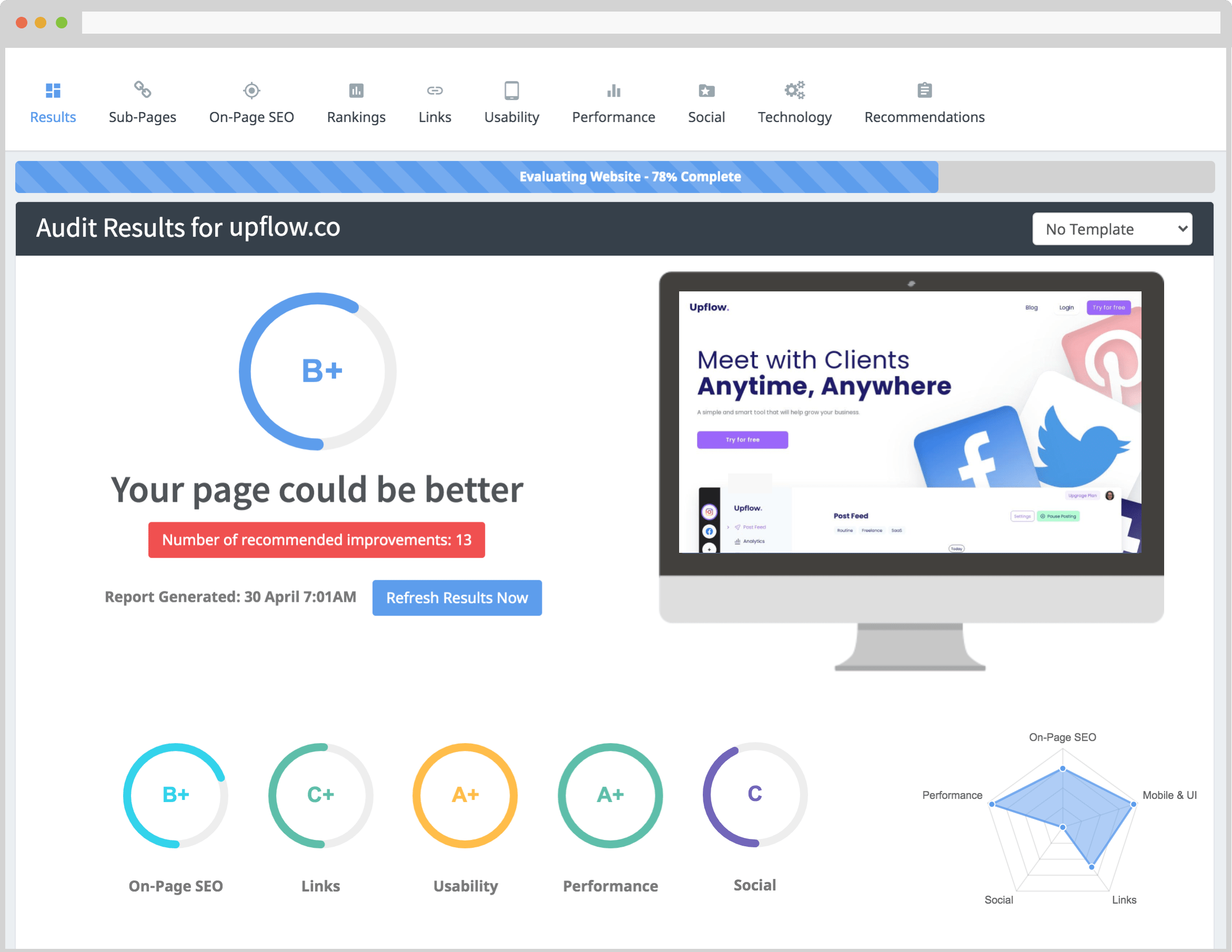
SEOptimer is a web-based SEO audit and reporting tool aimed at agencies, consultants and in-house marketers who need to check a site's health and hand the findings to someone else. Its core function is the instant audit: you enter a URL and it reviews on-page SEO, rankings and backlinks, then grades the site and flags problems. Beyond the audit, the page lists a broader suite covering keyword research, backlink research, an SEO crawler, keyword and backlink tracking, bulk reporting, an API and a library of free tools.
What stands out
- Reporting is the centerpiece. SEOptimer highlights white-label PDF reports you can brand as your own, which is why it tends to appeal to agencies producing audits for prospects and clients rather than to solo site owners doing quiet fixes.
- Lead generation is built in. An embeddable audit widget lets an agency put the audit tool on its own site, turning visitor URLs into enquiries.
- AI search visibility. A GEO audit checks how a brand appears in AI search and LLMs, alongside the more conventional SEO, local SEO and Google Business Profile audits.
- Breadth over depth. The feature list is long, so the practical question is whether one subscription replaces several point tools or whether you still need a dedicated crawler or rank tracker for heavy work.
Who it suits
| Reader | Fit |
|---|---|
| Agency or freelancer selling audits | Strong: branded PDFs, bulk reporting, embeddable widget |
| Small business checking its own site | Reasonable for a first pass; the agency-oriented features go unused |
| SEO specialist doing deep technical work | Useful as a quick external-facing layer, likely alongside a specialist crawler |
Next step
Run one free audit on a site you know well and read the report as if a client had received it. If the branding, grading and issue explanations are good enough to send without rewriting, the reporting side is doing its job; if not, treat it as a diagnostic tool only. Also confirm what the free tier includes before relying on it for client work, since the site separates a free audit from premium plans and a free trial.
How can I use SEOptimer to generate leads for my SEO business?
SEOptimer includes a lead-generation angle: it offers an embeddable SEO audit widget and white-label PDF reports, so you can run audits under your own brand and use them as a prospecting hook rather than just an internal check.
A practical workflow for an SEO agency
- Pick a target list of local businesses or niche sites you'd like as clients.
- Run each through the audit tool to find real, fixable issues (on-page problems, ranking gaps, backlink profile weaknesses).
- Export a branded PDF report and send it as the first touchpoint — "here's what we found on your site" — instead of a generic pitch.
- Embed the audit widget on your own site so prospects can self-serve a free audit, which gives you their URL (and often contact details) as an inbound lead.
- Follow up with a short, specific summary of the top two or three issues and what fixing them would involve.
Why the report-first approach tends to work
A cold email saying "we do SEO" is easy to ignore. A PDF showing a prospect's own broken title tags, missing meta descriptions or thin content is concrete and hard to argue with. The white-label option matters here: the report looks like your agency's work, not a third-party tool's output, which keeps the relationship with you.
Where it fits and where it doesn't
| Use case | Fit |
|---|---|
| Prospecting with branded audit reports | Strong — this is the core lead-gen play |
| Self-serve audit widget on your site | Strong — captures inbound leads |
| Bulk audits across a prospect list | Supported via bulk reporting |
| Deep technical crawls on large enterprise sites | Possible, but check depth limits against your needs |
| Full client SEO management (rank tracking, backlinks) | Covered by keyword tracking and backlink monitoring |
Next step
Start small: pick ten prospects in one niche, run audits, and send three branded PDFs with a one-paragraph note each. Measure reply rates before scaling to bulk. If the widget route appeals more, embed it on a landing page and see whether inbound audit requests convert better than outbound reports. You can compare the free trial against your current stack at SEOptimer before committing.
What does the AI visibility feature in SEOptimer show me?
The AI visibility feature—labelled GEO Audit on the site—shows how your brand and pages appear inside AI search experiences and large language models, rather than only in classic search results. The page frames it as a companion to the traditional SEO audit: one checks on-page SEO, rankings and backlinks, the other checks AI search and LLM visibility.
In practice, expect it to answer questions like:
- Does your site get picked up or cited when someone asks an AI assistant about your topic or category?
- How does your brand surface in AI-generated answers compared with competitors?
- Which pages or topics are being referenced by LLMs, and which are missing?
Who it's for: agencies and consultants auditing client sites will get the most from it, because the same audit can be packaged into a branded PDF report. In-house marketers running a small site can use it as a quick check on whether AI assistants recognise them at all.
Trade-off to weigh: AI visibility is a newer, less standardised measurement than traditional SEO metrics, so treat the results as directional signals for content and positioning decisions rather than a precise ranking. Pair it with the on-page and backlink audit before making changes.
Next step: run a free audit on your own domain, then run the same audit on one or two competitors and compare where each is cited. That gap tells you which topics to strengthen. You can start at SEOptimer.
Can I create white-label SEO reports with SEOptimer?
Yes. SEOptimer's page evidence lists "Beautiful, Branded, White Label PDF Reports" as one of its headline features, and the audit output is described as a PDF you can brand. So the core white-label capability is part of the product, not a workaround.
What that means in practice
A white-label report is one where your branding replaces the tool's. For SEOptimer, the relevant pieces are:
- Branded PDF output — the audit is delivered as a PDF report you can put your own logo and colours on, rather than a link back to a third-party dashboard.
- Audit content — on-page SEO, rankings and backlinks are the areas the page names for the SEO Audit; the GEO Audit covers how you appear in AI search and LLMs.
- Scale features — Bulk Reporting is listed separately, aimed at prospecting and lead generation across many sites at once.
Who this suits
| User | Why white-label matters |
|---|---|
| Freelance SEO consultant | Sends a branded audit as the first touch in a pitch, so the report sells the service rather than the tool |
| Small agency | Runs bulk audits across a prospect list and hands clients a consistent, own-brand document |
| In-house marketer | Produces a shareable report for stakeholders without exposing a paid third-party account |
A concrete scenario
You run a two-person agency and want 40 prospect audits before a cold outreach push. You would run each domain through the audit, export the PDF with your logo, and attach it to the first email. The prospect sees your brand, not SEOptimer's.
The trade-off to weigh
White-label reports are a presentation layer. They make your outreach look professional, but the value still depends on whether the underlying audit finds issues worth acting on. If you mainly audit your own site for your own use, branding matters far less and you can ignore this feature entirely.
Next step
Open the pricing page at SEOptimer and check which plan tier includes white-label PDF export and bulk reporting — those two are often gated to higher tiers, and that will decide whether it fits your workflow.
How does SEOptimer compare to other SEO audit tools in terms of pricing and features?
SEOptimer sits in the affordable, all-in-one end of the SEO audit market: it combines classic on-page auditing with AI-search (GEO) visibility checks, white-label PDF reporting and lead-generation widgets, and it advertises a free trial plus free tools. That combination is most useful if you audit sites repeatedly — for clients, prospects or your own portfolio — rather than if you need deep enterprise-level crawling or a full marketing automation suite.
Where it tends to fit
| Need | SEOptimer's fit |
|---|---|
| Quick audit + client-ready PDF | Strong: branded, white-label reports are a headline feature |
| Agency lead generation | Strong: embeddable audit widget and bulk reporting |
| AI/LLM visibility checks | Notable differentiator: a dedicated GEO audit alongside SEO |
| Local and Google Business Profile checks | Covered by dedicated audit types |
| Keyword, backlink, crawler, rank tracking | Included, but aimed at practical agency workflows rather than maximum depth |
| Custom integrations | API with 100+ data points |
How that compares in practice
Most competing tools fall into two camps. Free checkers (for example, Ahrefs' free tools or Semrush' free tier) give you a snapshot but rarely a polished, unbranded-removable PDF you'd send a client. Full platforms like Ahrefs, Semrush or Moz go deeper on backlink indexes, crawl scale and historical data, and typically cost more per month with less emphasis on white-label reporting. SEOptimer's pitch is the middle: enough audit depth for typical sites, plus the reporting and lead-gen layer agencies actually bill for.
On pricing, the page signals a free trial and a "simple, affordable" positioning, but the exact tiers and limits aren't specified here — check the pricing page directly before committing. As a general rule, compare tools on the metric that matters to you: number of audits per month, PDF branding, seats, crawl page limits, and whether AI-visibility tracking is included or an add-on.
A concrete scenario
If you run a small agency and want to send a prospect a branded audit as a sales hook, then re-audit the same site monthly, SEOptimer's widget-plus-white-label combination saves you building that pipeline yourself. If instead you need to crawl a 50,000-page e-commerce site weekly and track thousands of keywords historically, a heavier platform is likely the better tool — and you'd use SEOptimer only for the client-facing report.
Next step: run one free audit on a site you know well and judge the output against a report from a tool you already trust. If the findings and the PDF match what you'd send a client, the pricing decision becomes straightforward.
Does SEOptimer offer a free trial and what are the limitations?
Yes, SEOptimer offers a free trial of its premium plan, and it also provides a genuinely free starting point in the form of an instant website audit you can run without creating an account. The limitations differ depending on which of those two paths you take.
Free instant audit (no account)
- Enter a URL and get an on-page analysis, plus a grade for the site.
- Useful for a one-off check of a prospect, a client site or your own homepage.
- Typically limited in depth and volume compared with the paid toolset — think of it as a snapshot, not a full crawl.
Premium free trial
- Unlocks the broader suite: SEO/GEO audits, keyword research, backlink research, the SEO crawler, keyword tracking, backlink monitoring and white-label PDF reports.
- The trial is time-limited, so the practical constraint is how much you can evaluate before it ends.
Where the real limits bite
- Volume: crawling many pages, tracking many keywords or monitoring many backlinks usually pushes you toward a paid tier.
- White-label and bulk reporting: the branded PDF reports and bulk prospecting features are core paid functionality.
- API access: building on the 100+ data points is a premium capability, not a trial freebie.
- GEO/AI visibility: seeing how you appear in AI search and LLMs is part of the audit offering, but expect it to be a premium-tier feature rather than something the free check gives you in full.
Practical next step If you are an agency evaluating it for client reporting, run the free audit on two or three real client sites first to judge report quality and accuracy. Then start the premium trial and test the specific features you would actually pay for — the crawler on a large site, keyword tracking on a real campaign, and one white-label PDF export. If those three hold up, the trial has done its job; if you only need occasional one-page checks, the free audit may be enough on its own. See SEOptimer for the current trial terms and plan details.
 Hosting and Email
 Cloudflare
 Hosting
 Google Workspace
 Location
 Pages, Search and Sharing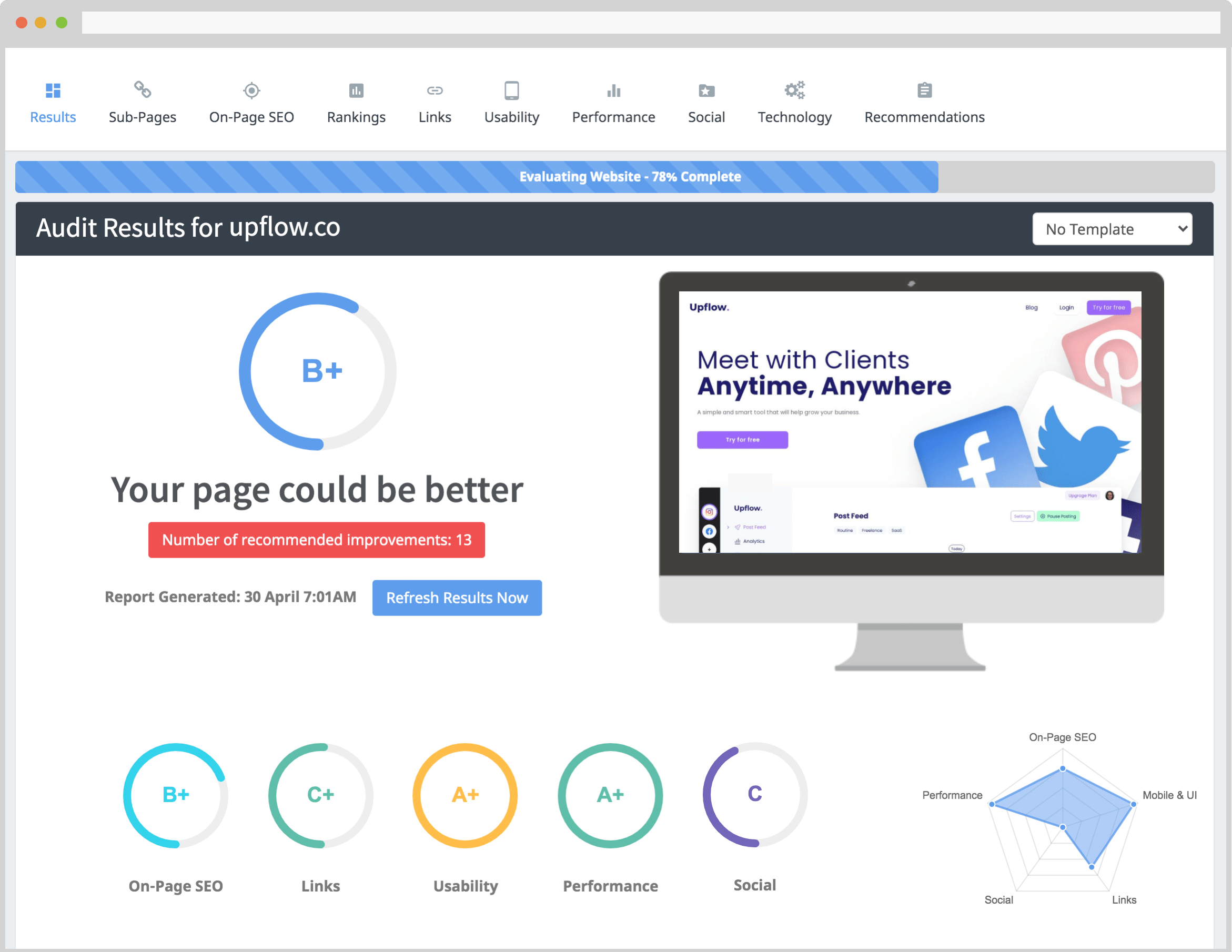



 All bots

 Registration details

 Identified technologies
User reviews (0)