
 简体中文
简体中文 English
submitsaas.com
Increase your SaaS visibility by submitting to 140+ directories. Save time, gain high-quality backlinks, and grow your reach with minimal effort.
At a glance
- Category
- Marketing
- Language
- English
- Paid-content signal
- Paid contentObserved
- Registered
- 2024
- Hosting
- CloudflareInferred
- HTTPS certificate trusted
- PassedObserved
- Last updated
Related questions
More questions →What Is SaaS? How Software-as-a-Service Works and When to Use It
SaaS (Software-as-a-Service) is a delivery model in which a vendor hosts an application and customers access it over the internet, typically paying a recurring subscription fee rather than buying a perpetual license. It fits most organizations that want faster deployment, lower upfront cost, and automatic updates — but it is a weaker fit when you need deep customization, strict data residency control, or the ability to run fully offline.
The core SaaS model
In a SaaS arrangement, three things move from the customer to the vendor:
- Infrastructure — servers, storage, and networking are owned and operated by the provider.
- Maintenance — patching, upgrades, and uptime are the provider's responsibility.
- Access — users reach the software through a browser or thin client, usually with per-user or usage-based billing.
You consume the software as a service rather than owning a copy of it. That single shift is what drives most of the benefits and most of the trade-offs below.
SaaS vs. on-premise, self-hosted, IaaS, and PaaS
These models are often confused because they all involve "the cloud." The difference is how much the vendor manages.
| Model | Who manages the app? | Who manages the infrastructure? | Typical customer control |
|---|---|---|---|
| SaaS | Vendor | Vendor | Configuration and data only |
| PaaS | Customer (builds/deploys) | Vendor | App code, runtime settings |
| IaaS | Customer | Customer (on rented VMs) | OS, middleware, app, data |
| On-premise | Customer | Customer (own hardware) | Everything |
| Self-hosted | Customer | Customer (own or rented) | Everything, but you install the vendor's software yourself |
A quick way to place them: with IaaS you rent the raw building blocks; with PaaS you rent a ready workbench to build on; with SaaS you rent the finished product. On-premise and self-hosted mean you run and maintain the software on infrastructure you control.
Main benefits and trade-offs
Benefits
- Lower upfront cost — no hardware purchase or large license fee; spend shifts to an operating expense.
- Faster setup — provisioning is usually measured in hours or days, not procurement cycles.
- Automatic updates — the vendor ships fixes and new features without a customer-side upgrade project.
- Elastic scalability — capacity can often be adjusted up or down as demand changes.
- Anywhere access — a browser and a connection are usually enough, which supports distributed teams.
Trade-offs
- Less data control — your data lives in the vendor's environment, subject to their architecture and regions.
- Limited customization — you generally configure within the vendor's boundaries rather than modifying the core.
- Vendor lock-in — migrating away can be costly if data export and integration are not well supported.
- Ongoing cost — subscriptions never "finish paying off" the way a perpetual license can.
- Dependency on connectivity and uptime — if the service is down or unreachable, work may stop.
Typical use cases and examples
SaaS is the default choice for horizontal needs like email, CRM, project management, and HR. It is also increasingly common as vertical SaaS — software built for one industry's specific workflows and compliance requirements.
Regulated industries are a useful illustration. Trust, corporate, and fund services providers handle sensitive client data and face audit and reporting obligations, so they tend to weigh data control and compliance heavily. Quantios, for example, describes itself as an AI-native SaaS platform for global corporate, trust, and fund services providers, positioned to help them reduce risk, boost efficiency, and scale. That is the vertical-SaaS pattern: the delivery model is standard SaaS, but the feature set and compliance posture are tailored to one sector.
How to evaluate a SaaS option
Use the same criteria regardless of vendor, and get specifics rather than assurances:
- Security — encryption in transit and at rest, access controls, and how incidents are handled.
- Compliance — which standards and regulations the vendor supports, and whether they match your obligations.
- Integration — APIs, prebuilt connectors, and how easily it fits your existing stack.
- Pricing model — per user, per usage, tiered, or a mix; understand what triggers a cost increase.
- Data portability and exit — can you export your data in a usable format, and what happens to it at contract end?
- Service levels — uptime commitments, support channels, and response times.
When SaaS is the right fit — and when it isn't
Choose SaaS when you want speed, predictable operating costs, and low maintenance overhead, and your data can reasonably live in a vendor's environment.
Reconsider when you need deep customization, must keep data strictly on your own infrastructure, operate in low-connectivity settings, or face regulations that rule out third-party hosting. In those cases, self-hosted or on-premise may be the better fit — or a SaaS vendor with strong regional and compliance guarantees.
What Kinds of Directories Does SubmitSaaS Submit To?
SubmitSaaS submits your SaaS product to a catalog of 140+ directories spanning eight categories: AI, community, general, international, launchpad, media, software, and startup. Each listing is tagged with a domain rating (DR), directory type, pricing status, and link type (dofollow or nofollow), so you can judge the mix before you buy. The catalog is browsable and filterable on the site, which matters if backlink quality is your main reason for submitting.
The eight directory categories
The site's directory table classifies every listing into one of these types:
| Category | What it typically covers | Example from the catalog |
|---|---|---|
| AI Directory | Tools and products built around AI | Future Tools (DR 69, dofollow), Acid Tools (DR 69, dofollow) |
| Community | Community-driven listing spaces | (category available as a filter) |
| General Directory | Broad, non-niche web directories | Link Centre (DR 72, dofollow), Viesearch (DR 72, dofollow) |
| International | Directories serving non-English or regional audiences | (category available as a filter) |
| Launchpad | Product-launch and "what launched today" sites | PeerPush (DR 78, dofollow), SmolLaunch (DR 76, nofollow) |
| Media | Media and publication-style listings | (category available as a filter) |
| Software Directory | SaaS and software-specific listings | SaaSHub (DR 80, nofollow), SaaS Browser (DR 74, nofollow) |
| Startup Directory | Startup-focused listings | Startup Benchmarks (DR 61, dofollow) |
The visible sample skews toward launchpads and software directories, which is consistent with a product built for SaaS launches. The AI, community, international, and media categories exist as filters but the excerpt doesn't show which specific sites sit in each.
What each listing tells you
Every row in the directory table carries four data points:
- DR (domain rating): a 0–100 score of the domain's backlink strength. The sample ranges from DR 60 (Unite List) to DR 80 (SaaSHub).
- Type: the category above.
- Pricing: whether the directory itself is free, conditional free, or paid. In the visible sample, most are "Free" and a few are "Conditional Free" (e.g., Good AI Tools).
- Link type: dofollow or nofollow. This is the field most buyers care about, since dofollow links pass SEO value and nofollow links generally don't.
You can filter by type and link type, and sort by DR, so you can, for example, isolate dofollow software directories above DR 70 before deciding.
Dofollow vs. nofollow in the catalog
The mix is genuinely mixed, and the highest-DR names aren't automatically the best backlink targets:
- SaaSHub (DR 80) is tagged nofollow.
- PeerPush (DR 78) is dofollow.
- SmolLaunch (DR 76) is nofollow.
- Good AI Tools (DR 75) is conditional free and dofollow.
If dofollow links are your goal, filter to dofollow and sort by DR rather than assuming the top of the list is the strongest. Note that "conditional free" means the directory may require something (a badge, a reciprocal link, or approval) before your listing goes live — worth checking per site.
How to evaluate the mix before buying
- Open the directory table and set Link Type to dofollow.
- Set Type to the categories that match your product (e.g., Software Directory and Launchpad for a typical SaaS).
- Sort by DR to see the strongest dofollow options first.
- Note how many are "Free" vs. "Conditional Free" vs. paid, since conditional listings may need extra work from you.
- Compare that filtered count against the package you're considering — the service submits across the full 140+ set, and you receive a report of every directory it submitted to.
The catalog is paginated (9 pages in the current view, last updated Oct 12, 2026), so the full list is longer than the 20 rows shown on page one.
Practical caveats
- The directory list and its DR scores change over time; treat the "last update" date as your freshness check.
- DR is a third-party metric, not a guarantee of traffic or ranking impact.
- The service handles profile creation and submission and delivers a report within 48 hours per the site, but the quality of any individual directory still depends on that directory's own moderation.
If your priority is dofollow backlinks from recognizable domains, filter first and buy second; if you mainly want broad visibility across launch and software sites, the default mix already covers that.
How Does SubmitSaaS's Directory Submission Process Work?
SubmitSaaS runs a done-for-you directory submission service: you pick a package, pay, and complete an onboarding form with your SaaS details. SubmitSaaS then reviews your information, fills any gaps, creates a dedicated email address, builds profiles, and submits your product to 140+ directories, delivering the work within 48 hours and sending you a report of every directory afterward. It suits SaaS founders who want directory listings and backlinks without spending the 20+ hours the site says manual submission would take.
The Four Steps
Step 1: Choose a package and pay
You select a package and complete payment, after which you are redirected straight to the onboarding form where you describe your SaaS. The site's pricing links show three package options at $60, $100, and $140. The page does not break down what differs between them, so check the pricing page before choosing.
Step 2: Review
SubmitSaaS reviews the information you submitted and fills in any gaps to produce a complete profile. This means your input doesn't need to be polished — missing descriptions or details are handled on their side.
Step 3: Submissions
SubmitSaaS creates a dedicated email address (described as a way to keep your own inbox clean), builds profiles, and submits your SaaS to the directories. The stated delivery window is 48 hours.
Step 4: Report
You receive a detailed report covering every directory where your SaaS was submitted.
What You Get
The service covers 140+ directories, which the site groups into categories including AI Directory, Community, General Directory, International, Launchpad, Media, Others, Software Directory, and Startup Directory. Each listing is tagged by domain rating (DR), link type (dofollow or nofollow), and pricing model.
A sample of the directory list from the site:
| Directory | DR | Type | Link Type |
|---|---|---|---|
| SaaSHub | 80.0 | Software Directory | Nofollow |
| PeerPush | 78.0 | Launchpad | Dofollow |
| SmolLaunch | 76.0 | Launchpad | Nofollow |
| Good AI Tools | 75.0 | Software Directory | Dofollow (conditional free) |
| SaaS Browser | 74.0 | Software Directory | Nofollow |
| TinyLaunch | 74.0 | Launchpad | Nofollow |
| Active Search Results | 73.0 | Others | Dofollow |
| Product Watch | 72.0 | Launchpad | Dofollow |
The list is paginated (9 pages in total), and the site notes a last update of Oct 12, 2026. Many listed directories are free to submit to directly, while some are conditional — worth knowing if you're weighing the service against doing it yourself.
What You Need to Provide
The process depends on your onboarding form submission: your SaaS details must be complete enough for SubmitSaaS to build profiles across platforms. The site references an example form you can view before starting, which is the best way to see exactly what information is expected.
When This Fits — and When It Doesn't
Choose SubmitSaaS if you want consistent listings across many directories without managing each submission, and you value the time savings over submitting to free directories yourself.
Consider doing it manually if you only want a handful of high-DR directories (several in the sample list are free and dofollow), or you want direct control over each listing's wording.
Either way, the report in Step 4 is the checkpoint to verify what was actually submitted — review it against the directory list to confirm coverage.
What SubmitSaaS Packages Are Available and How Do They Differ?
SubmitSaaS sells three directory-submission packages priced at $60, $100, and $140. All three follow the same four-step process: you pay, you're redirected to an onboarding form to describe your SaaS, the team reviews and completes your profile, then builds accounts and submits your product to directories, and finally sends you a report of every directory used. The site states delivery within 48 hours and a catalog of 140+ directories. The published materials confirm the three price points and the shared workflow, but they do not itemize which directories or how many submissions each tier includes — so the difference between tiers is a scope decision you should confirm before paying.
The three packages at a glance
| Package | Price | Checkout destination | What is confirmed |
|---|---|---|---|
| Entry | $60 | Onboarding form (package=s60) | Same 4-step process, 48-hour delivery claim, report included |
| Mid | $100 | Onboarding form (package=s100) | Same process; scope not itemized on the page |
| Top | $140 | Onboarding form (package=s140) | Same process; scope not itemized on the page |
Every package lands on the same form at submitsaas.com/form with a different package parameter, which means the tier you buy is recorded at checkout and carried into onboarding. That's the practical takeaway: the package choice is made before you fill in any product details, so decide your scope first.
What the process actually involves
- Choose a package and pay. Payment runs through Dodo Payments checkout links. After payment you're redirected to the onboarding form.
- Review. SubmitSaaS reviews your information and fills gaps to produce a complete profile.
- Submissions. The team creates a dedicated email address (to keep your inbox clean), builds profiles, and submits your SaaS.
- Report. You receive a detailed report listing every directory used.
Because step 3 includes creating a dedicated email and building profiles on your behalf, you are handing over account creation for third-party directories. That's the main operational trade-off: convenience and time saved versus giving an outside party control of listing accounts.
How to choose a tier
The site's own value proposition is time: it claims you save 20+ hours versus submitting manually. Use that as your benchmark.
- Pick the $60 package if you want a low-cost trial of the service and are mainly testing whether the report and backlink quality meet your bar. You can judge output quality before spending more.
- Pick the $100 package if you've already validated the approach (or trust the testimonials section) and want broader coverage than the entry tier without paying top price.
- Pick the $140 package if maximum directory coverage is the goal and the marginal cost is trivial relative to your marketing budget.
Before committing to $100 or $140, ask support directly what the submission count and directory mix is per tier. The public page lists directories with DR scores, type (AI, launchpad, software, general, startup), and link type (dofollow/nofollow), but does not map those to packages. Since the catalog includes both dofollow and nofollow links and some "conditional free" listings, the tier you buy likely affects how many of each you get — confirm rather than assume.
What you can verify before buying
The directory table on the site is a useful pre-check. It shows, for each directory, the DR, category, pricing model, link type, and a submit URL. Examples from the visible list include SaaSHub (DR 80, nofollow), PeerPush (DR 78, dofollow), and Good AI Tools (DR 75, conditional free, dofollow). You can use this table to:
- Check whether directories you already submitted to are in the list, to avoid duplicates.
- Judge whether the dofollow/nofollow mix matches your SEO goals.
- Estimate the manual effort you're outsourcing, which is the basis for the 20+ hour claim.
Note the page shows "Last Update: Oct 12, 2026" and pagination across 9 pages, so the catalog is larger than the 20 rows visible on page one.
Common sticking points
- No itemized tier comparison on the page. The pricing links confirm three prices but not per-tier deliverables. Get this in writing before paying the higher tiers.
- Payment is via a third-party checkout (Dodo Payments). Keep your receipt; the redirect to the form is how your package is associated with your order.
- You must supply complete product details. Step 2 exists because gaps get filled by the team, but accurate input reduces the chance of inconsistent listings across 140+ sites.
- Dedicated email creation means account ownership sits with the service during submission. Ask how you regain access to those listings afterward if that matters to you.
If your goal is simply to decide, the decision rule is: start at $60 to test output quality, move up only after confirming what extra directories and link types the higher tiers add.
What Is SubmitSaaS and What Does It Do?
SubmitSaaS is a paid directory submission service for SaaS products. Instead of creating accounts and filling out listing forms on dozens of sites yourself, you hand over your product details once and SubmitSaaS submits your SaaS to 140+ directories on your behalf. It is aimed at founders and small marketing teams who want directory backlinks and visibility without spending the 20+ hours the site says manual submission typically takes. Submissions are delivered within 48 hours, and you receive a report of every directory covered.
How the service works
The process is four steps, according to the site:
- Choose a package and pay. After checkout you are redirected to an onboarding form where you describe your SaaS. The site links to an example form so you can see what information is needed before buying.
- Review. SubmitSaaS reviews your information and fills in any gaps to produce a complete profile.
- Submissions. The team creates a dedicated email address (to keep your own inbox clean), builds profiles, and submits your SaaS to the directories.
- Report. You get a detailed report listing every directory your product was submitted to.
The dedicated-email detail matters in practice: many directories send confirmation and verification messages, and routing those to a separate inbox keeps them out of your main support or founder address.
What you get
The directory list is public on the site and filterable by type (AI, community, general, international, launchpad, media, software, startup), link type (dofollow/nofollow), and sortable by DR (domain rating). The first page of the list includes well-known entries such as SaaSHub (DR 80), PeerPush (DR 78), SmolLaunch (DR 76), and Future Tools (DR 69), with a mix of free, conditional-free, dofollow, and nofollow listings.
Two things worth understanding before you buy:
- Not every listing is dofollow. The list mixes dofollow and nofollow links. If your goal is specifically link equity, check the Link Type column for the directories in scope rather than assuming all 140+ pass link value.
- Directory DR varies widely. The visible entries range from DR 60 to DR 80 on the first page alone, so the backlink value across the full list is uneven.
Pricing
The site's checkout links show three packages: $60, $100, and $140. The page does not state what differs between them (for example, how many directories each tier covers), so confirm the scope of each package on the pricing page or the onboarding form before paying.
When it fits — and when it doesn't
It fits if:
- You have a launched SaaS with a clear landing page and are ready to build initial directory presence.
- You value your time more than the fee and would rather not manage 100+ signups and confirmation emails.
- You want a documented list of where your product was submitted, which the report provides.
It may not fit if:
- You are pre-launch with no public page to point directories to.
- You need guaranteed dofollow links only — the list includes nofollow entries, so filter first.
- You want hands-on control over each listing's copy and categorization; this is a managed, batch process.
A practical check before ordering
Open the directory list on the site, filter to Dofollow only, and count how many of those directories you have not already submitted to. That number, compared against the package price, is the clearest way to judge whether the service is worth it for your product. Also confirm on the pricing page which package covers the full 140+ list, since the checkout links alone don't specify it.
Website Overview
Page metadata, canonical configuration and social previews work together to provide more consistent search and sharing presentation. An active inbound-mail setup with incomplete authentication may leave the domain more open to impersonation. Provider hosting alone does not close that gap.
Domain and Registration
Transfer-protection status is present, helping reduce the risk of unauthorized domain transfers. The domain has about 2 years of registration history; its current configuration provides more context than age alone. The registrar is NameCheap, Inc., a widely used domain service provider. The domain uses the common .com extension, which is not an independent safety signal.
DNS and Email
The observed email authentication setup is incomplete: DMARC is missing. Nameservers are provided by Cloudflare, indicating managed DNS hosting. MX records point to the Google Workspace email service. No CNAME was found; the observed records resolve directly to addresses. TXT records include verification markers for Google. Such markers may also remain after a service stops being used.
TLS and Certificates
The public key uses EC with 256 bits. The server supplied a complete certificate chain. No organization name is present in the certificate; the available fields are consistent with domain validation. The certificate was issued within the Google Trust Services cloud or CDN ecosystem. The certificate's total validity is about 90 days, consistent with a short renewal cycle.
HTTP and Browser Security
The checked browser-security headers were not detected, leaving fewer explicit browser-side safeguards. No X-Powered-By header was found, reducing one common source of backend fingerprinting information. The cf-ray response header indicates a CDN or caching proxy in the delivery path. No obvious internal addresses or debug information were found in the headers. The Server header identifies cloudflare without an exact version.
Technology Stack Analysis
The public page identifies SvelteKit, Cloudflare without precise versions, leaving fewer clues for version-specific scanning.
Search and Social Sharing
Twitter Card metadata is configured. JSON-LD includes Organization data, helping describe the organization as an entity. The title has 49 characters, within a common display range. A meta description is present, with 145 characters. The observed directives allow indexing and link following.
Hosting and Email
 Cloudflare
 Google Workspace
Registration details
| Registrar | NameCheap, Inc. |
|---|---|
| Registered | 2024-03-19 |
| Expires | 2027-03-19 |
| Domain status | client transfer prohibited |
| Nameservers | aria.ns.cloudflare.com、donovan.ns.cloudflare.com |
| DNSSEC | unsigned |
DNS records
| Type | Name | Value | TTL | Priority |
|---|---|---|---|---|
| A | submitsaas.com | 104.21.38.103 | 300 | — |
| A | submitsaas.com | 172.67.221.251 | 300 | — |
| AAAA | submitsaas.com | 2606:4700:3032::ac43:ddfb | 300 | — |
| AAAA | submitsaas.com | 2606:4700:3033::6815:2667 | 300 | — |
| MX | submitsaas.com | aspmx.l.google.com | 3600 | 1 |
| MX | submitsaas.com | alt1.aspmx.l.google.com | 3600 | 5 |
| MX | submitsaas.com | alt2.aspmx.l.google.com | 3600 | 5 |
| MX | submitsaas.com | alt3.aspmx.l.google.com | 3600 | 10 |
| MX | submitsaas.com | alt4.aspmx.l.google.com | 3600 | 10 |
| NS | submitsaas.com | aria.ns.cloudflare.com | 86400 | — |
| NS | submitsaas.com | donovan.ns.cloudflare.com | 86400 | — |
| TXT | submitsaas.com | ahrefs-site-verification_7d64fad0a720b34e378416e4d7cae79af6f5dd69ac1542b6c98ccd33c393cc23 | 300 | — |
| TXT | submitsaas.com | google-site-verification=fTmUdpT0G1NhL5EOwEvpclQ0jWRoeKzFFL4rU3JAQoI | 300 | — |
| TXT | submitsaas.com | v=spf1 include:_spf.google.com ~all | 300 | — |
TLS and certificates
HTTP response headers
| Header | Value |
|---|---|
| content-type | text/html |
| server | cloudflare |
Identified technologies
Pages, Search and Sharing
| Meta description | Increase your SaaS visibility by submitting to 140+ directories. Save time, gain high-quality backlinks, and grow your reach with minimal effort. |
|---|---|
| Canonical URL | https://submitsaas.com/ |
| Language | English (default) |
| Twitter Card | summary_large_image |
Social Sharing Preview
12 fields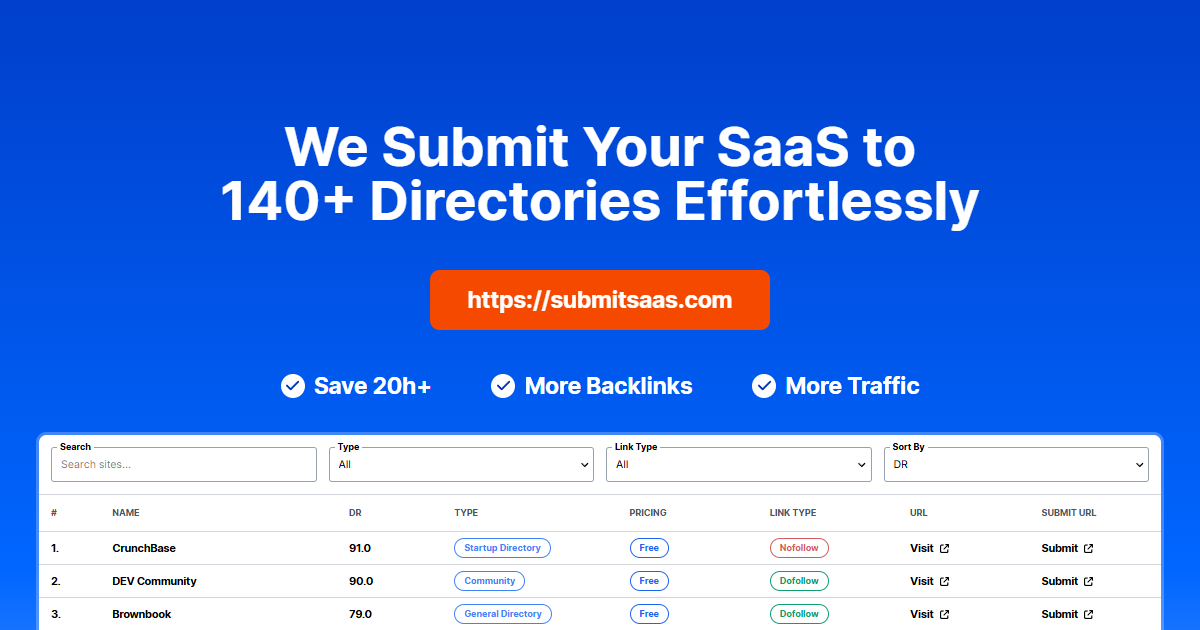

robots.txt (opens in a new tab)
2 rulesAll bots 1 allowed · 1 disallowed
- Allow
/ - Disallow
/form
No matching rules.
Sitemaps
1Recent Updates
- Website images
- Screenshots
- Network details
- Website Technologies
- Pages and Search Information
- HTTP Response Information
- TLS and certificates
- DNS Information
- Domain Registration
- Website profile
- Website Description
- Website Name
- Website profile
- Website Description
- Website Name
User reviews (0)