
 简体中文
简体中文 English
Website review
This review may include AI-generated content and is not individually verified. Domain, certificate and other facts come from the observed data on this page.
What is systemprompt.io?
systemprompt.io is a self-hosted control plane for governing AI use inside an organization. It sits between the AI clients your teams already use, the model providers they call, and the tools or MCP servers those agents can reach. Instead of each client holding its own credentials and permissions, traffic passes through one gateway where you set policy, route supported models, check tool calls before they execute, and keep an audit record in your own environment.
Its stated focus is accountability: who authorized an agent to use a tool, which model received a request, which policy allowed or denied an action, and where the record lives when someone asks. The runtime is described as Rust with PostgreSQL, deployed on infrastructure you control, with model inference and reachable external services as configuration choices.
systemprompt.io
Who it fits
- Security and platform teams that need a shared enforcement point and audit trail for AI traffic rather than per-tool controls.
- Organizations with data-residency or network-perimeter requirements that rule out a purely vendor-hosted gateway.
- Teams connecting multiple supported clients and providers (the page names Anthropic, OpenAI, Google, and Groq) who want one place for model routing and tool permissions.
- Builders who want to extend the same runtime with custom capabilities after governance is in place.
Trade-offs to weigh
Self-hosting shifts operational work to you: deployment, upgrades, credential handling, and audit storage become your responsibility. A gateway model also means connected clients must route through it, so unsupported clients may need workarounds. The page notes a live demo and a template to evaluate, which is the practical next step: run the demo, then check whether your actual clients and providers appear in the compatibility material before committing.
If you only need a single team on one provider, a lighter setup may be enough. If you need cross-provider policy and evidence, this is the problem it targets.
How does SystemPrompt govern AI agent access and tool permissions?
SystemPrompt governs agent access by sitting between the AI clients your teams already use and the models and tools those agents call. Instead of letting each client talk directly to providers, traffic passes through a self-hosted control plane where access rules, credentials, tool permissions, and audit records live in your environment. The page frames the core problem as accountability: knowing who authorized an agent to use a tool, which model received a request, which policy allowed or denied an action, and where the record is when someone asks.
H3 How the enforcement works
- Routing: Supported model requests from connected clients—coding agents, desktop clients, internal agents—go through a gateway that can route across providers such as Anthropic, OpenAI, Google, and Groq (per the page).
- Policy checks: Access rules apply to authenticated users and agents, and governed tool calls are checked before execution rather than after the fact.
- Credentials: Credentials are supplied to tool processes through the control plane, so keys are not scattered across clients.
- Audit: Policy decisions, execution records, and usage stay in your environment, supporting investigation of allowed and denied requests.
H3 What the demo illustrates The site's walkthrough shows a real session where policy checks pass, a human approves a risky call, and a leaked production key gets blocked. That combination—automated policy plus a human approval step for high-risk actions—is the practical pattern worth noting: governance is not just blocking, it is also escalation.
H3 Trade-offs to weigh
- Self-hosting the Rust runtime with PostgreSQL gives you control over configuration, upgrades, and where inference runs, but it also means your team owns deployment and maintenance.
- Centralizing model and MCP traffic creates a single point of policy enforcement and evidence, yet clients outside the supported set may not connect without workarounds.
- Human-in-the-loop approval improves safety for sensitive tool calls but adds latency to those paths.
Next step: If your security team is asking "who authorized this agent to use this tool," map your current agent traffic to see which clients and MCP servers could route through a gateway. Start with one high-risk tool call and test whether a policy check plus approval step gives you the audit trail you need. For a broader governance comparison, see SystemPrompt alongside general frameworks like NIST guidance on AI risk management.
Can I self-host SystemPrompt in my own cloud or on-premises infrastructure?
Yes. SystemPrompt is designed to be self-hosted: you deploy the Rust runtime with PostgreSQL on infrastructure you control, whether that is your own cloud account or on-premises servers. The page frames this as operating "inside your perimeter," with your team controlling configuration, upgrades, and where model inference and external service connectivity actually happen.
H3 What self-hosting means in practice
- Control plane stays with you. Connected AI clients, model routing, and MCP/tool access are governed through a control plane you run, rather than a vendor-hosted service.
- Audit and policy records live in your environment. Policy decisions, execution records, and recorded model usage are stored on your infrastructure, which matters if your security team needs to answer who authorized an agent, which model received a request, and why an action was allowed or denied.
- You choose the inference boundary. The deployment lets you decide where model inference runs and which external services are reachable—useful if some workloads must stay internal while others can call supported providers such as Anthropic, OpenAI, Google, or Groq.
H3 Trade-offs to weigh
Self-hosting shifts operational responsibility to your team: database provisioning, upgrades, credential handling for tool processes, and network reachability all become yours. In exchange, you get a single governed boundary between users, agents, models, and tools, plus evidence retained on your side. If your organization already runs PostgreSQL and has a platform or security team comfortable with containerized or on-prem deployments, this fits naturally. If you have no infrastructure team and want zero operational overhead, a managed alternative may be simpler.
H3 A useful next step
Before committing, map one real workflow: pick a coding agent or desktop client your team uses, list the models and tools it needs, and identify which of those must never leave your network. Then check whether the deployment model supports that split. The live demo on SystemPrompt shows a governed session—policy checks, a human approval for a risky call, and a blocked production key—which is a quick way to see whether the enforcement model matches your requirements.
Which AI clients and model providers are compatible with SystemPrompt?
SystemPrompt connects AI clients to model providers through a self-hosted gateway, and the page names two compatibility areas: clients and models. The client side covers supported coding agents, desktop clients, and internal agents; the model side covers Anthropic, OpenAI, Google, and Groq. For tool use, MCP servers and governed tool calls sit in the same control plane.
Clients
The site groups compatible clients into three buckets:
- Coding agents — agentic coding tools that make model and tool calls.
- Desktop clients — end-user applications that need governed access.
- Internal agents — agents your team builds and runs itself.
The live demo uses an embedded web agent, and the page notes that supported external clients can also connect through the model and MCP gateways. If your team uses a specific client, the practical step is to check the client compatibility page linked from the product before assuming it works.
Model providers
Supported providers named on the page are Anthropic, OpenAI, Google, and Groq. Requests from connected clients route through the gateway, so model choice stays under your policy rather than being hard-coded into each client.
Tools and MCP
MCP servers and tool access are managed in the same place as model routing. Permissions and policy checks apply on governed execution paths, with credentials supplied to tool processes and a record of allowed and denied activity.
A practical check
If you are evaluating fit, list the clients your team actually uses, the providers you need, and the MCP servers you depend on. Then confirm each against the compatibility documentation. The trade-off is centralization: you gain one policy and audit point, but only for traffic that passes through the gateway. Clients that cannot connect remain outside the governance boundary.
How do I set up policy checks and human approval for risky agent actions?
The short answer: put a control layer between your agents and the tools they call, define explicit allow/deny rules for each tool, and route anything tagged "risky" to a human approval step before execution. The key design choice is where that check lives — in the agent, in the tool, or in a shared gateway the agent must pass through.
A shared gateway is the more durable option, because enforcement doesn't depend on each agent behaving correctly. That is the model systemprompt.io describes: a self-hosted control plane sitting between connected AI clients, model providers, and tools, checking governed tool calls before execution and keeping policy decisions and execution records in your own environment. Its own demo shows the pattern end to end — policy checks pass, a human approves a risky call, and a leaked production key gets blocked.
A practical setup sequence
- Inventory the actions, not just the tools. "Send email" and "delete production database" may use the same credentials but need very different treatment.
- Classify by blast radius. Read-only and reversible actions can run automatically. Irreversible, external-facing, or credential-touching actions should require approval.
- Write rules against identity, not just the action. Tie permissions to the authenticated user or agent, so a compromised agent can't inherit broad rights.
- Add the approval gate at the enforcement point. The agent proposes; the gateway holds the call until a human approves or denies.
- Log the decision and the execution. Record who authorized it, which model received the request, which policy allowed or denied it, and what actually ran.
Where to enforce
| Approach | Strength | Trade-off |
|---|---|---|
| Prompt-level instructions | Fast to add | Model can be talked out of it; no audit trail |
| Checks inside each agent | Fine-grained context | Every agent must implement it; easy to skip |
| Shared gateway / control plane | Consistent, auditable, identity-aware | Requires deployment and routing work |
The gateway approach costs more upfront and adds a hop to every call, but it's the only one that gives you a defensible answer when someone asks "who authorized this?"
A concrete scenario
An internal agent wants to rotate an API key. Under a gateway policy, the tool call is intercepted, the agent's identity is checked against the permission set, the action is flagged as high-risk, and a Slack approval request goes to the on-call engineer. If approved, the call proceeds and both the approval and the result are written to your audit store. If the agent instead tries to read a production secret it has no grant for, it's denied outright — no human prompt needed.
For the enforcement and audit side of this, start with SystemPrompt. If you're comparing control layers or want to see how approval flows are described elsewhere, look at Anthropic and OpenAI for their own guidance on agent permissions and tool use.
Next step: pick your three highest-risk agent actions, write the rule for each as "identity + action + condition → allow / deny / require approval," and confirm your chosen layer actually blocks the call rather than merely warning about it.
What audit records and evidence does SystemPrompt keep for compliance?
SystemPrompt records governance evidence for connected AI traffic in your own environment: policy decisions, execution records, tool activity, and model usage. Because the deployment is self-hosted, the audit trail and its storage stay under your team's control rather than in a vendor cloud.
What the evidence covers
- Policy decisions — which policy allowed or denied a given action.
- Model usage — which model received a request, as routed through your gateway.
- Tool activity — governed tool calls, including checks performed before execution.
- Identity context — the authenticated user or agent behind a request, so you can answer "who authorized this agent to use this tool?"
How it maps to compliance work
The design target is the questions a security or audit reviewer asks after an agent acts: who authorized it, which model saw the request, which rule permitted or blocked it, and where the record lives. Keeping those answers in your perimeter matters when data-residency or evidence-retention rules prevent sending logs to an outside service.
A concrete scenario
A coding agent requests a tool that touches production credentials. Before execution, the policy check runs; a risky call can require human approval; a leaked production key gets blocked. The allow/deny decision and the execution record land in your audit storage, so when a reviewer asks weeks later why the call was stopped, the answer is a stored record rather than a reconstructed guess.
What to verify before relying on it
- Retention period and whether records are exportable to your existing SIEM or log pipeline.
- Whether audit storage is included in your PostgreSQL deployment or configured separately.
- Which identity provider feeds the "who" behind each action.
- Coverage boundaries: evidence exists for traffic routed through the gateway, so clients that bypass it fall outside the record.
For a practical next step, run the live demo session and then check whether the resulting records match the fields your compliance framework requires. If you need a comparison point for self-hosted governance approaches, SystemPrompt is the product in question; broader gateway and observability options are worth evaluating against the same checklist.
 Cloudflare
 Fastly
 Google Workspace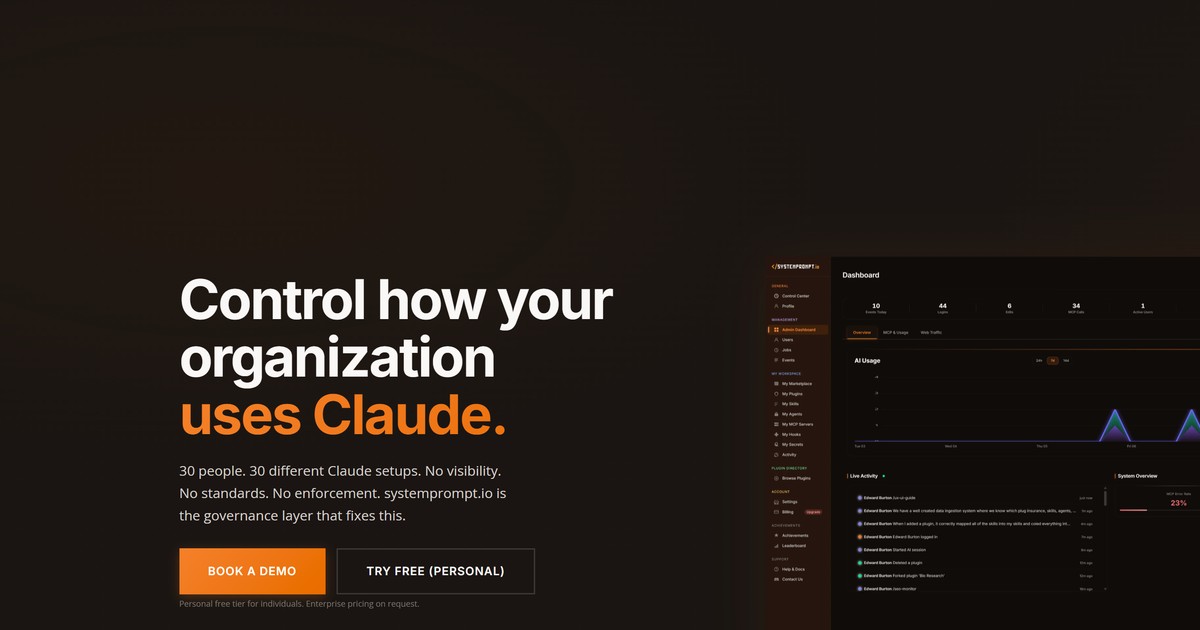

User reviews (0)