Website profiles · Technology insights · Alternatives

tabbied.com

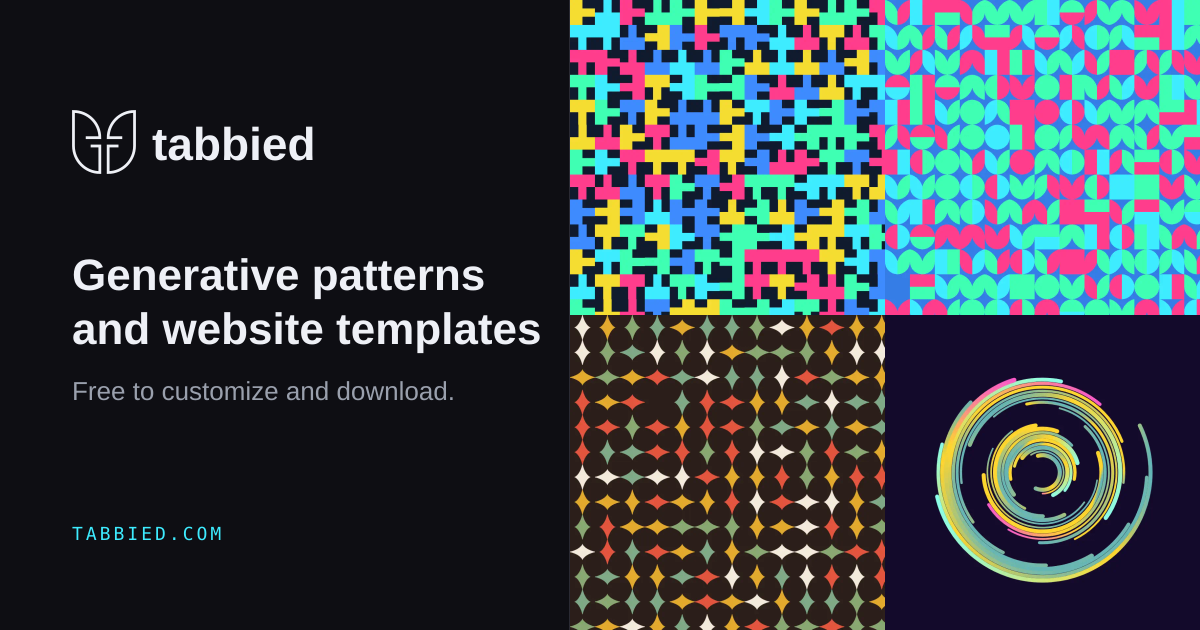
Explore a growing library of 382 customizable patterns and 377 website templates, ready to edit, download, and use.

No paid content found
Visit website
Profile views 6 Outbound visits 4 Normal
Tabbied Full homepage screenshot

At a glance

Category
Design & Creativity
Language
English
Paid-content signal
No paid content foundObserved
Registered
2019
Hosting
CloudflareInferred
HTTPS certificate trusted
PassedObserved
Last updated

Website review

This review may include AI-generated content and is not individually verified. Domain, certificate and other facts come from the observed data on this page.

What is Tabbied?

Tabbied is a library of generative background patterns and ready-made website templates. You pick a design, adjust it in the browser, and download the result. The site currently advertises 382 patterns and 377 website templates, all described as free to edit, download and use.

What you can actually do with it

  • Patterns: Choose from the pattern library, then change colors, frequency and density. The preview updates instantly as you edit, and you export either a 3000px PNG or a vector SVG. The SVG is the more useful of the two if you plan to scale the artwork or recolor it later in a design tool.
  • Website templates: Each template is built on the same generative pattern engine. Swap the pattern and the rest of the site picks up the change, so the visual identity stays consistent without you editing every section by hand. The catalogue leans toward small businesses and venues — an indoor plant shop, a dog groomer, a chiropractic clinic, a tapas bar, a golf club, a photo booth hire company, a music school, a strength gym.
  • Developer angle: The site lists six ways to use the patterns in code, which suggests the output is meant to be dropped into a real build rather than only used as flat decoration.

Who it suits

A solo developer or designer building a site for a local business is the clearest fit: you get a plausible starting layout plus a matching background system, and you can export assets without opening a separate graphics tool. It is less suited to someone who needs a heavily custom design system, since the templates share one underlying pattern engine and will feel related to each other.

If you are evaluating it, start with one pattern rather than browsing the whole library. Export the SVG, drop it into the template you like best, and check whether the swap behaves the way you expect before committing to a full build.

How do I customize a pattern on Tabbied?

Open a pattern in the library, then use the live controls to change colors, frequency and density until the result looks right; the preview updates immediately, and you export when you are done.

The three controls

  • Colors: pick a curated palette (the page shows options such as Mint, Sunset, Ocean and Bauhaus) or build your own.
  • Frequency: how often the motif repeats; the page shows values like 1.0 and offers presets such as 4×4, 9×9 and 12×12.
  • Density: how tightly the pattern packs into its canvas, shown as ratios like 6×3.

A practical workflow

  1. Choose the closest starting pattern from the 382 in the library rather than designing from scratch.
  2. Set the palette first, since color changes the character of a pattern more than small density tweaks do.
  3. Adjust frequency and density together. Raising density usually means lowering frequency, otherwise the pattern reads as noise at small sizes.
  4. Check the pattern at the size it will actually appear. A tile that looks calm full-screen can turn busy as a favicon or a fabric swatch.
  5. Export as SVG for logos, icons, print and anything that must scale cleanly, or as a 3000px PNG for quick mockups, social images and raster backgrounds.

If you are also using a website template, the pattern is the variable that drives the whole design: swapping it updates the site, so settle on the pattern before you fine-tune layout details. Tabbied's own library of 377 templates spans small businesses and venues — a plant shop, a dog groomer, a concert hall, a campground — which makes it easy to judge a pattern in a realistic context instead of in isolation.

For a concrete decision: if the pattern will sit behind text, favor lower density and higher contrast between palette colors; if it is decorative, such as a hero background or packaging, push frequency and density until the texture is clearly visible at thumbnail size.

As a next step, browse the pattern library at Tabbied, open one design, and change only the palette first — that single edit tells you quickly whether the pattern suits your project before you spend time on finer settings.

Can I download patterns for free, and what file formats are available?

Yes. Tabbied's pattern library is presented as free to download, and the export options listed on the page are PNG and SVG.

What each format is good for

Format Best suited to Trade-off
PNG Social posts, mockups, print tests, anywhere you just need a flat image Fixed resolution; enlarging it later will soften edges
SVG Websites, app backgrounds, packaging, large-format print, anything that needs recoloring or scaling Needs a design tool or code to edit; not ideal if you only want a quick image file

The page mentions a 3000px PNG export, which is generous enough for most screen and moderate print work, though not for very large banners. SVG is the safer choice if you expect to resize or recolor later.

How the editing step works

Patterns are adjusted before download rather than after: you pick a palette (or build your own), then change frequency and density with live preview. That means the file you export already matches your colors and scale, so there is no round trip through separate software just to get a usable asset.

A practical scenario

Suppose you run a small dog-grooming business and want a background for a one-page site plus matching Instagram tiles. Choose a pattern, set a palette that matches your branding, export SVG for the site so it stays crisp on high-density screens, and export a PNG for the social images where a flat file is easier to drop into a scheduler. Keep both exports in the same project folder so future updates stay consistent.

One thing worth checking before you commit

Confirm the license terms on the site itself if you plan to use a pattern in client work, merchandise or anything you resell. "Free to download" and "free for commercial use" are not always the same thing, and the page evidence here covers the download mechanics rather than usage rights.

If you would rather not start from a pattern alone, the same library feeds 377 website templates that share one pattern engine, so swapping the pattern updates the whole template. That is the quicker route if you need a finished page rather than a standalone asset.

What types of website templates does Tabbied offer?

Tabbied's template library is organized around a single generative pattern engine rather than around generic corporate layouts. Its page lists 377 website templates, and the examples shown are largely small-business, venue, and lifestyle sites: an indoor plant shop, hot air balloon rides, mobile dog grooming, a chiropractic and massage clinic, a watch manufacturer, a violin atelier, a scenic railway, a concert hall, a photo booth hire company, a vintage clothing store, a tapas bar, and a golf club. Further examples include an arcade bar, a swimwear label, a mountain lodge, a campground and RV park, a new-music ensemble, a music school, a listening bar, a community repair cafe, a sleep clinic, a dog daycare and boarding business, and a strength and conditioning gym.

What that means in practice

The recurring categories are:

  • Local services and clinics — grooming, chiropractic, sleep clinic, repair cafe.
  • Hospitality and venues — tapas bar, listening bar, arcade bar, concert hall, lodge, RV park, golf club.
  • Retail and makers — plant shop, vintage clothing, swimwear label, watch manufacture, violin atelier.
  • Experience and activity businesses — balloon flights, scenic railway, photo booth hire.
  • Community and education — music school, new-music ensemble, dog daycare.

Every template starts from the same generative core, so swapping the pattern updates the whole site with it. That is the main trade-off: you get visual consistency and fast restyling, but the templates are built for pattern-led identity rather than for heavily content-driven structures like large e-commerce catalogs, documentation portals, or news sites with complex article hierarchies.

How to choose

If your business fits one of the listed niches, start with the closest match and treat it as a styling and structure reference rather than a fixed design. If your project depends on a pattern as its visual signature — a brand where the background motif carries the identity — this approach will save you the most time. If your site needs deep navigation, product filtering, or many content types, expect to adapt the template substantially or look elsewhere.

For a concrete next step: open the template closest to your industry, change the palette and density first, and only then evaluate whether the page structure still fits your content.

How can I use Tabbied patterns in my own code?

Export a pattern as SVG and treat it as a tileable background asset, or export a 3000px PNG when you need a fixed raster image for print or a mockup. Tabbied describes six ways to use patterns in code, and the site's own templates are built on a single generative pattern engine: swap the pattern and the whole site updates with it. That is the key idea for developers — the pattern is a variable, not a one-off decoration.

Practical ways to wire a pattern into a project

  • CSS background: Reference the downloaded SVG and repeat it. Set background-repeat: repeat, then control scale with background-size rather than re-exporting.
  • Inline SVG: Paste the SVG markup into your component, then drive colours with currentColor or CSS custom properties so a theme switch recolours the pattern.
  • Data URI: Embed a small SVG directly in a stylesheet to avoid an extra request, useful for hero sections and empty states.
  • Canvas or WebGL: Render the SVG to a canvas for animated density or frequency shifts, or reimplement the geometry when you need the pattern to respond to scroll or pointer position.
  • Design tokens: Store palettes as variables (--pattern-mint, --pattern-ocean) and map them to your existing colour system so patterns follow your brand rather than the other way round.

A concrete scenario

A small agency building a site for a music school picks a template, exports its pattern as SVG, and drops it into a Tailwind config as a background image utility. The hero uses the pattern at low opacity; the footer uses the same file at a larger background-size. When the client asks for a warmer palette, the developer changes two CSS variables instead of regenerating and re-downloading assets.

Trade-offs to weigh

SVG scales cleanly and stays small, but complex generative geometry with many paths can bloat the file and tax rendering if repeated across a long page. PNG at 3000px is predictable and print-ready, but it is heavy on the web and blurs when scaled up. Inline SVG gives you colour control at the cost of larger HTML. If you need motion or per-element variation, plan for canvas early — retrofitting animation onto a static background usually means rewriting the layer.

Decision criteria

Choose SVG for responsive web backgrounds and anything you might recolour. Choose PNG for print, email, or fixed-size art direction. Choose inline SVG when theming matters more than payload. Choose canvas when the pattern must move or react.

To go further, browse the pattern library, export one SVG, and rebuild a single section of an existing page with it before committing a whole project. Pair it with a component library such as Tailwind CSS if you want pattern utilities alongside your spacing and colour tokens, and check MDN Web Docs for background-size and SVG-as-CSS-background behaviour when the tiling looks off.

Do I need to create an account to use Tabbied?

No. Tabbied's own page presents its patterns and website templates as free to explore, edit, download and use, and the pattern workflow — pick a palette, adjust frequency and density live, then export — is described without any account step. Signing in appears as an option in the site navigation rather than a requirement, so you can reasonably start browsing, customising and downloading without registering.

What this means in practice

  • Casual or one-off use: If you just need a background pattern for a slide, a poster or a small site, go straight to the pattern library, tune it, and export the PNG or SVG.
  • Template use: The templates are built on the same generative pattern core, so swapping a pattern updates the whole site. For a quick prototype or a personal project, you can evaluate and download without an account.
  • When an account may still help: Signing in is typically how a site ties downloads, saved edits or template selections to you across sessions. If you plan to return to the same customised pattern repeatedly, or want your work retrievable rather than re-created, an account is the safer route. The page itself doesn't state which of these benefits apply, so treat that as a general expectation rather than a confirmed feature.

A sensible next step

Open one pattern, change the palette and density, and export it. If the export works as described, you have your answer for your own use case; if you're prompted to sign in at that point, register then — you'll have lost nothing by trying first.

If you're comparing options, Tabbied sits alongside general-purpose pattern tools, while [[site:hero Patterns|Hero Patterns]] and CSS Pattern offer CSS-oriented background patterns and Coolors covers palette generation when you'd rather build your own colours than pick from a curated set.

Related questions

More questions →
What Can You Actually Do With a Free Hosted REST API Like ReqRes?

A free hosted REST API like ReqRes gives you a real HTTP endpoint you can call immediately—no signup, no local server, no database setup. You get predictable JSON responses for users, resources, login, and registration, which makes it useful for front-end demos, integration tests, learning HTTP clients, and prototyping. What it is not is a production backend for your app: the data is shared, resets periodically, and you don't control the schema. If you need persistent, private data with auth and logs, that's where an account-based backend or a commercial licence comes in.

What "free REST API for testing and prototyping" actually means

The phrase sounds vague, so it helps to separate two things people often conflate:

  • A mock/sample API — a public, hosted service with fixed or semi-fixed endpoints that return realistic-looking JSON. You don't own the data. It exists so you can point code at a URL and get a response.
  • A real backend you configure — a service where you define collections, schemas, authentication, and logging, and where your data persists and belongs to you.

ReqRes's landing page describes both: a free REST API for testing and prototyping with real responses and no signup, plus an option to build your own backend with collections, auth, and logs at app.reqres.in. Those are different products with different trade-offs. The free public endpoints are the "point and go" part; the account-based backend is the "own your data" part.

What you can do with the no-signup public endpoints

1. Front-end demos without a backend

If you're building a UI and need data to render, you can fetch from a public endpoint instead of hardcoding arrays. This keeps your demo code closer to real fetch logic:

async function loadUsers(page = 1) {
  const res = await fetch(`https://reqres.in/api/users?page=${page}`);
  if (!res.ok) throw new Error(`HTTP ${res.status}`);
  const { data, total, page: current } = await res.json();
  return { users: data, total, page: current };
}

You get pagination fields, a data array, and support metadata—enough to build list views, loading states, and empty states.

2. Integration and contract tests

You can assert that your HTTP layer handles status codes, headers, and JSON shapes correctly. Typical checks:

  • GET /api/users/2 returns 200 with a data object.
  • GET /api/users/23 returns 404 (a non-existent user).
  • POST /api/login with valid credentials returns a token; with missing fields returns 400.

This is useful for testing your client wrapper, retry logic, error handling, and serialization—without spinning up your own server.

3. Learning HTTP clients and tooling

If you're new to fetch, Axios, curl, Postman, or HTTPie, a hosted API is a low-friction target. You can practice:

  • Sending query parameters (?page=2, ?delay=3).
  • Setting headers and reading response headers.
  • Handling POST, PUT, PATCH, DELETE.
  • Observing status codes for success and failure.

4. Deliberate failure and latency testing

Endpoints that return 404 on purpose, or that accept a delay parameter, let you test how your app behaves when things go wrong or slow down. That's hard to do reliably against a happy-path local mock.

What the public endpoints are not good for

Use case Public sample endpoints Account-based backend
Persistent, private data No — shared and reset Yes
Custom schema/collections No Yes
Authentication you control Limited (demo login) Yes
Request logs and debugging No Yes
Production traffic Not intended Depends on plan/licence
Team collaboration No Yes

The key limitation: you don't own the data, and other people are hitting the same endpoints. Treat responses as illustrative, not authoritative.

When you'd move to an account-based backend

Consider app.reqres.in (collections, auth, logs) when any of these are true:

  • You need your own collections and fields, not the fixed demo schema.
  • You need data to persist between sessions and belong only to you.
  • You need real authentication flows you can rely on in a demo or internal tool.
  • You need request logs to debug what your client actually sent.
  • You're working with a team and need shared, stable endpoints.

The trade-off is setup and, eventually, cost. The public endpoints require none; the backend requires an account and configuration.

Where pricing and licensing become relevant

The site signals a commercial licence and an upgrade path (with Stripe as the payment platform), but specific prices, plan tiers, and limits aren't stated here—so don't assume numbers. What you can reason about:

  • Prototyping and learning → free public endpoints are usually enough.
  • Internal tools, demos for clients, or anything you don't want reset → an account-based backend is the natural next step.
  • Production or commercial use → check the licence terms and any paid plan, because "free for testing" and "free for commercial production" are not the same thing.

Before committing, read the current terms on the site rather than relying on secondhand summaries, since pricing and licence scope change.

A quick decision checklist

  1. Do you need data that persists and is private? If yes → account-based backend.
  2. Do you need a custom schema? If yes → account-based backend.
  3. Are you only testing HTTP behavior, UI rendering, or learning a client? If yes → free public endpoints.
  4. Will this touch real users or revenue? If yes → review the licence and any paid plan first.
  5. Do you need logs and team access? If yes → account-based backend.

If you answer "no" to 1, 2, 4, and 5, the free hosted API is likely all you need. If you answer "yes" to any of them, plan for the account-based path.

How to Customize and Download a Pattern on Tabbied

Tabbied lets you pick any pattern from its library of 382 designs, adjust the colors, frequency, and density with live preview, then export the result as a 3000px PNG or a vector SVG at no cost. The whole loop — choose, tweak, download — happens in the browser with no page reloads, so you can iterate until the pattern looks right before committing to a file.

What you need before starting

  • A browser and access to tabbied.com. The site's pattern library and editor are the core of the workflow described here.
  • A rough idea of where the pattern will end up (web background, print piece, or product surface), since that affects whether PNG or SVG is the better export.
  • No design software required — all editing happens on the site itself.

Step 1: Pick a starting pattern

Open the pattern library and browse the full set of 382 patterns. Each entry is a generative design, not a fixed image, which means the one you pick is a starting point rather than a final asset. Choose whichever is closest to the look you want; you'll reshape it in the next step.

Step 2: Adjust colors

The editor gives you two ways to set color:

  • Curated palettes — pick from the site's built-in palettes. The page names several, including Mint, Sunset, Ocean, and Bauhaus.
  • Custom colors — create your own palette if none of the presets fit.

Color is the first of the three live controls, so changes appear immediately in the preview.

Step 3: Tune frequency and density

These two controls change the structure of the pattern, not just its color:

Control What it changes Example values shown
Frequency How often the motif repeats 1.0
Density The grid the pattern is laid out on 4×4, 9×9, 12×12, 6×3

Higher density values mean a finer grid and a busier, more tightly packed pattern; lower values open it up. Frequency scales how frequently the motif appears within that structure. Adjust both until the pattern matches your intent — the preview updates instantly as you edit, with no page reload and no need to guess at the result.

Step 4: Export your pattern

Once the pattern looks right, download it. Two formats are available:

  • PNG — exported at 3000px, suited to raster use cases.
  • SVG — a vector file, so it scales without loss of quality.

Both are free to download. The site states the exports are ready for web, print, or product use, so the format choice comes down to whether you need fixed-resolution raster output (PNG) or scalable vector output (SVG).

How this connects to the website templates

Tabbied's 377 website templates all run on the same generative pattern engine. Swapping the pattern in a template updates the whole site along with it, so a pattern you customize here can carry directly into a template rather than being a standalone asset. If your end goal is a site rather than a single image, it's worth customizing the pattern with that template in mind.

Common sticking points

  • Choosing PNG vs. SVG too early. Decide based on the final medium. If the pattern will be scaled to different sizes — a hero background on desktop and mobile, for instance — SVG avoids re-exporting.
  • Over-tuning density. Very high density values (12×12) can make a pattern read as noise at small display sizes. Check the pattern at the size it will actually appear.
  • Treating the pattern as final. Since every template shares the same pattern engine, a pattern you like can be reused across templates; you don't need to rebuild it from scratch each time.
How to Browse and Choose Patterns or Website Templates on Tabbied

Tabbied splits its library into two browsing areas: a pattern library of 382 generative patterns and a website template gallery of 377 templates. Both are free to explore, and every template is built on the same pattern engine, so picking a template is really picking a starting pattern plus a layout. Use the pattern library if you need a standalone graphic (PNG or SVG); use the template gallery if you want a full site whose look you can reshape by swapping the pattern.

The two libraries at a glance

Patterns Website templates
Count 382 377
What you get A single generative pattern A full site layout built on one pattern
Entry point "Pattern library" → View all 382 "Website templates" → Browse all sites
Customization Colors, frequency, density Swap the pattern; the whole site updates with it
Export 3000px PNG or vector SVG (template editing flow)

Browsing the pattern library

  1. Open the pattern library and select View all 382 to see the full set.
  2. Scan by name and palette. Named palettes shown on the site include Mint, Sunset, Ocean, and Bauhaus — each pattern preview reflects its palette, so you can judge fit before clicking.
  3. Pick a design to enter the editor. The heading "Pick a design and start customizing" marks this step.

If you already know the vibe you want (mint, sunset, ocean, bauhaus), filtering by palette is faster than scrolling all 382.

Browsing the website template gallery

The gallery lists 377 sites, each with a name and a one-line description of its use case. That description is the main signal for whether a template fits your project — the pattern underneath is swappable, so choose on layout and subject matter first.

Examples from the gallery, grouped by what the description tells you:

  • Retail / product: Verdant (indoor plant shop), Cerulean (swimwear label), Second Life Vintage (vintage clothing store)
  • Food & drink: Casa Olivo (tapas bar), Orbital (listening bar), Continue? (arcade bar)
  • Services: Muddy Paws (mobile dog grooming), Restore (chiropractic and massage clinic), Fix-It Saturday (community repair cafe)
  • Hospitality & travel: Halfmoon (hot air balloon rides), Caldera (scenic railway journeys), High Pass Lodge (mountain lodge), Pinewood RV Park (campground and RV park)
  • Culture & music: Madrigal (violin atelier), Konzerthaus Halden (concert hall), Zwölfton (new-music ensemble), Cadence (music school)
  • Health & fitness: Sleepwell (sleep clinic), Forge Strength (strength and conditioning gym)
  • Other: Chronométrie Bex (watch manufacture), Four Frames (photo booth hire), Heron Point (golf club), Big Yard (dog daycare and boarding)

The list repeats some entries (Verdant, Halfmoon, Muddy Paws, and others appear twice), so treat the gallery as a scrollable set rather than a deduplicated index.

How to choose between a pattern and a template

  • Need a background, texture, or print asset? Go to the pattern library. You export a 3000px PNG or a vector SVG, ready for web, print, or product.
  • Need a whole site? Go to the template gallery. Every template starts from the same generative core, so once you pick one, swapping the pattern updates the entire site with it — you are not locked into the template's original look.
  • Undecided? Start from a template whose description matches your subject, then change its pattern to a palette you prefer. This gets you a relevant layout and a look you chose, in one pass.

From browsing to customizing

Selecting a design moves you into live editing. The controls are:

  • Colors — choose one of the curated palettes or create your own.
  • Frequency — options shown include 1.0, 4×4, 9×9, and 12×12.
  • Density — options shown include 6×3.

Every change updates the pattern instantly, with no page reloads. When it looks right, download it as a 3000px PNG or a vector SVG.

Common sticking points

  • The gallery repeats entries. Don't assume you've missed a filter; the same template names appear more than once in the list.
  • Template names are not categories. "Verdant" tells you nothing until you read "indoor plant shop" — always read the description line.
  • Choosing a template doesn't fix its pattern. The pattern engine is shared across all 377 sites, so the pattern is the part you're expected to change.
  • Export format depends on destination. Use SVG for anything that scales or gets edited later; use the 3000px PNG when you need a fixed raster asset.
What Is Tabbied and What Can You Find on the Site?

Tabbied is a free online library of generative patterns and website templates. According to its own site, it currently offers 382 customizable patterns and 377 website templates, all described as ready to edit, download, and use. If you need a background pattern, a print-ready graphic, or a starting point for a small site, Tabbied is built around picking a design and shaping it yourself rather than browsing finished stock art.

What the pattern library gives you

The pattern side is the core of the product. Each pattern is generative, meaning it is built from rules (colors, frequency, density) rather than being a fixed image.

You can adjust three things in real time:

  • Colors — choose from curated palettes such as Mint, Sunset, Ocean, and Bauhaus, or create your own.
  • Frequency — how often the motif repeats, with presets like 1.0, 4×4, 9×9, and 12×12.
  • Density — how tightly packed the elements are, shown as ratios such as 6×3.

Every change updates the pattern instantly, with no page reload. When you are happy with the result, you export it as either a 3000px PNG or a vector SVG. The SVG matters if you plan to scale the pattern for print or large displays; the PNG is the quicker option for web or quick mockups.

What the website templates give you

The 377 templates are not separate designs with their own styling systems. Tabbied describes them as sharing one pattern engine: every template starts from the same generative core, and swapping the pattern updates the whole site with it.

The template list covers a wide range of small-business and personal site types, for example:

Template Type of site
Verdant Indoor plant shop
Halfmoon Hot air balloon rides
Muddy Paws Mobile dog grooming
Chronométrie Bex Watch manufacture
Madrigal Violin atelier
Casa Olivo Tapas bar
Cadence Music school
Forge Strength Strength and conditioning gym

That range suggests the templates are aimed at people who want a distinctive visual identity quickly, not at teams building complex web applications.

How the pieces fit together

The workflow the site describes is short:

  1. Pick a pattern from the library.
  2. Tweak colors, frequency, and density live until it matches what you want.
  3. Download the PNG or SVG for free.
  4. If you are using a website template, swap in your pattern and the site updates around it.

There is also a Developers section and a mention of "6 ways to use them in code," which points to using the patterns programmatically rather than only as exported files. The site lists a Sign in option, but the source material does not state what an account unlocks or whether any features sit behind it.

Who this is for

Tabbied suits you if:

  • You want a custom-looking background or texture without designing one from scratch.
  • You need both raster and vector output from the same design.
  • You are building a small site and want a template whose look you can change in one move.
  • You prefer adjusting parameters live over editing static files.

It is less suited to projects needing a full CMS, complex page structures, or a design system with many independent components — the templates are organized around a single shared pattern engine, which is a strength for consistency but a constraint if you need each page to look unrelated.

The clearest way to judge it is to open the pattern library, change a few settings, and export one file. That takes a minute and tells you more than any description of the parameters can.

How Tabbied's Website Templates Use the Same Pattern Engine

Tabbied's 377 website templates all start from one generative core: the same pattern engine that powers its 382-pattern library. When you swap the pattern inside a template, the whole site updates with it, so the background, accents, and overall visual identity stay in sync instead of being styled piece by piece. This matters most if you want a site whose look can change quickly without rebuilding the design around it.

What the shared pattern engine actually means

On Tabbied, a pattern is not a flat image pasted behind a layout. It is generated from parameters you control — the site lists colors, frequency, and density as the live variables. The template is built to read from that same generative source.

The practical result: a template is not locked to the pattern it ships with. The pattern is a variable, and the template is the structure that displays it.

One pattern, whole-site update

Because every template starts from the same core, changing the pattern propagates through the site rather than staying confined to one section. You are not recoloring a header, then a button, then a footer separately. You change the pattern, and the site's visual treatment follows.

How customization works in practice

The pattern editor exposes three controls, and each one changes what you see immediately:

Control What it changes Example values shown on the site
Colors The palette the pattern is drawn from Mint, Sunset, Ocean, Bauhaus 01; or a custom palette
Frequency How often the pattern motif repeats 1.0, with presets like 4×4, 9×9, 12×12
Density The grid the pattern is laid out on 6×3

The site states that every pattern updates instantly as you edit — no page reloads. You pick a palette or build your own, adjust frequency and density, and watch the result change in real time.

From pattern to file

Once a pattern looks right, you export it. Tabbied offers:

  • PNG at 3000px
  • SVG as a vector

The site describes these as ready for web, print, or product. The same pattern you tuned inside a template can therefore leave the browser as a usable asset.

Why the shared engine matters for choosing a template

The template library spans very different businesses, which is the clearest sign that the pattern is decoupled from the layout. Examples listed on the site include:

  • Verdant — indoor plant shop
  • Halfmoon Balloon Flights — hot air balloon rides
  • Muddy Paws — mobile dog grooming
  • Restore — chiropractic and massage clinic
  • Chronométrie Bex — watch manufacture
  • Madrigal — violin atelier
  • Caldera — scenic railway journeys
  • Konzerthaus Halden — concert hall
  • Four Frames — photo booth hire
  • Second Life Vintage — vintage clothing store
  • Casa Olivo — tapas bar
  • Heron Point — golf club
  • Continue? — arcade bar
  • Cerulean — swimwear label
  • High Pass Lodge — mountain lodge
  • Pinewood RV Park — campground and RV park
  • Zwölfton — new-music ensemble
  • Cadence Music School — music lessons for all ages
  • Orbital — listening bar
  • Fix-It Saturday — community repair cafe
  • Sleepwell Sleep Clinic — sleep clinic
  • Big Yard — dog daycare and boarding
  • Forge Strength — strength and conditioning gym

A plant shop, a sleep clinic, and an arcade bar do not share a visual style. What they share is the engine underneath. That is what lets one pattern swap restyle any of them consistently.

When this approach fits your project

Choose a Tabbied template when you want the site's visual identity to be driven by a single adjustable pattern rather than assembled from many separate design decisions. It suits projects where you expect to iterate on the look — testing palettes, trying denser or sparser repeats — and want those changes to apply everywhere at once.

It is less suited to a project where the background pattern is a fixed, hand-placed illustration that should never move independently of the layout.

The takeaway

Tabbied's templates are not 377 separate designs with 377 separate backgrounds. They are one pattern engine applied across 377 layouts. Customize the pattern — colors, frequency, density — and the template updates with it; export the result as a 3000px PNG or an SVG when you need the asset outside the browser. If you want a site whose whole look can shift from one control panel, that shared core is the reason it works.

Website Overview

An established domain and managed infrastructure suggest continuity of operations and may support dependable delivery, although neither guarantees service quality. Page metadata, canonical configuration and social previews work together to provide more consistent search and sharing presentation.

Domain and Registration

Registered in 2019, this domain has about 7 years of history. That suggests continuity, although ownership and purpose may have changed. Transfer-protection status is present, helping reduce the risk of unauthorized domain transfers. The domain uses the common .com extension, which is not an independent safety signal.

DNS and Email

The observed email authentication setup is incomplete: DMARC is missing. Nameservers are provided by Cloudflare, indicating managed DNS hosting. MX records point to the Cloudflare Email Routing email service. No CNAME was found; the observed records resolve directly to addresses. DNSSEC signatures were not detected, so this additional DNS authenticity protection is not confirmed.

TLS and Certificates

The public key uses EC with 256 bits. The server supplied a complete certificate chain. No organization name is present in the certificate; the available fields are consistent with domain validation. The certificate was issued within the Google Trust Services cloud or CDN ecosystem. The certificate's total validity is about 90 days, consistent with a short renewal cycle.

HTTP and Browser Security

No X-Powered-By header was found, reducing one common source of backend fingerprinting information. All six checked browser-security headers are present. Their effectiveness still depends on the policy values and application behavior. The cf-ray response header indicates a CDN or caching proxy in the delivery path. No obvious internal addresses or debug information were found in the headers. The Server header identifies cloudflare without an exact version.

Technology Stack Analysis

The public page identifies Next.js, Cloudflare without precise versions, leaving fewer clues for version-specific scanning.

Search and Social Sharing

Twitter Card metadata is configured. The title has 56 characters, within a common display range. A meta description is present, with 115 characters. The observed directives allow indexing and link following. No Generator meta tag is publicly exposed.

Hosting and Email

DNSCloudflare
HostingCloudflare
EmailCloudflare Email Routing
Approximate IP geolocation (inferred; a CDN or proxy may differ from the origin server) Location unknown Inferred 104.21.44.12

Registration details

RDAP / WHOIS

RegistrarDreamHost, LLC
Registered2019-09-24
Expires2027-09-24
Domain statusclient transfer prohibited
Nameserversbetty.ns.cloudflare.com、igor.ns.cloudflare.com
DNSSECunsigned

DNS records

DNS

TypeNameValueTTLPriority
Atabbied.com104.21.44.12300—
Atabbied.com172.67.192.203300—
AAAAtabbied.com2606:4700:3030::ac43:c0cb300—
AAAAtabbied.com2606:4700:3033::6815:2c0c300—
MXtabbied.comroute1.mx.cloudflare.net30013
MXtabbied.comroute2.mx.cloudflare.net30044
MXtabbied.comroute3.mx.cloudflare.net30056
NStabbied.combetty.ns.cloudflare.com86400—
NStabbied.comigor.ns.cloudflare.com86400—
TXTtabbied.comv=spf1 include:_spf.mx.cloudflare.net ~all300—

TLS and certificates

TLS / SSL

AssessmentNormal configuration
Supported protocolsTLSv1.2、TLSv1.3
Negotiated protocolTLSv1.3
Certificate subjecttabbied.com
IssuerGoogle Trust Services
Valid until2026-12-25T01:09 · Remaining when checked: 70 days
Verification detailsCertificate trust: Passed · Hostname match: Passed

HTTP response headers

HTTP

HeaderValue
content-typetext/html
cache-controlpublic, max-age=0, must-revalidate
servercloudflare
strict-transport-securitymax-age=31536000
content-security-policyframe-ancestors 'self'
x-frame-optionsSAMEORIGIN
x-content-type-optionsnosniff
referrer-policystrict-origin-when-cross-origin
permissions-policycamera=(), microphone=(), geolocation=(), payment=()

Identified technologies

Next.jsCloudflare

Pages, Search and Sharing

Meta descriptionExplore a growing library of 382 customizable patterns and 377 website templates, ready to edit, download, and use.
Canonical URLhttps://tabbied.com/
LanguageEnglish (default)
Twitter Cardsummary_large_image
All bots 1 allowed · 11 disallowed
  • Allow/
  • Disallow/account/
  • Disallow/admin/
  • Disallow/studio/
  • Disallow/s/
  • Disallow/api/
  • Disallow/mcp
  • Disallow/sign-in/
  • Disallow/sign-up/
  • Disallow/forgot-password/
  • Disallow/reset-password/
  • Disallow/verify-email/

User reviews (0)

  • No reviews yet.