Website profiles · Technology insights · Alternatives

taskslinger.net

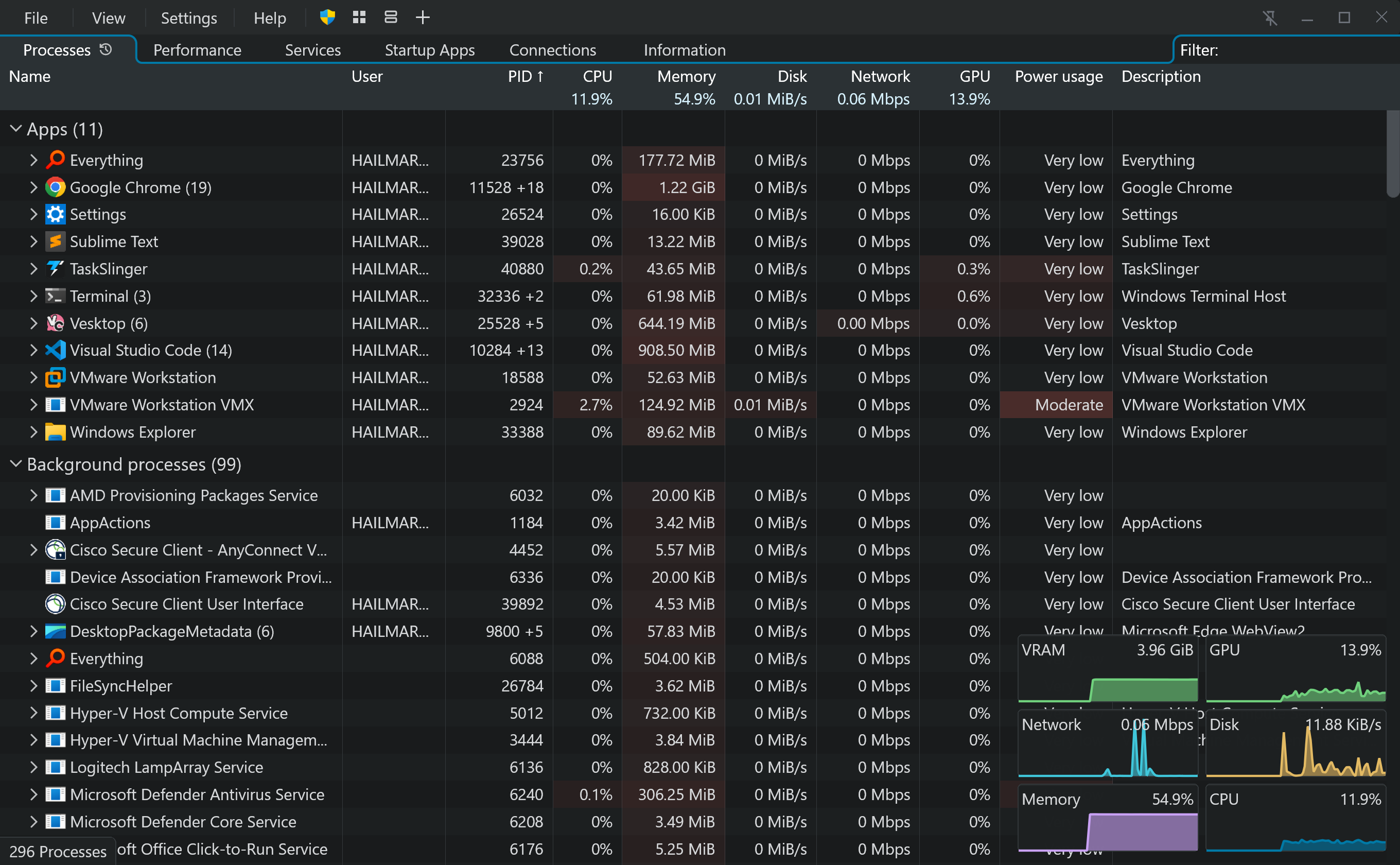
TaskSlinger is a high quality native C and Direct3D task manager replacement written from scratch with a custom UI framework, and fast process, performance, services, startup, and connection monitoring.

Paid content
Visit website
Profile views 1 Outbound visits 0 Normal
TaskSlinger Full homepage screenshot

At a glance

Category
Development
Language
English
Paid-content signal
Paid contentObserved
Registered
2026
Hosting
CloudflareInferred
HTTPS certificate trusted
PassedObserved
Last updated

Website review

This review may include AI-generated content and is not individually verified. Domain, certificate and other facts come from the observed data on this page.

What is TaskSlinger?

TaskSlinger is a native Windows task manager replacement for Windows 10/11 x64, written in C and Direct3D rather than built on an embedded web view or React Native. It targets people who keep a system monitor open all day — developers, system tuners and support engineers — and offers deeper inspection than the built-in Task Manager, including viewing process modules and tokens, dumping processes, and managing services and startup items.

Its views cover processes (grouped apps, background processes, live totals, compact resource meters), performance (logical processor graphs and resource summaries), services, startup apps, connections and system information. Search works by simply starting to type, and columns, layout and theme are customizable. The site states it launches in 150 milliseconds and sends no telemetry or analytics.

Two practical caveats: it is currently beta software (version 0.9.5, a 2.1 MB download) that may contain bugs, and it is a Windows-only tool with no cross-platform use.

If you want to evaluate it, install the free beta alongside Task Manager rather than replacing it immediately, then use it during a real troubleshooting session — for example, tracing which process owns a suspicious connection or checking a service's startup type and executable path. Keep the built-in tool available until the beta proves stable on your machine.

How does TaskSlinger's launch speed and rendering compare to the built-in Windows Task Manager?

TaskSlinger is designed to launch and draw its interface faster than the built-in Windows Task Manager, and its custom rendering is the main reason. The site states TaskSlinger launches in about 150 milliseconds and is fully rendered from the first frame, using a Direct3D renderer with controls built for dense system telemetry rather than an embedded web view. By contrast, the built-in Task Manager is a system component whose startup time varies with the machine, and the site does not publish a direct side-by-side benchmark against it.

What the difference means in practice

Aspect TaskSlinger (as described) Built-in Task Manager
Rendering Custom Direct3D renderer, not a web view Standard Windows UI
Startup ~150 ms, ready on first frame Varies by system; no published figure
Interaction Responsive under dense telemetry Generally slower to open and populate
Audience Power users, developers, support engineers General users

The practical benefit is that when something goes wrong, you want the tool open immediately. A support engineer diagnosing a hung process, or a developer checking CPU and memory while testing, gets a live view without waiting for the window to populate.

A useful next step: if fast access matters to you, pin TaskSlinger to the taskbar and compare launch time against Task Manager on your own machine. For a broader look at native Windows utilities, see Microsoft Learn for system tooling documentation.

What can power users do in TaskSlinger that they cannot do in Task Manager, such as dumping processes or viewing modules and tokens?

TaskSlinger is aimed at people who keep a system monitor open all day—developers, system tuners, support engineers—and its page lists several inspection and control actions that go beyond the built-in Task Manager: viewing process modules and tokens, dumping processes, managing services and startup items, and configuring columns, layout and theme. It also adds views for startup apps (status, type, location, publisher, command) and connections (local and foreign endpoints, state, process ID, owning process), plus an information view covering OS, processor, system, memory and BIOS fields.

The practical difference is depth and workflow. A support engineer diagnosing a hung app can inspect its loaded modules and security token to see what it is running and under which identity, then dump the process for later analysis—steps that normally require separate tools. A developer or tuner can manage services and startup entries from the same window instead of switching between consoles and settings pages. Search-as-you-type and a dense, customizable table make scanning many rows faster.

Trade-offs to weigh

Aspect TaskSlinger Task Manager
Inspection depth Modules, tokens, process dumps, service and startup management Basic process list and end-task
Views Processes, performance, services, startup apps, connections, information Similar core views, less column control
UI approach Custom Direct3D renderer, native C Native but less configurable
Maturity Beta (0.9.5), may contain bugs Shipped with Windows, stable
Telemetry None stated Windows system component

The main trade-off is maturity: TaskSlinger is beta software, so for critical recovery situations you may still want the built-in tool as a fallback. Its stated 150 ms launch and no-telemetry design matter most if you open a monitor frequently or work on machines where data leaving the host is a concern.

Next step: if you regularly chase startup slowdowns or suspicious connections, try the beta on a non-critical machine and compare its startup-apps and connections views against your current routine. For a broader comparison of Windows utilities, see Microsoft Learn and Sysinternals.

How do I use TaskSlinger's search and column customization to manage services, startup apps, and connections?

TaskSlinger puts search and column customization on the same footing across its Services, Startup Apps and Connections views, so the workflow is the same in each: start typing to filter rows, then choose which columns you want to see. The difference is what you filter on and which columns matter for each view.

Services

The Services view shows startup type, status, owning process ID, user and executable path. A practical routine is to leave the status and startup-type columns visible, then type a service name or publisher fragment to narrow the list. Support engineers often start here when a machine boots slowly: filter to the services sharing a suspicious executable path or user, then decide whether to change startup type or stop the service. Keep the executable path column in view, because a service name alone rarely tells you who actually owns it.

Startup apps

Startup Apps adds status, type, location, publisher and command columns. The command column is the one to keep when troubleshooting, since it shows exactly what runs at logon. To audit a slow-booting PC, show status plus command, scan for disabled entries you expected to be active (or the reverse), and use the location column to tell registry entries from folder-based shortcuts.

Connections

The Connections view lists local endpoints, foreign endpoints, state, process ID and owning process. Filtering by process name or a port fragment is the fast way to answer "what is this app talking to?" Keep state and foreign endpoint visible so you can separate established sessions from idle listeners; the owning process column ties each row back to something you can act on in the process table.

Search and columns compared

View Most useful filter target Columns to keep visible Typical use
Services Service name, user, executable path Status, startup type, executable path Diagnosing boot and background behavior
Startup apps App name, publisher, command text Status, command, location Auditing what launches at logon
Connections Process name, endpoint, port State, foreign endpoint, owning process Checking what an app is connecting to

Two caveats from the page itself: the product is in beta (0.9.5), described as possibly containing bugs, and the search behavior is "start typing" rather than a documented query syntax, so treat complex multi-term filters as something to verify on your own machine. The site also states there is no telemetry, which matters if you are inspecting connections on a machine where you do not want the monitor itself generating traffic.

A sensible next step is to open Services first, keep only status, startup type and executable path, and type the name of a service you already know; that confirms the filter-and-column rhythm before you apply it to startup apps and connections. For a broader comparison, Microsoft Learn documents the built-in Task Manager views, and Sysinternals covers Process Explorer and Autoruns, which overlap with the startup and process-inspection use cases.

Does TaskSlinger collect telemetry or send data anywhere, and what does its privacy approach mean for my machine?

TaskSlinger states that it sends no telemetry, analytics, or usage data anywhere, and that it does not "phone home." That is the product's own claim on its site rather than an independently verified audit, so treat it as a design intention you can check yourself rather than a guarantee.

What the privacy stance means in practice

For a system monitor, "no telemetry" matters more than it would for a notes app. A task manager sees your full process list, service configuration, startup entries, network connections, and hardware details — a rich picture of your machine. If that data were transmitted, it would be a meaningful exposure. A local-only tool keeps that picture on your PC.

Practical implications:

  • No account or cloud dependency described. The site presents a free beta download and a perpetual license, with no mention of sign-in or hosted features. Local-only tools generally keep working offline.
  • Your inspection data stays in the session. Process modules, tokens, dumps, and connection lists are exactly the kind of detail you would not want leaving the machine.
  • You can verify the claim. Run it with a network monitor or firewall rule and watch for outbound connections during startup and normal use. This is the concrete test that turns a marketing statement into evidence.

Where the trade-off sits

The cost of a no-telemetry approach is usually slower improvement from real-world usage data and fewer cloud-synced settings. The site notes it is beta software that "may contain bugs," so you are trading some maturity for a lean, local tool. For developers, support engineers, and people who keep a task manager open all day, that trade is usually acceptable; for someone who wants vendor-side diagnostics and crash reporting, it is a downside.

A sensible next step: download the beta on a non-critical machine, add a firewall rule limiting outbound traffic, and confirm behaviour before relying on it for daily inspection. If you want a cross-check on how a native monitor compares with the built-in one, Microsoft Learn documents what Task Manager itself exposes.

Is TaskSlinger free, and what does the early-bird perpetual license cost after the beta ends?

TaskSlinger is free to use during its beta, but it is not presented as permanently free software. The site offers a free beta download (version 0.9.5, Windows 10/11 x64) and states that the free beta stays available until version 1.0. After that, continued use is tied to a paid "early-bird" perpetual license. The site also notes the beta may contain bugs and should be used at your own discretion.

The early-bird perpetual license price is not stated in the supplied page information. The page links to a pricing page but does not include the actual figure, so no cost can be quoted here. Check the official pricing page at TaskSlinger for the current amount and license terms.

What this means in practice

  • Now: You can evaluate TaskSlinger at no cost while the beta runs.
  • At 1.0: Expect to buy a perpetual license if you want to keep using it; "perpetual" typically means a one-time payment rather than a subscription, though confirm that on the pricing page.
  • Decision criterion: If you mainly need a free replacement for Task Manager, treat the beta as a trial and decide before 1.0 whether the deeper inspection features (process modules, tokens, dumps, service and startup management) justify a purchase.

A support engineer who keeps Task Manager open all day could reasonably test the beta now, note which views they actually rely on, and then compare the license cost against that daily value once pricing is confirmed.

Related questions

More questions →
What is TaskSlinger and what does it do?

TaskSlinger is a native Windows task manager replacement written in C with a custom Direct3D-rendered interface. It is aimed at people who keep Task Manager open all day — developers, system tuners, and support engineers — and it covers process, performance, service, startup, connection, and system-information monitoring in one window. You can try it on Windows 10 or 11 (x64) through a free beta; a paid perpetual license is offered separately for when you want to keep using it past the beta.

What you can inspect

TaskSlinger organizes its views as tabs. Each one answers a different "what is running on this machine?" question:

Tab What it shows
Processes Process table with grouped apps, background processes, live totals, and compact resource meters
Performance Logical processor graphs and resource summaries
Services Startup type, status, owning process ID, user, and executable path
Startup Apps Status, type, location, publisher, and command
Connections Local and foreign endpoints, state, process ID, and owning process
Information Operating system, processor, system, memory, and BIOS fields

Beyond viewing, the site describes deeper actions: viewing process modules and tokens, dumping processes, and managing services and startup items. Those are the operations that go past what the built-in Task Manager exposes, and they are the main reason a power user would switch.

Why it is built the way it is

The interface is drawn by a custom Direct3D renderer rather than an embedded web view or a cross-platform UI framework. The stated goal is a tool that "should never feel heavy": controls are built for dense system telemetry, and the UI is meant to stay responsive while data updates.

Two practical consequences follow from that design:

  • Fast launch. TaskSlinger is described as launching in 150 milliseconds and being fully rendered from the first frame. That matters in the exact moment you reach for a task manager — when something has gone wrong and you need the tool up immediately.
  • No telemetry. The site states that TaskSlinger sends no telemetry, analytics, or usage data anywhere. If you work on machines where outbound reporting from utilities is a concern, that is a checkable claim you can weigh.

A concrete case: a support engineer remoting into a user's PC needs to see which service owns a misbehaving process and what that service's executable path is. In TaskSlinger that is a single Services view with the owning process ID and path columns, rather than a trip through separate dialogs.

Trying it and deciding

The beta is version 0.9.5, a 2.1 MB download for Windows 10/11 x64. The site is explicit that this is beta software that may contain bugs or behave unexpectedly, and asks you to use it at your own discretion — so treat it as something to evaluate, not something to depend on for production machines without testing.

The free beta is stated to remain available until version 1.0. A perpetual license is sold separately, with pricing on the site's pricing page; buying is positioned as something to do "when you are ready," not a requirement to run the beta.

Choose TaskSlinger if you want a fast, native, dense view of processes, services, startup items, and connections with deeper inspection actions, and you are comfortable running beta software. Stay with the built-in Task Manager if you need a tool that ships with Windows and carries no beta caveat, or if the standard views already cover what you check.

How does TaskSlinger compare to the built-in Windows Task Manager?

TaskSlinger is a from-scratch, native Windows system monitor aimed at people who keep Task Manager open all day — developers, system tuners, and support engineers. It matches the core Task Manager jobs (processes, performance, services, startup, connections, system info) and adds deeper inspection tools, a customizable dense UI, and a claimed 150 ms launch. It is currently beta software (version 0.9.5, Windows 10/11 x64), so it is a reasonable switch if you want more depth and speed and can tolerate beta behavior; the built-in Task Manager remains the safer default for occasional, no-install use.

Feature comparison

Capability Built-in Windows Task Manager TaskSlinger
Process view Process list with resource usage Process table with grouped apps, background processes, live totals, compact resource meters
Performance view CPU, memory, disk, network graphs Logical processor graphs and resource summaries
Services Basic services tab Columns for startup type, status, owning process ID, user, executable path
Startup apps Enable/disable startup items Status, type, location, publisher, command columns
Connections Limited network view Local/foreign endpoints, state, process ID, owning process
System information Limited OS, processor, system, memory, BIOS fields
Deep process tools Limited View process modules and tokens, dump processes
Search and filtering Basic Start typing to search and filter rows
Customization Minimal Customizable columns, layout, and theme
Rendering Native Custom Direct3D renderer and UI framework
Launch speed Standard Claimed 150 ms, fully rendered from first frame
Telemetry OS-level Stated no telemetry, analytics, or usage data

Where TaskSlinger goes beyond Task Manager

The main differentiators are depth and density rather than a different core purpose. TaskSlinger exposes process modules and tokens, lets you dump processes, and provides management for services and startup items — actions the built-in tool either hides or splits across separate utilities. Its views are built for dense telemetry: services, startup apps, connections, and system information each get dedicated columns instead of a single summary tab.

The UI is a custom Direct3D renderer rather than an embedded web view, which the site frames as the reason it stays responsive with dense data. Search works by simply starting to type, and columns, layout, and theme are adjustable.

Performance and privacy claims

TaskSlinger states it launches in 150 milliseconds and is fully rendered from the first frame, described as multiple times faster than some alternatives. It also states it sends no telemetry, analytics, or usage data anywhere. These are vendor claims from the product site; treat the speed figure as a stated target rather than an independently verified benchmark.

Practical trade-offs

  • Beta status: Version 0.9.5 is explicitly beta software that may contain bugs or behave unexpectedly. The free beta stays available until 1.0, and a perpetual license is offered separately — check the pricing page for current terms.
  • Install required: Unlike Task Manager, TaskSlinger is a separate download (2.1 MB, Windows 10/11 x64), so it is not available on a locked-down or freshly imaged machine without installing it.
  • Familiarity: The built-in tool is where most users and support scripts expect to find processes and services; TaskSlinger's denser layout rewards users who customize it but has a learning curve.

When to choose which

Choose TaskSlinger if you regularly need process modules/tokens, process dumps, detailed service and startup columns, or connection ownership details in one fast, customizable window, and you are comfortable running beta software.

Stay with the built-in Task Manager if you need a zero-install tool, want the most conservative option on production machines, or only occasionally check CPU and memory usage.

Is TaskSlinger Free, and What Does the Pricing Involve?

TaskSlinger is free to download and use right now as a beta (version 0.9.5, 2.1 MB, Windows 10/11 x64). The site states the free beta stays available until version 1.0, and that a perpetual license can be purchased when you are ready. The site links to a pricing page but does not list prices, tiers, or payment details on the pages reviewed here, so treat the beta as free and the paid license as a future purchase whose cost you need to check on the pricing page.

What the free beta includes

The beta is the full application, not a stripped-down trial. According to the site, it includes:

  • Processes view with grouped apps, background processes, live totals, and compact resource meters
  • Performance view with logical processor graphs and resource summaries
  • Services view with startup type, status, owning process ID, user, and executable path
  • Startup apps view with status, type, location, publisher, and command
  • Connections view with local and foreign endpoints, state, process ID, and owning process
  • Information view with OS, processor, system, memory, and BIOS fields
  • Power-user tools such as viewing process modules and tokens, dumping processes, and managing services and startup items

The download page labels this as beta software that "may contain bugs or behave unexpectedly," with use at your own discretion. That caveat is the main condition attached to the free access.

How the free beta and paid license relate

The site frames the two as sequential rather than parallel:

Free beta Perpetual license
Availability Until version 1.0 When you are ready to buy
Cost Free Not stated on the pages reviewed; see the pricing page
Term Tied to the beta period Perpetual, per the site's wording
Status Beta, may contain bugs Presumably the released product

The phrase "early-bird license" appears next to the pricing link, which suggests buying before 1.0 is positioned as an early-purchase option. The site does not explain what early-bird buyers receive beyond the perpetual license, so confirm that on the pricing page before paying.

What the site does and does not say about cost

Supported by the site: a free beta until 1.0, a perpetual license for purchase, and a pricing page at taskslinger.net/buy/.

Not stated on the pages reviewed: the license price, whether the beta expires on a date or only at 1.0, whether beta users get a discount, and what payment methods are accepted. Do not assume the beta converts automatically into a paid license or that the app is free indefinitely — the site ties free access to the pre-1.0 period.

Practical guidance before you download

  1. If you just want to try it: download 0.9.5 from the site. It runs on Windows 10/11 x64 and is a small 2.1 MB install. Expect beta behavior and keep your built-in Task Manager available as a fallback.
  2. If you plan to rely on it long-term: open the pricing page first and check the license cost and early-bird terms, since the free window closes at 1.0.
  3. If data privacy is your concern: the site states TaskSlinger sends no telemetry, analytics, or usage data anywhere. That claim is about data collection, not about price, so it does not change the beta/license structure.

The short answer: yes, it is free today as a beta, and no, the site does not present it as free forever — a perpetual license is the stated path once version 1.0 arrives.

Does TaskSlinger Collect Telemetry or Send Data Anywhere?

No. According to the TaskSlinger website, the app "sends no telemetry, analytics, or usage data anywhere." That statement covers the tool's own behavior, not Windows itself — the operating system and any other software you run can still phone home independently. The claim applies to the current free beta, version 0.9.5 for Windows 10/11 x64.

What the no-telemetry claim covers

The site lists three specific categories it says are never transmitted:

  • Telemetry
  • Analytics
  • Usage data

It also states there is "no phoning home," which in practice means the app does not check in with a vendor server during normal use. The site does not publish a network-audit report, packet log, or third-party privacy certification, so the claim rests on the developer's own description. If you need proof rather than a statement, monitor the app's outbound connections yourself after installing (see the verification steps below).

Why the architecture matters for privacy and weight

TaskSlinger is written in native C with a custom Direct3D renderer and its own UI framework. The site explicitly says it is "not an embedded web view or a React Native application." That distinction is relevant to both privacy and resource use:

  • Fewer moving parts. No embedded browser engine means no browser-style background services or update pings bundled in.
  • Small footprint. The download is listed at 2.1 MB.
  • Fast start. The site claims a 150-millisecond launch, fully rendered from the first frame.

These are design goals stated by the developer, not independently benchmarked figures. Treat the 150 ms number as a vendor claim until you time it on your own machine.

What TaskSlinger does locally

The app is a system monitor and control tool. Its views — Processes, Performance, Services, Startup Apps, Connections, and Information — read local system state. The Connections view shows local and foreign endpoints, state, process ID, and owning process, which is useful context: the tool can show you what other programs are connecting to, even though it says it makes no connections of its own.

Beyond monitoring, the site describes deeper actions: viewing process modules and tokens, dumping processes, and managing services and startup items.

How to verify the no-telemetry claim yourself

  1. Install the beta from the official site (0.9.5, Windows 10/11 x64).
  2. Open TaskSlinger's own Connections view and locate the TaskSlinger process. Expect no foreign endpoints under normal use.
  3. Cross-check with a second tool. Use Windows Resource Monitor (Network tab) or a packet capture tool, filtered to the TaskSlinger process, while you browse its views and change settings.
  4. Watch during startup and shutdown, since check-in behavior often hides at launch.
  5. Repeat after any update, because a new build can change behavior.

Expected result if the claim holds: no outbound traffic to a vendor domain. If you see connections, note the endpoint and state before drawing conclusions — some traffic may belong to Windows components the app queries rather than the app itself.

Beta status and what to weigh before installing

The site labels 0.9.5 as beta software that "may contain bugs or behave unexpectedly" and advises using it at your own discretion. Two practical implications:

  • Privacy posture vs. stability. A clean network profile does not guarantee a stable app. If you rely on a task manager during incidents, keep the built-in Windows Task Manager available as a fallback.
  • Licensing. The free beta is stated to remain available until version 1.0, with a perpetual license offered for purchase afterward. The site links to a pricing page; specific prices are not stated in the material reviewed here, so check that page directly rather than assuming cost or free-forever terms.

Bottom line

If your concern is whether TaskSlinger itself ships telemetry, the developer's answer is a clear no — no telemetry, analytics, or usage data, and no phoning home — backed by a native, non-web-view design and a 2.1 MB footprint. Because that is a self-reported claim on beta software, the deciding factor for privacy-sensitive users is a short verification pass with a network monitor after install.

What are the system requirements for TaskSlinger?

TaskSlinger runs on Windows 10 or Windows 11, 64-bit (x64). The download page lists version 0.9.5 at about 2.1 MB, and it is distributed as beta software, so bugs or unexpected behavior are possible. Those are the only platform requirements stated in the available product information; no minimum CPU, RAM, disk, or GPU specifications are published.

Supported platform at a glance

Item Detail
Operating system Windows 10 / Windows 11
Architecture x64 (64-bit)
Version listed 0.9.5
Download size 2.1 MB
Release status Free beta, with a paid perpetual license planned for 1.0
Telemetry None stated — no analytics or usage data sent

What the requirements mean in practice

  • 64-bit Windows only. The download is labeled x64, so 32-bit Windows installations and ARM-native setups are not covered by the stated support.
  • Small footprint. At roughly 2.1 MB, the installer is light enough that disk space is unlikely to be a constraint. The app is built as a native C and Direct3D program rather than an embedded web view, and the site claims a launch time of about 150 milliseconds.
  • Beta caveat. Because 0.9.5 is beta software, treat it as something to test rather than depend on for critical support work. The vendor explicitly notes it may contain bugs or behave unexpectedly.

How to check your system before installing

  1. Press Win + R, type winver, and press Enter. Confirm the dialog reports Windows 10 or Windows 11.
  2. Open Settings → System → About and check that System type says "64-bit operating system, x64-based processor."
  3. If both checks pass, download version 0.9.5 from taskslinger.net and run it. Expect the app to open almost immediately, since it renders from the first frame.
  4. If either check fails — for example, a 32-bit install — the published requirements do not cover your machine.

Common sticking points

  • Assuming any Windows build works. The stated support is Windows 10/11 x64 specifically; older Windows versions are not mentioned.
  • Expecting a long feature list of hardware demands. No CPU, memory, or GPU minimums are published, so there is nothing to verify beyond the OS and architecture.
  • Treating the beta as final. Version 0.9.5 is explicitly beta. If stability matters for your workflow, wait for 1.0 or test alongside the built-in Task Manager rather than replacing it outright.

If your machine meets the Windows 10/11 x64 condition, the download is small enough that trying the beta costs little. If it does not, there is no stated supported configuration to fall back on.

Website Overview

The available information shows a mix of normal operation and configuration gaps. Depending on how the website is used, these gaps may affect secure access or the consistency of its public presentation.

Domain and Registration

The domain was registered less than a year ago and has limited historical evidence to assess. Transfer-protection status is present, helping reduce the risk of unauthorized domain transfers. The registrar is Cloudflare, Inc., a widely used domain service provider. The domain uses the common .net extension, which is not an independent safety signal.

DNS and Email

Nameservers are provided by Cloudflare, indicating managed DNS hosting. MX records point to the mailbox.org email service. No CNAME was found; the observed records resolve directly to addresses. SPF and DMARC are configured. DKIM status is unknown. TXT records include verification markers for Google. Such markers may also remain after a service stops being used.

TLS and Certificates

The public key uses EC with 256 bits. The server supplied a complete certificate chain. No organization name is present in the certificate; the available fields are consistent with domain validation. The certificate was issued within the Google Trust Services cloud or CDN ecosystem. The certificate's total validity is about 90 days, consistent with a short renewal cycle.

HTTP and Browser Security

The response lacks these common security headers: CSP. CORS permits any origin to read this response. This is common for public resources; sensitive responses need narrower handling. No X-Powered-By header was found, reducing one common source of backend fingerprinting information. The cf-ray response header indicates a CDN or caching proxy in the delivery path. No obvious internal addresses or debug information were found in the headers.

Technology Stack Analysis

The public page identifies Cloudflare without precise versions, leaving fewer clues for version-specific scanning.

Search and Social Sharing

The meta description has 202 characters and may be shortened in search results. Twitter Card metadata is configured. JSON-LD includes Organization data, helping describe the organization as an entity. The page declares 2 language or regional alternatives using hreflang. The title has 53 characters, within a common display range.

Hosting and Email

DNSCloudflare
HostingCloudflare
Emailmailbox.org
Approximate IP geolocation (inferred; a CDN or proxy may differ from the origin server) Location unknown Inferred 104.21.72.85

Registration details

RDAP / WHOIS

RegistrarCloudflare, Inc.
Registered2026-05-13
Expires2027-05-13
Domain statusclient transfer prohibited
Nameserversmiles.ns.cloudflare.com、savanna.ns.cloudflare.com
DNSSECunsigned

DNS records

DNS

TypeNameValueTTLPriority
Ataskslinger.net104.21.72.85300—
Ataskslinger.net172.67.177.246300—
AAAAtaskslinger.net2606:4700:3036::ac43:b1f6300—
AAAAtaskslinger.net2606:4700:3037::6815:4855300—
MXtaskslinger.netmxext1.mailbox.org30010
MXtaskslinger.netmxext2.mailbox.org30010
MXtaskslinger.netmxext3.mailbox.org30010
MXtaskslinger.netmxext4.mailbox.org30010
NStaskslinger.netmiles.ns.cloudflare.com86400—
NStaskslinger.netsavanna.ns.cloudflare.com86400—
TXTtaskslinger.netgoogle-site-verification=svgD_ZOfpbRiz0uSWtb3YP1MdSGaZeJ9jX0HdTufsD4300—
TXTtaskslinger.netv=spf1 include:mailbox.org ~all300—
DMARC_dmarc.taskslinger.netv=DMARC1; p=reject;300—

TLS and certificates

TLS / SSL

AssessmentNormal configuration
Supported protocolsTLSv1.2、TLSv1.3
Negotiated protocolTLSv1.3
Certificate subjecttaskslinger.net
IssuerGoogle Trust Services
Valid until2026-12-07T10:46 · Remaining when checked: 40 days
Verification detailsCertificate trust: Passed · Hostname match: Passed

HTTP response headers

HTTP

HeaderValue
content-typetext/html; charset=utf-8
cache-controlpublic, max-age=0, must-revalidate
servercloudflare
strict-transport-securitymax-age=63072000; includeSubDomains; preload
x-frame-optionsDENY
x-content-type-optionsnosniff
referrer-policystrict-origin-when-cross-origin
permissions-policybrowsing-topics=(), camera=(), ch-ua-arch=(self), ch-ua-bitness=(self), geolocation=(), interest-cohort=(), microphone=()
access-control-allow-origin*

Identified technologies

Cloudflare

Pages, Search and Sharing

Meta descriptionTaskSlinger is a high quality native C and Direct3D task manager replacement written from scratch with a custom UI framework, and fast process, performance, services, startup, and connection monitoring.
Canonical URLhttps://taskslinger.net/
LanguageEnglish (default)
Twitter Cardsummary_large_image
All bots 1 allowed · 13 disallowed
  • Allow/
  • Disallow/api/
  • Disallow/download
  • Disallow/download/
  • Disallow/downloads/
  • Disallow/archive/download
  • Disallow/archive/download/
  • Disallow/p/
  • Disallow/buy/
  • Disallow/stats
  • Disallow/stats/
  • Disallow/sendmail
  • Disallow/sendmail/
  • Disallow/diag.exe
amazonbot 0 allowed · 1 disallowed
  • Disallow/
applebot-extended 0 allowed · 1 disallowed
  • Disallow/
bytespider 0 allowed · 1 disallowed
  • Disallow/
ccbot 0 allowed · 1 disallowed
  • Disallow/
claudebot 0 allowed · 1 disallowed
  • Disallow/
diffbot 0 allowed · 1 disallowed
  • Disallow/
google-extended 0 allowed · 1 disallowed
  • Disallow/
gptbot 0 allowed · 1 disallowed
  • Disallow/
omgili 0 allowed · 1 disallowed
  • Disallow/
anthropic-ai 0 allowed · 1 disallowed
  • Disallow/
claude-web 0 allowed · 1 disallowed
  • Disallow/
cohere-ai 0 allowed · 1 disallowed
  • Disallow/
mistralai-training 0 allowed · 1 disallowed
  • Disallow/
meta-externalagent 0 allowed · 1 disallowed
  • Disallow/
googleother 0 allowed · 1 disallowed
  • Disallow/
baiduspider 0 allowed · 1 disallowed
  • Disallow/
petalbot 0 allowed · 1 disallowed
  • Disallow/
awariosmartbot 0 allowed · 1 disallowed
  • Disallow/
awariorssbot 0 allowed · 1 disallowed
  • Disallow/
google-cloudvertexbot 0 allowed · 1 disallowed
  • Disallow/
qualifiedbot 0 allowed · 1 disallowed
  • Disallow/
cotoyogi 0 allowed · 1 disallowed
  • Disallow/
icc-crawler 0 allowed · 1 disallowed
  • Disallow/
atlassian-bot 0 allowed · 1 disallowed
  • Disallow/
fishbot 0 allowed · 1 disallowed
  • Disallow/
borderxbot 0 allowed · 1 disallowed
  • Disallow/
navubot 0 allowed · 1 disallowed
  • Disallow/
semrushbot-swa 0 allowed · 1 disallowed
  • Disallow/
wardbot 0 allowed · 1 disallowed
  • Disallow/
magpie-crawler 0 allowed · 1 disallowed
  • Disallow/
kimibot 0 allowed · 1 disallowed
  • Disallow/
citibotsitecrawler 0 allowed · 1 disallowed
  • Disallow/

User reviews (0)

  • No reviews yet.