
 uibeats.com
 Paid content
Categories: Development
Beautifully designed, animated React components built with React, TypeScript, Tailwind CSS and Motion. Copy, paste, or install with the shadcn CLI.
 Visit website
 Updated: 2026-10-06 17:36
 Language: English (default)
 Access: Normal
 Profile views 0
 Outbound visits 0
Related questions
More questions →What Is TypeScript and How Do You Use It?
TypeScript is a typed superset of JavaScript: every valid JavaScript program is also valid TypeScript, but TypeScript adds optional static types that a compiler checks before your code ever runs. You use it by installing the typescript package, writing .ts files, and compiling them to plain .js with the tsc command. It fits best when a codebase grows past a few files or several people, where catching type errors at build time is cheaper than debugging them at runtime. For a throwaway script, plain JavaScript is usually faster to write.
What TypeScript actually adds
TypeScript does not change how JavaScript runs. Browsers and Node.js still execute JavaScript, so the types are erased during compilation. What you gain is a checking pass:
- Static type checking — the compiler reads your annotations and flags mismatches before execution.
- Earlier error detection — mistakes like calling a method that does not exist surface in your editor or in
tsc, not in production. - Better tooling — editors use the type information for autocomplete, inline documentation, and safe rename/refactor operations.
- Self-documenting interfaces — function signatures and object shapes describe intent without extra comments.
The trade-off is a build step and some annotation overhead. Types are optional, so you can adopt them gradually.
The basic workflow
1. Install the compiler
npm install --save-dev typescript
This adds tsc to your project. You can also install it globally, but a local dev dependency keeps the version consistent across machines and CI.
2. Write a .ts file
function greet(name: string): string {
  return `Hello, ${name}`;
}

console.log(greet("Ada"));
The : string annotations tell the compiler what name and the return value must be. If you call greet(42), tsc reports an error instead of letting it fail silently at runtime.
3. Compile
npx tsc greet.ts
Expected result: a greet.js file next to the source, containing the same logic with the type annotations removed. That .js file is what Node.js or the browser runs.
4. Add a config file
For anything beyond one file, create a tsconfig.json so you do not repeat flags:
{
  "compilerOptions": {
    "target": "ES2020",
    "module": "ESNext",
    "strict": true,
    "outDir": "dist"
  },
  "include": ["src"]
}
Then just run npx tsc. strict: true turns on the stricter checks, including strictNullChecks, which is where most real-world type safety comes from. Turning it on later in a large project is painful, so enable it early.
Key features with examples
Type annotations
let count: number = 0;
let names: string[] = ["Ada", "Grace"];
Annotations can be omitted when TypeScript can infer the type, which it does for most assignments.
Interfaces
interface User {
  id: number;
  email: string;
  nickname?: string; // optional
}

function sendWelcome(user: User) {
  console.log(`Welcome, ${user.nickname ?? user.email}`);
}
An interface describes the shape an object must have. Passing an object missing id or email is a compile error.
Generics
function first<T>(items: T[]): T | undefined {
  return items[0];
}

const n = first([1, 2, 3]);      // n: number | undefined
const s = first(["a", "b"]);     // s: string | undefined
Generics let one function work across types while keeping the relationship between input and output. T is a placeholder filled in at the call site.
Using TypeScript in an existing JavaScript project
You do not have to convert everything at once:
- Add
typescriptand atsconfig.jsonwith"allowJs": trueso.jsfiles are included. - Rename files to
.tsone at a time, starting with the most central modules. - Add types to function boundaries first — parameters and return values — and let inference handle the internals.
- Turn on
strictonce the obvious errors are cleared.
Most build tools and bundlers accept TypeScript through a loader or plugin, so you rarely need to run tsc by hand in a modern setup. In monorepos, tools like Lerna manage multiple JavaScript/TypeScript packages from one repository, and each package can carry its own tsconfig.json while sharing a base config. That is a common reason teams introduce TypeScript: a shared type contract between packages catches breaking changes at build time rather than at integration.
Common sticking points
anyeverywhere — annotating everything asanydisables the checks you installed TypeScript for. Preferunknownand narrow it.- Ignoring
strictNullChecks— most runtime crashes come fromnull/undefined, which this flag catches. - Types at runtime — TypeScript types do not exist after compilation, so you still need runtime validation for data from APIs, files, or user input.
- Build configuration drift — mismatched
target/modulesettings betweentsconfig.jsonand your bundler cause confusing errors; keep them aligned.
If your goal is safer JavaScript in a growing codebase, start with a tsconfig.json, enable strict, and convert files incrementally. If you are writing a small script that will not be maintained, plain JavaScript remains the simpler choice.
What Are React Components and How Do You Use Them?
A React component is a reusable piece of UI defined as a JavaScript function (or, historically, a class) that returns markup. You build an interface by composing many small components, passing data in through props and tracking change with state. If you're starting a project or adding to one, you'll usually write your own components for app-specific logic and pull in prebuilt ones from a library or registry for common UI like buttons, heroes, and cards. The sections below cover how components work, when to use which style, and how to add one and confirm it renders.
The core idea: a function that returns UI
A component takes an input object called props and returns what should appear on screen. State is data a component owns and can change over time; when it changes, React re-renders that component.
function Greeting({ name }) {
  return <h1>Hello, {name}</h1>;
}

// Used like an HTML tag:
<Greeting name="Ada" />
Two rules matter in practice:
- Props flow down, events flow up. A parent passes data to a child via props; the child signals change by calling a function the parent handed it.
- Components must be pure with respect to their inputs. Given the same props and state, they should render the same output. Side effects (fetching, subscriptions) belong in hooks like
useEffect.
Function components vs. class components
Modern React uses function components with hooks. Class components still appear in older codebases and some libraries, so you should recognize them even if you don't write them.
| Dimension | Function component + hooks | Class component |
|---|---|---|
| Syntax | Plain function returning JSX | class extends React.Component with a render() method |
| State | useState, useReducer |
this.state and this.setState |
| Side effects | useEffect |
Lifecycle methods (componentDidMount, etc.) |
this binding |
Not applicable | Requires binding or arrow methods |
| Current default | Yes | Legacy, still supported |
If you're starting fresh, use function components. Reach for a class only when maintaining existing code or integrating a library that requires it.
Composition: build big UI from small pieces
The main way you scale a React app is by splitting UI into small components and combining them. Three patterns cover most cases:
- Passing
childrenlets a wrapper render whatever you nest inside it:function Card({ children }) { return <div className="card">{children}</div>; } <Card><Greeting name="Ada" /></Card> - Lifting state up means moving shared state to the closest common parent so two siblings can stay in sync, rather than duplicating it in each.
- Keeping components focused — one component, one job — makes them easier to reuse and test.
Where prebuilt components come from
You rarely build everything yourself. Two distribution models dominate:
- Package libraries ship compiled code you import from
node_modules. You get updates by bumping a version, but you don't own or edit the source. - Registries and copy-in source give you the actual component file, which lands in your repo and becomes yours to edit. This is the model behind shadcn/ui conventions, where components are React + Tailwind source rather than an opaque dependency.
21st is a registry in the second category. Its library lists 12,000+ crafted React components, templates, and shadcn themes, organized into categories such as 2,000+ marketing blocks (animated heroes, shaders, backgrounds, footers) and 2,100+ UI components (buttons, AI chats, cards and grids, navigation, sign-ins). Components are attributed to named authors, and the site states they ship as prompts you can copy into your tooling — its examples show the same prompt producing a diff in Codex, a file in Claude Code, and a live preview in Lovable. The site also reports 25,431 installs in a week for one component and a builder count of 3,819,076, which gives a rough sense of activity rather than a quality guarantee.
Because these components are source you place in your project, the trade-off is the reverse of a package library: you can edit anything, but you also own maintenance and updates.
Adding a component to your project and verifying it
The exact command depends on the registry, but the shape of the task is consistent. Using a copy-in component as the example:
- Confirm prerequisites. You need a React project with Tailwind and the
cnutility (a class-merging helper) available, since registry components typically import from@/lib/utils. - Get the source. Either run the registry's install command or paste the component's prompt into your AI tool so it writes the file into your components directory. Expect a new file such as
components/ui/shimmer-button.tsx. - Import and render it. Add the import to a page and place the component in the tree.
- Verify. Run your dev server and check that the component appears and responds to interaction. If the registry ships a preview, compare against it.
A minimal check after install:
import { ShimmerButton } from "@/components/ui/shimmer-button";

export default function Page() {
  return <ShimmerButton>Get started →</ShimmerButton>;
}
If it renders and the hover/interaction behavior matches the preview, the install succeeded.
Troubleshooting common problems
- Missing imports or unresolved
@/paths. The@alias must be configured in your bundler ortsconfig. If the component imports@/lib/utilsand that file doesn't exist, create it or fix the alias. - Prop type errors. If the component expects a required prop and you omit it, you'll get a warning or a crash. Check the component's signature and pass what it declares.
- Styling looks wrong. Registry components assume Tailwind is set up and that your theme tokens (colors, radii) exist. Missing Tailwind config or theme variables produce unstyled output rather than an error.
- Excessive re-renders. A component re-rendering on every keystroke or parent update usually means state lives too high or a new object/function is created each render. Move state closer to where it's used, or memoize with
useMemo/useCallbackwhen profiling shows it matters. - "Hooks can only be called inside a component." You called a hook at the top level of a module or inside a condition. Hooks must run unconditionally at the top of a component or custom hook.
Choosing between writing and installing
Write your own component when the logic is specific to your app, when you need tight control over behavior, or when a library's abstraction would fight your design. Install from a registry when the UI is generic (buttons, heroes, cards), when you want to read and edit the source, and when you're comfortable owning updates. Use a package library instead when you'd rather receive fixes automatically and don't need to modify internals. The right choice depends on how much control versus maintenance you want — not on which option is universally better.
Website Overview
Page metadata, canonical configuration and social previews work together to provide more consistent search and sharing presentation.
Domain and Registration
Transfer-protection status is present, helping reduce the risk of unauthorized domain transfers. The domain has about 2 years of registration history; its current configuration provides more context than age alone. The domain uses the common .com extension, which is not an independent safety signal.
DNS and Email
Nameservers are provided by Cloudflare, indicating managed DNS hosting. No CNAME was found; the observed records resolve directly to addresses. No MX record was found. A conventional explicit inbound-mail route is not configured. TXT records include verification markers for Google. Such markers may also remain after a service stops being used. DNSSEC signatures were not detected, so this additional DNS authenticity protection is not confirmed.
TLS and Certificates
The public key uses EC with 256 bits. The server supplied a complete certificate chain. No organization name is present in the certificate; the available fields are consistent with domain validation. The certificate was issued within the Google Trust Services cloud or CDN ecosystem. The certificate's total validity is about 90 days, consistent with a short renewal cycle.
HTTP and Browser Security
The response lacks these common security headers: CSP. No X-Powered-By header was found, reducing one common source of backend fingerprinting information. The cf-ray response header indicates a CDN or caching proxy in the delivery path. No obvious internal addresses or debug information were found in the headers. The Server header identifies cloudflare without an exact version.
Technology Stack Analysis
The public page identifies Next.js, Cloudflare, Vercel without precise versions, leaving fewer clues for version-specific scanning.
Search and Social Sharing
Twitter Card metadata is configured. The title has 44 characters, within a common display range. A meta description is present, with 147 characters. The observed directives allow indexing and link following. No Generator meta tag is publicly exposed.
 Hosting and Email
 Cloudflare
 Hosting
 Vercel
 Location
 unknown
104.21.52.212
Location
Location unknown
104.21.52.212
 Pages, Search and Sharing
| Meta description | Beautifully designed, animated React components built with React, TypeScript, Tailwind CSS and Motion. Copy, paste, or install with the shadcn CLI. |
|---|---|
| Canonical URL | https://uibeats.com |
| Language | English (default) |
| Twitter Card | summary_large_image |
Social Sharing Preview
19 fields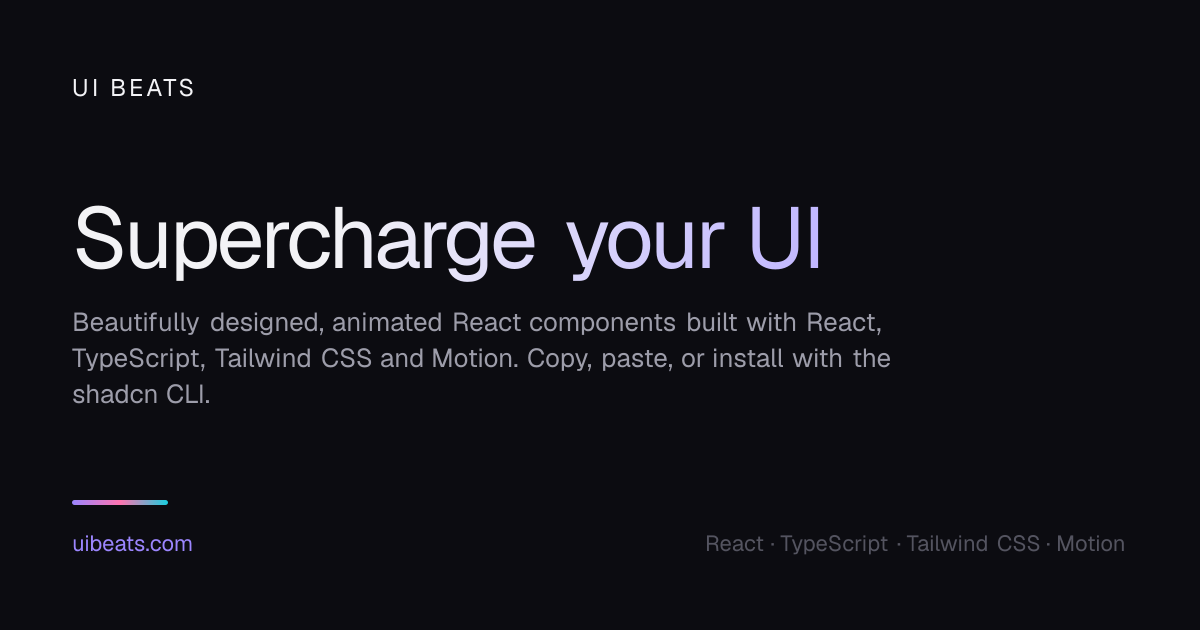

Sharing metadata
| og:url | https://uibeats.com |
|---|---|
| og:type | website |
| og:image | https://uibeats.com/opengraph-image?32ff900ac848d745 |
| og:title | UI Beats · Animated React components you own |
| og:locale | en_US |
| og:image:alt | UI Beats: animated React components |
| og:site_name | UI Beats |
| og:image:type | image/png |
| og:description | Beautifully designed, animated React components built with React, TypeScript, Tailwind CSS and Motion. Copy, paste, or install with the shadcn CLI. |
| og:image:width | 1200 |
| og:image:height | 630 |
| twitter:card | summary_large_image |
| twitter:image | https://uibeats.com/opengraph-image?32ff900ac848d745 |
| twitter:title | UI Beats · Animated React components you own |
| twitter:image:alt | UI Beats: animated React components |
| twitter:image:type | image/png |
| twitter:description | Beautifully designed, animated React components built with React, TypeScript, Tailwind CSS and Motion. Copy, paste, or install with the shadcn CLI. |
| twitter:image:width | 1200 |
| twitter:image:height | 630 |
robots.txt (opens in a new tab)
1 rulesAll bots 1 allowed · 0 disallowed

 All bots

/
No matching rules.
Sitemaps
1 Registration details RDAP / WHOIS
| Registrar | HOSTINGER operations, UAB |
|---|---|
| Registered | 2024-07-08 |
| Expires | 2027-07-08 |
| Domain status | client transfer prohibited |
| Nameservers | chip.ns.cloudflare.com、zara.ns.cloudflare.com |
| DNSSEC | unsigned |
 DNS records
| Type | Name | Value | TTL | Priority |
|---|---|---|---|---|
| A | uibeats.com | 104.21.52.212 | 300 | — |
| A | uibeats.com | 172.67.204.25 | 300 | — |
| AAAA | uibeats.com | 2606:4700:3030::6815:34d4 | 300 | — |
| AAAA | uibeats.com | 2606:4700:3036::ac43:cc19 | 300 | — |
| NS | uibeats.com | chip.ns.cloudflare.com | 86400 | — |
| NS | uibeats.com | zara.ns.cloudflare.com | 86400 | — |
| TXT | uibeats.com | google-site-verification=H-ScsGva4t5OM7r9I29gzG9CqfeOUAux_CqnnKojx90 | 300 | — |
| TXT | uibeats.com | v=MCPv1; k=ed25519; p=B6A6/gq/rOwcH82yF5Fxgw/Zd1cNd6aWx7cWTffmgQ4= | 300 | — |
 TLS and certificates
| Assessment | Normal configuration |
|---|---|
| Supported protocols | TLSv1.2、TLSv1.3 |
| Negotiated protocol | TLSv1.3 |
| Certificate subject | uibeats.com |
| Issuer | Google Trust Services |
| Valid until | 2027-01-02T15:18 · Remaining when checked: 87 days |
| Verification details | Certificate trust: Passed · Hostname match: Passed |
 HTTP response headers
| Header | Value |
|---|---|
| content-type | text/html; charset=utf-8 |
| cache-control | public, max-age=0, must-revalidate |
| server | cloudflare |
| strict-transport-security | max-age=63072000 |
| x-frame-options | SAMEORIGIN |
| x-content-type-options | nosniff |
| referrer-policy | strict-origin-when-cross-origin |
| permissions-policy | camera=(), microphone=(), geolocation=() |
 Identified technologies
User reviews (0)