
 简体中文
简体中文 English
Website review
This review may include AI-generated content and is not individually verified. Domain, certificate and other facts come from the observed data on this page.
What is VoxJong?
VoxJong is a free browser-based Mahjong Solitaire game built with CSS, available at VoxJong. It's the classic tile-matching puzzle: you clear a stacked layout by pairing identical tiles whose long edges are unobstructed, until the board is empty or no legal matches remain.
The distinguishing detail is the "CSS" part. Rather than relying on a heavy game engine or plugin, the game is rendered and styled with web technologies, which typically means it loads quickly, runs in a modern browser without installation, and works on both desktop and mobile screens. That makes it a low-friction option for a short break — open a tab, play a round, close it.
Who it suits
- Casual players who want a no-download, no-account puzzle.
- Anyone on a locked-down or shared computer where installing software isn't an option.
- People who already know Mahjong Solitaire rules and just want a clean board to solve.
What to weigh
- Browser games vary in layout variety, undo/hint options and difficulty settings; check the page for what's offered before committing to a long session.
- CSS-rendered games can be lighter but may feel less polished than engine-based versions if animations or sound matter to you.
- Tile-matching solitaire rewards patience over reflexes, so it's a poor fit if you want fast, action-driven play.
As a next step: open the site, play one standard layout, and judge it on two things — whether the tile faces are readable at your screen size, and whether a hint or undo feature exists when you get stuck. Those two factors decide whether a Mahjong Solitaire implementation is worth returning to.
How do I play VoxJong's Mahjong Solitaire?
VoxJong is a browser-based Mahjong Solitaire game built with CSS, so there is nothing to install or download: open VoxJong and the board loads directly in the page. The rules follow standard Mahjong Solitaire, not the four-player rummy-style game, so you are matching tiles against each other rather than building hands.
The basic loop
- Scan the layout for two identical free tiles and click them one after the other. A matched pair disappears from the board.
- A tile is "free" when nothing sits on top of it and at least one of its long sides (left or right) is open. Tiles buried under others or boxed in on both sides cannot be selected.
- Keep clearing pairs until the board is empty. Most layouts are solvable, but a wrong early choice can block you later, so it pays to look at the whole board before clicking.
- If you get stuck, look for a shuffle or undo control. Many browser versions offer these, though whether VoxJong includes them is worth checking on the page itself.
A practical first move
Start with the tiles on the outermost edges and the top layer. Those are almost always free, and clearing them opens up the middle of the layout, which is where the tightest clusters usually sit. Save pairs that appear in only one place on the board — if you match a tile that has just one possible partner, you may strand its neighbour.
What to expect from a CSS build
Because the game is rendered with CSS rather than a canvas or plugin, it tends to load fast and run on phones, tablets and desktops without extra software. The trade-off is usually a simpler visual style and fewer animation flourishes than a JavaScript-heavy version. That suits short breaks and casual play well; if you want timed challenges, score tracking or large tile sets, a dedicated Mahjong app may fit better.
If the board does not respond to clicks, try refreshing the page or switching browsers — CSS-driven interactions occasionally behave differently across engines.
Is VoxJong free to play, or does it require payment?
VoxJong is described as a free CSS Mahjong Solitaire game. The site's own description presents it as something you "play" for free, and there is no payment platform, subscription tier or pricing link indicated anywhere in the available information. In practical terms, that means you can open the page and start a game without entering card details or creating a paid account.
What "free" likely means here
A browser-based solitaire like this typically makes money, if at all, through unobtrusive display advertising rather than charging players. Since no payment signals appear, treat it as a straightforward free-to-play distraction: no paywalled boards, no premium tile sets behind a checkout.
A sensible way to check before committing time
If you want to confirm the experience matches the description, play one or two rounds first. Free browser games can differ in how they handle progress — some save your game locally in the browser, others reset when you close the tab. If keeping a half-finished layout matters to you, test that early rather than assuming it.
For comparison, established free solitaire destinations include 247 Mahjong and Mahjong Games, both of which follow the same ad-supported, no-payment model.
Can I play VoxJong without downloading an app?
Yes. VoxJong runs in a web browser, so you can start a game by opening the site and clicking a tile layout — no app store install, account, or download is required. The trade-off is that browser play depends on your connection for the first load, and it may not match a native app for offline sessions, haptics, or system-level notifications.
What that means in practice
- On a phone: open the site in Safari or Chrome and play in the tab. Add it to your home screen if you want an app-like icon for quick access.
- On a desktop: play in a normal browser window; a keyboard and larger screen make scanning the board easier.
- On a shared or locked-down device: browser play is usually the simplest option, since nothing needs to be installed or approved.
When a download is still the better choice
Choose a native app if you want offline play on a flight, want your progress synced across devices, or prefer touch gestures and sound design tuned to a specific platform. Choose the browser version for a quick round, a one-off puzzle, or when you are on a device you do not control.
A useful next step: open VoxJong, pick a layout, and test whether the tile sizes and tap targets feel comfortable on your screen before committing to a longer session.
What makes VoxJong different from other Mahjong Solitaire games?
VoxJong's distinguishing trait is that it is a CSS Mahjong Solitaire. In practice, that means the game is built with web styling technology rather than as a downloaded app or a canvas-rendered program, so it loads in a browser and is aimed at quick, casual play. The site describes itself simply as a free CSS Mahjong Solitaire, with no elaborate feature list, so the difference is one of format and presentation rather than a set of extra modes.
What that means for a player
- No install or account friction. You open the page and play, which suits a short break on a laptop or phone.
- Lightweight footprint. A CSS-driven layout tends to feel immediate and uncluttered, which fits the classic tile-matching loop.
- Standard rules, familiar goal. As with other Mahjong Solitaire games, the core task is matching pairs of free tiles until the board is cleared.
How to choose between it and alternatives
If you want a no-frills, browser-based version of the classic tile game and care most about getting into a round quickly, VoxJong fits that need. If you want animated 3D tiles, level progression, hints, timers or a large themed tile set, a dedicated Mahjong app will usually offer more. A useful test: play one board on VoxJong, then compare it with a feature-rich title such as Mahjong.com to see whether the extra options matter to you.
As a next step, start a single board and note whether the tile faces stay readable at your screen size — that is the main practical trade-off with a CSS-based board, and it decides whether the minimalist approach works for you.
Does VoxJong work on mobile devices and tablets?
Yes, VoxJong is built to run in a web browser and uses CSS for its rendering, which generally means it works on phones and tablets without a separate app download. You open the site, and the Mahjong Solitaire board appears in your mobile browser.
What to expect on a touchscreen
- Tap to select and match tiles. The core interaction is tapping a tile, then tapping its pair, so it maps naturally to touch.
- Layout scales to the screen. Because the game is CSS-based rather than a fixed-size canvas, the board should reflow to fit narrower viewports. On a phone in portrait orientation, tiles will be smaller and denser than on a tablet or desktop.
- No install step. You avoid app-store friction, but you also depend on a stable browser connection and the site loading correctly each session.
Practical trade-offs
| Device | Likely experience | Watch out for |
|---|---|---|
| Phone (portrait) | Playable, but small tiles | Mis-taps on tightly packed layouts; consider landscape |
| Phone (landscape) | Wider board, easier targeting | Less vertical room for tall stacks |
| Tablet | Closest to desktop comfort | Still worth checking tile size at your zoom level |
| Desktop | Largest tiles, easiest scanning | — |
A quick way to decide
If you mainly play in short bursts while commuting, a phone in landscape is usually the better fit. If you prefer longer sessions and want to scan the whole board at once, a tablet or laptop will feel more comfortable.
The simplest next step: load VoxJong on your own device, rotate the screen, and try one or two deals. If tiles feel too small to tap accurately, switch orientation or move to a larger screen before deciding the game isn't for you.
 NS1
NS1 Netlify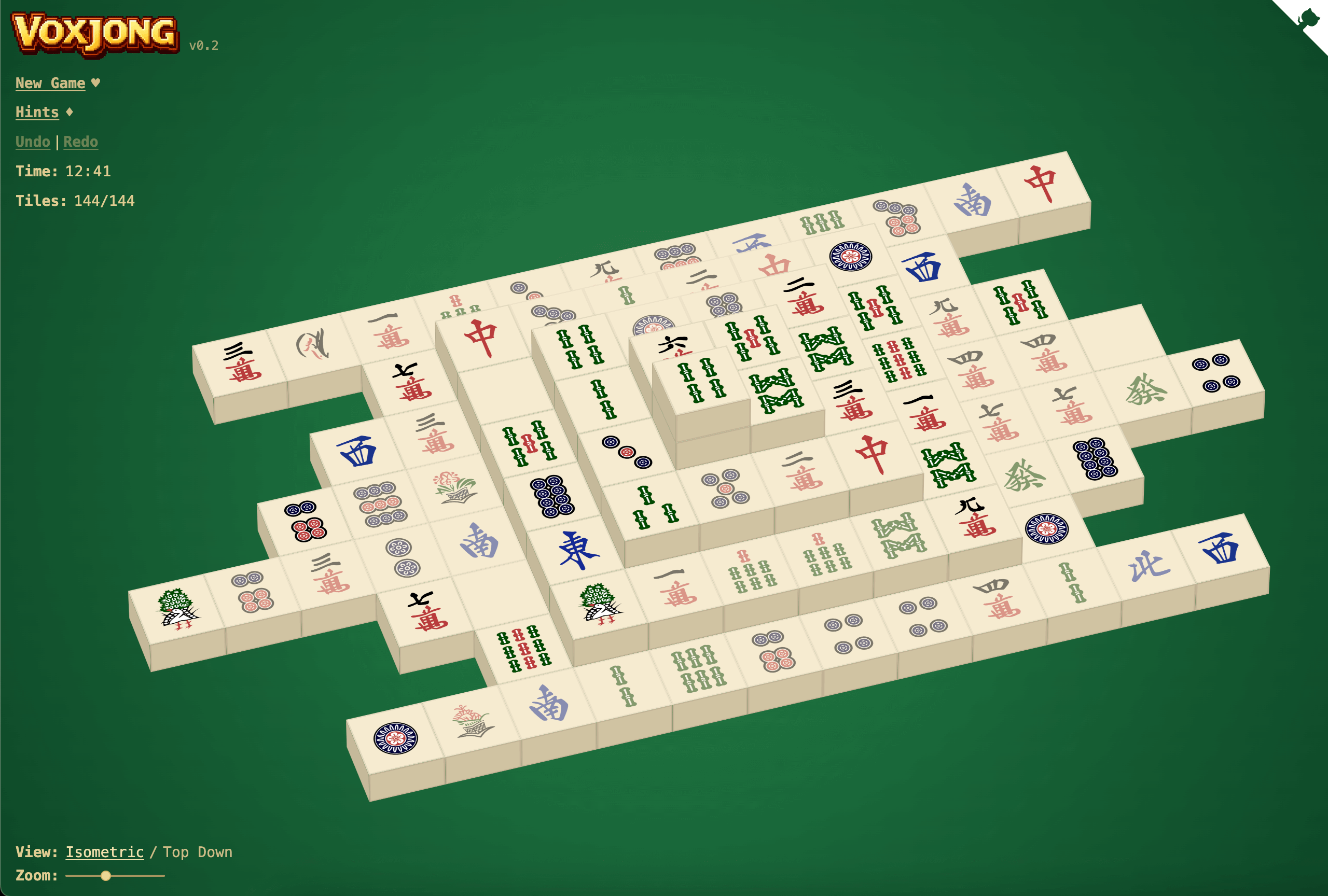

User reviews (0)