
 简体中文
简体中文 English
Website review
This review may include AI-generated content and is not individually verified. Domain, certificate and other facts come from the observed data on this page.
What is Z-Tonnetz?
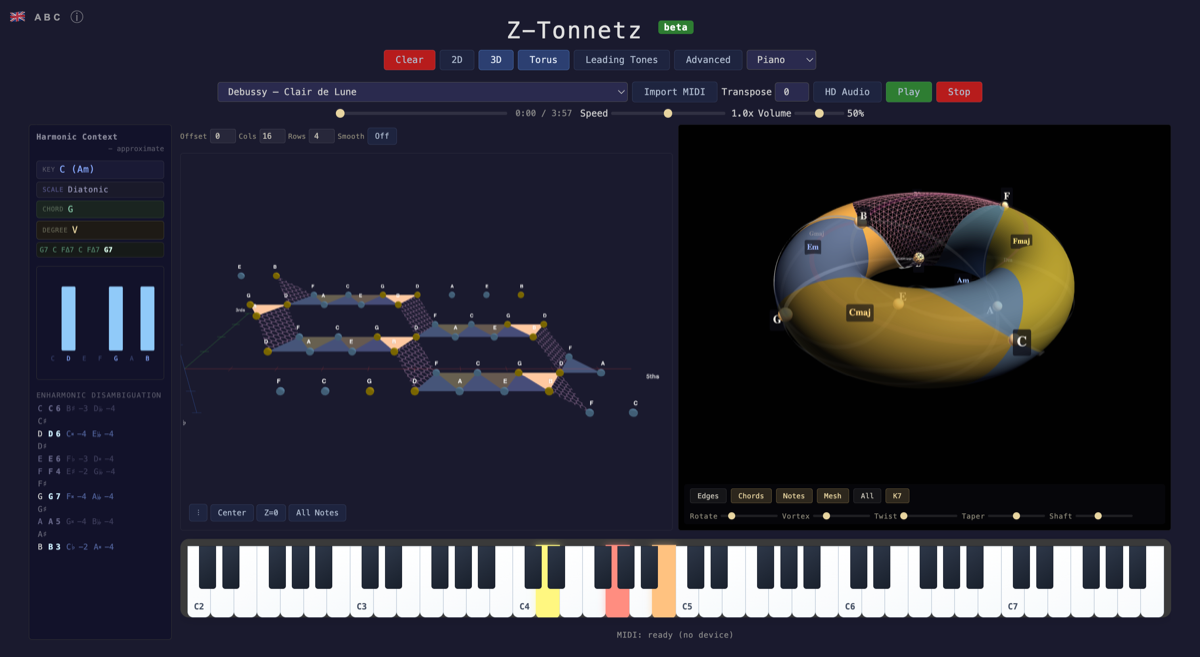
Z-Tonnetz is a browser-based tool that turns harmony into an interactive 3D map. It builds a neo-Riemannian Tonnetz—a grid where chords and keys sit in spatial relationships—and animates music on it in real time, so you can watch voice leading and key changes as they happen rather than infer them from a score.
What you can do with it
- Play your own keyboard and see chords light up on the Tonnetz as you play.
- Import a MIDI file, or pick from the built-in demo library, and follow the harmony unfold.
- Switch between 2D and 3D views, including a torus layout, and toggle overlays for leading tones and chord labels.
- Change the instrument sound (piano, organ, guitar, strings, brass, e-piano, synth and others) and adjust speed and volume.
Who it suits
It is aimed at people who already read a little theory and want to see it: composition and theory students studying neo-Riemannian ideas, songwriters looking for smooth chord moves, and teachers who want a visual aid in class. The demo list leans heavily on Bach—chorales, inventions, the Cello Suite Prélude, the Chaconne—alongside pop and film/game music (a-ha, Radiohead, Toto, Uematsu), which makes it easy to compare a chorale's tight voice leading with a pop progression's looser moves.
Trade-offs
The appeal is the visual, real-time feedback; the cost is that the 3D Tonnetz takes a little getting used to, and the tool is a viewer for harmonic relationships, not a notation or scoring program. It is labeled beta, so expect rough edges.
Next step: open the demo files and load a Bach chorale alongside a pop track you know well, then toggle the leading-tone overlay to compare how each handles resolution.
How can I use Z-Tonnetz to visualize a MIDI file I already have?
Load your file with Import MIDI in Z-Tonnetz, then press Play and watch the harmony move through the 3D Tonnetz in real time. The page's controls let you switch between 2D, 3D and a Torus view, and toggle Leading Tones and Chords overlays, so you can decide how much harmonic detail is shown while the piece plays. Use Speed to slow a dense passage down and Transpose if you want to view the same progression in another key. A SoundFont loads on first playback, so expect a short wait before audio starts.
A practical workflow
- Import the MIDI and play it once at normal speed just to see the overall path the music takes across the space.
- Slow it down and enable the Chords overlay to study individual progressions; add Leading Tones when you want to see how single voices connect one chord to the next.
- Switch to the Torus view for music that modulates widely, since wrapping the space keeps distant keys in view.
If you want a reference point before using your own file, the built-in demo list includes Bach chorales and preludes, a Mozart sonata movement, Debussy's Clair de Lune, and pop tracks such as a-ha's Take On Me and Toto's Africa — useful for comparing how a classical modulation and a pop loop look in the same visualization.
Your own keyboard input is also available if you want to test a chord you just heard in the file. For background on the Tonnetz concept itself, Wikipedia's Tonnetz article explains the underlying geometry.
What does the 3D Tonnetz view show about chord relationships and voice leading that a 2D view cannot?
The 3D Tonnetz turns the flat triangular lattice into a wrapped surface—the page shows a Torus toggle alongside 2D/3D and Leading Tones/Chords modes—so harmonic space continues past the edges instead of stopping at a boundary. In practice, a 2D Tonnetz makes local moves easy to read: neighbouring triangles share tones, and a short step across an edge is a small voice-leading change. The 3D view's value is showing what happens when a progression keeps moving in the same direction: distant keys reappear as adjacent regions because the space closes on itself, which is hard to picture on a flat diagram.
What each view is good for
| View | Best for | Trade-off |
|---|---|---|
| 2D Tonnetz | Reading individual chord moves and shared tones at a glance | Long or modulating progressions run off the diagram |
| 3D/Torus | Seeing repeated patterns, enharmonic wrap-around and large-scale key motion | Perspective hides some triangles; needs rotating to read |
The Leading Tones and Chords toggles change what is emphasised, so you can follow single-voice motion or whole-chord shapes. The Advanced option and the instrument and sound presets suggest the page is built for listening as well as looking, and the demo files range from Bach chorales and fugues to pop songs such as "Africa" and "Take On Me"—useful because their modulations and chromatic bass lines give the 3D space something to show.
A concrete way to use it: load a MIDI file with a clear modulation, such as a Bach chorale or "Creep," and switch between 2D and 3D on the same passage. If the chord path curves back near its starting region, you are seeing a return to a closely related key; if it spirals away, the modulation is more distant. For background on the underlying theory, see Wikipedia's article on the Tonnetz, and for a broader harmony reference, musictheory.net.
What is neo-Riemannian theory and how does Z-Tonnetz help me understand it?
Neo-Riemannian theory is a way of describing harmony by how chords transform into one another, rather than by stacking scale degrees within a key. Its basic moves connect major and minor triads that share two common tones: P (parallel) flips a triad to its same-root opposite, L (leading-tone exchange) swaps the third for the root a semitone away, and R (relative) swaps the fifth for the third. Chaining these transformations produces progressions that often cross key boundaries smoothly, which is why the theory is popular for explaining chromatic music from the nineteenth century onward and, more recently, film and pop harmony.
Z-Tonnetz presents this as an interactive 3D harmonic space built on a neo-Riemannian Tonnetz. According to the site, you can play a MIDI file or your own keyboard and watch chords, voice leading and key relationships update in real time. The page also shows a 2D/3D toggle, a torus view, and layers labelled "Leading Tones" and "Chords," plus instrument and synth options and a library of demo files ranging from Bach and Mozart to pop songs such as "Take On Me" and "Africa."
How the site helps you learn the theory
- Seeing transformations, not just names. A P, L or R move is a short step between neighbouring triangles on a Tonnetz. Watching a chord change animate makes the shared tones and the moving voice concrete rather than abstract.
- Connecting sound to geometry. Loading a familiar piece and following its triads shows where a progression stays local and where it jumps, which is exactly the distinction the theory is designed to capture.
- Testing ideas by playing. Because you can use your own keyboard, you can try a chain like C major → A minor (R) → F major (L) and observe the path, then compare it with a conventional functional progression.
- Using the torus view for wrap-around relationships. The 3D torus is a way to see that the space closes on itself; treat it as an orientation aid once the flat layout is familiar.
A practical starting point
Pick one short demo, such as a Bach chorale prelude or "Take On Me," and watch only the chord layer. Pause on each change and ask which of P, L or R it resembles, and which single note moved. Then reproduce that move yourself on the keyboard and listen for the common tones. If you want a second reference for the underlying concepts, the Wikipedia article on neo-Riemannian theory covers the transformations and their history, while musictheory.net is useful for brushing up on basic triads and intervals first.
The main trade-off: a Tonnetz rewards curiosity and repeated listening but does not teach notation or voice-leading rules on its own, so pair it with score reading or a theory text if you need systematic grounding.
Can I connect my own MIDI keyboard to Z-Tonnetz and see chords in real time?
Yes. Z-Tonnetz is built to respond to live playing as well as to MIDI files: its own description says you can "play any MIDI file or your own keyboard and watch chords, voice leading and key relationships unfold in real time." The page also shows a Free Mode with 2D/3D and torus views plus toggleable Leading Tones and Chords layers, so incoming notes can be read as chord shapes and voice-leading motion rather than just a scrolling piano roll.
What to expect in practice
- Setup: connect your keyboard, then check that Free Mode is active and that notes register on the Tonnetz before judging the chord display. If nothing lights up, the issue is usually the browser's MIDI permission or the keyboard's MIDI channel setting, not the visualization.
- Chord labels: the Chords layer is most useful for block chords and slow harmonic rhythm. With fast arpeggios or heavy sustain-pedal use, expect overlapping notes to blur the reading—release the pedal or play more sustained voicings when you want clean labels.
- Voice leading: the Leading Tones layer is the one to watch for smooth progressions. Play a short loop such as C–Am–F–G and compare how the highlighted tones move against a more chromatic progression; that contrast is where the tool teaches most.
A concrete first session
Pick one short progression you already know, play it in Free Mode with Chords on, then switch to 3D or the torus view to see whether repeated chords cluster in the same region. Then import a MIDI file of a piece in the demo list and follow along at reduced speed—hearing a familiar work while watching its harmonies move is often faster than reading theory first.
Where it fits and where it doesn't
It suits harmony students, composers testing progressions, and neo-Riemannian curious players who want a visual complement to score study. It is not a notation editor, a transcription trainer, or a substitute for ear work; treat the display as a second opinion on what you played. For conventional score-based analysis alongside it, Music Theory and Hooktheory cover complementary ground.
As a next step, decide your goal before connecting: chord recognition practice favors 2D with Chords on, while key-relationship exploration rewards the 3D and torus views.
How do I switch between the 2D, 3D, and torus views to compare harmonic spaces?
Use the 2D, 3D and Torus controls at the top of the Z-Tonnetz interface to switch views directly; the page shows these as separate toggles rather than a single view menu. In practice, start in 2D to read the layout, switch to 3D to see how the harmonic surface is arranged in depth, and use Torus to see the space wrapped so that opposite edges connect.
What each view is for
| View | Best for | Trade-off |
|---|---|---|
| 2D | Reading chord positions and voice-leading paths at a glance; a clean reference while listening | Loses the sense of depth and the wrap-around relationships |
| 3D | Seeing the harmonic space as a spatial object and how regions sit relative to one another | Notes can overlap or hide behind others, so orientation takes a moment |
| Torus | Understanding why distant-seeming keys connect, since the surface closes on itself | The wrap is conceptually demanding; less useful for quick note-finding |
A practical comparison routine
- Load a short, familiar piece from the demo files — a Bach chorale or the Pachelbel Canon works well because the harmony is clear.
- Play it in 2D and note the chord sequence and how the highlighted path moves.
- Switch to 3D and replay the same passage, watching how that path sits on the surface.
- Switch to Torus and replay once more, this time looking for where the path crosses the wrapped edges.
This sequence uses the same music three times, so the only variable is the view — which is what makes the comparison meaningful. Keep the Leading Tones and Chords overlays consistent across all three passes, otherwise you are comparing overlays rather than views.
Choosing a default
If you are learning neo-Riemannian theory or analysing voice leading, stay in 2D for daily work and treat 3D and Torus as occasional checks. If your interest is the geometry of harmonic space itself, the Torus view is the one that repays the most time, with 2D as the map you return to when you get lost.
 IONOS SE
 Germany

User reviews (0)