
 简体中文
简体中文 English
adamstrange.itch.io
At a glance
- Category
- Games & Board Games
- Language
- English
- Paid-content signal
- No paid content foundObserved
- Registered
- Unknown
- Hosting
- CloudflareInferred
- HTTPS certificate trusted
- PassedObserved
- Last updated
Related questions
More questions →How to Find a Specific AdamStrange Game or Tool on itch.io
Open the AdamStrange profile on itch.io and scan the project list on that page. Each project name—such as BleakHarbor, Axonite, NeonOverdrive, or HoneyThings—is a separate entry that links to its own itch.io project page with the details for that release. This works when you already know the title or can recognize it from the list; if you only remember a genre or a rough description, use the genre labels shown next to each entry to narrow the list first.
Start From the Profile Page
The profile page is the single index for everything AdamStrange publishes on itch.io. It presents the projects as a list, and each line pairs a title with a short description and a genre tag. That structure is what makes title matching practical: you read down the list, spot the name, and click through.
The page also carries a Follow option for the creator, which is the way to see new releases as they appear rather than checking back manually.
Match the Project Title
Titles on the page are distinctive enough to search visually. The list includes, among others:
| Title | What the entry describes |
|---|---|
| BleakHarbor | Dungeon Crawler |
| DemonStrike | Atari 2600-style shoot-em-up |
| SoulBinder | Dungeon Crawler / Role Playing |
| QasarBeach | Alias (Fairlight CMI IV) music |
| PicoView | A small PicoCad 3D viewer |
| NeonOverdrive | 3D vector retro arcade |
| WIDE2 | Wonkey IDE 2 |
| Sunken | Underwater Dungeon Crawler |
| Axonite | Amiga-style retro shoot-em-up |
| One Of Us | 7drl 2020 entry, Role Playing |
| QasarBeach CMI IIz | Complete Fairlight CMI IIx reproduction |
| HoneyThings | Amiga 16-bit Puzzle Action RPG |
| Viva Mortis | Spectrum-style retro action |
| ColorTagz | Pick colors from images and create palettes |
| Bloom | AGBIC2018 entry, arcade/NES/2600 retro action |
| BloodCrypt | 3D roguelike action |
| SyntaxBomb | Retro action |
| FontMap | Multiple resolution map generator |
| PaletteEditor | Edit custom palettes for your projects |
| FontSprite | Simple fontsprite editing with many functions |
If the title you have in mind is not in the list, it may be listed under a slightly different name—QasarBeach, for example, appears more than once with different suffixes (the Alias/Fairlight CMI IV entry and the CMI IIz reproduction). Check the variants before concluding a project is missing.
Use Genre Labels When You Only Remember the Type
The genre tag after each title is the fastest filter when the name escapes you. The page groups its output into recognizable categories:
- Dungeon crawlers and role-playing: BleakHarbor, SoulBinder, Sunken, One Of Us, BloodCrypt, HoneyThings
- Shooters and action: DemonStrike, Axonite, Viva Mortis, SyntaxBomb, Bloom, NeonOverdrive
- Music and audio: the QasarBeach entries
- Creative and utility tools: PicoView, WIDE2, ColorTagz, FontMap, PaletteEditor, FontSprite
- Magazines: SyntaxBomb Magazine and the Retro Inspired Xmas Magazine
So if you remember "the Amiga-style shooter," the shooter rows point you to Axonite; if you remember "the palette tool," the utility rows point you to PaletteEditor or ColorTagz.
Open the Project Page for Details
Clicking a title takes you to that project's own itch.io page. That page is where the specifics live—the full description, any screenshots or GIFs, and whatever download or play options the creator has set up there. The profile list itself only gives you the title, a one-line description, and the genre, so treat it as the directory and the project page as the detail view.
Keep Track of New Releases
Following the AdamStrange profile is the intended way to catch additions to the list. Because the profile page is the canonical index, a new game or tool will appear there as a new entry with its own title and genre tag, and you can locate it the same way—by scanning titles or filtering by genre.
Common Sticking Points
- Similar names: QasarBeach appears in multiple forms. Read the suffix to tell the Alias/Fairlight CMI IV entry apart from the CMI IIz reproduction.
- Tools versus games: Utility entries like FontMap, PaletteEditor, and FontSprite sit in the same list as the games. If you are looking for a game, skip rows tagged as generators or editors.
- Magazine entries: SyntaxBomb Magazine and the Xmas magazine are publications, not games or tools, so they will not match a search for playable software.
- No search box on the profile: The list is short enough to scan, but matching on the exact title or the genre tag is faster than reading every description.
What Is AdamStrange on itch.io?
AdamStrange on itch.io is the creator profile page of a solo developer who publishes retro-inspired games and small development tools. It is a catalog of projects rather than a single product: visitors can browse titles across many genres and follow the creator for updates. If you are looking for a specific game, a retro-style shooter, or a utility like a palette editor, this page is the place to find it.
What you will find on the page
The profile lists each project with a short description and a genre tag. The catalog mixes full games with practical tools.
Games
| Project | Genre / style |
|---|---|
| BleakHarbor | Dungeon crawler |
| DemonStrike | Atari 2600-style shoot-em-up |
| SoulBinder | Dungeon crawler / role playing |
| NeonOverdrive | 3D vector retro arcade racing |
| Sunken | Underwater dungeon crawler |
| Axonite | Brutal Amiga-style retro shoot-em-up |
| One Of Us | 7drl 2020 entry, role playing |
| HoneyThings | Amiga 16-bit puzzle action RPG |
| Viva Mortis | Retro Spectrum-style action |
| Bloom | AGBIC2018 entry, arcade/NES/2600-style platformer |
| BloodCrypt | 3D roguelike action |
| SyntaxBomb | Retro-style platformer |
Tools and utilities
- QasarBeach – an alias/reproduction of the Fairlight CMI (CMI IIz is described as a complete CMI IIx reproduction), aimed at music work.
- ColorTagz – pick colors from images and create palettes.
- FontMap – multiple-resolution map generator.
- PaletteEditor – edit custom palettes for use in your projects.
- FontSprite – simple font sprite editing with many functions.
- PicoView – a small PicoCad 3D viewer.
- WIDE2 (Wonkey IDE 2) – a development IDE.
- SyntaxBomb Magazine and a Retro Inspired Xmas Magazine – magazine projects.
How to use the page
- Open
adamstrange.itch.ioin a browser. - Scroll the project grid to see each title, its short description, and its genre tag.
- Click a project to open its own page, where you can read more and download or play it.
- Use the Follow option on the profile to keep up with new releases.
The expected result is a quick overview of the whole catalog; individual project pages hold the download and play details.
Who it is for
- Retro game fans – the catalog leans heavily on Atari 2600, Amiga, Spectrum, and NES aesthetics across shooters, platformers, dungeon crawlers, and racing.
- Game makers – the palette, font, and map tools are small utilities you can use in your own projects.
- Music and demo enthusiasts – QasarBeach targets Fairlight CMI-style music work.
Common sticking points
- It is a profile, not a storefront. There is no single checkout; each project is handled on its own page.
- Genres are tags, not guarantees. A tag like "Role Playing" or "Adventure" describes the style, so check the project page for specifics before downloading.
- Tool vs. game. Some entries (FontMap, PaletteEditor, WIDE2) are development utilities, not playable games — useful to know if you arrived expecting a game.
What Are the QasarBeach Projects on AdamStrange's itch.io Page?
QasarBeach is AdamStrange's music-software line on itch.io, listed as two separate projects: QasarBeach, described as an "Alias (Fairlight CMI IV) music" project, and QasarBeach CMI IIz, described as a "Complete Fairlight CMI IIx reproduction." Both are music tools rather than games, and they sit on a profile otherwise dominated by retro shooters, dungeon crawlers, and pixel-art utilities. Treat them as two distinct downloads and check each project page for platform and usage details before installing.
The two listings at a glance
| Project | Listing description | Category shown | What it points to |
|---|---|---|---|
| QasarBeach | "Alias (Fairlight CMI IV) music" | Music | A tool modeled on the Fairlight CMI series, specifically the Alias / CMI IV reference |
| QasarBeach CMI IIz | "Complete Fairlight CMI IIx reproduction" | Music | A reproduction of the Fairlight CMI IIx |
The Fairlight CMI was a landmark sampling synthesizer of the late 1970s and 1980s, famous for its light-pen interface and its cost. Both listings frame QasarBeach as software in that lineage: one as an "Alias" take on the CMI IV, the other as a full reproduction of the CMI IIx. The page text does not state price, operating system, or whether either is open source, so confirm those on the individual project pages.
Which one are you looking at?
The names are easy to confuse because both begin with "QasarBeach" and both use Fairlight model numbers.
- QasarBeach — the shorter name, tagged with "Alias (Fairlight CMI IV)." If you want the project that references the CMI IV / Alias line, this is the one.
- QasarBeach CMI IIz — the longer name, tagged as a "complete" CMI IIx reproduction. The "IIz" in the title and the "IIx" in the description both appear in the listing as written; read the project page itself to see which model it targets and what "complete" covers.
Neither entry is a game, so don't expect the arcade or roguelike style of the rest of the profile. They belong with the creator tools on the page — ColorTagz, FontMap, PaletteEditor, FontSprite, PicoView — rather than with BleakHarbor, Axonite, or NeonOverdrive.
How to decide whether to download
- Open each project page from the profile rather than relying on the listing blurb.
- Check the stated platform and any system requirements; the profile page does not list them.
- Look for version notes or changelogs to see how actively each is maintained.
- Confirm licensing and price terms on the page itself — the profile gives no pricing signals either way.
- If you specifically want a CMI IIx-style instrument, start with QasarBeach CMI IIz; if you want the CMI IV / Alias reference, start with QasarBeach.
Where these fit on the profile
AdamStrange's itch.io page mixes retro games (DemonStrike, Axonite, Viva Mortis, BloodCrypt), adventure and RPG entries (BleakHarbor, SoulBinder, Sunken, One Of Us), and small creative utilities. The QasarBeach pair is the music corner of that catalog. If your interest is game development tooling rather than music, the palette and font utilities are the closer match; if you came for the Fairlight connection, the two QasarBeach listings are the relevant ones.
What the Utility Tools on AdamStrange's itch.io Page Can Do
The AdamStrange itch.io profile mixes retro-style games with a set of small creative utilities. Based on the page listings, the tools cover five jobs: pulling color palettes out of images (ColorTagz), generating maps at multiple resolutions (FontMap), editing custom palettes for your own projects (PaletteEditor), editing fonts and sprites (FontSprite), and viewing PicoCad 3D models (PicoView). Each is presented as a standalone project on the profile, so the practical question is which one matches the asset task you're doing.
What each tool is listed as
| Tool | Listed description | What that implies you'd use it for |
|---|---|---|
| ColorTagz | "pick colors from images and create palettes" | Sampling colors from reference images and assembling them into a palette |
| FontMap | "Multiple resolution map generator" | Producing map output at more than one resolution |
| PaletteEditor | "Edit Custom Palettes to use in your projects" | Adjusting palettes so they can be reused in your own work |
| FontSprite | "Simple fontsprite editing with lots of functions" | Editing font and sprite assets in one place |
| PicoView | "A Small PicoCad 3d Viewer" | Opening and inspecting PicoCad 3D models |
How the tools fit together
The palette-related tools form a natural sequence. ColorTagz is the entry point when your color source is an image: you pick colors from it and build a palette. PaletteEditor is where you refine a palette and keep it for use in projects. If you're working in a retro or limited-color style — which fits the rest of the profile, where listings reference Atari 2600, Amiga, Spectrum, and NES influences — that pair covers going from a reference image to a reusable palette.
FontMap and FontSprite sit on the asset-production side rather than the color side. FontMap's listing is specifically about generating maps at multiple resolutions, so it's the one to look at when the same map needs to exist at more than one size. FontSprite is described as font/sprite editing with "lots of functions," which suggests a general-purpose editor rather than a single narrow task; the listing doesn't enumerate the functions, so treat the exact feature set as something to confirm on the project page.
PicoView is the outlier: it's a viewer, not an editor. Its listed purpose is displaying PicoCad 3D models, so it's useful for checking a model rather than changing it.
Choosing based on your task
- You have a reference image and need its colors → start with ColorTagz.
- You have a palette and need to adjust or store it for a project → PaletteEditor.
- You need the same map at several resolutions → FontMap.
- You're editing font or sprite assets → FontSprite.
- You need to look at a PicoCad model → PicoView.
What the page does and doesn't tell you
The profile page gives one-line descriptions and genre/style tags for each project, not feature lists, version numbers, or platform requirements. Before committing to a tool for a real project, open its individual project page to check the supported formats, how output is exported, and whether it runs in the browser or as a download — none of that is established by the profile listing alone. The page also doesn't state pricing for these tools, so don't assume they're free or require no account; confirm that on each project page.
What AdamStrange Publishes on itch.io: Retro Games and Creative Tools
AdamStrange's itch.io page is a catalog of retro-inspired games and practical development tools. The games lean on Atari 2600, Amiga, ZX Spectrum, and NES references, spanning shoot-em-ups, dungeon crawlers, platformers, racing, and puzzle titles. Alongside them are utilities for palette work, font editing, map generation, and 3D viewing, plus music software that reproduces the Fairlight CMI. If you want fast, arcade-style play or small tools for retro-style projects, the page is worth browsing; if you need modern large-scale games or actively maintained commercial software, the listings alone won't tell you whether they fit.
Games: Retro Action Across Several Genres
The game listings cluster around arcade and 8/16-bit styles. The page describes several titles directly:
| Title | Genre / Style | Page description |
|---|---|---|
| DemonStrike | Shooter | "Revisit the Atari 2600 with this blast of a shoot-em-up" |
| Axonite | Shooter | "Brutal Amiga Retro Shootemup" |
| Viva Mortis | Action | "full-on retro Spectrum-tastic action" |
| Bloom | Platformer | "AGBIC2018 Entry. Arcade/NES/2600 fast retro action" |
| SyntaxBomb | Platformer | "full-on retro-tastic action" |
| NeonOverdrive | Racing | "3DVector retro arcade mayhem" |
| BleakHarbor | Dungeon Crawler | listed under Adventure |
| SoulBinder | Dungeon Crawler | listed under Role Playing |
| Sunken | Dungeon Crawler | listed under Adventure |
| BloodCrypt | Role Playing | "Fabulous 3d roguelike action" |
| HoneyThings | Puzzle | "Amiga 16-bit Puzzle Action RPG" |
| One Of Us | Role Playing | "7drl 7drl 2020 entry" |
Two patterns stand out. First, the platform references are explicit and specific—Atari 2600, Amiga, Spectrum, NES—so you can pick by the era you enjoy rather than guessing from screenshots. Second, several titles are game-jam entries (AGBIC2018, 7drl 2020), which usually means small scope and a short, focused experience rather than a long campaign.
Tools: Small Utilities for Retro and Pixel Work
The page also lists several development and creative tools:
- ColorTagz — "pick colors from images and create palettes"
- PaletteEditor — "Edit Custom Palettes to use in your projects"
- FontMap — "Multiple resolution map generator"
- FontSprite — "Simple fontsprite editing with lots of functions"
- PicoView — "A Small PicoCad 3d Viewer"
These are narrow, single-purpose utilities. If your task is, for example, extracting a palette from a reference image and reusing it in a pixel-art project, ColorTagz and PaletteEditor cover that step; FontSprite handles bitmap font work. The listings don't state platform support, file formats, or price, so check each project page before relying on one in a workflow.
Music Software: Fairlight CMI Reproductions
Two listings target music production rather than games:
- QasarBeach — described as an "Alias (Fairlight CMI IV) music" project
- QasarBeach CMI IIz — "Complete Fairlight CMI IIx reproduction"
These are for people interested in the sound and workflow of the Fairlight CMI, a classic sampling synthesizer. The descriptions indicate reproduction/emulation of specific CMI models, but the page doesn't give system requirements or licensing details—confirm those on the individual project pages.
Magazines and Other Listings
The page also includes SyntaxBomb Magazine ("Retro Inspired Xmas Magazine"), a magazine-style release rather than a game or tool. It's a signal that the creator's output extends to community and retro-culture content, not just software.
How to Decide What to Try
- Want a quick arcade fix: start with the shooters (DemonStrike, Axonite) or the vector racer NeonOverdrive; the descriptions promise short, intense sessions.
- Prefer dungeon crawlers or roguelikes: BleakHarbor, SoulBinder, Sunken, and BloodCrypt form a clear cluster, with BloodCrypt noted as 3D.
- Working on a retro-style project: the palette, font, and map tools are the relevant group; treat each as a small utility and verify its inputs and outputs on its own page.
- Interested in classic samplers: the QasarBeach listings are the entry point.
Because the page gives genre labels and short taglines but not prices, platforms, or update status, use the listings to shortlist titles and then open the individual project pages for the details that matter to your decision.
Website Overview
Several search or sharing settings need attention. Together they may make snippets, preview images or preferred URLs less consistent across platforms.
Domain and Registration
Unknown
DNS and Email
Nameservers are provided by Cloudflare, indicating managed DNS hosting. MX records point to the Zoho Mail email service. No CNAME was found; the observed records resolve directly to addresses. SPF and DMARC are configured. DKIM status is unknown. TXT records include verification markers for Google. Such markers may also remain after a service stops being used.
TLS and Certificates
The public key uses EC with 256 bits. The server supplied a complete certificate chain. No organization name is present in the certificate; the available fields are consistent with domain validation. The certificate was issued within the Google Trust Services cloud or CDN ecosystem. The certificate's total validity is about 90 days, consistent with a short renewal cycle.
HTTP and Browser Security
The response lacks these common security headers: HSTS, CSP, Permissions-Policy. No X-Powered-By header was found, reducing one common source of backend fingerprinting information. The cf-ray response header indicates a CDN or caching proxy in the delivery path. No obvious internal addresses or debug information were found in the headers. The Server header identifies cloudflare without an exact version.
Technology Stack Analysis
The public page identifies Google Analytics, Cloudflare without precise versions, leaving fewer clues for version-specific scanning.
Search and Social Sharing
No homepage meta description was detected, leaving snippet selection more dependent on page text. No homepage canonical URL was detected. If duplicate URLs exist, consolidation may be less explicit. No Open Graph metadata was detected, so social previews may depend on platform inference. Twitter Card metadata is configured. The title has 21 characters, within a common display range.
Hosting and Email
 Cloudflare
 Zoho Mail
Registration details
Unknown
DNS records
| Type | Name | Value | TTL | Priority |
|---|---|---|---|---|
| A | adamstrange.itch.io | 104.26.8.198 | 300 | — |
| A | adamstrange.itch.io | 104.26.9.198 | 300 | — |
| A | adamstrange.itch.io | 172.67.69.99 | 300 | — |
| AAAA | adamstrange.itch.io | 2606:4700:20::681a:8c6 | 300 | — |
| AAAA | adamstrange.itch.io | 2606:4700:20::681a:9c6 | 300 | — |
| AAAA | adamstrange.itch.io | 2606:4700:20::ac43:4563 | 300 | — |
| MX | itch.io | mx.zoho.com | 300 | 10 |
| MX | itch.io | mx2.zoho.com | 300 | 20 |
| NS | itch.io | dawn.ns.cloudflare.com | 86400 | — |
| NS | itch.io | noah.ns.cloudflare.com | 86400 | — |
| TXT | itch.io | google-site-verification=6hl42kO3bIWWIu-mf44uXdzQc2ckxn-If90YdNhRUBg | 300 | — |
| TXT | itch.io | v=spf1 include:mailgun.org include:zohomail.com include:mail.zendesk.com include:spf.mtasv.net -all | 300 | — |
| TXT | itch.io | zoho-verification=zb14183429.zmverify.zoho.com | 300 | — |
| DMARC | _dmarc.itch.io | v=DMARC1; p=none; pct=100; rua=mailto:[email protected]; sp=none; aspf=r; | 300 | — |
TLS and certificates
HTTP response headers
| Header | Value |
|---|---|
| content-type | text/html |
| server | cloudflare |
| x-frame-options | SAMEORIGIN |
| x-content-type-options | nosniff |
| referrer-policy | no-referrer-when-downgrade |
| set-cookie | Redacted |
Identified technologies
Pages, Search and Sharing
| Meta description | Not detected |
|---|---|
| Canonical URL | Not detected |
| Language | English (default) |
| Twitter Card | summary_large_image |
Social Sharing Preview
5 fields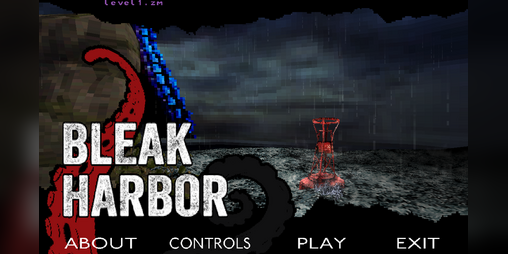
robots.txt (opens in a new tab)
4 rulesmediapartners-google 0 allowed · 0 disallowed
All bots 0 allowed · 4 disallowed
- Disallow
/*/download/ - Disallow
/*/rh/ - Disallow
/*/rp/ - Disallow
/-/
No matching rules.
User reviews (0)