Website profiles · Technology insights · Alternatives

ambient-mixer.com No paid content found

Categories: Music & Audio

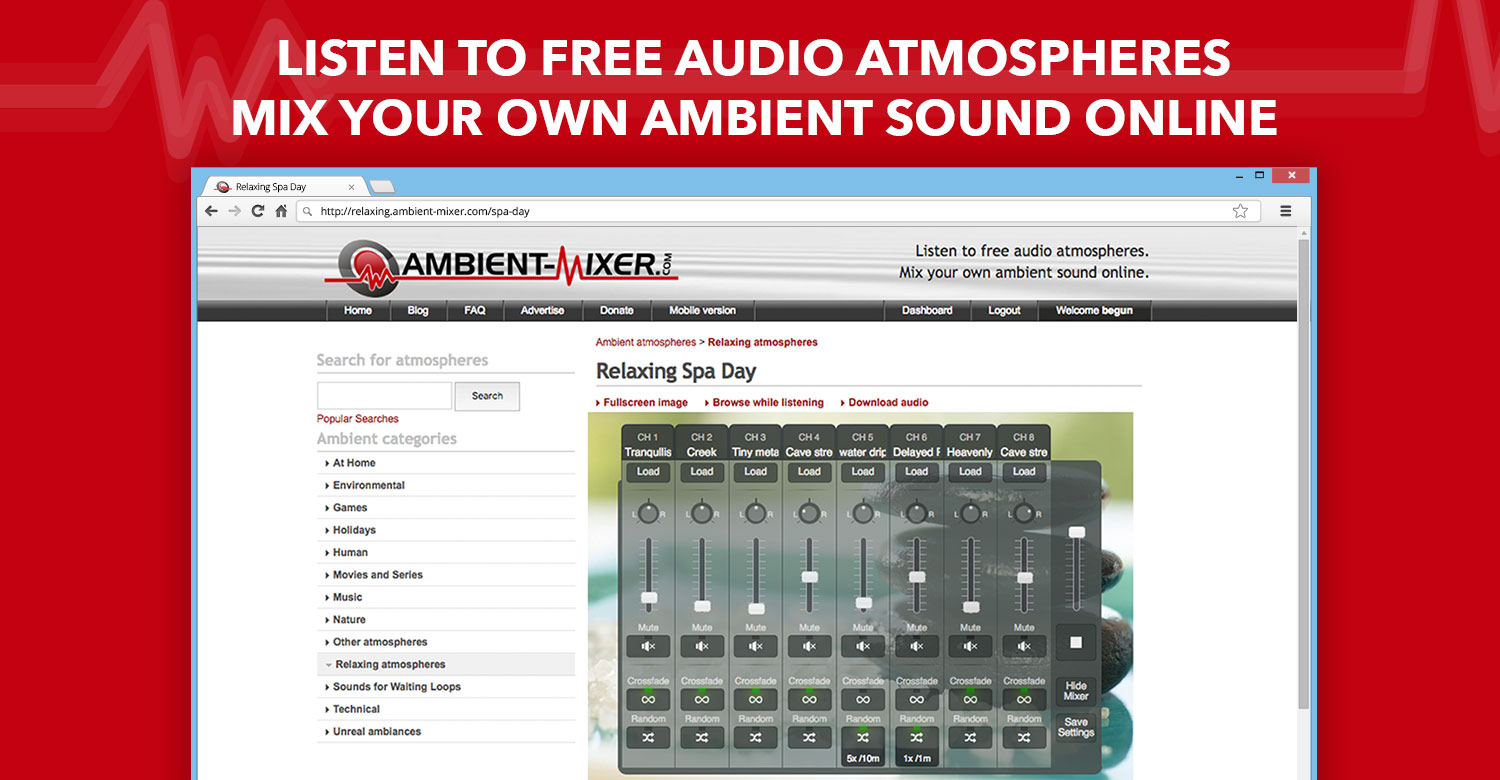
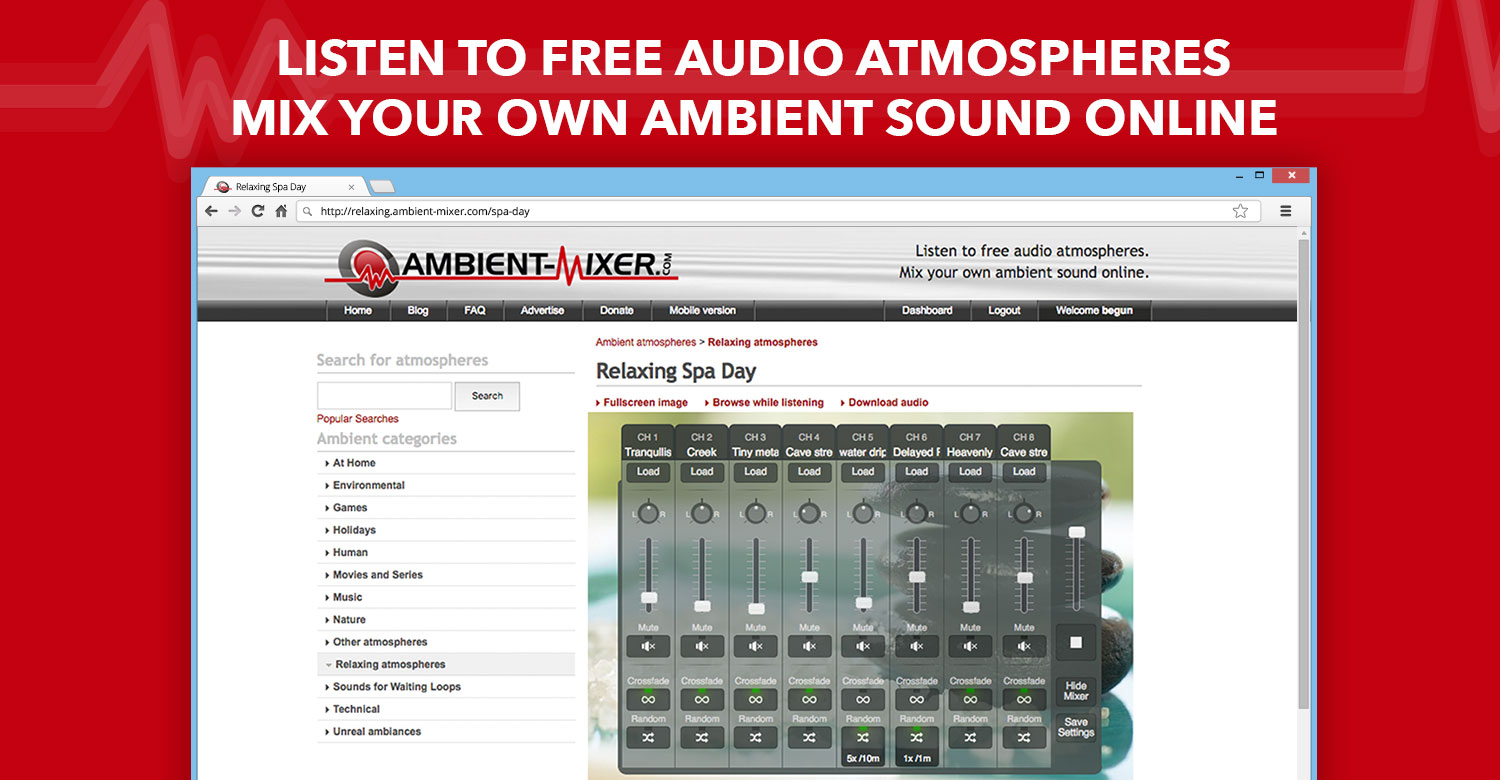
Listen online to relaxing sound atmospheres, ambient music or chilling sound effects. You can even create and mix your own moods, all for free.

Visit website

Updated: 2026-10-01 11:57 Language: English (default) Access: Normal

Profile views 0 Outbound visits 0
Listen and create ambient sounds easily Full homepage screenshot
Editorial Review

Website Review

What is Ambient-Mixer.com?

Ambient-Mixer.com is a free, community-driven site for listening to and building ambient soundscapes. You browse a gallery of ready-made "audio templates," click one, and it plays a layered atmosphere — rain, fire, forest, room tone, music fragments and effects — that you can often edit by adjusting or muting individual layers. The stated uses are chilling, relaxing, focus and recording backgrounds.

Who it suits

  • Writers, students and remote workers who want steady background noise instead of silence or lyrics.
  • Tabletop role-players and fan-fiction readers who want a scene-setting room, tavern or storm.
  • Anyone curious enough to build a custom mix rather than accept a single fixed track.

What you actually get

  • A large library of user-made atmospheres, with sorting by most rated and most recent.
  • A built-in mixer for creating your own sound mix online, plus editing of existing templates.
  • A visible voting and view count on each template, which is a rough popularity signal rather than a quality guarantee.
  • A mobile version, blog and FAQ, and a donation option rather than a paywall.

Trade-offs to weigh

Strength Limitation
Free to listen and mix in the browser Community-made quality varies widely
Huge, browsable catalogue Popularity skews toward fandom themes, not neutral ambience
Editable layers give control You may spend more time tweaking than listening

A practical next step

Pick one template that matches your task — for example a rain or library mix for focused work — play it for ten minutes, then open the mixer and lower any layer that distracts you. Save that version for reuse. If you want a different flavour of the same idea, compare with myNoise for parameter-heavy generators or A Soft Murmur for a simpler mixer.

How can I create my own ambient sound mix on Ambient-Mixer.com?

You can create your own mix by starting from an existing template rather than building from scratch. On Ambient-Mixer.com, every audio template is editable, so the practical workflow is: open a soundscape that is close to what you want, then adjust it to your needs. The site describes this as creating your own atmospheric sound mix online and for free.

A practical way to build a mix

  1. Pick a starting point. Browse the top audio templates or the most-rated and most-recent lists. If you want rain plus a fire, open something like "Fire On A Stormy Night" or "Scottish Rain" and edit from there.
  2. Choose your layers. A mix usually combines a background bed (rain, wind, forest) with foreground details (crackling fire, pages turning, distant voices). Keeping one continuous layer underneath makes the result feel less choppy.
  3. Balance the volumes. Set the main atmosphere loud enough to mask distractions, then bring secondary sounds in quietly. If you are using it for writing or study, aim for a mix where no single element pulls your attention.
  4. Save and name it. Give it a clear name so you can find it again, especially if you make several versions for different moods.

Matching the mix to the task

Goal Useful mix shape
Focused work or study One steady layer (rain, library hum) with minimal variation
Winding down before sleep Low, slow sounds such as rain or a fireplace, no sudden peaks
Tabletop gaming or reading A themed scene with several distinct elements, like a tavern or common room
Recording or streaming A consistent loop you can leave running without noticeable repeats

The trade-off is between realism and control. Templates with many layers feel richer but take longer to balance; a two- or three-layer mix is quicker to set up and easier to keep unobtrusive.

As a next step, open one template, mute everything except the layer you like most, then add one sound back at a time until the mix sounds right.

What types of ambient sound atmospheres are available on Ambient-Mixer.com?

Ambient-Mixer.com is a community-driven library of user-created ambient soundscapes. Rather than a fixed catalogue of nature recordings, it hosts thousands of themed "audio templates" that mix background noise, music and effects into a continuous atmosphere. The page highlights popular mixes drawn from fantasy, fandom and everyday settings.

The main atmosphere categories you will find

  • Fantasy and fandom rooms – the most visible examples are Hogwarts common rooms, the Hogwarts Library, Rivendell, Neverland, Sherlock's apartment and a D&D tavern. These combine crackling fires, chatter, page turns and distant music to recreate a fictional place.
  • Weather and nature – thunderstorms, Scottish rain, summer forest and autumn forest mixes aimed at relaxation or masking background noise.
  • Cozy indoor scenes – fireplaces, libraries, cafés and "Mr. Tumnus' House" style domestic settings.
  • Travel and transport – ships at sea, trains and similar moving environments.
  • Seasonal and event sets – the site groups mixes for autumn, Halloween, bonfires and staying in.

How people actually use them

A student writing an essay might open a library or rain mix to block out a noisy flat. A tabletop role-playing group could run a tavern or dungeon ambience in the background. Someone winding down before sleep might pick a storm or forest loop. Because each template is editable, you can also start from an existing mix and adjust the balance of rain, fire or music to suit your own room.

A practical next step

Browse the "most rated" or "most recent" lists rather than searching blind, since community votes are a rough quality signal. If nothing fits, open a template close to what you want and edit the layers to build your own mix. For a broader range of professionally recorded ambience, myNoise and A Soft Murmur are established alternatives, while Freesound is useful if you want individual sound clips to assemble yourself.

Can I use Ambient-Mixer.com sounds for studying, writing, or sleeping?

Yes. Ambient-Mixer.com is built for exactly those low-focus, background-listening situations. The site describes its soundscapes as atmospheres for "chilling, relaxing or your recordings," and its templates are designed to loop as ambient background rather than demand active listening. Studying, writing and sleeping all fit that use case.

H3 How each use case works in practice

  • Studying: Pick a steady, low-variation mix — rain, a library, or a soft café hum — and keep it quiet enough that it doesn't compete with reading. Consistency matters more than novelty, so favor one template you can return to.
  • Writing: Atmosphere helps with scene-setting. The page's top templates lean heavily toward fictional places (Hogwarts common rooms, Rivendell, a fantasy tavern, Sherlock's apartment), which writers can use to hold a mood across a session. If you need to concentrate rather than imagine, choose a neutral template instead.
  • Sleeping: Long, repetitive textures such as rain, storms or a crackling fire work best. The page highlights "Summer Forest," "Scottish Rain" and "Fire On A Stormy Night," all of which are the kind of continuous, non-narrative sound that suits falling asleep.

H3 The mixer is the real advantage

The site lets you edit any template and build your own mix online, so you can raise the rain and lower the chatter, or drop a distracting element entirely. That control is what separates it from a fixed playlist: you tune the soundscape to your task rather than adapting to someone else's recording.

H3 Practical checks before you rely on it

  • Volume and speakers: For sleep, use a low, steady level and avoid sudden loud peaks; test a mix for a few minutes before committing to it overnight.
  • Offline and mobile: The site offers a mobile version, but check whether a mix keeps playing with your screen off or your connection dropped before you depend on it at bedtime.
  • Licensing: The page describes listening and free personal mixing, not reuse rights. If you plan to publish recordings that include these sounds, verify the terms rather than assuming they're cleared.
  • Alternatives: If you want ready-made long-form audio without mixing, Rainy Mood and A Soft Murmur are common options; YouTube hosts many ambient tracks, though ads and autoplay can break the mood.

Next step: open one template that matches your task, trim it in the mixer until nothing pulls your attention, and save that version as your default before trying anything new.

Is Ambient-Mixer.com free to use, and do I need an account?

Yes, Ambient-Mixer.com is free to use, and you can start listening without an account. You only need to sign in for actions that save or personalise your work.

What you can do without an account

  • Open any audio template from the homepage and press play.
  • Browse the top-rated, most-viewed or most recent atmospheres.
  • Listen to full mixes such as "The Perfect Storm" or "Hogwarts Library" as they were published.

Why you might still want an account

  • Creating and saving your own mix so you can return to it later.
  • Editing an existing template and keeping those changes tied to your profile.
  • Voting, commenting or otherwise taking part in the community side of the site.

Practical example A student writing a thesis might open "Scottish Rain" for background noise and never sign in, because listening is enough. The same person might later want a custom blend of rain, keyboard clicks and a fireplace, save it under a name, and adjust the volume balance each session. That second use is where an account earns its place.

Decision criterion If you only want to press play, skip the account. If you want the mix to be yours, repeatable and editable, create one. The site is supported by donations and advertising rather than a paywall, so the free tier is the main experience rather than a trial.

How do I save or share a custom mix I create on Ambient-Mixer.com?

Ambient-Mixer.com's core feature is that every published "audio template" can be edited to suit your own needs, and you can build your own atmospheric mix online for free. The site's own wording stresses listening and editing templates rather than a documented export or download workflow, so the reliable way to keep or share a custom mix is to save it on the site itself and pass along its page address.

Practical steps

  1. Open a template that is close to what you want and adjust the individual sound layers.
  2. Save the edited mix as your own version so it gets its own page.
  3. Share that page link with friends, or post it in a forum, Discord server or study group.
  4. To reuse it later, keep the link in your bookmarks or a notes file rather than relying on memory.

What to check before you invest time

  • Account requirement: The site's menu includes Login and Create account, so an account is likely needed to keep mixes tied to you. Sign in first if you want a mix to persist.
  • Public vs. private: Community mixes are publicly listed with view and vote counts, so a saved mix may be visible to others. Treat saving and publishing as closely related.
  • Offline use: If you need a mix on a plane, in a dead-zone classroom or on a device without a connection, don't assume the site offers an offline file. Test by opening your mix link with Wi-Fi off.

A concrete scenario

A student writing a thesis wants a "rainy library" mix for three-hour sessions. They open a library-style template, lower the crowd chatter, raise the rain, save it, then bookmark the resulting page. When a friend asks for the same background, they send the link instead of describing the settings.

If you need a downloadable file

If your real goal is an audio file you can loop in a video editor, a podcast or a phone's music player, this kind of browser-based mixer may not be the right tool. In that case, look at a dedicated soundscape or field-recording source, such as Freesound for Creative Commons audio clips, and check each file's licence before publishing anything.

Decision criterion

Choose the save-and-share-the-link route if you and your listeners will always have a browser and internet access. Choose a downloadable-audio route if you need the mix inside another app, offline, or under a licence you control.

Related questions

More questions →
What Is Ambient Sound and How Do You Use It to Relax or Focus?

Ambient sound is steady background audio—rain, wind, hums, or low-key instrumental loops—that fills a space without demanding your attention. You use it by picking a texture that matches your goal (rain or lofi for calm, steady noise for focus), keeping the volume just below your task, and letting it run in the background. It works best when the sound is predictable and you're not actively listening for changes.

Ambient sound vs. music vs. sudden noise

The difference is how much attention the audio pulls.

Type Attention demand Typical effect
Ambient sound Low, steady Masks distractions, sets a mood
Music with lyrics/structure Medium–high Engages memory and emotion, can compete with reading or writing
Sudden noise (alerts, traffic) High, unpredictable Breaks concentration, triggers startle

Ambient sound sits in the middle: present enough to cover small interruptions, plain enough that your brain stops tracking it after a minute or two.

Why steady background sound can help

Two mechanisms do most of the work:

  • Masking. Constant sound raises the floor of what you hear, so a nearby conversation or a door closing is less noticeable. The steadier the sound, the less your attention is drawn to it.
  • Predictability. A loop with no sudden changes gives your brain nothing new to react to, which is why rain and low hums are common choices.

This is why ambient sound often helps with reading, writing, or falling asleep—tasks where small interruptions cost more than the sound itself.

Common types and what they suit

  • Rain and water — steady, slightly textured. Good for sleep, reading, and winding down.
  • Nature soundscapes (forest, birds, waves) — more variation than rain. Better for mood and relaxation than deep focus, since birdsong can pull attention.
  • White / pink / brown noise — flat, non-musical. Best for masking speech and steady concentration; brown noise is lower and often described as less harsh than white.
  • Lofi — slow instrumental loops with a beat. Suits creative work and light tasks; the rhythm can compete with heavy reading.

How to choose a sound and volume

  1. Name the task. Sleep and relaxation → rain or nature. Focused work → noise or rain. Creative work → lofi.
  2. Start quiet. Set volume so the sound is audible but you can still hear a person speak at normal level. If you have to raise your voice, it's too loud.
  3. Test for 10 minutes. If you notice the sound itself, lower the volume or switch to something steadier.
  4. Match duration to the task. A loop for a work session; a longer, more varied soundscape for sleep.

How ambient sound generators work

A generator plays a loop or a synthesized stream of sound, and many let you layer or adjust it. Ambicular, for example, describes itself as a lofi vibes and rain sound generator that gives "an easy creative boost or just relax." Its page also notes you can "Play our music or Upload your audio file to see the magic happens," so beyond built-in sounds, you can bring your own audio into the mix.

That upload option matters if the built-in library doesn't match what you need—for instance, a recording of your own fan or a specific rain loop you already like.

When ambient sound distracts instead of helping

  • It has variation you track. Birdsong, thunder, or a melody with changes will pull attention. Switch to rain or noise.
  • It's too loud. Loud background sound makes effortful tasks harder. Drop the volume until it's barely there.
  • It competes with the task. Lyrics or a strong beat clash with reading and writing. Use instrumental or non-musical sound.
  • You're listening for the loop point. A short loop that repeats obviously becomes its own distraction. Use a longer loop or a generated stream.

If none of these fix it, the task may simply need silence—ambient sound is a tool, not a requirement.

How Does AI Audio Transcription Work and What Affects Its Accuracy?

AI audio transcription converts speech into text by combining signal processing with machine learning models trained on huge amounts of paired audio and text. In practice, the pipeline runs through several stages: audio preprocessing, acoustic and language modeling, punctuation and formatting, and—if enabled—speaker diarization and summarization. Accuracy is not a single fixed number; it depends on recording quality, accents, background noise, overlapping speech, vocabulary, and how well the chosen language is supported. This article explains each stage and the practical factors that move accuracy up or down, so you can judge when automated transcription is enough and when human review still matters.

The core pipeline: from sound wave to readable text

1. Audio preprocessing

Before any speech recognition happens, the file is normalized and cleaned up. Typical steps include:

  • Resampling to a consistent sample rate (commonly 16 kHz for speech models).
  • Channel handling: mono conversion or selecting the dominant channel when stereo tracks differ.
  • Noise reduction and gain normalization to bring quiet speakers up and steady loud peaks.
  • Voice activity detection (VAD) to find where speech actually occurs and skip silence.

Good preprocessing improves everything downstream. A clean, consistent input gives the model less to compensate for.

2. Speech recognition (acoustic + language modeling)

Modern systems use neural networks—often transformer-based—that map short audio frames to probable words or subword units. Two components work together:

  • The acoustic model estimates which sounds were spoken.
  • The language model estimates which word sequences are plausible in the target language.

The decoder combines both to produce the most likely transcript. This is why context matters: a model that "knows" a phrase is common will favor it over a phonetically similar but unlikely alternative.

3. Punctuation, casing, and formatting

Raw recognition output is a stream of words. A separate step adds:

  • Sentence boundaries and punctuation.
  • Capitalization of proper nouns and sentence starts.
  • Number, date, and currency formatting.

These are learned from text data, so they follow the conventions of the training material rather than any single style guide.

4. Speaker diarization

Diarization answers "who spoke when." The system extracts voice characteristics (embeddings) from each speech segment, clusters similar segments, and assigns labels like Speaker 1, Speaker 2. It works best when speakers sound distinct and don't talk over each other. Overlapping speech and similar voices are the main failure modes.

5. Summaries and derived outputs

Once a transcript exists, summarization models condense it into key points, action items, or topics. Because summaries are generated from the transcript, any transcription error can propagate into the summary. Speaker labels also let a summary attribute statements to the right person—if diarization was accurate.

What actually affects accuracy

Accuracy varies widely by conditions. The table below summarizes the main factors and their typical effect.

Factor Why it matters Practical impact
Audio quality / bitrate Low bitrate or clipping destroys phonetic detail Major
Background noise Music, traffic, chatter mask speech Major
Microphone distance Far-field audio is reverberant and quiet Major
Accents and dialects Training data may underrepresent them Moderate to major
Overlapping speech Models struggle to separate simultaneous voices Major for diarization
Speaking rate Very fast speech blurs word boundaries Moderate
Domain vocabulary Jargon, names, acronyms are rare in training data Moderate to major
Language coverage Less-resourced languages have weaker models Major
Audio length / consistency Mixed conditions within one file Moderate

Language coverage and multilingual models

A system advertising "54+ languages" does not mean equal quality in all of them. High-resource languages (English, Spanish, French, German) usually have more training data and better accuracy. Lower-resource languages may show more errors, especially with specialized terms. Multilingual models can handle code-switching—mixing languages in one conversation—but results depend on how much mixed-language data the model saw. If your content is in a less common language, test a sample before committing.

Domain-specific vocabulary

Names, product terms, medical or legal jargon, and acronyms are frequent error sources because they're rare in general training text. Many tools let you supply a custom vocabulary or keyword list to bias the decoder. This is one of the highest-leverage fixes you can apply.

Practical steps to improve your results

  1. Record well. Use a close microphone, a quiet room, and a consistent setup. This single step often matters more than any setting.
  2. Use one speaker per channel when possible; it makes diarization trivial and more reliable.
  3. Add a custom vocabulary for names, brands, and technical terms.
  4. Choose the correct language explicitly rather than relying on auto-detection, especially for short clips.
  5. Review the transcript against the audio for high-stakes content.
  6. Check speaker labels if attribution matters; correct them before generating summaries.

A simple quality-check template

For any important recording, run this quick pass:

  • [ ] Does the transcript match the audio in the first two minutes?
  • [ ] Are proper nouns and numbers correct?
  • [ ] Are speaker labels consistent and correctly assigned?
  • [ ] Do punctuation and paragraph breaks aid readability?
  • [ ] Does the summary reflect the actual discussion, not just keywords?

When human review is still needed

Automated transcription is fast and increasingly accurate, but certain situations call for a human pass:

  • Legal, medical, or financial records where a single word changes meaning.
  • Heavily accented or overlapping speech in noisy environments.
  • Highly technical content with dense jargon.
  • Anything published under your name where errors carry reputational cost.

A common workflow is machine transcription first, then targeted human editing—this captures most of the speed benefit while controlling risk.

Choosing a tool: what to compare

When evaluating transcription software, compare on the dimensions that match your use case:

  • Language support for your specific languages, not just the headline count.
  • Speaker detection quality if you need attributed transcripts.
  • Custom vocabulary support.
  • Export formats (SRT, VTT, DOCX, JSON) for your downstream tools.
  • Summarization if you want derived outputs.
  • Pricing model—check the vendor's current pricing page, since plans and rates change.

Sonix, for example, positions itself around transcription in 54+ languages with AI summaries and speaker detection, and offers a free trial without a credit card. Verify current features and pricing directly on its site, as these details evolve.

Bottom line

AI transcription works by cleaning audio, recognizing speech with acoustic and language models, then adding punctuation, speaker labels, and summaries. Accuracy is driven less by the model alone and more by your recording conditions, language, vocabulary, and whether speakers overlap. Improve the input, supply domain terms, and reserve human review for high-stakes content—and you'll get reliable results from automated transcription in most everyday cases.

Website Overview

An established domain and managed infrastructure suggest continuity of operations and may support dependable delivery, although neither guarantees service quality. Page metadata, canonical configuration and social previews work together to provide more consistent search and sharing presentation.

Domain and Registration

Registered in 2010, this domain has about 16 years of history. That suggests continuity, although ownership and purpose may have changed. Transfer-protection status is present, helping reduce the risk of unauthorized domain transfers. The domain uses the common .com extension, which is not an independent safety signal.

DNS and Email

The lowest TTL is 9 seconds, supporting rapid record changes at the cost of more frequent lookups. Nameservers are provided by Cloudflare, indicating managed DNS hosting. MX records point to the tectrend.de email service. CAA records restrict which certificate authorities are authorized to issue certificates. No CNAME was found; the observed records resolve directly to addresses.

TLS and Certificates

The public key uses EC with 256 bits. The server supplied a complete certificate chain. No organization name is present in the certificate; the available fields are consistent with domain validation. The certificate was issued within the Google Trust Services cloud or CDN ecosystem. The certificate's total validity is about 90 days, consistent with a short renewal cycle.

HTTP and Browser Security

The response lacks these common security headers: CSP, Referrer-Policy, Permissions-Policy. No X-Powered-By header was found, reducing one common source of backend fingerprinting information. The cf-ray response header indicates a CDN or caching proxy in the delivery path. No obvious internal addresses or debug information were found in the headers. The Server header identifies cloudflare without an exact version.

Technology Stack Analysis

The public page identifies Cloudflare without precise versions, leaving fewer clues for version-specific scanning.

Search and Social Sharing

The title has 39 characters, within a common display range. A meta description is present, with 143 characters. The observed directives allow indexing and link following. No Generator meta tag is publicly exposed. A viewport declaration is present, providing a basis for mobile layout.

Hosting and Email

DNSCloudflare
HostingCloudflare
Emailtectrend.de
Location Location unknown 104.21.6.90

User reviews (0)

  • No reviews yet.

Pages, Search and Sharing

Meta descriptionListen online to relaxing sound atmospheres, ambient music or chilling sound effects. You can even create and mix your own moods, all for free.
Canonical URLhttps://www.ambient-mixer.com/
LanguageEnglish (default)
Twitter CardNot detected
mediapartners-google 0 allowed · 0 disallowed
All bots 1 allowed · 5 disallowed
  • Allow/
  • Disallow/dashboard
  • Disallow/terms
  • Disallow/audio
  • Disallow/audio-template
  • Disallow/images_template

No sitemaps found

Registration details RDAP / WHOIS

RegistrarInterNetX GmbH
Registered2010-06-28
Expires2027-06-28
Domain statusclient transfer prohibited
Nameserversaida.ns.cloudflare.com、jake.ns.cloudflare.com
DNSSECunsigned

DNS records

TypeNameValueTTLPriority
Awww.ambient-mixer.com104.21.6.909—
Awww.ambient-mixer.com172.67.154.2139—
AAAAwww.ambient-mixer.com2606:4700:3030::6815:65a300—
AAAAwww.ambient-mixer.com2606:4700:3036::ac43:9ad5300—
MXambient-mixer.commx.tectrend.de30010
NSambient-mixer.comaida.ns.cloudflare.com86400—
NSambient-mixer.comjake.ns.cloudflare.com86400—
TXTambient-mixer.comgoogle-site-verification=idsru73PaiS8ypZ0fWJ3YCTs3N0AQDB8g5omhNcp5JI300—
TXTambient-mixer.commandrill_verify.IbfNVrS8RPUY9qjRUhLIyA300—
TXTambient-mixer.comv=spf1 ip4:136.243.56.162 ip4:51.68.181.87 include:spf.mandrillapp.com ~all300—
CAAambient-mixer.com0 issue "comodoca.com"3600—
CAAambient-mixer.com0 issue "digicert.com; cansignhttpexchanges=yes"3600—
CAAambient-mixer.com0 issue "letsencrypt.org"3600—
CAAambient-mixer.com0 issue "pki.goog; cansignhttpexchanges=yes"3600—
CAAambient-mixer.com0 issue "ssl.com"3600—
CAAambient-mixer.com0 issuewild "comodoca.com"3600—
CAAambient-mixer.com0 issuewild "digicert.com; cansignhttpexchanges=yes"3600—
CAAambient-mixer.com0 issuewild "letsencrypt.org"3600—
CAAambient-mixer.com0 issuewild "pki.goog; cansignhttpexchanges=yes"3600—
CAAambient-mixer.com0 issuewild "ssl.com"3600—
DMARC_dmarc.ambient-mixer.comv=DMARC1; p=reject; rua=mailto:[email protected];300—

TLS and certificates

AssessmentNormal configuration
Supported protocolsTLSv1.2、TLSv1.3
Negotiated protocolTLSv1.3
Certificate subjectambient-mixer.com
IssuerGoogle Trust Services
Valid until2026-12-18T04:20 · Remaining when checked: 77 days
Verification detailsCertificate trust: Passed · Hostname match: Passed

HTTP response headers

HeaderValue
content-typetext/html; charset=UTF-8
cache-controlno-cache
servercloudflare
strict-transport-securitymax-age=15552000; includeSubDomains
x-frame-optionsSAMEORIGIN
x-content-type-optionsnosniff
set-cookieRedacted

Identified technologies

Cloudflare