
 Visit website
 Updated: 2026-10-04 03:59
 Language: English (default)
 Access: Normal
 Profile views 3
  Outbound visits 0
 Website Review
What is AnimatedLLM?
AnimatedLLM is a free educational website that explains how large language models work "under the hood" through animation and visualization. Instead of treating an LLM as a black box that magically produces text, it walks through the internal mechanics — the kind of step-by-step, visual explanation that suits people who learn better by seeing a process unfold than by reading dense math.
Who it's for
- Curious non-specialists who want intuition about transformers and neural networks without a formal course.
- Students or career-changers starting in NLP who need a friendly mental model before tackling papers or code.
- Developers and product people who use LLM APIs and want a clearer sense of what happens between input and output.
How it compares to alternatives
| Resource type | Best for | Trade-off |
|---|---|---|
| Animated, visual explainer (this site) | Building intuition fast | Less depth and rigor than a textbook |
| Written guides and blog posts | Reference and re-reading | Harder to grasp sequential, dynamic processes |
| Full courses and academic papers | Systematic, deep understanding | Higher time commitment and prerequisites |
A practical next step
Pick one concept you keep hearing about — attention, tokens, or embeddings — and watch that part first. Then try to explain it out loud in your own words to someone else. If you can't, rewatch that section; if you can, you've got the intuition the site is designed to give. For a broader, text-based reference to pair with it, Wikipedia covers transformers and related concepts, and arXiv hosts the original research papers if you later want the formal version.
How can AnimatedLLM help me understand how large language models work under the hood?
AnimatedLLM is a visual explainer for the internals of large language models: it takes mechanisms that are usually described in equations or code and shows them as animated, step-by-step processes. The value is in watching information move through a transformer rather than only reading that it does.
What it is useful for
- Seeing how a token becomes a vector and how that vector changes layer by layer.
- Following attention: which positions look at which other positions, and how the weighting changes the output.
- Building intuition for the feed-forward blocks, residual connections and normalization that sit between attention layers.
- Connecting the training objective (predict the next token) to the generation loop you actually interact with.
Who gets the most from it
If you are a developer, student or product person who has read that "transformers use self-attention" but cannot picture the data flow, an animation is a faster route to a mental model than a paper. If you already implement models, the animations work better as a revision aid or a way to explain a concept to a colleague than as a source of implementation detail.
How to use it well
- Before each animation, write down your current guess about what happens at that step.
- Watch once without pausing, then again pausing at each frame to name the tensor and its shape.
- Afterward, try to re-explain the step in your own words without the visuals; gaps show what to revisit.
- Pair the visual intuition with a hands-on build so the concepts stick. Jay Alammar's Visualizing Machine Learning covers similar ground in written, diagram-heavy form, and Hugging Face hosts models and courses where you can run the ideas yourself.
Trade-offs to expect
Animations simplify. They tend to show one head, small sequences and clean numbers, so they understate the scale, parallelism and numerical messiness of real training and inference. Treat AnimatedLLM as a map of the architecture's logic, not a specification of any particular model's dimensions or training recipe.
Is AnimatedLLM a good resource for beginners learning about Transformers and neural networks?
Yes, for the specific goal of understanding how a Transformer processes text, AnimatedLLM is a good starting point for beginners. It is a visual explainer rather than a full course, so it works best as a companion to reading, not a replacement.
What it is good for
The site's stated purpose is to show how large language models work "under the hood" through animation and interactive demos. That format suits beginners because the hardest part of learning Transformers is usually not the math but the sequence of operations: how a token becomes a vector, how attention mixes information between positions, and how predictions come out the other end. Watching those steps move on screen makes the pipeline concrete before you meet the notation.
Where it falls short for a beginner
- It is a single interactive resource, not a curriculum with exercises, quizzes or graded difficulty.
- Neural network fundamentals — gradients, loss, backpropagation — are broader than what a Transformer walkthrough typically covers.
- There is no substitute for writing code or working through a small model yourself.
A practical way to use it
If you are starting out, read a short conceptual overview of attention first, then use the animation to check your mental model: pause at each stage and try to predict what the next step does. Afterwards, implement a tiny attention layer in PyTorch or JAX and compare its behaviour with what you saw.
Pairing resources
- AnimatedLLM for the visual walkthrough.
- Jay Alammar's Visualizing Machine Learning for written, diagram-heavy explanations of Transformers and embeddings.
- arXiv for the original "Attention Is All You Need" paper once the intuition is in place.
- PyTorch for building a small model yourself.
- YouTube channels such as 3Blue1Brown for neural network fundamentals, if you want the math animated too.
Decision rule: if you already understand what a neural network layer does and want to see how attention and token prediction fit together, start here. If you do not yet know what a weight, a gradient or a loss function is, learn those first — otherwise the animation will look smooth but mean little.
What interactive visualizations does AnimatedLLM offer for exploring LLM architecture?
AnimatedLLM is built around interactive visualizations that show how a large language model processes text step by step, rather than just describing the architecture in prose. Based on the site's stated purpose—understanding how LLMs work "under the hood"—its visualizations are aimed at making the internal pipeline visible and manipulable.
Typical interactive elements you can expect from this kind of tool include:
- Tokenization views that let you type text and see how it is split into tokens before entering the model.
- Embedding and attention displays that show how tokens relate to one another and where the model "looks" when predicting the next token.
- Layer-by-layer walkthroughs that trace a single input through transformer blocks so you can pause, step forward, or change inputs and watch the output shift.
- Prediction visualizations that rank candidate next tokens and show how probabilities change as you adjust the input.
These are most useful for learners who already know the basics of neural networks and want intuition about transformers, and for instructors who need a live demo instead of static diagrams. The trade-off is depth: interactive demos favor clarity over full fidelity to a production model, so they are better for building mental models than for benchmarking or debugging real systems.
If you want to check whether the specific demos cover what you need, open AnimatedLLM and try feeding it a short sentence, then step through each stage. If attention and tokenization are shown clearly, it will serve self-study well; if you need exact layer dimensions or training dynamics, pair it with a more technical reference.
Can I use AnimatedLLM to explain deep learning concepts to students or colleagues?
Yes. AnimatedLLM is built for exactly that kind of explanation: it visualizes how large language models work under the hood, which makes abstract mechanisms easier to show than to describe in words. AnimatedLLM
Where it fits in a teaching flow
- Opening intuition: Use a single animation to show that a model processes tokens and produces predictions step by step, rather than "thinking" like a person.
- Mechanism walkthrough: Walk through attention or transformer structure while the visualization stays on screen, so you can pause and point instead of sketching diagrams live.
- Q&A anchor: When a colleague asks "but how does it know which word matters?", return to the visual rather than re-explaining from scratch.
Audience trade-offs
| Audience | Best use | Watch out for |
|---|---|---|
| Undergraduates / newcomers | Build intuition before math | They may over-trust the animation as a literal model |
| Engineers / colleagues | Quick shared reference for architecture terms | They may want depth the visualization doesn't cover |
| Mixed group | Common vocabulary for discussion | Pace can be too fast or too slow for part of the room |
Practical next step
Open the site before your session, pick two or three visualizations that match your learning objective, and script one sentence per visual. For a 15-minute slot, one concept explained well beats five shown quickly. Pair it with a short hands-on task—ask students to predict what changes when the input changes, then reveal the animation—so they engage actively rather than just watch.
One caution as advice, not a product claim: visualizations simplify. State explicitly that the animation is a teaching model, and point to the underlying mathematics for anyone who needs precision.
What specific LLM components, like attention or feedforward layers, does AnimatedLLM animate?
AnimatedLLM is an educational visualization site that animates the internal components of a transformer-based large language model, focusing on how a token's representation moves through the network.
The components it animates typically include:
- Tokenization and embeddings — text split into tokens, each mapped to a vector.
- Attention — queries, keys and values; attention scores between tokens; the weighted mixing of value vectors.
- Multi-head attention — several attention heads computed in parallel and combined.
- Feedforward layers — the position-wise MLP block applied after attention.
- Residual connections and layer normalization — the skip paths and normalization steps that stabilize the flow.
- Layer stacking — repeated transformer blocks from input to output.
- Output projection — the final mapping to next-token probabilities.
A useful next step: open the site and watch one token's vector through a single block, pausing at each stage. If you can point to where the attention weights are computed and where the feedforward layer changes the vector, you have the core mental model; the remaining layers are repetitions of the same pattern.
Decision criterion: if you want intuition about why transformers work, the attention animation is the most valuable part. If you want to understand training or fine-tuning, this kind of visualization is less relevant, since it shows inference-time computation rather than gradient updates.
Related resources worth comparing: Jay Alammar's Visualizing Machine Learning for static illustrated explanations, and Transformer Circuits for deeper mechanistic interpretability.
 Hosting and Email
 Amazon Route 53
 Hosting
 Fastly
 Location
 United States
 Pages, Search and Sharing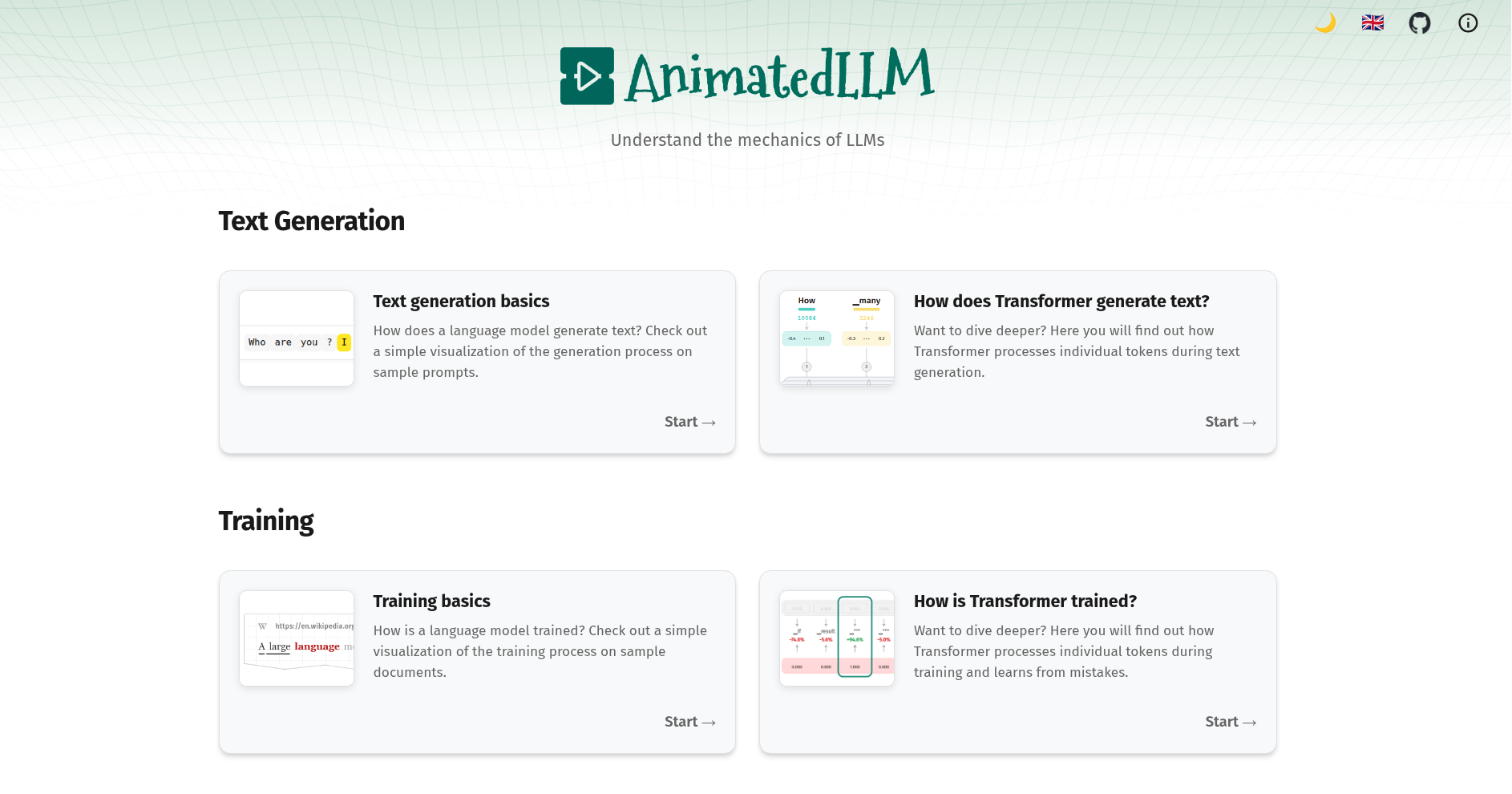



 All bots

 Registration details

 Identified technologies
User reviews (0)