
 简体中文
简体中文
audiocontrol.org
Open source web interfaces for vintage samplers and synthesizers.
At a glance
- Category
- Software & Apps
- Language
- English
- Paid-content signal
- No paid content foundObserved
- Registered
- 2025
- Hosting
- NetlifyInferred
- HTTPS certificate trusted
- PassedObserved
- Last updated
Related questions
More questions →What is audiocontrol.org?
audiocontrol.org is an open-source project that builds free, browser-based editors for vintage rack samplers and synthesizers. If you own hardware like a Roland S-330 or S-550, you can open its editor directly in a web browser — no installation required — and control the device with real-time hardware sync, patch browsing, and parameter visualization. The project is aimed at musicians and engineers who still use 12- and 16-bit samplers from the late 1980s and 1990s but no longer have access to the original, decades-old software.
What the site offers
The core idea, as stated on the site, is simple: "The hardware is on the shelf. The original software is thirty years gone." audiocontrol.org writes modern browser editors for that hardware, releasing them one device at a time.
Key characteristics:
- Open source — source code, issues, and discussions are hosted on GitHub.
- Web-native — editors run in a browser; no install step.
- Free — the site presents the editors as free to open and use.
- Device-by-device rollout — not every sampler is supported yet; the project adds devices as they are completed.
Devices available now
Two editors are live and can be opened in a browser today:
| Device | Year | Specs | Editor features |
|---|---|---|---|
| Roland S-330 | 1987 | 16-voice, 12-bit, rack-mount | Real-time hardware sync, patch browsing, filter/envelope visualization |
| Roland S-550 | 1987 | 16-voice, 16-bit | Shares the S-330 editor UI with an expanded feature set; more memory and VGA output |
Both are Roland 12- and 16-bit rack samplers from the same family, so the S-550 editor builds on the S-330 interface rather than starting from scratch.
Devices in development
Three more editors are on the workbench. The site lists them as pending and directs users to GitHub Discussions for updates:
- Akai S3000XL (1994) — 32-voice, 16-bit. The MIDI-over-SCSI protocol has been reverse-engineered; the editor is under construction.
- Akai S5000 (1999) — 64-voice, 24-bit, with USB and 24-bit audio. Shares a parameter model with the S6000.
- Roland JV-1080 (1994) — 64-voice rack synthesizer module with expansion board slots. Patch editor and librarian are in early exploration.
Because these are listed as in development, you should not expect them to be usable yet. The GitHub Discussions channel is the stated way to follow progress.
How to get started
- Identify your hardware. If you own a Roland S-330 or S-550, an editor is available now.
- Open the editor in your browser from the site — there is no download or install step.
- Connect your hardware and use the editor for patch browsing and parameter editing, with real-time sync.
- For anything still in development, follow the project on GitHub Discussions to know when it ships.
Community and support
The project points to three channels:
- GitHub — source code, issues, and discussions for every editor.
- Discord — chat with maintainers and other users.
- YouTube — demos, walkthroughs, and teardown videos.
If you hit a bug or want a device prioritized, GitHub Issues and Discussions are the intended places to raise it.
Who this is for
audiocontrol.org is most useful if you already own one of the supported rack units and want a modern way to edit it without hunting down original software or running legacy operating systems. If your sampler is not on the available or in-development list, the project does not yet cover it — check the GitHub Discussions to see whether it is planned.
What Are Open-Source UI Element Libraries and How Do They Differ From UI Frameworks?
An open-source UI element library is a collection of individual, ready-made interface pieces—buttons, cards, inputs, toggles, loaders—that you copy into your own project and adapt. A UI framework, by contrast, is a structured system of components, conventions, and often a theming layer that governs how your whole interface is built. The practical difference: an element library gives you a snippet; a framework gives you a way of working. If you need a polished button in ten minutes, reach for the element library. If you're building a 40-screen product with a team, you probably want the framework.
What "open-source UI element library" actually means
The term gets used loosely, so it helps to separate the parts:
- Open-source: the code is publicly available, and the license tells you what you may do with it—copy, modify, redistribute, or use commercially.
- UI element: a single, self-contained piece of interface, usually small enough to read in one sitting. A button with hover states, a pricing card, a search field.
- Library: a browsable, searchable collection of those elements, typically contributed by many different people.
On a site like Uiverse, elements are shared by a community and written in plain CSS or Tailwind. You find one you like, copy the markup and styles, paste them into your project, and adjust colors, spacing, and text to fit. There's no package to install and no build step required—which is exactly the appeal, and also the source of most of the confusion.
Element library vs. UI framework: the core differences
| Dimension | Open-source UI element library | UI framework / design system |
|---|---|---|
| Unit of reuse | A single snippet you copy | A component you import or call |
| Installation | None; paste into your code | Package install, config, sometimes a provider |
| Consistency | Depends on you; each element may look different | Enforced by shared tokens and APIs |
| Theming | Manual edits per element | Central theme/config file |
| Updates | You own the copy; no upstream updates | Version bumps bring fixes and changes |
| Accessibility | Varies per contributor; must be checked | Usually tested and documented |
| Best for | Prototypes, landing pages, small sites, one-off needs | Multi-page apps, teams, long-lived products |
| Learning curve | Low—read the CSS | Higher—learn the API and conventions |
The table isn't a verdict. It's a map of trade-offs. Element libraries win on speed and freedom; frameworks win on consistency and maintenance.
Licensing and attribution: what to check before you paste
This is where people get into trouble, and it's worth slowing down for.
- Find the license. Every element or collection should state one. Common open-source licenses include MIT, Apache-2.0, and BSD. Some projects use copyleft licenses like GPL, which can impose obligations if you redistribute your code.
- Understand what the license permits. MIT and Apache-2.0 are permissive: you can typically use the code in commercial and closed-source projects. Copyleft licenses may require you to release derivative source under the same terms.
- Check attribution requirements. Permissive licenses usually require you to keep the copyright notice and license text somewhere in your project. That's a real obligation, not a formality.
- Look for per-element terms. On community sites, the site's overall terms and the individual contributor's stated wishes may differ. If a contributor asks for credit, honor it.
- When in doubt, ask or avoid. If a snippet has no license at all, you don't have clear permission to reuse it. Treat "no license" as "not open source," even if the code is publicly visible.
This article is general information, not legal advice. For commercial products with real exposure, have someone qualified review the licenses you're relying on.
How to use a community element in your project: a practical workflow
Here's a repeatable process that avoids most of the usual mess.
1. Start from a real need, not a browsing session
Decide what you need first—"a compact primary button with a loading state"—then search. Browsing aimlessly produces a pile of pretty snippets that don't fit together.
2. Copy the smallest version that works
Take the markup and the styles. Strip anything you don't need: demo wrappers, extra animations, decorative layers. Less code means fewer surprises.
3. Convert it to your conventions
If your project uses design tokens or CSS variables, replace hard-coded values:
/* Before: hard-coded */
.button { background: #4f46e5; border-radius: 8px; }

/* After: token-based */
.button { background: var(--color-primary); border-radius: var(--radius-md); }
This one step is what keeps a copied element from looking like a foreign object in your UI.
4. Check accessibility before you ship
Community elements vary widely here. Verify at minimum:
- Keyboard focus is visible and the element is reachable by Tab.
- Color contrast meets WCAG AA (4.5:1 for normal text).
- Interactive elements use semantic HTML (
<button>, not a clickable<div>). - Form inputs have associated labels.
- Motion respects
prefers-reduced-motion.
5. Test in context
Paste it into a real page with real content. Long labels, small screens, and dark mode break more copied elements than anything else.
6. Note where it came from
Keep a short comment or an internal credits file: source, license, date. Future you—and your legal reviewer—will be grateful.
Where element libraries genuinely shine
- Prototypes and demos: you need something clickable today, not a design system.
- Landing pages and marketing sites: a handful of distinctive elements, each custom.
- Filling gaps: your framework lacks one specific component, and you don't want to build it from scratch.
- Learning: reading well-made CSS is one of the fastest ways to improve.
- Small projects: a personal site doesn't need a theming architecture.
Where they fall short
- Consistency at scale: ten elements from ten contributors rarely look like one product.
- Maintenance: you own every copy. When your design changes, you edit each one.
- Accessibility debt: you inherit whatever the contributor did or didn't do.
- No upstream fixes: a bug fixed in the original won't reach your copy.
- Integration friction: different naming conventions, different units, different assumptions about resets.
When to choose which
Choose an element library when the scope is small, the timeline is short, or you need a few distinctive pieces rather than a whole system.
Choose a framework or design system when multiple people build multiple screens over months, when consistency is a product requirement, or when accessibility and theming need to be guaranteed rather than checked.
A hybrid works well for many teams: adopt a framework for the structural components—forms, navigation, layout—and borrow individual elements for the places where you want personality. Just route every borrowed element through the same token and accessibility checks, so it lands as part of your system rather than beside it.
The short version: open-source UI element libraries are a fast, flexible way to get good-looking interface pieces into a project. They are not a substitute for a design system, and the license and accessibility details are the part worth reading carefully.
Which Vintage Samplers and Synthesizers Does audiocontrol.org Support?
audiocontrol.org currently offers browser-based editors for two devices you can use today: the Roland S-330 and Roland S-550. Three more devices — the Akai S3000XL, Akai S5000, and Roland JV-1080 — are listed as in development, so they are not yet usable. The project is open source and web-native, meaning no installation is required to open an editor.
Available now
These editors are live and can be opened directly in a browser.
| Device | Year | Type | Key specs | Editor features noted |
|---|---|---|---|---|
| Roland S-330 | 1987 | Rack-mount digital sampler | 16-voice, 12-bit | Real-time hardware sync, patch browsing, filter/envelope visualization |
| Roland S-550 | 1987 | Rack-mount digital sampler | 16-voice, 16-bit | Shares the S-330 editor UI with an expanded feature set |
The S-550 is described as the S-330's bigger sibling, with more memory and VGA output, but it belongs to the same family — which is why both share a common editor interface.
In development
These devices are on the workbench and not yet available. The site directs users to sign up via GitHub Discussions for updates.
| Device | Year | Type | Key specs | Status notes |
|---|---|---|---|---|
| Akai S3000XL | 1994 | Rack sampler | 32-voice, 16-bit | MIDI-over-SCSI protocol reverse-engineered; editor under construction |
| Akai S5000 | 1999 | Rack sampler | 64-voice, 24-bit | USB and 24-bit audio; shared parameter model with the S6000 |
| Roland JV-1080 | 1994 | Rack synth module | 64-voice | Patch editor and librarian in early exploration |
How to choose what to expect
- If you own a Roland S-330 or S-550: an editor is ready now — open it in a browser and connect to your hardware.
- If you own an Akai S3000XL, S5000, or Roland JV-1080: no editor is available yet. Follow the project's GitHub Discussions to track progress.
- If you own a different vintage sampler or synth: it is not listed on the site, so there is no stated support or timeline.
Where to follow progress and get help
The project lists three community channels:
- GitHub — source code, issues, and discussions for every editor.
- Discord — chat with maintainers and other users.
- YouTube — demos, walkthroughs, and teardown videos.
For devices still in development, GitHub Discussions is the stated place to sign up for updates.
Is audiocontrol.org Open Source, and How Can I Get Involved?
Yes. audiocontrol.org describes itself as open source, and its community infrastructure is built around that: source code, issues, and discussions live on GitHub, with Discord and YouTube as additional channels. You can get involved by filing issues, joining GitHub Discussions to follow development, or chatting with maintainers and other users on Discord. The main constraint is device coverage — only some editors are available today, so your ability to contribute depends on which hardware you own.
What "open source" means here
The site's framing is explicit: these are "modern browser editors" for 12- and 16-bit rack samplers, offered as "open source, no install." The practical implications:
- Source is public. GitHub hosts "source, issues, and discussions for every editor."
- No installation. Editors run in a browser, so there's no local build step required just to use one.
- Development is incremental. The site describes devices "coming back online one device at a time," which means the project is actively being extended rather than finished.
Note that "open source" on the site refers to the editors themselves. The page does not state a specific license, so if licensing terms matter to you, check the individual GitHub repositories directly.
Which devices are supported right now
This matters for involvement because the most useful contributions usually come from people who own the hardware.
| Device | Type | Status |
|---|---|---|
| Roland S-330 | 1987 · 16-voice · 12-bit rack sampler | Available |
| Roland S-550 | 1987 · 16-voice · 16-bit rack sampler | Available |
| Akai S3000XL | 1994 · 32-voice · 16-bit rack sampler | In development |
| Akai S5000 | 1999 · 64-voice · 24-bit rack sampler | In development |
| Roland JV-1080 | 1994 · 64-voice rack synth | In development |
The two available editors (S-330 and S-550) offer real-time hardware sync, patch browsing, and filter/envelope visualization; the S-550 shares the editor UI with an expanded feature set. The Akai S3000XL editor is described as having its MIDI-over-SCSI protocol reverse-engineered, with the editor still under construction.
How to get involved
1. Report issues or follow progress on GitHub
GitHub is the primary channel. The site points to it for "source, issues, and discussions for every editor." For in-development devices, it specifically says to "sign up via GitHub Discussions for updates." That's the route to take if you want to know when the S3000XL, S5000, or JV-1080 editors become usable.
2. Join the Discord
Discord is described as the place to "chat with the maintainers and other users." This is the better fit for open-ended questions, troubleshooting an editor against your hardware, or coordinating with other owners of the same sampler.
3. Watch the YouTube channel
The YouTube channel carries "demos, walkthroughs, and teardown videos." Useful if you want to see an editor working before you set it up, or if you're considering contributing to a device you don't yet own.
4. Contribute where you have hardware access
The most concrete contribution path implied by the site is hardware-adjacent: the editors depend on real-time sync with physical units, and the in-development devices are waiting on protocol and parameter work. If you own an S3000XL, S5000, or JV-1080, your ability to test against the real machine is more valuable than a general code contribution.
Practical starting point
If you just want to use what exists, open the S-330 or S-550 editor from the site — no install, no account mentioned. If you want to contribute or track the unfinished devices, go to GitHub first (issues and Discussions), then Discord for conversation. The site does not publish pricing or login requirements, so treat access as browser-based and open unless a specific repository says otherwise.
How to Use the Free Web Editors on audiocontrol.org
audiocontrol.org hosts browser-based editors for specific vintage rack samplers and synthesizers, so you can edit patches without installing the original 30-year-old software. Two editors are available now — the Roland S-330 and Roland S-550 — while the Akai S3000XL, Akai S5000, and Roland JV-1080 are still in development. You need the physical hardware and a browser; the site describes the editors as open source and web-native with no install.
What you can use today
| Device | Type | Status |
|---|---|---|
| Roland S-330 (1987) | 16-voice, 12-bit rack sampler | Available |
| Roland S-550 (1987) | 16-voice, 16-bit rack sampler | Available |
| Akai S3000XL (1994) | 32-voice, 16-bit rack sampler | In development |
| Akai S5000 (1999) | 64-voice, 24-bit rack sampler | In development |
| Roland JV-1080 (1994) | 64-voice rack synth module | In development |
The S-330 editor is listed with real-time hardware sync, patch browsing, and filter/envelope visualization. The S-550 shares the same editor UI with an expanded feature set, reflecting its larger memory and VGA output.
Opening an editor
- Go to audiocontrol.org and find the "Available Now" section.
- Select Open Editor next to the Roland S-330 or S-550.
- The editor loads in your browser — the site states no installation is required.
- Connect and sync with your hardware to begin patch browsing and editing.
The expected result is a working editor session in the browser, with the device's patches visible and parameters editable. The site does not document the exact connection or sync procedure, so treat the hardware hookup as the step to verify against your own setup.
Checking on in-development devices
The Akai S3000XL, Akai S5000, and Roland JV-1080 are listed as pending. The S3000XL entry notes its MIDI-over-SCSI protocol has been reverse-engineered and the editor is under construction; the S5000 shares a parameter model with the S6000; the JV-1080 patch editor and librarian are in early exploration.
To follow progress, the site points to GitHub Discussions for updates. You can also file issues and talk to maintainers through the GitHub repository, the Discord server, or watch demos and teardowns on YouTube.
Common sticking points
- Hardware is required. These are editors for gear you already own, not standalone software instruments.
- Only two devices are usable now. If you have an Akai or the JV-1080, you are waiting on development rather than editing today.
- Connection details are not spelled out on the page. The site confirms real-time hardware sync exists for the S-330/S-550 but does not publish the cable or MIDI configuration, so check the GitHub repository or Discord if sync does not work immediately.
If you own an S-330 or S-550, you can start editing in a browser right away. If you own one of the pending devices, join GitHub Discussions to track when its editor comes online.
Website Overview
An advisory match combined with missing browser safeguards may increase exposure if the affected component is active. Deployment-specific verification and remediation deserve priority. Identifiable technologies and additional version or configuration signals make the service easier to fingerprint, which may help targeted scanners narrow their checks.
Domain and Registration
Transfer-protection status is present, helping reduce the risk of unauthorized domain transfers. The domain has about 1 years of registration history; its current configuration provides more context than age alone. The domain uses the common .org extension, which is not an independent safety signal.
DNS and Email
Nameservers are provided by NS1, indicating managed DNS hosting. No CNAME was found; the observed records resolve directly to addresses. No MX record was found. A conventional explicit inbound-mail route is not configured. TXT records include verification markers for Google. Such markers may also remain after a service stops being used. DNSSEC signatures were not detected, so this additional DNS authenticity protection is not confirmed.
TLS and Certificates
The public key uses EC with 256 bits. The server supplied a complete certificate chain. No organization name is present in the certificate; the available fields are consistent with domain validation. The certificate was issued by Let's Encrypt, commonly associated with automated certificate services. The certificate's total validity is about 89 days, consistent with a short renewal cycle.
HTTP and Browser Security
The response lacks these common security headers: CSP, X-Content-Type-Options, Referrer-Policy, Permissions-Policy, clickjacking protection. No X-Powered-By header was found, reducing one common source of backend fingerprinting information. No obvious internal addresses or debug information were found in the headers. The Server header contains the custom value Netlify. No explicit CDN or WAF marker was found in the response headers.
Technology Stack Analysis
The public page identifies Astro 5.16.15, Google Tag Manager, Netlify, with exact versions exposed for 1 technologies. These details can narrow vulnerability checks, although exposure alone is not a vulnerability. The advisory source OSV places Astro 5.16.15 in the affected range of GHSA-26w7-cxv4-gfx2, GHSA-2pvr-wf23-7pc7, GHSA-376h-93r7-7g6f, GHSA-4g3v-8h47-v7g6, GHSA-7pw4-f3q4-r2p2 等 10 项. Verify the deployed version and relevant configuration before drawing conclusions about exploitability. Updating affected components should be a priority.
Search and Social Sharing
The title has 87 characters and may be truncated in search results. The Generator tag identifies Astro v5.16.15, making the publishing system easier to fingerprint. Twitter Card metadata is configured. JSON-LD includes Organization data, helping describe the organization as an entity. A meta description is present, with 65 characters.
Hosting and Email
 NS1
NS1 Netlify
 Ashburn, Virginia, United States
Inferred
18.208.88.157
Ashburn, Virginia, United States
Inferred
18.208.88.157
Registration details
| Registrar | Name.com, Inc. |
|---|---|
| Registered | 2025-10-04 |
| Expires | 2027-10-04 |
| Domain status | client transfer prohibited |
| Nameservers | dns1.p05.nsone.net、dns2.p05.nsone.net、dns3.p05.nsone.net、dns4.p05.nsone.net |
| DNSSEC | unsigned |
DNS records
| Type | Name | Value | TTL | Priority |
|---|---|---|---|---|
| A | audiocontrol.org | 18.208.88.157 | 120 | — |
| A | audiocontrol.org | 98.84.224.111 | 120 | — |
| NS | audiocontrol.org | dns1.p05.nsone.net | 3600 | — |
| NS | audiocontrol.org | dns2.p05.nsone.net | 3600 | — |
| NS | audiocontrol.org | dns3.p05.nsone.net | 3600 | — |
| NS | audiocontrol.org | dns4.p05.nsone.net | 3600 | — |
| TXT | audiocontrol.org | google-site-verification=GOWFr1dGPh6ESnTHCNLvym0uZ9OXaja_9ZztWPM-_8o | 3600 | — |
TLS and certificates
HTTP response headers
| Header | Value |
|---|---|
| content-type | text/html; charset=UTF-8 |
| cache-control | public,max-age=0,must-revalidate |
| server | Netlify |
| strict-transport-security | max-age=31536000 |
Identified technologies
Pages, Search and Sharing
| Meta description | Open source web interfaces for vintage samplers and synthesizers. |
|---|---|
| Canonical URL | https://audiocontrol.org/ |
| Language | English (default) |
| Twitter Card | summary_large_image |
Social Sharing Preview
11 fields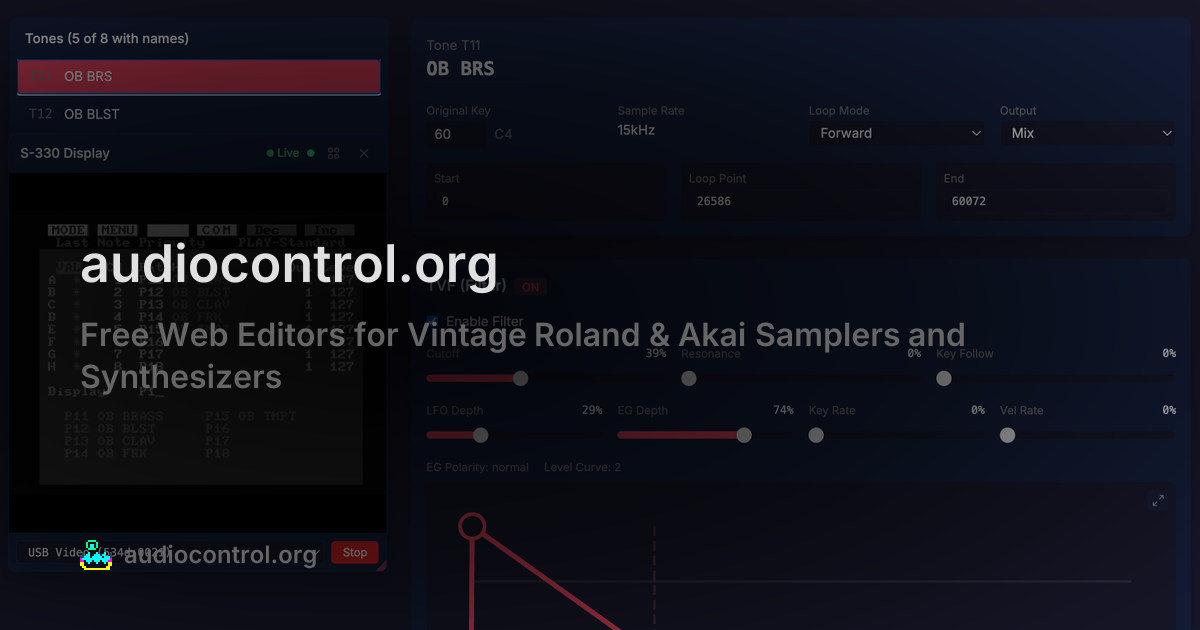

robots.txt (opens in a new tab)
1 rulesAll bots 1 allowed · 0 disallowed
- Allow
/
No matching rules.
Sitemaps
1Recent Updates
- Website images
- Screenshots
- Network details
- Website Technologies
- Pages and Search Information
- HTTP Response Information
- TLS and certificates
- DNS Information
- Domain Registration
- Website profile
- Website Description
- Website profile
- Website Description
- Website Name
User reviews (0)