Website profiles · Technology insights · Alternatives

bizplanner.ai

Write a business plan in minutes with AI: 3-year financial projections, market analysis, SWOT and PDF/Word export lenders and investors accept. Free preview, $4.99 to unlock.

Paid content Multilingual
Visit website
Profile views 1 Outbound visits 0 Normal
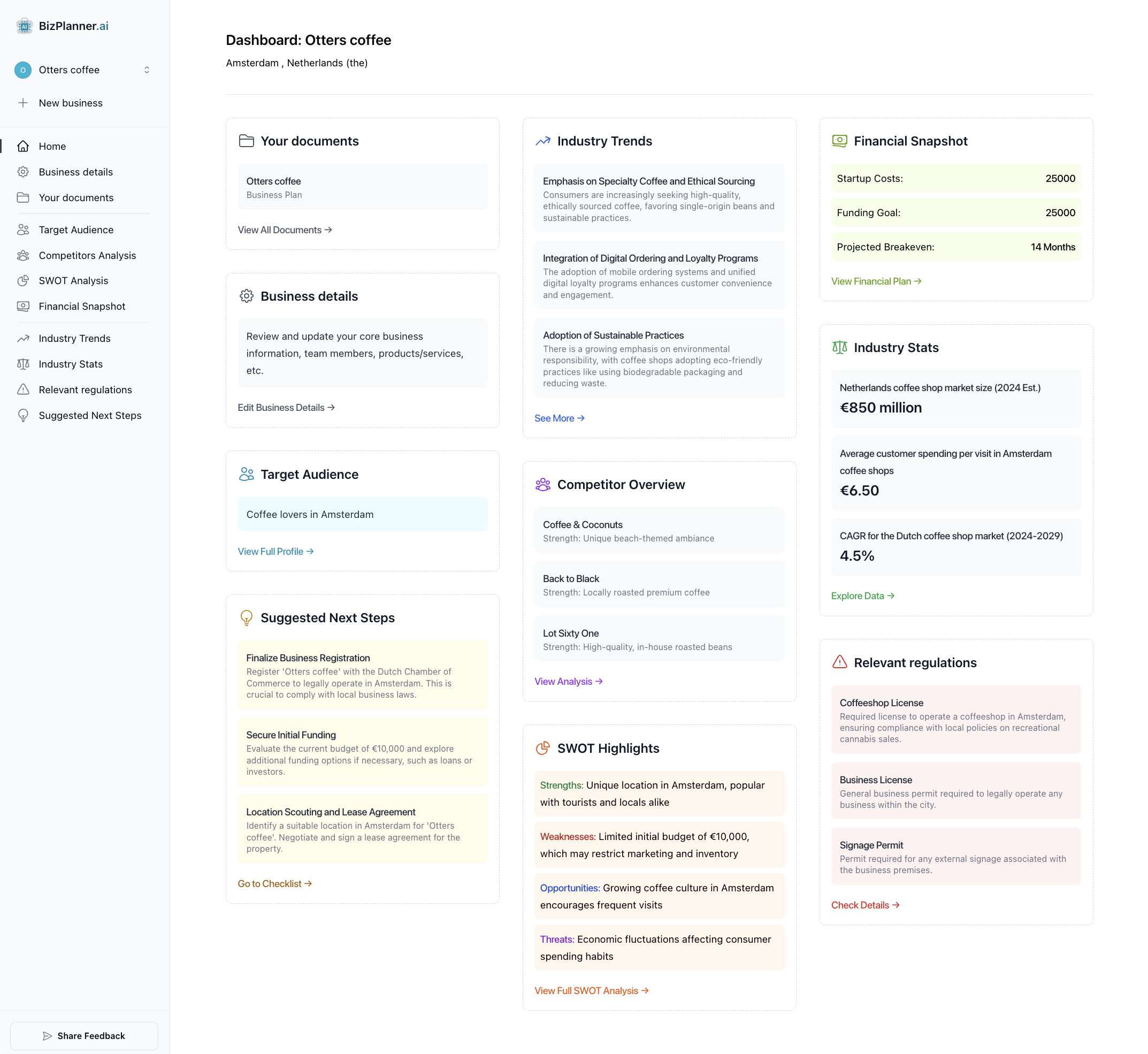
BizPlanner AI Full homepage screenshot

At a glance

Category
Artificial Intelligence
Language
English
Paid-content signal
Paid contentObserved
Registered
2023
Hosting
CloudflareInferred
HTTPS certificate trusted
PassedObserved
Last updated

Website review

This review may include AI-generated content and is not individually verified. Domain, certificate and other facts come from the observed data on this page.

What is BizPlanner AI?

BizPlanner AI is an AI business plan generator: you answer a short questionnaire about your business, market and numbers, and it drafts a full plan — executive summary, company description, market and competitor analysis, marketing strategy, operations and staffing, SWOT, and a three-year financial model covering profit & loss, cash flow and break-even. Everything stays editable in a built-in editor, and you can export the finished document to PDF or Word for a bank, investor, landlord or government agency.

Who it suits

  • First-time founders who need a structured draft rather than a blank page, and who can supply rough revenue, cost and headcount assumptions.
  • Small businesses applying for funding or premises — the export targets lenders, investors, landlords and agencies, and there is a template set organised by industry.
  • Immigration or visa applicants who need a formal plan document, which the site lists as a dedicated use case.
  • People who dislike long-form writing but are happy to review and correct generated text section by section.

It is a weaker fit if you need original primary market research, audited financials, or a plan built around a niche model the questionnaire does not cover.

How it works in practice

The workflow is questionnaire → generated draft → edit → export. Two features matter more than they first appear: regenerating a single section with new instructions, and logo/cover-page control. Together they let you keep the sections you like and redo only the weak ones, which is usually faster than rewriting from scratch.

What to check before committing

The site advertises a free preview with a paid unlock; confirm current pricing on its own Pricing page rather than relying on any figure quoted elsewhere. Treat the financial projections as a starting framework: the numbers are only as good as the assumptions you enter, and a lender will scrutinise them. As a rough comparison, established template libraries such as SCORE offer free mentoring and plan templates, while U.S. Small Business Administration provides free guidance on what lenders expect — useful for pressure-testing the AI draft before you send it out.

How does BizPlanner AI generate a full business plan from a short questionnaire?

BizPlanner AI turns a short questionnaire into a complete written plan by drafting each standard section from the answers you provide. According to its page, you answer questions about your business, market and numbers; the tool then writes the executive summary, company description, market and competitor analysis, marketing strategy, operations and staffing, SWOT, and a three-year financial model covering profit & loss, cash flow and break-even. Every section stays editable in a built-in WYSIWYG editor, and you can regenerate any section with new instructions. The finished plan exports to PDF or editable Word for a bank, investor, landlord or government agency.

What the questionnaire feeds into

The practical logic is that one set of inputs is reused across sections, so consistency matters more than length:

  • Business and market answers drive the executive summary, company description, market sizing, target-customer profile and competitor landscape.
  • Numbers feed the three-year P&L, cash flow and break-even projections.
  • Strategy and operations answers shape marketing, operations and the staffing schedule.
  • SWOT is assembled from the competitive and internal points you supply.

A realistic use case

Suppose a café owner needs a plan for a small bank loan. She enters her concept, local market, competitors, startup costs, expected monthly revenue and staffing. The tool drafts a full document; she then edits the financial assumptions herself, since lenders scrutinise those most, and regenerates the market analysis with a narrower postcode. She exports to Word so her accountant can adjust the numbers, then to PDF for submission.

Trade-offs to weigh

Speed and structure are the main gains: a first draft in minutes instead of days, with the sections lenders expect already present. The main risk is generic output. AI-drafted market analysis and projections are only as good as the inputs and are not a substitute for verified figures, real quotes or your own knowledge of the local market. Treat the draft as a scaffold, then check every number and claim.

Next step

Before starting, gather three things: your actual cost and revenue assumptions, two or three named competitors, and a clear statement of who buys from you and why. Paste those into the questionnaire rather than vague descriptions, then edit the financial model first, because that is where reviewers spend their time. If you want to compare formats, look at the U.S. Small Business Administration's guidance at SBA and SCORE's templates at SCORE; for immigration or visa plans, check the specific agency's requirements before relying on any template.

Can I edit the AI-generated sections and export the plan to PDF or Word?

Yes. BizPlanner AI produces each section in a built-in WYSIWYG editor, so the AI output is a starting draft rather than a locked document. You can rewrite the executive summary, adjust the market analysis, correct your financial assumptions, or regenerate any single section with new instructions instead of rebuilding the whole plan. Logo and cover-page controls are part of the same editor, and the finished plan exports to PDF or to editable Word.

What that means in practice

  • Edit in place: Every section listed on the page — executive summary, company description, market and competitor analysis, marketing strategy, operations and staffing, SWOT, and the three-year financial model — stays editable after generation.
  • Regenerate selectively: If the executive summary reads too generic, you can re-run just that section with sharper instructions and leave the rest untouched.
  • Two export paths: PDF suits lenders, landlords and agencies that want a fixed, presentable file. Word suits anyone who needs to keep editing outside the tool or hand sections to an accountant, co-founder or consultant.
  • Financials need your review: Three-year profit & loss, cash flow and break-even projections are only as good as the inputs from the questionnaire. Treat them as a structured first pass, then check pricing, margins, seasonality and tax treatment yourself before submitting.

A realistic workflow

A solo founder applying for a small business loan might answer the questionnaire, export to Word, send the financial section to an accountant for corrections, paste the revisions back into the editor, then export a final PDF for the bank. That keeps one source of truth and avoids re-keying numbers into a separate template.

How to decide

Your situation Better export
Submitting to a bank, landlord or government agency PDF
Working with a co-founder, accountant or mentor Word
Needing only one weak section fixed Regenerate that section, then re-export
Needing heavy rewriting or a house style Word, then edit externally

The page mentions a free preview with a one-time unlock, so check the preview against your actual needs before paying. If you want a second opinion on structure or financial presentation, general guidance from U.S. Small Business Administration is useful for what lenders typically expect, and a plain template approach via SCORE can help you sanity-check whether the generated plan covers the sections your reader cares about.

What financial projections and analyses does BizPlanner AI include for lenders or investors?

BizPlanner AI produces a three-year financial model made up of a profit-and-loss statement, a cash-flow projection and a break-even analysis, alongside a market analysis covering market size, target customers and competitors, plus a SWOT and an operations and staffing plan. The executive summary is written from the same questionnaire inputs, so the narrative and the numbers stay aligned — useful when a lender reads the summary first and then checks the projections.

What each lender-facing piece is for

  • Profit & loss (3 years): shows whether the business generates a surplus and how that changes as revenue grows; lenders look for a plausible path to debt service.
  • Cash flow (3 years): the statement most small-business lenders care about most, because profitable businesses still fail when cash timing is wrong.
  • Break-even: gives a single figure — sales needed to cover costs — that an underwriter can sanity-check against your market analysis.
  • Market and competitor analysis: supports the revenue assumptions rather than standing alone as marketing copy.
  • SWOT, operations and staffing: explains execution capacity, which matters to investors weighing whether the team can deliver the plan.

Practical trade-offs

Generated projections are only as good as the questionnaire answers behind them. If you enter optimistic growth, the model will faithfully project it, and a reviewer will spot the gap between your market-size section and your revenue line. Treat the output as a structured first draft: replace industry-average assumptions with your own quotes, payroll figures and lease terms, and check that break-even volume is achievable with the customers you describe.

The built-in editor and section-by-section regeneration matter here. You can revise the financial narrative without rebuilding the document, then export to PDF for submission or Word when an advisor or accountant needs to edit figures directly.

Who benefits most

  • First-time borrowers who need a complete, conventional structure rather than a blank template.
  • Visa or immigration applicants, where a full plan with projections is often a formal requirement.
  • Founders preparing an investor conversation, who need a coherent document fast and will refine the numbers afterwards.

If your plan hinges on unusual revenue mechanics — multi-year contracts, hardware margins, regulated pricing — a generic three-year model will need manual rework. In that case, pair it with an accountant's review before submission. For a straightforward service or retail business, the standard structure is usually sufficient as a starting point.

Next step

Gather your real inputs before you start: last 12 months of revenue and costs if trading, startup cost quotes if not, and your intended pricing. Then run the questionnaire once, and compare the generated break-even figure against your own estimate — a large gap tells you which assumptions to correct first.

How much does BizPlanner AI cost, and what does the free preview include?

BizPlanner AI advertises a free preview and a one-time $4.99 charge to unlock the finished plan. Treat those figures as the site's own pricing signals rather than a full price list: the page mentions a pricing page, but the supplied evidence does not break down tiers, refunds, or what happens on repeat purchases.

What the free preview appears to cover

From the page description, the free preview is a look at the AI-generated draft rather than a downloadable, lender-ready document. Practically, that means you can see whether the output structure matches what you need before paying.

A reasonable expectation based on the page evidence:

  • A generated draft of the plan sections (executive summary, market analysis, SWOT, operations, staffing, and three-year financials).
  • Enough visibility to judge tone, depth, and relevance to your industry.
  • The paid unlock is what the site frames as the point where you export to PDF or Word.

What the evidence does not confirm: how many words or sections the preview shows, whether the preview is watermarked, whether editing is allowed before payment, or whether regenerating sections costs extra.

Is $4.99 the real cost?

For a single plan, $4.99 is low compared with hiring a consultant or buying dedicated business-plan software. The trade-off is that a low one-time price usually signals a template-driven tool: you supply the inputs, the AI assembles standard sections, and the quality depends heavily on how specific your questionnaire answers are.

If you need a plan for a bank, investor, landlord, or government agency, the deciding factor is not the price but whether the financial model holds up. A three-year P&L, cash flow, and break-even projection generated from a short questionnaire is a starting draft, not a substitute for checking your own assumptions on pricing, costs, and demand.

A practical next step

Before paying, run the preview against one real use case: a specific loan amount or investor ask. Check whether the executive summary states a clear funding request and use of funds, and whether the financial projections tie to numbers you can defend in a meeting. If the preview produces generic market language with no figures tied to your inputs, the $4.99 unlock will not fix that — you would be better served by a structured template you fill in yourself, such as those offered by the U.S. Small Business Administration at SBA.

If the preview does reflect your inputs, the low unlock cost makes it reasonable to pay, export to Word, and then edit the financials with your accountant before sending the plan anywhere.

Does BizPlanner AI offer industry-specific templates or support immigration and visa business plans?

Yes to both, though they serve different users. BizPlanner AI lists business plan templates by industry and a separate immigration and visa business plans track, so the plan's structure and emphasis can match either a sector or a visa submission rather than starting from one generic outline.

Industry templates vs. visa plans

Need What BizPlanner AI provides Who it suits
Sector-specific structure Business plan templates by industry Founders whose lender or investor expects industry norms in market, competitor and operations sections
Immigration or visa filing Immigration & visa business plans Applicants who need a plan formatted for a government agency rather than a bank

How this plays out in practice

A restaurant owner applying for a small business loan mainly needs credible three-year profit & loss, cash flow and break-even numbers plus a realistic staffing schedule. An industry template keeps those sections aligned with hospitality expectations.

An entrepreneur preparing a visa application faces a different test: the plan must justify the business's viability and the applicant's role clearly enough for a government reviewer. The immigration and visa plan type is the better starting point, even if the underlying sections overlap.

Decide before you generate

  1. Identify the reader first — bank, investor, landlord, government agency or visa officer.
  2. Pick the matching template or plan type, then answer the questionnaire with figures you can defend.
  3. Treat the AI draft as a first pass: every section stays editable, and you can regenerate any part with new instructions.
  4. Add your logo and cover page, then export to PDF for submission or Word if a reviewer wants edits.

If your plan must satisfy both a lender and an immigration reviewer, generate the visa version first and adapt the financial sections for the bank; the reverse order tends to leave the personal and business-viability narrative thin.

Related questions

More questions →
What Should a Business Plan Template Include to Be Bank & Investor Ready?

A bank- or investor-ready business plan template needs eight sections: executive summary, company description, market and competitor analysis, marketing strategy, operations and staffing, SWOT, and a three-year financial model covering profit & loss, cash flow, and break-even. The financial section is what most templates get wrong — lenders check whether the numbers reconcile and whether repayment or break-even is plausible, not whether the prose sounds confident. A template is enough when you already know your numbers and just need structure; a guided or AI generator is worth using when you need each section drafted from your own inputs and regenerated as assumptions change.

The sections a usable template must cover

Section What it must contain What reviewers check
Executive summary The whole plan compressed to one page: what you sell, to whom, the ask, and how it gets repaid or returned Whether it matches the detailed sections — mismatches are the fastest way to lose credibility
Company description Legal structure, ownership, location, stage, what the business actually does Consistency with registration and licensing documents
Market & competitor analysis Market size, target customers, named competitors, your position against them Whether market size claims have a source and whether competitors are real, not generic
Marketing strategy Channels, pricing, customer acquisition approach, sales process Whether the plan to reach customers is specific enough to be costed
Operations & staffing How the product or service is delivered, key roles, hiring schedule, suppliers Whether the staffing schedule matches the payroll figures in the financials
SWOT Strengths, weaknesses, opportunities, threats specific to this business Whether weaknesses and threats are honest — a SWOT with no weaknesses signals a template that was filled in, not thought through
Financial model Three-year profit & loss, cash flow, break-even Whether the three statements agree with each other and with the narrative

Why the financials are where most templates fail

A fill-in-the-blank template usually gives you a single revenue line and a profit figure. That is not what a lender reads. Three statements need to work together:

  • Profit & loss shows whether the business earns a margin after costs.
  • Cash flow shows whether money is in the account when bills and loan payments come due. A profitable business can still fail this test.
  • Break-even shows the sales volume or revenue at which the business stops losing money — the number a lender uses to judge how much cushion exists if projections run late.

The common failure is that these three are built independently, so the cash flow doesn't reflect the P&L timing and the break-even doesn't match either. Before submitting, check that a change in one assumption — a slower sales ramp, a higher payroll — flows through all three consistently.

Adapting a generic template to your industry

A generic template forces your business into someone else's structure. Two adjustments matter most:

  1. Replace the revenue model with your actual one. A restaurant's plan is driven by covers, average ticket, and table turns; a SaaS plan is driven by subscribers, churn, and monthly recurring revenue. If the template's revenue logic doesn't match how you get paid, rebuild that section rather than filling in the blanks.
  2. Swap the competitor set and cost structure. Industry-specific templates exist for this reason — they pre-load the cost categories and competitive dynamics that reviewers in that sector expect to see.

If you can't find a template for your industry, use a general one but rewrite the market analysis and financial drivers from scratch. The structure can be borrowed; the substance can't.

Template vs. guided generator: how to choose

Use a static template when you already have your financial model built elsewhere, you know your market and competitors, and you only need a document structure to write into. It's the cheaper and faster path in that case.

Use a guided or AI generator when the bottleneck is drafting, not structure. BizPlanner AI, for example, takes a short questionnaire about your business, market, and numbers and drafts every section — executive summary, company description, market and competitor analysis, marketing strategy, operations and staffing, SWOT, and a three-year financial model with profit & loss, cash flow, and break-even. Each section stays editable in a built-in editor, you can regenerate any section with new instructions, and you can add a logo and cover page. The site describes a free preview with a $4.99 unlock, and export to PDF or editable Word.

The practical difference: with a template you write everything and the tool holds the structure; with a generator you supply inputs and the tool produces a first draft you then correct. The correction step is not optional either way — the plan is only as good as the assumptions you feed it.

Exporting and formatting for the right audience

The same plan often goes to four different readers, and the format should match:

  • Bank or lender — PDF is the safe default because pagination and tables stay fixed. Include the full financial model; lenders will want the assumptions behind it.
  • Investor — PDF for the pitch copy, but be ready to send an editable Word version if they want to circulate comments or extract your financials.
  • Landlord — usually a shorter version; the cash flow and break-even matter more than the growth story.
  • Government agency or visa application — check the specific format and section requirements first, since these often prescribe structure rather than accept a general plan.

Export to editable Word when the recipient needs to annotate or when you'll keep revising; export to PDF for the final submission copy. Keep both, and re-export the PDF after any edit so the two don't drift apart.

A quick pre-submission check

Before you send the plan anywhere, confirm: the executive summary matches the detailed sections; every market-size claim has a source; the P&L, cash flow, and break-even reconcile; the staffing schedule matches payroll; the SWOT includes real weaknesses; and the export format matches what the recipient asked for. If any of those fail, the problem is the content, not the template.

PDF Invoices in Legal Billing: What to Include and When to Use Them

A PDF invoice in legal billing is a fixed-format document that presents the fees and costs owed on a matter in a layout that looks the same on every device. It is the digital equivalent of a printed bill: readable, portable, and easy to attach to an email or upload to a client portal. Its main limitation is that it is not machine-readable in the way a LEDES file is, so a client's e-billing system cannot automatically ingest it. PDF works best for flat-fee matters, small or one-off engagements, and clients who do not run an automated billing platform.

What "PDF" means in a legal billing context

When a billing tool offers to send an invoice "in PDF," it is generating a rendered document rather than a structured data file. The distinction matters:

  • PDF is a presentation format. A human reads it. Line items, totals, and matter details appear as text and tables on a page.
  • LEDES (Legal Electronic Data Exchange Standard) is a structured, delimited text format. An e-billing system parses it, validates it against outside counsel guidelines, and routes it for review.
  • Email delivery is a transport method, not a format. You can email a PDF, email a LEDES file, or email a link to an online invoice.

These three are often confused because a single invoice can combine them: a LEDES file delivered by email, or a PDF attached to an email. The format is what the client's systems can read; the delivery method is how it arrives.

When a PDF invoice is the right choice

PDF is usually appropriate when the client does not require electronic submission through a billing platform. Common scenarios:

  • Flat-fee and fixed-price matters. When the invoice is one or two lines, a structured file adds no value.
  • Small businesses and individuals. Clients without an accounts payable system can open a PDF and pay from it.
  • Retainers and replenishment requests. A simple statement of the retainer balance is easy to read as a PDF.
  • Pro bono or courtesy bills. Where no formal e-billing review applies.
  • Backup documentation. Even when a LEDES file is submitted, a PDF is often attached for the reviewer's convenience.

If the client has outside counsel guidelines requiring LEDES submission, a PDF alone will typically be rejected or returned for manual entry. Check the client's billing requirements before choosing the format.

PDF versus LEDES versus emailed invoice: a quick comparison

Factor PDF LEDES Email (as delivery)
Machine-readable No Yes N/A
Accepted by e-billing platforms Rarely Yes Depends on attachment
Setup effort Low Higher (mapping fields) Low
Best for Flat fees, small clients, backup Corporate and insurer clients Any format
Risk Manual re-entry by client Format rejection if fields are wrong Lost or filtered messages

Core elements of a compliant legal PDF invoice

A PDF invoice should stand on its own. If a client's AP department picks it up with no context, it should still answer who, what, when, and how much.

Firm and client identification

  • Firm name, address, and contact details
  • Tax or VAT identification number where applicable
  • Client name and billing contact
  • Invoice number and invoice date
  • Client matter number or reference

Matter and timekeeper detail

  • Matter name and description
  • For each timekeeper: name, initials, and billing rate
  • Time entries with date, narrative description, and time recorded in tenths of an hour
  • Clear separation of fee earners if rates differ

Fees, expenses, and totals

  • Fees subtotal
  • Disbursements and expenses, itemized with dates
  • Taxes applied
  • Prior payments, credits, or trust retainer applied
  • Total amount due and currency

Payment terms

  • Due date and payment window
  • Accepted payment methods
  • Remittance details or a payment link
  • Late-payment terms if the engagement letter specifies them

A useful test: hand the PDF to someone who has never seen the matter and ask them to confirm the amount due and the period covered. If they hesitate, the invoice is missing something.

Practical limitations to plan around

PDF invoices shift work to the recipient. Someone at the client has to read the document and key the data into their system, which introduces delay and transcription errors. PDFs also cannot be validated against billing guidelines automatically, so a reviewer may reject a line item that a LEDES rule would have caught before submission.

Two habits reduce the friction:

  1. Send a consistent template. Clients learn where to find the total, the matter number, and the payment terms.
  2. Keep a LEDES version in reserve. If a client later adopts an e-billing platform, you can convert rather than rebuild.

Choosing between PDF, LEDES, and email delivery

Work from the client's requirements backward:

  • Does the client mandate LEDES submission? If yes, PDF is a supplement, not a substitute.
  • Is the matter flat-fee or very small? PDF is usually sufficient.
  • Does the client have no billing system? PDF delivered by email or portal is the simplest path.
  • Is the invoice complex with many timekeepers and expenses? A structured format reduces disputes, even if the client accepts PDF.

When in doubt, ask the client's billing contact which format they prefer and whether a PDF attachment is acceptable alongside any required file. That one question prevents most rejected invoices.

Easy Legal Billing supports sending or scheduling invoices in LEDES, email, or PDF formats, which lets you match the format to each client's requirements rather than forcing one approach across every matter.

What Does an AI Business Plan Writer Actually Produce for Banks and Investors?

An AI business plan writer such as BizPlanner AI produces a full draft plan — executive summary, company description, market and competitor analysis, marketing strategy, operations and staffing, SWOT, and a three-year financial model with profit & loss, cash flow, and break-even — from a short questionnaire, then lets you edit every section and export to PDF or Word. That output is a strong starting document for a bank, investor, landlord, or government agency, but "bank and investor ready" means the numbers, assumptions, and competitor detail are yours and verified, not that the AI's first draft is submittable as-is.

What the tool generates

According to the BizPlanner AI site, the generator drafts every section of the plan from your answers:

  • Executive summary — written from your inputs, positioned as investor-ready
  • Company description
  • Market analysis — market size, target customers, competitors
  • Competitive landscape
  • Marketing strategy
  • Operations and staffing — including a staffing schedule
  • SWOT analysis
  • Three-year financial model — profit & loss, cash flow, and break-even projections

Every section stays editable in a built-in WYSIWYG editor. You can add a logo and cover page, regenerate any single section with new instructions, and export to PDF or editable Word. There are also industry-specific business plan templates.

What "bank and investor ready" realistically means

A lender or investor reads for credibility: do the numbers reconcile, does the market claim match a source, does the team section explain why you can execute. An AI draft gives you structure and language for all of that, but three things usually need human work before submission:

Area What the AI provides What you still verify
Financial projections 3-year P&L, cash flow, break-even That assumptions (pricing, growth, costs) match your real figures and are defensible
Market analysis Market size, target customers, competitors Cited sources and named local competitors, not generic categories
Executive summary A drafted summary from your inputs That it reflects your actual ask, use of funds, and repayment or return logic
Industry specifics Industry templates Licensing, permits, or format rules your bank or agency requires

The practical test: if a reviewer asks "where did this number come from," you should have an answer that isn't "the AI wrote it."

How to supply inputs so the output isn't generic

The quality of the draft tracks the quality of the questionnaire answers. Before you start, gather:

  • Business basics — legal structure, location, what you sell, who owns it
  • Market numbers — your target customer profile, the size of the market you can actually reach, and two or three named competitors with a note on how you differ
  • Financial figures — startup or expansion costs, expected revenue by month or quarter, fixed and variable costs, and the amount you're asking for
  • Use of funds — what the money buys and how it improves the business

Vague inputs produce vague sections. If you don't have a number yet, put your best estimate in and flag it for review rather than leaving it blank — a plan with placeholder gaps reads worse than one with stated assumptions.

Editing, regenerating, and exporting

  1. Complete the questionnaire with the inputs above.
  2. Review each generated section in the editor; rewrite anything that doesn't match your business.
  3. Regenerate individual sections with new instructions when a draft misses — for example, a more specific competitor comparison.
  4. Add your logo and cover page.
  5. Export to PDF for a clean submission copy, or Word if the recipient wants to comment or you need to adapt it for a second audience.

Different recipients want different emphasis: a bank focuses on cash flow and repayment capacity, an investor on growth and return, a landlord on the lease and revenue assumptions, and a government agency on format and eligibility. Export once, then adjust the relevant sections per audience rather than sending the same file everywhere.

Common gaps to check before submitting

  • Unsupported market claims — replace generic market-size statements with sourced figures or clearly labeled estimates.
  • Thin competitor detail — name real competitors and state your specific advantage.
  • Financial assumptions that don't tie together — revenue growth should be consistent with your marketing plan and staffing.
  • Missing industry requirements — check whether your bank, investor, or agency mandates specific sections, formats, or certifications.
  • No clear ask — the executive summary should state the amount requested and what it funds.

Cost and access

The site describes a free preview and a $4.99 charge to unlock the finished document. Treat that as the stated pricing on the page; confirm current terms on the pricing page before you rely on them.

Used this way — AI for structure and first draft, you for numbers and verification — an AI business plan writer shortens the work from weeks to hours while keeping the plan defensible in front of a lender or investor.

What Are Financial Projections and What Should They Include?

Financial projections are forward-looking estimates of your business's revenue, costs, profit, and cash position over a future period—typically three years. They differ from historical financial statements, which report what already happened. Lenders and investors use projections to judge whether your business model can generate enough cash to repay a loan or deliver a return, so the numbers must be internally consistent and tied to stated assumptions. A three-year model with a profit & loss statement, cash flow statement, and break-even analysis is the standard package for a bank or investor-ready plan.

What Financial Projections Are—and What They Are Not

Projections are forecasts built on assumptions you choose and can defend. Historical statements (income statement, balance sheet, cash flow) are records of actual transactions. Confusing the two is the most common reason a plan gets rejected: a projection that simply extrapolates past revenue without explaining why growth will occur reads as a guess.

Projections answer three questions a lender or investor is really asking:

  • Can this business make money? — shown by the profit & loss projection.
  • Will it have enough cash to operate and repay? — shown by the cash flow projection.
  • At what point does it stop losing money? — shown by the break-even analysis.

Core Components of a Projection Package

Component What it shows Typical horizon
Profit & loss (P&L) Revenue, cost of goods sold, operating expenses, net profit 3 years
Cash flow statement Cash in, cash out, ending cash balance per period 3 years
Break-even analysis Sales volume or revenue needed to cover fixed + variable costs Point in time
Balance sheet (optional but stronger) Assets, liabilities, equity at period end 3 years
Assumptions sheet The drivers behind every number above —

BizPlanner AI's generator produces a three-year financial model with profit & loss, cash flow, and break-even as part of its plan output, alongside the executive summary, market analysis, SWOT, and operations sections. That gives you the structure; the credibility still depends on the assumptions you feed it.

The Assumptions That Matter Most

Lenders and investors scrutinize assumptions harder than the resulting numbers, because assumptions reveal whether you understand your own business. Document these explicitly:

  • Revenue drivers — units sold, average price, number of customers, contract value, or subscription count. State the basis: market research, signed contracts, pilot results, or comparable benchmarks.
  • Cost structure — fixed costs (rent, salaries, software) versus variable costs (materials, payment fees, shipping). Split them; break-even depends on this split.
  • Growth rates — month-over-month or year-over-year. A 20% monthly growth rate sustained for 36 months implies roughly a 700x increase; if that is not your intent, the number is wrong.
  • Headcount plan — who you hire, when, and at what salary. Staffing is usually the largest cost line and the one most often understated.
  • Payment terms — when customers actually pay you versus when you record the sale. This is where profitable businesses still run out of cash.

How to Structure the Timeline

A credible model uses finer granularity early and coarser granularity later:

  1. Year 1: monthly. Cash timing, seasonality, and hiring ramp all matter month to month. A monthly view exposes the month you go cash-negative.
  2. Years 2–3: annual (or quarterly). By then the pattern is established; annual totals keep the model readable.

If you only project annually from day one, you will miss the working-capital gap that kills young businesses.

Common Mistakes That Make Projections Look Unrealistic

  • Hockey-stick revenue with no driver. Revenue tripling in year two needs a named cause: new locations, a signed distribution deal, a price change.
  • No costs for growth. More revenue usually means more staff, more inventory, more support. A model where costs stay flat while revenue doubles is a red flag.
  • Forgetting taxes, loan payments, and owner's draw. These are real cash outflows; omitting them overstates ending cash.
  • Break-even that contradicts the P&L. If your break-even says 200 units but your P&L assumes 150 units sold in year one, the two sections disagree.
  • Round numbers everywhere. Every figure at exactly $10,000 signals the model was not built from drivers.

Sanity-checking your own model

  • Does ending cash ever go negative? If so, how is that gap funded?
  • Does the break-even point fall inside year one, or does the plan implicitly assume losses continue?
  • If you cut projected revenue by 30%, does the business still survive? Investors will run this test mentally.
  • Can you explain any single number on the page in one sentence?

Where AI Tools Fit—and Where They Don't

An AI business plan generator can draft the projection structure, populate the P&L, cash flow, and break-even sections from a short questionnaire, and keep every section editable so you can revise figures. BizPlanner AI, for example, generates the three-year model and exports the finished plan to PDF or editable Word. That removes the blank-page problem and enforces a consistent format.

What it cannot do is verify your assumptions. The revenue driver, growth rate, and cost estimates are only as credible as the inputs you supply. Treat the AI output as a first draft: replace every default number with one you can source or defend, then re-check that the break-even, P&L, and cash flow still agree. A lender will ask how you arrived at your numbers—the answer needs to be yours, not the tool's.

AI Business Plan Generator: Can It Produce a Bank & Investor-Ready Plan?

Yes—if the tool covers the sections a lender or investor actually reads, and if you can edit the output. BizPlanner AI is an AI business plan generator that drafts a full plan from a short questionnaire: executive summary, company description, market and competitor analysis, marketing strategy, operations and staffing, SWOT, and a three-year financial model with profit & loss, cash flow, and break-even. You can preview it free and pay $4.99 to unlock the finished document, then export to PDF or editable Word. It fits founders who need a submission-ready draft quickly; it does not replace your own numbers, and you should still verify every figure before handing it to a bank, investor, landlord, or government agency.

What the generator actually produces

According to the product page, the plan is assembled from your answers about your business, market, and numbers. The output includes:

  • Executive summary — written from your inputs and positioned as investor-ready
  • Company description
  • Market analysis — market size, target customers, and competitors
  • Competitive landscape
  • Marketing strategy
  • Operations and staffing — including a staffing schedule
  • SWOT analysis
  • Three-year financial model — profit & loss, cash flow, and break-even projections

That section list matters because it maps to what reviewers expect. A bank or investor typically wants the financial model and the market/competitive reasoning to hold up, not just polished prose.

The parts that decide whether it's "ready"

Financial projections

The three-year P&L, cash flow, and break-even are the highest-stakes sections. The tool generates them from your questionnaire inputs, so their quality depends entirely on the numbers you enter. Treat the generated model as a structured starting point: check that revenue assumptions, cost categories, and break-even logic match your actual business before submitting.

Editability

Every section stays editable in a built-in WYSIWYG editor. You can also regenerate any section with new instructions. This is the difference between a usable draft and a locked template—if a section reads generically, you can rewrite it or re-prompt it rather than starting over.

Delivery format

You can add your logo and control the cover page, then export to PDF or editable Word in one click. PDF suits a formal submission; Word lets a reviewer or advisor mark it up.

How to evaluate it before paying

  1. Answer the questionnaire with your real market and financial figures—vague inputs produce vague plans.
  2. Review the free preview and check whether the executive summary, market analysis, and financial sections reflect your business specifically.
  3. Test one regeneration on the weakest section to see whether new instructions improve it.
  4. Confirm the export gives you both PDF and editable Word.
  5. Decide on the $4.99 unlock only after the preview shows sections you'd actually submit.

Where it fits—and where it doesn't

Use case Fit
Loan or investor submission draft Strong, if you verify the financials
Landlord or government agency document Reasonable, given PDF/Word export
Immigration & visa business plans The site lists this as a category—check requirements for your specific case
Industry-specific plans Templates by industry are offered
Replacing professional financial advice No—projections are only as good as your inputs

If you need a fast, structured first draft you can edit and export, this covers the sections that matter. If your plan hinges on complex financial modeling or regulated filings, use the generated draft as a base and have the numbers reviewed before submission.

Website Overview

Several search or sharing settings need attention. Together they may make snippets, preview images or preferred URLs less consistent across platforms. An active inbound-mail setup with incomplete authentication may leave the domain more open to impersonation. Provider hosting alone does not close that gap.

Domain and Registration

Transfer-protection status is present, helping reduce the risk of unauthorized domain transfers. The domain has about 3 years of registration history; its current configuration provides more context than age alone. The registrar is NameCheap, Inc., a widely used domain service provider. Registration contact information is publicly available through RDAP. The domain uses the common .ai extension, which is not an independent safety signal.

DNS and Email

The observed email authentication setup is incomplete: SPF is missing. Nameservers are provided by Namecheap, indicating managed DNS hosting. MX records point to the Namecheap Private Email email service. No CNAME was found; the observed records resolve directly to addresses. TXT records include verification markers for Google. Such markers may also remain after a service stops being used.

TLS and Certificates

The public key uses EC with 256 bits. The server supplied a complete certificate chain. No organization name is present in the certificate; the available fields are consistent with domain validation. The certificate was issued within the Google Trust Services cloud or CDN ecosystem. The certificate's total validity is about 90 days, consistent with a short renewal cycle.

HTTP and Browser Security

The response lacks these common security headers: CSP, Permissions-Policy, clickjacking protection. No X-Powered-By header was found, reducing one common source of backend fingerprinting information. The cf-ray response header indicates a CDN or caching proxy in the delivery path. No obvious internal addresses or debug information were found in the headers. The Server header identifies cloudflare without an exact version.

Technology Stack Analysis

The public page identifies Google Analytics, Cloudflare without precise versions, leaving fewer clues for version-specific scanning.

Search and Social Sharing

The title has 66 characters and may be truncated in search results. The meta description has 174 characters and may be shortened in search results. Twitter Card metadata is configured. JSON-LD includes Organization data, helping describe the organization as an entity. The page declares 5 language or regional alternatives using hreflang.

Hosting and Email

DNSNamecheap
HostingCloudflare
EmailNamecheap Private Email
Approximate IP geolocation (inferred; a CDN or proxy may differ from the origin server) Germany flagFrankfurt am Main, Hesse, Germany Inferred 185.158.133.1

Registration details

RDAP / WHOIS

RegistrarNameCheap, Inc.
Registered2023-09-02
Expires2027-09-02
Domain statusclient transfer prohibited
Nameserversdns1.registrar-servers.com、dns2.registrar-servers.com
DNSSECunsigned

DNS records

DNS

TypeNameValueTTLPriority
Abizplanner.ai185.158.133.1300—
MXbizplanner.aimx1.privateemail.com180010
MXbizplanner.aimx2.privateemail.com180010
NSbizplanner.aidns1.registrar-servers.com1800—
NSbizplanner.aidns2.registrar-servers.com1800—
TXTbizplanner.aigoogle-site-verification=aYTwwErul8AeZ6RpDethe4I37NClkovI_r_kAdJZqug1799—
TXTbizplanner.aiopenai-domain-verification=dv-xFDY8kvSXE1oWCqxG3UMurZU1799—
DMARC_dmarc.bizplanner.aiv=DMARC1; p=none; pct=100; rua=mailto:[email protected]300—

TLS and certificates

TLS / SSL

AssessmentNormal configuration
Supported protocolsTLSv1.2、TLSv1.3
Negotiated protocolTLSv1.3
Certificate subjectbizplanner.ai
IssuerGoogle Trust Services
Valid until2026-11-14T10:26 · Remaining when checked: 35 days
Verification detailsCertificate trust: Passed · Hostname match: Passed

HTTP response headers

HTTP

HeaderValue
content-typetext/html; charset=utf-8
cache-controlno-cache, must-revalidate, max-age=0
servercloudflare
strict-transport-securitymax-age=31536000; includeSubDomains
x-content-type-optionsnosniff
referrer-policystrict-origin-when-cross-origin

Identified technologies

Google AnalyticsCloudflare

Pages, Search and Sharing

Meta descriptionWrite a business plan in minutes with AI: 3-year financial projections, market analysis, SWOT and PDF/Word export lenders and investors accept. Free preview, $4.99 to unlock.
Canonical URLhttps://bizplanner.ai/
LanguageEnglish (default) · Multilingual
Twitter Cardsummary_large_image
googlebot 1 allowed · 0 disallowed
  • Allow/
bingbot 1 allowed · 0 disallowed
  • Allow/
twitterbot 1 allowed · 0 disallowed
  • Allow/
facebookexternalhit 1 allowed · 0 disallowed
  • Allow/
gptbot 1 allowed · 0 disallowed
  • Allow/
oai-searchbot 1 allowed · 0 disallowed
  • Allow/
chatgpt-user 1 allowed · 0 disallowed
  • Allow/
claudebot 1 allowed · 0 disallowed
  • Allow/
claude-user 1 allowed · 0 disallowed
  • Allow/
claude-searchbot 1 allowed · 0 disallowed
  • Allow/
anthropic-ai 1 allowed · 0 disallowed
  • Allow/
perplexitybot 1 allowed · 0 disallowed
  • Allow/
perplexity-user 1 allowed · 0 disallowed
  • Allow/
google-extended 1 allowed · 0 disallowed
  • Allow/
applebot-extended 1 allowed · 0 disallowed
  • Allow/
bytespider 1 allowed · 0 disallowed
  • Allow/
cohere-ai 1 allowed · 0 disallowed
  • Allow/
meta-externalagent 1 allowed · 0 disallowed
  • Allow/
All bots 1 allowed · 2 disallowed
  • Allow/
  • Disallow/_next/
  • Disallow/codebuild/

User reviews (0)

  • No reviews yet.