
 简体中文
简体中文 English
Website review
This review may include AI-generated content and is not individually verified. Domain, certificate and other facts come from the observed data on this page.
What is BrandQuantum?
BrandQuantum is a cloud-based brand consistency platform. Its purpose is to keep everyday business communications—emails, documents, presentations, desktop visuals, artwork and forms—on-brand and compliant, while giving administrators central control and reporting.
Its main components, as described on the site:
- BrandMail — consistent, tamper-proof email signatures, digital business cards, banners, surveys and polls, with Outlook integration and cloud administration.
- BrandOffice — branded Word, Excel and PowerPoint content, managed centrally to keep business communications compliant.
- BrandInsight — real-time data feeds in Excel via the BrandOffice ribbon, aimed at automating recurring reporting and reducing manual work.
- BrandStream — centrally managed desktop wallpapers and screensavers, used to schedule announcements and push messages to groups.
- BrandArt — template-based artwork and social media post creation, with permission-based access and an audit trail.
- BrandForms — centrally managed form libraries with locked fields and permission controls.
Who it suits
BrandQuantum fits organisations where many people produce customer-facing material and brand drift or non-compliant footers are a real risk: marketing and brand teams, IT and compliance staff, and employees who need to create on-brand documents without design training. A practical example: a regulated firm needs every outgoing email to carry an approved disclaimer, and every proposal to use current templates. Central administration handles the first; BrandOffice and BrandForms address the second.
Trade-offs to weigh
The value comes from central control, so someone must own the templates, permissions and content updates—otherwise the platform simply enforces stale material. Microsoft-centric integration is a strength if your organisation already runs Outlook and Office, and a limitation if it does not. The modular structure is helpful: you can start with the module that solves your most pressing problem rather than adopting everything at once.
To decide whether it fits, compare the feature list against your current process, then book a demo using your own signature, document and form examples. Official pages: BrandQuantum and pricing.
How does BrandQuantum ensure email signature consistency across different email platforms?
BrandQuantum's answer to cross-platform email signature consistency is BrandMail, the module it positions as its flagship email-signature product. Rather than asking each person to build a signature in their own mail client, BrandMail applies a centrally managed signature from the cloud, so the same layout, logo, legal wording and contact details reach recipients regardless of which platform a colleague happens to send from.
How the consistency is actually enforced
- Server-side or add-in delivery instead of per-user editing. Because the signature is generated and applied by the platform rather than typed into each mailbox, individual users cannot quietly change fonts, spacing or disclaimers.
- Tamper-proof signatures with digital business cards. The page explicitly frames signatures as "tamper proof," which matters most in regulated industries where a wrong job title or missing disclaimer is a compliance issue, not a cosmetic one.
- Cloud administration for compliance and integrity. Admins control the master templates, so a rebrand or a legal update is published once and propagates everywhere.
- Outlook integration without email rerouting. BrandQuantum notes seamless Outlook integration with no reroutes, meaning messages are not diverted through a third-party mail relay to get the signature attached — a meaningful difference for IT teams worried about deliverability and mail-flow architecture.
- Banners, surveys and polls inside the signature block. These turn a static sign-off into a campaign surface, but they also stay under central control.
A realistic scenario
Picture a 400-person professional services firm where marketing, HR and legal all need different disclaimers but the same visual identity. Without central management, you get a dozen signature variants, outdated logos after a rebrand, and no way to prove what a client actually received. With a platform like this, the marketing team updates the template once, and the audit trail shows when the change went live.
Trade-offs to weigh
Central control costs flexibility. Teams that legitimately need bespoke sign-offs — regional offices with local legal text, for instance — must be handled through permission-based variations rather than free-form editing. The other consideration is that the strongest consistency claims apply to the supported email platforms; if your organisation runs a mix that includes niche or heavily customised clients, confirm coverage before committing. BrandQuantum invites prospects to compare features or request a demo, which is the sensible way to test your specific platform mix.
Practical next step
List every email client in use across the organisation, then ask for a demo that includes your least common one. If the signature renders identically there, the consistency promise holds. If you also need branded documents and presentations, BrandOffice covers Word, Excel and PowerPoint, and BrandInsight feeds live data into Excel — useful if you want one governance model across email and documents rather than two separate tools. For background on the category, Microsoft documents how signature management works in Outlook and Microsoft 365.
Can BrandQuantum integrate with Microsoft Office applications like Word, Excel, and PowerPoint?
Yes. BrandQuantum describes its BrandOffice module as integrating seamlessly with Microsoft Office, covering Word, Excel and PowerPoint so staff produce consistently branded documents and presentations. The same page also states that BrandMail integrates with Outlook, and that BrandInsight feeds live data into Excel through the BrandOffice ribbon.
What that means in practice
| Application | BrandQuantum component described | Typical use |
|---|---|---|
| Word, Excel, PowerPoint | BrandOffice | Business-compliant documents and presentations using approved templates and brand assets |
| Outlook | BrandMail | Tamper-proof signatures and digitally signed business cards, with no email rerouting |
| Excel | BrandInsight | Automated real-time data feeds surfaced via the BrandOffice ribbon |
A useful way to picture it: a marketing team locks down templates and approved content, then an account manager builds a proposal in Word or a budget in Excel without hunting for the current logo or colour palette. Central cloud administration is described as handling compliance, and BrandQuantum also mentions audit logs, dashboards and reporting for oversight.
Next step
Confirm the specifics that matter to your setup before committing: which Office versions and deployment models (desktop, web, Microsoft 365) are supported, whether the Outlook integration needs add-ins pushed through your tenant, and how template and content updates propagate to existing documents. The vendor's comparison and demo pages are the practical place to test those against your own environment, and pricing is listed separately at BrandQuantum. If your main pain point is signatures rather than documents, weigh BrandMail first; if it is document and slide consistency, BrandOffice is the relevant piece.
What are the pricing options for BrandQuantum's software?
BrandQuantum does not publish specific prices on its site; the pricing page is the entry point for a quote rather than a self-serve rate card. The product is organized as separate modules — BrandMail (email signatures and banners), BrandOffice (Word, Excel and PowerPoint templates), BrandInsight (Excel data feeds), BrandStream (wallpapers, screensavers and internal announcements), BrandArt (artwork and social templates) and BrandForms (form libraries) — so expect pricing to be built around which modules you adopt and how many users need them. See BrandQuantum for the current options.
What to expect from a quote
| Factor | Why it moves the price |
|---|---|
| Modules chosen | Each module solves a different problem; buying one is cheaper than the full suite |
| User count | Per-user or banded licensing is typical for signature and template software |
| Deployment scope | Cloud administration across an organization usually costs more than a small pilot |
| Support and onboarding | Rollout help, template build and admin training are often quoted separately |
A practical next step
Before requesting pricing, write down three numbers: how many staff need branded email signatures, how many need Office templates, and which single department could pilot the tool first. Vendors quote far more precisely against a defined scope, and you can compare module-by-module costs instead of a single bundled figure. If you mainly need compliant signatures, ask for BrandMail alone; if document and presentation consistency matters equally, ask for BrandMail plus BrandOffice and compare that against a broader suite quote.
How does BrandQuantum handle compliance and audit trails for brand assets?
BrandQuantum approaches compliance through centralised, cloud-based administration rather than trusting each employee's device or template. For brand assets, that means the rules live in the platform: signatures, Office documents, desktop displays, artwork and forms are generated or served from centrally controlled components, so individual users are not free to alter approved elements. Its page describes "cloud admin ensures compliance and integrity" across the BrandMail, BrandOffice and BrandStream modules, tamper-proof email signatures with digital business cards, and permission-based access for BrandArt and BrandForms.
Audit trails and reporting
Audit functionality appears in two places on the page:
- BrandStream (wallpapers, screensavers, announcements) lists "detailed audit logs, dashboards and reporting for added insights."
- BrandArt (artwork and social media templates) and BrandForms (forms libraries) both list an "audit trail and historical view" of artwork, assets and form fields.
So if your compliance requirement is "who changed this asset, when, and what did it look like before," the page points to BrandArt and BrandForms for asset-level history, and BrandStream for display and message activity. For email signatures, the emphasis is on tamper-proofing and central administration rather than a described log.
What this means in practice
A useful scenario: a regulated firm needs every outbound email to carry the current legal disclaimer, and marketing needs to prove the disclaimer was in force during a given period. Central signature control addresses the first need; the audit and historical views are what you would use to answer the second. Similarly, a brand team fielding requests for social posts can let staff self-serve from locked templates while retaining a record of what was produced.
Two trade-offs to weigh. First, central control reduces local flexibility — teams that routinely need off-template documents may find locked content restrictive, so check how exceptions are handled. Second, audit depth varies by module: the page describes detailed logs for BrandStream and historical views for BrandArt and BrandForms, but does not describe equivalent reporting for signatures or Office documents, so confirm coverage for whichever asset type matters most to your auditors.
A practical next step is to list your specific compliance obligations — retention period, regulator, evidence format — then ask for a demo mapped to those, using the "compare features" and demo options on BrandQuantum. If you also evaluate alternatives, Microsoft Purview and similar compliance suites cover broader data governance, while dedicated signature tools compete mainly on email; BrandQuantum's stated scope is the brand-asset layer across email, Office, displays, artwork and forms.
What types of businesses or teams benefit most from using BrandQuantum?
BrandQuantum suits organizations where many people produce customer-facing documents and email, and where brand, legal or compliance teams need central control without slowing everyone down. Its modules target different parts of that problem: BrandMail for email signatures and banners, BrandOffice for Word, Excel and PowerPoint, BrandInsight for live data feeds in Excel, BrandStream for desktop wallpapers and internal announcements, BrandArt for template-based artwork and social posts, and BrandForms for centrally managed forms. The shared pattern is cloud administration, permission-based access and audit trails.
Teams that get the clearest fit
- Marketing and brand teams in multi-office or franchise businesses. They can lock templates, signatures and artwork so local staff stay on-brand without submitting every request to a designer.
- IT and Microsoft 365 administrators. BrandMail and BrandOffice integrate with Outlook and Microsoft Office, and the cloud admin layer is presented as handling compliance and integrity centrally. That reduces per-user setup and signature drift across platforms.
- Compliance, legal and risk teams in regulated sectors such as financial services, insurance, healthcare, legal and professional services. Tamper-proof signatures, permission controls and audit logs matter when disclaimers, disclosures or approved wording must appear consistently.
- Internal communications teams. BrandStream covers wallpapers, screensavers, announcements and scheduled messages to groups, which fits distributed workforces that need a managed visual channel.
- Operations and finance teams. BrandInsight's automated Excel data feeds and BrandForms' locked form libraries target repetitive, error-prone document work rather than creative output.
Where it fits less well
Very small businesses with a handful of staff and one email platform may find a centralized brand platform heavier than needed; a shared template folder and a signature tool can be enough. Organizations with no Microsoft 365 dependency should check integration requirements carefully, since Outlook and Office integration is central to the described workflow. Companies whose main pain is creative campaign production, rather than consistent business documents, may get more from a design and asset management tool.
A practical way to decide
List the places your brand currently breaks: email signatures, Office templates, forms, desktop screens, social artwork. If two or more of those are managed manually across many people, the case is strong. If only signatures are a problem, start with BrandMail alone and expand later, since the platform is described as modular.
For a concrete test, pick one department that sends regulated or customer-facing documents, run a short pilot with BrandMail and BrandOffice, and measure signature compliance and template errors before and after. Compare the module list against your own gaps using the vendor's feature comparison at BrandQuantum.
 Cloudflare
 Microsoft 365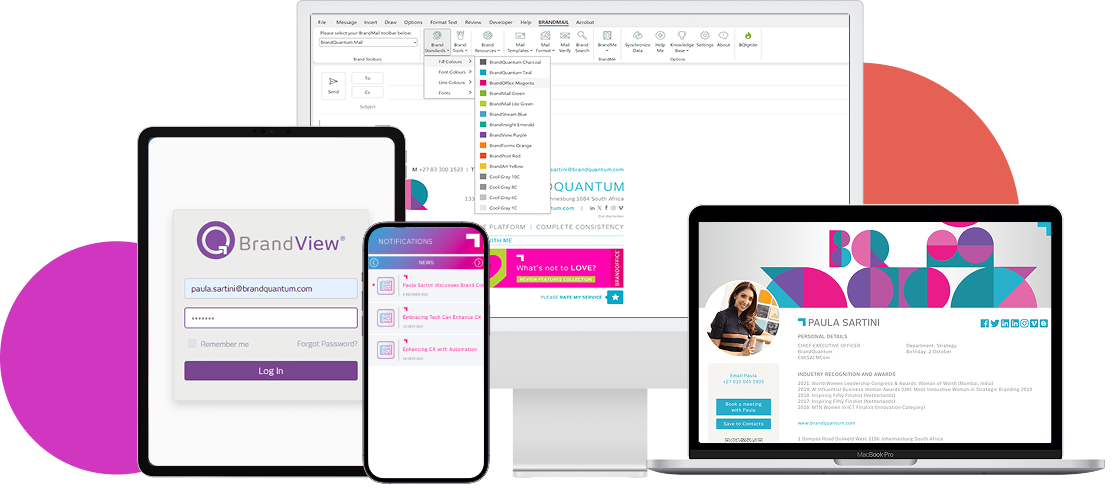
User reviews (0)