
 简体中文
简体中文 English
Website review
This review may include AI-generated content and is not individually verified. Domain, certificate and other facts come from the observed data on this page.
What is Buzzinga.io?
Buzzinga.io is a browser-based Jeopardy-style game maker and host platform. You build a custom board of categories and clues, then run it live while players buzz in from their own phones or devices. The site handles buzzer lockouts and resets automatically and keeps score as the game progresses, so the host is not juggling a stopwatch, a spreadsheet and a tangle of cables at the same time. The host view can run from any device, which keeps the shared screen clean for the audience while you see correct responses on your own screen.
It is aimed at anyone who wants a quiz-show format without building one from scratch:
- Classrooms and training sessions — teachers and corporate trainers who want a review game or a knowledge check with automatic scoring.
- Team and company events — the teams offering adds a shared workspace, seat management, a private board library and organization branding, which suits repeatable training and multi-host workflows.
- Social occasions — game nights, birthday parties and similar gatherings, as described in customer comments on the page.
Free versus Pro
| Free | Pro | |
|---|---|---|
| Players per game | Up to 3 | Unlimited |
| Board creation | Standard categories and clues | Adds your own logo, images, audio and video, plus AI category generation |
| Bulk content | Manual entry | CSV upload of clues and responses via the board settings template |
| Large groups | Not practical above a few players | Teams option recommended for more than 10 participants, with points accumulating together |
The practical trade-off is straightforward: the free tier is enough to test the format or run a small living-room game, but it caps out at three players. If you are hosting a class, a workshop or a party with more than a handful of people, the player limit is the constraint that pushes you toward Pro or Teams. The page also notes you do not need an account to start creating a game.
A concrete next step: decide your player count before you invest time in writing clues. If you expect more than three people to buzz in, check the plans page first, because a board built for a small group may need reworking once you move to a larger format.
How do players buzz in and how does the automatic buzzer management work during a game?
Players buzz in from their own phones or devices rather than from a dedicated hardware buzzer set. When a clue is revealed, each player taps their device to signal in, and Buzzinga handles the lockouts and resets automatically so the host does not have to manually open, close or clear the buzzer between clues.
What the host still controls
Automatic management covers the repetitive mechanics, not the judgment calls. The host still decides when a clue is revealed and how to resolve a wrong answer or disputed response. Buzzinga's remote host control is intended to let the host run the game from any device, so the display board can stay clean for the audience while the host sees answers and game state separately.
Why this matters in practice
Buzzer timing disputes are one of the most common friction points in live trivia. Automatic lockouts remove the "who was first?" argument, and automatic resets mean the host is not clicking a reset button after every clue. That is most valuable in formats where many clues are played quickly, such as classroom reviews or corporate training sessions.
Practical scenario
A teacher projects the board, students join on their phones, and the teacher keeps a laptop or tablet open as the host view. The teacher reveals a clue, students tap in, the system locks out later taps, and the teacher confirms or rejects the answer. Scores update as the game progresses, and the host can modify or undo a score with one click if a correction is needed.
Limits to plan around
Free games support up to 3 players, while unlimited players require Pro. For larger groups, Buzzinga recommends a teams approach so participants stay involved while points accumulate together rather than each person needing an individual buzzer. If you are running a big event, decide in advance whether you want individual buzzers or team-based buzzing, because that choice affects how you set up the game and how you explain the rules to the room.
Next step: run a short practice round with the exact number of players you expect, including at least one deliberately wrong answer, so you can confirm the lockout and score-correction flow before the real game.
What are the differences between the free plan and Buzzinga Pro, especially for player limits and customization options?
The free plan lets up to 3 players join a game; Buzzinga Pro removes that cap and adds deeper customization, including your own logo, images, audio and video, AI-generated categories, and CSV clue import. Both plans share the same core hosting tools: phone buzzers with automatic lockouts and resets, automatic scorekeeping with one-click edits or undos, and remote host control from any device, so the board stays clean for the audience while you see answers on your own screen.
| Feature | Free | Buzzinga Pro |
|---|---|---|
| Players per game | Up to 3 | Unlimited |
| Logo, images, audio, video | Not listed | Yes |
| AI category generation | Not listed | Yes |
| CSV clue/response upload | No | Yes |
| Buzzers, scoring, remote host | Yes | Yes |
Which one fits your situation
- Small household game night: the free plan is enough if only a few people are buzzing in.
- Classroom or training session: Pro matters most when the whole room needs to participate or when you want branded slides and media.
- Larger events: the site suggests teams for groups above roughly 10 participants, so points accumulate together and everyone stays involved rather than competing for a handful of buzzers.
A practical next step is to count your expected simultaneous players before choosing. If that number is three or fewer and you don't need custom branding, start free and upgrade only when a specific session demands more seats or media. You can also compare it with general-purpose quiz tools such as Kahoot! or Quizizz, which handle audience participation differently but lack the Jeopardy-style board.
How can teachers or corporate trainers use Buzzinga.io for classroom activities or team training sessions?
Teachers and trainers use Buzzinga.io as a Jeopardy-style game maker: you build a board of categories and clues, players join from their own phones, and the site handles buzzing and scoring so you can focus on running the session. No account is required to start creating a game, which lowers the barrier for a one-off class review or a team workshop.
In the classroom
- Build a board around a unit — vocabulary, formulas, historical events, lab safety — and leave unneeded columns blank if you want fewer than six categories.
- Students join on their devices and tap to buzz in. The game manages buzzer lockouts and resets, so you are not adjudicating who was first by hand.
- Scores update automatically and can be adjusted or undone with one click, which matters when a disputed answer needs a correction mid-game.
- Run the board from your own device rather than a fixed lectern setup, keeping the projected board clean for students while you see correct responses at a glance.
The free plan caps games at 3 players, so a whole class cannot each hold a buzzer on that tier. The practical workaround is teams: group students into a few competing squads, let one device represent each team, and have team members take turns answering. That also keeps quieter students involved without needing dozens of individual buzzers.
For corporate training
- Use it for product knowledge checks, compliance refreshers, onboarding trivia, or conference icebreakers where a plain slide deck would lose the room.
- Remote host control suits hybrid sessions: a facilitator can run the game from a laptop while participants join from wherever they are.
- For recurring programs and multiple hosts, the Teams offering adds a shared workspace, seat management, a private shared board library, role-based access, and organization branding — useful when several trainers need to reuse and adapt the same material.
Reviewer Christina H., a customer quoted on the site, describes previously feeling stressed managing buzzers and scores and finding that the platform handles both; that is a plausible pain point for anyone who has tried to run a quiz while also keeping time and tallying points manually. Perri M., a software product manager, frames it as well-executed tooling worth paying for, and Mike W. reports using it for a family birthday party — a reminder that the same mechanics work for social events, not just formal training.
Choosing between free and paid
The main decision is participant count and customization. The free plan fits small groups and team-based play; Pro raises the player limit, and the site says Pro also adds your own logo, images, audio and video, AI-assisted category generation, and CSV import of clues and responses via the board settings template. If your session has more than about ten participants, the site itself recommends a team format so points accumulate across a group rather than one buzzer per person.
A sensible next step: draft one board for a topic you already teach, set it up with three or four teams on the free plan, and run it once as a pilot. If the format lands, decide whether unlimited players, branding, and reusable board libraries justify moving to a paid tier. For general quiz-game alternatives, JeopardyLabs and Factile are established options worth comparing on player limits and buzzer handling before you commit your materials to one tool.
Can I upload my own questions and answers using a CSV file, and how does that process work?
Yes, but it is a Pro feature rather than part of the free plan. According to Buzzinga.io, you upload a CSV while editing a board: open the board editor, select the settings (gear) icon, download the example template, fill it in, and re-upload it. The template matters because it defines the column structure the importer expects, so editing the downloaded file rather than building a spreadsheet from scratch is the safer route.
Practical workflow
- Create or open the board you want to populate.
- In the editor, click the gear icon to download the example CSV template.
- Fill in your category titles, clues and correct responses, keeping the template's columns and order intact.
- Save as CSV and re-upload it through the same settings area.
- Review the imported board before hosting, since a mismatched column or stray comma can shift content into the wrong cell.
Who this suits
- Teachers and trainers who already keep question banks in spreadsheets and want to reuse them across sessions.
- Corporate hosts building repeatable training boards where the same content is refreshed each quarter.
- Event hosts preparing a large game and wanting to avoid typing dozens of clues by hand.
If you are running a one-off game night with a handful of clues, manual entry is probably faster than preparing a file. The CSV route pays off once you have a reusable bank or more content than you would comfortably type.
Trade-offs to weigh
| Consideration | CSV upload | Manual entry |
|---|---|---|
| Best for | Large or reused question sets | Small, one-off boards |
| Plan needed | Pro | Free plan available |
| Main risk | Template mismatch or formatting errors | Time and typing mistakes |
| Editing later | Re-upload or edit individual cells | Edit cells directly |
A sensible next step: download the template first and test it with two or three rows before committing your full question bank. That confirms your spreadsheet exports cleanly and shows you exactly how clues and responses map onto the board.
For teams running many games, the shared workspace and board library described under Buzzinga Teams may reduce how often you need to re-import the same content, since boards can be reused across hosts.
How does Buzzinga Teams support organizations with shared workspaces and multi-host workflows?
Buzzinga Teams is the organizational tier of the Buzzinga.io Jeopardy game maker, and its purpose is straightforward: replace one-off game files and a single host's laptop with a shared, governed workspace that multiple people can run from.
What the shared workspace provides
According to the site, Buzzinga Teams gives an organization:
- A centralized workspace — one place for the team's games rather than scattered individual accounts.
- A private shared board library — reusable boards that stay inside the organization, useful when the same training content is delivered repeatedly.
- Seat management — the organization controls how many people have access.
- Role-based access — different permissions for different people, so not everyone needs full editing rights.
- Organization branding — the games carry the organization's identity rather than a generic look.
How multi-host workflows actually work
The multi-host benefit comes from separating the two jobs that a single host normally does at once. Buzzinga's remote host control lets someone run the show from any device, which means the person driving the board does not need to be at the front of the room or tethered to a projector cable. Combined with a shared board library, this lets a team rotate hosts without rebuilding anything: a trainer creates and stores the board, a colleague hosts the session, and scores and buzzer lockouts are handled by the platform rather than by hand.
Automatic buzzer management and automatic scorekeeping matter more here than in a casual game night. When players tap their phones to buzz in and the system handles lockouts and resets, the host is free to focus on facilitation instead of adjudicating who was first. The site notes scores update as play progresses and can be modified or undone with a single click — useful when a disputed answer needs correcting mid-session.
Choosing between the free plan and Teams
A practical decision rule: if you are hosting a one-off session for a small group, the free plan is enough. If you are running recurring training, multiple hosts, or larger audiences, the organizational features are what you are paying for.
| Situation | Better fit |
|---|---|
| One host, casual game night, small group | Free plan |
| Repeatable training, several hosts, shared content | Buzzinga Teams |
| Large event where many participants should stay involved | Teams, so points accumulate together |
The site's own guidance is that for games with more than 10 participants, teams are recommended so everyone stays involved while their points accumulate collectively rather than being split across tiny individual games. Note that the free plan is described as supporting up to three players, with unlimited players on Pro.
A concrete scenario
A regional sales manager needs to run the same product-knowledge review for four offices. She builds one board, stores it in the shared library, and assigns a different facilitator per office. Each facilitator logs in, runs the session from their own device, and the scores and buzzers take care of themselves. Nobody has to email a file around or rebuild the board, and the branding stays consistent across all four sessions.
To start, open the board settings while editing to check what your current plan supports, and compare the plan options before committing a whole team to the workspace. If you want a broader look at how this category of tool compares, JeopardyLabs and Factile are established alternatives worth reviewing against your hosting and multi-host needs.
 NS1
NS1 Netlify
 Zoho Mail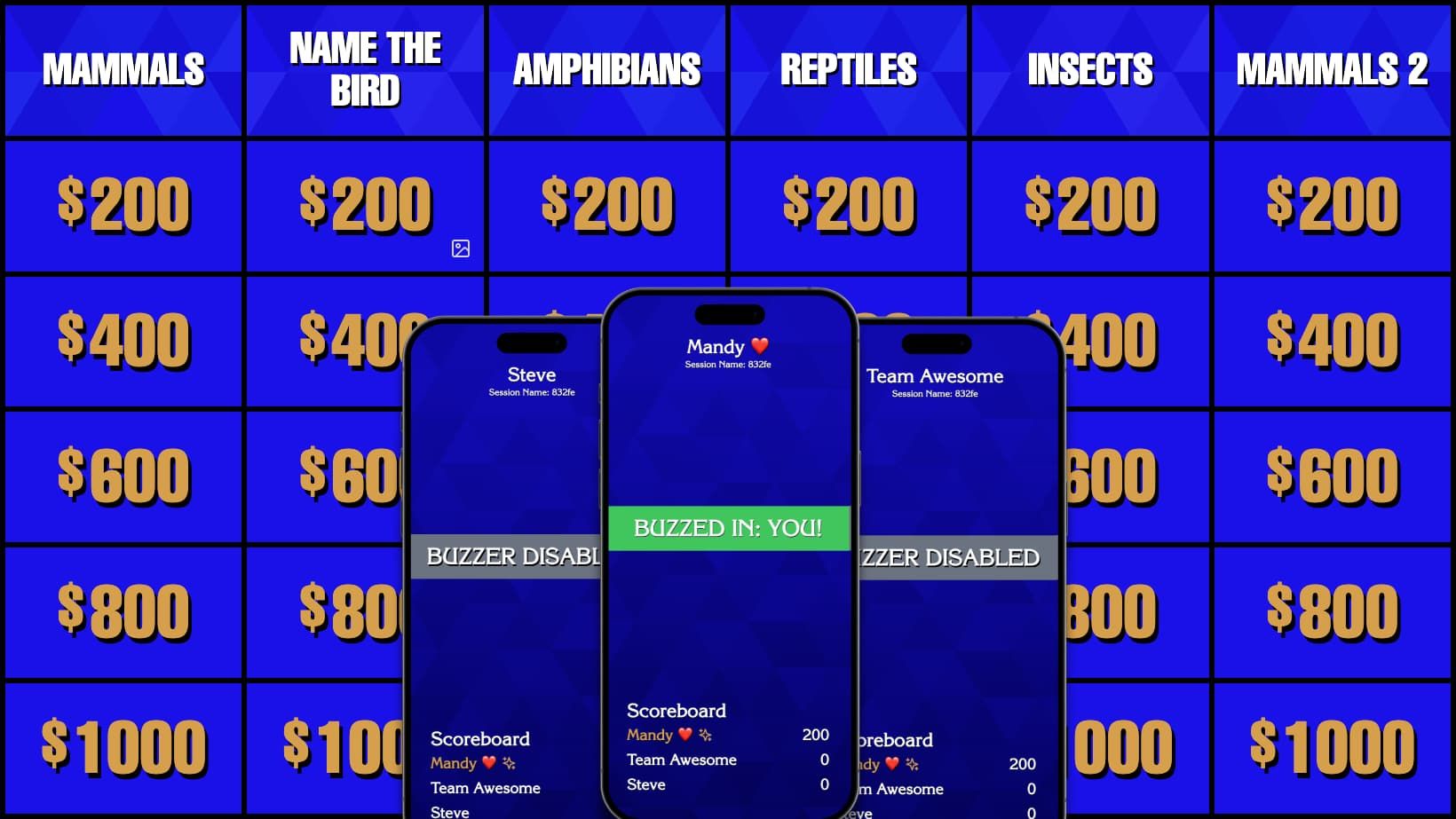

User reviews (0)