
 简体中文
简体中文 English
canoeboot.org
Canoeboot is a free/opensource BIOS/UEFI boot firmware distribution based on coreboot with GNU boot loader GRUB, SeaBIOS and U-Boot, for booting Linux/BSD.
At a glance
- Category
- Software & Apps
- Language
- English
- Paid-content signal
- No paid content foundObserved
- Registered
- 2023
- Hosting
- Akamai Connected CloudInferred
- HTTPS certificate trusted
- PassedObserved
- Last updated
Related questions
More questions →What Is Libreboot and What Does It Do?
Libreboot is a free, open source (libre) boot firmware distribution that replaces the proprietary BIOS/UEFI firmware on specific Intel/AMD x86 and ARM motherboards. It is a coreboot distribution — the same relationship Debian has to Linux — not a fork of coreboot. It initializes your hardware (memory controller, CPU, peripherals) and then starts a bootloader for your operating system, with Linux, BSD, and Windows all well-supported. It is a fit for you if your board appears on the supported hardware list and you want software freedom, continued firmware updates, and the right to keep repairing and using your machine.
What Libreboot actually does at boot
Libreboot runs coreboot for machine initialization, then jumps to a payload stored in the boot flash. Coreboot supports many payloads; Libreboot's job is to make that stack usable without you having to assemble it yourself.
The boot sequence in practice:
- You power on the machine.
- Coreboot initializes the hardware (memory controller, CPU, peripherals).
- Control passes to a payload in the boot flash.
- The payload loads your operating system — Linux, BSD, or Windows.
Because Libreboot ships several payloads in a single image, you pick one at boot time rather than reflashing to switch.
The payloads it bundles
| Payload | Platform | What it boots |
|---|---|---|
| GNU GRUB | x86 / x86_64 Intel & AMD | Linux, BSD and other multiboot targets |
| SeaBIOS | x86 / x86_64 Intel & AMD | Legacy BIOS-style booting |
| EDK2 UEFI | x86 / x86_64 (enabled by default on most boards) | Nearly anything, including Windows |
| U-Boot UEFI | ARM64 (Aarch64) | UEFI booting on ARM boards |
The practical consequence: on most x86 boards you get a UEFI environment by default, so you are not locked out of operating systems that expect UEFI — including Windows.
Libreboot vs. coreboot
This is the distinction people most often get wrong.
- Coreboot is the low-level firmware that initializes the machine and then hands off to a payload. It is a component, not a ready-to-flash product.
- Libreboot is a distribution of coreboot. It packages coreboot plus payloads plus build and install tooling into images you can actually flash.
The project states this directly: Libreboot is not a fork of coreboot. The Debian-to-Linux analogy is the intended one — Debian does not fork the Linux kernel, it distributes it in a usable form. Libreboot does the same for coreboot.
Why people choose it
The project frames its purpose around software freedom: the freedom to study, share, modify, and use software without restriction. In concrete terms, that translates to:
- No proprietary BIOS/UEFI on supported boards.
- Continued firmware updates, so you can keep using hardware that vendors have stopped supporting.
- Right to repair — the firmware does not stand between you and your machine.
If none of those matter to you, or your board is not supported, Libreboot is not the right tool.
How to get it
Two routes:
- Download and flash it yourself. The project publishes releases, install documentation, and a Git repository. The latest release is Libreboot 26.10, released 15 October 2026.
- Buy hardware with Libreboot preinstalled. Minifree Ltd sells select hardware with Libreboot preinstalled, and also accepts compatible hardware sent in for preinstallation. Minifree is owned and operated by Leah Rowe, Libreboot's founder and lead developer; sales fund Libreboot's development.
Support is available via #libreboot on Libera IRC. Since 8 September 2025, Libreboot has been an official Associated Project at SPI (Software in the Public Interest).
Before you commit
The single gating factor is hardware compatibility. Libreboot targets specific Intel/AMD x86 and ARM motherboards, including laptops and desktops — not every machine. Check your exact board against the supported hardware list before planning a flash, because an unsupported board means no install path at all.
What Is Canoeboot and How Does It Differ From Libreboot and Coreboot?
Canoeboot is a free, open source boot firmware distribution built on coreboot — the same underlying firmware that Libreboot packages. The practical difference is policy: Canoeboot follows a stricter free software standard that rejects proprietary binary blobs, while Libreboot is willing to include them where needed to support more hardware. Coreboot itself is the low-level initialization code both distributions build on, not something you normally install directly. If your goal is a fully libre firmware image and your machine is on the supported list, Canoeboot is the stricter choice; if you want broader hardware support or preinstalled options, Libreboot is the more practical one.
The three layers, in plain terms
It helps to separate what each project actually does:
| Project | What it is | What you do with it |
|---|---|---|
| coreboot | Low-level firmware that initializes hardware (memory controller, CPU, peripherals) and then jumps to a payload | Developers and advanced users build it for a specific board; it is not a ready-to-flash product for most people |
| Libreboot | A coreboot distribution — coreboot plus preconfigured payloads, build scripts, and documentation, in the same way Debian is a Linux distribution | Download or build an image for a supported board and flash it |
| Canoeboot | A coreboot distribution derived from Libreboot, with a stricter free software policy | Same workflow as Libreboot, but the resulting image excludes proprietary blobs |
The key sentence from Libreboot's own description is that it "is a coreboot distribution (coreboot distro), in the same way that Debian is a Linux distribution." Canoeboot sits in that same category — a distro, not a separate firmware stack.
What coreboot actually does
Coreboot performs machine initialization, then hands control to a payload stored in the boot flash. A payload is the part that actually boots your operating system. Libreboot's design bundles several payloads into a single image so you can pick one at boot time:
- GRUB — GNU bootloader, the default for many Linux/BSD setups
- SeaBIOS — provides a legacy BIOS interface
- U-Boot — used as a UEFI payload on ARM64 (Aarch64) boards
- EDK2 UEFI — enabled by default on most x86/x86_64 boards, and capable of booting nearly anything, including Windows
Because coreboot works with many payloads, the distribution's job is to make that combination easy to install and configure for non-expert users.
Canoeboot vs. Libreboot: where they actually diverge
Both are coreboot distributions with the same general architecture and the same payload options. The meaningful differences are:
- Blob policy. Canoeboot's stricter standard means it will not ship proprietary binary blobs. Libreboot accepts blobs in cases where they are required to support a given board. This is the single biggest reason to pick one over the other.
- Hardware coverage. Because of that policy, Canoeboot's supported hardware list is narrower. A board that works with Libreboot may not be usable with Canoeboot.
- Governance and maintenance. They are separate projects with their own maintainers and release cycles, even though Canoeboot derives from Libreboot's codebase.
If "no proprietary code in my firmware, ever" is a hard requirement, that constraint decides the choice for you. If you need a specific laptop or desktop to work and it needs a blob, Libreboot is the realistic path.
How to decide
Work through these in order:
- Check the supported hardware list first. This eliminates most of the decision. If your board is not listed for Canoeboot, it is not an option regardless of policy preferences.
- Decide whether blobs are acceptable. If not, you are limited to Canoeboot-compatible hardware. If yes, Libreboot covers more machines.
- Confirm your payload needs. Linux and BSD are well supported across both. If you need to boot Windows, note that the EDK2 UEFI payload is what makes that possible on x86/x86_64 boards.
- Decide whether to flash it yourself or buy preinstalled. Libreboot can be purchased preinstalled from Minifree Ltd on select hardware, and compatible hardware can be sent in for preinstallation. If you would rather not flash firmware yourself, that route matters.
- Only consider raw coreboot if you are comfortable building firmware for a specific board and do not need the packaging, payload defaults, or documentation a distribution provides.
Before you flash anything
- Verify your exact board model against the project's supported list — "same laptop family" is not good enough.
- Confirm which payloads are available for your board and which one you intend to boot.
- Identify your flashing method for that specific machine, since it varies by board and by whether the flash chip is accessible in place.
- Keep a recovery path in mind: a failed flash can leave the machine unbootable until the chip is rewritten externally.
For current release information, Libreboot's site lists Libreboot 26.10 (released 15 October 2026) as the latest version, and support is available via #libreboot on Libera IRC. Canoeboot maintains its own release and documentation pages, which is where you should confirm its current hardware list before committing.
What Is Libreboot and How Does It Differ From Coreboot?
Libreboot is a free, open source boot firmware distribution built on coreboot. It replaces the proprietary BIOS/UEFI firmware on specific Intel/AMD x86 and ARM motherboards, initializes the hardware, and hands off to a bootloader for your operating system. The key distinction: Libreboot is a coreboot distribution, not a fork of coreboot — the same way Debian is a Linux distribution rather than a fork of Linux. If you want a ready-to-flash, pre-configured coreboot build with a choice of bootloaders, Libreboot is aimed at you. If you want to assemble your own coreboot configuration from scratch, plain coreboot is the more direct route.
What Libreboot actually does
On a normal machine, proprietary BIOS/UEFI firmware runs first: it initializes the memory controller, CPU, and peripherals, then loads your operating system's bootloader. Libreboot takes that same role but with free software.
- Hardware initialization is handled by coreboot.
- Booting your OS is handled by a payload — a bootloader stored in the boot flash that coreboot jumps to.
- Supported operating systems include Linux, BSD, and Windows.
Libreboot runs on specific Intel/AMD x86 and ARM based motherboards, covering both laptops and desktops. Support is board-specific, so compatibility depends on your exact hardware model rather than the CPU vendor alone.
Libreboot vs. coreboot: distribution, not fork
This is the relationship most people get wrong, so it's worth stating plainly.
| coreboot | Libreboot | |
|---|---|---|
| What it is | Firmware project that initializes hardware | A distribution of coreboot |
| Analogy | The Linux kernel | Debian |
| Configuration | You build and configure it yourself | Pre-configured, ready to flash |
| Payloads | You choose and integrate them | Multiple payloads bundled in one image |
Libreboot is not a fork of coreboot. A fork would mean Libreboot maintains its own divergent copy of the coreboot codebase. Instead, Libreboot takes coreboot and packages it — adding configuration, build tooling, documentation, and bundled payloads — so that non-experts can install and use it. That's the same model Debian uses with the Linux kernel.
The bundled payloads and how you choose one
Libreboot's design puts all supported payloads into a single image, and you select one at boot time. You don't reflash to switch bootloaders.
- GRUB — GNU boot loader, available on x86/x86_64 Intel/AMD motherboards.
- SeaBIOS — also on x86/x86_64 Intel/AMD boards.
- U-Boot — a UEFI payload for coreboot on ARM64 (Aarch64) motherboards.
- EDK2 UEFI — an x86/x86_64 UEFI payload enabled by default on most boards, capable of booting nearly anything, including Windows.
The practical effect: one firmware image covers multiple boot scenarios, and the choice happens at the boot menu rather than at build time.
Why choose Libreboot
The project frames its purpose around software freedom and hardware longevity. The concrete benefits:
- Free and open source firmware — you can study, share, modify, and use the software without restriction.
- Continued firmware updates — Libreboot lets you keep using existing hardware rather than replacing it when vendor firmware support ends.
- Right to repair — firmware you control supports keeping hardware in service longer.
- Ease of use — Libreboot's stated goal is making coreboot practical for non-experts.
These are the reasons the project gives for existing; whether they matter to you depends on how much you value firmware-level control over your machine.
How to get Libreboot
Two routes are available:
- Download and install it yourself. Releases are published on the project site, with installation documentation and a download page. Check board compatibility before starting, since support is model-specific.
- Buy hardware with Libreboot preinstalled. Minifree Ltd sells select hardware with Libreboot already installed, and also accepts compatible hardware sent in for preinstallation. Minifree is owned and operated by Libreboot's founder and lead developer, Leah Rowe, and its sales fund the project.
The latest release noted on the project site is Libreboot 26.10, released on 15 October 2026. Libreboot also became an official Associated Project at SPI (Software in the Public Interest) on 8 September 2025.
Deciding between them
- Choose Libreboot if you want free firmware without building coreboot yourself, want multiple bootloaders selectable at boot, or want a documented, supported installation path for a specific board.
- Choose plain coreboot if you want full control over configuration and payload integration, or your hardware isn't on Libreboot's supported list.
- Check your exact board first in either case — support is per-model, not per-CPU-family.
For help, the project points to the #libreboot channel on Libera IRC.
What Does "Open Source" Mean for a Zen Cart Online Store?
Open source means the software's source code is publicly available, so anyone can inspect, modify, and redistribute it. Zen Cart, the platform running this reptile supply store, is open-source e-commerce software: the store owner can read and change the code, and no license fee is paid to a vendor. That matters to a small shop because it removes per-sale or monthly software fees and allows deep customization — but it also means the owner (or a developer they hire) handles hosting, updates, and security. Note that "open source" here describes the store software, not the reptile foods and supplements sold on it.
Open source in plain terms
Proprietary store platforms typically charge a subscription or a percentage of sales and keep their code closed. Open-source platforms publish the code under a license that permits use and modification. In practice, for a store like this one:
- No license fee. You pay for hosting and your own time, not for permission to run the software.
- Full access to the code. Layouts, checkout flow, and product pages can be changed beyond what a theme editor allows.
- Community development. Fixes and add-ons come from contributors and other store owners, not only from one company.
What it looks like on this store
The page evidence shows a typical Zen Cart storefront: category navigation (Bee Pollen, Cat Grass, Chia Seeds, Dandelion, Sprouting Seeds, Supplements), an "All Products" listing, reviews, and an information block with About Us, Shipping & Returns, Privacy Notice, Conditions of Use, Order Status, Site Map, Gift Certificate FAQ, and Discount Coupons. That structure — categories, reviews, coupons, gift certificates, order status — is what the platform provides out of the box. The store also publishes care guides (Russian Tortoise Care, Box Turtle Care, Redfoot Tortoise Care) and growing instructions, which are content pages the owner added rather than built-in store features.
Benefits for a small pet supply shop
- Cost control. No platform subscription means a low fixed cost that doesn't scale with order volume.
- Custom catalog logic. A shop selling seeds, dried weeds, and supplements by weight can adjust product options, units, and shipping rules directly in the code.
- Content and commerce in one place. Care guides and growing instructions sit alongside the catalog, which supports the store's stated role of helping customers find foods for herbivore reptiles.
- No vendor lock-in on data. You can export and migrate your catalog if you decide to move.
Trade-offs to plan for
| Concern | What it means in practice |
|---|---|
| Hosting | You arrange your own web host and domain; the platform doesn't host the store for you |
| Security updates | You apply patches yourself or pay someone to; skipping them is the main risk |
| Technical maintenance | Theme changes, add-ons, and upgrades need someone comfortable with PHP-based code |
| Support | Help comes from forums, documentation, and paid developers rather than a single support line |
| Add-on quality | Third-party modules vary; test before relying on them for checkout or payments |
Deciding whether it fits your store
Choose an open-source cart like Zen Cart if you want no license fees, need code-level customization, and have either technical skills or a developer you can call. Choose a hosted subscription platform instead if you'd rather not manage hosting, patches, and upgrades, and you're comfortable paying monthly for that convenience. A middle path works for many small shops: run the open-source cart on managed hosting that handles server updates, and keep a developer on retainer for store-level changes.
If you're evaluating this specific store as a model, the useful signal is that a niche reptile supply shop can run a full catalog, reviews, coupons, and care content on open-source software without a platform fee — the cost shifts from subscriptions to maintenance.
What Is Coreboot and How Does It Relate to Libreboot?
Coreboot is free, open source boot firmware that initialises a computer's hardware and then hands control to a separate program called a payload, which boots your operating system. Libreboot is not a fork of coreboot — it is a coreboot distribution, in the same way Debian is a Linux distribution. In practice this means Libreboot takes coreboot, adds a set of payloads and build tooling, and ships it as a ready-to-flash image for specific Intel/AMD x86 and ARM motherboards. If you want to understand the mechanism, learn coreboot. If you want firmware you can install on supported hardware without assembling it yourself, a distribution like Libreboot is usually the practical route.
What coreboot actually does
Boot firmware runs before your OS. On most machines that job is done by a proprietary BIOS/UEFI. Coreboot replaces that layer with free software and splits the work in two:
- Hardware initialisation — coreboot sets up the memory controller, CPU and peripherals so the machine is usable.
- Payload handoff — coreboot then jumps to a payload stored in the boot flash, and the payload boots the operating system.
This split is the key idea. Coreboot itself is not a bootloader and does not present a boot menu on its own; that is the payload's job.
The coreboot-plus-payload model
Because coreboot only initialises hardware, what you actually see at boot depends on which payload is included. Common payloads include:
| Payload | What it provides |
|---|---|
| GRUB | GNU bootloader, common for Linux/BSD |
| SeaBIOS | Legacy BIOS-style booting on x86 |
| U-Boot | Bootloader used on ARM64 (Aarch64) boards |
| EDK2 UEFI | UEFI environment that can boot nearly anything, including Windows |
A single firmware image can bundle several of these and let you pick one at boot time. That is exactly the design Libreboot uses: it incorporates GRUB and SeaBIOS payloads on x86/x86_64 Intel/AMD boards, a U-Boot UEFI payload on ARM64 boards, and enables an x86/x86_64 EDK2 UEFI payload by default on most boards.
Why Libreboot is a distribution, not a fork
The distinction matters when you are deciding what to install.
- A fork takes the original project's code and develops it separately, diverging over time.
- A distribution packages an upstream project — coreboot — together with payloads, configuration and build tooling, and releases it as a usable product.
Libreboot states plainly that it is not a fork of coreboot. It provides coreboot for machine initialisation, then jumps to a payload in the boot flash. The value it adds is making coreboot easy to use for people who are not firmware developers: preconfigured images, a defined set of payloads, and documentation.
What hardware and operating systems are supported
Libreboot targets specific Intel/AMD x86 and ARM-based motherboards, including laptops and desktops. Linux, BSD and Windows are all described as well-supported, with the EDK2 UEFI payload being what makes near-universal booting possible on x86.
The word to note is specific. Coreboot and its distributions support a defined list of boards, not arbitrary hardware. Before planning an install, confirm your exact motherboard or laptop model is supported — this is the single most common blocker.
Choosing coreboot directly vs. a distribution
Both paths use the same underlying firmware. The difference is how much work you take on.
Choose coreboot directly if:
- You want to build from source and control every configuration choice.
- Your board is supported by coreboot but not by any distribution.
- You are developing or porting firmware and need upstream code.
Choose a distribution like Libreboot if:
- You want a prebuilt image for a supported board.
- You want multiple payloads bundled and selectable at boot without assembling them yourself.
- You value continued firmware updates that let you keep using existing hardware.
For most people replacing a proprietary BIOS on a supported machine, the distribution route removes the build step entirely. Libreboot also notes that preinstalled hardware and preinstallation services are available from Minifree Ltd on select hardware, and that sales fund the project — worth knowing if you would rather buy a ready machine than flash one yourself.
Practical next steps
- Check support first. Look up your exact board in the distribution's supported hardware list. No match means no install.
- Decide source vs. prebuilt. If you are not building from source, use a released image rather than assembling coreboot and payloads manually.
- Pick your payload. For Linux/BSD, GRUB or SeaBIOS; for Windows or broad compatibility on x86, the EDK2 UEFI payload; for ARM64, U-Boot.
- Verify after flashing. Confirm the machine initialises, the payload menu appears, and your OS boots — that sequence proves both halves of the coreboot-plus-payload model are working.
The mental model to keep: coreboot is the engine that wakes the hardware; the payload is what actually starts your operating system; and Libreboot is one convenient way of getting both onto a supported machine.
Website Overview
Page metadata, canonical configuration and social previews work together to provide more consistent search and sharing presentation.
Domain and Registration
Transfer-protection status is present, helping reduce the risk of unauthorized domain transfers. The domain has about 2 years of registration history; its current configuration provides more context than age alone. The registrar is Gandi SAS, a widely used domain service provider. The domain uses the common .org extension, which is not an independent safety signal.
DNS and Email
Nameservers are provided by shlinux.org, indicating managed DNS hosting. CAA records restrict which certificate authorities are authorized to issue certificates. No CNAME was found; the observed records resolve directly to addresses. No MX record was found. A conventional explicit inbound-mail route is not configured. DNSSEC signatures were not detected, so this additional DNS authenticity protection is not confirmed.
TLS and Certificates
The certificate uses an RSA 2048-bit public key, offering broad client compatibility. The server supplied a complete certificate chain. No organization name is present in the certificate; the available fields are consistent with domain validation. The certificate was issued by Let's Encrypt, commonly associated with automated certificate services. The certificate's total validity is about 89 days, consistent with a short renewal cycle.
HTTP and Browser Security
The response lacks these common security headers: CSP, Referrer-Policy, Permissions-Policy. No X-Powered-By header was found, reducing one common source of backend fingerprinting information. No obvious internal addresses or debug information were found in the headers. The Server header identifies nginx without an exact version. No explicit CDN or WAF marker was found in the response headers.
Technology Stack Analysis
The public page identifies pandoc, nginx without precise versions, leaving fewer clues for version-specific scanning.
Search and Social Sharing
The Generator tag identifies pandoc, making the publishing system easier to fingerprint. Twitter Card metadata is configured. The title has 47 characters, within a common display range. A meta description is present, with 155 characters. The observed directives allow indexing and link following.
Hosting and Email
 Akamai Connected Cloud
 London, England, United Kingdom
Inferred
212.111.40.74
London, England, United Kingdom
Inferred
212.111.40.74
Registration details
| Registrar | Gandi SAS |
|---|---|
| Registered | 2023-10-25 |
| Expires | 2033-10-25 |
| Domain status | client transfer prohibited |
| Nameservers | ns1.shlinux.org、ns2.shlinux.org、ns3.vimuser.org、ns4.vimuser.org |
| DNSSEC | unsigned |
DNS records
| Type | Name | Value | TTL | Priority |
|---|---|---|---|---|
| A | canoeboot.org | 212.111.40.74 | 604800 | — |
| AAAA | canoeboot.org | 2a01:7e00::f03c:93ff:fea6:5496 | 604800 | — |
| NS | canoeboot.org | ns1.shlinux.org | 604800 | — |
| NS | canoeboot.org | ns2.shlinux.org | 604800 | — |
| NS | canoeboot.org | ns3.vimuser.org | 604800 | — |
| NS | canoeboot.org | ns4.vimuser.org | 604800 | — |
| CAA | canoeboot.org | 0 iodef "mailto:[email protected]" | 604800 | — |
| CAA | canoeboot.org | 0 issue "letsencrypt.org" | 604800 | — |
TLS and certificates
HTTP response headers
| Header | Value |
|---|---|
| content-type | text/html |
| server | nginx |
| strict-transport-security | max-age=63072000; includeSubDomains; preload |
| x-frame-options | DENY |
| x-content-type-options | nosniff |
Identified technologies
Pages, Search and Sharing
| Meta description | Canoeboot is a free/opensource BIOS/UEFI boot firmware distribution based on coreboot with GNU boot loader GRUB, SeaBIOS and U-Boot, for booting Linux/BSD. |
|---|---|
| Canonical URL | https://canoeboot.org/ |
| Language | English (default) |
| Twitter Card | summary_large_image |
Social Sharing Preview
8 fields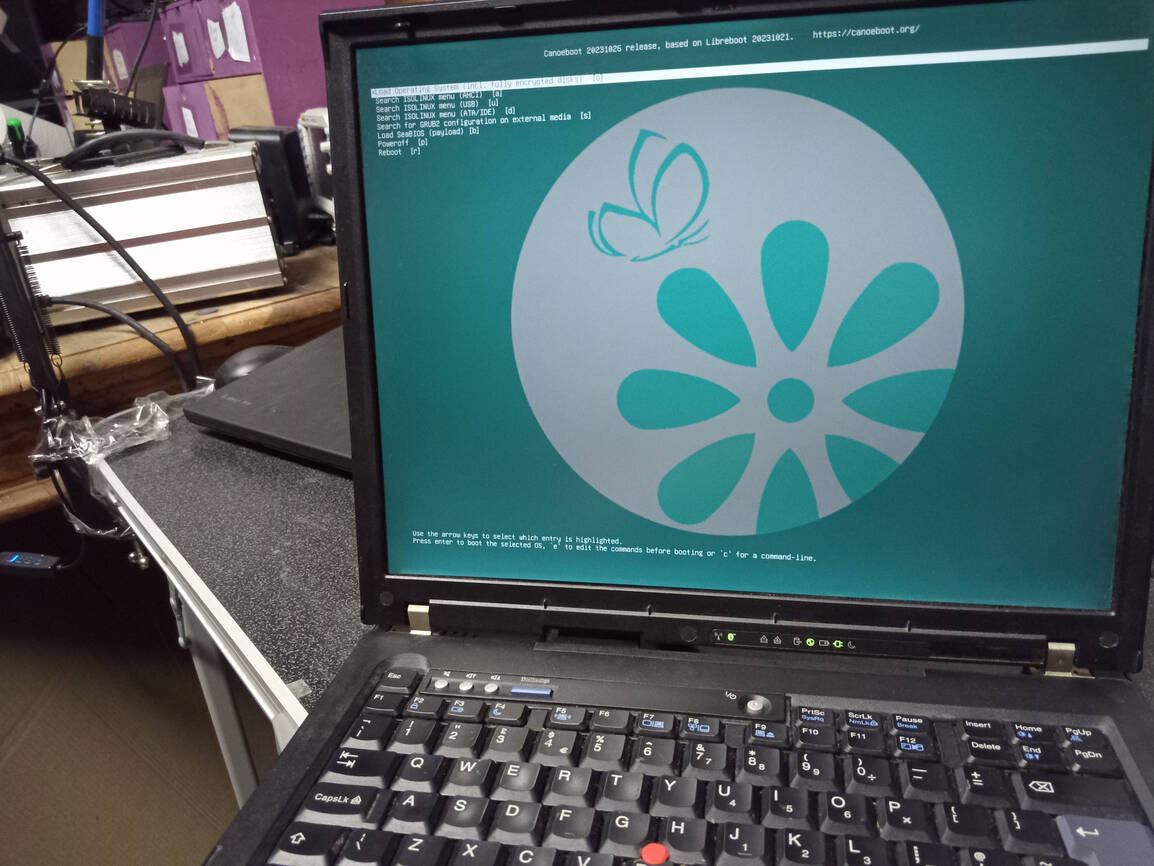
robots.txt (opens in a new tab)
0 rulesAll bots 0 allowed · 0 disallowed
No matching rules.
User reviews (0)