
 简体中文
简体中文 English
Website review
This review may include AI-generated content and is not individually verified. Domain, certificate and other facts come from the observed data on this page.
What is Copyhat?
Copyhat is an AI writing assistant, available on iOS, that helps you draft and improve short-form text: emails, messages and sales copy. Its own description also lists less business-oriented uses, such as generating insightful questions on a topic, working through philosophical dilemmas and writing funnier openers.
What it is good for
- Everyday correspondence: turning rough notes into a clearer email or message.
- Sales and marketing snippets: producing or polishing short promotional copy.
- Idea starters: generating questions, angles or opening lines when you are stuck.
Who it suits
It is aimed at people who write in short bursts on a phone and want help getting a first draft or a better phrasing quickly—freelancers, salespeople, or anyone answering a lot of messages. It is not positioned as a long-document or technical-writing tool; for reports, articles or structured documents, a general-purpose assistant is usually a better fit.
A practical next step
Pick one real task you do often—say, replying to client enquiries—and test whether Copyhat's drafts sound like you with light editing. If they need heavy rewriting, the time saving is small; if they need only a tweak, it fits your workflow.
How can Copyhat help me write better emails and sales copy?
Copyhat is positioned as an AI writing assistant for exactly that job: drafting and improving emails, messages and sales copy. According to its own description, it can help you compose better emails, brainstorm insightful questions on a topic, and write funnier openers — the "choice is yours" framing suggests a general-purpose writing helper rather than a tool locked to one format. It is offered on iOS, so the intended workflow appears to be writing on a phone or tablet, useful when you draft replies or outreach between meetings rather than at a desk.
Where it fits in practice
- Cold or follow-up sales emails: use it to turn a rough point list ("we cut onboarding time, ask for 15 minutes") into a polished draft, then edit for accuracy.
- Subject lines and openers: the "funnier openers" angle is most useful for newsletters or casual outreach; test a few variants and keep the one that sounds like you.
- Difficult or sensitive replies: a first draft you can trim is often faster than a blank page, especially for negotiation or apology emails.
- Question generation: its question-brainstorming use carries over to discovery emails and sales calls — good questions often matter more than polished prose.
Trade-offs to weigh
AI drafts tend to be fluent but generic. Sales copy lives on specifics — a real customer detail, a concrete number, a named pain point — so treat Copyhat's output as a skeleton and supply the substance yourself. Tone is the other risk: humour that lands in one inbox can misfire in another, so match the register to the recipient. For longer-form or SEO-oriented copy, a dedicated long-form tool may suit you better; for quick mobile drafting, a lightweight assistant like this is the more natural fit.
A practical next step
Pick one real email you need to send this week. Draft it with Copyhat, then rewrite the opening line and one proof point in your own words before sending. If that hybrid draft takes less time than writing from scratch and reads naturally, the tool has earned a place in your workflow; if you find yourself rewriting everything, keep it for brainstorming only.
Is Copyhat available on iOS, and how do I get it?
Yes. Copyhat's own page says it is available on iOS and points visitors to download it from the App Store. It is described as an AI writing assistant for emails, messages, sales copy, insightful questions and openers, so the iOS app is the intended way to use it on an iPhone.
How to get it
- Open the App Store on your iPhone and search for "Copyhat."
- Check that the listing matches the Prague-based developer behind the site (yadada s.r.o.) before installing.
- Install and open the app, then try a short, low-stakes task first—for example, drafting a two-line follow-up email—to see whether the tone controls suit you.
What to expect on iOS
The page presents Copyhat as an iOS product rather than a web-first one, so plan on doing your writing in the app. That suits quick drafting on your phone: polishing a sales message between meetings, rewording a reply, or generating questions for an interview. If you mostly write at a desk with long documents, a phone-only workflow may feel cramped, and you should test a realistic task before relying on it.
A practical check before committing
Run the same prompt twice—once with a formal tone and once with a casual one—and compare the output. If the results need heavy rewriting, the app adds little; if they are close to publishable, it saves real time. For alternatives, compare general assistants such as OpenAI or dedicated writing tools, and keep Copyhat's App Store listing as the authoritative source for current availability and requirements.
Can Copyhat help me generate insightful questions about a topic?
Yes. Copyhat is explicitly positioned to help you "come up with insightful questions about any topic," and the same assistant is aimed at emails, messages and sales copy, so question generation is one of several writing tasks rather than a dedicated research tool.
Where it fits
- Interview or podcast prep: Ask for questions that move past the obvious, then pick the ones that match your guest's expertise.
- Workshops and meetings: Generate prompts that surface assumptions before a team commits to a plan.
- Essays and study: Use the output as a starting set to refine, not a finished list.
What to expect
The page describes Copyhat as an AI writing assistant available on iOS, with a small team behind it. The examples it gives (philosophical dilemmas, funnier openers) suggest a general-purpose tone-shifting assistant rather than a structured research engine.
Practical caveat
Question quality depends on what you supply. Vague prompts tend to return generic "what are the challenges?" questions. Give it the audience, the purpose and a few example questions you consider strong, then ask for questions that would not fit those examples.
Next step
Start with one real task: paste a short brief (topic, audience, what a good answer would change) and request ten questions, then ask it to rank them by how much they would challenge a knowledgeable reader. Compare that list with what you would have written yourself; that gap tells you whether it earns a place in your workflow.
For a second opinion on general AI writing assistants, see OpenAI and Anthropic.
Who is behind Copyhat, and how is my data handled?
Copyhat is a product of yadada s.r.o., a company based in Prague, Czechia. The site names three people behind it: Dominik Simonik, Denis Valasek and Jan Antonin Kolar, with Jan Antonin Kolar listed as director. The product itself is presented as an AI writing assistant for emails, messages and sales copy, available on iOS.
How your data is handled
The page itself gives no detail on data handling beyond linking to a Privacy Policy and Terms and Conditions. It does not state where text you enter is processed, whether it is stored, whether it is used for model training, or which third-party AI providers are involved.
For a writing tool this matters concretely: emails and sales copy often contain client names, pricing and internal plans. Before pasting that kind of material, open the privacy policy and look for four things:
- Retention: how long submitted text is kept, and whether you can delete it.
- Training use: whether your inputs can be used to improve models, and whether you can opt out.
- Subprocessors: which AI or cloud providers receive the text, and in which countries.
- Account data: what is collected on signup and whether the iOS app shares data with the website.
Practical next step
If the policy is silent on training or subprocessors, treat the tool as suitable for drafting and brainstorming rather than for confidential material, and strip names and figures before pasting. For comparison, mainstream assistants publish detailed data policies you can check against: OpenAI and Anthropic. The company's own site is Copyhat.
What kinds of writing tasks is Copyhat best suited for compared with general-purpose AI chatbots?
Copyhat is presented as a focused AI writing assistant, so its clearest fit is short-form, purpose-driven text: emails, messages, sales copy, openers, and brainstorming question prompts. That narrower framing suits someone who wants a drafting nudge inside a writing task rather than an open-ended conversation.
Where a focused writing tool tends to fit
- Email and message drafting, where the goal is tone and clarity rather than research.
- Sales and marketing snippets such as openers or short persuasive lines.
- Prompt-style thinking, such as generating questions about a topic before you write.
- Casual or creative variety, including alternative phrasings and lighter openers.
How it compares in practice
| Task | Copyhat's apparent strength | General chatbot's strength |
|---|---|---|
| Short emails and messages | Purpose-built framing for drafting | Flexible but requires more instruction |
| Sales copy snippets | Aimed at persuasive short text | Capable, less task-focused by default |
| Multi-step research or analysis | Not the stated focus | Stronger for extended reasoning |
| Long documents and editing | Limited evidence on the page | Better suited to iterative long-form work |
Take a concrete case: a founder writing ten follow-up emails after a conference. Copyhat's stated purpose—composing better emails and funnier openers—matches that repetitive, tone-sensitive work. The same founder planning a pricing strategy would be better served by a general chatbot that can hold a long back-and-forth.
A useful next step
Write one real email you need to send and one short sales line. Draft both with Copyhat, then judge whether the output needs less editing than your usual process. If you find yourself wanting research, fact-checking, or long structured documents, keep a general-purpose chatbot alongside it. For broader context on AI writing tools, see OpenAI.
 Amazon.com, Inc.
 Google Workspace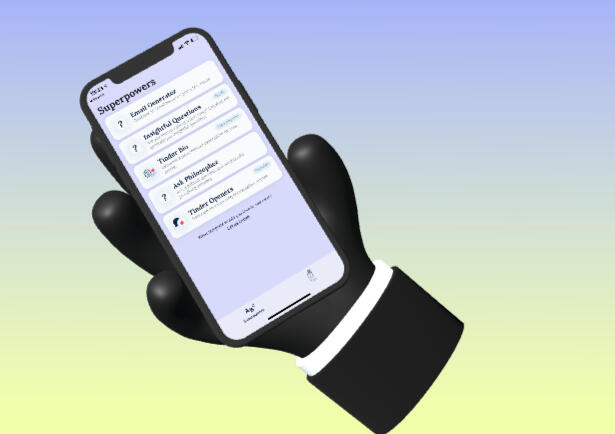
User reviews (0)