Website profiles · Technology insights · Alternatives

crookcatcher.app

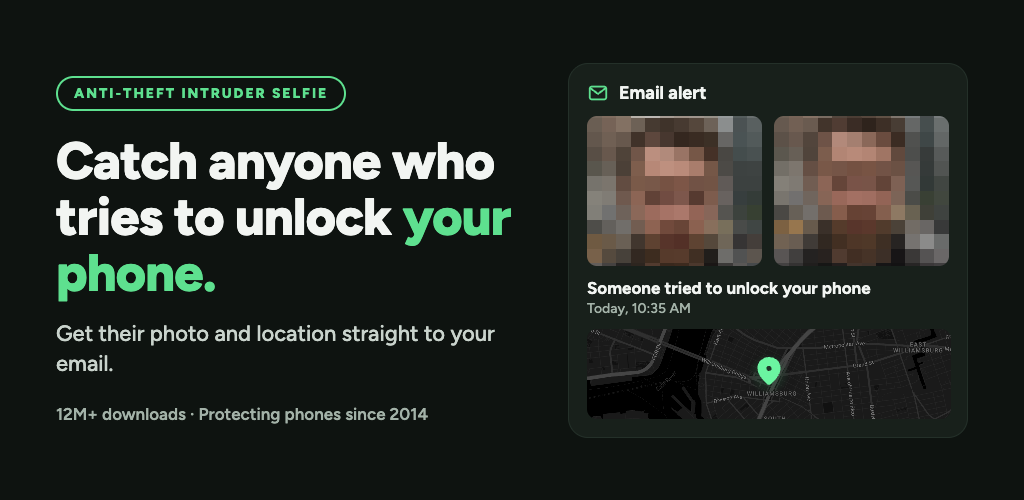
CrookCatcher takes an intruder selfie when someone enters a wrong PIN, pattern or password, and emails you their photo and GPS location. Free for Android.

No paid content found
Visit website
Profile views 4 Outbound visits 1 Normal
CrookCatcher Full homepage screenshot

At a glance

Category
Other
Language
English
Paid-content signal
No paid content foundObserved
Registered
2018
Hosting
CloudflareInferred
HTTPS certificate trusted
PassedObserved
Last updated

Website review

This review may include AI-generated content and is not individually verified. Domain, certificate and other facts come from the observed data on this page.

What is CrookCatcher?

CrookCatcher is an Android anti-theft app that turns a failed unlock attempt into usable evidence. When someone enters the wrong PIN, pattern or password, it takes a front-camera "intruder selfie," records the location, and emails both to you — so you may learn who tried to get into your phone and where they were, often before they realize an alert was sent.

Its core features are deliberately narrow: wrong-unlock detection, an intruder photo, GPS location, and instant email alerts. The app also organizes attempts into a timeline with photos, timestamps and locations, and lets you share that evidence with police or people nearby. The free tier covers these essentials; Pro adds stronger evidence and countermeasures such as video with sound, back-camera capture, break-in detection (alerting even if the intruder later guesses the right unlock), Google Drive backup, a loud alarm, a lock-screen warning, a fake home screen, and app-lock protection so the app itself can't easily be disabled.

Who it suits

  • Anyone who leaves a phone in a bag, pocket, car or shared space and wants a record of tampering attempts.
  • People who have already lost a phone and want the thief's photo and location emailed off-device.
  • Privacy-conscious users who want evidence stored in their own inbox rather than a third-party account — the free version needs no registration.

Trade-offs to weigh

  • It only works on Android, and only when the app is installed and configured before the phone goes missing.
  • A front-camera selfie in poor light or a hurried grab may be blurry or partial; treat it as a lead, not proof.
  • Email alerts depend on the phone having power, signal and data at the time of the attempt.
  • The free tier's evidence stays on the device, so a thief who wipes or keeps the phone can also remove it — off-device backup is a Pro feature.

Practical next step

If you install it, test it yourself: lock the screen, deliberately enter a wrong PIN, and confirm the photo and location email arrive. Then decide whether the free essentials are enough or whether video, break-in detection and off-device backup justify Pro for your situation. For broader device-finding help, Google's own service at Google Find My Device can locate, lock or erase a missing Android phone, and it pairs well with an app like this rather than replacing it.

How does CrookCatcher take a photo when someone enters the wrong PIN?

CrookCatcher hooks into Android's failed-unlock event: when someone enters a wrong PIN, pattern or password, the app fires the front camera and captures a photo, then records the location at that moment. The photo and GPS position are emailed to you right away, so the evidence reaches your inbox before the person holding the phone knows anything was captured. It runs without registration and is free on Android, according to the app's own description.

The practical detail that matters most is that the trigger is the failed attempt, not the successful one. That means the photo is taken while the intruder is still guessing, which is usually when they're looking straight at the screen. Each attempt is logged as a labeled event with a timestamp and location, so you can see a sequence rather than a single frame.

What you get on the free tier

  • Front-camera intruder selfie on each wrong PIN, pattern or password
  • GPS location attached to every alert
  • Instant email with the photo and location
  • A timeline of attempts in the app

What Pro adds, and when it's worth it

The free version answers "who tried to get in, and where were they?" Pro is aimed at stronger evidence and recovery: video with sound, a back-camera shot so you see the room rather than just a face, break-in detection that still alerts you if the person eventually guesses the correct unlock, Google Drive backup so evidence survives even if the phone is taken, plus a loud alarm, a lock-screen warning, a fake home screen and the ability to lock CrookCatcher itself so it can't be switched off.

Limits worth knowing before you rely on it

  • A front-camera selfie in a dark room or from an odd angle may be too poor to identify anyone.
  • Someone who knows the app exists can disable it unless you use the app-lock option, and a thief who immediately powers the phone off or removes the SIM may cut off email delivery before it sends.
  • Email alerts depend on the phone having a data connection at that moment.

A sensible setup: install it, run one deliberate wrong-PIN test to confirm the email actually arrives with a usable photo and location, then enable the app lock. Keep the phone's own Find My Device or Google account recovery as a parallel route, since CrookCatcher is evidence-gathering rather than a locator you can query on demand. For a broader comparison of anti-theft approaches, see Google's Android device-location help and your carrier's phone-insurance terms, which often govern what you need for a police report.

Do I need to pay for CrookCatcher or is the free version enough?

The free version of CrookCatcher covers the core job: when someone fails your PIN, pattern or password, it takes a front-camera selfie, records the location, and emails both to you. If your main worry is simply knowing who tried to get in and where they were, that alone is usually enough. It works without registration, and the app has been around since 2014 with a large install base, so the basic loop is well tested.

What you get free versus what Pro adds

Capability Free Pro
Intruder selfie on failed unlock Yes Yes
GPS location with each alert Yes Yes
Instant email alerts Yes Yes
Event timeline with labels Yes Yes
Video with sound No Yes
Break-in detection after a correct unlock No Yes
Back camera capture No Yes
Google Drive backup off-device No Yes
Loud alarm and lock-screen warning No Yes
Fake home screen No Yes
App lock so it can't be disabled No Yes

When free is genuinely enough

  • You mainly want a photo and location of whoever is fumbling with your lock screen.
  • You keep your phone with you most of the time and the risk is opportunistic snooping — a partner, a colleague, a curious friend.
  • You don't mind that evidence lives only on the phone until you forward it.

When Pro earns its place

The Pro features matter most in the scenario the app is built around: the phone is actually stolen and gone. Google Drive backup means the evidence survives even if the thief wipes or keeps the device. Break-in detection covers the smarter thief who watches you enter your code, fails once, then succeeds — free only fires on the failed attempt. The loud alarm and fake home screen are about the moment of the crime rather than the aftermath.

One practical note: the free tier's evidence sits on the device, so a thief who immediately factory-resets or stays offline can cut you off from it. If losing the phone entirely is your real fear, backup is the single most valuable upgrade.

A reasonable next step is to install the free version, trigger a test alert yourself with a wrong unlock, and confirm the email arrives with a usable photo and location. If the picture quality or the lack of off-device storage bothers you, that's your signal to consider Pro. For general context on anti-theft apps, Google Find My Device covers device location but not intruder photos, so the two serve different purposes.

What extra evidence do I get with CrookCatcher Pro compared to the free version?

The free version captures a front-camera intruder selfie plus GPS location whenever someone fails your PIN, pattern or password, and emails both to you immediately. It also keeps a timeline of every attempt with time, location and labels distinguishing failed unlocks from break-ins.

Pro adds evidence types that matter once a phone is actually gone or a thief gets past the lock screen:

  • Video with sound — captures voice and movement, which is often more useful to police than a single still frame.
  • Break-in detection — still triggers an alert if the person eventually guesses the correct unlock after failing.
  • Back camera — shows the surroundings rather than only the intruder's face, useful for identifying a location or a second person.
  • Google Drive backup — stores evidence off-device, so it survives even if the phone is wiped or never recovered.

Pro also bundles deterrent and deception tools rather than evidence: a loud alarm, a lock-screen warning message, and a fake home screen that makes a thief think they have unlocked the phone. A pattern-lock app lock keeps CrookCatcher itself from being disabled.

Choosing between them

If your main worry is someone snooping through your phone at a desk or party, the free tier already covers it — a photo and a location in your inbox is enough to identify them. Pro is aimed at the stolen-phone scenario: the person has your device and time to work on it. That is when video, break-in detection and off-device backup change the outcome, because a thief who wipes the phone destroys anything stored only on it.

Practical step: before deciding, test the free version by deliberately failing your unlock once and confirming the email arrives with a usable photo and an accurate location. If the photo is too dark or the angle misses the face in your typical setting, the back-camera and video options in Pro are the features most likely to fix that for you.

How do I share the intruder photo and location with police?

CrookCatcher is built to hand you the evidence in a form you can forward: every failed unlock produces a selfie with a timestamp and GPS location, delivered to your email inbox. To get that to the police, open the alert email on any device and forward it to the non-emergency address or reporting portal your local force provides, attaching or linking the photo and location exactly as received.

What to send

  • The intruder photo from the email alert, unedited and at full resolution.
  • The timestamp and GPS coordinates recorded with that event.
  • The labeled event type (failed unlock, or a break-in alert if you have Pro), so the officer knows what triggered it.
  • Your phone's IMEI and model, plus the date and approximate place the phone went missing.

Practical steps

  1. File the report first and get a case or reference number. Evidence is far more useful once it is attached to an open case.
  2. Forward the original email rather than retyping details, so headers and timestamps survive intact.
  3. If you have Pro and evidence is backed up to Google Drive, share that folder or the individual files with the officer handling the case.
  4. Keep your own copy. Don't delete the alerts, and don't edit the images.
  5. If you believe the phone is nearby right now, call the emergency number instead of emailing. An email is for after-the-fact reporting.

Decisions worth making in advance

  • Save your local non-emergency police email or online reporting link in your contacts before you need it. In the moment, people waste time searching.
  • Check whether your force accepts digital photo evidence by email or requires a portal upload; some do, some don't.
  • Note that a selfie plus a location pin is a lead, not proof of identity or intent. Police will treat it as one piece of a report, and it is strongest when combined with your IMEI and a clear timeline.

For general reporting routes, see Police.uk in the UK or USA.gov for US state and local links. CrookCatcher's own description also suggests sharing the evidence with people nearby, which is a reasonable parallel step if the phone may still be close by.

Can a thief disable CrookCatcher after stealing my phone?

A thief can disable CrookCatcher, but only if they can get past the lock screen and into your settings. The app is designed so that the failed attempts themselves are what trigger the evidence, so the most useful captures usually happen before anyone has full access to the phone.

What the app does to protect itself

The free tier focuses on the alert itself: a wrong PIN, pattern or password triggers a front-camera photo and a GPS location, sent to your email inbox right away. That means the first few failed guesses are already recorded and off the phone before a thief works out the correct code.

CrookCatcher's Pro tier adds the features that make disabling harder:

  • App lock – you can require a pattern lock just to open CrookCatcher, so someone with your phone unlocked still can't switch it off casually.
  • Break-in detection – it keeps watching even if the thief eventually guesses the right unlock after failing.
  • Google Drive backup – evidence is copied off the device automatically, so deleting the app doesn't delete the photos and locations already collected.
  • Lock screen warning – a message appears when an alert fires, which can make a thief think twice.

The honest limitation

If a thief has your unlock code and enough time, they can reach Android's app settings, force-stop or uninstall CrookCatcher, and turn off location or email sync. No anti-theft app on a stock Android phone can fully prevent that. What these apps do well is win the first few minutes — the window when a thief is still guessing and hasn't yet thought about app management.

A practical scenario: someone snatches your phone at a café and tries a few codes before walking off. Those attempts generate selfies and locations that are already in your inbox. By the time they sit down to dig through settings, you have a face, a timestamp and a rough location to hand to police.

A sensible next step

Turn on Google Drive backup and App lock, then test the flow yourself: lock the phone, deliberately enter a wrong code a few times, and confirm the email arrives with the photo and location. If it doesn't, fix that now rather than discovering it after a theft. Also enable Android's own Find My Device, since a factory reset or offline phone is a scenario CrookCatcher alone can't cover.

Related questions

More questions →
What Is CrookCatcher and What Does It Do?

CrookCatcher is an Android anti-theft app that takes an intruder selfie when someone enters a wrong PIN, pattern, or password, then emails you that photo along with the recorded GPS location. It suits anyone who wants usable evidence if their phone is stolen or someone tries to unlock it — the site states it is free on Android with no registration, and lists a Pro tier for stronger evidence and extra deterrent features.

How it works

The site describes a three-step flow from a failed unlock to evidence you can act on:

  1. Intruder selfie — when someone enters a wrong PIN, pattern, or password, CrookCatcher automatically takes a front-camera photo and records the location.
  2. Instant email alert — the photo and location are sent to your email inbox right away, before the person realizes it happened.
  3. Share the evidence — you can pass the photo and location to the police or to people nearby to help recover the phone.

Because the alert goes out by email rather than staying only on the device, the evidence can reach you even if the phone is no longer in your hands.

What evidence you collect

Every failed attempt is saved as a timeline, so you can see the full sequence of events. According to the site, each entry includes:

  • Photos and video — an intruder selfie on every attempt, plus video with sound on Pro.
  • Time and location — each event is stamped with when and where it happened.
  • Labeled events — you can tell at a glance whether it was a failed unlock or a break-in.
  • Off-device backup (Pro) — evidence is backed up to Google Drive, so it survives even if the phone is gone.

Free vs. Pro

The site frames the split as "everything you need to catch an intruder is free," with Pro adding stronger evidence and more ways to fight back.

Capability Free Pro
Intruder selfie on wrong PIN/pattern/password Yes Yes
GPS location with every alert Yes Yes
Instant email alerts Yes Yes
Video with sound — Yes
Break-in detection (alerts even if they later guess the right unlock) — Yes
Back camera capture — Yes
Google Drive backup — Yes
Loud alarm — Yes
Lock screen warning message — Yes
Fake home screen — Yes
App lock (pattern-lock CrookCatcher so it can't be disabled) — Yes

If your goal is simply to capture a face and a location on a failed unlock, the free tier covers it. If you want evidence that holds up better (voice, movement, surroundings) or features that keep the app from being switched off, that is what Pro is for.

Who it fits — and what to check first

CrookCatcher fits Android users who want a low-effort tripwire: install it, and a wrong unlock attempt turns into an emailed photo and location. The site reports 4.6 stars from 90K+ ratings, 12M+ downloads, and activity since 2014, which suggests a long-running app rather than a new experiment.

Before relying on it, confirm two things on your own device:

  • Email delivery works on your phone. The whole mechanism depends on the alert reaching your inbox, so test it with a deliberate wrong unlock and check that the photo and location arrive.
  • The app can't be easily disabled. On the free tier, someone who knows their way around Android settings may be able to turn it off; the Pro app-lock feature exists specifically to prevent that.

Current pricing, subscription terms, and any login requirements are not specified in the available site information, so check the Play Store listing for those details before deciding between free and Pro.

CrookCatcher Free vs Pro: What's the Difference?

CrookCatcher's free tier covers the core job: when someone enters a wrong PIN, pattern, or password, it takes a front-camera selfie, records the location, and emails both to you. Pro adds stronger evidence (video with sound, back camera, Google Drive backup) and active countermeasures (alarm, lock-screen warning, fake home screen, app lock). Choose free if you only want to know who tried to unlock your phone; consider Pro if you need evidence that holds up better or want tools to fight back while the phone is still in the thief's hands.

What the free version includes

According to the site, "everything you need to catch an intruder is free." The free tier covers:

  • Intruder selfie — front-camera photo triggered by a wrong PIN, pattern, or password
  • GPS location — location recorded with every alert
  • Instant email alerts — photo and location sent straight to your inbox

The site also states CrookCatcher is free on Android with no registration, and cites 4.6 stars from 90K+ ratings, 12M+ downloads, and use since 2014. Every attempt is saved as a timeline with time and location stamps, and events are labeled so you can tell a failed unlock from a break-in.

What Pro adds

Pro is split into two kinds of upgrades: better evidence, and ways to respond.

Stronger evidence

Feature What it does
Video with sound Captures voice and movement for stronger proof
Break-in detection Still alerts you if the person guesses the correct unlock after failing
Back camera Shows surroundings, not just the intruder's face
Google Drive backup Saves evidence off-device automatically, even if the phone is gone

Countermeasures

Feature What it does
Loud alarm Startles thieves and alerts people nearby
Lock screen warning Shows a message when an alert is triggered
Fake home screen Tricks thieves into thinking they unlocked the phone
App lock Pattern-locks CrookCatcher so it can't be disabled

How to decide

The dividing line is what you plan to do with the evidence.

  • Stay on free if your goal is simply to see who tried to get in and where they were — a photo, a location, and an email cover that.
  • Consider Pro if any of these apply:
    • You want proof that is harder to dispute (video with sound, back-camera context).
    • You worry the thief will eventually guess the right unlock — break-in detection covers that gap.
    • You want the evidence to survive losing the phone — Google Drive backup is the only off-device option listed.
    • You want to act while the phone is still with the thief — the alarm, lock-screen warning, fake home screen, and app lock are Pro-only.

A practical way to test it

Install the free version first and confirm the basics work on your device: trigger a wrong unlock, then check that the selfie and location arrive in your email. If the free alert reaches you reliably, you've validated the core mechanism — Pro builds on the same trigger, so the upgrade is about evidence quality and response tools rather than a different detection system.

One caveat worth noting: the site does not publish pricing for Pro, so check the app listing for current cost before deciding. The feature split above is what the site documents; anything beyond that isn't confirmed here.

How Does CrookCatcher Work Step by Step?

CrookCatcher is an Android anti-theft app that takes a front-camera photo and records GPS location whenever someone enters a wrong PIN, pattern, or password on your phone, then emails you that photo and location. The core flow — wrong unlock attempt → intruder selfie + location → instant email alert → evidence timeline — is free and requires no registration. Pro adds video with sound, break-in detection, back-camera capture, Google Drive backup, and other extras. Below is the full sequence from setup to sharing evidence.

Step 1: Trigger — a failed unlock attempt

The whole system starts with a wrong unlock attempt. When someone enters an incorrect PIN, pattern, or password, CrookCatcher automatically:

  • Takes an intruder selfie using the front camera
  • Records the GPS location at that moment

This happens before the person realizes anything was captured. No action is needed from you at this point — the trigger is the failed unlock itself.

Step 2: Instant email alert

Once the selfie and location are captured, CrookCatcher sends them straight to your email inbox. The alert includes:

  • The intruder's photo
  • The recorded location

Because the email goes out immediately, you have the evidence in hand even if the phone is taken or turned off afterward. This is the step that makes the app useful for recovery rather than just logging.

Step 3: Review the evidence timeline

Every attempt is saved as a labeled event in a timeline, so you can see the full story rather than a single snapshot. Each event includes:

Evidence type What it shows
Photos + video Intruder selfies on every attempt; video with sound on Pro
Time + location When and where each event happened
Labeled events Whether it was a failed unlock or a break-in

On the free plan, evidence stays on the device. Pro backs it up to Google Drive, so it survives even if the phone is gone.

Step 4: Share the evidence

From the timeline, you can share what was captured with:

  • The police (the app references a police SMS option)
  • People nearby
  • Email groups

The goal is to get the photo and location into the hands of someone who can help recover the phone.

What Pro adds to the flow

The free version covers the essential loop above. Pro extends it with stronger evidence and more response options:

  • Video with sound — captures voice and movement for stronger proof
  • Break-in detection — still alerts you if the thief guesses the correct unlock after failing
  • Back camera — shows surroundings, not just the intruder's face
  • Google Drive backup — saves evidence off-device automatically
  • Loud alarm — startles thieves and alerts people nearby
  • Lock screen warning — shows a message when an alert is triggered
  • Fake home screen — tricks thieves into thinking they unlocked the phone
  • App lock (pattern-lock) — prevents CrookCatcher from being disabled

What you need to know before relying on it

  • CrookCatcher is Android-only and free to download, with no registration required.
  • The app reports 4.6 stars from 90K+ ratings, 12M+ downloads, and has been protecting phones since 2014.
  • The free tier's evidence stays on the device — if the phone is lost or wiped, that evidence may go with it. Pro's Google Drive backup addresses this gap.
  • The trigger is specifically a wrong PIN, pattern, or password. If someone never attempts an unlock (for example, the phone is simply snatched while unlocked), the intruder selfie won't fire.

If your main concern is catching whoever tries to break into your phone and getting a photo plus location to the police, the free flow — failed unlock, selfie, email, timeline, share — covers it. If you want video, off-device backup, or ways to keep the app from being disabled, that's where Pro fits.

How CrookCatcher Stays Hidden and Prevents Being Disabled

CrookCatcher is designed to keep running even if a thief tries to shut it down. The app includes an app lock (pattern-lock protection so it can't be disabled), a fake home screen that makes thieves think they've successfully unlocked the phone, a lock screen warning shown when an alert is triggered, and — on Pro — automatic Google Drive backup so evidence survives even if the phone is gone. These features matter because an anti-theft app is only useful if it keeps working after the first failed unlock attempt.

Why staying hidden is the hard part

Most anti-theft apps fail at the same point: the intruder realizes something is wrong and immediately tries to disable or uninstall the app. CrookCatcher's protection features are built around that moment — the goal is to keep capturing evidence for as long as possible before the thief catches on.

The four protection mechanisms

App lock (pattern-lock protection)

CrookCatcher can be locked behind a pattern lock, so it can't be opened, disabled, or uninstalled by someone who doesn't know the pattern. This is the core defense: even with the phone in hand, a thief can't simply go into settings and turn the app off.

Fake home screen

When triggered, CrookCatcher can show a fake home screen that tricks the thief into thinking they've successfully unlocked the phone. Instead of seeing a security warning, they see what looks like a normal home screen — which keeps them using the device while CrookCatcher continues collecting evidence.

Lock screen warning

When an alert is triggered, CrookCatcher can display a message on the lock screen. This serves two purposes: it can warn the person that their photo has been taken and sent, and it can alert people nearby.

Google Drive backup (Pro)

On the Pro tier, evidence is backed up automatically to Google Drive, off the device. This is the safeguard against the worst case — if the phone is wiped, factory reset, or never recovered, the intruder selfies, timestamps, and locations are still in your Google Drive account.

How these fit together

Feature What it prevents Tier
App lock (pattern-lock) App being disabled or uninstalled Free
Fake home screen Thief realizing the app is active Pro
Lock screen warning Thief not knowing they've been caught Pro
Google Drive backup Evidence lost with the phone Pro

What this means in practice

The free tier covers the most important protection: the app lock, so CrookCatcher can't be casually disabled. If you want the app to keep collecting evidence after a thief is already inside the phone — through a fake home screen, and with evidence safely off-device — that's where Pro comes in.

One practical note: because CrookCatcher relies on failed unlock attempts to trigger, the protection features are most valuable in the window between the first wrong PIN and the thief deciding to wipe the phone. Backing up to Google Drive (Pro) is what makes the evidence survive past that window.

What Evidence Does CrookCatcher Collect and Can It Help Recover a Stolen Phone?

CrookCatcher collects an intruder selfie, GPS location, and timestamp every time someone enters a wrong PIN, pattern, or password on your Android phone, then emails that evidence to you immediately. That evidence is designed to be handed to police or shared with people nearby, which is the practical path to getting a phone back. It helps most when the phone is still powered on and connected, and when you act on the alert quickly. Pro adds video with sound, back-camera photos, and off-device backup, which matter if the thief disables or wipes the phone.

What evidence CrookCatcher actually captures

The core capture is triggered by a failed unlock, not by a remote command. According to the site, the flow is: wrong PIN/pattern/password → automatic front-camera selfie + location → instant email to you.

Evidence type When it's captured Free or Pro
Intruder selfie (front camera) Every failed unlock attempt Free
GPS location Attached to every alert Free
Time stamp Every event Free
Instant email alert Sent as the attempt happens Free
Video with sound On failed unlock Pro
Back-camera photo On failed unlock Pro
Google Drive backup Automatic, off-device Pro

Two Pro features change what you can prove after the fact: break-in detection still alerts you if the person eventually guesses the correct unlock after failing, and Google Drive backup keeps evidence even if the phone is gone. Without backup, evidence lives on the device — which is a problem if the thief wipes it.

How the evidence is organized

Every attempt is saved as a labeled event in a timeline, so you can see at a glance whether it was a failed unlock or a break-in, and when and where each one happened. This matters for two reasons:

  • Pattern over single shot. One selfie is weak. A timeline showing repeated attempts at the same location is a clearer story for police.
  • Labeling. Marking failed-unlock vs. break-in events tells you whether someone was guessing or had already gotten in.

Can it actually help recover a stolen phone?

It can help, but it depends on conditions you don't control:

  • The phone must still be on and have a data connection for the email to reach you. A powered-off or offline phone sends nothing.
  • The thief must trigger a failed unlock. If they never touch the lock screen, no selfie is taken.
  • You have to act on the alert. The site's own framing is to share the photo and location with police or people nearby — the app produces evidence, it doesn't recover the phone itself.
  • Pro's Drive backup is the safeguard for the case where the phone is wiped or lost before you can pull evidence off it.

The site reports 12M+ downloads, a 4.6-star rating from 90K+ reviews, use since 2014, and 1.2M intruder photos per day. Those numbers indicate the app is widely used and the capture mechanism fires often in practice, but they don't guarantee recovery in any individual case.

Practical setup notes

  • Free tier covers the essentials: selfie, GPS, email alerts — enough to identify a person and a location.
  • Pro is for stronger evidence and persistence: video with sound, back camera, break-in detection, Drive backup, plus deterrent tools (loud alarm, lock-screen warning, fake home screen) and an app lock so CrookCatcher can't be disabled.
  • No registration is required to use it, per the site.
  • The site does not state pricing for Pro, so check the app listing for current cost before deciding.

If your goal is a photo and location to hand to police after a theft, the free tier does that. If your concern is a thief who wipes the phone or guesses the code, the Pro backup and break-in detection are the features that keep the evidence usable.

Website Overview

An established domain and managed infrastructure suggest continuity of operations and may support dependable delivery, although neither guarantees service quality. Page metadata, canonical configuration and social previews work together to provide more consistent search and sharing presentation.

Domain and Registration

Registered in 2018, this domain has about 8 years of history. That suggests continuity, although ownership and purpose may have changed. Transfer-protection status is present, helping reduce the risk of unauthorized domain transfers. The registrar is CloudFlare, Inc., a widely used domain service provider. The domain uses the common .app extension, which is not an independent safety signal.

DNS and Email

Nameservers are provided by Cloudflare, indicating managed DNS hosting. MX records point to the Proton Mail email service. No CNAME was found; the observed records resolve directly to addresses. SPF and DMARC are configured. DKIM status is unknown. TXT records include verification markers for Google. Such markers may also remain after a service stops being used.

TLS and Certificates

The public key uses EC with 256 bits. The server supplied a complete certificate chain. No organization name is present in the certificate; the available fields are consistent with domain validation. The certificate was issued within the Google Trust Services cloud or CDN ecosystem. The certificate's total validity is about 90 days, consistent with a short renewal cycle.

HTTP and Browser Security

The response lacks these common security headers: HSTS, CSP, Permissions-Policy, clickjacking protection. CORS permits any origin to read this response. This is common for public resources; sensitive responses need narrower handling. No X-Powered-By header was found, reducing one common source of backend fingerprinting information. The cf-ray response header indicates a CDN or caching proxy in the delivery path. No obvious internal addresses or debug information were found in the headers.

Technology Stack Analysis

The public page identifies SvelteKit, Google Analytics, Cloudflare without precise versions, leaving fewer clues for version-specific scanning.

Search and Social Sharing

Twitter Card metadata is configured. JSON-LD includes Organization data, helping describe the organization as an entity. The page declares 4 language or regional alternatives using hreflang. The title has 56 characters, within a common display range. A meta description is present, with 154 characters.

Hosting and Email

DNSCloudflare
HostingCloudflare
EmailProton Mail
Approximate IP geolocation (inferred; a CDN or proxy may differ from the origin server) Location unknown Inferred 104.21.54.7

Registration details

RDAP / WHOIS

RegistrarCloudFlare, Inc.
Registered2018-09-07
Expires2027-09-07
Domain statusclient transfer prohibited
Nameserversbeau.ns.cloudflare.com、venus.ns.cloudflare.com
DNSSECunsigned

DNS records

DNS

TypeNameValueTTLPriority
Awww.crookcatcher.app104.21.54.7300—
Awww.crookcatcher.app172.67.221.238300—
AAAAwww.crookcatcher.app2606:4700:3030::6815:3607300—
AAAAwww.crookcatcher.app2606:4700:3034::ac43:ddee300—
MXcrookcatcher.appmail.protonmail.ch30010
MXcrookcatcher.appmailsec.protonmail.ch30020
NScrookcatcher.appbeau.ns.cloudflare.com86400—
NScrookcatcher.appvenus.ns.cloudflare.com86400—
TXTcrookcatcher.appgoogle-site-verification=4EQ_lXK9EAYcko_iBxcw83qzMt2lu7X8JqPXioTMxyI300—
TXTcrookcatcher.appprotonmail-verification=af32952c43faa20d10a4b7b8e99b88f3af22e98e300—
TXTcrookcatcher.appv=spf1 include:_spf.protonmail.ch mx ~all300—
DMARC_dmarc.crookcatcher.appv=DMARC1; p=quarantine300—

TLS and certificates

TLS / SSL

AssessmentNormal configuration
Supported protocolsTLSv1.2、TLSv1.3
Negotiated protocolTLSv1.3
Certificate subjectwww.crookcatcher.app
IssuerGoogle Trust Services
Valid until2026-12-28T13:29 · Remaining when checked: 80 days
Verification detailsCertificate trust: Passed · Hostname match: Passed

HTTP response headers

HTTP

HeaderValue
content-typetext/html; charset=utf-8
cache-controlpublic, max-age=0, must-revalidate
servercloudflare
x-content-type-optionsnosniff
referrer-policystrict-origin-when-cross-origin
access-control-allow-origin*

Identified technologies

SvelteKitGoogle AnalyticsCloudflare

Pages, Search and Sharing

Meta descriptionCrookCatcher takes an intruder selfie when someone enters a wrong PIN, pattern or password, and emails you their photo and GPS location. Free for Android.
Canonical URLhttps://www.crookcatcher.app/
LanguageEnglish (default)
Twitter Cardsummary_large_image
All bots 1 allowed · 0 disallowed
  • Allow/

User reviews (0)

  • No reviews yet.