Website profiles · Technology insights · Alternatives

defonic.com

Ambient sounds for use as background noise at home or in the office. Create your own unique sound environment with our noise generator.

No paid content found
Visit website
Profile views 0 Outbound visits 0 Normal
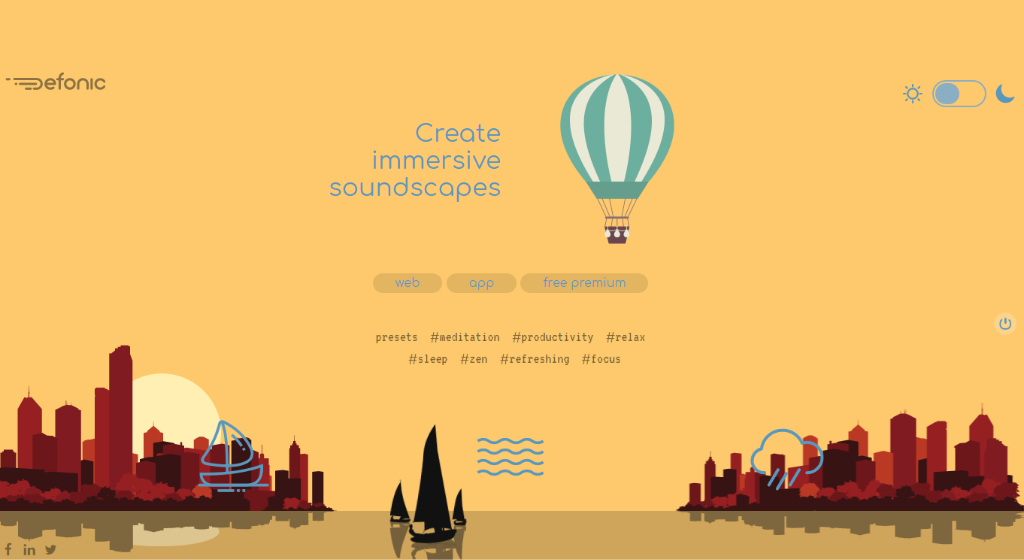
Defonic Full homepage screenshot

At a glance

Category
Software & Apps
Language
English
Paid-content signal
No paid content foundObserved
Registered
2006
Hosting
A2 Hosting, Inc.Inferred
HTTPS certificate trusted
PassedObserved
Last updated

Website review

This review may include AI-generated content and is not individually verified. Domain, certificate and other facts come from the observed data on this page.

What is Defonic?

Defonic is a browser-based ambient noise generator: it lets you build a layered soundscape from nature and background sounds, then play it while you work, rest or sleep. The site presents it as "ambient sounds for use as background noise at home or in the office," with the goal of creating "your own unique sound environment."

What you can do with it

  • Mix your own environment. Rather than picking a single fixed track, you combine individual sounds (rain, and other nature or ambient layers) to taste.
  • Start from presets. The page lists preset moods — meditation, productivity, relax, sleep, zen, refreshing and focus — which suit people who don't want to fine-tune anything.
  • Set a timer. Controls include muting now, in 30 minutes or in 1 hour, which is the practical feature for falling asleep to rain or capping a work sprint.
  • Use it in the browser. No install is needed for the core generator, so it works as a tab you keep open alongside other work.

Who it suits

The clearest fit is someone who finds music distracting but silence worse: a student writing an essay, a developer in an open-plan office, or a light sleeper who wants steady rain rather than a playlist that changes every few minutes. The preset labels make it easy to pick a starting point without understanding the sound library first.

Trade-offs to weigh

A layered generator gives you control but asks for a little setup, and the more layers you stack, the more likely you are to fiddle with sliders instead of working. If you want one click and no decisions, a single fixed ambience may serve you better. The page also points to premium software with a lifetime license rather than a subscription, plus a Windows build and a dashboard, so the free web version and the paid desktop product are separate things — check which one you actually need before paying.

A concrete next step

Open Defonic, load the "focus" preset, add one rain layer, and set the mute timer to 30 minutes. If you find yourself adjusting it repeatedly, try a simpler single-sound option such as Rainy Mood for rain alone, or a broader library like myNoise if you want more precise control over individual frequencies.

How can I use Defonic to improve focus while working from home?

Defonic is an ambient-noise generator for building a background soundscape while you work. For focus at home, treat it as a way to mask distractions rather than as a productivity system: pick a steady sound bed, keep the volume just below the level where you'd notice it, and leave it running through a work block.

A practical setup

  • Start with one or two layers. A rain or nature sound alone is often enough to cover household noise; add a second layer only if the first feels too thin.
  • Choose by task. Steady, low-variation sounds suit reading and detailed work; slightly richer mixes can help with repetitive tasks where you want less silence.
  • Use the built-in mute timers. The page lists 30-minute and 1-hour mute options, which fit a wind-down at the end of a session or a break without stopping the mix.
  • Match the preset to the moment. The listed presets (meditation, productivity, relax, sleep, zen, refreshing, focus) are starting points; adjust layers from there rather than hunting for a perfect preset.

Fit and trade-offs

A browser-based generator is quick to try and needs no install, but it depends on a stable tab and connection. The page also points to Windows software with a lifetime license at $19 and no subscription, which suits someone who wants the sound running all day without keeping a browser tab open. If you mainly work on a phone or Mac, check that the web version covers your setup before committing to the desktop option.

Decide with one test

Run a single 45-minute block with one nature layer at low volume and note whether you were distracted by the sound itself or by the room. If the sound disappeared into the background, keep that layer as your default; if it drew attention, simplify. For a second option to compare, Rainy Mood offers a single rain-focused ambience.

What ambient sounds are available in Defonic's noise generator?

Defonic's generator page describes its purpose as building a personal "sound environment" for background listening at home or in the office, and the page's main heading is "Create immersive soundscapes." The visible evidence shows curated preset categories rather than a full list of individual sounds: meditation, productivity, relax, sleep, zen, refreshing and focus. That tells you the intended uses, but not the exact inventory of rain, wind, waves or similar individual layers.

What the presets suggest

The categories map onto common listening situations. A "focus" or "productivity" preset suits desk work where steady background texture masks office chatter; "sleep" and "relax" suit quieter evening listening; "meditation" and "zen" imply calmer, more sustained textures. Because these are presets, the practical question is whether the site lets you adjust or combine individual sounds yourself, since the description speaks of creating "your own unique sound environment."

A concrete way to check

Open the generator and test one preset against a real task: play the "focus" preset at low volume during 25 minutes of concentrated work, then switch to "sleep" in a quiet room and note whether the texture is steady or repetitive. If the page exposes separate sound layers with volume sliders, you can tune the mix; if it only offers fixed presets, treat it as a quick-start tool rather than a custom mixer.

Related options to compare

If the preset list feels limited, compare with other ambient generators that expose individual layers: Rainy Mood for rain-focused listening, Noisli for combining sounds and colour backgrounds, and myNoise for highly adjustable soundscapes. Judge each on how much control you want versus how quickly you want to start listening.

Is Defonic free to use, or do I need to pay for premium features?

Defonic is usable for free, but it also has paid premium features. The page presents a browsable ambient-sound generator alongside a "Premium features" section, and it offers Defonic software as a lifetime license rather than a subscription. So you can try the core experience without paying, while the full software and premium options require a purchase.

What this means in practice

  • Free use: Suitable for a quick background soundscape—rain, nature ambience, or similar—while working or relaxing.
  • Premium/software: The paid option is aimed at people who want the fuller experience, including the desktop software and preset soundscapes such as meditation, productivity, focus, relax, and sleep. The page lists a one-time lifetime license at $19, with no subscription.

How to decide

If you only need occasional background noise in a browser, start free and see whether the available sounds and controls are enough. If you want presets, the Windows software, or a one-time purchase you can keep using, the lifetime license is the relevant option—check the current page for exactly what premium includes before buying.

For comparison, other ambient-sound sites include Rainy Mood for rain-focused ambience and Noisli for mixing background sounds.

Can Defonic help me fall asleep faster with rain sounds and other nature audio?

Yes. Defonic is built for exactly that use: layering rain and other nature sounds into a steady background that masks distractions and makes it easier to wind down. Its page presents presets aimed at sleep, relaxation and meditation, so you can start a rain-heavy mix with one click rather than building a mix from scratch.

How to use it for sleep

  • Start with rain as the base layer, then add a softer element such as distant water or wind to avoid a flat, repetitive loop.
  • Keep the volume just above the level of your room's noise—loud enough to cover traffic or neighbours, quiet enough that your attention doesn't latch onto it.
  • Use the built-in mute timer (options like 30 minutes or an hour are shown on the page) so the sound fades out after you've settled, rather than running all night.
  • Save a mix you like as a preset so your bedtime routine stays identical each night; consistency is what helps a soundscape become a sleep cue.

Things to weigh

Rain and nature audio help most when the problem is a noisy or unpredictable environment, or a mind that won't switch off. If your difficulty is a racing mind, a mix with a slow, low-frequency base tends to work better than bright, detailed sounds like birdsong. If you share a bed or room, test volume and speaker placement first—a phone speaker next to the pillow can sound harsh, while a small speaker across the room is usually gentler.

The page also shows a lifetime licence for the software version, which suits someone who wants offline soundscapes and saved presets; the browser version is the simpler way to try the idea before committing. Related options worth comparing are myNoise for highly adjustable sound generators and Rainy Mood for a single, rain-only ambience.

How does Defonic compare to other ambient noise generators for creating a meditation soundscape?

Defonic is a browser-based ambient sound mixer aimed at building layered soundscapes from nature and environmental sounds, with themed presets such as meditation, relax, sleep and focus. For meditation specifically, its main appeal is simplicity: you open the page, pick a preset or stack a few sounds, and get a continuous background without installing anything. That suits someone who wants a calm rain-and-waves bed for a ten-minute breathing session and doesn't want to manage a library of tracks.

Where it fits and where it doesn't

  • Best for quick, lightweight sessions. A browser mixer is ideal on a shared or work computer where you can't install software. If your meditation happens at a desk between tasks, this is the least-friction option.
  • Weaker for long, structured practice. Timed mute controls (the page mentions muting in 30 minutes or an hour) suggest it's built around sessions rather than all-day ambience. If you need scheduled fades, guided cues or session logging, a dedicated meditation app will serve you better.
  • Consider the licensing model. The page lists a one-time lifetime license for the software version rather than a subscription, which matters if you dislike recurring fees. The free browser generator and the paid software are separate things; check what each includes before committing.

Comparison by use case

Need Defonic's approach Better-suited alternative type
Layered nature ambience in a browser Sound mixer with presets —
Guided or timed meditation with cues Ambient background only Meditation apps with voice guidance
Long, evolving soundscapes Preset-based mixing Generators with dynamic, shifting layers
No-install, no-account listening Browser page —

For a broader palette of generators, myNoise offers highly adjustable multi-layer soundscapes, and Rainy Mood is a single-purpose rain option if you want one sound and nothing else.

Next step: decide whether you need ambience only or ambience plus guidance. If it's ambience only and you work in a browser, start with a meditation preset, add one or two layers, and test it for a full session before paying for the software version.

Related questions

More questions →
What Are Ambient Sounds and How Can They Help You Relax or Focus?

Ambient sounds are continuous background noises—rain, wind, ocean waves, a coffee shop hum—that you play at low volume to mask the sharper, more distracting sounds around you. They help because the brain is drawn to sudden, irregular noises (a door slam, a colleague's conversation, a ringing phone) far more than to steady, predictable ones. On a site like Noises Online, you pick the sounds you like, blend their relative levels, and use them to boost focus, deepen meditation, or fall asleep. The approach works without expensive gear such as active noise-cancelling headphones, since everything runs in a web browser.

What counts as an ambient sound

An ambient sound is any steady, non-threatening background noise that fills the acoustic space rather than demanding attention. The word "noise" carries a negative connotation, but ambient sounds are often pleasant—the ocean, rain, or a summer field.

The key distinction is predictability:

Distracting noise Ambient sound
Pattern Sudden, irregular Continuous, steady
Effect Pulls attention Blends into background
Examples Traffic horns, talking, notifications Rain, waves, wind, coffee shop

Because ambient sounds are steady, your brain stops tracking them after a short while. That frees attention for whatever you actually want to do.

How ambient sounds help you relax or focus

The core mechanism is masking: you use noises you like to cover the noises you dislike. This is the idea behind an online background noise machine.

  • For focus: Masking removes the unpredictable sounds that trigger attention shifts, so you stay on task longer.
  • For relaxation and sleep: A steady sound gives your mind something neutral to rest on, which can quieten racing thoughts. The site explicitly lists falling asleep at night as a use case.
  • For meditation: A consistent sound bed makes it easier to settle without silence feeling oppressive.
  • For tinnitus: The site lists masking your tinnitus as one of its purposes—ambient sound can reduce the contrast between the tinnitus and a quiet room.

The concept is simple and works extremely well, and it doesn't require expensive equipment.

Common ambient sound types and when to use them

Noises Online draws on original recordings—not stock sounds—covering rain, wind, coffee, ocean, sea, and waves. Matching the sound to the task helps:

  • Rain — steady and dense; good for sleep and for masking speech.
  • Ocean / sea / waves — slow swells with a natural rhythm; good for relaxation and meditation.
  • Wind — smooth and continuous; good for long focus sessions.
  • Coffee shop — mid-range chatter and clatter; good for productivity when you want a sense of company.

You can combine several at once. Adjusting their relative levels lets you reach a well-balanced background noise rather than a single flat layer.

How to choose and set up your ambient sound

  1. Pick one or two sounds that you find pleasant, not just neutral. Liking the sound matters, because you'll hear it for a long stretch.
  2. Set the volume low—just enough to cover the distracting sounds, not enough to become the main event. The site recommends headphones for the best experience.
  3. Balance the layers. If you use more than one sound, raise or lower each until no single one stands out.
  4. Save your setup. The player includes a "Save current setup" option under User Sets, so you can return to a configuration you like.
  5. Use the controls to fine-tune tone and liveliness, and try the Free Audio Loop if you want a continuous sample.
  6. Verify it's working: after a few minutes you should notice the outside distractions less, without feeling like you're actively listening to the sound itself.

Practical tips and things to watch for

  • Headphones help. The site notes the experience is best with headphones, which also keeps the sound from bothering others.
  • Don't overdo the volume. Loud ambient sound becomes its own distraction and, over long periods, is harder on your ears.
  • Give it a few minutes. Masking works gradually; judging it in the first 30 seconds undersells it.
  • Match sound to goal. Denser sounds (rain, coffee) mask speech better; slower sounds (waves) suit winding down.
  • Expect a cost to run, not to use. Noises Online is free to use, but the site states it isn't free to maintain—hosting and CDN costs are covered by donations, which you can make at myNoise if you want to support it.
  • If you want more control, the same creator runs myNoise, which offers far more noises and deeper customization, including taking your hearing thresholds into account. Its complexity can discourage newcomers, which is why Noises Online exists as a simpler alternative with the same audio quality.
What Are Nature Sounds and How Can You Use Them for Relaxation or Focus?

Nature sounds are recordings or generated audio of the outdoors—rain, flowing water, birds, wind, and similar elements. People use them as background sound to mask distracting noise and create a steadier listening environment for work, rest, meditation, or sleep. They are not a treatment for any condition; they are an everyday tool for shaping what you hear around you.

What counts as a nature sound

Nature sounds differ from general ambient noise in where the sound comes from. A nature soundscape is built from recognizable outdoor elements, while ambient noise can include hums, drones, or room tone.

Type Typical examples Common use
Water Rain, streams, waves Masking irregular noise, winding down
Weather Wind, distant thunder Steady background texture
Wildlife Birdsong, insects Lighter, more detailed ambience
Layered mixes Rain plus birds plus wind Personalizing the sound environment

Many generators let you combine several elements at once, so you can build a mix rather than rely on a single loop.

Why nature sounds can help you relax or focus

The main mechanism is masking. Steady nature audio reduces how much sudden or irregular sound—conversation, traffic, doors—reaches your attention. A consistent sound floor makes the environment more predictable, which many people find easier to work or rest in.

A second factor is familiarity and association. Rain or birdsong often carries calm associations, which can make settling into a task or bedtime routine easier. This is a general observation about listening habits, not a clinical claim.

How to choose and use them by situation

For focus and work

  • Pick a steady, low-variation sound such as rain or a stream; sudden birdsong can pull attention.
  • Keep volume just below the level of the sounds you want to mask.
  • Use a single mix for a whole work block so the soundscape doesn't change and distract you.

For sleep

  • Favor low, smooth sounds like rain or distant wind over sharp, detailed ones.
  • Set a timer if the tool offers one, so audio stops after you fall asleep.
  • Keep the volume low enough that it doesn't compete with an alarm.

For meditation or winding down

  • Choose one element and keep it unchanged for the session.
  • Presets can help: Defonic lists preset categories such as meditation, relax, sleep, focus, and productivity, which give you a starting point instead of building a mix from scratch.

Practical cautions

  • Volume: keep it modest; the goal is masking, not covering everything.
  • Duration: long sessions are common, but take breaks from headphones to avoid ear fatigue.
  • Variation: loops with obvious repetition can become distracting; layered or longer recordings usually hold up better.
  • Fit: if a sound makes you alert rather than calm, switch elements—response to sound is personal.

Free versus paid options

Many nature-sound players and generators are available at no stated cost, but features vary and you should check each tool's own terms. Defonic's page describes a software product with premium features and presets, offered as a lifetime license with no subscription for $19, alongside Windows software and a dashboard with mute timers (mute now, in 30 minutes, in 1 hour). The page does not state that the web generator itself is free or requires login, so treat access terms as something to confirm on the site rather than assume.

If you only need occasional rain or stream audio, a simple free player may be enough. If you want layered mixes, presets, and scheduled muting in one place, a paid generator with those features is the more direct fit.

What Is Background Noise and How Can It Help You Relax or Focus?

Background noise is a steady, low-intensity sound that carries no information you need to follow — rain, fan hum, white or pink noise, or a cat's purr. Because it has no content to track, it gives your attention something neutral to rest on and covers up the sharp, sudden sounds that pull you out of sleep, work, or a calm state. It works best when it sits below whatever you're doing: audible enough to mask disruptions, quiet enough that you stop noticing it. If your problem is unpredictable interruptions (a neighbor, a keyboard, traffic), background noise is the right tool. If your problem is silence itself feeling oppressive, it also helps.

Why steady sound helps

The main mechanism is masking. A sudden noise — a door, a notification, a car — stands out because it contrasts with a quiet background. Add a continuous sound and that contrast shrinks, so your brain has less reason to switch attention toward it. Fewer attention switches means less effort spent re-focusing, which is why the same sound can support both concentration and falling asleep.

The second factor is predictability. A purr, rain, or noise generator changes slowly and gently, so it doesn't demand a response. Purrli describes its engine as producing "a purr that delicately changes over time," aiming to feel "as real and lively as possible" rather than looping identically — the variation is what keeps it from becoming irritating.

Common types and what they suit

Type Character Often used for
White noise Equal energy across frequencies; hissy Masking speech and sharp sounds
Pink noise More low-frequency energy; softer, deeper Sleep, steady focus
Nature sounds (rain, waves) Slow, organic variation Relaxation, winding down
Cat purr Low-frequency, rhythmic, with slow changes Comfort, stress relief, sleep

Low-frequency sounds like a purr are the ones most likely to fail on small speakers. Purrli states plainly that "headphones, or external speakers required: tiny mobile phone or laptop speakers are not compatible with the low frequencies of a cat purr." That's a hardware limit, not a setting — if a purr sounds thin or inaudible on your laptop, the speaker is the cause.

How to use it

  1. Pick a sound that matches the task. For masking noisy environments, lean toward white or pink noise. For comfort or sleep, a purr or rain tends to sit better.
  2. Set the volume just under your task. You should be able to forget the sound is playing. If you're raising your voice or turning up your headphones to hear other things, it's too loud.
  3. Use the right output. Headphones or external speakers for low-frequency sounds like purrs; built-in laptop or phone speakers for higher-frequency noise.
  4. Give it a few minutes. Masking effects aren't instant — the point is that you stop noticing both the background and the interruptions.
  5. Adjust over time, not constantly. Frequent tweaking is itself a distraction.

Purrli exposes this as a set of sliders — Sleepy/Happy/Steady/Lively, Purr Out/Purr In, Relaxed/Overjoyed, Close/Distant — so you can tune character and distance rather than just volume. One caveat it raises itself: the last slider controls how much the "cat" calls for attention, so if you don't want to be interrupted mid-task, leave that one low.

Choosing between options

  • Want maximum masking of voices and clatter? White or pink noise usually beats nature sounds or a purr.
  • Want something pleasant enough to leave on for hours? Organic, slowly varying sounds (rain, purr) tend to wear better than flat noise.
  • On a phone or laptop speaker only? Avoid purrs and other deep sounds; pick higher-frequency noise.
  • Want a free, no-ads option? Purrli describes itself as "a free website that runs without ads," supported by donations, with bonus features for supporters. Note that donation and patron login pages exist — free access to the core generator is stated, but extra features sit behind support.

Common snags

  • "I can't hear the purr." Almost always the speaker. Switch to headphones or external speakers.
  • "It's distracting rather than helpful." Usually too loud, or the sound has too much variation. Lower the volume or move to a steadier option.
  • "It stopped helping after a while." Try a different sound type, or a version that changes slowly over time rather than a short loop.
  • "I keep fiddling with it." Set it once, then leave it. The adjustment is the interruption.
What Is a Noise Generator and How Can You Use One for Relaxation or Focus?

A noise generator is a tool that plays continuous, loopable sound — either synthetic noise (white, pink, brown) or recorded ambience like ocean waves — to mask distracting background sound and create a steady audio environment. You use one when you want to sleep, study, or work without reacting to every passing noise. The main condition for it to work: the sound must be steady enough that your attention stops tracking it, and loud enough to cover what you're trying to hide but not so loud it becomes the distraction itself.

How a noise generator differs from a music player

A music player gives you tracks with beginnings, endings, lyrics, and dynamics. Those changes are exactly what pulls attention. A noise generator gives you a continuous bed of sound with no narrative and no obvious loop point.

That difference matters for two tasks:

  • Masking — covering speech, traffic, or keyboard noise that would otherwise interrupt you.
  • Settling — giving your ears something constant so your mind stops scanning the room.

Synthetic noise and recorded ambience both do this, but they feel different. Noise is flat and predictable; ambience has texture and variation. Neither is better in general — it depends on whether variation helps you or distracts you.

The common sound types and what each is good for

Sound type Character Typical use
White noise Equal energy across frequencies; hissy, bright Masking sharp, high-frequency interruptions
Pink noise More energy at low frequencies; softer than white General focus and sleep; often described as more natural
Brown noise Deep, rumbling, low-heavy Masking bass-heavy noise like traffic or footsteps
Ocean / sea ambience Waves with natural rise and fall Winding down, reading, meditation
Rain, storm, boat, underwater Thematic ambience with variation Immersion, scene-setting, longer sessions

Virtual Ocean is an example of the ambience end of this range. Its sound list includes calming sea, peaceful ocean, rough storm, rowing a boat, boat mast, seagulls, dolphins, sailboat interior, distant foghorn, walking on a beach, underwater diving, submarine ambiance, buoy bells, and a motor boat trip — plus a separate set of tabletop sounds for D&D campaigns. That variety is useful because "ocean" isn't one sound; a calm shore and a storm hit different goals.

How to pick a sound for your goal

Work backward from what you're trying to accomplish.

For sleep: choose low-frequency, low-variation sound — brown noise or a calm sea loop. Sudden peaks (seagulls, foghorns, a boat mast creaking) can wake you at the transition into lighter sleep. If you use ambience, pick the flattest option available.

For studying or deep work: pink noise or steady ocean works for most people. If your distraction is other people talking, favor noise over ambience — speech-like variation in a recording can compete with real speech.

For masking a specific nuisance: match the frequency range. High-pitched distractions (clattering, chatter) respond to white or pink noise. Low rumbling (traffic, machinery, footsteps overhead) responds better to brown noise.

For winding down or meditation: ambience with slow variation, like waves on a beach, gives your attention something gentle to rest on without demanding anything.

A practical test: play the candidate for ten minutes while doing the actual task. If you notice the sound more than once, it's probably too variable or too loud for that task.

Features worth checking before you commit

  • Looping quality — a loop with an audible seam becomes a distraction on repeat. Ambience recordings usually loop better than short clips.
  • Volume control — you want fine adjustment, not just a few steps. The useful range is often lower than you'd expect.
  • Mute and hide-UI controls — Virtual Ocean's interface exposes Mute, SFX, Fullscreen, and Hide UI. Hide UI matters if you're leaving a screen on in a dark room.
  • Offline use — if the tool is browser-based, check whether it works without a connection. A generator that stops when your Wi-Fi drops is a poor sleep aid.
  • Timers — useful for falling asleep without leaving sound running all night, and for ending a focus block.
  • Mixing — some generators let you layer sounds (waves plus rain, for instance). Layering can make a loop less noticeable.

Pricing and account requirements vary by tool and aren't specified for Virtual Ocean in the available material, so check the site directly before relying on it for a nightly routine.

Fitting it into a daily routine

The generator works best as a cue, not just a background.

  1. Pick one sound per purpose and keep it consistent. A single "focus sound" and a single "wind-down sound" trains the association faster than rotating through options.
  2. Start it before you begin the task, not after you're already distracted. The point is to set the environment.
  3. Set volume at the threshold where the nuisance disappears — then stop. Louder isn't more effective.
  4. Use a timer for sleep so the sound fades out rather than running until morning.
  5. Give it a week. If you're still noticing the sound constantly after several sessions, switch types rather than pushing through.

Common snags

  • Too loud. The most frequent mistake. If you can't hear a nearby conversation at all, you've probably overshot into fatigue territory.
  • Too variable. Seagulls and foghorns are atmospheric but poor for sleep. Save them for daytime ambience.
  • Headphones vs. speakers. Headphones mask better but can be uncomfortable overnight; speakers need to be loud enough to cover the room, which may disturb others.
  • Expecting silence. A generator doesn't remove noise — it replaces it with something steadier. That's the whole mechanism.
What Is Rain Sound and How Can It Help You Sleep or Focus?

Rain sound is ambient noise made of raindrops, steady rainfall, or a full thunderstorm, and it helps sleep or focus mainly by masking sudden noises that pull your attention. It suits people who are kept awake or distracted by unpredictable sound — traffic, neighbours, an open-plan office — and who prefer a natural texture over flat white noise. It is not a treatment for insomnia or a substitute for medical advice; treat it as a listening environment you can tune.

What counts as rain sound

Rain sound is a category, not one file. The variants differ in texture and in how much they demand attention:

  • Ambient rain — continuous, even rainfall. The steadiest option, and usually the easiest to leave running for a long session.
  • Raindrops — discrete, irregular taps. More detail and variation; some people find it pleasant, others find the individual drops distracting.
  • Thunderstorm — rain plus thunder. Richer and more immersive, but the loud transients can startle you, so it works better at low volume or as background than as a sleep track.
  • Rain noise / white noise — rain layered with or blended into broadband noise. Useful when plain rain feels too thin to cover a noisy room.

Rainyscope, for example, presents itself as a rain sound generator with seasonal and setting variations — its page lists Summer, Canicule, Autumn, Winter, Spring, and Cafe — so you can pick a mood rather than a single fixed loop.

Why steady rain helps you sleep or focus

The mechanism is mostly masking, not magic. Your brain is tuned to notice change: a door closing, a voice rising, a car braking. A steady sound raises the floor of what you can hear, so those sudden peaks no longer stand out. Rain is well suited to this because it is broadband — it contains energy across many frequencies — and because its small random variations keep it from sounding like a machine tone.

Two practical consequences follow:

  1. Consistency beats realism. A loop that repeats every 20 seconds becomes noticeable; a longer, less patterned track stays in the background.
  2. Volume is the main control. Loud enough to cover the room, quiet enough that you are not listening to it. If you can pick out individual raindrops over your own thoughts, it is probably too loud for focus work.

Rain sound vs other ambient options

Use the same dimensions to compare, then pick by situation:

Option Texture Best for Watch out for
Ambient rain Continuous, natural Sleep, long focus blocks Can feel too quiet in very noisy rooms
Raindrops Irregular, detailed Short tasks, relaxation Individual drops may draw attention
Thunderstorm Dynamic, immersive Atmosphere, reading Sudden thunder can break sleep onset
White / pink noise Flat, machine-like Masking speech and sharp noise Some find it harsh over hours
Music Structured, melodic Mood, motivation Lyrics compete with reading and writing

A simple rule: if the problem is unpredictable noise, rain or white noise; if the problem is motivation, music; if the problem is both, rain at low volume with no lyrics.

How to use a rain sound generator well

  1. Open the generator and start playback. On Rainyscope the sound begins from the page itself; there is no account step described, so you can test it immediately.
  2. Choose a variation. Switch between the seasonal and setting options (Summer, Autumn, Winter, Spring, Canicule, Cafe) until the texture matches the task — brighter and lighter for daytime work, heavier for winding down.
  3. Set volume by masking, not by preference. Raise it until the room noise disappears, then lower it slightly. That is your working level.
  4. Use the timer for sleep. Rainyscope exposes a timer control in its interface. Set it so playback stops after you are likely asleep rather than running all night, which also saves battery.
  5. Hide the UI once configured. The interface includes a hide-UI control, so the screen can stay dark and uncluttered while the sound continues.
  6. Verify it is actually running. Play for a minute and confirm you hear continuous rain with no gaps — a stalled tab or muted system output is the most common false alarm.

Common snags and what to do

  • "Your browser does not support WebGL." Rainyscope's page shows this message when the browser cannot render its visuals. The fix is on your side: update the browser, enable hardware acceleration, or try a different browser. If sound still plays, you can ignore the visual layer.
  • The loop feels repetitive. Change the variation rather than the volume — switching from, say, Winter to Cafe alters the texture more than a small volume nudge.
  • It stops when you switch tabs. Some browsers throttle background tabs. Keep the tab active, or use a dedicated device or speaker for playback.
  • It is not loud enough to mask your room. Layer rain with white noise, or move the speaker closer to you rather than pushing the volume up, which distorts the sound.
  • You stop noticing it — then notice it again. That is normal. If it keeps pulling your attention, the track is too detailed or too loud; go back to plain ambient rain.

Choosing between options

Pick ambient rain if you want the least intrusive background for sleep or deep work. Pick raindrops or thunderstorm if you want atmosphere and do not mind variation. Pick white or pink noise if your main problem is speech or sharp mechanical sound. Pick music only when the task does not involve reading or writing. Whichever you choose, set a timer for sleep, keep the volume at masking level, and change the variation before you change the volume.

Website Overview

An established domain and managed infrastructure suggest continuity of operations and may support dependable delivery, although neither guarantees service quality. Page metadata, canonical configuration and social previews work together to provide more consistent search and sharing presentation.

Domain and Registration

Registered in 2006, this domain has about 20 years of history. That suggests continuity, although ownership and purpose may have changed. Transfer-protection status is present, helping reduce the risk of unauthorized domain transfers. The registrar is NameCheap, Inc., a widely used domain service provider. The domain uses the common .com extension, which is not an independent safety signal.

DNS and Email

The observed email authentication setup is incomplete: DMARC is missing. Nameservers are provided by a2hosting.com, indicating managed DNS hosting. MX records point to the defonic.com email service. No CNAME was found; the observed records resolve directly to addresses. DNSSEC signatures were not detected, so this additional DNS authenticity protection is not confirmed.

TLS and Certificates

The certificate uses an RSA 2048-bit public key, offering broad client compatibility. The server supplied a complete certificate chain. No organization name is present in the certificate; the available fields are consistent with domain validation. The certificate was issued by Let's Encrypt, commonly associated with automated certificate services. The certificate's total validity is about 89 days, consistent with a short renewal cycle.

HTTP and Browser Security

The response lacks these common security headers: CSP, Referrer-Policy, Permissions-Policy. No X-Powered-By header was found, reducing one common source of backend fingerprinting information. No obvious internal addresses or debug information were found in the headers. The Server header contains the custom value LiteSpeed. No explicit CDN or WAF marker was found in the response headers.

Technology Stack Analysis

The public page identifies jQuery, Bootstrap without precise versions, leaving fewer clues for version-specific scanning.

Search and Social Sharing

Twitter Card metadata is configured. The title has 44 characters, within a common display range. A meta description is present, with 135 characters. The observed directives allow indexing and link following. No Generator meta tag is publicly exposed.

Hosting and Email

DNSa2hosting.com
HostingA2 Hosting, Inc.
Emaildefonic.com
Approximate IP geolocation (inferred; a CDN or proxy may differ from the origin server) United States flagDetroit, Michigan, United States Inferred 70.32.23.71

Registration details

RDAP / WHOIS

RegistrarNameCheap, Inc.
Registered2006-05-12
Expires2028-05-12
Domain statusclient transfer prohibited
Nameserversns1.a2hosting.com、ns2.a2hosting.com、ns3.a2hosting.com、ns4.a2hosting.com
DNSSECunsigned

DNS records

DNS

TypeNameValueTTLPriority
Adefonic.com70.32.23.71900—
MXdefonic.comdefonic.com9000
NSdefonic.comns1.a2hosting.com86400—
NSdefonic.comns2.a2hosting.com86400—
NSdefonic.comns3.a2hosting.com86400—
NSdefonic.comns4.a2hosting.com86400—
TXTdefonic.comv=spf1 ip4:70.32.23.71 include:spf.a2hosting.com +a +mx +ip4:68.66.216.53 +ip4:209.182.198.33 +ip4:70.39.144.206 +ip4:198.46.91.106 +ip4:68.65.120.121 +ip4:198.54.121.240 +include:helpscoutemail.com ~all900—

TLS and certificates

TLS / SSL

AssessmentNormal configuration
Supported protocolsTLSv1.2、TLSv1.3
Negotiated protocolTLSv1.3
Certificate subject*.defonic.com
IssuerLet's Encrypt
Valid until2026-12-01T12:18 · Remaining when checked: 43 days
Verification detailsCertificate trust: Passed · Hostname match: Passed

HTTP response headers

HTTP

HeaderValue
content-typetext/html
cache-controlmax-age=3600, must-revalidate
serverLiteSpeed
strict-transport-securitymax-age=63072000; includeSubDomains
x-frame-optionsSAMEORIGIN
x-content-type-optionsnosniff

Identified technologies

jQueryBootstrap

Pages, Search and Sharing

Meta descriptionAmbient sounds for use as background noise at home or in the office. Create your own unique sound environment with our noise generator.
Canonical URLhttps://defonic.com/
LanguageEnglish (default)
Twitter Cardsummary_large_image
All bots 0 allowed · 0 disallowed

User reviews (0)

  • No reviews yet.