
 driveandlisten.app
No paid content found
driveandlisten.app
No paid content found
Categories: Other
Drive & Listen - Experience cities around the world from the comfort of your home. Listen to local radio stations while virtually driving through 100+ cities including New York, Tokyo, Paris, London, Istanbul, Berlin, and more. Previously known as driveandlisten.herokuapp.com
 Visit website
 Updated: 2026-09-26 04:32
 Language: English (default)
 Access: Normal
 Profile views 6
 Outbound visits 1
Related questions
More questions →What Is Online Radio and How Can You Listen to Live Stations for Free?
Online radio is audio delivered over the internet instead of through AM/FM broadcast towers. You listen on a phone, computer, tablet, or smart speaker, and you can often start for free. Services like TuneIn aggregate tens of thousands of real broadcast stations plus internet-only channels, covering news, sports, music, talk, audiobooks, and podcasts. If you just want to hear live radio without a subscription, a free tier on a web player or app is usually enough to get started.
How Online Radio Differs from AM/FM Radio
Traditional radio sends one signal over the air to everyone in range. Internet radio sends the same audio as a data stream, which changes a few practical things:
- Reach: A station in another city or country is as easy to open as a local one, as long as it streams.
- Choice: Instead of scanning a dial, you search by station name, genre, city, or host.
- Devices: The same stream works on a browser, a mobile app, a smart speaker, or a car system with a data connection.
- Reliability: Streaming depends on your internet connection. A weak signal causes buffering rather than static.
- Cost model: Many stations and aggregators are free to listen to, supported by ads or optional paid tiers.
One thing stays the same: a live broadcast is still live. You hear it in real time, and you can't skip ahead the way you can with a podcast episode.
The Main Types of Content on Free Online Radio
"Radio" now covers several formats that behave differently. Knowing which one you want saves time.
| Type | What it is | Typical use |
|---|---|---|
| Live radio | A real-time broadcast stream from an AM/FM or internet station | News updates, sports play-by-play, live shows |
| Streaming radio | Any audio played continuously over the internet, often genre-based | Background music, curated stations |
| Talk radio | Host-driven shows with callers, interviews, or debate | News analysis, sports talk, local issues |
| Music radio | Stations organized by genre, era, or mood | Discovery, parties, focus |
| Podcasts | On-demand episodes you play, pause, and resume | Deep dives, storytelling, catch-up listening |
| Audiobooks | Narrated long-form books, sometimes serialized | Commutes, chores, wind-down |
The key distinction is live vs. on-demand. Live radio is a shared moment; podcasts and audiobooks are yours to control. Many free services mix both in one app.
How to Start Listening for Free
You don't need special hardware to begin. Pick the path that matches where you already are.
On a computer or laptop
- Open a radio aggregator or a station's own website in your browser.
- Use the search box to enter a station name, city, or genre (for example, "news radio" or "jazz").
- Click the station and press play. Most players start within a few seconds.
- If audio stutters, close other tabs or lower the stream quality if the player offers that option.
On a phone or tablet
- Install the radio app from your app store.
- Allow notifications only if you want alerts for live events; otherwise skip.
- Search or browse by category, then tap a station to play.
- Use the app's favorites or "recently played" list so you don't search again.
On a smart speaker
- Set up the speaker in its companion app.
- Link or enable the radio service you want to use.
- Say the station name or ask for a genre, such as "play news radio."
- If the wrong station plays, add the city or call letters to be more specific.
In a car
- Use your phone connected by Bluetooth or USB and play through the radio app.
- Or use a built-in infotainment system that supports internet radio apps.
- Avoid browsing stations while driving; set up favorites before you leave.
Terms Worth Knowing Before You Choose
- Live radio: Real-time broadcast. No skipping, no rewinding.
- Streaming radio: Continuous audio over the internet; may be live or a programmed loop.
- On-demand audio: Podcasts and audiobooks you control. Play, pause, rewind, resume.
- Aggregator: A service that collects many stations in one place, so you search once instead of visiting each station's site.
- Free tier: Listening at no cost, usually with ads. Some services also offer an optional premium tier with extras like fewer ads or offline listening. Check the current terms on the service's own page, since features change.
Practical Tips for a Better Free Listening Experience
- Favorites first: Save five to ten stations you actually return to. It beats searching every time.
- Match format to moment: Live sports needs a real-time stream; background music works with almost any genre station.
- Watch your data: Streaming uses mobile data. On Wi-Fi, quality is usually better and cost is lower.
- Expect regional limits: Some stations restrict streams to certain countries for licensing reasons. If one won't play, try another in the same genre.
- Use one app for both: A service that carries live stations and podcasts means fewer apps and one place for your history.
Quick Start Checklist
- Decide what you want right now: live news, live sports, music, talk, or on-demand.
- Choose a device: browser, phone app, smart speaker, or car.
- Search by station name, city, or genre.
- Press play and give it ten seconds to buffer.
- Save the station to favorites.
- If it fails, try a different station in the same category before troubleshooting your connection.
Online radio removes the distance limit of AM/FM while keeping the immediacy of live broadcasting. Start with the free option, build a short favorites list, and add a paid tier later only if you find you need offline listening or an ad-free experience.
Website Overview
An active inbound-mail setup with incomplete authentication may leave the domain more open to impersonation. Provider hosting alone does not close that gap.
Domain and Registration
Transfer-protection status is present, helping reduce the risk of unauthorized domain transfers. The domain has about 4 years of registration history; its current configuration provides more context than age alone. The registrar is Namecheap Inc., a widely used domain service provider. The domain uses the common .app extension, which is not an independent safety signal.
DNS and Email
The observed email authentication setup is incomplete: DMARC is missing. Nameservers are provided by Cloudflare, indicating managed DNS hosting. MX records point to the Namecheap Private Email email service. No CNAME was found; the observed records resolve directly to addresses. TXT records include verification markers for Google. Such markers may also remain after a service stops being used.
TLS and Certificates
The public key uses EC with 256 bits. The server supplied a complete certificate chain. No organization name is present in the certificate; the available fields are consistent with domain validation. The certificate was issued within the Google Trust Services cloud or CDN ecosystem. The certificate's total validity is about 90 days, consistent with a short renewal cycle.
HTTP and Browser Security
The response lacks these common security headers: CSP, X-Content-Type-Options, Referrer-Policy, Permissions-Policy, clickjacking protection. No X-Powered-By header was found, reducing one common source of backend fingerprinting information. The cf-ray, x-cache, x-served-by response header indicates a CDN or caching proxy in the delivery path. No obvious internal addresses or debug information were found in the headers. The Server header identifies cloudflare without an exact version.
Technology Stack Analysis
The public page identifies Bootstrap, Cloudflare, Fastly without precise versions, leaving fewer clues for version-specific scanning.
Search and Social Sharing
The meta description has 276 characters and may be shortened in search results. Twitter Card metadata is configured. JSON-LD includes Product or Offer data, potentially supporting eligible product search features. The title has 15 characters, within a common display range. The observed directives allow indexing and link following.
 Hosting and Email
 Cloudflare
 Hosting
 Fastly
 Namecheap Private Email
 Location
 unknown
104.21.49.187
Location
Location unknown
104.21.49.187
 Pages, Search and Sharing
| Meta description | Drive & Listen - Experience cities around the world from the comfort of your home. Listen to local radio stations while virtually driving through 100+ cities including New York, Tokyo, Paris, London, Istanbul, Berlin, and more. Previously known as driveandlisten.herokuapp.com |
|---|---|
| Canonical URL | https://driveandlisten.app |
| Language | English (default) |
| Twitter Card | summary_large_image |
Social Sharing Preview
15 fields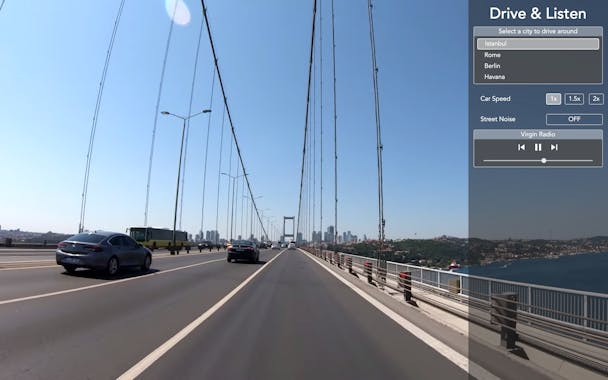

Sharing metadata
| og:url | https://driveandlisten.app |
|---|---|
| og:type | website |
| og:image | https://ph-files.imgix.net/76a102e0-4873-470d-b8ce-2e4b8addf160?auto=format&auto=compress&codec=mozjpeg&cs=strip&w=304&h=190&fit=max&dpr=2 |
| og:title | Drive & Listen Original |
| og:locale | en_US |
| og:site_name | Drive & Listen |
| og:description | Original website of Drive & Listen (previously driveandlisten.herokuapp.com) - Listen to local radio stations while driving through the cities around the world. Istanbul, Berlin, London, Paris, New York City and many more |
| og:image:width | 1200 |
| og:image:height | 630 |
| twitter:card | summary_large_image |
| twitter:site | @driveandlisten |
| twitter:image | https://ph-files.imgix.net/76a102e0-4873-470d-b8ce-2e4b8addf160?auto=format&auto=compress&codec=mozjpeg&cs=strip&w=304&h=190&fit=max&dpr=2 |
| twitter:title | Drive & Listen - Virtual City Drives with Local Radio |
| twitter:creator | @driveandlisten |
| twitter:description | Drive around cities while listening to their local radios |
robots.txt (opens in a new tab)
1 rulesAll bots 1 allowed · 0 disallowed

 All bots

/- Interval
Crawl delay 1 seconds
No matching rules.
Sitemaps
1 Registration details RDAP / WHOIS
| Registrar | Namecheap Inc. |
|---|---|
| Registered | 2022-02-10 |
| Expires | 2028-02-10 |
| Domain status | client transfer prohibited |
| Nameservers | henrik.ns.cloudflare.com、kim.ns.cloudflare.com |
| DNSSEC | unsigned |
 DNS records
| Type | Name | Value | TTL | Priority |
|---|---|---|---|---|
| A | driveandlisten.app | 104.21.49.187 | 300 | — |
| A | driveandlisten.app | 172.67.165.228 | 300 | — |
| AAAA | driveandlisten.app | 2606:4700:3031::ac43:a5e4 | 300 | — |
| AAAA | driveandlisten.app | 2606:4700:3035::6815:31bb | 300 | — |
| MX | driveandlisten.app | mx1.privateemail.com | 300 | 10 |
| MX | driveandlisten.app | mx2.privateemail.com | 300 | 10 |
| NS | driveandlisten.app | henrik.ns.cloudflare.com | 86400 | — |
| NS | driveandlisten.app | kim.ns.cloudflare.com | 86400 | — |
| TXT | driveandlisten.app | google-site-verification=uLaPYLxHFJjluB57inaGab5yus10C5vEaz3j5BnbnGs | 300 | — |
| TXT | driveandlisten.app | hosting-site=driveandlisten-1a399 | 300 | — |
| TXT | driveandlisten.app | v=spf1 include:spf.privateemail.com ~all | 300 | — |
 TLS and certificates
| Assessment | Normal configuration |
|---|---|
| Supported protocols | TLSv1.2、TLSv1.3 |
| Negotiated protocol | TLSv1.3 |
| Certificate subject | driveandlisten.app |
| Issuer | Google Trust Services |
| Valid until | 2026-12-20T19:41 · Remaining when checked: 85 days |
| Verification details | Certificate trust: Passed · Hostname match: Passed |
 HTTP response headers
| Header | Value |
|---|---|
| content-type | text/html; charset=utf-8 |
| cache-control | max-age=3600 |
| server | cloudflare |
| strict-transport-security | max-age=31556926 |
 Identified technologies
Recent Updates
- Website images
- Screenshots
- Network details
- Website Technologies
- Pages and Search Information
- TLS and certificates
User reviews (0)