Website profiles · Technology insights · Alternatives

drumha.us

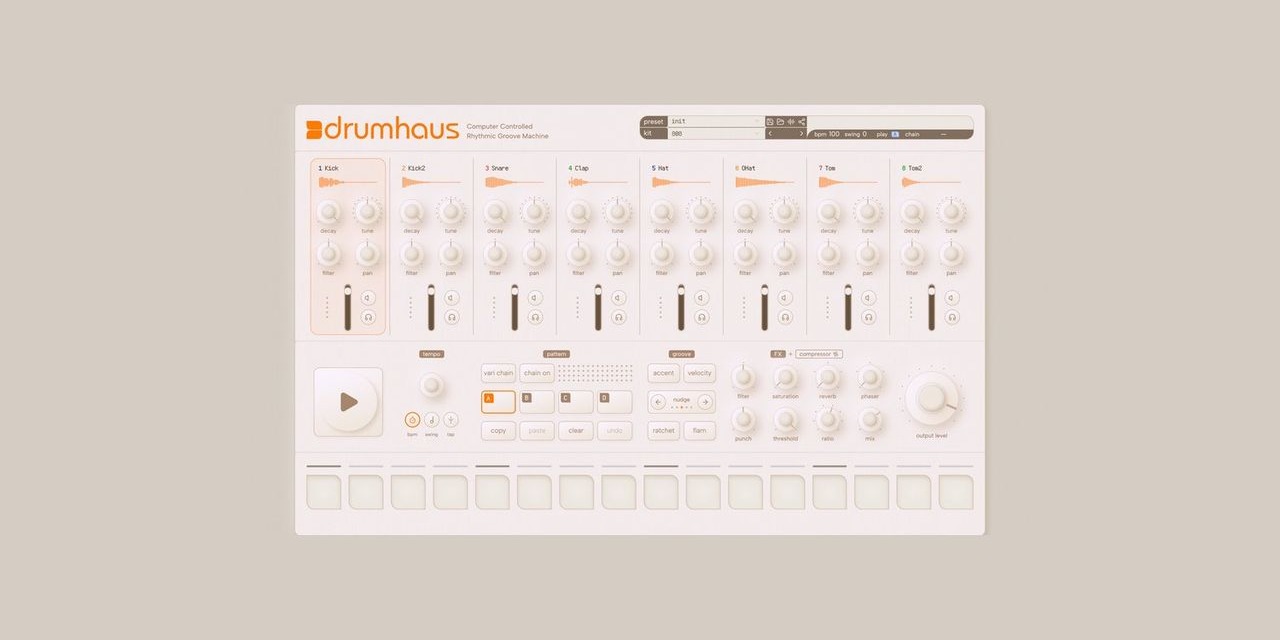
Online drum machine and beat sequencer. 8 voices, 16 steps, chainable patterns with velocity, flam, ratchet, and accent. Per-voice filters, pitch, and decay. Master FX bus. WAV export and preset sharing. Free, no account required.

No paid content found
Visit website
Profile views 7 Outbound visits 10 Normal
Drumhaus Full homepage screenshot

At a glance

Category
Development
Language
English
Paid-content signal
No paid content foundObserved
Registered
2023
Hosting
CloudflareInferred
HTTPS certificate trusted
PassedObserved
Last updated

Website review

This review may include AI-generated content and is not individually verified. Domain, certificate and other facts come from the observed data on this page.

What is Drumhaus?

Drumhaus is a free browser-based drum machine and step sequencer. You program beats on a grid of 8 voices and 16 steps, then chain up to four pattern variations into sequences of up to 8 bars. It runs in the browser with no account required, so you can start sketching a beat without installing anything.

Its depth comes from per-step and per-voice controls rather than sample browsing. Individual steps support velocity, flam, ratchet, and accent; each voice has filter, pitch, decay, pan, and mute/solo; and a master effects bus adds reverb, compression, phaser, and saturation. Finished patterns can be exported as WAV files or shared as preset links.

Who it suits

  • Quick idea capture: Anyone who wants a beat fast, without opening a DAW or creating a login.
  • Rhythm practice and teaching: The visible 16-step grid makes timing, accents, and subdivisions easy to demonstrate.
  • Sound design on a budget: Per-voice pitch, decay, and filtering let you reshape the built-in voices instead of only picking presets.
  • Sharing work: Preset links are convenient for sending a groove to a collaborator or posting it for feedback.

Trade-offs to expect

  • It is a drum machine, not a full production suite: no arrangement timeline, audio recording, or mixing of external tracks.
  • Browser tools depend on your machine and browser for timing stability, so very dense ratchets and flams may feel less tight than a dedicated hardware unit.
  • WAV export gives you a stem of the pattern, but you lose the ability to re-edit that audio afterward, so keep the preset link if you may want changes.

A practical next step

If you make beats, try this exercise: build one bar with just kick, snare, and hi-hat, then use a second chained pattern for a fill with flams and ratchets. Export both as WAVs and drop them into your DAW as a rough sketch. If you want a broader comparison, Ableton and Image-Line cover full production, while GitHub hosts the Drumhaus source if you want to see how it is built.

How do I create a drum beat in Drumhaus?

Start with the step sequencer: pick a voice for each row (eight are available), then click steps on the 16-step grid to place hits. Use the pattern chaining to line up up to four variations into a longer sequence of up to 8 bars, then export the result to WAV or share the preset by link.

A practical starting workflow

  1. Set a skeleton first. Place a kick on steps 1 and 9, a snare or clap on 5 and 13, and a closed hi-hat on every other step. This gives you a steady 4/4 pulse you can hear immediately.
  2. Add motion with velocity. On off-beat hats or ghost snares, lower the velocity so the beat breathes instead of sounding flat. Accent the downbeats you want the listener to lock onto.
  3. Use flam and ratchet sparingly. Flam thickens a single hit into a quick double; ratchet subdivides one step into repeated hits. Both are best as occasional ornaments — on a snare fill or a transition — rather than on every step.
  4. Shape each voice. Adjust pitch, decay, pan, and the per-voice filter so the kick and bass-register sounds do not fight. Mute/solo helps you audition one layer at a time.
  5. Chain patterns into a song. Build variation A as the main groove, then a B pattern with a different kick placement or an open hat, and chain them. Four chainable variations at up to 8 bars is enough for a short loop or a simple arrangement.
  6. Finish with the master FX bus. Reverb, compressor, phaser, and saturation are available globally. Add compression for glue and a little reverb for space; keep saturation light unless you want obvious grit.
  7. Export or share. Render to WAV for use in a DAW, or copy the preset link to send the exact beat to someone else.

Choosing where to spend your time

Goal What to adjust first
Make a loop groove quickly Kick/snare/hat placement, then velocity
Add human feel Velocity variation, flam on fills, slight pan
Fit a mix Per-voice pitch, decay, and filter
Turn a loop into a track Pattern chaining, then master FX
Hand off to another tool WAV export or preset link

If you want a browser-based alternative to compare workflow and sound, Soundtrap is a full online studio rather than a focused drum machine, so it suits arranging a whole song more than sketching a beat fast.

A sensible next step: build one two-bar pattern with only kick, snare, and hat, then duplicate it as a second chained pattern and change just one element — an open hat on the last step, for example. That single change usually teaches you more about the chaining and velocity controls than starting with a dense beat.

Can I export my Drumhaus patterns to WAV?

Yes. Drumhaus exports your patterns to WAV, and it does so without requiring an account.

What that looks like in practice

You build a beat in the browser, then render it to an audio file you can keep, drop into a DAW, or send to a collaborator. Because Drumhaus also lets you chain four pattern variations up to 8 bars, an export can capture a longer arrangement rather than a single bar on loop — useful if you want a rough demo of an intro-and-drop structure rather than a one-measure sketch.

The per-voice controls (filters, pitch, decay, pan, mute/solo) and the per-step settings (velocity, flam, ratchet, accent) feed into what gets rendered, so the WAV should reflect the sound you hear, not a stripped-down version. The master FX bus — reverb, compressor, phaser, saturation — sits on the same output path, so your exported file carries that processing too.

A practical workflow

  1. Sketch the core groove on the 16-step grid.
  2. Use pattern chaining to lay out variations across up to 8 bars.
  3. Check the master FX bus last, since reverb tails and compression change the overall balance.
  4. Export the WAV and audition it away from the browser — on headphones or in your DAW — before treating it as final.

One decision point worth knowing

The trade-off with any browser-based export is that you get a finished stereo file, not separate stems. If you want to rebalance the kick against the hats later, you would need to rework the pattern and export again. For quick ideas, loops and sharing, that is fine; for a mix you intend to refine track by track, plan to recreate the parts in a DAW.

If you would rather hand someone the editable version instead of audio, Drumhaus also shares presets via link — good for a collaborator who has the tool open and wants to tweak the beat themselves.

Next step: load a pattern, chain two or three variations, and export once to hear how the master FX translate to a file. That single test tells you whether the WAV is usable as-is or whether you need stems from elsewhere.

How do I share my Drumhaus presets with others?

Drumhaus supports preset sharing via link, so the basic workflow is to build your pattern in the browser, then use the share option to generate a URL you can send to anyone. There is no account requirement, so the recipient does not need to sign up to open it.

What a shared link likely carries

Because Drumhaus is a step sequencer, a shared preset should reproduce your pattern rather than just a sound. Based on the instrument's design, expect the link to encode:

  • The 16-step layout across the 8 voices
  • Per-step velocity, flam, ratchet, and accent settings
  • Per-voice filter, pitch, decay, pan, and mute/solo states
  • The master FX bus settings (reverb, compressor, phaser, saturation)
  • Your chained pattern variations, up to 8 bars

A practical way to use it

Treat the link as a snapshot, not a live session. If you keep editing after copying the URL, the link will not update, so generate a fresh one for each version you send. A simple habit: name your variations in your own notes (for example, "verse groove" and "fill"), send one link per variation, and keep a text file of the URLs alongside your project.

For anyone who wants the audio rather than the pattern, WAV export is the better handoff, since it works in any DAW or messaging app. The link is for collaborators who want to tweak your beat.

When a link is the wrong choice

  • Sending to a non-musician: a WAV or a screen recording communicates the idea faster.
  • Long-term archiving: a URL can be lost or broken; a downloaded WAV plus your own notes is safer.
  • Building a shared library: with no accounts, there is no central place to collect presets, so you will need your own index.

If you want to see how the tool itself is put together or report an issue with sharing, the project is open source and credited to Max Fung, with the code linked from Drumhaus.

What sound design options does Drumhaus offer per voice?

Drumhaus gives each of its 8 voices its own shaping controls rather than treating the kit as a single mixed instrument. Per the site, every voice has a filter, pitch, decay, pan, and mute/solo. That means you can tune a kick's pitch and decay independently of a snare, darken or thin out a hi-hat with its filter, and place individual voices in the stereo field with pan.

For a concrete workflow: a producer sketching a beat might shorten the decay on a clap so it sits tight against the kick, then pan a shaker slightly off-center. Because these are per-voice, changes to one sound don't force compromises on the others.

Beyond the voice level, Drumhaus also offers a master FX bus with reverb, compressor, phaser, and saturation — these process the overall output rather than individual voices, so they're better for glue and character than for fixing a single drum.

If you want to hear the difference quickly, load a pattern, mute all but one voice, and sweep that voice's filter and decay while the beat loops. That isolates how much of the kit's character comes from per-voice shaping before you reach for the master bus.

Explore it at Drumhaus.

Is Drumhaus free and do I need an account to use it?

Yes. Drumhaus is free to use, and you do not need to create an account. You can open Drumhaus in your browser and start building a beat right away.

That matters most in two situations:

  • Quick sketching: You want a beat idea down before inspiration fades, without an email signup or trial timer interrupting you.
  • Teaching or demoing: A class, a friend or a bandmate can follow along on their own laptop without creating logins first.

A practical next step: load the 8-voice, 16-step grid, program a simple kick-snare-hat pattern, then try one pattern variation and the WAV export. If the exported file fits your workflow, Drumhaus can serve as a zero-friction scratchpad; for finished productions, you would still move the audio into your main DAW for arrangement and mixing.

Related questions

More questions →
Is Drumhaus Free and Does It Require an Account?

Yes. Drumhaus is free to use and requires no account. You open it in a browser and start building beats — there is no sign-up, login, or payment step described on the site. The project is also open source, with its code available on GitHub, and it is credited to its builder, Max Fung.

What "free, no account required" means in practice

  • No registration wall. You do not create a username, email login, or profile before using the drum machine.
  • No payment step described. The site presents Drumhaus as free; no pricing page, subscription, or payment platform is mentioned in the available site information.
  • Browser-based. It runs as an online drum machine and beat sequencer, so access is through the browser rather than an installed desktop or mobile app.
  • Open source. The source is linked on GitHub, so you can inspect how it works if you want to.

What you can do without an account

The free, no-login model still gives you the full feature set described on the site:

Area What's available
Sequencing 8 voices, 16 steps, four chainable pattern variations up to 8 bars
Per-step control Velocity, flam, ratchet, and accent
Per-voice shaping Filters, pitch, decay, pan, and mute/solo
Master effects Reverb, compressor, phaser, and saturation on a master FX bus
Output WAV export and preset sharing via link

So the absence of an account does not appear to lock features behind a login — the export and sharing tools are listed alongside the rest of the instrument.

A practical way to check before committing time

  1. Open Drumhaus in your browser.
  2. Confirm you land directly on the drum machine without a login prompt.
  3. Program a short pattern and try the WAV export and preset link sharing.
  4. If any step asks for payment or an account, that would contradict the site's description — but nothing in the available information suggests it will.

Things the site information does not answer

  • Whether there are usage limits, storage limits, or future paid tiers is not stated.
  • Whether presets shared by link are stored permanently or only temporarily is not specified.
  • Whether the GitHub source carries a particular license is not stated in the available material.

If any of those matter to you, check the GitHub repository or the site directly, since those details are not covered in the description provided.

What Is Drumhaus? A Browser-Based Drum Machine and Beat Sequencer

Drumhaus is a free online drum machine and beat sequencer that runs entirely in your browser. It gives you 8 drum voices across a 16-step grid, with four chainable pattern variations that can extend a beat up to 8 bars. Each step supports velocity, flam, ratchet, and accent, and each voice has its own filter, pitch, decay, pan, and mute/solo controls. A master FX bus adds reverb, compressor, phaser, and saturation. You can export your beat to WAV or share presets via a link, and no account is required.

Who it's for

Drumhaus fits anyone who wants to sketch a beat quickly without installing a DAW or creating a login:

  • Producers who want a fast idea sketch before moving into a full session
  • Beginners learning step sequencing and drum programming basics
  • Anyone who needs a drum loop exported as WAV for a project
  • Collaborators who want to send a beat idea as a shareable link

It is not a full production environment. There is no arrangement timeline, no audio recording, and no mixing console beyond the master FX bus described on the site.

Core features at a glance

Feature What it does
8 voices Eight drum sound slots to build your kit
16 steps One bar of 16th-note steps per pattern
4 chainable patterns Chain variations to reach up to 8 bars
Per-step controls Velocity, flam, ratchet, and accent on individual steps
Per-voice controls Filter, pitch, decay, pan, mute/solo
Master FX bus Reverb, compressor, phaser, saturation
Export WAV download
Sharing Preset links
Access Free, no account required

How the sequencing works

The grid is the center of the workflow. You place hits on a 16-step row for each of the 8 voices, then shape individual steps rather than treating every hit the same:

  • Velocity sets how hard a step hits, useful for ghost notes and dynamics.
  • Accent pushes a step forward in the mix for emphasis.
  • Flam adds a quick double-hit feel to a step.
  • Ratchet retriggers a step multiple times within its slot.

Because each voice also has filter, pitch, decay, and pan, you can tune a single drum sound without leaving the page. Mute and solo help you audition parts in isolation while building.

Patterns and length

A single pattern is 16 steps, which is one bar. Drumhaus provides four chainable pattern variations, and chaining them lets a beat run up to 8 bars. This is the main way to get beyond a one-bar loop without an arrangement view — you build variations and chain them in sequence.

Exporting and sharing

Two outputs matter here:

  1. WAV export — render your beat to an audio file you can drop into another project.
  2. Preset links — share the beat itself as a link so someone else can open the same settings.

Both are listed as built-in features, and neither requires an account.

Practical limitations to keep in mind

  • Everything lives in the browser, so a stable connection and a reasonably current browser matter for a smooth session.
  • There is no account system, which means no cloud library tied to a login — sharing happens through links instead.
  • The scope is beat-making: 8 voices, 16 steps, chainable patterns, master FX, WAV export. If you need multitrack recording or full song arrangement, you would move the exported WAV into a DAW.

Getting started

  1. Open Drumhaus in your browser — no signup step.
  2. Pick a voice and place hits on the 16-step grid.
  3. Shape steps with velocity, accent, flam, and ratchet.
  4. Adjust per-voice filter, pitch, decay, and pan to taste.
  5. Add master FX (reverb, compressor, phaser, saturation).
  6. Build variations and chain patterns for up to 8 bars.
  7. Export to WAV or copy the preset link to share.

Drumhaus is built by Max Fung, with source available on GitHub, and is described as free with no account required.

How to Export or Share Your Drumhaus Beats

Drumhaus lets you get your beat out of the browser in two ways: export to WAV for a finished audio file, or share presets via link so someone else can open the same pattern. Both are built into the tool, and neither requires an account. The catch is that the two outputs are different things — a WAV is a rendered audio file, while a shared link is the pattern/preset itself, so pick based on whether you want to hand someone a sound or a project.

Exporting to WAV

WAV export turns your current pattern into an audio file you can drop into a DAW, upload, or send to someone.

What the export captures is your beat as it plays — the 8 voices, 16 steps, and the four chainable pattern variations across up to 8 bars, including the per-step velocity, flam, ratchet, and accent settings, the per-voice filters, pitch, decay, pan, and mute/solo states, and the master FX bus (reverb, compressor, phaser, saturation). In other words, the WAV reflects the full signal chain you've dialed in, not a dry version of the pattern.

Steps:

  1. Build your beat and set the pattern chain to the length you want (up to 8 bars).
  2. Confirm your mix — check mute/solo states and the master FX bus, since these are baked into the render.
  3. Trigger the WAV export.
  4. The browser produces a downloadable WAV file. Save it wherever you keep your audio.

Verification: open the downloaded file in any audio player or import it into a DAW. If the length matches your pattern chain and you hear the FX and per-voice settings, the export captured what you intended.

Common snags:

  • If a voice is muted or soloed unexpectedly, it will be missing or isolated in the WAV. Check mute/solo before exporting.
  • If the file sounds shorter than expected, your pattern chain is probably set to fewer bars than you think.
  • Export is a render, not a live capture — you don't need to "record" in real time.

Sharing Presets via Link

Preset sharing produces a link that carries your pattern. Whoever opens it gets the same beat loaded in their own Drumhaus session — no account needed on either end.

What the shared content includes is the preset: the pattern data and the settings that define your beat. It is not an audio file, so the recipient hears it through their own browser session rather than receiving a rendered track. If you want them to have the actual sound file, use WAV export instead.

Steps:

  1. Get your beat to a state you want to share.
  2. Generate the share link for the preset.
  3. Send the link however you like — message, email, post.

Verification: open the link yourself in a fresh browser tab or a private window. If your pattern loads correctly, the link is good to send.

Common snags:

  • A shared link is a snapshot of the pattern at the time you created it. Later edits to your own session won't change what the link contains unless you generate a new one.
  • Because it's a preset rather than audio, the recipient's playback depends on their browser and session — it's the same pattern, not a fixed recording.

Which One Do You Need?

Goal Use What you get
Send a finished track to a DAW, upload, or listener WAV export Rendered audio file including voices, per-step settings, and master FX
Let someone open and edit your pattern Preset link The pattern/preset, loaded in their browser
Archive a beat you can re-open later Preset link The pattern data, restorable in Drumhaus
No account, no signup Either Both work without an account

If you want both a file and a shareable project, do both: export the WAV for listening and generate the link for anyone who wants to open the beat themselves.

How to Make a Beat in Drumhaus

Open drumha.us in a browser and you can build a beat immediately: pick sounds across 8 voices, place them on a 16-step grid, then shape each hit with velocity, flam, ratchet, and accent. Chain up to four pattern variations into sequences as long as 8 bars, adjust per-voice filters, pitch, decay, pan, and mute/solo, run everything through the master FX bus, and export to WAV or share the preset by link. No account is required.

Step 1: Set up the pattern

The sequencer is a grid of 8 voices (rows) by 16 steps (columns). Each row is one drum sound; each column is one step in the bar.

  • Click a cell to place a hit on that voice at that step.
  • Click it again to remove it.
  • Build the backbone first — usually kick on the strong beats, snare on the backbeat, hats on the offbeats — then add the rest.

If you want to start from an existing groove instead of an empty grid, load a shared preset link before editing.

Step 2: Shape individual hits

Each step is not just on or off. Once a hit is placed, you can modify how it plays:

Control What it does
Velocity Sets how hard the hit lands, for dynamics and groove
Accent Marks the step as emphasized
Flam Adds a quick doubled/grace-note feel to the hit
Ratchet Retriggers the hit multiple times within the step

Use velocity to keep a loop from sounding robotic, accent to push key beats forward, and flam or ratchet sparingly for fills and transitions.

Step 3: Tune each voice

Per-voice controls let you treat each of the 8 sounds as its own instrument:

  • Filter — shape the tone of that voice.
  • Pitch — tune it up or down.
  • Decay — shorten or lengthen how long the sound rings.
  • Pan — place it left, right, or center in the stereo field.
  • Mute / Solo — isolate or silence voices while you work.

A common approach: solo a voice, dial in its filter, pitch, and decay until it sits right, then unmute and check it against the full pattern.

Step 4: Chain pattern variations

Drumhaus supports four chainable pattern variations, and chaining them lets a sequence run up to 8 bars. This is how you turn a one-bar loop into a full arrangement:

  1. Build variation A as your main groove.
  2. Copy or create variation B as a fill or a variation on the same groove.
  3. Create C and D for further sections — a break, a build, a drop.
  4. Chain them in the order you want them to play.

Keep the core groove consistent across variations so the chain feels like one piece of music rather than four unrelated loops.

Step 5: Process through the master FX bus

The master FX bus applies to the whole kit and includes:

  • Reverb
  • Compressor
  • Phaser
  • Saturation

Add these after the pattern and voices are working, not before — processing a weak groove usually just makes a louder weak groove. Small amounts of reverb and compression go a long way on a drum bus.

Step 6: Export or share

When the beat is done:

  • Export to WAV to get an audio file you can drop into a DAW or upload elsewhere.
  • Share presets via link to send the exact pattern and settings to someone else.

Common sticking points

  • Everything sounds flat. Add velocity variation and accents rather than more sounds.
  • The loop feels static over 8 bars. Use the pattern variations for changes instead of piling on more steps.
  • A voice is buried or overpowering. Use per-voice filter, decay, and pan, or mute/solo to check it in isolation.
  • The mix is muddy. Pull back reverb and saturation on the master bus before adding more.

Drumhaus is free and requires no account, so you can start building and exporting beats right away.

What Sound-Shaping Controls Does Drumhaus Offer?

Drumhaus gives you two layers of sound shaping: per-voice controls that sculpt each of the 8 drum sounds individually, and a master FX bus that processes the whole mix. On top of that, every step in the 16-step sequencer carries its own performance parameters — velocity, flam, ratchet, and accent — so you can shape not just the tone of a sound but how each individual hit plays. All of this runs in the browser, and the site states it is free with no account required.

Per-voice controls

Each of the 8 voices has its own set of parameters, so you can treat every drum sound as a separate instrument rather than a fixed sample.

Control What it does
Filter Shapes the frequency content of that voice — useful for thinning out a busy hi-hat or darkening a snare.
Pitch Tunes the voice up or down, letting you retune a kick or turn a tom into a different register.
Decay Controls how long the voice rings out, from tight and clipped to open and sustained.
Pan Places the voice in the stereo field, so you can spread elements across the mix.
Mute / Solo Isolates or silences voices while you work on the rest of the pattern.

The practical effect: you can build a kit that sounds cohesive without leaving the page. A short decay and a low-pass filter on a snare, for example, pushes it toward a tight, closed sound, while a long decay and brighter filter opens it up.

Per-step performance controls

The 16-step grid isn't just on/off. Each active step can carry performance data that changes how that single hit is played:

  • Velocity — how hard the step hits, giving you dynamics instead of a flat, machine-gun pattern.
  • Accent — emphasizes a step, typically used to mark the downbeat or a syncopated push.
  • Flam — a quick double-hit on the same step, adding a human, rolled feel.
  • Ratchet — repeats the hit multiple times within the step, useful for rolls and stutters.

These are the controls that separate a stiff loop from a groove. A common approach is to accent the first step of a bar, drop velocity on off-beats, and reserve flam or ratchet for fills and transitions.

Master FX bus

After the individual voices, everything passes through a master FX bus with four processors:

  • Reverb — adds space and depth to the whole kit.
  • Compressor — glues the voices together and controls peaks.
  • Phaser — a modulated sweep effect for movement and texture.
  • Saturation — adds harmonic color and drive.

Because these sit on the master bus, they affect the entire pattern rather than one voice. That makes them best for overall character — a touch of reverb for room, compression for punch, saturation for grit — rather than surgical fixes to a single sound.

How the layers work together

The signal flow is essentially: per-voice shaping → per-step performance → master FX. A beat that sounds thin might need a filter and decay adjustment on the voice, a velocity change on the step, or a bit of saturation on the master bus — and often the fastest fix is at the earliest stage. Start with the voice, then the step, then the bus.

Patterns are also chainable: the site describes four chainable pattern variations up to 8 bars, so you can build a longer arrangement rather than looping a single bar. When you're done, you can export to WAV or share a preset via link.

What this means in practice

If you want to know whether Drumhaus is enough for your needs, the answer depends on how much control you want per sound. It offers meaningful tone shaping (filter, pitch, decay, pan) and real performance detail (velocity, flam, ratchet, accent) plus a master bus — which covers a lot of beat-making ground in a browser. What it does not claim to offer is per-voice effects sends or a full mixer; the effects are on the master bus. For sketching beats, sound design within those limits, and exporting a WAV, the control set is broad. For detailed mixing with individual channel processing, you'd move the exported audio into a DAW.

Website Overview

The available information shows a mix of normal operation and configuration gaps. Depending on how the website is used, these gaps may affect secure access or the consistency of its public presentation.

Domain and Registration

Transfer-protection status is present, helping reduce the risk of unauthorized domain transfers. The domain has about 2 years of registration history; its current configuration provides more context than age alone. The registrar is Cloudflare, Inc., a widely used domain service provider. The domain uses the common .us extension, which is not an independent safety signal.

DNS and Email

Nameservers are provided by Cloudflare, indicating managed DNS hosting. No CNAME was found; the observed records resolve directly to addresses. No MX record was found. A conventional explicit inbound-mail route is not configured. TXT records include verification markers for Google. Such markers may also remain after a service stops being used. DNSSEC signatures were not detected, so this additional DNS authenticity protection is not confirmed.

TLS and Certificates

The public key uses EC with 256 bits. The server supplied a complete certificate chain. No organization name is present in the certificate; the available fields are consistent with domain validation. The certificate was issued within the Google Trust Services cloud or CDN ecosystem. The certificate's total validity is about 90 days, consistent with a short renewal cycle.

HTTP and Browser Security

The response lacks these common security headers: HSTS, CSP, Permissions-Policy, clickjacking protection. CORS permits any origin to read this response. This is common for public resources; sensitive responses need narrower handling. No X-Powered-By header was found, reducing one common source of backend fingerprinting information. The cf-ray response header indicates a CDN or caching proxy in the delivery path. No obvious internal addresses or debug information were found in the headers.

Technology Stack Analysis

The public page identifies Cloudflare without precise versions, leaving fewer clues for version-specific scanning.

Search and Social Sharing

The meta description has 230 characters and may be shortened in search results. Twitter Card metadata is configured. JSON-LD includes Product or Offer data, potentially supporting eligible product search features. The title has 30 characters, within a common display range. The observed directives allow indexing and link following.

Hosting and Email

DNSCloudflare
HostingCloudflare
EmailUnknown
Approximate IP geolocation (inferred; a CDN or proxy may differ from the origin server) Location unknown Inferred 104.21.62.179

Registration details

RDAP / WHOIS

RegistrarCloudflare, Inc.
Registered2023-11-22
Expires2026-11-22
Domain statusclientTransferProhibited https://icann.org/epp#clientTransferProhibited
Nameserverscraig.ns.cloudflare.com、kayleigh.ns.cloudflare.com
DNSSECunsigned

DNS records

DNS

TypeNameValueTTLPriority
Adrumha.us104.21.62.179300—
Adrumha.us172.67.137.233300—
AAAAdrumha.us2606:4700:3032::ac43:89e9300—
AAAAdrumha.us2606:4700:3033::6815:3eb3300—
NSdrumha.uscraig.ns.cloudflare.com86400—
NSdrumha.uskayleigh.ns.cloudflare.com86400—
TXTdrumha.usgoogle-site-verification=CrCxC3rcfMZTr4NQAbfHdj9pdRTLoZDDbofMBV25-Fo300—
TXTdrumha.usgoogle-site-verification=jcK5PlFNj3FmRE46PFhzlqyUktZzC-f1Kvl-swtaZVs300—
TXTdrumha.usv=spf1 -all300—
DMARC_dmarc.drumha.usv=DMARC1; p=reject; sp=reject; adkim=s; aspf=s;300—

TLS and certificates

TLS / SSL

AssessmentNormal configuration
Supported protocolsTLSv1.2、TLSv1.3
Negotiated protocolTLSv1.3
Certificate subjectdrumha.us
IssuerGoogle Trust Services
Valid until2026-12-11T17:30 · Remaining when checked: 70 days
Verification detailsCertificate trust: Passed · Hostname match: Passed

HTTP response headers

HTTP

HeaderValue
content-typetext/html; charset=utf-8
cache-controlpublic, max-age=0, must-revalidate
servercloudflare
x-content-type-optionsnosniff
referrer-policystrict-origin-when-cross-origin
access-control-allow-origin*

Identified technologies

Cloudflare

Pages, Search and Sharing

Meta descriptionOnline drum machine and beat sequencer. 8 voices, 16 steps, chainable patterns with velocity, flam, ratchet, and accent. Per-voice filters, pitch, and decay. Master FX bus. WAV export and preset sharing. Free, no account required.
Canonical URLhttps://drumha.us/
LanguageEnglish (default)
Twitter Cardsummary_large_image
All bots 1 allowed · 0 disallowed
  • Allow/

User reviews (0)

  • No reviews yet.