
 简体中文
简体中文exifcleaner.com
Fast, private, free. Strip EXIF metadata from photos, videos, and PDFs.
At a glance
- Category
- Development
- Language
- English
- Paid-content signal
- No paid content foundObserved
- Registered
- 2019
- Hosting
- NetlifyInferred
- HTTPS certificate trusted
- PassedObserved
- Last updated
Related questions
More questions →Which file formats and operating systems does ExifCleaner support?
ExifCleaner runs on macOS, Windows, and Linux, and it strips metadata from images, videos, and PDFs. The formats named on the site include JPEG, PNG, WebP, TIFF, GIF, MP4, MOV, M4A, and PDF, with "and more" indicating the list is not exhaustive. The interface ships with 24+ languages built in, so no extra language downloads or plugins are needed.
Supported operating systems
| OS | Supported |
|---|---|
| macOS | Yes |
| Windows | Yes |
| Linux | Yes |
The site states availability for all three desktop platforms. There is no mention of mobile (iOS/Android) or web-based versions, so treat this as a desktop tool.
Supported file formats
The site groups support into three categories:
- Images: JPEG, PNG, WebP, TIFF, GIF
- Videos: MP4, MOV
- Audio: M4A
- Documents: PDF
The page lists these as examples followed by "and more," so other common formats may also work — but only the formats above are explicitly confirmed by the source.
What this means in practice
If your files are standard phone photos (JPEG), screenshots (PNG), screen recordings or clips (MP4/MOV), voice memos (M4A), or exported documents (PDF), ExifCleaner covers them. The typical use case is removing GPS coordinates, camera model, and timestamps — for example, a photo carrying GPS: 37.7749, -122.4194, Camera: iPhone 15 Pro, and Date: 2024-03-15 can have those fields stripped.
Two related capabilities worth knowing when choosing formats:
- Batch processing: You can drop tens, hundreds, or thousands of files at once, so mixed-format folders are fine as long as each file type is supported.
- Metadata inspection: Expanding a file shows a before-and-after diff of the removed fields, which helps you confirm what was actually stripped for a given format.
Common sticking points
- "And more" is not a guarantee. If you rely on an uncommon format, test one file first and use the inspection view to confirm metadata was removed.
- Privacy model: The site states the app has no network access and no telemetry, and it is open source under the MIT License — relevant if you are cleaning sensitive files.
- Language: 24+ languages are built in, so you do not need to install anything extra to use it in your language.
If you need a cross-platform desktop tool for the formats above, ExifCleaner fits. If your files are in a format outside the named list, verify with a single test file before batch processing.
What Does a Postal Code API Return? Fields, Formats, and Common Use Cases
A postal code API returns structured location data for a given ZIP Code or Canadian postal code. A typical response includes the code itself, city, state or province, county, latitude/longitude, and — where available — ZIP+4 detail. More complete services add time zone, area codes, boundary geometry, and demographic fields. You send a code (or an address), and the API sends back a machine-readable record you can store, validate, or display.
This article explains what those responses contain, how requests are usually shaped, and where postal code data fits into real applications.
First, clear up the word "code"
The keyword "code" is overloaded, and that causes real confusion for developers:
- Postal code — the ZIP Code (U.S.) or postal code (Canada) that identifies a delivery area.
- API key — the credential you use to authenticate your requests. It is not postal data.
- Source code — the program you write to call the API.
When someone searches for "postal code API code," they usually want example request/response code for a postal code service. The rest of this article treats it that way.
What a postal code API actually returns
Response fields vary by provider and endpoint, but the core set is fairly consistent. A single-code lookup commonly returns:
| Field | Example | Notes |
|---|---|---|
| Postal code | 90210 |
The code you queried |
| City | Beverly Hills |
May be one of several acceptable place names |
| State / Province | CA |
Two-letter abbreviation |
| County | Los Angeles |
Useful for tax, territory, and reporting logic |
| Latitude / Longitude | 34.0901, -118.4065 |
Usually the centroid of the area |
| ZIP+4 | 90210-1234 |
Present only when a specific delivery segment is known |
| Time zone | America/Los_Angeles |
Helps with scheduling and display |
| Area codes | 310, 424 |
Regional phone context |
Richer datasets add 90+ fields: boundaries, population, income, elevation, and more. You rarely need all of them — request only what your application uses.
A representative JSON response
{
  "postal_code": "90210",
  "city": "Beverly Hills",
  "state": "CA",
  "county": "Los Angeles",
  "latitude": 34.0901,
  "longitude": -118.4065,
  "timezone": "America/Los_Angeles",
  "area_codes": ["310", "424"]
}
XML responses carry the same information in tag form. Choose based on what your stack parses most easily; JSON is the common default.
Common request patterns
Most postal code APIs support four patterns. Knowing which one you need prevents wasted calls.
1. Lookup by code
You have a code and want its details. This is the simplest and fastest call.
GET /lookup?code=90210
2. Reverse lookup by address
You have a street address and want to confirm or complete the code. This is the pattern behind checkout address validation.
GET /validate?street=...&city=...&state=...
3. Radius search
You have a center point and want all codes within a distance. Useful for store locators and delivery zones.
GET /radius?code=90210&miles=10
4. Batch validation
You have a file of addresses and want them cleaned in bulk. Batch endpoints trade latency for throughput and usually have their own limits.
Handling missing and ambiguous matches
Real data is messy. Plan for these cases:
- No match — the code doesn't exist or the address is malformed. Return a clear error rather than a silent empty object.
- Multiple matches — a city name may map to several codes, or a code may span several acceptable city names. Decide whether to pick the primary or return a list.
- Partial match — the street is valid but the ZIP+4 isn't. Fall back to the 5-digit code.
- Stale data — codes are added, retired, and reassigned. Refresh your dataset on a regular schedule.
A practical rule: validate at the point of entry, store the normalized result, and never re-derive it later from raw user input.
Practical use cases
- Checkout address validation — catch typos before shipping, reduce failed deliveries.
- Shipping zone lookup — map a code to a zone, carrier route, or rate table.
- Data enrichment — append county, coordinates, or demographics to existing records.
- Store and service locators — radius search to find nearby branches or coverage areas.
- Territory and tax logic — county and boundary data drive jurisdiction rules.
Licensing and data-source considerations
Postal code data originates with national authorities — USPS in the United States and Canada Post in Canada. Providers license and repackage it, which is why accuracy, update frequency, and field coverage differ between services. Before committing:
- Confirm the data source and how often it refreshes.
- Check whether ZIP+4 and boundary data are included or sold separately.
- Review usage limits and whether batch processing is allowed.
- Read the license terms for redistribution and storage.
Pricing and plan details change, so check the provider's current documentation rather than relying on secondhand figures.
Getting started
- Decide which request pattern you need (lookup, reverse, radius, or batch).
- Pick the fields you'll actually store.
- Write a small test call and inspect the raw response.
- Add error handling for no-match and ambiguous cases.
- Cache results where the same codes repeat.
A postal code API is ultimately a translation layer: you give it a code or an address, and it gives back structured location facts. Understand the fields, match them to your use case, and handle the messy edges — that's most of the work.
What Is EXIF Metadata and Why Should You Remove It?
EXIF metadata is hidden information embedded inside photos, videos, and PDFs — things like GPS coordinates, camera model, and capture date. You should remove it before sharing files because that data can reveal where you were, what device you used, and when you took the shot. ExifCleaner is a free, open-source tool that strips this metadata from JPEG, PNG, WebP, TIFF, GIF, MP4, MOV, M4A, PDF, and other formats, and it works on macOS, Windows, and Linux.
What EXIF metadata actually contains
EXIF (Exchangeable Image File Format) is a standard for storing extra fields alongside the image or media itself. A single photo can carry:
- GPS coordinates — for example,
37.7749, -122.4194 - Device identity — for example,
Camera: iPhone 15 Pro - Timestamps — for example,
Date: 2024-03-15 - Plus other fields your camera or phone writes automatically.
These fields exist to help software organize and display your media. The problem is they travel with the file. Post a photo to a forum, email a PDF, or upload a video, and the recipient — or anyone who downloads it — can read that metadata unless it has been removed.
Why removing it matters
The risk is cumulative. A single GPS tag can pinpoint a home address. A camera model plus a timestamp can link separate files to the same person and device. Across many files, that pattern can expose location history and personal habits.
This is why "strip before you share" is a reasonable default for anything leaving your control. It is not about having something to hide; it is about not broadcasting data you never chose to publish.
How ExifCleaner removes metadata
ExifCleaner's workflow is deliberately short:
- Drop — drag files or folders onto the window.
- Clean — metadata is stripped instantly.
- Done — your files are private.
A few details from the project's own description are worth knowing before you rely on it:
- Batch processing — it handles tens, hundreds, or even thousands of files at once.
- Metadata inspection — you can expand any file to view a before-and-after diff of the removed metadata fields, so you can see exactly what was stripped rather than trusting a black box.
- Privacy controls — you can fine-tune what gets removed: preserve orientation, save copies, or strip extended attributes.
- No network access and no telemetry — the app does not phone home, and because it is open source under the MIT License, you can verify that claim yourself.
- 24+ languages built in, with no extra downloads or plugins.
The before-and-after diff is the feature that matters most for verification: instead of assuming the GPS tag is gone, you can confirm it.
What to check before you decide
- Format coverage — confirm your file type is supported. The listed set covers JPEG, PNG, WebP, TIFF, GIF, MP4, MOV, M4A, and PDF, among others.
- Whether you need the original intact — the "save copies" option lets you keep originals while producing cleaned versions, which is safer if you might need the metadata later.
- Orientation — some viewers rely on an orientation tag to display a photo correctly. The preserve-orientation control exists precisely so cleaning does not rotate your images unexpectedly.
- Platform — it runs on macOS, Windows, and Linux, so the same tool works across a mixed-device workflow.
If your goal is simply to share files without leaking location, device, and timing data, a local, offline, open-source stripper like ExifCleaner covers the common cases. If you need to preserve specific fields for archival or professional reasons, use the inspection diff and the fine-grained controls to confirm what survives before you send anything out.
How to Use ExifCleaner to Strip Metadata from Files
ExifCleaner removes EXIF metadata from photos, videos, and PDFs by drag-and-drop: drop files or folders onto the window, and the metadata is stripped instantly. It runs on macOS, Windows, and Linux, and is free and open source (MIT License). Use it when you want to share files without exposing GPS coordinates, camera model, timestamps, or other embedded details.
What ExifCleaner removes
ExifCleaner targets embedded metadata across common formats:
- Images: JPEG, PNG, WebP, TIFF, GIF
- Videos and audio: MP4, MOV, M4A
- Documents: PDF
Typical metadata includes GPS location, camera/device model, and capture date. For example, a photo might carry GPS: 37.7749, -122.4194 | Camera: iPhone 15 Pro | Date: 2024-03-15 — all of which can be stripped.
Step-by-step: cleaning files
- Download and open ExifCleaner. Get it from the official site or GitHub. It's available for macOS, Windows, and Linux.
- Drag files or folders onto the window. You can drop a single file or an entire folder. Batch processing handles tens, hundreds, or even thousands of files at once.
- Let it clean. Metadata is stripped instantly — no extra confirmation step is required.
- Verify the result (optional). Expand any file to view a before-and-after diff of the removed metadata fields, so you can see exactly what was stripped.
- Share your files. Once cleaned, the files are ready to send.
Fine-tuning what gets removed
ExifCleaner includes privacy controls so you can adjust the default behavior:
- Preserve orientation — keep the orientation tag so images don't display rotated.
- Save copies — write cleaned output as new files instead of overwriting originals.
- Strip extended attributes — remove additional file-system metadata beyond standard EXIF.
These options matter when a stripped field would break how a file displays or when you need to keep the original untouched.
Privacy and language details
- No network access and no telemetry. The app does not connect to the internet or send usage data, and since it's open source you can verify these claims yourself.
- 24+ built-in languages. No downloads or plugins needed for localization.
- Dark mode that automatically matches your operating system theme.
Common questions
Does it work offline? Yes — ExifCleaner makes no network access, so cleaning happens entirely on your machine.
Can I process many files at once? Yes, batch processing is a core feature and handles large volumes.
Is it really free? Yes. ExifCleaner is free and open source software under the MIT License.
What if I need to keep some metadata? Use the privacy controls to preserve orientation or strip only extended attributes, depending on your needs.
What Privacy Controls Does ExifCleaner Offer?
ExifCleaner gives you four privacy controls that change what happens during a clean: you can fine-tune which metadata gets removed, preserve orientation, save copies instead of overwriting originals, and strip extended attributes. These options matter because the default "strip everything" behavior isn't always what you want — removing orientation data can rotate your photos, and overwriting originals leaves no way back if you clean the wrong file.
The controls are described on exifcleaner.com under the "Privacy Controls" feature. The site does not document the exact menu location or default state of each toggle, so treat the descriptions below as what each option does rather than a click-by-click walkthrough.
The four controls and what each one changes
| Control | What it affects | When to use it |
|---|---|---|
| Fine-tune what gets removed | Which metadata fields are stripped from the file | You need to keep some metadata (e.g., copyright or color profile) while removing GPS or camera data |
| Preserve orientation | Keeps the orientation tag so viewers display the image the right way up | You're cleaning photos taken on phones or cameras that rely on an orientation flag |
| Save copies | Writes cleaned files alongside the originals instead of replacing them | You want a fallback, are testing settings, or need to keep the untouched source |
| Strip extended attributes | Removes extra filesystem-level metadata beyond standard EXIF | You want the most thorough clean and don't need extended attributes preserved |
Why "preserve orientation" is the control people miss
Most image viewers and browsers read an orientation tag to decide whether to rotate a photo. If you strip all metadata, that tag disappears, and a portrait photo shot on a phone can display sideways. Preserving orientation keeps the tag that tells the viewer which way is up, while still removing the sensitive fields like GPS coordinates, camera model, and capture date.
The site's own example of what gets removed shows exactly the kind of data at stake: GPS: 37.7749, -122.4194 | Camera: iPhone 15 Pro | Date: 2024-03-15. Orientation is a display hint, not personal data, so keeping it costs you little privacy.
Save copies vs. overwrite
By default, a cleaner that modifies files in place is fast but unforgiving. The save-copies option changes the output: cleaned files are written separately, and your originals stay untouched. Use it when:
- You're cleaning a batch for the first time and want to verify results before committing.
- The originals are the only copy you have.
- You need to compare before-and-after (the site's metadata inspection feature shows a diff of removed fields, which pairs naturally with keeping originals).
Once you trust your settings, overwriting is fine for throwaway copies.
Extended attributes: the extra layer
Standard EXIF lives inside the image file. Extended attributes (xattrs) live at the filesystem level and can carry their own metadata. Stripping them makes the clean more complete, but it's a separate toggle because some workflows depend on xattrs for things like tags or quarantine flags. If you just want GPS and camera data gone, you don't need this on.
What the controls don't change
Two things stay constant regardless of your settings. First, ExifCleaner makes no network access and collects no telemetry — the site states this and points to the open-source code so you can verify it. Second, the supported formats don't shrink: JPEG, PNG, WebP, TIFF, GIF, MP4, MOV, M4A, PDF, and more are all handled. The controls only affect what is removed and where the output goes, not which file types work.
A practical starting configuration
If you're cleaning photos to share publicly and want to avoid surprises:
- Turn on preserve orientation so photos don't rotate.
- Turn on save copies for your first batch.
- Leave strip extended attributes off unless you have a specific reason.
- Use fine-tune to keep any field you legitimately need (for example, a color profile).
Then check the before-and-after diff on one file to confirm the GPS and camera fields are gone and orientation survived. Once that checks out, you can drop save-copies and process the rest in place.
The site does not publish a default state for these toggles, so verify the current settings in the app before running a large batch — a single test file is the cheapest way to confirm your configuration does what you expect.
Website Overview
Identifiable technologies and additional version or configuration signals make the service easier to fingerprint, which may help targeted scanners narrow their checks. An established domain and managed infrastructure suggest continuity of operations and may support dependable delivery, although neither guarantees service quality.
Domain and Registration
Registered in 2019, this domain has about 6 years of history. That suggests continuity, although ownership and purpose may have changed. Transfer-protection status is present, helping reduce the risk of unauthorized domain transfers. The registrar is NameCheap, Inc., a widely used domain service provider. The domain uses the common .com extension, which is not an independent safety signal.
DNS and Email
Nameservers are provided by NS1, indicating managed DNS hosting. No CNAME was found; the observed records resolve directly to addresses. No MX record was found. A conventional explicit inbound-mail route is not configured. DNSSEC signatures were not detected, so this additional DNS authenticity protection is not confirmed. The lowest observed DNS TTL is 120 seconds.
TLS and Certificates
The public key uses EC with 256 bits. The server supplied a complete certificate chain. No organization name is present in the certificate; the available fields are consistent with domain validation. The certificate was issued by Let's Encrypt, commonly associated with automated certificate services. The certificate's total validity is about 89 days, consistent with a short renewal cycle.
HTTP and Browser Security
The response lacks these common security headers: CSP, X-Content-Type-Options, Referrer-Policy, Permissions-Policy, clickjacking protection. No X-Powered-By header was found, reducing one common source of backend fingerprinting information. No obvious internal addresses or debug information were found in the headers. The Server header contains the custom value Netlify. No explicit CDN or WAF marker was found in the response headers.
Technology Stack Analysis
The public page identifies Hugo 0.159.1, Netlify, with exact versions exposed for 1 technologies. These details can narrow vulnerability checks, although exposure alone is not a vulnerability.
Search and Social Sharing
The Generator tag identifies Hugo 0.159.1, making the publishing system easier to fingerprint. No homepage canonical URL was detected. If duplicate URLs exist, consolidation may be less explicit. The title has 32 characters, within a common display range. A meta description is present, with 71 characters. The observed directives allow indexing and link following.
Hosting and Email
 NS1
NS1 Netlify
 Ashburn, Virginia, United States
Inferred
18.208.88.157
Ashburn, Virginia, United States
Inferred
18.208.88.157
Registration details
| Registrar | NameCheap, Inc. |
|---|---|
| Registered | 2019-12-06 |
| Expires | 2026-12-06 |
| Domain status | client transfer prohibited |
| Nameservers | dns1.p04.nsone.net、dns2.p04.nsone.net、dns3.p04.nsone.net、dns4.p04.nsone.net |
| DNSSEC | unsigned |
DNS records
TLS and certificates
HTTP response headers
| Header | Value |
|---|---|
| content-type | text/html; charset=UTF-8 |
| cache-control | public,max-age=0,must-revalidate |
| server | Netlify |
| strict-transport-security | max-age=31536000 |
Identified technologies
Pages, Search and Sharing
| Meta description | Fast, private, free. Strip EXIF metadata from photos, videos, and PDFs. |
|---|---|
| Canonical URL | Not detected |
| Language | English (default) |
| Twitter Card | Not detected |
Social Sharing Preview
5 fields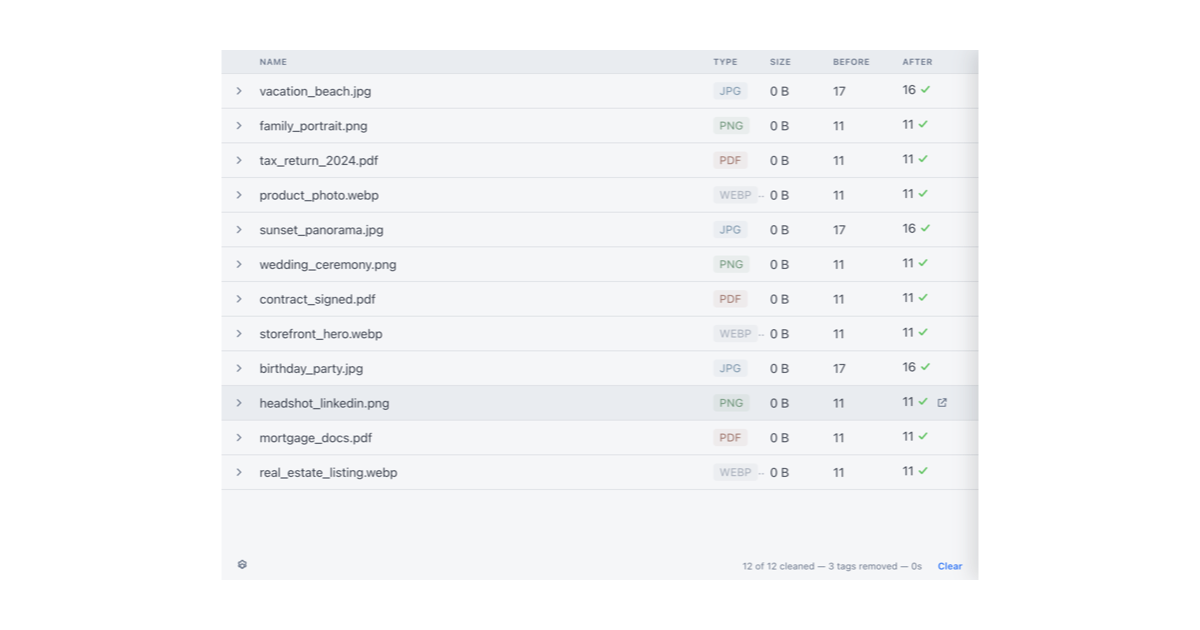
robots.txt (opens in a new tab)
HTTP 404No robots.txt found
Sitemaps
1Recent Updates
- Website images
- Screenshots
- Network details
- Website Technologies
- Pages and Search Information
- HTTP Response Information
- TLS and certificates
- DNS Information
- Domain Registration
- Website profile
- Website Description
- Website Name
- Website profile
- Website Description
- Website Name
User reviews (0)