Website profiles · Technology insights · Alternatives

flashmyboard.com

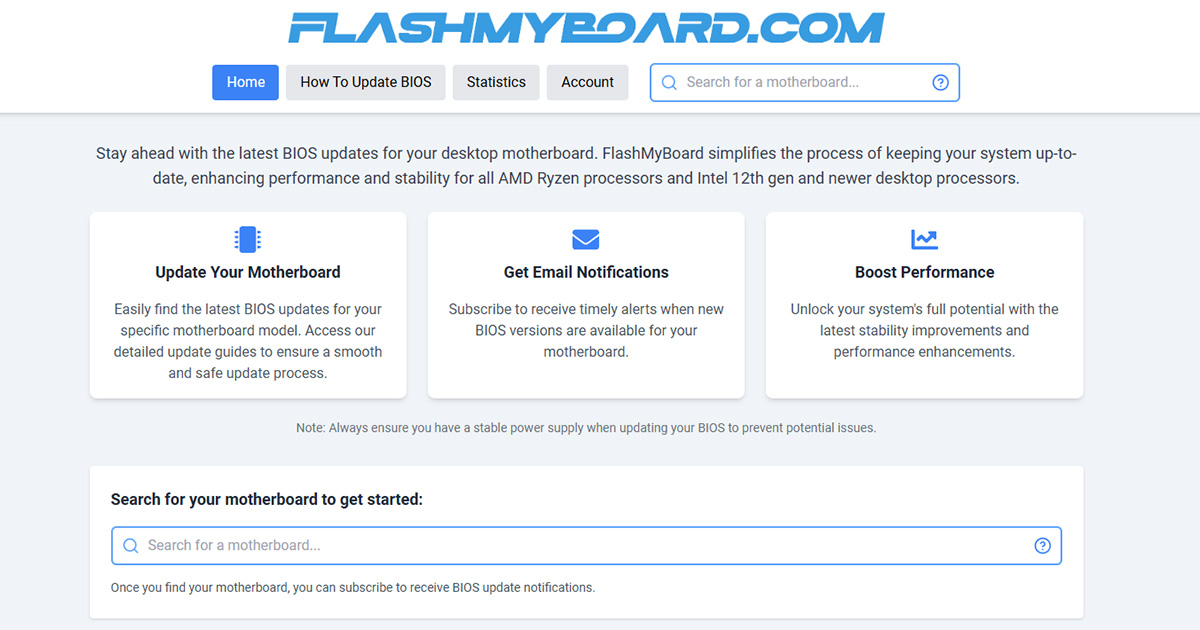
Search over 1900 Intel & AMD motherboards, get release notes analysis, AGESA & microcode tracking, email alerts. Download BIOS directly from manufacturers with full version history, updated daily.

No paid content found
Visit website
Profile views 6 Outbound visits 3 Normal
Simplify Motherboard BIOS Updates - Intel & AMD Database Full homepage screenshot

At a glance

Category
Resources & Utilities
Language
English
Paid-content signal
No paid content foundObserved
Registered
2024
Hosting
DigitalOcean, LLCInferred
HTTPS certificate trusted
PassedObserved
Last updated

Website review

This review may include AI-generated content and is not individually verified. Domain, certificate and other facts come from the observed data on this page.

What is FlashMyBoard?

FlashMyBoard is a BIOS-update tracking site for desktop motherboards. Rather than hosting the firmware itself, it indexes motherboards, points you to the manufacturer's official download, and keeps a version history so you can see what changed and when.

Its coverage focuses on AMD Ryzen platforms (AM4 and AM5 chipsets like B550, X570, B650, X670, X870) and Intel 12th-gen-and-newer boards (LGA1700 and LGA1851, including B760, Z790, B860, Z890). According to the site, it tracks roughly 1,966 motherboards and over 38,800 BIOS versions, with manufacturers including ASRock, Asus, Biostar, Gigabyte, MSI and NZXT.

What it actually helps with

  • Finding the right file fast: search by model instead of digging through a vendor's support pages.
  • Understanding releases: release-note summaries plus AGESA and microcode tracking, which matters when a BIOS update is really about CPU compatibility, memory stability or a security fix.
  • Staying current: optional email alerts when a new version appears for your board.
  • Update guidance: step-by-step instructions aimed at making the flash process safer.

Who it suits

A typical user is someone mid-build or mid-upgrade: say you've dropped a newer Ryzen chip into an older AM4 board and need the BIOS version that adds support, or you're chasing memory instability on an AM5 system and want to know whether a recent AGESA revision addresses it. Enthusiasts who flash regularly will get the most from the version history and alerts; casual users who update once every few years can still use it as a lookup tool.

Trade-offs to keep in mind

It's a reference and notification layer, not a download mirror — you still fetch the file from the manufacturer, which is the safer route anyway. Value depends on how completely and quickly it tracks your specific board, and older or low-volume models may be thinner on detail than popular ones. Email alerts only help if you act on them.

As a next step, search your exact motherboard model, check the newest version against what you're currently running, and read the release notes before deciding whether the update is worth the risk. The site's own note is worth repeating: only flash with a stable power supply.

How do I find the latest BIOS update for my specific motherboard model?

Search the site's motherboard database by model, then open the update guide for that board. FlashMyBoard's page evidence shows a search field plus browse-by-chipset-and-manufacturer filters, and it says you can subscribe to email alerts once your board is found.

Step by step

  1. Identify your exact model, not just the chipset. "B650" is a chipset; "B650 Aorus Elite AX" is a model. The model number is printed on the board itself and in your manual.
  2. Search that model in the database, or narrow down using the chipset lists (AM4, AM5, LGA1700, LGA1851) and the manufacturer list (ASRock, Asus, Biostar, Gigabyte, MSI, NZXT).
  3. Open the version history and release notes. FlashMyBoard tracks AGESA and microcode changes, which is where the practical differences between versions usually hide.
  4. Read the update guide before flashing, then download the BIOS from the manufacturer's own site, as the site describes.
  5. Subscribe to alerts so you don't have to check manually for the next release.

Choosing the right version

Situation Sensible choice
System is stable, no CPU/RAM changes planned Latest stable release, unless notes warn of a regression
Installing a newer CPU generation Minimum version that adds support for that CPU
Chasing memory stability or a specific fix The version whose notes mention that AGESA/microcode change
Mid-build, nothing installed yet Update first, while a failed flash is least disruptive

A concrete scenario You've bought a Ryzen CPU for an older AM4 board that sat in a warehouse. The board may ship with firmware too old to POST with that chip. Checking the version history tells you the minimum BIOS needed and whether the board supports USB BIOS Flashback, which lets you update without a working CPU. That single detail decides whether the build works tonight or waits on a loaner chip.

Practical cautions

  • Match the exact revision. Some manufacturers ship the same model name with different revisions that use different BIOS files.
  • Update from a stable power source. The site's own note warns about this, and a power loss mid-flash can brick the board.
  • Don't update reflexively. If your system is stable and the release notes don't address a problem you have, waiting is a legitimate choice.
  • Check whether settings reset. Most updates clear CMOS, so note any custom fan curves, memory profiles or undervolts first.

Next step Find your model in the database and read its release notes before downloading anything. If your board isn't listed, go straight to the manufacturer's support page for that exact model and revision — ASUS, MSI, Gigabyte and ASRock all publish BIOS files and notes directly.

What are the benefits of subscribing to email notifications for BIOS updates?

Email alerts exist to close the gap between a BIOS release and the moment you notice it. On FlashMyBoard, the practical benefit is that you subscribe to a specific motherboard model rather than monitoring a manufacturer's support page by hand: the site tracks version history and release notes across a large board database and tells you when something new appears for your board.

What you actually gain

  • You stop polling support pages. Instead of checking Asus, MSI, Gigabyte or ASRock download pages every few weeks, you get a message only when your model changes.
  • You see the reason, not just the version number. Release notes analysis and AGESA/microcode tracking matter because two boards can share a version number while fixing different things; the useful signal is what changed and whether it affects you.
  • You can time updates deliberately. A new BIOS is not automatically worth installing the day it lands. Knowing early lets you wait a week, read other users' reports, and update on a weekend when a failed flash is inconvenient rather than catastrophic.
  • You catch security-relevant fixes. Microcode and AGESA updates often address stability or vulnerability issues that never show up as a headline feature.

Who benefits most

Reader Value of alerts
New builder on a current platform Learns when early-adopter fixes arrive for a new chipset
Owner of a stable 2–3 year old system Avoids unnecessary flashing; acts only on meaningful fixes
Troubleshooter chasing crashes or memory instability Wants to know immediately if a fix is pending
Person managing several machines One subscription per board beats manual tracking

A concrete scenario

You build an AM5 system, hit occasional memory training issues, and check the vendor page twice, find nothing, and give up. With an alert on your exact model, the next AGESA-carrying release reaches you as a notification, and you can read what it changes before deciding.

Decision criterion

Subscribe if your board is still receiving updates and you would otherwise forget to check. Skip it if your system is stable and out of support — alerts then just add noise. Either way, treat a notification as a prompt to read the release notes, not as an instruction to flash immediately, and keep a stable power supply during the update.

Next step: search your exact motherboard model on the site and subscribe to that model, not to a brand or chipset in general.

How can updating my BIOS improve my system's performance and stability?

BIOS updates rarely make a system faster in everyday tasks, but they often fix the specific problems that make a system feel unstable or hold back a new component. The main gains fall into four areas:

  • CPU and memory compatibility. Firmware carries the microcode and AGESA code that tells the board how to talk to newer processors and memory kits. On AMD's AM4 and AM5 platforms, and on Intel's LGA1700 and LGA1851 boards, a BIOS update is frequently the only way to boot a CPU or RAM kit released after the motherboard shipped.
  • Stability fixes. Vendors patch memory training, voltage regulation, sleep/wake behavior and USB or PCIe dropouts. If your system randomly fails to POST, reboots under load or loses a drive, the changelog is where the fix usually appears.
  • Security patches. Microcode updates address CPU vulnerabilities, so staying current matters even when nothing feels broken.
  • Performance, usually modest. Gains come from better memory support (running rated speeds instead of a fallback), corrected power limits, or a newer AGESA branch that improves boost behavior. Expect small benchmark differences rather than a transformed machine.

A practical scenario: you buy a current-generation CPU for a board that launched a year earlier. Without the right firmware the system may not POST at all; with it, the CPU runs and your existing RAM may also reach its rated speed. That is a compatibility and stability win far more than a speed win.

Where a tracking site helps

FlashMyBoard indexes roughly 1,966 Intel and AMD desktop motherboards with version histories and email alerts when something new appears. That matters because vendor support pages are easy to miss and changelogs are often terse. The site's stated focus on release-note analysis and AGESA/microcode tracking is aimed at people who want to know what changed before flashing, not just that a file exists. It covers AMD Ryzen boards and Intel 12th-gen-and-newer desktop platforms, so older Intel systems fall outside its stated scope.

When to update, and when to wait

Situation Reasonable action
New CPU or RAM won't boot or run at rated speed Update; check the CPU support list first
Random instability, USB/PCIe dropouts, sleep bugs Update if the changelog mentions your symptom
Security advisory affecting your CPU Update
System is stable and nothing has changed Waiting is defensible; every flash carries a small risk
You need the machine working today for a deadline Wait until you have time to recover from a failed flash

Before you flash: confirm the exact board model and revision, read the vendor's instructions for your board's update method, use a stable power source (a UPS is ideal on a desktop), and avoid interrupting the process. Note that some updates cannot be rolled back, and a few require stepping through an intermediate version first.

Next step: look up your exact motherboard on the manufacturer's support page or a tracker, read the release notes for the versions between your current one and the latest, and decide based on whether any listed fix matches a problem you actually have.

What steps should I follow to safely update my motherboard's BIOS?

Use the motherboard vendor's own instructions as the authority, and treat a BIOS database as a way to find the right file and understand what changed.

A safe update sequence

  1. Identify the exact model. Check the model printed on the board itself, not just what a system tool reports. Retail names and board revisions can differ, and a BIOS for the wrong revision may not be accepted or may behave incorrectly.
  2. Read the release notes for your model and revision. Note whether the update is a security fix, a CPU or memory compatibility update, or a stability/performance change. If your system is stable and the update only adds support for hardware you do not own, waiting is reasonable.
  3. Check the vendor's required update path. Some boards require stepping through an intermediate version before the newest one, and some updates reset settings or change how profiles are stored.
  4. Prepare the machine. Connect to mains power (a laptop should be plugged in; a desktop should be on a reliable supply, ideally with a UPS). Avoid updating during a storm or when power is unreliable. Save your work and close everything.
  5. Record your current settings. Photograph or write down custom fan curves, memory profiles, boot order and any overclock. CMOS resets and profile loss are common after a BIOS flash.
  6. Use the vendor's flashing method. Many boards offer a built-in utility that reads the file from a USB drive; some support flashing without a CPU or memory installed. Follow the vendor's file-naming and USB-formatting requirements exactly.
  7. Do not interrupt it. Never power off, reset or remove the USB drive during the write. A failed flash can leave the board unbootable, though many modern boards have a recovery method.
  8. Reconfigure and verify. Enter setup, load defaults if instructed, then reapply your settings. Confirm the new version in setup or with a system information tool, and check that memory and boot devices are detected.

Where a database helps

Sites that track BIOS releases are most useful for the research steps: confirming which version is newest, seeing how recently it was published, and reading what a vendor changed. FlashMyBoard is one such database; its page describes searchable coverage of over 1,900 Intel and AMD desktop motherboards, version history, release-note analysis, AGESA and microcode tracking, and email alerts when a new version appears. That alert feature is the practical part: you can subscribe for your board and stop manually checking vendor pages, then still download the firmware from the manufacturer as the site describes.

Practical cautions

  • A "newer" BIOS is not automatically better for your use case. If the release notes only mention a CPU you do not have, the risk of flashing may outweigh the benefit.
  • Beta or recently posted versions deserve extra caution; waiting a week or two for reports to appear is a low-cost hedge.
  • Vendor support pages remain the source of truth for your specific revision, warranty terms and recovery procedures. A third-party database is a convenience layer, not a substitute.
  • If the machine is a work-critical system and is running well, schedule the update for a moment when downtime is acceptable.

Decision shortcut

Situation Reasonable action
New CPU or memory not detected or unstable Check for a compatibility BIOS and update if the notes match
Security advisory affecting your board Update, following the vendor's path
Stable system, notes mention only unrelated hardware Wait and revisit
Unsure of board revision Confirm the revision first, then decide

A good next step: look up your exact board and revision, read the last two or three release notes, and only then decide whether this update is worth the risk today.

Which motherboard manufacturers and chipsets are supported on FlashMyBoard?

FlashMyBoard covers 1,966 desktop motherboards from six manufacturers, spanning AMD's AM4 and AM5 sockets and Intel's LGA1700 and LGA1851 sockets.

Manufacturers: ASRock, Asus, Biostar, Gigabyte, MSI and NZXT.

AMD chipsets: AM4 — A320, B350, X370, B450, X470, A520, B550, X570. AM5 — A620, B650, X670, B840, B850, X870.

Intel chipsets: LGA1700 — H610, B660, H670, Q670, Z690, B760, H770, Z790. LGA1851 — H810, B860, Q870, W880, Z890.

The scope is deliberately narrow: recent AMD Ryzen platforms and Intel 12th-generation-and-newer desktop processors. If you are maintaining an older Intel board, a workstation platform, or a prebuilt with a proprietary motherboard, this database will not help you.

How to check yours

Search your exact board model, then look at whether a version history appears. A match means you can also subscribe to email alerts for new BIOS releases, which is the main reason to use a tracker rather than checking vendor pages manually.

For context, the site reports 38,807 total BIOS versions tracked and 23 updates in a recent week — a reminder that update frequency varies a lot by model, so an alert subscription is more useful for boards that receive regular AGESA or microcode refreshes than for ones that rarely change.

If your board is not listed, go straight to the manufacturer's own support page: ASUS, Gigabyte, MSI, ASRock or Biostar.

Related questions

More questions →
How to Find and Install the Latest BIOS Update for Your Motherboard on FlashMyBoard

FlashMyBoard is a searchable database of BIOS releases for over 1,900 Intel and AMD desktop motherboards, with 38,807 BIOS versions tracked and updates added daily. You can use it to find the newest BIOS for your exact board, read release notes and AGESA/microcode tracking, subscribe to email alerts, and then download the file from the manufacturer's official source. It covers AMD Ryzen platforms (AM4, AM5) and Intel 12th gen and newer desktop processors (LGA1700, LGA1851). It does not host BIOS files itself — it points you to the manufacturer for the actual download.

Step 1: Locate your exact motherboard model

You have two ways to narrow down to your board:

  • Search directly — enter your motherboard model in the search field on the homepage to jump straight to its page.
  • Browse by chipset and manufacturer — use the filters if you don't know the exact model name yet.
Filter Options listed
AMD chipsets AM4: A320, B350, X370, B450, X470, A520, B550, X570 · AM5: A620, B650, X670, B840, B850, X870
Intel chipsets LGA1700: H610, B660, H670, Q670, Z690, B760, H770, Z790 · LGA1851: H810, B860, Q870, W880, Z890
Manufacturers ASRock, Asus, Biostar, Gigabyte, MSI, NZXT

Match the model string exactly — vendors often ship several revisions of the same name, and BIOS files are not always interchangeable across revisions.

Step 2: Review the version history and release notes

On the motherboard's page you can see the full BIOS version history rather than just the newest file. Two things are worth checking before you download:

  • Release notes analysis — what each version actually changes, so you can tell whether an update is relevant to your problem (stability, memory compatibility, CPU support) or skippable.
  • AGESA and microcode tracking — for AMD boards this shows which AGESA version each BIOS carries; for Intel it tracks the microcode revision. This matters when a specific AGESA or microcode update is the reason you're updating.

If you only want to know when something new appears, subscribe to email notifications for that board instead of checking manually.

Step 3: Follow the update guide and prepare safely

FlashMyBoard provides detailed update guides for a smooth, safe process. The site's own note is explicit: always ensure you have a stable power supply when updating your BIOS to prevent potential issues. A power loss mid-flash can leave the board unbootable.

Practical preparation:

  • Connect to mains power (desktop) and avoid updating during storms or known outages.
  • Read the manufacturer's instructions for your specific board — the in-firmware tool name and menu path differ between vendors.
  • Note your current BIOS version first, so you can confirm the update succeeded and know your rollback point.

Step 4: Download from the manufacturer

FlashMyBoard links out to the manufacturer's official download for the version you selected. Download the BIOS file from that source, not from third-party mirrors, and verify you have the correct file for your exact model and revision before flashing.

Common snags

  • Wrong board revision — same model name, different BIOS file. Confirm the revision printed on the board.
  • Skipping intermediate versions — some vendors require flashing through a specific earlier version first; check the release notes.
  • Assuming the newest version is always best — if your system is stable and the release notes don't address anything you need, updating carries its own risk.
  • Expecting a download on FlashMyBoard — it's a tracking and notification layer; the file comes from the manufacturer.

When this approach fits

Use FlashMyBoard if you want one place to compare BIOS versions across AMD and Intel desktop boards, track AGESA/microcode changes, and get alerted to new releases without manually revisiting vendor pages. If you need the BIOS file itself or vendor-specific flashing instructions, you'll still finish the job on the manufacturer's site.

What Is FlashMyBoard and What Does It Do?

FlashMyBoard is a BIOS update tracking site for desktop motherboards. It aggregates BIOS release information for Intel and AMD boards, lets you search by motherboard model, and can email you when a new version appears. It's aimed at people running AMD Ryzen or Intel 12th-gen and newer desktop processors who want to know when firmware updates land without manually checking vendor pages. Downloads themselves come from the manufacturers, not from FlashMyBoard.

What the site actually provides

The core value is tracking, not hosting. According to the site, it covers over 1,900 motherboards and has logged more than 38,800 BIOS versions, with updates added daily. Its stated features:

  • Model search — look up your specific motherboard to see its BIOS history.
  • Version history — a full list of past BIOS releases for that board.
  • Release notes analysis — the site summarizes what changed in each release.
  • AGESA and microcode tracking — for AMD boards, it follows the AGESA firmware versions; for Intel, the CPU microcode revisions bundled into BIOS updates.
  • Email alerts — subscribe to a board and get notified when a new BIOS is posted.
  • Update guides — instructions for performing the flash safely.
  • Download links — point to the manufacturer's own download, so you get the official file.

Who it's for

You'll get the most out of it if:

  • You have an AMD Ryzen system or an Intel 12th-gen or newer desktop CPU.
  • You want to know whether a BIOS update matters before you install it — for example, whether it brings a new AGESA version, a microcode fix, or a stability improvement.
  • You'd rather subscribe to alerts than check ASRock, Asus, Biostar, Gigabyte, MSI, or NZXT support pages yourself.

It's less useful if you're on older Intel platforms or a laptop, since the coverage is scoped to the desktop boards and processor generations above.

How to use it

  1. Search your motherboard model on the site to pull up its page.
  2. Review the version history and release notes analysis to see what the latest BIOS changes and whether it's worth applying.
  3. Subscribe to email notifications for that board so future releases reach you automatically.
  4. Download the BIOS from the manufacturer using the provided link, then follow the site's update guide.

Browsing by chipset and manufacturer

If you don't have a specific board in mind, you can browse by platform. The site lists these chipsets:

Platform Chipsets
AM4 A320, B350, X370, B450, X470, A520, B550, X570
AM5 A620, B650, X670, B840, B850, X870
LGA1700 H610, B660, H670, Q670, Z690, B760, H770, Z790
LGA1851 H810, B860, Q870, W880, Z890

Manufacturers covered: ASRock, Asus, Biostar, Gigabyte, MSI, and NZXT.

A practical caveat

The site itself warns to ensure you have a stable power supply when updating your BIOS. That's the real risk in any flash — an interrupted update can leave a board unbootable. FlashMyBoard reduces the research burden (finding the right file, knowing what changed, getting notified), but the flashing step and its risks are still yours to manage, and the file should always come from the manufacturer.

Bottom line

FlashMyBoard is a lookup-and-alert layer on top of manufacturer BIOS pages: search your board, read what each update does, subscribe for notifications, and download the official file. If you maintain an AMD Ryzen or recent Intel desktop and want to stop manually hunting for firmware updates, it's built for exactly that.

Which Motherboards and Chipsets Are Covered by FlashMyBoard?

FlashMyBoard covers desktop motherboards from six manufacturers across AMD's AM4 and AM5 platforms and Intel's LGA1700 and LGA1851 platforms. According to the site's own stats, the database currently lists 1,966 motherboards and 38,807 BIOS versions, with updates maintained daily. If your board is an AMD Ryzen desktop board or an Intel 12th-gen-or-newer desktop board from one of the supported vendors, it is likely in the database.

AMD coverage

FlashMyBoard lists AMD chipset families by socket:

Socket Chipsets
AM4 A320, B350, X370, B450, X470, A520, B550, X570
AM5 A620, B650, X670, B840, B850, X870

The site states it supports all AMD Ryzen processors, so AM4 and AM5 boards from the supported manufacturers fall within scope.

Intel coverage

Intel coverage is split across two socket generations:

Socket Chipsets
LGA1700 H610, B660, H670, Q670, Z690, B760, H770, Z790
LGA1851 H810, B860, Q870, W880, Z890

Note the scope boundary: the site describes support for Intel 12th-gen and newer desktop processors. Older Intel platforms are not part of the stated coverage.

Supported manufacturers

The browse-by-manufacturer list includes:

  • ASRock
  • Asus
  • Biostar
  • Gigabyte
  • MSI
  • NZXT

If your motherboard is from a brand outside this list, the database likely does not have an entry for it.

How current the data is

The site publishes running stats on its homepage. At the time of the source snapshot:

  • Total motherboards: 1,966
  • Updates this week: 23
  • Updates today: 0
  • Total BIOS versions: 38,807

The "updated daily" claim is consistent with a weekly update count in the low tens, though a same-day count of zero simply means no new versions had landed yet that day.

How to check whether your board is included

  1. Go to the site and use the motherboard search field.
  2. Enter your motherboard model.
  3. If a match appears, you can view its BIOS version history and subscribe to email alerts for new releases.

If your model does not appear, the most likely reasons are that it falls outside the AMD Ryzen / Intel 12th-gen-or-newer scope, or that its manufacturer is not among the six listed brands.

How to Set Up Email Notifications for New BIOS Versions on FlashMyBoard

FlashMyBoard lets you subscribe to email alerts for a specific motherboard model, so you get notified when a new BIOS version appears instead of checking manufacturer pages yourself. The setup is a two-step flow: first find your exact motherboard page, then subscribe from that page. This works for the AMD and Intel desktop boards in the site's database (1,966 motherboards as of the site's stats), and it's most useful if you want to catch stability or security fixes without monitoring download pages manually.

Step 1: Find your exact motherboard page

Notifications are tied to a specific model, so the search result you land on matters.

  1. Go to flashmyboard.com and use the search field on the homepage ("Search for your motherboard to get started").
  2. Enter your motherboard model — the more specific, the better (for example, include the chipset or model suffix rather than just the brand).
  3. Confirm you're on the right page before subscribing. Check that the model name matches what's printed on your board or shown in your system information.

If you're not sure of the exact model string, you can browse instead of searching. The site organizes boards by chipset and manufacturer:

Filter Options listed on the site
AMD chipsets AM4: A320, B350, X370, B450, X470, A520, B550, X570 — AM5: A620, B650, X670, B840, B850, X870
Intel chipsets LGA1700: H610, B660, H670, Q670, Z690, B760, H770, Z790 — LGA1851: H810, B860, Q870, W880, Z890
Manufacturers ASRock, Asus, Biostar, Gigabyte, MSI, NZXT

Browsing by chipset and manufacturer is the safer route when two models share a similar name, since picking the wrong page means your alerts will track the wrong board.

Step 2: Subscribe to BIOS update notifications

Once you're on your motherboard's page, subscribe to its update alerts. The site describes this as: "Once you find your motherboard, you can subscribe to receive BIOS update notifications." You'll receive an email when a new BIOS version becomes available for that model.

A few practical points:

  • Subscribe per model. Alerts are scoped to the motherboard page you subscribed from, so if you have multiple systems, subscribe on each model's page.
  • Expect alerts only when something changes. The site's stats show update activity is uneven — 23 updates in a week and 0 on the day the stats were captured — so quiet periods are normal, not a sign the subscription failed.
  • Keep the email address you actually monitor. Since the value of the alert is timeliness, an address you check rarely defeats the purpose.

What you get when an alert arrives

The notification is a prompt to review, not an instruction to flash immediately. Before updating, use the version history and release notes available on the model page to decide whether the update is worth the risk for your system. The site tracks release notes analysis plus AGESA and microcode changes, which is where you'll see whether an update targets a stability fix, a security issue, or a performance change relevant to your CPU.

This matters because BIOS updates carry a real risk of a failed flash. The site itself notes: "Always ensure you have a stable power supply when updating your BIOS to prevent potential issues." So treat the email as a signal to check the release notes and plan the update, not as a reason to update the same day.

Common snags

  • No alerts after subscribing. Confirm you subscribed on the correct model page and that the model actually has new versions pending. If the board hasn't received a new BIOS, there's nothing to send.
  • Wrong model subscribed. If you searched a broad term and picked a similarly named board, alerts will track that board instead of yours. Re-subscribe from the correct page.
  • Assuming an alert means you must update. Skipping an update is a valid choice if the release notes don't address anything affecting your system.

When this is worth setting up

Set up notifications if you run an AMD Ryzen or Intel 12th-gen-or-newer desktop board and want to stay current on stability and security fixes without manually rechecking manufacturer download pages. If you only update BIOS when you hit a specific problem, or you prefer to check release notes on your own schedule, the alerts add little — the same version history and release notes are available on the model page whenever you look.

What AGESA and Microcode Tracking Means for Your AMD or Intel Motherboard

AGESA and microcode are the two lowest-level pieces of firmware that reach your motherboard through a BIOS update. AGESA is AMD's platform initialization code, bundled inside the BIOS for AM4, AM5, and related chipsets. Microcode is the CPU's internal instruction patch, delivered by Intel (and also by AMD) inside the same BIOS package. FlashMyBoard tracks both so you can see what actually changed in a BIOS release instead of guessing from a version number. This matters if you are deciding whether a specific update is worth the risk of flashing.

Why the version number alone tells you little

A BIOS version like "7D75v1H" or "3202" is just a label. The meaningful change is usually one of:

  • A new AGESA revision (AMD platforms), which controls memory training, CPU compatibility, PCIe behavior, and stability.
  • A new microcode revision (Intel and AMD), which patches CPU-level behavior — errata fixes, security mitigations, sometimes performance tuning.

Two BIOS releases with similar-looking numbers can carry very different AGESA or microcode versions. Tracking those separately is what lets you compare releases across vendors and time.

AGESA: what it controls on AMD boards

AGESA (AMD Generic Encapsulated Software Architecture) is the firmware layer that initializes the CPU, memory controller, and fabric before your operating system loads. When a vendor ships a new AGESA, common real-world effects include:

  • Memory compatibility — new DDR5 or DDR4 kits that previously failed to train may now boot at rated speed.
  • CPU support — new Ryzen models added to an existing socket.
  • Stability fixes — idle crashes, USB dropout, or PCIe link issues tied to the platform code.

Because AGESA is shared across vendors, the same AGESA version often appears in ASRock, Asus, Gigabyte, and MSI BIOS releases around the same time. FlashMyBoard's AGESA tracking lets you see that lineage rather than treating each vendor's build as unrelated.

Microcode: the CPU patch inside your BIOS

Microcode is loaded by the BIOS at boot and updates how the processor executes certain instructions. It is the mechanism behind:

  • Security mitigations for CPU errata.
  • Stability corrections for specific workloads.
  • Performance or power behavior changes that vendors sometimes tune.

On Intel 12th gen and newer desktop processors, microcode revisions have been a recurring topic because they can affect both stability and performance characteristics. On AMD, microcode updates ship alongside AGESA. Either way, the microcode revision is not something you can read off the box — it comes with the BIOS.

How FlashMyBoard ties this to your specific board

FlashMyBoard indexes over 1,900 Intel and AMD motherboards and 38,807 BIOS versions, updated daily. For each board you can:

  1. Search your exact model to see its full BIOS version history.
  2. Read release notes analysis that surfaces the AGESA or microcode change behind a release.
  3. Track AGESA and microcode versions across releases so you can see when a meaningful change landed.
  4. Subscribe to email alerts so you are notified when a new version appears for your board.

Downloads themselves come directly from the manufacturers — FlashMyBoard points you to the source rather than hosting files.

Deciding whether an update is worth it

Use the tracked AGESA/microcode change as your filter:

What changed Typical reason to update
New AGESA with memory or CPU support You added RAM or a CPU that needs it
Microcode with a security fix You want the mitigation
Microcode/AGESA with stability fixes You are hitting crashes or instability
Minor version bump, no AGESA/microcode change Usually optional

If your system is stable and nothing in the tracked change applies to you, waiting is reasonable. If you are chasing a specific fix, confirm the release notes mention it before flashing.

Before you flash

The site's own guidance applies here: ensure you have a stable power supply during a BIOS update. An interrupted flash can leave the board unbootable. Follow the manufacturer's update guide for your specific model, and use the version history to confirm you are moving to the intended release.

The practical value of AGESA and microcode tracking is simple: it turns "should I update my BIOS?" from a guess about version numbers into a decision based on what the firmware actually changes.

Website Overview

The available information shows a mix of normal operation and configuration gaps. Depending on how the website is used, these gaps may affect secure access or the consistency of its public presentation.

Domain and Registration

Transfer-protection status is present, helping reduce the risk of unauthorized domain transfers. The domain has about 2 years of registration history; its current configuration provides more context than age alone. The registrar is NameCheap, Inc., a widely used domain service provider. The domain uses the common .com extension, which is not an independent safety signal.

DNS and Email

Nameservers are provided by DigitalOcean, indicating managed DNS hosting. MX records point to the forwardemail.net email service. No CNAME was found; the observed records resolve directly to addresses. SPF and DMARC are configured. DKIM status is unknown. TXT records include verification markers for Google. Such markers may also remain after a service stops being used.

TLS and Certificates

The public key uses EC with 256 bits. The server supplied a complete certificate chain. No organization name is present in the certificate; the available fields are consistent with domain validation. The certificate was issued by Let's Encrypt, commonly associated with automated certificate services. The certificate's total validity is about 89 days, consistent with a short renewal cycle.

HTTP and Browser Security

The response lacks these common security headers: X-Content-Type-Options. No X-Powered-By header was found, reducing one common source of backend fingerprinting information. No obvious internal addresses or debug information were found in the headers. The Server header identifies nginx without an exact version. No explicit CDN or WAF marker was found in the response headers.

Technology Stack Analysis

The public page identifies Next.js, nginx without precise versions, leaving fewer clues for version-specific scanning.

Search and Social Sharing

The meta description has 196 characters and may be shortened in search results. Twitter Card metadata is configured. JSON-LD includes Organization data, helping describe the organization as an entity. The title has 56 characters, within a common display range. The observed directives allow indexing and link following.

Hosting and Email

DNSDigitalOcean
HostingDigitalOcean, LLC
Emailforwardemail.net
Approximate IP geolocation (inferred; a CDN or proxy may differ from the origin server) United States flagSanta Clara, California, United States Inferred 159.223.202.151

Registration details

RDAP / WHOIS

RegistrarNameCheap, Inc.
Registered2024-08-27
Expires2027-08-27
Domain statusclient transfer prohibited
Nameserversns1.digitalocean.com、ns2.digitalocean.com、ns3.digitalocean.com
DNSSECunsigned

DNS records

DNS

TypeNameValueTTLPriority
Aflashmyboard.com159.223.202.1511203—
MXflashmyboard.commx1.forwardemail.net360010
MXflashmyboard.commx2.forwardemail.net360010
NSflashmyboard.comns1.digitalocean.com1800—
NSflashmyboard.comns2.digitalocean.com1800—
NSflashmyboard.comns3.digitalocean.com1800—
TXTflashmyboard.comforward-email-site-verification=RfdCQGOvcS3600—
TXTflashmyboard.comgoogle-site-verification=9b8zjXLlMbCnkXQ9ug0MDKc2q13GmJF1t3W0eN7m3j43600—
TXTflashmyboard.comv=spf1 include:spf.forwardemail.net -all3600—
DMARC_dmarc.flashmyboard.comv=DMARC1; p=reject; pct=100; rua=mailto:[email protected];3600—

TLS and certificates

TLS / SSL

AssessmentNormal configuration
Supported protocolsTLSv1.2、TLSv1.3
Negotiated protocolTLSv1.3
Certificate subjectflashmyboard.com
IssuerLet's Encrypt
Valid until2026-11-22T23:00 · Remaining when checked: 48 days
Verification detailsCertificate trust: Passed · Hostname match: Passed

HTTP response headers

HTTP

HeaderValue
content-typetext/html; charset=utf-8
cache-controls-maxage=60, stale-while-revalidate=31535940
servernginx
strict-transport-securitymax-age=63072000; includeSubDomains; preload
content-security-policydefault-src 'self'; script-src 'self' 'unsafe-inline' https://www.googletagmanager.com https://www.google-analytics.com https://www.google.com https://www.gstatic.com; style-src 'self' 'unsafe-inline' https://fonts.googleapis.com; font-src 'self' https://fonts.gstatic.com; img-src 'self' data: https://www.google-analytics.com https://www.googletagmanager.com; connect-src 'self' https://www.google-analytics.com https://analytics.google.com https://www.google.com; frame-src https://www.google.com https://www.recaptcha.net; object-src 'none'; base-uri 'self'; form-action 'self'; frame-ancestors 'none';
x-frame-optionsDENY, DENY
x-content-type-optionsnosniff, nosniff
referrer-policystrict-origin-when-cross-origin, strict-origin-when-cross-origin
permissions-policyaccelerometer=(), camera=(), geolocation=(), gyroscope=(), magnetometer=(), microphone=(), payment=(), usb=(), interest-cohort=(), accelerometer=(), camera=(), geolocation=(), gyroscope=(), magnetometer=(), microphone=(), payment=(), usb=(), interest-cohort=()

Identified technologies

Next.jsnginx

Pages, Search and Sharing

Meta descriptionSearch over 1900 Intel & AMD motherboards, get release notes analysis, AGESA & microcode tracking, email alerts. Download BIOS directly from manufacturers with full version history, updated daily.
Canonical URLhttps://flashmyboard.com
LanguageEnglish (default)
Twitter Cardsummary_large_image
All bots 1 allowed · 2 disallowed
  • Allow/
  • Disallow/api/
  • Disallow/account/

User reviews (0)

  • No reviews yet.