
 Visit website
 Updated: 2026-10-04 00:19
 Language: English (default)
 Access: Normal
 Profile views 1
  Outbound visits 0
 Website Review
What is FunNode?
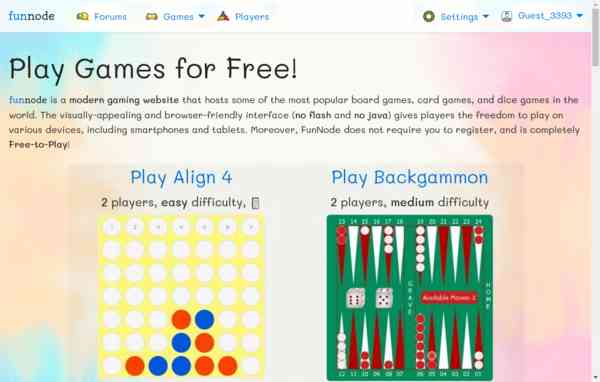
FunNode is a free, browser-based multiplayer games site. It hosts dozens of classic board, card, dice and word games that you play against real people or AI bots, without downloading anything or creating an account.
Its main draw is the mix of familiar titles and instant matchmaking. The catalogue on the page lists 10 board games (Align 4, Backgammon, Checkers, Chess, Go, Ludo, Mancala, Reversi, Warships, Wild Jacks), 13 card games (Big Two, Blackjack, Crazy Eights, Elimination, Hearts, Hold'em Poker, Kachuful, Old Maid, Pairs, Rummy, Spades, Thirteen, Wild Jacks), 4 dice games (Backgammon, Farkle, Liar's Dice, Ludo) and 2 word games (Hangman, Word Storm).
What it offers
- Real-time multiplayer with players worldwide, or private tables for friends
- Bots with adjustable difficulty when nobody is online
- Tournaments, daily cups, seasonal ladders and leaderboards using XP, ELO and badges
- Friends lists, lobby and table chat, and forums
- Guest play, plus optional profiles with themes, fonts and emoji styles
Who it suits
- Casual players who want a quick game in a browser tab with no install
- Groups of friends who want a private table for cards or board games
- Players learning a game who want bot practice before facing people
Trade-offs to expect
- Browser games like these are best for short, lightweight sessions; a deep single-player campaign or high-fidelity graphics is not the point
- Skill levels vary widely in open matchmaking, so ranked ladders and ELO matter more than casual tables if you want even games
- Guest play is convenient but a profile is what preserves stats, friends and ranking over time
A practical first step: pick a game you already know, such as Chess or Crazy Eights, play one round against a bot to learn the interface, then try a live table. If you want a specific alternative for comparison, Chess.com is built around chess alone rather than a broad multi-game lobby.
How can I play games on FunNode with my friends?
You can play with friends on FunNode by creating a private table and inviting them, or by adding them as friends once you have a profile. FunNode is browser-based and says no account is required to play, so a guest can join a game quickly; a profile mainly helps with friends lists, chat, and tracking progress.
Two practical ways to play together
- Private table (best for a specific group): One of you sets up the table for the chosen game and invites the others. This avoids being matched with strangers and lets you control who joins.
- Friends and chat (best for repeat sessions): Register a player profile, add friends, and follow their games. You can then message them in lobbies or at tables to arrange a match.
Choosing a game for your group
FunNode organises games into board, card, dice, and word categories. Match size matters more than theme when you are inviting friends:
| If your group is… | Consider | Why |
|---|---|---|
| 2 players | Chess, Checkers, Backgammon, Align 4, Reversi, Mancala | Listed as 2-player games, so no waiting for extra people |
| 3–5 players | Hearts, Elimination, Kachuful, Old Maid | Card games listed for small groups |
| 6–10 players | Hold'em Poker, Pairs, Wild Jacks | Larger card tables that keep everyone involved |
| Mixed or casual | Ludo, Blackjack, Crazy Eights | Easier rules and flexible player counts |
Difficulty labels are also useful: Align 4, Blackjack, Crazy Eights, Old Maid, and Pairs are marked easy, while Chess, Go, and Hold'em Poker are marked hard. For a mixed-ability friend group, start with an easy game and move up.
If your friends are not online
FunNode supports adjustable AI opponents in every game, so you can practise a game's rules before teaching it to friends. This is especially helpful for games with unusual scoring, such as Hearts or Kachuful.
Next step
Decide your group size first, pick a game from the matching row above, then have one person create the private table and send the invite. If you want to keep playing together regularly, register a profile so you can add each other as friends rather than relying on one-off invites. For a broader look at browser game platforms, Pogo and Chess.com are established alternatives, though FunNode's draw is its wide mix of board, card, dice, and word games in one place.
What are the available board games on FunNode?
FunNode lists ten board games, spanning quick two-player abstracts to casual dice-and-board hybrids:
- Align 4 — easy, 2 players
- Backgammon — medium, 2 players
- Checkers — medium, 2 players
- Chess — hard, 2 players
- Go — hard, 2 players
- Ludo — easy, 2–8 players
- Mancala — medium, 2 players
- Reversi — medium, 2 players
- Warships — easy, 2 players
- Wild Jacks — medium, 2–10 players
How to choose
If you want a fast, low-pressure match, start with Align 4, Warships or Ludo. For something with more strategic depth, Chess and Go are labelled hard, while Backgammon, Checkers, Mancala and Reversi sit in the middle. Ludo and Wild Jacks are the two board-category options that support more than two players, so they suit a group table better than the strictly two-player titles.
A practical next step
Pick one easy game and one harder game, then try each against bots before joining a live table — bot play is available in every game, so you can learn the interface without the pressure of a real opponent. If you would rather play with people you know, create a private table and invite them; otherwise, use matchmaking to find opponents.
How do I play against bots on FunNode?
FunNode supports bot opponents in every game it lists, so you can play any time without waiting for another person to join. Bots are described as adjustable AI opponents, meaning you can pick a difficulty level that matches how much of a challenge you want.
How to get into a bot game
- Open FunNode in your browser — no download, plugin or account is needed. You can play as a guest.
- Pick a game from the Board, Card, Dice or Word Games sections (for example Chess, Backgammon, Rummy or Hangman).
- When the game asks how you want to play, choose the bot or AI option instead of real-time multiplayer. If you want to invite a friend later, that's a separate private-table route.
- Set the AI difficulty before or at the start of the match, then play as normal.
When bots are the right choice
| Situation | Bots | Real players |
|---|---|---|
| Learning the rules of Chess or Go | Good — adjustable difficulty, no time pressure | Harder — opponents may be far stronger |
| A quick game at an odd hour | Always available, 24/7 | Depends on who is online |
| Playing a 6–10 player game like Hold'em Poker | Bots fill the table instantly | Can mean a longer wait |
| Testing a strategy before ranked play | Useful for repetition | Better for real ELO and leaderboard progress |
One practical trade-off: bot matches let you drill a game repeatedly, but the site's tournaments, leaderboards, XP and ELO are aimed at competitive play against people, so treat bots as practice rather than a route to ranking up. Chat, friends and forums also only come into play with human opponents.
If you want a concrete starting point, open a two-player game with clear rules such as Checkers or Reversi, set the bot to an easy level, and play a few games before moving the difficulty up. For a fuller comparison of what's on offer, see FunNode.
What tournaments and leaderboards does FunNode offer?
FunNode runs two connected competitive layers: recurring tournaments and persistent leaderboards. The site describes "free daily cups, seasonal ladders and global rankings," with XP, ELO and badges as the progression signals. So a casual player can jump into a daily cup, while a regular player can track a seasonal ladder position and a global rank over time.
Leaderboards
The homepage's "Top Players" list is the visible global ranking. Each entry shows a player name, a numeric score, a percentage, and a second large number that looks like a cumulative count (games played or XP earned). The spread is wide — the top-ranked player sits far above the rest, and the list runs to at least 15 names with a "See all" link, so the full board is longer than the homepage preview.
Tournaments
The evidence names daily cups and seasonal ladders but does not list specific tournament formats, entry rules, schedules or prizes. Treat those details as something to confirm in-game rather than assume.
What this means in practice
| Goal | What to use | Trade-off |
|---|---|---|
| Quick competitive session | Daily cups | Resets daily, so a missed day costs you |
| Steady long-term climb | Seasonal ladders | Rewards consistency over bursts |
| Bragging rights / comparison | Global rankings with ELO | ELO moves slowly and punishes losses |
| Casual play without pressure | Games vs bots | No ranking progress against AI |
A concrete scenario: you have 20 minutes after work and want a ranked game. A daily cup fits — it is time-boxed and the result is meaningful immediately. If instead you want to see whether you are improving at Chess over months, the seasonal ladder plus ELO is the better signal, because a single cup result says little.
Next step
Open the leaderboard from the homepage and check the "See all" view first: the number of ranked players tells you how competitive the ladder actually is before you invest time in it. If the board is thin, daily cups will feel more rewarding than a long ladder climb.
Can I customize the look and feel of FunNode?
Yes. FunNode includes built-in appearance settings, so you can change the site's theme, accent colors, fonts and emoji style without downloading anything.
What the page shows
- A Settings area alongside Players, Tournaments and Forums.
- A "Make it yours" section listing themes, accent colors, fonts and emoji styles.
- A sample theme name, "Mali Highlight Blue", suggesting preset color schemes rather than only single-color pickers.
How to use it
- Open Settings from the main navigation.
- Pick a theme first, then adjust accent color, font and emoji style.
- Check a busy table — card games with many players, or word games where text legibility matters more — to confirm the combination still reads well.
Practical notes
- Customization here is cosmetic: it affects how the interface looks, not game rules, matchmaking or difficulty. Bot difficulty is listed per game instead.
- A lighter theme with high contrast tends to work better for word games and long chat sessions; darker themes suit late-night card or dice play.
- Because play is browser-based with no account required, appearance settings may be tied to the browser or device you are using. If you create a profile, check whether the settings follow you across devices.
A quick decision guide
| Goal | Sensible choice |
|---|---|
| Reading text for long sessions | High-contrast theme, simple font |
| Casual play with friends | Any theme; emoji style matters more for chat |
| Shared screen or streaming | Larger, clearer fonts and a bold accent color |
If you want a consistent look across devices, register a profile rather than playing as a guest, then confirm your chosen theme persists after signing in.
 Hosting and Email
 Namecheap
 Hosting
 Google LLC
 Location
 Kansas City, Missouri, United States
 Pages, Search and Sharing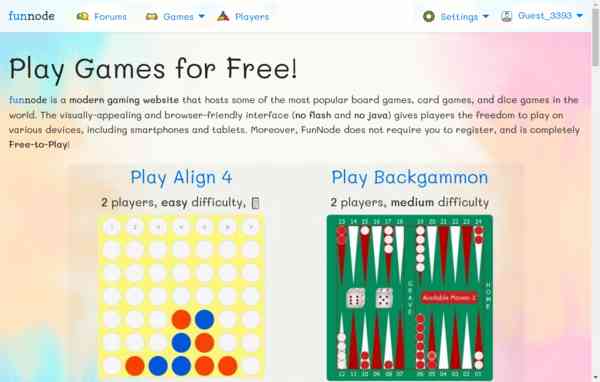


 All bots

 Registration details

 Identified technologies
User reviews (0)