Website profiles · Technology insights · Alternatives

gazerecorder.com

Webcam Eye-Tracker: Cloud eye tracking insights platform for remote behavioral research. Measure eye movements Online. Attention HeatMap. Free

No paid content found
Visit website
Profile views 4 Outbound visits 1 Normal
Online Eye Tracking | Webcam eye-tracking software Full homepage screenshot

At a glance

Category
Development
Language
English
Paid-content signal
No paid content foundObserved
Registered
2019
Hosting
CloudflareInferred
HTTPS certificate trusted
PassedObserved
Last updated

Website review

This review may include AI-generated content and is not individually verified. Domain, certificate and other facts come from the observed data on this page.

What is GazeRecorder?

GazeRecorder is a webcam-based eye-tracking platform from Online Eye Tracking. It uses an ordinary webcam and software running on a PC to estimate where someone is looking, without specialized hardware. The page presents it as a cloud platform for remote behavioral research, with attention heatmaps and video recordings of gaze movement.

What it includes

  • GazeRecorder app — records eye movement and produces video recordings of it.
  • Website eye-tracking heatmaps — shows where attention lands on a page or creative.
  • GazeCloudAPI.js — a way to add real-time eye tracking to a website with a few lines of code.
  • Related tools — GazePointer (move the mouse cursor with your eyes), GazeBoard (eye-based text entry), and GazeFlow (a hardware-independent tracking engine).
  • Research applications — advertising and video engagement, shelf and package testing, virtual-store consumer behavior, and mobile eye tracking.

Who it suits

It fits researchers, marketers and UX teams who need remote gaze data from participants who only have a webcam, rather than a lab with dedicated eye-tracking hardware. It also suits developers who want to embed tracking in their own web pages through the API. The trade-off is accuracy and control: webcam-based estimation is more sensitive to lighting, camera position and calibration than dedicated infrared trackers, so it is better for aggregate attention patterns than for precise fixation measurement.

A practical next step is to run the site's live demo on the device and in the lighting conditions your participants will actually use, then compare the heatmap output against a task you already know the answer to.

How accurate is webcam eye tracking compared to dedicated eye-tracking hardware?

Webcam eye tracking trades precision for reach. Software like GazeRecorder runs on an ordinary camera and PC, with no physical contact, so it can collect gaze data from participants in their own homes. Dedicated hardware — infrared cameras, head rests, chin rests, high-speed sampling — is built to measure where and when the eye moves with far tighter tolerance. The practical gap shows up in the kinds of questions each tool can answer.

Where the difference matters

Research need Webcam tracking Dedicated hardware
Remote, large-sample studies Practical: participants use their own laptop Impractical: equipment must ship or participants must travel
Coarse attention maps and heatmaps Usually adequate for web pages, ads, shelves Also adequate, but overkill
Fixation timing, saccade latency, micro-movements Noisy; small differences are hard to trust Designed for this level of resolution
Uncontrolled lighting, glasses, movement Accuracy degrades; calibration drifts More tolerant, with controlled setup
Budget and setup time Low cost, minutes to deploy High cost, lab time, trained operator

The page evidence describes GazeRecorder's own positioning around webcam-based accuracy, 3D gaze tracking, and smartphone eye tracking, alongside use cases such as remote video testing, shelf testing, and consumer behavior in virtual store environments. Those are exactly the tasks where approximate gaze location is still informative: you care whether people look at the logo or the price, not whether they fixated for 187 versus 193 milliseconds.

A concrete reader scenario

A market researcher wants to know which of two package designs draws the eye first. Recruiting 200 people into a lab is not feasible, so webcam tracking over the web is the only realistic route. The result will support a claim like "the red variant attracted earlier and longer attention," but not a claim about fine-grained fixation durations. If the same researcher needed to publish oculomotor timing data, the lab system would be the right instrument.

Decision criterion

Choose webcam tracking when the research question is about relative attention, remote reach, or speed of setup. Choose dedicated hardware when the question depends on precise timing, small within-subject differences, or measurement conditions you cannot control remotely. Many teams use both: webcam for broad screening, hardware for a smaller confirmatory sample.

A useful next step is to run a small pilot with your own stimuli and a few known gaze targets, then compare the recorded positions against where you know people were looking. That tells you whether the accuracy is good enough for your specific claim before you commit to a full study.

How can I use webcam eye tracking for website heatmaps and behavior analytics?

Webcam eye tracking turns an ordinary camera into a rough attention sensor, so you can see where people look on a page without shipping them special hardware. The trade-off is precision: it is good for relative attention patterns across a design, not for millisecond-accurate fixation research.

GazeRecorder describes this workflow directly. Its GazeRecorder App is positioned for website eye-tracking heatmaps and behavior analytics, and the same site offers GazeCloudAPI.js for embedding real-time tracking into a site with a few lines of code. It also lists remote video testing, shelf testing and virtual-store consumer behavior as use cases, which tells you the intended audience: UX researchers, marketers and agencies running remote studies rather than lab-based vision science.

A practical setup

  1. Define one question per page: does the hero get seen, does the pricing table get read, does the CTA compete with the nav?
  2. Recruit participants who match your real audience and have them join from their own laptop or phone.
  3. Run a short task ("find the annual plan"), then review the attention heatmap alongside the recording.
  4. Repeat with a changed layout and compare the two heatmaps, not the raw numbers.

Where it fits, and where it does not

  • Good fit: comparing two homepage layouts, checking whether a banner is noticed, validating ad or video engagement, early-stage concept testing.
  • Weak fit: fine typography decisions, reading-order claims, accessibility conclusions, or anything where a few centimetres of screen error changes the answer.
  • Always pair with: click maps, scroll depth, session recordings and task success. Gaze alone shows attention, not comprehension or intent.

Lighting, glasses, camera position and calibration drift all degrade webcam gaze estimates, so treat any single session as noisy and look for patterns across many participants. If you need lab-grade accuracy or published-grade measurement, use dedicated hardware instead.

A sensible next step is to run one small pilot: ten participants, one task, two page variants, and a single metric such as "share of participants who looked at the CTA before scrolling." If that produces a clear difference, scale the study; if not, your question may need clicks and conversions rather than gaze.

Can I control my mouse cursor or type with my eyes using only a webcam?

Yes — with webcam-based eye tracking, you can move a mouse cursor and enter text using only your eyes, and GazeRecorder's site lists dedicated tools for both.

What the site offers for this

  • GazePointer — described as webcam eye-tracking software that lets you move the mouse cursor with your eyes, with no extra hardware required.
  • GazeBoard — a gaze-based keyboard for text entry using an ordinary webcam; the site describes it as a restricted text-entry system.
  • GazeFlow — the underlying hardware-independent tracking engine that works in real time with a common webcam and PC software.

How it works in practice

You sit in front of an ordinary webcam, the software estimates where you're looking on screen, and that estimate drives the cursor or an on-screen keyboard. Because it's camera-based, there's no headset, infrared emitter or contact sensor to wear.

What to expect

Webcam tracking is convenient but less precise than dedicated eye-tracking hardware. Two practical consequences:

  • Dwell clicking and large targets help. Small buttons and fine cursor positioning are harder; on-screen keyboards with big keys work better than a normal desktop layout.
  • Lighting and head position matter. The site itself references research on web-based eye-tracking performance under different lighting conditions, which reflects a real constraint: stable, even light and a fairly steady head position improve results.

A realistic scenario

If you're setting up hands-free computer use for someone with limited hand mobility, a sensible starting point is GazeBoard for typing and GazePointer for pointer control, tested in the actual room and lighting where they'll be used. Expect a learning curve and calibrate before judging accuracy.

Next step

Visit GazeRecorder and try the live demos for GazePointer and GazeBoard. Test them with your own webcam, in your own lighting, on the tasks you actually need — that will tell you quickly whether the accuracy is sufficient for cursor control or just for coarse text entry.

How do I integrate real-time eye tracking into my own website using GazeCloudAPI.js?

GazeCloudAPI.js is the browser-side library on GazeRecorder for adding webcam gaze tracking to a page with a few lines of JavaScript. It is the right choice when you want gaze data inside your own web app rather than running a study in GazeRecorder's hosted tools; the trade-off is that you handle consent, calibration flow and data storage yourself.

What the integration looks like

The page lists GazeCloudAPI.js under its own heading with the line "Integrate real time Eye-Tracking in to you website in few lines of code" and a live demo link. In practice that means loading the script, calling a start function that triggers the browser camera permission prompt, and registering a callback that fires with gaze coordinates as the user looks around. You then decide what to do with each sample: draw a moving dot, log a stream, or accumulate fixations into a heatmap.

A minimal shape of the work:

  1. Add the GazeCloudAPI script tag to the page you want to track.
  2. Call the start method from a user gesture, such as a button click, so the camera prompt is expected.
  3. Subscribe to the gaze callback and read the x/y coordinates it returns.
  4. Run a short calibration step where the user looks at on-screen points, then start recording.
  5. Stop tracking and release the camera when the task ends.

Practical decisions before you build

Consent and privacy. Webcam gaze tracking is sensitive data. Ask for explicit permission, explain what is recorded, and avoid capturing video frames you do not need.

Calibration and lighting. Accuracy depends heavily on the participant sitting reasonably still, facing the camera, and being well lit. Build a re-calibration path for when tracking drifts.

What you measure. Raw coordinates are noisy. Most useful outputs are attention heatmaps, time-to-first-fixation on an element, and dwell time over regions — the page itself advertises attention heatmaps and remote video testing as use cases.

Device coverage. The site separates webcam, smartphone and 3D gaze tracking, so test on the phones and laptops your audience actually uses rather than assuming one setup generalizes.

A concrete scenario

Suppose you run a landing-page A/B test and want to know which headline actually draws the eye. You add GazeCloudAPI.js, ask a small panel of remote participants to complete a short task, calibrate each one, and record gaze while they browse. Afterwards you overlay fixations on a screenshot of each variant. This gives directional evidence about attention that click data alone misses, but treat it as qualitative: webcam tracking is less precise than dedicated hardware, and a handful of participants will not support statistical claims.

Next step

Open the GazeCloudAPI.js live demo on the site and inspect the network requests and callback output in your browser's developer tools before writing any production code. That shows you the exact data shape you will be handling. If you would rather not build the pipeline yourself, compare it with the hosted GazeRecorder app for website heatmaps and the related tools on the same site, such as GazePointer for cursor control and GazeBoard for text entry. For background on webcam-based gaze estimation generally, the site's publications list includes work on web-based eye-tracking performance under different lighting conditions, which is worth reading before you commit to a study design.

What are the privacy and consent considerations when conducting remote eye-tracking research with participants?

Remote webcam eye-tracking raises the same core duties as any human-subjects research, plus a few that are specific to the method: you are capturing a participant's face, often their room, and a stream of gaze data that can reveal attention, reading, and reaction patterns. Consent has to cover the recording itself, not just the task.

What to disclose before a session

  • Webcam video and still frames. Even if you only store coordinates, the camera feed may be processed or recorded. Participants should know which.
  • Gaze and interaction data. Where they looked, for how long, and in what order; combined with timestamps this is more identifying than many people expect.
  • Calibration and face data. Calibration involves facial landmarks or eye images; say whether these are stored or discarded.
  • Environment capture. A webcam sees the room behind the participant. Background objects, other people, or a screen with private content may be recorded.
  • Downstream use. Whether data feeds heatmaps, model training, or sharing with clients, and for how long it is kept.

Consent that actually works

A checkbox at the end of a long form is weak consent for camera-based research. Use a short plain-language summary before calibration, state the purpose and the retention period, and require an affirmative action. Tell participants they can pause, skip a question, or stop and withdraw, and explain what happens to their data if they do. For minors or vulnerable groups, plan for guardian consent and stricter limits on video retention.

Tools like GazeRecorder illustrate the practical split: browser-based tracking that runs through a webcam, with options such as heatmaps, video testing and shelf or package testing. That convenience is exactly why the notice has to be explicit — participants may assume "just a survey" when the camera is on.

Practical safeguards

Risk Practical measure
Identifiable faces stored indefinitely Delete raw video after extracting gaze coordinates; keep only derived data
Background reveals private space Ask participants to sit against a neutral wall; offer a blur or crop step
Re-identification from gaze patterns Store a random participant ID, not names, in the analysis dataset
Covert or pressured participation Separate the consent step from the task; no tracking before agreement
Cross-border or third-party transfer Name any processor or client receiving data in the consent text

A quick decision rule

If you cannot explain in two sentences what is recorded, why, for how long, and who sees it, the consent is not ready. Write that summary first, then build the study around it. For a student project, a short information sheet plus an on-screen confirmation before calibration is usually sufficient; for commercial client work, add a data-processing agreement and a defined deletion date.

Related questions

More questions →
What equipment do I need to use GazeRecorder's webcam eye tracking?

You only need a computer or mobile device with an ordinary webcam—no dedicated eye-tracking hardware is required. GazeRecorder's GazeFlow engine is described as a hardware-independent technology that performs real-time eye movement tracking without physical contact, using a common webcam plus software running on a PC. The same webcam-based approach is listed for desktop and mobile devices, and there is published research on web-based eye-tracking performance under different lighting conditions, so you don't need a controlled lab setup to get started.

Minimum setup

  • A device with a webcam. A standard built-in or USB webcam on a PC, or a smartphone/tablet camera for mobile eye tracking.
  • A browser and internet connection. The tools are online: GazeRecorder runs as a webcam eye-tracking app, and GazeCloudAPI.js lets you integrate real-time eye tracking into a website with a few lines of code.
  • No physical contact equipment. GazeFlow tracks eye movement remotely, without any contact sensors or head-mounted gear.

What you can run with that setup

Tool What it does Equipment note
GazeRecorder Tracks eye movement and creates video recordings using your webcam Webcam as input source
GazeCloud / Online Eye-Tracer Cloud eye-tracking insights platform for remote behavioral research Webcam-based, online
GazeCloudAPI.js Adds real-time eye tracking to a website via code Runs in the browser
GazePointer Moves the mouse cursor with your eyes Webcam eye tracker software
GazeBoard Text entry using only an ordinary webcam Webcam-based keyboard
GazeFlow Real-time eye movement tracking engine Hardware-independent, PC software + webcam

Research and testing scenarios the same equipment supports

The site lists these use cases, all built on webcam tracking rather than lab hardware:

  • Website eye-tracking heatmaps and behavior analytics
  • Remote video testing to understand viewer engagement with ads and promotional videos
  • Shelf testing to optimize product design against competitors
  • Consumer behavior research in a virtual store environment
  • Smartphone eye tracking alongside desktop

Practical conditions to keep in mind

  • Lighting matters. One of the listed publications specifically investigates web-based eye-tracking system performance under different lighting conditions for neuromarketing—so treat your lighting as a variable you may need to adjust, not a fixed given.
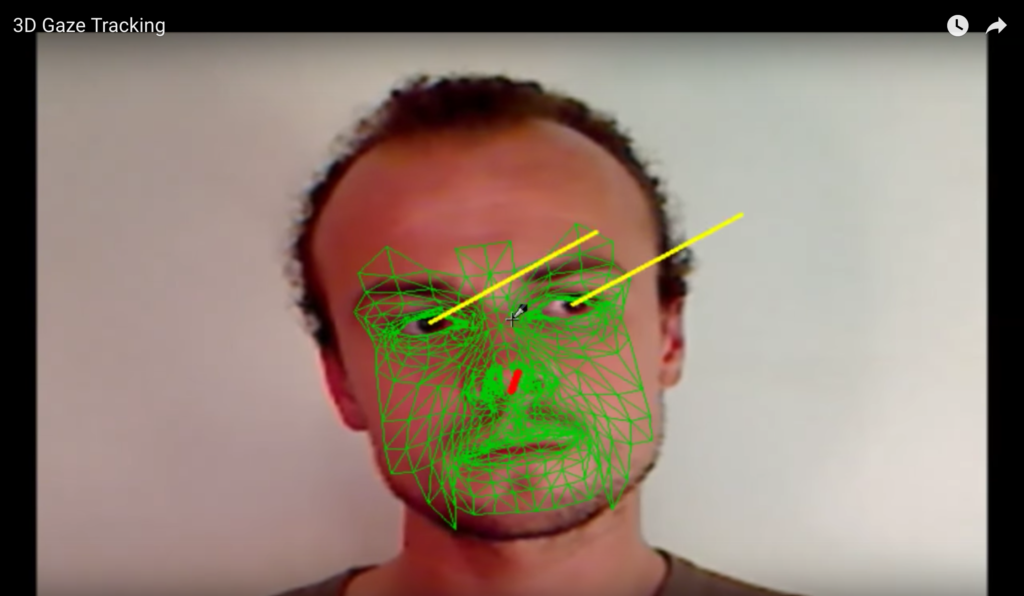
  • Accuracy is webcam-grade. The site lists "WebCam Eye-Tracking Accuracy" and "3D Gaze Tracking" as features, but this is consumer-webcam estimation, not a research-grade infrared tracker. Match expectations to the task.
  • Remote, not in-person. The platform is positioned for online webcam eye-tracking because in-person research is challenging—useful if participants can't come to a lab.

If your goal is simply to try it, a laptop with a working webcam and a browser is enough to start. If your goal is precise gaze measurement for published research, plan to test under your actual lighting conditions first and confirm the accuracy meets your threshold.

What Research and Behavioral Analytics Use Cases Does GazeRecorder Support?

GazeRecorder supports webcam-based eye-tracking research and behavioral analytics across several applied areas: website attention heatmaps, remote video and ad testing, shelf and packaging testing, virtual-store consumer behavior studies, and academic research in fields such as programming education, mental health, medical imaging education, and neuromarketing. It fits teams that need remote, contact-free gaze data collected through an ordinary webcam rather than dedicated eye-tracking hardware — and it is less suited to studies requiring laboratory-grade precision or controlled physical setups.

Website and UX attention analysis

GazeRecorder's core behavioral analytics product is website eye-tracking heatmaps. The platform describes this as "Website Eye-Tracking Heatmaps & More," aimed at understanding where visitors look on a page.

Typical use cases:

  • Landing page and layout testing — identify which page regions attract gaze and which are ignored.
  • Attention heatmaps — aggregate gaze data into visual maps of attention across a page.
  • Web-browsing behavior research — one listed publication examines how web-browsing patterns reflect and shape mood and mental health, indicating the platform has been used for browsing-behavior studies, not just commercial UX.

The relevant mechanism: gaze position is estimated from a webcam feed and mapped onto the screen content being viewed, producing attention data without physical contact with the participant.

Remote video and advertising testing

GazeRecorder lists "Remote Video testing" as a use case, framed around understanding viewer engagement with advertisements and promotional videos — specifically, what attracts most users' attention.

This matters because remote testing removes the need to bring participants into a lab. You can run video or ad stimulus tests with participants in their own environment, which broadens reach but also means you inherit the accuracy limits of webcam-based tracking.

Shelf, packaging, and retail testing

Two related commercial research use cases are described:

Use case Stated goal
Shelf testing with eye tracking Optimize product design so it stands out from competitors on a store shelf
Consumer behavior in a virtual store environment Unpack consumer behavior in a simulated retail setting

The platform frames this against a practical constraint: in-person research is challenging, so online webcam eye-tracking offers an alternative way to run shelf and in-store-style studies remotely.

Academic and applied research

GazeRecorder publishes a list of research publications using or relating to its methods. The listed topics include:

  • Computer programming education — a framework for eye-tracking data collection and feature extraction, including learner stimulus intent.
  • Mood and mental health — web-browsing patterns reflecting and shaping mood and mental health.
  • Medical imaging education — improving lesion detection skills through enhanced peripheral visual perception.
  • Neuromarketing — investigation of web-based eye-tracking system performance under different lighting conditions.
  • Cross-device gaze estimation — webcam-based gaze estimation for computer screen interaction, and webcam eye tracking for desktop and mobile devices.

These indicate the platform has been used both as a research instrument and as an object of methodological study (for example, how lighting conditions affect accuracy).

What you need to run these use cases

Per the platform's own framing, the tracking is hardware-independent and contact-free: it performs real-time eye movement tracking using only a common webcam and software running on a PC. No specialized eye-tracking hardware is described as required.

Practical implications:

  • Remote participation is possible — participants need a webcam-equipped computer rather than a lab visit.
  • Lighting and setup matter — one listed study specifically examines performance under different lighting conditions, so environmental control is a real variable in data quality.
  • Accuracy is webcam-grade — the site references "WebCam Eye-Tracking Accuracy" and "3D Gaze Tracking," but webcam estimation is not equivalent to dedicated infrared eye trackers. Treat results as directional attention data rather than precise fixation measurement.

Choosing GazeRecorder for your study

GazeRecorder is a reasonable fit if you need:

  • Remote, scalable collection of gaze/attention data.
  • Website heatmaps, video/ad engagement testing, or shelf and virtual-store studies.
  • Research where webcam-level accuracy is acceptable and lab hardware is impractical.

It is a weaker fit if you need:

  • Clinical or high-precision fixation metrics.
  • Fully controlled laboratory conditions.
  • Studies where lighting and participant setup cannot be standardized.

For pricing, account requirements, and API-level integration details, check the site's own pages (GazeCloudAPI.js, GazeRecorder API, Downloads, and FAQ), since the available material does not specify current pricing terms.

What Is GazeRecorder and What Can It Do?

GazeRecorder is a webcam-based eye-tracking platform: it estimates where a person is looking on a screen using an ordinary camera instead of dedicated eye-tracking hardware. It is aimed at remote behavioral research and usability work — recording gaze, producing attention heatmaps, and testing ads, videos, shelves, and websites with participants who are not in a lab. If you need lab-grade precision or physiological measurement, this class of tool is not a substitute; if you need fast, low-friction attention data from many remote participants, it is built for exactly that.

What the platform actually includes

The site presents GazeRecorder as a family of tools rather than a single app:

Component What it does
GazeRecorder (app) Tracks eye movement via webcam and creates video recordings of the session
GazeInsight Cloud platform for eye-tracking insights and behavioral research
GazeCloud / Online Eye-Tracer Browser-based online eye tracking
GazeCloudAPI.js JavaScript API to add real-time eye tracking to a website in a few lines of code
GazeRecorder API Programmatic access to the recorder
GazeFlow / GazeFlow SDK Hardware-independent, contact-free real-time eye-movement tracking engine running on a PC with a common webcam
GazePointer Moves the mouse cursor with your eyes
GazeBoard Text entry using only eye tracking and a webcam
GazeScroll Gaze-driven scrolling

There is also a mobile eye-tracking offering alongside the webcam product, and the site lists downloads, an FAQ, and a login area.

Core use cases

The homepage groups its applications around research and commercial testing:

  • Remote video and ad testing — understand viewer engagement with advertisements and promotional videos, and what attracts attention.
  • Shelf testing — optimize product design so it stands out from competitors on a store shelf.
  • Consumer behavior — study behavior in a virtual store environment.
  • Website heatmaps — behavior analytics with eye-tracking heatmaps for web pages.
  • 3D gaze tracking and smartphone eye tracking as additional modes.

The framing throughout is remote research: the site notes that in-person research is challenging, and positions online webcam eye tracking as the alternative.

How you would use it

  1. Pick the entry point. For a one-off recording, use the GazeRecorder app. For a hosted study with heatmaps and analytics, use GazeInsight. For embedding tracking in your own site, use GazeCloudAPI.js.
  2. Run a calibration. Webcam gaze estimation depends on the participant calibrating to the screen; the site's live demo exists so you can test this before committing.
  3. Collect the session. The recorder captures eye movement and produces a video recording; the cloud platform aggregates sessions into heatmaps and attention metrics.
  4. Read the output. Heatmaps and recordings tell you which regions drew gaze — useful for layout, creative, and packaging decisions.

If you are integrating rather than running a study, the API route is the relevant one: GazeCloudAPI.js is described as adding real-time eye tracking to a website in a few lines of code, and the GazeFlow engine is described as hardware-independent and contact-free, running on a PC with a common webcam.

What to check before relying on it

  • Accuracy depends on conditions. The site's own publications include a study on web-based eye-tracking performance under different lighting conditions for neuromarketing — lighting is a real variable, so control it in your setup.
  • Webcam estimation is not the same as infrared eye tracking. Treat results as attention estimates suitable for aggregate patterns, not as precise fixation coordinates.
  • Pricing and account requirements are not established here. The site shows "Try it FREE" and a login, and mentions purchase, but the available material does not state current prices or what a free trial includes — verify on the site before planning a study.
  • The research base is published. The publications list covers eye-tracking data collection in programming education, web-browsing patterns and mood, lesion detection training in medical imaging, webcam-based gaze estimation for screen interaction, and webcam eye tracking for desktop and mobile — useful if you need to cite validity for a methods section.

Who it fits

Choose GazeRecorder if you want remote, webcam-based attention data — ad and video testing, shelf and packaging tests, website heatmaps, or embedding gaze tracking into your own product via API — and you can accept the accuracy limits of camera-based estimation. Look elsewhere if you need medical-grade or high-precision fixation data, or if your protocol requires controlled laboratory hardware.

What Tools and Features Does GazeRecorder Offer?

GazeRecorder (gazerecorder.com) is a webcam-based eye-tracking platform that bundles several distinct tools under one site. The main ones are GazeRecorder (record eye movements and produce video recordings), GazePointer (control the mouse cursor with your eyes), GazeBoard (eye-based keyboard and text entry), GazeCloudAPI.js (embed real-time eye tracking in a website with a few lines of code), plus GazeInsight, GazeCloud Online Eye-Tracer, and Mobile Eye Tracking. All of them share the same core idea: tracking eye movement in real time using only a common webcam and software, with no physical contact or special hardware.

The core tools

GazeRecorder — webcam eye tracking and video recordings

GazeRecorder tracks your eye movement and creates video recordings of it, using your webcam as the input source. It is the flagship application and the entry point most users start with. A live demo is available on the site, so you can test tracking behavior before committing to a workflow.

GazePointer — eye-controlled mouse cursor

GazePointer controls mouse cursor position with your eyes via webcam. It is described as webcam eye-tracker software that lets you move the mouse cursor using your eyes, and notably it does not require any kind of installation according to the site. This makes it the most direct accessibility-oriented tool in the set.

GazeBoard — eye-based text entry

GazeBoard is a gaze-based keyboard: text entry using eye tracking and only an ordinary webcam. The site notes it functions as a text-entry system with a restricted (limited) character set, so it is best understood as an assistive input method rather than a full replacement keyboard.

GazeCloudAPI.js — eye tracking inside your own website

GazeCloudAPI.js lets you integrate real-time eye tracking into a website in a few lines of code. This is the developer-facing option: if you want tracking embedded in your own page rather than using GazeRecorder's interface, this is the relevant entry point.

Research and analytics features

Beyond the standalone tools, the platform is positioned as a cloud eye-tracking insights platform for remote behavioral research. The site lists these application areas:

Feature / use case What it covers
Website eye-tracking heatmaps Attention heatmaps and behavior analytics for web pages
Remote video testing Understanding viewer engagement with ads and promotional videos
Shelf testing Optimizing product design to stand out on a store shelf
Consumer behavior Unpacking behavior in a virtual store environment
Mobile eye tracking Tracking on smartphones
3D gaze tracking Gaze tracking in three dimensions
Accuracy Webcam eye-tracking accuracy as a stated capability

The site frames online webcam eye-tracking as a response to the difficulty of in-person research, positioning remote data collection as the alternative.

Supporting pages and resources

  • GazeInsight and GazeCloud Online Eye-Tracer — additional online tracking entry points listed in the navigation.
  • GazeFlow — described as a hardware-independent webcam eye-tracking engine that performs real-time eye movement tracking without physical contact, using only a common webcam and PC software. A GazeFlow SDK is also listed.
  • Downloads and FAQ — for getting the software and answering setup questions.
  • Publications — a research section. Listed papers include work on eye-tracking data collection in computer programming education, web-browsing patterns and mood/mental health, lesion detection skills in medical imaging education, webcam-based gaze estimation for screen interaction, web-based eye-tracking performance under different lighting conditions for neuromarketing, and webcam eye tracking for desktop and mobile devices.

How to choose among them

  • Just want to record and watch your gaze? Start with GazeRecorder.
  • Need hands-free cursor control? GazePointer.
  • Need to type with your eyes? GazeBoard, keeping in mind the restricted character set.
  • Building tracking into your own site? GazeCloudAPI.js.
  • Running behavioral research (ads, shelves, web pages)? The heatmap, video testing, shelf testing, and consumer behavior features are the relevant ones.

The site offers a "Try it FREE" entry and a login, and mentions "purchase" among its signals, so some functionality may sit behind an account or paid tier — check the Downloads and FAQ pages for the current terms rather than assuming everything is free.

How to Start Using GazeRecorder and Is It Free?

GazeRecorder is a webcam-based eye-tracking platform you can start using directly in a browser — no special hardware beyond a webcam. The site offers a "Try it FREE" entry point and an Online Live Demo, so you can evaluate the core experience before committing. The presence of purchase-related signals on the site indicates paid options likely exist, but the free trial and demo let you test first.

What GazeRecorder Is

GazeRecorder is an online eye-tracking and behavioral analytics platform that uses a standard webcam as its input source. According to the site, it tracks eye movement and can create video recordings of gaze behavior. It is positioned as a cloud eye-tracking insights platform for remote behavioral research.

The product family includes several tools:

Tool What it does
GazeRecorder App Website eye-tracking heatmaps and behavior analytics
GazeCloud Online eye-tracking engine
GazeCloudAPI.js Integrate real-time eye tracking into a website with a few lines of code
GazeRecorder API Programmatic access to the tracking engine
GazePointer Control mouse cursor position with your eyes via webcam
GazeBoard Text entry using only an ordinary webcam
GazeFlow Hardware-independent real-time eye movement tracking engine
Mobile Eye Tracking Eye tracking for mobile devices

What You Need to Get Started

Based on the site's descriptions, the requirements are minimal:

  • A webcam — this is the only stated input source. GazeFlow is described as hardware-independent and works "using only a common webcam and software running on a PC."
  • A browser or PC — the online tools run in a browser; the desktop-oriented tools (GazePointer, GazeBoard, GazeFlow) run on a PC.
  • No physical contact equipment — the technology performs real-time tracking without any physical contact.

If you want to embed tracking into your own website, you would use GazeCloudAPI.js, which the site says integrates real-time eye tracking in a few lines of code.

How to Start: Step by Step

  1. Go to the site and find the "Try it FREE" link in the navigation. This is the stated free entry point.
  2. Run the Online Live Demo to see how tracking behaves with your webcam before doing anything else. This lets you check whether your camera and lighting produce usable results.
  3. Choose your path based on your goal:
    • For website heatmaps and behavior analytics → start with the GazeRecorder App.
    • For cursor control → try GazePointer.
    • For text entry via gaze → try GazeBoard.
    • For embedding into your own site → use GazeCloudAPI.js.
  4. Check the FAQ and Downloads pages for setup details and any software you need to install for the desktop tools.
  5. If you need a paid tier, look for the purchase option on the site — the page contains purchase-related signals, but the exact plans and prices are not specified in the available information, so verify them directly on the site.

Expected result: After the demo, you should know whether your webcam setup produces stable tracking. If it does, you can proceed to the app or API that matches your use case.

Is It Free?

The site provides a free trial entry ("Try it FREE") and a free online demo, so you can start and evaluate at no stated cost. However, the page also contains purchase-related signals, which indicates that paid plans or paid features likely exist. The available information does not specify:

  • What the free tier includes versus what requires payment
  • The price of any paid plan
  • Whether a login is required for the free trial

Practical takeaway: Treat the free trial and demo as your evaluation path. Confirm current pricing, plan limits, and login requirements directly on the site before relying on it for a project.

Common Use Cases It Supports

The site lists research and behavioral analytics applications, including:

  • Remote video testing — understanding viewer engagement with ads and promotional videos
  • Shelf testing — optimizing product design to stand out on a store shelf
  • Consumer behavior — studying behavior in a virtual store environment
  • Website heatmaps — seeing where attention goes on a page
  • Desktop and mobile eye tracking

The publications section references academic work on eye-tracking data collection in programming education, web-browsing patterns and mental health, lesion detection training in medical imaging, webcam-based gaze estimation, and web-based eye-tracking performance under different lighting conditions.

Common Pitfalls to Watch For

  • Lighting matters. One of the cited publications specifically investigates web-based eye-tracking performance under different lighting conditions — so expect accuracy to vary with your environment.
  • Webcam quality affects results. Since tracking relies on a standard webcam, results will differ from dedicated infrared eye-tracking hardware.
  • Don't assume the free tier covers everything. The purchase signals suggest limits; check what's included before building a workflow around it.
  • For integration, start with the API docs. GazeCloudAPI.js is the stated path for embedding tracking, and the FAQ is the stated place for setup questions.

Website Overview

Identifiable technologies and additional version or configuration signals make the service easier to fingerprint, which may help targeted scanners narrow their checks. An established domain and managed infrastructure suggest continuity of operations and may support dependable delivery, although neither guarantees service quality.

Domain and Registration

Registered in 2019, this domain has about 7 years of history. That suggests continuity, although ownership and purpose may have changed. Transfer-protection status is present, helping reduce the risk of unauthorized domain transfers. The domain uses the common .com extension, which is not an independent safety signal.

DNS and Email

Nameservers are provided by Cloudflare, indicating managed DNS hosting. MX records point to the byethost26.org email service. No CNAME was found; the observed records resolve directly to addresses. SPF and DMARC are configured. DKIM status is unknown. TXT records include verification markers for Google. Such markers may also remain after a service stops being used.

TLS and Certificates

The public key uses EC with 256 bits. The server supplied a complete certificate chain. No organization name is present in the certificate; the available fields are consistent with domain validation. The certificate was issued within the Google Trust Services cloud or CDN ecosystem. The certificate's total validity is about 90 days, consistent with a short renewal cycle.

HTTP and Browser Security

The response lacks these common security headers: HSTS, CSP, X-Content-Type-Options, Permissions-Policy, clickjacking protection. No X-Powered-By header was found, reducing one common source of backend fingerprinting information. The cf-ray response header indicates a CDN or caching proxy in the delivery path. No obvious internal addresses or debug information were found in the headers. The Server header identifies cloudflare without an exact version.

Technology Stack Analysis

The public page identifies WordPress 6.2.5, jQuery, Google Analytics, Cloudflare, with exact versions exposed for 1 technologies. These details can narrow vulnerability checks, although exposure alone is not a vulnerability.

Search and Social Sharing

The Generator tag identifies WordPress 6.2.5, making the publishing system easier to fingerprint. Twitter Card metadata is configured. JSON-LD includes Organization data, helping describe the organization as an entity. The title has 50 characters, within a common display range. A meta description is present, with 142 characters.

Hosting and Email

DNSCloudflare
HostingCloudflare
Emailbyethost26.org
Approximate IP geolocation (inferred; a CDN or proxy may differ from the origin server) Location unknown Inferred 104.21.79.164

Registration details

RDAP / WHOIS

RegistrarPDR Ltd. d/b/a PublicDomainRegistry.com
Registered2019-09-17
Expires2028-09-17
Domain statusclient transfer prohibited
Nameserversbowen.ns.cloudflare.com、katelyn.ns.cloudflare.com
DNSSECunsigned

DNS records

DNS

TypeNameValueTTLPriority
Agazerecorder.com104.21.79.164300—
Agazerecorder.com172.67.146.152300—
AAAAgazerecorder.com2606:4700:3034::6815:4fa4300—
AAAAgazerecorder.com2606:4700:3034::ac43:9298300—
MXgazerecorder.comsv26.byethost26.org3001
NSgazerecorder.combowen.ns.cloudflare.com86400—
NSgazerecorder.comkatelyn.ns.cloudflare.com86400—
TXTgazerecorder.comgoogle-site-verification=FAFbDYjLayncx_wk_k8rnPMXY7xzKtdxsCV9uv2E9Po300—
TXTgazerecorder.comv=spf1 +a +mx +ip4:82.163.176.27 +ip4:31.22.4.169 +ip4:31.22.4.221 -all300—
DMARC_dmarc.gazerecorder.comv=DMARC1; p=reject; sp=none; pct=100; ri=86400; rua=mailto:[email protected]300—

TLS and certificates

TLS / SSL

AssessmentNormal configuration
Supported protocolsTLSv1.2、TLSv1.3
Negotiated protocolTLSv1.3
Certificate subjectgazerecorder.com
IssuerGoogle Trust Services
Valid until2026-12-22T12:28 · Remaining when checked: 76 days
Verification detailsCertificate trust: Passed · Hostname match: Passed

HTTP response headers

HTTP

HeaderValue
content-typetext/html; charset=UTF-8
cache-controlmax-age=345600
servercloudflare
referrer-policyno-referrer-when-downgrade

Identified technologies

WordPress 6.2.5jQueryGoogle AnalyticsCloudflare

Pages, Search and Sharing

Meta descriptionWebcam Eye-Tracker: Cloud eye tracking insights platform for remote behavioral research. Measure eye movements Online. Attention HeatMap. Free
Canonical URLhttps://gazerecorder.com/
LanguageEnglish (default)
Twitter Cardsummary_large_image

No rules found

User reviews (0)

  • No reviews yet.