
 简体中文
简体中文
getconch.ai
Humanize AI writing with Conch AI so it sounds natural and undetectable. Draft papers, check AI content, organize notes, and create study sets, flashcards, mind maps and Podcast.
At a glance
- Category
- Productivity
- Language
- English
- Paid-content signal
- Paid contentObserved
- Registered
- 2023
- Hosting
- VercelInferred
- HTTPS certificate trusted
- PassedObserved
- Last updated
Related questions
More questions →What Is an AI Essay Writer and How Can Students Use It for Essays?
An AI essay writer is a tool that turns a prompt or your own course materials into essay text — outlines, drafts, rewrites, or grammar and structure fixes. LearnlyAI, for example, describes itself as an all-in-one study platform that can "turn lectures and notes into study tools, essays and slides." It suits students who want help getting started, tightening a draft, or checking structure — not students looking to submit generated text as their own work.
What an AI Essay Writer Actually Does
Most tools grouped under this label handle a few distinct jobs. Knowing which one you need keeps you from expecting the wrong output.
- Drafting from a prompt — you give a topic or question, the tool produces a starting draft.
- Expanding or rewriting — you paste a paragraph and ask for a longer, clearer, or differently toned version.
- Outlining — you get a structure (thesis, sections, evidence points) before you write.
- Grammar and structure checks — the tool flags awkward sentences, weak transitions, or missing topic sentences.
LearnlyAI's own description places essays alongside notes and slides as outputs of the same workspace, so the essay function is meant to sit next to your study materials rather than stand alone.
How Students Use It Step by Step
The quality of the output depends heavily on what you feed in. A generic prompt gives generic text; your own materials give something closer to your course.
- Start with your course material, not a blank prompt. LearnlyAI's Smart Note System is built to summarize and organize lectures and PDFs. If your notes are already in the workspace, the essay tool has real content to work from.
- Ask for an outline first. Request a thesis and section plan for your question. Check it against your assignment brief before writing anything.
- Draft section by section. Ask for one section at a time so you can steer the argument instead of accepting a whole essay you didn't shape.
- Rewrite in your own voice. Use the tool to tighten your own sentences rather than replace them. This is where most of the learning happens.
- Verify every claim and citation. AI output can state things confidently that your sources don't support. Check facts against your reading list.
Expected result: a draft that reflects your materials and your argument, with you able to explain every point in it.
Where the Academic Integrity Line Sits
This is the part students get wrong most often, and it varies by institution — so check your own school's policy rather than assuming.
| Use | Usually acceptable | Usually a violation |
|---|---|---|
| Brainstorming angles | ✓ | |
| Outlining structure | ✓ | |
| Grammar and clarity edits on your own draft | ✓ | |
| Generating a full essay and submitting it | ✗ | |
| Rewriting AI text to disguise its origin | ✗ | |
| Using AI output as a source without checking it | ✗ |
The safe rule: if you couldn't defend the argument in a viva or explain a sentence's reasoning, it isn't yours yet. Treat the tool as a tutor that asks questions and suggests structure, not a ghostwriter.
Common Problems and How to Fix Them
Output feels vague or generic. Your prompt lacked specifics. Add your course, the exact question, your key sources, and the argument you want to make.
Citations are missing or invented. AI tools frequently fabricate references. Never trust a citation you haven't opened yourself. Pull real sources from your reading list and insert them manually.
The tone doesn't match your subject. Ask for a specific register — "formal academic, third person, no contractions" — and give an example of your own writing to match.
The essay drifts off the question. Re-paste the assignment brief with every request. Long conversations lose the original instructions.
Choosing Whether to Use One
An AI essay writer is worth using if you struggle to start, want structural feedback fast, or need help tightening prose you've already written. It's the wrong tool if you're hoping to skip the thinking — the output won't match your course, and the integrity risk is real.
LearnlyAI bundles essay writing with notes, presentations, and revision tools, which helps if you want your source materials and your writing in one place. Its site lists pricing as a separate section but doesn't publish figures in the material available here, so check the pricing page directly before committing. If you only need occasional grammar help, a standalone checker may be enough.
What Can AI Writing Tools Actually Do for Everyday Writing Tasks?
AI writing tools are best understood as fast, tireless assistants for the mechanical parts of writing: getting words on the page, reshaping existing text, and adjusting tone. They are genuinely useful for drafting emails, summarizing long documents, rewriting awkward sentences, and generating first-pass ideas. They are much weaker at guaranteeing factual accuracy, producing truly original insight, or understanding context they were never given. In practice, the more specific and well-fed your input, the more useful the output — and the more you treat the result as a draft to edit rather than a finished product, the better your results will be.
The Core Capabilities You Can Rely On
Most AI writing tools, including free online suites like TinyWow, cluster around a handful of repeatable tasks. These are the areas where the technology is most dependable.
Drafting from a prompt or outline
Give a tool a topic, a rough outline, or a few bullet points, and it will produce connected paragraphs. This is useful for overcoming the blank-page problem. The output is usually generic on the first pass, but it gives you something to react to and edit.
Rewriting and paraphrasing
You can paste a sentence or paragraph and ask for a clearer, shorter, more formal, or more casual version. This is one of the most reliable uses, because the tool is working with material you already know is accurate.
Summarizing
Long articles, meeting notes, and reports can be condensed into key points. Summarization works best when the source text is well-structured and not too long for the tool's input limit.
Adjusting tone and reading level
The same content can be shifted between professional, friendly, persuasive, or simple language. This is handy when you're writing for a different audience than usual.
Generating variations and ideas
Tools can produce multiple headline options, subject lines, or angles on a topic. Treat these as a brainstorm, not a shortlist of winners.
Basic proofreading and grammar
Catching typos, awkward phrasing, and inconsistent tense is a common and low-risk function.
Typical Everyday Use Cases
| Task | What the tool does well | What still needs you |
|---|---|---|
| Work emails | Drafts a polite, structured message from a few notes | Confirming facts, names, dates, and tone fit your relationship |
| Social posts | Generates hooks, captions, and hashtag ideas | Choosing what actually represents you or your brand |
| Essays and schoolwork | Helps outline and rephrase | Original argument, citations, and checking your institution's rules |
| Summarizing reports | Condenses long text into bullets | Verifying nothing important was dropped or distorted |
| Product or service descriptions | Produces multiple phrasing options | Accuracy about features, pricing, and claims |
What AI Writing Tools Genuinely Struggle With
Knowing the limits saves you from embarrassing or costly mistakes.
Factual accuracy
A tool can state something confidently that is simply wrong. It has no built-in way to verify a statistic, a date, a quote, or a legal detail. Anything factual needs independent checking.
Originality and genuine insight
Tools remix patterns from existing language. They can sound insightful without adding a new idea. If your task depends on a unique argument or firsthand experience, the tool can assist with phrasing but not supply the substance.
Context they weren't given
A tool doesn't know your company's history, your reader's mood, or the unwritten rules of your workplace. If that context matters, you have to supply it explicitly in your prompt.
Long or complex documents
Very long inputs may be truncated or lose coherence. Structure and consistency across a 20-page document are hard to maintain.
Nuance, humor, and cultural sensitivity
Tone can come out flat, overly formal, or accidentally off-key. Anything sensitive deserves a human read.
What Input a Tool Needs to Be Useful
The quality gap between a vague prompt and a detailed one is large. To get usable output, provide:
- The goal: what the text should achieve (persuade, inform, apologize, sell).
- The audience: who will read it and what they already know.
- The format: email, list, paragraph, headline, 100 words, etc.
- The tone: formal, warm, direct, playful.
- The facts: names, dates, figures, and any must-include points.
- Examples: a sample of your usual writing style helps match voice.
A reusable prompt template:
Write a [format] for [audience] about [topic]. The goal is to [goal]. Use a [tone] tone and keep it to [length]. Include these points: [list]. Avoid [things to avoid].
How to Judge Whether a Tool Fits Your Task
Ask three questions before you start:
- Is the task about language or about truth? If it's mainly reshaping words you already trust, a tool helps. If it hinges on facts, you'll need to verify everything.
- How costly is an error? A casual social post is low-risk. A contract, medical note, or financial claim is not — those need qualified human review.
- Do you have source material? Tools are far stronger when summarizing or rewriting existing text than when inventing content from nothing.
A Practical Workflow
- Write a one-line description of what you need.
- Feed the tool your goal, audience, tone, and key facts.
- Generate a draft.
- Edit for accuracy, voice, and anything the tool couldn't know.
- Fact-check every specific claim.
- Do a final human read before sending or publishing.
The Bottom Line
AI writing tools are excellent at acceleration and reshaping, and unreliable at verification and originality. Use them to draft, summarize, rephrase, and adjust tone — then apply your own judgment, facts, and voice. If you keep that division of labor clear, they can save real time on everyday writing without quietly introducing errors.
Website Overview
The available information shows a mix of normal operation and configuration gaps. Depending on how the website is used, these gaps may affect secure access or the consistency of its public presentation.
Domain and Registration
Transfer-protection status is present, helping reduce the risk of unauthorized domain transfers. The domain has about 3 years of registration history; its current configuration provides more context than age alone. The registrar is NameCheap, Inc., a widely used domain service provider. Registration contact information is publicly available through RDAP. The domain uses the common .ai extension, which is not an independent safety signal.
DNS and Email
Nameservers are provided by Namecheap, indicating managed DNS hosting. MX records point to the Google Workspace email service. SPF and DMARC are configured. DKIM status is unknown. TXT records include verification markers for Google. Such markers may also remain after a service stops being used. DNSSEC signatures were not detected, so this additional DNS authenticity protection is not confirmed.
TLS and Certificates
The certificate uses an RSA 2048-bit public key, offering broad client compatibility. The server supplied a complete certificate chain. No organization name is present in the certificate; the available fields are consistent with domain validation. The certificate was issued by Let's Encrypt, commonly associated with automated certificate services. The certificate's total validity is about 89 days, consistent with a short renewal cycle.
HTTP and Browser Security
The response lacks these common security headers: CSP. CORS permits any origin to read this response. This is common for public resources; sensitive responses need narrower handling. No X-Powered-By header was found, reducing one common source of backend fingerprinting information. No obvious internal addresses or debug information were found in the headers. The Server header contains the custom value Vercel.
Technology Stack Analysis
The public page identifies Next.js, Vercel without precise versions, leaving fewer clues for version-specific scanning.
Search and Social Sharing
The meta description has 178 characters and may be shortened in search results. Twitter Card metadata is configured. JSON-LD includes Organization data, helping describe the organization as an entity. The title has 58 characters, within a common display range. The observed directives allow indexing and link following.
Hosting and Email
 Namecheap
 Vercel
 Google Workspace
 United States
Inferred
216.150.1.193
United States
Inferred
216.150.1.193
Registration details
| Registrar | NameCheap, Inc. |
|---|---|
| Registered | 2023-01-31 |
| Expires | 2027-01-31 |
| Domain status | client transfer prohibited |
| Nameservers | dns1.registrar-servers.com、dns2.registrar-servers.com |
| DNSSEC | unsigned |
DNS records
| Type | Name | Value | TTL | Priority |
|---|---|---|---|---|
| A | b44d293a2893ad0e.vercel-dns-016.com | 216.150.1.193 | 300 | — |
| A | b44d293a2893ad0e.vercel-dns-016.com | 216.150.16.193 | 300 | — |
| MX | getconch.ai | aspmx.l.google.com | 1799 | 1 |
| MX | getconch.ai | alt1.aspmx.l.google.com | 1799 | 5 |
| MX | getconch.ai | alt2.aspmx.l.google.com | 1799 | 5 |
| MX | getconch.ai | alt3.aspmx.l.google.com | 1799 | 10 |
| MX | getconch.ai | alt4.aspmx.l.google.com | 1799 | 10 |
| NS | getconch.ai | dns1.registrar-servers.com | 1800 | — |
| NS | getconch.ai | dns2.registrar-servers.com | 1800 | — |
| TXT | getconch.ai | google-site-verification=SQZSveYll82FFDhVApCMT9H96Zdegkf37kzYKdyRMCQ | 1799 | — |
| TXT | getconch.ai | google-site-verification=c1jKCxYKXLNFRQvZsUxDqBguuvfkvP9Iea4LzUbyiPQ | 1799 | — |
| TXT | getconch.ai | google-site-verification=oe98emQjdzAcKv_QqUw4ibkGj1HYhPxYGKChhwh6V6M | 1799 | — |
| TXT | getconch.ai | openai-domain-verification=dv-CfuJ0K0QYtnuxUGZaR0prASS | 1799 | — |
| TXT | getconch.ai | v=spf1 include:_spf.google.com include:amazonses.com ~all | 1799 | — |
| CNAME | www.getconch.ai | b44d293a2893ad0e.vercel-dns-016.com | 1799 | — |
| DMARC | _dmarc.getconch.ai | v=DMARC1; p=quarantine; rua=mailto:[email protected]; ruf=mailto:[email protected]; sp=quarantine; fo=1 | 1799 | — |
TLS and certificates
HTTP response headers
| Header | Value |
|---|---|
| content-type | text/html; charset=utf-8 |
| cache-control | public, max-age=0, must-revalidate |
| server | Vercel |
| strict-transport-security | max-age=63072000 |
| x-frame-options | SAMEORIGIN |
| x-content-type-options | nosniff |
| referrer-policy | strict-origin-when-cross-origin |
| permissions-policy | camera=(), microphone=(), geolocation=(), interest-cohort=() |
| access-control-allow-origin | * |
| set-cookie | Redacted |
Identified technologies
Pages, Search and Sharing
| Meta description | Humanize AI writing with Conch AI so it sounds natural and undetectable. Draft papers, check AI content, organize notes, and create study sets, flashcards, mind maps and Podcast. |
|---|---|
| Canonical URL | https://www.getconch.ai |
| Language | English (default) |
| Twitter Card | summary_large_image |
Social Sharing Preview
16 fields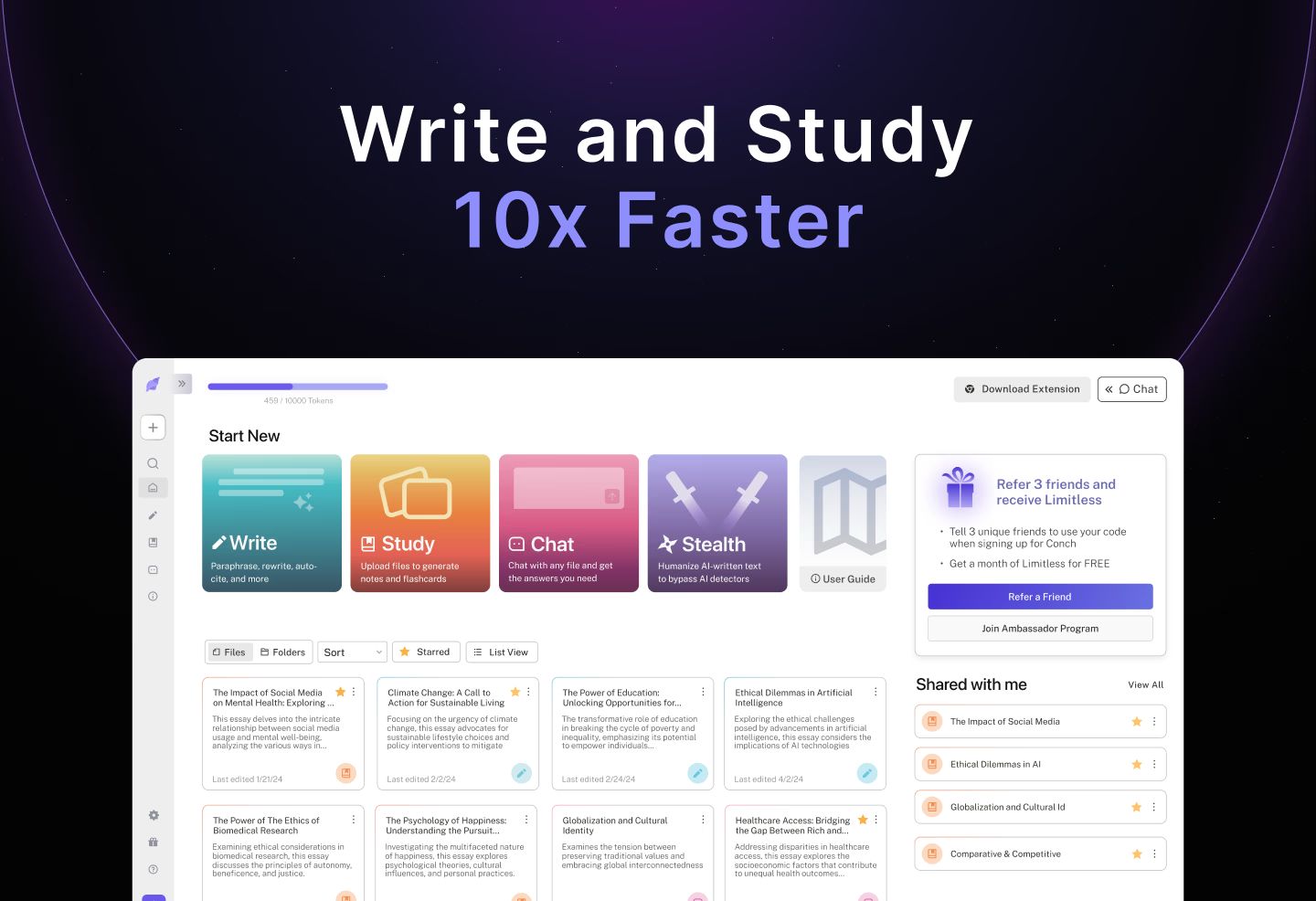

robots.txt (opens in a new tab)
56 rulesadsbot-google 1 allowed · 1 disallowed
- Allow
/ - Disallow
/blogs/
adsbot-google-mobile 1 allowed · 1 disallowed
- Allow
/ - Disallow
/blogs/
gptbot 1 allowed · 6 disallowed
- Allow
/ - Disallow
/app - Disallow
/onboarding - Disallow
/sign-in - Disallow
/upgrade - Disallow
/api/ - Disallow
/admin
perplexitybot 1 allowed · 6 disallowed
- Allow
/ - Disallow
/app - Disallow
/onboarding - Disallow
/sign-in - Disallow
/upgrade - Disallow
/api/ - Disallow
/admin
claudebot 1 allowed · 6 disallowed
- Allow
/ - Disallow
/app - Disallow
/onboarding - Disallow
/sign-in - Disallow
/upgrade - Disallow
/api/ - Disallow
/admin
applebot-extended 1 allowed · 6 disallowed
- Allow
/ - Disallow
/app - Disallow
/onboarding - Disallow
/sign-in - Disallow
/upgrade - Disallow
/api/ - Disallow
/admin
google-extended 1 allowed · 6 disallowed
- Allow
/ - Disallow
/app - Disallow
/onboarding - Disallow
/sign-in - Disallow
/upgrade - Disallow
/api/ - Disallow
/admin
googlebot 1 allowed · 6 disallowed
- Allow
/ - Disallow
/app - Disallow
/onboarding - Disallow
/sign-in - Disallow
/upgrade - Disallow
/api/ - Disallow
/admin
All bots 0 allowed · 10 disallowed
- Disallow
/app - Disallow
/onboarding - Disallow
/sign-in - Disallow
/upgrade - Disallow
/api/ - Disallow
/admin - Disallow
/*.json$ - Disallow
/*_buildManifest.js$ - Disallow
/*_middlewareManifest.js$ - Disallow
/*_ssgManifest.js$
No matching rules.
User reviews (0)