
 简体中文
简体中文 English
Website review
This review may include AI-generated content and is not individually verified. Domain, certificate and other facts come from the observed data on this page.
What is Publii?
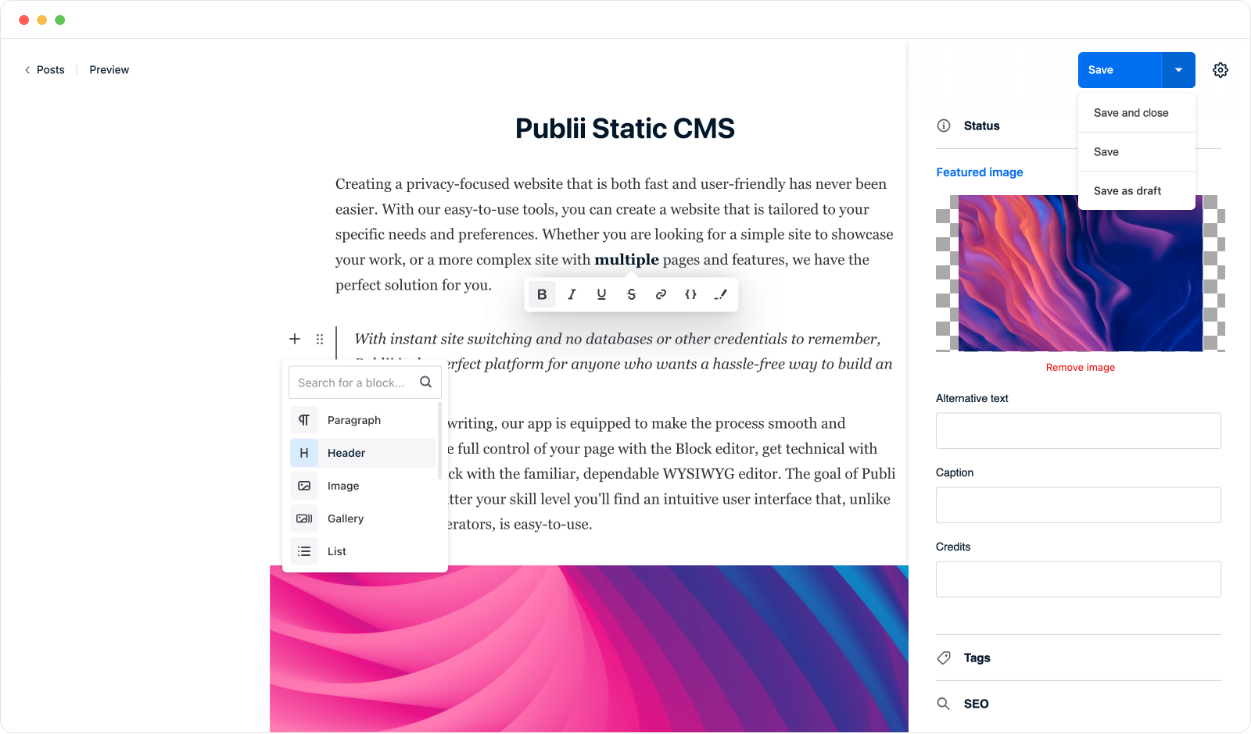
Publii is a free, open-source content management system that runs as a desktop application on your own computer rather than on a web server. You write and manage content locally, and Publii generates a static website that you upload to a host such as GitHub Pages, Netlify, Amazon S3, or your own server via FTP. Because the published site is static, there is no database, no PHP, and no public admin panel for an attacker to target.
Who it suits
- Bloggers and writers who want a straightforward editor and a site they own, without running server software.
- Portfolio and small-business owners who need a few well-designed pages rather than a constantly updated publication.
- Documentation and content-focused sites where speed and low maintenance matter more than dynamic features.
- Non-developers who like the idea of static sites but want a graphical interface instead of a command line.
How it differs from typical CMS options
| Aspect | Publii | Server-based CMS (e.g. WordPress) |
|---|---|---|
| Where it runs | Desktop app on your machine | Web server |
| Database | None | Required |
| Public admin panel | None | Yes |
| Publishing | Generates static files, uploads to a host | Serves pages dynamically |
| Maintenance | Fewer moving parts to patch | Regular core, plugin and security updates |
Trade-offs to weigh
Static publishing is fast and has a small attack surface, but it is not the right fit for everything. If you need user accounts, comments, e-commerce checkout, or content that changes per visitor, you would typically add third-party services or choose a different platform. Publii's own material notes that there is no tracking by default — analytics or other scripts are only present if you add them yourself, which is a privacy advantage but also means you must set up measurement deliberately.
A practical next step
Decide first where the site will live. If you already use GitHub Pages or Netlify, Publii's one-click sync fits naturally; if you have conventional hosting, FTP works. Then install Publii, pick a theme, write one post, and publish to a test location before committing your main domain. The official site is Publii, and its GitHub repository is a useful place to check release notes and community activity.
How does Publii compare to WordPress for building a website?
Publii and WordPress solve the same problem in opposite ways. Publii is a desktop app that generates a static site on your own computer and uploads the finished files to a host; WordPress is server software that renders pages on demand from a database. That single difference drives most of the trade-offs below.
Where they differ most
| Publii | WordPress | |
|---|---|---|
| Where it runs | Installed on your computer | Installed on a web server |
| Page delivery | Pre-built static HTML files | Generated per request from a database |
| Database / PHP | None required | Both required |
| Public login page | None to attack | /wp-admin is a public target |
| Editing | Local desktop editor, then sync | Browser-based from anywhere |
| Multi-author workflows | Limited to local collaboration | Mature roles, permissions, editorial flow |
| Plugins and themes | Smaller, curated set | Enormous ecosystem, variable quality |
| Ongoing maintenance | Little: update the app, republish | Frequent core, theme and plugin updates |
What that means in practice
Security and upkeep. Because Publii produces plain files and has no server-side admin panel, there is no database to inject into and no login page to brute-force. WordPress's popularity makes it a constant target, which is why patching and plugin hygiene matter so much. If you have ever spent a weekend recovering a hacked WordPress site, this is the strongest argument for Publii.
Speed and hosting cost. Static files are cheap and fast to serve, and they can go to GitHub Pages, Netlify, Amazon S3 or ordinary FTP hosting. WordPress needs a host that supports PHP and MySQL, and usually caching to stay quick.
Publishing workflow. Publii's model is: write locally, click sync, done. That suits one person at a desk. It is a poor fit if several people edit from different machines, if you need scheduled publishing while your laptop is closed, or if you rely on comments, membership logins or e-commerce running on the site itself. Those are WordPress's home turf.
Flexibility. WordPress can become almost anything through plugins, at the cost of complexity and a wider attack surface. Publii stays deliberately narrower: content-focused sites such as blogs, portfolios and documentation, extended with the services you already use.
A concrete scenario
A freelance designer wants a portfolio plus a small blog, posts a few times a month, and does not want to think about servers. Publii fits well: install the desktop app, pick a theme, write, publish to Netlify or their existing host, and revisit only when they have something to say. The same person building a membership site with paid downloads and three guest authors should look at WordPress instead.
How to decide
Choose Publii if you are the main author, your site is mostly articles, images and pages, and you value low maintenance and a small attack surface. Choose WordPress if you need multiple remote editors, on-site user accounts, or a specific plugin that has no static equivalent. A useful test: list the features your site genuinely needs, then check whether each can be delivered without server-side code. If the answer is yes for all of them, static publishing removes a whole category of work.
To try it, download the desktop app, build one small site locally, and publish it to a free static host before moving anything real. That gives you a realistic feel for the workflow at almost no cost. If you prefer a browser-based alternative in the same static camp, Jekyll and Hugo are worth a look, though both assume more comfort with the command line than Publii does.
How do I publish a Publii site to GitHub Pages or Netlify?
Publii is built for exactly this workflow: you write and manage content in the desktop app, it generates a static site, and you push the finished files to your host. GitHub Pages and Netlify are both listed as supported destinations, so neither requires a database or PHP on the server side.
GitHub Pages
The usual path is to create a repository for the site and connect Publii to it through its built-in sync options. Because Publii generates plain static files, the output can live directly in the repo and be served as a project or user site. This suits people who want version history, free hosting for public repositories, and a setup that keeps working even if they stop touching it for months.
Netlify
Netlify works well if you prefer drag-and-drop or continuous deployment from a Git repository. You can either upload the generated output or let Netlify build from the repo. Netlify adds conveniences like deploy previews, form handling and redirects, which matter more for marketing pages and documentation than for a simple personal blog.
| Consideration | GitHub Pages | Netlify |
|---|---|---|
| Setup effort | Repository plus sync configuration | Repository or manual upload |
| Best for | Developers, open-source projects, versioned content | Marketing sites, docs, teams wanting previews |
| Extras | Git history, free public hosting | Deploy previews, redirects, form handling |
| Trade-off | Fewer built-in services | More platform features to learn |
A practical next step
Decide based on who maintains the site. If you are comfortable with Git and want everything in one repository, start with GitHub Pages. If you want previews and easier collaboration with non-technical colleagues, start with Netlify. Either way, the core loop is the same: write locally, generate the static output, then sync or upload.
For general static-site hosting context, you can also compare GitHub Pages and Netlify directly.
What are the security advantages of using a static CMS like Publii?
A static CMS such as Publii removes several of the most commonly exploited parts of a traditional website. Because Publii runs as a desktop application and generates static HTML files, there is no database, no PHP runtime, and no public admin panel on the server. That means common attack paths—SQL injection, vulnerable login forms, plugin exploits, and remote code execution through a CMS admin—simply do not exist on the published site.
What actually changes
| Traditional CMS (e.g. WordPress-style) | Static CMS like Publii |
|---|---|
| Database stores content and users | Content lives in local files; nothing to query |
| Public login page and admin panel | No server-side admin panel to attack |
| Plugins and themes run code on the server | Themes and extensions run locally during build |
| Server-side scripting (often PHP) | Only static HTML, CSS, JS, images |
| Frequent core/plugin updates to patch holes | Fewer moving parts; updates are local |
The practical result: the published site is just files. If someone requests a page, the host serves it. There is no application layer to trick into revealing data or executing code.
Privacy and tracking
Publii's page describes it as privacy-first and notes that no tracking scripts are included unless you add them yourself. That matters for security in a broader sense: fewer third-party scripts means fewer external dependencies that could be compromised or leak visitor data. You still control analytics and embeds, but they are deliberate choices rather than defaults.
Hosting and deployment
Publii publishes to GitHub Pages, Netlify, Amazon S3, or your own hosting via FTP. Each option shifts the security boundary:
- GitHub Pages / Netlify: the provider handles TLS, CDN, and server patching. You mainly manage your account and repository permissions.
- S3 or your own hosting: you are responsible for bucket policies, TLS certificates, and server configuration.
In all cases, the attack surface is smaller than a database-backed CMS, but it is not zero. Weak host credentials, misconfigured permissions, or a compromised local machine can still cause problems.
Where it fits and where it does not
Publii suits blogs, portfolios, documentation sites, and other content-focused sites where the author publishes from a desktop. It is a poor fit for sites that need user accounts, comments stored server-side, e-commerce transactions, or real-time collaborative editing in the browser—those require a dynamic backend, and with it the security work that Publii avoids.
A useful next step: list the features your site truly needs. If none of them require a server-side database or login, a static CMS removes a whole category of risk. If some do, plan how you will secure that dynamic component separately.
Which types of websites are best suited for Publii?
Publii suits content-focused sites where the main job is publishing text and images rather than running logged-in user accounts, shopping carts or dynamic apps. Because it runs as a desktop app and generates static files, its natural fits are:
- Personal blogs and newsletters — write locally, keep drafts and media on your machine, publish a fast static site.
- Portfolios — small, image-led sites for designers, photographers and freelancers, where low maintenance matters more than interactive features.
- Documentation and knowledge bases — structured pages that change occasionally and benefit from fast loading and no server-side CMS to secure.
- Small business and brochure sites — a handful of pages describing services and contact details, without a public admin panel exposed to attack.
- Project or product landing pages — static marketing pages published to GitHub Pages, Netlify, Amazon S3 or your own hosting over FTP, as described on the product page.
It is a weaker fit when you need multi-user editing with role permissions on the live site, e-commerce checkout, membership logins, comments handled server-side, or content updated by many people from different devices in real time. Those needs point toward a database-backed CMS or a hosted platform instead.
A quick way to decide
Use this as a filter: if your content is mostly pages and posts, updated by one or a few authors, and you are comfortable installing a desktop program, Publii is a good match. If your site's value comes from dynamic behavior — user accounts, transactions, frequent collaborative editing — look elsewhere.
As a concrete example, a freelance illustrator could keep each project as a post with images and tags, preview locally, then sync to a static host. A five-person support team editing the same help center every hour would likely find the single-author, publish-on-demand model awkward.
What to weigh
The trade-off is control versus convenience. You gain speed, privacy by default (no tracking scripts unless you add them), and no database or PHP to maintain. You give up the browser-based editing that lets anyone with an account update the site from anywhere, and you take on the build-and-publish step yourself. Publii's own comparison point is the PublishDrive team's use of it, and its page cites long-running community feedback about ease of use for non-developers — useful signals, but still worth testing against your own workflow before committing.
If you want to see how it feels, download the desktop app, build two or three representative pages, and publish them to a free static host as a trial. That single test will tell you more than any feature list about whether the local-first model fits how you actually work. For alternatives with similar static-output goals, Hugo and Jekyll are worth comparing, though both assume more command-line comfort.
How can I migrate my existing WordPress site to Publii?
Migrating from WordPress to Publii means moving your published content out of WordPress and into a local desktop app, then rebuilding your site as static files. Publii is a free, open-source CMS that runs on your computer rather than on a server; it generates a static site you publish to GitHub Pages, Netlify, Amazon S3, or your own hosting via FTP, with no database, no PHP, and no public admin panel. That architecture is what makes the migration different from a typical CMS-to-CMS move: you are not copying a database across, you are importing content and re-rendering it as static pages.
A practical migration path
- Export your WordPress content. Use WordPress's built-in export tool to produce a WXR (XML) file containing posts, pages, categories, tags, and authors. If you also want images, download the uploads folder separately, since the export file references media rather than bundling it.
- Install Publii and create a site. Set up a new site in the app and pick a theme. Publii ships professionally designed, hand-coded themes, so choose one that matches the structure of your old site (blog, portfolio, or documentation layout).
- Import the WXR file. Publii supports importing WordPress content, which brings in posts, pages, and taxonomy. Expect to review the result rather than trust it blindly.
- Clean up after import. Recreate menus and any custom post types that didn't survive, re-link images, and check that internal links still resolve. Shortcodes and page-builder markup from WordPress plugins usually won't render and need to be replaced with the block editor's structured layouts.
- Rebuild the parts that were plugins. Contact forms, comment systems, analytics, and search were probably WordPress plugins. In a static setup these become third-party services or JavaScript embeds you add yourself — Publii adds no tracking scripts unless you include them.
- Preview locally, then publish. Publii builds the static site on your machine, so you can review it before anything goes live. When it looks right, sync to your host with a click.
- Cut over the domain. Point your domain at the new host and keep the old WordPress install available until you've confirmed redirects and that key URLs still work.
What changes, and what to watch
| Area | WordPress | Publii |
|---|---|---|
| Where it runs | On a server, with a database and PHP | On your desktop; output is static files |
| Security surface | Public admin panel and plugins to patch | No public admin panel or database to attack |
| Editing | In the browser, from any device | In the desktop app on your computer |
| Extending | Plugins | Integrations with external tools and services |
| Publishing | Immediate on save | Build locally, then sync to your host |
The trade-off is collaboration and convenience. Because Publii is a desktop app, multiple authors can't log in from anywhere to draft simultaneously the way they can in WordPress; your workflow becomes local-first, then publish. Dynamic features such as membership, comments, or e-commerce need external services rather than plugins.
A realistic scenario
A solo blogger with a few hundred posts and a handful of plugins is a good fit: export, import, swap the contact form for a hosted form service, re-add analytics if wanted, and publish. A large multi-author news site with custom post types, a page builder, and thousands of images faces far more manual cleanup, and should migrate in stages — perhaps starting with an archive or a subsection — rather than all at once.
If you want to see how the app handles imports before committing, the project's own site and community are the best starting points: Publii and its GitHub repository, where issues and release notes document import behavior. For the WordPress side of the export, WordPress.org documents the export tool.
 Google Workspace
 Poland
User reviews (0)