
 简体中文
简体中文 English
Website review
This review may include AI-generated content and is not individually verified. Domain, certificate and other facts come from the observed data on this page.
What is Gitingest?
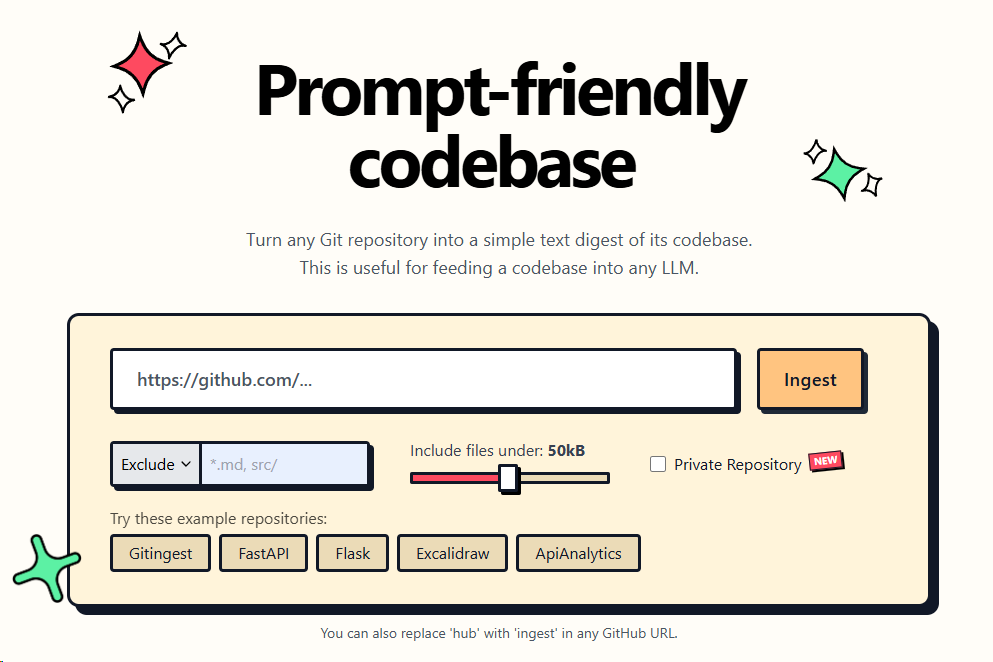
Gitingest turns a Git repository into a single prompt-friendly text digest of its codebase, intended for feeding into a large language model. The core mechanic is in the name: replace "hub" with "ingest" in any GitHub URL and you get a text version of that repository instead of the normal web interface. You can also paste a repository directly into the site and use the controls to include or exclude files, with an option to include files under a size threshold such as 50kB.
The output is structured for reading and copying: a summary, a directory structure, and file contents, each with its own copy control, plus a "copy all" and download option.
Who it is for
- Developers who want an LLM to review, explain or refactor a codebase without manually gathering files.
- People pasting repository context into a chat assistant and hitting message or token limits with raw file dumps.
- Anyone exploring an unfamiliar project who wants a readable tree plus contents in one pass.
Private repositories
The page states that a personal access token is never stored in the backend, is used once for cloning and then discarded from memory, that browser caching is not used, and that cloned repositories are deleted after processing. Treat those as the service's stated handling rather than an independent audit, and still judge whether a given codebase is appropriate to send to a third-party tool at all.
Practical next step
If you are evaluating it, start with a small repository you already know well, such as a personal project, and compare the digest against the actual tree. Check whether excluded files, generated code or lockfiles are cluttering the output, then adjust the include and exclude settings before trying it on a large production codebase. For broader context on a project alongside the digest, the repository's own page on GitHub remains the reference point for issues and history.
How do I use Gitingest to convert a GitHub repository into a text digest?
Change github to ingest in the repository URL. For example, github.com/tiangolo/fastapi becomes ingest.com/tiangolo/fastapi — wait, the actual pattern is gitingest.com/tiangolo/fastapi. The site also accepts a repository URL pasted into its input field, and the result is a plain-text digest of the codebase with a directory structure and file contents, which you can copy or download.
What the digest contains
- Summary of the repository.
- Directory structure, so the model can see how files relate.
- Files content, concatenated as text.
- Filters: include or exclude patterns, and an option to include only files under a size limit (the page shows 50kB as an example value).
Typical workflow
- Open Gitingest.
- Paste a GitHub URL, or edit the URL directly by replacing
hubwithingest. - Adjust include/exclude patterns if you only need part of the repo.
- Copy the digest into your LLM prompt, or download it as a file.
Private repositories
For a private repo, the site asks for a personal access token (PAT). The page states the token is not stored in the backend, is used once for cloning, and is discarded from memory; cloned repositories are deleted after processing and nothing is cached in the browser. Treat that as the product's own description of its handling rather than an independent audit — if your organization has strict rules, check its policy before pasting a token, and prefer a short-lived, read-only token scoped to the single repository.
When this is the right tool
It suits quick, one-off context building: asking a model to explain an unfamiliar codebase, draft documentation, or review a small project. For very large repositories, the digest can exceed a model's context window, so use include/exclude filters or the size limit to keep only the files that matter. If you need repeated, automated ingestion as part of a pipeline, a command-line tool or a script that clones and concatenates files may fit better, since it can be versioned and run without manual copying.
Is Gitingest safe for private repositories, and how does it handle authentication tokens?
Yes, with a caveat: Gitingest is designed to handle private repositories without retaining your credentials, but you are still handing a personal access token (PAT) to a third-party service, so the trust decision is yours to make.
How tokens are handled
According to the site, a PAT is never stored in the backend. It is used once to clone the repository and then discarded from memory. Cloned repositories are deleted after processing, and there is no browser caching. That means the token is not persisted in a database or written to disk by design, and the cloned code does not linger on their servers.
The practical implication: exposure is limited to the window during which the clone and digest are generated. If the service is honest about this behavior, the risk is transient rather than permanent.
Where the real risk sits
Transient handling reduces risk but does not eliminate it. A few things to weigh:
- The token's scope matters more than the service. Use a fine-grained PAT limited to the specific repository and read-only contents access. If the token is ever intercepted or misused, the blast radius is one repo, not your whole account.
- Short expiry is your friend. Set the token to expire in days, not months. You can always issue a new one.
- The digest itself is sensitive. The output is your source code in plain text. If you copy or download it, it now lives wherever you paste it — including into an LLM prompt.
A sensible workflow
For a private repo you want to feed into an LLM:
- Create a fine-grained PAT scoped to that one repository, read-only, short expiry.
- Run it through Gitingest.
- Revoke the token once you have the digest.
- Treat the digest as confidential — it is your code.
This limits both the credential window and the scope of any mishap. The token-handling claims are reasonable, but the safest posture is to assume any third-party processing carries some residual risk and constrain what a leaked token could do.
If you would rather avoid sending a token at all, clone locally and generate a digest with a local tool, keeping everything on your own machine.
What are the size limits and file exclusion options when using Gitingest?
Gitingest is built to turn a Git repository into a single plain-text digest you can paste into an LLM prompt, and its controls for size and exclusion are deliberately simple. The page shows an Include files under field set to 50kB, an Exclude input, an Include input, and a Private Repository PAT option. Treat the 50kB value as a starting threshold you can change, not a fixed ceiling: it is the boundary that decides which individual files are pulled into the digest.
What the options do
- Include files under: a per-file size filter. Files larger than the threshold are left out of the digest, which keeps generated bundles, datasets, lockfiles and minified assets from crowding out the code you actually want the model to read.
- Exclude: patterns for paths or file types you never want included, such as build output, vendored dependencies or test fixtures.
- Include: patterns that pull specific paths back in, useful when you want a narrow slice of a large repository rather than the whole tree.
- Private Repository PAT: a personal access token used once to clone a private repo, then discarded from memory. The page states the token is never stored in the backend, that cloned repos are deleted after processing, and that there is no browser caching.
Choosing a threshold
The right size limit depends on what you are asking the model to do.
| Goal | Sensible approach |
|---|---|
| Understand overall architecture | Keep the default small-file threshold, exclude build and vendor directories |
| Review one module in depth | Raise the threshold or use Include patterns to target that directory |
| Feed a whole small project | Leave the threshold generous; the repository is small enough that filtering matters less |
| Work with a large monorepo | Combine a low threshold with Include patterns for the packages you care about |
For most readers the practical first step is to run the repository through with the default settings, then look at the directory structure in the summary and add Exclude patterns for anything irrelevant before copying the content. If the digest still feels bloated, lower the size threshold; if important files are missing, raise it or name them in the Include field.
A concrete scenario: you want an LLM to explain how a Flask application handles authentication. Excluding tests/, migrations/ and any front-end build folder, then including only the application package, gives a digest small enough to fit comfortably in context while still containing the routes, models and configuration that answer the question. The same repository run without filters would waste context on fixtures and generated files.
Gitingest also accepts a shortcut: replacing hub with ingest in any GitHub URL opens the same repository in the tool. The page lists example repositories including Gitingest itself, FastAPI, Flask, Excalidraw and ApiAnalytics, which are handy for testing how the filters behave before you use them on your own code. The output section offers a summary, a directory structure, and separate copy actions for the file content, so you can take only the parts you need.
Can I use Gitingest with Git repositories other than GitHub?
Yes — Gitingest is not limited to GitHub. Its own tagline is that you replace "hub" with "ingest" in any GitHub URL, and the page also offers a private-repository option using a personal access token (PAT), which implies Git hosting beyond the public GitHub case. The tool turns a repository into a text digest of its codebase; the host of the Git repository is a separate matter from whether the digest can be produced.
What the page actually supports
The page presents two entry points:
- URL rewriting: swap
githubforgitingestin a GitHub URL to get a prompt-friendly digest. - Private repositories: supply a PAT, which the page says is never stored in the backend, is used once for cloning, then discarded from memory. Cloned repos are deleted after processing, and there is no browser caching.
The private-repo flow is the strongest signal that other Git hosts are in scope, because a PAT is the standard authentication mechanism for Git services generally, not just GitHub. That said, the page does not enumerate which hosts are supported, so treat non-GitHub support as plausible but unconfirmed for any specific service.
How to check for your host
Try the repository URL directly in the input field and watch the summary, directory structure, and file content panels. If the clone succeeds, you will see the digest; if it fails, you will get an error rather than a partial result. For self-hosted GitLab, Gitea, or Bitbucket instances, authentication requirements differ, so a PAT alone may not be enough.
Practical decision criteria
| Situation | Likely outcome |
|---|---|
| Public repo on GitHub | Straightforward; URL rewriting works |
| Public repo on another major host | Worth trying; host support is not documented on the page |
| Private repo with a PAT | Supported per the page's description |
| Self-hosted Git server | Uncertain; may need network access and host-specific auth |
If you rely on a non-GitHub host regularly, test one repository end to end before building it into a workflow. For a broader view of the project, GitHub hosts the source, and FastAPI is one of the example repositories the page links to, which is useful for a quick sanity check of the digest output.
What are some example repositories to try with Gitingest?
Gitingest's own page lists four example repositories to try: Gitingest, FastAPI, Flask, and Excalidraw. A fifth, ApiAnalytics, also appears in that set. These are the quickest way to see what the tool actually produces — a plain-text digest of a codebase's directory structure and file contents, sized for pasting into an LLM prompt.
What each example shows you
- Gitingest — the self-referential choice. Ingesting the tool's own repository lets you compare the digest against a codebase you can browse directly, so you can judge how faithfully files and structure survive the conversion.
- FastAPI — a mid-sized Python web framework. Useful for testing how the digest handles a well-organized package layout with docs, tests, and multiple modules.
- Flask — a smaller, long-established Python project. Good baseline for checking output length before you move to something bigger.
- Excalidraw — a TypeScript/React front end. A practical way to see how the tool treats a JavaScript-heavy repository with build config and component files.
- ApiAnalytics — a smaller project, handy if you want a short digest you can read end to end rather than skim.
How to choose one
Pick based on what you plan to do with the output. If you're testing whether a digest fits inside a context window, start with ApiAnalytics or Flask and work upward. If you're checking whether the tool preserves the details you care about — type definitions, configuration files, docstrings — use a repository whose contents you already know well, which makes Gitingest itself or FastAPI the better trial.
There is also a shortcut worth noting: you can replace hub with ingest in any GitHub URL to generate a digest for that repository. So once you've tried the built-in examples, the natural next step is to run the same substitution on a repository from your own work and see whether the result is specific enough to be useful in a prompt.
 Cloudflare
 Amazon.com, Inc.
 Dublin, Leinster, Ireland

User reviews (0)