Website profiles · Technology insights · Alternatives

guess-the-year.davjhan.com

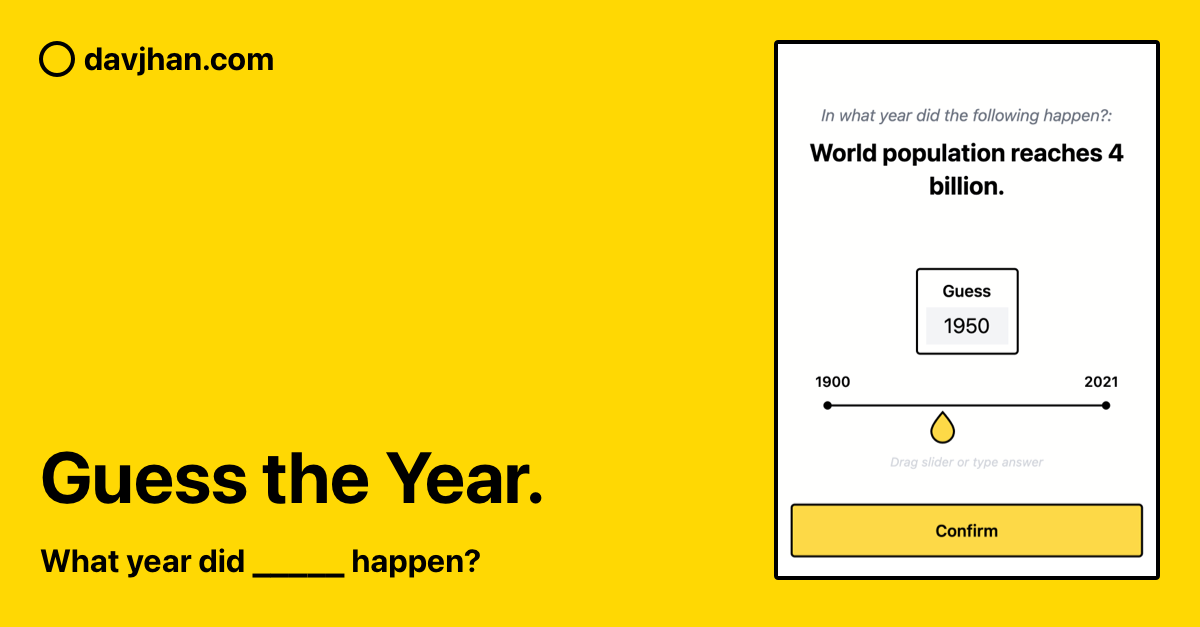
Guess what year the following events happened.

No paid content found
Visit website
Profile views 0 Outbound visits 0 Normal
Guess the Year game Full homepage screenshot

At a glance

Category
Games & Board Games
Language
English
Paid-content signal
No paid content foundObserved
Registered
2021
Hosting
NetlifyInferred
HTTPS certificate trusted
PassedObserved
Last updated

Website review

This review may include AI-generated content and is not individually verified. Domain, certificate and other facts come from the observed data on this page.

What is the Guess the Year game?

The Guess the Year game is a short trivia quiz on Guess the Year game that asks you to name the year a famous event happened. Answers fall between 1900 and 2021, and the page lists a playing time of one to two minutes, so it works as a quick break or a warm-up activity rather than a long session.

How it plays

You see an event, pick or enter the year you think it occurred, and move on to the next one. Because every answer sits in a defined 1900–2021 window, there is no trickery with ancient history — the challenge is memory and a sense of how recent or distant something feels.

Who it suits

  • Casual trivia fans who want a fast round without setup or accounts.
  • Teachers and hosts looking for a lightweight warm-up or icebreaker on a shared screen.
  • Groups comparing guesses, since the narrow date range makes disagreements easy to settle.

The trade-off is depth: with a one-to-two-minute format, expect a short set of questions rather than a long progression or detailed explanations of each event. If you want a study tool with context, this is not that; if you want a quick memory test, it fits.

A practical next step: play one round yourself first to gauge difficulty, then decide whether to use it solo as a daily warm-up or with others as a group guessing game.

How do I play the Guess the Year game?

Open Guess the Year game and select Start game. Each round shows a famous event, and you pick the year it happened. Answers fall between 1900 and 2021, and a session runs about 1–2 minutes, so it works as a quick solo break or a tie-breaker in a group quiz.

How a round works

  1. Read the event shown on screen.
  2. Enter or choose the year you believe it occurred.
  3. Submit your answer and move to the next event until the session ends.

Play it well

  • Anchor each event to something you already know: a war, an election, a moon landing, a technology launch.
  • Use decade logic first, then narrow within the decade; being off by a few years is usually the main risk.
  • For group play, have everyone commit to an answer before revealing it, then discuss the misses—those are the parts people remember.

A practical next step

Play one round alone to calibrate how the 1900–2021 range feels, then run it with friends and keep score across several rounds. If you want a broader history quiz alongside it, Sporcle hosts many timeline-style quizzes, though its format and difficulty differ.

What years can the answers fall between?

The answers range from 1900 to 2021, according to the game's instructions. Each round gives you a famous event and asks you to place it in that span.

Because the range covers more than 120 years, the useful next step is to anchor each event to a rough era before guessing: wars, space exploration, music and technology shifts usually narrow the window to a decade or two. A player who knows the event happened "sometime in the 1960s" can then reason from related milestones rather than picking blindly across the full range.

How long does a round of the Guess the Year game take?

A round of the Guess the Year game takes about 1–2 minutes, according to the game's own instructions. That short length makes it well suited to a quick break or a filler activity rather than a long session.

What shapes the time

  • Answer range: events fall between 1900 and 2021, so each guess is a single year within that span.
  • Format: you read a famous event and enter the year it happened; the page describes this as a short, self-contained round.

Practical use

If you are planning a group activity, expect each person to finish in a minute or two, so a set of several rounds fits easily into a five-minute slot. For a solo player, it works as a fast warm-up or a brief distraction. If you want a longer session, plan on playing multiple rounds back to back rather than expecting one round to fill the time.

A useful next step: open Guess the Year game and time your first round to see whether the 1–2 minute estimate matches your own pace.

Can I play the Guess the Year game without downloading anything?

Yes. Guess the Year is a browser-based quiz you can play directly on the page—no download or installation is needed. The page presents an event, you choose the year it happened, and the answer falls somewhere between 1900 and 2021. A round is designed to take about 1–2 minutes, so it works well as a quick break or a short group activity.

To get started, open Guess the Year game and select Start game. If you are playing with others, decide in advance whether you will guess individually or agree on one answer per event; the latter keeps a short round moving and makes the result more of a shared challenge.

How can I create my own version of the Guess the Year game?

Build it as a small quiz app: a list of events with a year attached, a screen that shows one event and asks for a year, and a simple scoring loop. That is the whole product; everything else is polish.

Core structure

  1. Content file — a JSON array of objects: event text, correct year, and optionally a category or a short hint. Keep the event wording neutral so the year isn't given away by phrasing ("the Berlin Wall fell" rather than "in 1989 the Berlin Wall fell").
  2. Answer input — a numeric field or a slider. A slider gives a tactile "how close am I?" feel; a typed year is faster for confident players.
  3. Scoring rule — decide before you build: exact match only, or points for proximity (e.g., within 2 years = partial credit). Exact match is simpler and suits a 1–2 minute round; proximity scoring is more forgiving and better for a mixed-knowledge group.
  4. Round length — a fixed number of questions (5–10) with a final score screen. The original Guess the Year game frames a round as roughly 1–2 minutes across events spanning 1900–2021, which is a good default range: broad enough to feel varied, narrow enough that guesses stay plausible.

Practical choices that shape the experience

Decision Easier option More engaging option
Input Typed year Slider with live feedback
Scoring Exact match Distance-based points
Content Hand-written list Public-domain timeline data
Feedback Show correct answer Show correct answer plus a one-line context note

A one-line context note after each answer ("The first Moon landing, watched by an estimated 600 million people") turns a guessing game into a light learning tool and gives players a reason to keep going after a wrong answer.

A concrete starting scenario

If you are building this for a classroom or a family quiz night, write 30–50 events first, sorted by year, and check that no two events share a year in the same round — otherwise a sharp player can infer one answer from another. Then build the loop with placeholder styling, play it yourself ten times, and only then add visuals.

Next step

Start with the content file and a single HTML page that renders one random event and checks the answer. Once that loop feels right, add the score screen and the context notes. For implementation, the MDN Web Docs at MDN Web Docs cover the array, random-selection and form-handling basics you need, and GitHub is a reasonable place to host the static result.

Related questions

More questions →
What Is the Guess the Year Game Website?

The Guess the Year game is a free browser-based trivia game where you guess the year a famous event happened. Answers fall between 1900 and 2021, and a round takes about 1–2 minutes. You can start playing directly from the page — no account or download is mentioned.

How It Works

The game presents you with a famous event, and you pick the year it occurred. The only constraint stated on the site is the answer range: 1900 to 2021.

What to Expect

Detail What the site says
Format Browser-based trivia game
Task Guess the year a famous event happened
Answer range 1900–2021
Round length About 1–2 minutes
Getting started Click "Start game" on the page
Account or download Not mentioned

Who It's For

This is a good fit if you want a quick, low-commitment trivia break — the 1–2 minute round length makes it easy to play in a spare moment. It also works as a casual group activity, since guessing years is something people can debate together.

It's less suited if you're looking for deep historical detail or a long-form quiz session. The site describes a short, single-format game rather than an extensive quiz platform.

How to Play

  1. Open guess-the-year.davjhan.com in your browser.
  2. Read the instructions on the landing page.
  3. Click Start game.
  4. For each event shown, choose the year you believe it happened, keeping in mind the 1900–2021 range.
  5. Continue through the round, which should take roughly 1–2 minutes.

Common Pitfalls

  • Ignoring the range: Answers outside 1900–2021 aren't valid, so anchor your guess within that window.
  • Rushing: With only a minute or two per round, it's tempting to click fast — but events near the edges of the range (early 1900s or 2020s) are easy to misplace by a few years.

The Bottom Line

If you want a fast, no-fuss trivia game about historical events, this site is worth opening. The rules are simple, the time commitment is small, and you can start immediately from the page.

What Kinds of Events and Years Are Covered in Guess the Year?

Guess the Year asks you to identify the year a famous event happened, and every correct answer falls between 1900 and 2021. That is the full scope stated on the game's page: it describes the questions as famous events and gives 1900–2021 as the answer range, without listing specific categories, regions, or topics. So you should expect a mix of historical and recent events spread across that 121-year window, and you should not expect the site to tell you in advance which subject areas will appear.

The answer range in practice

The range matters for how you play, not just for trivia:

  • No answers before 1900 or after 2021. If your guess is outside that window, it cannot be correct.
  • The midpoint is around 1960–1961. A first guess near the middle splits the range roughly in half, which is useful when you have no idea.
  • Recent events are included. Because the range runs to 2021, questions can draw on events from the 2010s and 2020s-adjacent years, not only distant history.

What the page does and does not say

Question What the site states
What are the questions about? Famous events
What is the answer range? 1900–2021
How long does a round take? 1–2 minutes
Are categories listed? No categories are listed
Are regions or topics specified? Not specified

The absence of categories is itself useful information: you cannot prepare by studying one domain, such as only sports or only politics. The game is a general-knowledge exercise, and the only reliable constraint is the date range.

How this shapes your guesses

Because the content type is broad and only the year range is fixed, a sensible approach is to reason from the event itself rather than from a topic list:

  1. Read the event and identify its rough era from context — technology mentioned, names, or the kind of event.
  2. Place your guess inside 1900–2021, using the midpoint as an anchor when unsure.
  3. Use the 1–2 minute playing time as a signal that each question is meant for a quick, intuitive answer rather than deep research.

For example, an event involving early aviation points you toward the first decades of the range, while an event involving smartphones or social media points toward the last two decades. The game gives you no category label, so the event description is your only clue.

Who this suits

The 1900–2021 range and the famous-events focus make the game a good fit if you have broad general knowledge across modern history and want a short session — the page estimates 1–2 minutes of playing time. It is a weaker fit if you prefer deep specialization in one topic, since nothing on the page suggests the questions are grouped or themed. If you want to know how a round is started and structured, see the guide on how to play the Guess the Year game.

How to Play the Guess the Year Game

To play the Guess the Year game, open guess-the-year.davjhan.com, press Start game, read the famous event shown, and guess the year it happened. Answers fall within 1900–2021, and a session takes roughly 1–2 minutes.

What the Game Asks You to Do

The game presents a famous event and asks you to identify the year it occurred. The only rule stated on the site is the answer range: any year from 1900 through 2021 is valid. That range matters because it tells you how precise your guess should be — you are picking a single year, not a decade or era.

Step by Step

  1. Open the site. Go to guess-the-year.davjhan.com in your browser. No account or setup is described on the page.
  2. Press Start game. This is the button shown on the landing page and it begins a round.
  3. Read the event. The event is displayed as text; there is no list of options to choose from based on the page description.
  4. Enter your year. Give a year between 1900 and 2021.
  5. Check the result and continue. The page describes a short session of 1–2 minutes, so expect a quick sequence of events rather than a long quiz.

What to Expect

Item Detail
Task Guess the year a famous event happened
Valid answers 1900–2021
How a round starts Start game button
Typical session length 1–2 minutes
Account needed Not mentioned on the page

Practical Tips for Better Guesses

  • Anchor to well-known decades. If the event feels like a mid-century moment, start near the middle of the range and adjust.
  • Use the range as a signal. Because answers stop at 2021, very recent events are not part of the pool.
  • Keep rounds short. The 1–2 minute session length suggests the game is built for quick repeated attempts, so treat a wrong guess as information for the next round rather than a reason to stop.

Common Sticking Points

  • Guessing a decade instead of a year. The game wants one year; a range like "the 1960s" is not an answer format.
  • Assuming answers go past 2021. They do not, per the site's stated range.
  • Looking for a sign-up flow. None is described on the page, so go straight to Start game.

If you want to confirm the rules yourself before playing, the instructions and answer range are stated directly on the site's landing page.

How to Start Playing Guess the Year on guess-the-year.davjhan.com

Open guess-the-year.davjhan.com in your browser and select the Start game button on the page. The site presents a short set of instructions first: guess the year a famous event happened, with answers ranging from 1900 to 2021. A round is listed as taking 1–2 minutes, so you can begin immediately without creating an account or preparing anything in advance.

What You Need Before Starting

  • A web browser and an internet connection to load the site.
  • No sign-up, payment, or download is mentioned on the page, so there is nothing to install or register for before playing.
  • No prior knowledge setup is required — the game supplies the events and you supply the year.

Step-by-Step: Getting Into a Round

  1. Open the site. Go to guess-the-year.davjhan.com. The page heading reads "Guess the year game."
  2. Read the on-page instructions. They state the core rule: guess the year that the famous event happened, with answers between 1900 and 2021.
  3. Select Start game. This is the entry point listed on the page and takes you into play.
  4. Make your guess for each event. Use the 1900–2021 range as your boundary — any guess outside it is not a valid answer under the stated rules.
  5. Finish the round. Expect roughly 1–2 minutes of play per session, based on the playing time noted on the site.

Expected result: you move from the landing page into an active round and submit year guesses for the events shown.

What to Expect Once You're In

Detail What the page states
Task Guess the year a famous event happened
Answer range 1900–2021
Playing time 1–2 minutes
Entry point "Start game" button
Account or payment Not mentioned on the page

The answer range is the most useful constraint to keep in mind: it tells you the earliest and latest possible correct years, so you can rule out guesses before 1900 or after 2021.

Common Snags

  • Can't find the button: the page is short — the instructions and the Start game control sit together near the top, below the "Guess the year game" heading.
  • Guessing outside the range: answers are bounded at 1900–2021, so anchor your estimate inside those limits rather than reaching for very recent or pre-1900 dates.
  • Expecting a long session: the stated playing time is 1–2 minutes, so treat it as a quick round rather than an extended quiz.

If you want background on the site itself or the kinds of events it covers, those are separate questions; for simply getting started, opening the site and pressing Start game is the whole process.

How Long Does a Game of Guess the Year Take?

A game of Guess the Year takes 1–2 minutes, according to the site's own instructions. That short window makes it a quick trivia break rather than a long session: you read a famous event, pick the year it happened, and move on. Answers fall between 1900 and 2021, so every guess is a year inside that range.

What the 1–2 minute estimate covers

The site lists "Playing Time: 1-2 minutes" alongside its instructions, which describe a single task: guess the year a famous event occurred. The estimate therefore describes one short pass through the game, not a multi-round match.

The page does not describe multiple rounds, difficulty levels, or a longer mode. If you want to keep playing after a round ends, plan on repeating the same short format rather than expecting a built-in long session.

Why the format stays fast

Two design choices keep each round brief:

  • A bounded answer range. Because answers sit between 1900 and 2021, you are narrowing a year, not researching an open-ended question.
  • One question type. Each prompt is an event plus a year guess. There are no multi-part questions or bonus stages described on the page.

For example, if you have two minutes between meetings, you can open the site, read the event, enter a year, and see the result without needing to set anything up.

Where a 1–2 minute game fits

Situation Why it works
Short break at work or school Fits inside a coffee or between-task pause
Warm-up trivia before a quiz night Quick enough to run once or twice without eating into the main event
Casual competition with a friend Each person can take a fast turn and compare results
Filling a wait Short enough to finish before an appointment or pickup

If you are organizing a longer trivia activity, treat Guess the Year as one small segment and plan other games around it, since the page gives no indication of a extended play mode.

What to expect when you start

The page presents a Start game button under the instructions. From there, the loop is: read the event, submit a year within 1900–2021, and get your result. The whole exchange is what the 1–2 minute estimate refers to.

One practical note: the estimate is the site's stated playing time, not a timer shown during play. Treat it as a guide for planning your break, not a countdown you need to beat.

Website Overview

Several search or sharing settings need attention. Together they may make snippets, preview images or preferred URLs less consistent across platforms.

Domain and Registration

Transfer-protection status is present, helping reduce the risk of unauthorized domain transfers. The domain has about 5 years of registration history; its current configuration provides more context than age alone. The registrar is Squarespace Domains II LLC, a widely used domain service provider. The domain uses the common .com extension, which is not an independent safety signal.

DNS and Email

Nameservers are provided by NS1, indicating managed DNS hosting. No CNAME was found; the observed records resolve directly to addresses. No MX record was found. A conventional explicit inbound-mail route is not configured. DNSSEC signatures were not detected, so this additional DNS authenticity protection is not confirmed. The lowest observed DNS TTL is 120 seconds.

TLS and Certificates

The public key uses EC with 256 bits. The server supplied a complete certificate chain. No organization name is present in the certificate; the available fields are consistent with domain validation. The certificate was issued by Let's Encrypt, commonly associated with automated certificate services. The certificate's total validity is about 89 days, consistent with a short renewal cycle.

HTTP and Browser Security

The response lacks these common security headers: CSP, X-Content-Type-Options, Referrer-Policy, Permissions-Policy, clickjacking protection. No X-Powered-By header was found, reducing one common source of backend fingerprinting information. No obvious internal addresses or debug information were found in the headers. The Server header contains the custom value Netlify. No explicit CDN or WAF marker was found in the response headers.

Technology Stack Analysis

The public page identifies Netlify without precise versions, leaving fewer clues for version-specific scanning.

Search and Social Sharing

No homepage meta description was detected, leaving snippet selection more dependent on page text. No homepage canonical URL was detected. If duplicate URLs exist, consolidation may be less explicit. Open Graph is partially configured; og:title, og:type is missing. The title has 20 characters, within a common display range. The observed directives allow indexing and link following.

Hosting and Email

DNSNS1
HostingNetlify
EmailUnknown
Approximate IP geolocation (inferred; a CDN or proxy may differ from the origin server) United States flagAshburn, Virginia, United States Inferred 18.208.88.157

Registration details

RDAP / WHOIS

RegistrarSquarespace Domains II LLC
Registered2021-01-13
Expires2027-01-13
Domain statusclient delete prohibited、client transfer prohibited
Nameserversdns1.p08.nsone.net、dns2.p08.nsone.net、dns3.p08.nsone.net、dns4.p08.nsone.net
DNSSECunsigned

DNS records

DNS

TypeNameValueTTLPriority
Aguess-the-year.davjhan.com18.208.88.157120—
Aguess-the-year.davjhan.com98.84.224.111120—
AAAAguess-the-year.davjhan.com2600:1f18:16e:df01::258311—
AAAAguess-the-year.davjhan.com2600:1f18:16e:df01::259311—
NSdavjhan.comdns1.p08.nsone.net3600—
NSdavjhan.comdns2.p08.nsone.net3600—
NSdavjhan.comdns3.p08.nsone.net3600—
NSdavjhan.comdns4.p08.nsone.net3600—

TLS and certificates

TLS / SSL

AssessmentNormal configuration
Supported protocolsTLSv1.2、TLSv1.3
Negotiated protocolTLSv1.3
Certificate subjectdavjhan.com
IssuerLet's Encrypt
Valid until2026-12-14T03:48 · Remaining when checked: 54 days
Verification detailsCertificate trust: Passed · Hostname match: Passed

HTTP response headers

HTTP

HeaderValue
content-typetext/html; charset=UTF-8
cache-controlpublic,max-age=0,must-revalidate
serverNetlify
strict-transport-securitymax-age=31536000

Identified technologies

Netlify

Pages, Search and Sharing

User reviews (0)

  • No reviews yet.