Website profiles · Technology insights · Alternatives

interviewsby.ai

Boost your confidence with AI-powered interview preparation.

No paid content found
Visit website
Profile views 6 Outbound visits 12 Normal
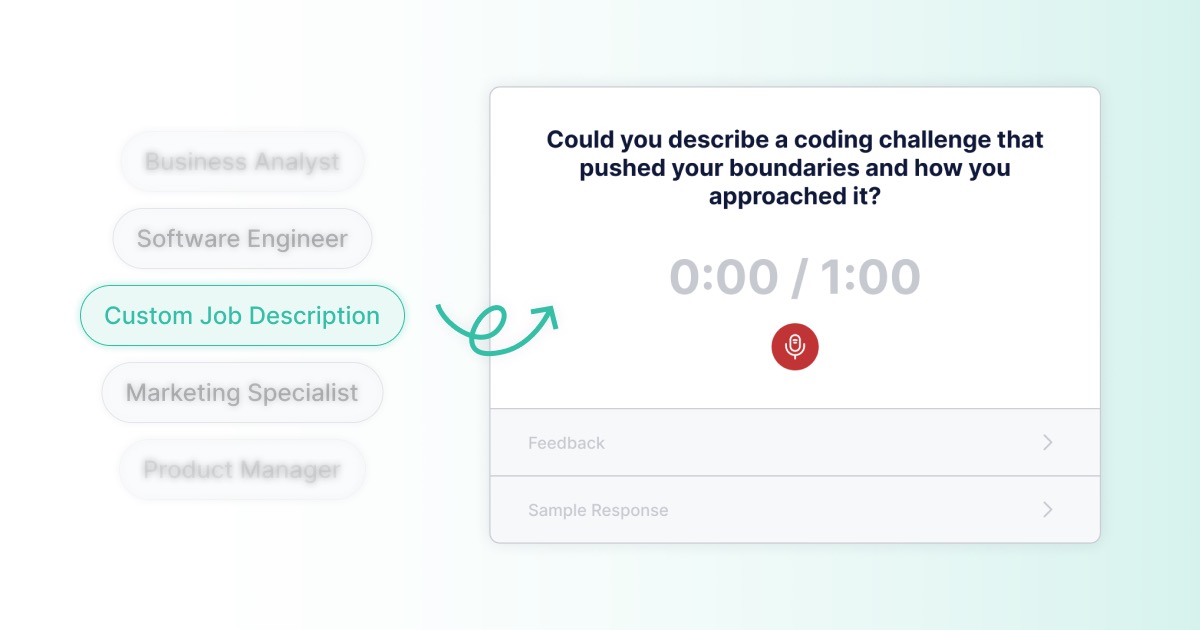
Interviews by AI Full homepage screenshot

At a glance

Category
Education & Learning
Language
English
Paid-content signal
No paid content foundObserved
Registered
2023
Hosting
Microsoft CorporationInferred
HTTPS certificate trusted
PassedObserved
Last updated

Website review

This review may include AI-generated content and is not individually verified. Domain, certificate and other facts come from the observed data on this page.

What is Interviews by AI?

Interviews by AI is an AI-powered interview preparation tool that turns a job description into realistic practice questions. Paste in a posting, and it generates behavioral and technical questions tailored to that role, then lets you answer out loud or in writing and receive instant feedback built on frameworks like STAR, along with a stronger sample answer to learn from.

Its core pitch is preparation over guesswork: instead of generic advice, you rehearse questions likely to come up for the specific job you applied to.

H3 What it actually does

  • Generate: Paste any job description (or pick a curated sample role) and get role-specific behavioral and technical questions.
  • Practice: Answer by audio or text, simulating the real thing.
  • Improve: Get feedback tied to your job description, the question, and your answer, plus a model answer to compare against.

The site says it works across roles and industries, listing examples such as software engineer, business analyst, product manager, marketing specialist, data analyst, sales, HR, UX/UI designer, QA engineer, and customer service. It also states sessions are private by default, with nothing stored beyond a transcript, and that resume upload is available on a paid tier.

H3 Who it suits, and the trade-offs

It fits job seekers who have a specific posting in hand and want to rehearse answers rather than read general tips — especially people who freeze in behavioral interviews and benefit from hearing themselves respond. The trade-off is that output quality depends on the detail in the job description, and the site itself notes the feedback "isn't perfect." Treat generated questions as a strong rehearsal set, not a leaked question bank.

User notes on the page come from Henry Tran, Jenny Jiang, and Charles Burr, who each describe generated questions matching real interviews or helping them prepare. Those are individual experiences, not guarantees; a sensible read is that the tool is best at surfacing the kinds of questions a role tends to attract.

H3 A practical next step

Pick one live application, paste its full description, and run three questions aloud — one behavioral, one technical, one about your background. Compare your answer to the sample and note one concrete change. For broader interview technique alongside this, see The Balance and Indeed. If you want to compare dedicated AI practice tools, interviewing.io and Big Interview are established alternatives.

How do I generate interview questions from a job description?

Paste the job description into the generator, then answer the resulting questions aloud or in writing and review the feedback. On Interviews by AI, that's the whole loop: the tool turns a pasted job description into behavioral and technical questions tailored to the role, you practice out loud or in text, and you get instant feedback built on frameworks like STAR plus a stronger sample answer. Feedback draws on the job description, the question asked, and your recorded answer, so the more detail you put into the description, the more tailored the questions become. Nothing is stored beyond a transcript, and resume upload is a Pro feature.

A practical workflow

  1. Copy the full posting, not just the title — responsibilities, required skills, and team context all give the generator material.
  2. Generate questions, then sort them into two piles: ones you can answer fluently and ones that expose a gap.
  3. Practice the gap pile out loud first. Speaking reveals rambling and missing specifics that silent reading hides.
  4. Read the sample answer, then re-record your own version in your own words rather than memorizing theirs.
  5. Repeat the weakest questions a day later, without looking at your earlier answer.

If you'd rather not use a dedicated tool

You can do a rough version yourself: highlight every requirement in the posting, turn each into a "tell me about a time when…" prompt, and answer using STAR (Situation, Task, Action, Result). The trade-off is time and blind spots — you'll tend to write questions you already find easy. A generator's value is mainly coverage: it surfaces question types you wouldn't have thought to prepare.

Choosing your approach

Situation Better fit
Interview in a few days, limited time Generator with instant feedback
Senior role with deep technical rounds Generator for behavioral, plus a human mock interviewer for depth
Exploring a career change Sample role templates to see what the field asks
Tight budget Start free; check what's gated before committing

Next step

Pick one real posting you're actually applying to and run it through once. If the generated questions feel generic, add more of the posting's detail and regenerate before judging the output.

Is my practice data private and secure?

Interviews by AI states that practice is private by default: answering works with audio or text input, and the page says "nothing is stored beyond a transcript." The feedback step is described as using your job description, the question asked, and your recorded answer.

What that means in practice

  • Your answer is used to generate feedback, so it is processed by the service rather than staying only on your device.
  • The transcript is the record that persists after a session; audio itself is not presented as a stored library item.
  • Resume upload is listed as a Pro feature, so if you use it, you are sharing more personal material than a job description alone.

How to decide whether that is enough for you

Ask yourself what you are practicing. A generic behavioral question about teamwork is low-risk. A question that pulls in your employer's roadmap, unreleased product details, or a named colleague is different, because the transcript can capture it.

A practical routine

  1. Strip identifying details from the job description and your answers before you start.
  2. Practice sensitive stories with placeholders ("a client in a regulated industry") rather than real names.
  3. If a session produces a transcript you would not want retained, delete it after reviewing the feedback.
  4. Before uploading a resume, check the current privacy policy and account settings, since those govern retention and deletion.

For a second opinion on general interview-prep privacy practices, see The New York Times Career section.

Can I use it for non-tech roles like sales or customer service?

Yes. Interviews by AI is explicitly built to work across roles and industries, and sales and customer service are among the roles it names directly. On the site you can start from a preset like Customer Service Representative or Sales Representative, or paste your own job description to generate questions tailored to that specific posting.

What that looks like in practice

  • Sales roles: expect behavioral prompts about persuasion, handling objections, and working with skeptical stakeholders, plus role-specific questions drawn from the job description you paste.
  • Customer service roles: expect prompts about de-escalating upset customers, prioritizing competing requests, and explaining policies clearly.
  • Any other non-tech role: the same generate → practice → improve loop applies, so long as you supply a detailed job description.

Why detail matters

The site states that questions come from the job description you provide (or from curated sample roles), and that more detail produces more tailored questions. So a two-line job ad will give you generic prompts; pasting the full posting, including required skills and responsibilities, gives you something closer to what the real interviewer would ask.

A practical way to test it

Pick one real opening you're applying for, paste the complete description, and run five questions out loud. If the prompts sound like the language in the posting rather than boilerplate, it's working for your role. If they feel generic, add the responsibilities and "you will" bullet points and regenerate.

Worth knowing before you commit

Feedback is generated from your job description, the question, and your recorded answer, and the site itself says it isn't perfect — treat it as a rehearsal partner, not a verdict. The site also notes that nothing is stored beyond a transcript, and that resume upload is a Pro feature. For a second opinion on non-tech interview expectations, it helps to compare against field-specific guidance such as The Balance or Indeed career pages, since AI-generated questions won't capture every company's internal rubric.

What kind of feedback does the AI give on my answers?

The feedback is built around structured answer frameworks, most notably STAR, and is generated from three inputs: the job description you supplied, the question that was asked, and your recorded answer. In practice that means you get a critique of how well your response is organized and whether it actually addresses the question, plus a stronger sample answer you can compare against your own.

What the feedback draws on

  • Your job description — so the advice is framed around the role you're targeting rather than generic interview tips.
  • The specific question — feedback is tied to what was asked, not a blanket score.
  • Your answer — spoken or written, depending on which practice mode you used.

How to use it well

Treat the sample answer as a teaching example, not a script. Read it, note the structure (situation, task, action, result), then re-record your own version in your own voice. The value comes from the second attempt, not the first score.

One practical caveat: the quality of the feedback depends on the detail in your job description and the substance of what you said. A vague posting and a 20-second answer will produce thin, generic feedback. Paste the full posting and speak for a couple of minutes and you'll get something far more specific.

If you want a second opinion on your answers, pair this with a human mock interview — a friend, a mentor, or a career coach. AI feedback is good at catching structure and missing-result problems; people are better at catching tone, nervousness and whether you come across as someone they'd want to work with.

Is there a free version and what does the paid plan include?

Yes. Interviews by AI offers a free way to start, and a paid tier called Pro that adds features aimed at deeper preparation. The site's own wording is "Try now for free," and the comparison it draws is between preparing with the tool and going in unprepared. The page does not state prices, so treat cost as something you'd confirm on the site before committing.

What the free version appears to cover

  • Generating realistic behavioral and technical questions from a job description you paste in
  • Practicing answers out loud or in writing, with audio or text input
  • Instant feedback built on frameworks such as STAR, plus a stronger sample answer to learn from
  • Curated sample roles if you don't have a specific posting handy (for example Software Engineer, Business Analyst, Product Manager, Marketing Specialist, Customer Service Representative)

The page also notes that practice sessions are "private by default," with nothing stored beyond a transcript.

What Pro adds

The clearest stated difference is resume upload on Pro. That matters because feedback is generated from your job description, the question asked, and your recorded answer — adding a resume gives the tool more context about your actual background, which tends to produce more specific follow-up questions and more relevant sample answers.

How to decide

If you're testing whether the question quality fits your field, start free with one real job posting and answer three questions out loud. If the generated questions feel close to what you'd actually face, Pro's resume-based tailoring is the natural next step for a high-stakes interview. If you're early in a search and just want volume practice, the free tier may be enough.

For context on the format itself, STAR-based answering is widely covered by careers services such as MIT Career Advising and Professional Development.

Related questions

More questions →
How does Interviews by AI turn a job description into interview practice?

Interviews by AI takes a job description you paste in (or a curated sample role you pick) and generates realistic behavioral and technical interview questions tailored to that role. You then answer those questions out loud or in writing, and the tool returns instant feedback built on frameworks like STAR, plus a stronger sample answer to learn from. It's designed for anyone preparing for a specific interview — the more detail you give in the job description, the more tailored the questions become.

Step 1: Generate questions from a job description

Paste any job description into the tool, or choose from curated sample roles if you don't have a specific posting handy. The site lists sample roles including Software Engineer, Business Analyst, Product Manager, Marketing Specialist, and Customer Service Representative, among others (Data Analyst, Sales Representative, HR Specialist, UX/UI Designer, QA Engineer).

What you get back: realistic behavioral and technical questions matched to the role. The site states the questions work for any industry, and that tailoring improves with the detail you provide — a vague posting yields more generic questions than a detailed one.

Step 2: Practice out loud or in writing

Answer the generated questions the way you would in a real interview — speaking your response or typing it. The site describes this as answering "just like the real thing," with either audio or text input.

One privacy detail worth noting: the site says nothing is stored beyond a transcript, and describes the practice as "private by default."

Step 3: Get instant feedback and a sample answer

After you answer, the tool returns feedback built on frameworks like STAR (Situation, Task, Action, Result), along with a stronger sample answer you can study. According to the site's FAQ, the feedback is based on three inputs: your job description, the question asked, and your recorded answer.

The site is upfront that the feedback "isn't perfect" — treat it as a structured second opinion rather than a definitive score.

What the three steps add up to

Step Your input What you get
Generate Job description or sample role Role-specific behavioral and technical questions
Practice Spoken or written answers A realistic rehearsal, transcript only
Improve Your recorded answer STAR-based feedback + a stronger sample answer

The site frames the payoff as walking in "already knowing what they'll ask" — replacing guesswork with role-specific preparation. It reports being used by 50,000+ job seekers, and one testimonial (Henry Tran, Marketing Operations) notes that a generated question came up in an actual interview.

Practical notes before you start

  • Tailoring depends on you. Since questions are generated from the job description you provide, paste the full posting rather than a one-line summary if you want sharper questions.
  • Resume upload is a Pro feature. The site lists resume upload under Pro; other pricing details aren't specified in the available information.
  • You can try it free. The site offers a free trial ("Try now for free"), though what the free tier includes isn't detailed here.
  • Feedback is a guide, not a verdict. Use the STAR feedback and sample answers to sharpen your structure, then rehearse the improved version out loud.
What Is Interviews by AI?

Interviews by AI (interviewsby.ai) is an AI-powered interview preparation tool that turns a job description into realistic behavioral and technical interview questions. You paste in a job posting, practice answering out loud or in writing, and get instant feedback built on frameworks like STAR, plus a stronger sample answer to learn from. It's aimed at anyone preparing for a specific interview — the site says it's trusted by 50,000+ job seekers and works across roles and industries.

How it works

The site describes a three-step process:

  1. Generate — Paste a job description and get realistic behavioral and technical questions tailored to the role. You can also pick from curated sample roles if you don't have a specific posting.
  2. Practice — Answer out loud or in writing, "just like the real thing." The site states nothing is stored beyond a transcript, and that audio or text input is private by default.
  3. Improve — Get instant feedback based on frameworks like STAR, along with a stronger sample answer to learn from.

The core idea, in the site's words, is to "walk in already knowing what they'll ask" instead of guessing.

What you can prepare for

The tool is positioned as working for every role and industry. Sample roles shown on the site include:

  • Software Engineer
  • Business Analyst
  • Product Manager
  • Marketing Specialist
  • Data Analyst
  • Customer Service Representative
  • Sales Representative
  • Human Resources Specialist
  • UX/UI Designer
  • QA Engineer

You can also paste your own job description for a role not on the list.

Accuracy and limitations

The site is upfront about how the questions and feedback are produced:

  • Questions are generated from the job description you provide, or from curated sample roles. The more detail you give, the more tailored they are.
  • Feedback is based on your job description, the question asked, and your recorded answer.
  • The site notes the feedback "isn't perfect" — it's a practice aid, not a guarantee of what you'll be asked.

One user quoted on the site, Henry Tran (Marketing Operations), said a generated question came up in an actual interview. That's a single anecdote, not a promise.

What the site claims vs. what to verify

Claim on site What it means for you
"Try now for free" You can start without paying; the site also mentions "Resume upload on Pro," implying a paid tier exists
"50,000+ job seekers" A stated user count, not independently verified here
"Private by default" The site says nothing is stored beyond a transcript
"Works for every role and industry" Sample roles plus custom job descriptions cover many fields

Pricing details beyond the free trial and the mention of a Pro tier aren't specified on the page, so check the site directly if cost matters to you.

Who it's for

Interviews by AI fits best if you:

  • Have a specific job posting and want questions tailored to it
  • Want to practice answering out loud and get structured feedback
  • Are preparing for behavioral or technical interviews and want a low-pressure way to rehearse

It's less useful if you're looking for live mock interviews with a human, or if you want a guarantee of the exact questions you'll face — no prep tool can offer that.

Does Interviews by AI Store My Practice Answers?

Interviews by AI states that practice is private by default and that nothing is stored beyond a transcript. You can answer out loud or in writing, and the site's own wording is that "nothing is stored beyond a transcript." That means you should assume a text record of your answer exists for the session, but not that your audio recording is kept.

What the site says about storage

The practice step on interviewsby.ai is described in three parts:

  • Input options: Answer out loud or in writing, "just like the real thing."
  • Storage: "Nothing is stored beyond a transcript."
  • Privacy: "Private by default."

So the product's stated position is that your practice answer is not retained beyond a transcript. The site does not publish a retention period, a deletion process, or a data-processing detail on the page, so treat the transcript as the boundary of what persists.

What this means in practice

If you are deciding whether to practice with sensitive material, the relevant question is what ends up in the transcript. A transcript is a text version of your spoken or written answer, so anything you say out loud can appear there. If you would not want a hiring manager to read a sentence, do not say it during practice.

A concrete example: you are preparing for a business analyst interview and want to rehearse a story about a failed project. The transcript will contain your account of that failure. That is fine for practice, but it is a reason to keep names, client details, or confidential figures out of your answer.

Audio vs. text input

Input type What the site says is stored
Spoken answer (audio) Nothing beyond a transcript
Written answer (text) Nothing beyond a transcript

Both paths lead to the same stated outcome: a transcript, not the original recording. The site does not say whether the transcript is deleted after the session, so if that matters to you, check the current privacy terms before relying on it.

Feedback and what it is built from

The FAQ explains that feedback is based on three things:

  1. The job description you provide
  2. The question asked
  3. Your recorded answer

This is worth knowing because it tells you what the system reads to generate feedback. It also means the quality of your feedback depends on how much detail you put into the job description — the site says the more detail you give, the more tailored the questions are.

Practical steps if privacy matters to you

  1. Paste a job description, not personal data. The generator works from the job posting, so there is no need to include your name, employer, or contact details.
  2. Practice the answer, then strip identifying details. Rehearse the structure and the outcome; leave out client names and figures you would not repeat publicly.
  3. Use text input if you want to control exactly what becomes the transcript. With written answers, you see the transcript as you create it.
  4. Check the current privacy terms if retention or deletion is a deciding factor, since the page does not specify a retention window.

The bottom line

Interviews by AI presents practice as private by default with nothing stored beyond a transcript. If your concern is whether your voice recording is kept, the site's answer is no. If your concern is whether a text record of your answer exists, the site's answer is yes — a transcript. Plan your practice answers accordingly, and verify the current privacy policy if you need a firm retention guarantee.

Which Roles and Industries Does Interviews by AI Work For?

Interviews by AI is designed to work for every role and industry. You either paste your own job description or pick from a set of sample roles, and the tool generates behavioral and technical questions tailored to that role. The main condition for the best results is the same one the site states directly: the more detail you give in the job description, the more tailored the questions are.

How role coverage actually works

There are two paths into a practice session, and they cover different needs.

Path 1: Paste your own job description

This is the broadest option and the reason the tool can claim to work across industries. You paste any job description, and Interviews by AI generates realistic behavioral and technical questions from it. Because the questions come from the description you supply rather than a fixed library, the coverage is limited mainly by how specific your input is.

For example, if you paste a job posting for a logistics coordinator, the generated questions reflect that posting's stated responsibilities and requirements rather than a generic "tell me about yourself" set.

Path 2: Use a sample role

If you don't have a job description handy, the site offers curated sample roles you can start from. The roles named on the site include:

  • Software Engineer
  • Business Analyst
  • Product Manager
  • Marketing Specialist
  • Data Analyst
  • Customer Service Representative
  • Sales Representative
  • Human Resources Specialist
  • UX/UI Designer
  • QA Engineer

These samples are starting points, not a limit on what the tool handles. They exist so you can begin practicing without pasting a description first.

What kinds of questions you get

Both paths produce two question types:

Question type What it covers
Behavioral Situational and past-experience questions, e.g. "Tell me about a time you had to persuade a skeptical stakeholder."
Technical Role-specific knowledge and skills questions tied to the job description

Feedback on your answers is built on frameworks like STAR, and each question comes with a stronger sample answer to learn from. The site notes the feedback is based on your job description, the question asked, and your recorded answer, and that it "isn't perfect" — so treat it as a structured practice aid rather than a verdict on your readiness.

Choosing your path

  • You have a specific job posting → paste it. This gives the most tailored questions because the generator works from the actual requirements.
  • You're exploring a role or prepping broadly → start with a sample role, then switch to a real description once you have one.
  • Your role isn't in the sample list → use your own job description. The sample list is a convenience, not the boundary of what's supported.

Practical notes before you start

  • Practice can be done out loud or in writing, so it works whether you want spoken delivery practice or written answer drafting.
  • The site states nothing is stored beyond a transcript, and audio or text input is private by default.
  • Resume upload is listed as a Pro feature, so some tailoring options sit behind a paid tier. The site does not publish pricing details on the page, so check the current plan before assuming what's included.
  • The tool is used by 50,000+ job seekers according to the site, with testimonials from people in marketing operations, software engineering, and UX design — a spread consistent with the "every role and industry" claim.

If your goal is to confirm fit: any role works as long as you can supply a job description or use a sample role, and the quality of the output tracks the detail you put in.

How Accurate Are Interviews by AI's Questions and Feedback?

Interviews by AI generates questions from the job description you paste in (or from curated sample roles), and its feedback is built from three inputs: your job description, the question asked, and your recorded answer. The site itself notes the feedback "isn't perfect." So the honest answer is: accuracy is relative — it scales with how much detail you give it, and it's designed to be a realistic practice aid, not a prediction of the exact questions you'll face.

Where the questions come from

The site describes two sources for generated questions:

  • Your pasted job description — the primary input. Paste a real posting and the tool produces behavioral and technical questions tailored to that role.
  • Curated sample roles — pre-built sets for common positions like Software Engineer, Business Analyst, Product Manager, Marketing Specialist, and Customer Service Representative, if you don't have a description handy.

The key accuracy lever is stated directly in the FAQ: "the more detail you give, the more tailored they are." A vague one-line description yields generic questions; a full posting with responsibilities, required skills, and team context yields questions that map to the actual role.

What "accurate" means here

The tool isn't claiming to know the exact questions a specific company will ask. It's generating realistic, role-specific questions — the kind that plausibly come up for that position. One user quoted on the site, Henry Tran (Marketing Operations), said a generated question actually came up in his real interview. That's a single data point, not a guarantee, but it illustrates the intended use: broad, plausible coverage rather than exact prediction.

How the feedback is generated

Feedback is derived from three things:

  1. The job description you provided
  2. The specific question that was asked
  3. Your recorded answer (spoken or written)

It's structured around frameworks like STAR (Situation, Task, Action, Result), and each response comes with a stronger sample answer to learn from. This means the feedback is contextual — it evaluates your answer against the role and the question, not against some universal script.

The accuracy caveat

The site is upfront: "It isn't perfect." Treat the feedback as a structured second opinion that catches obvious gaps (missing results, vague actions, no clear situation) rather than an authoritative judgment of whether you'd get the job. It's most useful for spotting patterns across multiple answers.

What makes results more or less accurate

Factor More accurate Less accurate
Job description detail Full posting with skills and responsibilities One-line or vague description
Input method Answering out loud, as in a real interview Skipping practice or answering in fragments
Feedback use Comparing across several answers to spot patterns Treating one score as definitive
Expectations Realistic practice coverage Expecting the exact questions

Practical takeaway

If you want the most reliable output, paste the complete job description — responsibilities, required qualifications, and any team or product context — rather than a trimmed version. Then practice out loud and read the STAR-based feedback as a coaching signal, not a verdict. The tool is built to make you "walk in already knowing what's likely to come up," and its accuracy tracks how much relevant detail you feed it.

Website Overview

Page metadata, canonical configuration and social previews work together to provide more consistent search and sharing presentation.

Domain and Registration

Transfer-protection status is present, helping reduce the risk of unauthorized domain transfers. The domain has about 3 years of registration history; its current configuration provides more context than age alone. The registrar is GoDaddy.com, LLC, a widely used domain service provider. Registration contact information is publicly available through RDAP. The domain uses the common .ai extension, which is not an independent safety signal.

DNS and Email

Nameservers are provided by GoDaddy, indicating managed DNS hosting. MX records point to the Google Workspace email service. No CNAME was found; the observed records resolve directly to addresses. SPF and DMARC are configured. DKIM status is unknown. TXT records include verification markers for Google. Such markers may also remain after a service stops being used.

TLS and Certificates

The certificate issuer is DigiCert Inc, a commercial certificate authority. The certificate uses an RSA 2048-bit public key, offering broad client compatibility. The server supplied a complete certificate chain. No organization name is present in the certificate; the available fields are consistent with domain validation. The certificate is valid for about 183 days in total, with 75 days remaining.

HTTP and Browser Security

X-Powered-By exposes backend information: Next.js. The response lacks these common security headers: HSTS, CSP, X-Content-Type-Options, Referrer-Policy, Permissions-Policy. No obvious internal addresses or debug information were found in the headers. No explicit CDN or WAF marker was found in the response headers. No CORS permission header was found, so browsers normally restrict cross-origin script access.

Technology Stack Analysis

The public page identifies Next.js without precise versions, leaving fewer clues for version-specific scanning.

Search and Social Sharing

Twitter Card metadata is configured. JSON-LD includes Product or Offer data, potentially supporting eligible product search features. The title has 51 characters, within a common display range. A meta description is present, with 60 characters. The observed directives allow indexing and link following.

Hosting and Email

DNSGoDaddy
HostingMicrosoft Corporation
EmailGoogle Workspace
Approximate IP geolocation (inferred; a CDN or proxy may differ from the origin server) United States flagDulles, Virginia, United States Inferred 20.119.8.32

Registration details

RDAP / WHOIS

RegistrarGoDaddy.com, LLC
Registered2023-05-07
Expires2027-05-07
Domain statusclient delete prohibited、client renew prohibited、client transfer prohibited、client update prohibited
Nameserversns17.domaincontrol.com、ns18.domaincontrol.com
DNSSECunsigned

DNS records

DNS

TypeNameValueTTLPriority
Ainterviewsby.ai20.119.8.32600—
MXinterviewsby.aiaspmx.l.google.com36001
MXinterviewsby.aialt1.aspmx.l.google.com36005
MXinterviewsby.aialt2.aspmx.l.google.com36005
MXinterviewsby.aialt3.aspmx.l.google.com360010
MXinterviewsby.aialt4.aspmx.l.google.com360010
NSinterviewsby.ains17.domaincontrol.com3600—
NSinterviewsby.ains18.domaincontrol.com3600—
TXTinterviewsby.aigoogle-site-verification=5wSlGqobrgAXS13o3EQ2TgFSlhCIrqzavIz5DOl6Ld43600—
TXTinterviewsby.aigoogle-site-verification=yq3Wuqk2xj5DAt2w0ec46legzJkOjjnu5q4qY8l7Ae03600—
TXTinterviewsby.aiv=spf1 include:dc-aa8e722993._spfm.interviewsby.ai ~all3600—
DMARC_dmarc.interviewsby.aiv=DMARC1; p=none3600—

TLS and certificates

TLS / SSL

AssessmentNormal configuration
Supported protocolsTLSv1.2、TLSv1.3
Negotiated protocolTLSv1.3
Certificate subjectinterviewsby.ai
IssuerDigiCert Inc
Valid until2026-12-12T23:59 · Remaining when checked: 75 days
Verification detailsCertificate trust: Passed · Hostname match: Passed

HTTP response headers

HTTP

HeaderValue
content-typetext/html; charset=utf-8
cache-controls-maxage=86400, stale-while-revalidate
x-frame-optionsDENY
access-control-allow-origin

Identified technologies

Next.js

Pages, Search and Sharing

Meta descriptionBoost your confidence with AI-powered interview preparation.
Canonical URLhttps://interviewsby.ai
LanguageEnglish (default)
Twitter Cardsummary_large_image
All bots 0 allowed · 2 disallowed
  • Disallow/dashboard/
  • Disallow/account/

User reviews (0)

  • No reviews yet.