

 Paid content
 Multilingual
 Visit website
 Updated: 2026-09-23 13:50
 Access: Normal
 Profile views 3
  Outbound visits 0
 Website Review
What is Jenni?
Jenni is an AI academic writing and research assistant aimed at students, researchers, and academics. Its focus is on the full path from a blank page to a cited paper: drafting essays and papers, generating citations, and handling research-oriented sections such as abstracts and references. The site positions it explicitly as "not another AI chatbot," meaning it is meant to work inside the writing and citation workflow rather than as a general-purpose conversation tool.
It is most useful when you already know your topic and need help turning notes and sources into structured academic prose. A typical reader scenario: a graduate student has ten sources and a rough outline, and uses Jenni to expand bullet points into paragraphs while keeping citations attached, then edits for argument and voice.
Where it fits, and where it doesn't
- Good fit: essays, literature reviews, research papers, and citation-heavy writing where structure matters.
- Weaker fit: casual writing, brainstorming unrelated to sources, or tasks where you want a general assistant for coding, planning, or chat.
- Main trade-off: convenience in drafting and citing versus the editing work still required — you remain responsible for accuracy, originality, and checking that every citation matches the source.
How to decide
If your bottleneck is formatting references and producing a first draft, Jenni targets that directly. If your bottleneck is finding or evaluating sources, treat it as a drafting layer on top of your own reading. Compare it with general assistants such as ChatGPT or Claude, which are broader but less tuned to academic citation workflows.
Next step: check the current plans and limits on Jenni's pricing page, then test it on one real assignment — paste your outline and two sources, and see whether the draft and citations save you more time than they cost you in corrections.
How can Jenni help me write an essay or research paper?
Jenni is aimed at the drafting and citation stages of academic writing, not at replacing your reading or your argument. Its pitch is "from blank page to cited paper in three steps," and the page frames it as a research assistant rather than a general chatbot — so expect help with structure, phrasing and references rather than with deciding what you think.
Where it fits in an essay workflow
- Getting past the blank page. You can start from a topic or prompt and get a working draft or outline to react to, which is often the hardest part of an essay.
- Structuring an argument. Sections like an abstract and references are treated as first-class parts of the document, so the tool is oriented toward paper-shaped writing rather than chat-style answers.
- Citations. Citation handling is one of its stated strengths, which matters most when you are juggling many sources and formatting rules.
- Academic register. It is positioned for students, researchers and academics, so the default tone is more formal than a general-purpose assistant.
Where it does not help
A tool like this cannot judge whether your thesis is original, whether your sources are the right ones, or whether your interpretation holds up. The phrase "not another AI chatbot" signals a narrower, document-centred design — useful if you want a workspace, less useful if you want open-ended brainstorming across many topics.
A concrete scenario
Suppose you have a seminar paper due in two weeks and eight sources. You could use Jenni to turn your notes into a structured draft with citations in place, then spend your remaining time checking every claim against the original sources and rewriting the analysis in your own voice. That division of labour keeps the tool on formatting and first-draft mechanics while you keep the intellectual work.
How to decide
| Your situation | Reasonable fit |
|---|---|
| Long paper, many citations, tight deadline | Strong — drafting and reference handling are the core offering |
| Short reflective piece in your own voice | Weak — the tool adds little |
| You need help finding or evaluating sources | Check what the tool actually offers before relying on it |
| Your institution restricts AI-assisted writing | Read your course policy first; disclosure rules vary |
Next step: open Jenni and test it on one real paragraph from a current assignment — paste in a source and see whether the citation and phrasing it produces match your department's style guide. If it does, expand to a full section; if not, you have lost only a few minutes.
Can Jenni generate citations and references automatically?
Yes — citation and reference generation is one of Jenni's core functions, not an add-on. According to the site's own framing, the tool covers the full path "from blank page to cited paper in three steps," and "References" appears as a named section alongside "Abstract" in its writing workflow. So in practice you write or draft in the editor, and the citation layer is handled inside the same document rather than in a separate tool.
H3: What that means in practice
- In-text citations while drafting. You insert a source as you write, and Jenni produces the corresponding in-text marker rather than leaving you to type it manually.
- A reference list generated from what you cited. Because references are a first-class part of the document, the bibliography is built from your cited sources instead of being assembled by hand at the end.
- Formatting styles. Academic citation styles differ by field and journal; check the current style list on the site before committing, since this is the detail most likely to change.
H3: Whose experience is this
The supplied notes contain no reviewer or video observations, so there is no third-party experience to report here. My own analysis: the real value is not the automation itself but the consistency it enforces. The classic failure mode in student papers is a source cited in the text that never appears in the references, or a reference with a missing year. A tool that generates both from one source entry removes that class of error.
H3: A realistic scenario
Suppose you are writing a literature review with 30 sources. Manually, you would track each source in a separate reference manager, then paste the bibliography in and re-check every in-text citation. With Jenni's approach, you add each source once as you cite it, and the reference list follows. The trade-off: you still have to verify that the metadata pulled for each source is correct — wrong author order or a mislabeled journal is a source-level error the tool cannot detect for you.
H3: How to decide
| Your situation | Jenni's citation feature is likely... |
|---|---|
| Essay or paper with a moderate source count | A good fit — one place for drafting and citing |
| Strict institutional style requirements | Worth testing against your required style first |
| Heavy archival or unusual source types | Verify coverage before relying on it |
| You already use a dedicated reference manager | Useful, but check for duplication of effort |
A practical next step: take one source you know well, add it in Jenni, and compare the generated citation against your department's style guide. That single test tells you more than any feature list. If you want a second opinion on the broader category of academic writing tools, Jenni is the product in question here, and comparing its citation output directly against your style guide remains the fastest way to judge fit.
How does Jenni differ from general AI chatbots like ChatGPT?
Jenni is positioned as a research and academic-writing assistant rather than a general-purpose chatbot. The distinction is mostly about workflow: it is built around producing essays, papers and citations, with sections such as Abstract and References visible in its interface, and it describes going "from blank page to cited paper in three steps." A general chatbot like ChatGPT, by contrast, is a broad conversational tool you have to steer toward academic conventions yourself.
That difference matters most when the task is a long, source-backed document. If you are drafting a literature review or a seminar paper, a tool that keeps citations and paper structure in view reduces the amount of manual formatting and re-prompting. If you are brainstorming, summarizing a single article, or writing something non-academic, a general chatbot is usually the more flexible choice.
H3 Practical comparison
| Dimension | Jenni | General chatbots |
|---|---|---|
| Primary framing | Academic writing and research assistant | Open-ended conversational assistant |
| Visible structure | Abstract, References, step-by-step paper flow | Free-form chat; structure comes from your prompts |
| Citation handling | Presented as part of the writing process | You request and verify citations yourself |
| Best fit | Essays, papers, source-based academic work | Brainstorming, explanations, everyday drafting |
H3 What to watch
Academic-specific tools still require you to verify sources, check that citations match the claims, and confirm your institution's rules on AI assistance. Jenni's own framing is that it is "not another AI chatbot," which signals a narrower, more guided scope — useful if that scope matches your assignment, limiting if it does not.
A sensible next step: take one paragraph you have already written, run it through both kinds of tool, and compare how much editing the output needs before it meets your citation and style requirements. For pricing and feature specifics, check Jenni.
Is Jenni suitable for academic writing and does it help avoid plagiarism?
Yes—Jenni is built specifically for academic writing, and its feature set targets the two things students worry about most: getting words onto the page and keeping sources traceable. Jenni describes itself as an AI research and academic writing assistant, and its page sections ("Abstract," "References," "From blank page to cited paper in three steps," "Not another AI chatbot") point to a workflow organized around papers rather than general chat.
How it fits academic writing
- It is positioned for essays, papers and citations, so the interface and prompts assume formal structure (abstract, argument, references) rather than casual content.
- The "three steps" framing suggests a linear process: start from a blank page, draft, then produce a cited paper. That suits students who need momentum more than free-form brainstorming.
- The "Not another AI chatbot" line is a deliberate contrast: the value is in research-and-citation scaffolding, not open-ended conversation.
Does it help avoid plagiarism?
It can reduce accidental plagiarism—the kind caused by sloppy note-taking or lost sources—by keeping citation work inside the drafting flow. That is a real benefit, because most unintentional plagiarism comes from paraphrasing from memory without a traceable reference.
It does not remove your responsibility. Two limits matter:
- Citation accuracy. Any tool that generates references can produce a plausible-looking but wrong entry (bad year, wrong author order, mismatched DOI). Always verify each reference against the original source before submitting.
- Text similarity. AI-generated prose is not automatically "original" in your institution's eyes. Many universities treat unacknowledged AI drafting as a form of academic misconduct, separate from plagiarism detection.
A practical scenario
Suppose you are writing a 2,000-word literature review with 15 sources. Use Jenni to draft section by section with citations attached as you go, then run a two-pass check: first verify every reference against the actual paper, then run the draft through your institution's similarity checker. If your course requires disclosure of AI assistance, note how you used it.
Decision criterion
Choose it if your bottleneck is structuring and citing a source-heavy paper. If your need is quick factual answers or coding help, a general assistant is a better fit—and if your institution bans AI drafting outright, no tool in this category is appropriate regardless of quality. Check Jenni's own pricing page for current plan limits before committing.
How much does Jenni cost and is there a free plan?
Jenni is a commercial AI academic-writing tool, so the practical answer depends on the current pricing page rather than a fixed figure: Jenni lists a "Pricing" page, which is where the exact tiers and any free-usage limits are stated. The site presents three steps from blank page to cited paper, and its feature headings (Abstract, References, citation-assisted writing) show the paid value is aimed at research writing rather than casual chat. A free plan, if offered, is typically a limited entry point — enough to test the workflow, not to finish a thesis.
How to decide
- If you write one essay: start with whatever free allowance exists, then pay only for the weeks you actually draft.
- If you write a thesis or dissertation: a paid tier is usually worth it for the citation and reference handling, since that is the repetitive part.
- If your institution provides a license: check your library or writing centre first; that can remove the cost question entirely.
What to compare before paying
- Monthly vs annual billing — annual is normally cheaper per month but locks you in.
- Word or page limits per month, and whether unused allowance rolls over.
- Whether citations are included or a separate add-on.
- Export formats (Word, LaTeX, BibTeX) and plagiarism-checker access.
Next step: open the pricing page, note the monthly and annual rates, and calculate the cost per assignment you expect to write this term. If that number is higher than a single tutoring session, a free tool plus manual citations may serve you better.
 Hosting and Email
 Cloudflare
 Hosting
 Amazon.com, Inc.
 Google Workspace
 Location
 United States
 Pages, Search and Sharing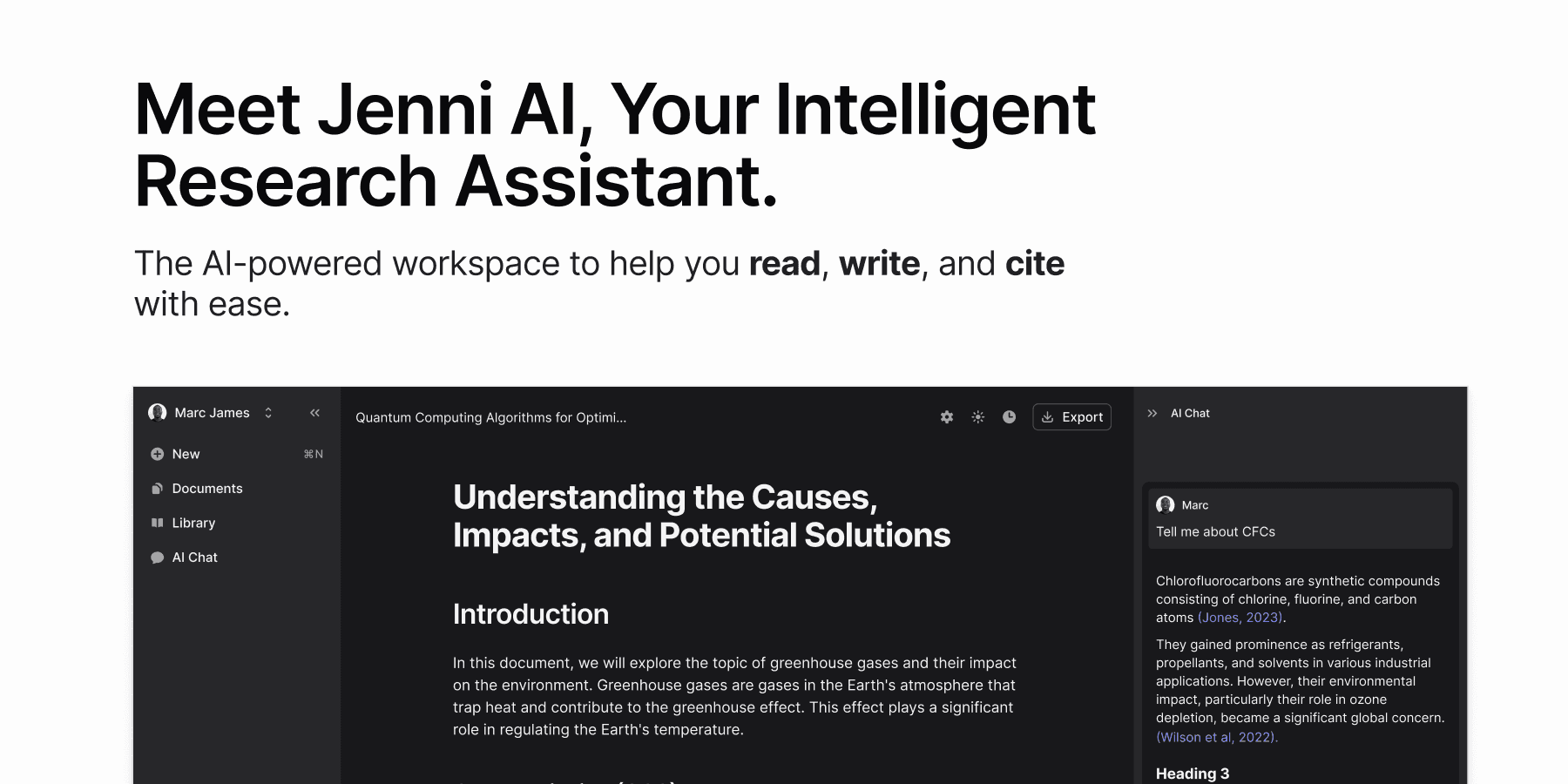



 All bots

 Registration details

 Identified technologies
User reviews (0)