
 简体中文
简体中文 English
Website review
This review may include AI-generated content and is not individually verified. Domain, certificate and other facts come from the observed data on this page.
What is Kanka?
Kanka is a web-based worldbuilding and campaign-management tool for tabletop role-playing games. It gives game masters, writers and worldbuilders one place to store the people, places, factions, timelines and maps that make up an invented world, with entries that link to each other instead of sitting in separate documents.
The core idea is connection. In Kanka, a session log can mention a character, and that mention links to the character's own entry; from there you can jump to their city, then to its ruler, then to the war that ruler started. That chain is what makes it useful mid-session, when a player asks something you did not prepare and you need an answer in seconds rather than a page-flip through notes.
What it covers
- Entries across 20+ categories — characters, locations, organizations, families, timelines and calendars, among others.
- Maps and timelines as first-class parts of the world rather than attachments.
- Session logs where names link automatically to their entries.
- Search across everything, available on any device.
- Collaboration — invite players and co-GMs, then set what each person can see and edit, so hidden material stays hidden until you reveal it.
- Customization — rename categories, restructure to match your system, or go deeper with custom CSS and community plugins.
Who it suits, and the trade-offs
| If you are… | Kanka is a good fit when… | Watch out for… |
|---|---|---|
| A GM running an ongoing campaign | You need fast lookup and linked notes during play | It organizes your world; it does not run rules or combat for you |
| A homebrew worldbuilder | Your world has many interlocking factions, places and timelines | A very small one-shot may not justify the setup |
| A writer | You want characters and settings cross-referenced | It is built around campaign play, not manuscript drafting |
| A group | Multiple people contribute and need different visibility | You must actually configure permissions, or secrets leak |
The free tier is described as the full product rather than a trial: all core features, unlimited campaigns and unlimited entries, with most GMs said never to need to pay. Premium exists for those who want more, but the free tier is the sensible starting point. Content can be exported at any time, so your world is not trapped in the tool.
Next step: create a free account and build one small test campaign — a town, three NPCs and a session log — then check whether the linking and search match how you actually run your table before moving your existing notes across. If you already use another tool for maps or rules reference, Kanka is designed to sit alongside them rather than replace them.
How does Kanka help game masters find information quickly during a live RPG session?
Kanka's answer to mid-session lookup is connected entries plus search. Rather than keeping notes in separate documents, you build characters, locations, organizations, families, timelines, calendars and maps as entries in one place, and entries link to each other automatically. The page's own example: @mention a character in a session log and the link is created, so one click takes you from a city to its ruler to the war they started. When a player asks something you didn't prepare, the intended path is a single search across the whole campaign, available on any device.
What that looks like at the table
Say the party arrives in a port city you sketched two months ago. Instead of flipping through a notebook, you open the city entry and follow its links: the harbor master, the smuggling guild, the festival on the calendar. If a player asks about a noble house you mentioned once, searching its name surfaces the entry and everything connected to it.
The practical payoff is that preparation turns into a navigable web rather than a pile of pages. The trade-off is front-loading: links only help if you've created and connected the entries beforehand. GMs who prep lightly may find search alone carries most of the weight, while heavy worldbuilders get more from the linking.
Who benefits most
- GMs running long campaigns with many recurring NPCs, factions and places, where remembering relationships is the hard part.
- Groups with co-GMs or players who need shared access; the page notes you can invite players and co-GMs and control exactly what each person sees and edits, keeping secrets hidden until reveal.
- Homebrew and non-D&D systems, since categories can be renamed and restructured, with custom CSS and community plugins for deeper changes.
- Writers and worldbuilders tracking a setting rather than a single session.
A sensible first step
Pick your current campaign and create entries for the five NPCs and three locations most likely to come up next session, then link them to each other. Run one session that way and judge whether lookup felt faster than your previous method. If you want to see how the tool is organized before committing, the site's own feature overview is the place to start: Kanka.
Can I invite my players and control what they see and edit in my Kanka campaign?
Yes. Kanka is built for shared campaigns: you can invite players and co-GMs, then set what each person can view and edit. The site describes role-based controls that let you keep GM-only material hidden until you choose to reveal it.
How this tends to work in practice
- Invite by campaign role. You add people to a campaign and assign them permissions rather than handing out one shared password.
- Separate players from co-GMs. Co-GMs typically get broader editing rights, while players see a curated view of the world.
- Hide secrets per entry. Notes, NPC motives, or future plot points can stay invisible to players until you make them public.
- Reveal mid-session. When the party finally meets the traitor, you flip visibility instead of rewriting anything.
A concrete scenario
You prep a city with a secretly corrupt mayor. You write the mayor's true allegiance in the entry, keep it hidden from players, and link the mayor to the city, the guild, and a war timeline. At the table, a player asks who funds the guild. You search the guild entry, follow the link to the mayor, and read the answer without exposing the secret. Later, when the reveal happens, you change the mayor's visibility so players can browse the entry themselves between sessions.
Trade-offs to weigh
Fine-grained permissions add setup work. On a small campaign with one group, the default player view may be enough. On a long-running game with guest players, rotating co-GMs, or a shared public wiki, spending twenty minutes mapping roles up front saves confusion later. Kanka's entry-linking also means permission mistakes travel: if a hidden entry is mentioned inside a visible one, check how that mention renders before you rely on it.
Next step
Open your campaign's settings, create a test player account, and view the campaign as that player before you invite anyone real. That single check tells you more about your permission setup than any documentation.
If you want to compare approaches, World Anvil World Anvil and Obsidian Publish Obsidian handle sharing differently, though neither is a like-for-like campaign manager.
Is Kanka free, and what do I get if I pay for premium?
Kanka is free in a meaningful sense: its free tier includes all core features, unlimited campaigns and unlimited entries, and the page states most game masters never need to pay. The free plan is not presented as a time-limited trial, so you can run a full campaign without a paywall stopping you. Premium is aimed at users who want extra capacity or convenience rather than at unlocking the basic worldbuilding toolset.
What premium appears to cover
The page signals that premium is tied to active premium campaigns, suggesting the paid unit is a campaign rather than merely a user account. The concrete premium feature details are not fully listed in the supplied evidence, so treat the exact limits as something to confirm on the pricing page before subscribing. The practical difference is likely to matter most to heavy users: many campaigns, very large worlds, or groups that want more room and advanced options. For a single homebrew campaign with a handful of players, the free tier is usually enough.
Who should consider paying
- Casual or first-time GMs: Free covers the core experience; start there and only upgrade when you actually hit a limit.
- Professional or high-volume GMs: If you run multiple active campaigns or maintain a very large linked world, premium is the natural next step.
- Worldbuilders who want to stay long-term: The free tier's unlimited entries make it low-risk to build your world first and decide on payment later.
A useful next step
Before paying, check the official pricing page at Kanka to see the current premium limits and what each tier includes. A good decision rule: if you are bumping into campaign or storage limits while actively running games, premium is worth it; if you are simply exploring, the free tier gives you the full core toolset with no lock-in, and you can export your content anytime.
How does Kanka connect characters, locations, and timelines so I can navigate between them?
Kanka's core idea is that entries link to each other rather than sitting in separate files. A character, a location, and a timeline event are all entries in the same campaign, and you connect them by mentioning or linking one from another. When you write a session log and @mention a character, the mention becomes a link, so a single click takes you from the log to that character's page, and from there to the city they rule or the war they started.
What actually links
- @mentions in text. Typing a mention of an existing entry inside a note, session log, or description creates a working link back to that entry.
- Entry relationships. Character pages can point to locations, organizations, families, and events; those pages can point back, so navigation works in both directions.
- Timelines and calendars. Events sit on a timeline or calendar, and each event can reference the characters and places involved, which is how you move from "what happened" to "who was there."
- Maps. Pins on a map connect to the location entries they mark, so you can go from a visual overview to the detail page.
- Search. Everything lives in one campaign, so a search for a name surfaces the entry and its connections, which matters most mid-session when a player asks something you did not prep.
A concrete scenario
You are running a session and a player asks who rules the port city they just arrived in. You search the city's name, open its entry, and follow the linked ruler, then follow that ruler's linked organization or the timeline event where they took power. No tab-switching between a notes app, a wiki, and a spreadsheet.
Trade-offs to weigh
Automatic linking only pays off if you name and link entries consistently; a campaign full of near-duplicate entries or unlinked prose is harder to navigate than a tidy folder of documents. The structure is also more database than document, so writers who think in long continuous prose may find it constraining at first. If your world is small and mostly narrative, a simple document may be enough. If it has many recurring people, places, and dates that you need to cross-reference live, linked entries earn their keep.
Next step
Pick one recurring element of your world, such as your starting town, and create it as a location entry. Then create two characters who live there and link them to it, and add one timeline event that involves all three. That small triangle shows you whether linked navigation fits how you run your game before you commit your whole world.
For alternatives with different linking models, World Anvil and Obsidian are worth comparing, though their approaches to automatic linking and campaign sharing differ from Kanka's.
Can I export my worldbuilding content from Kanka if I decide to leave?
Yes. Kanka states you can download your content at any time, and it frames this as "no lock-in, ever." The relevant promise on its site is that your world is yours and export is available whenever you want it.
What that means in practice
- You are not trapped by your world's data. If you build a campaign, then decide to move to another tool or just keep an offline archive, the exit path exists.
- Export is a data-rights feature, not a publishing feature. Downloading your content is about keeping a copy; it does not mean the export will look identical to Kanka's linked pages, timelines or maps.
- Format matters more than the button. Before you commit hundreds of entries, test an export of a small campaign and open the file in a plain text editor. Check whether your notes, relationships and custom categories survive in a form you can actually reuse.
A sensible test
Create one campaign with two linked entries, export it, and try to reconstruct those links elsewhere. If the result is readable and complete enough for your needs, you can build with confidence. If not, keep periodic manual backups of the entries you care most about.
For alternatives with their own export and portability stories, it is worth comparing Obsidian for local Markdown files and Notion for database-style campaign notes. The trade-off is that Kanka is purpose-built for TTRPG linking and session lookup, while general note tools usually require more setup to recreate that structure.
 Cloudflare
 Proton Mail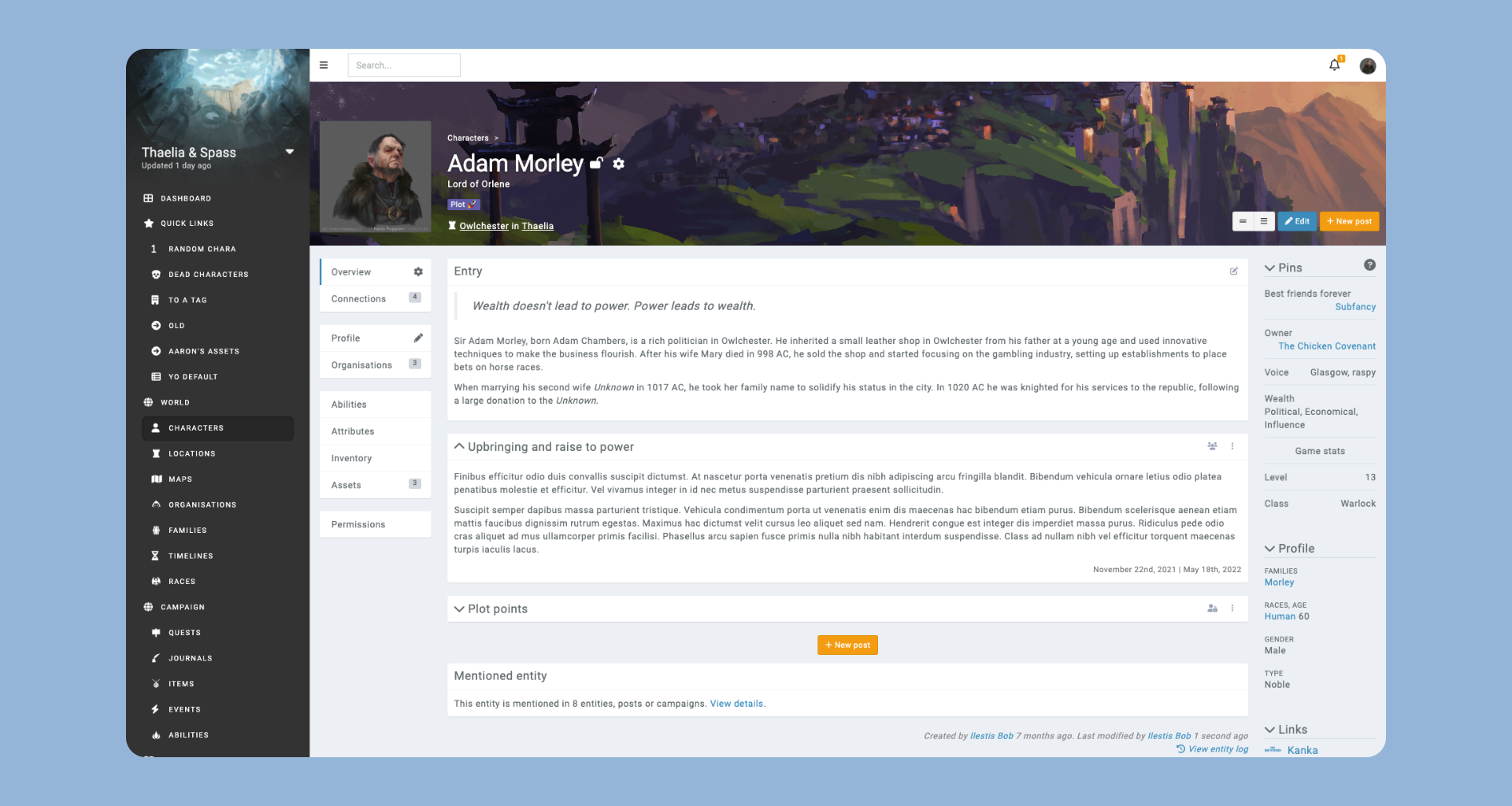
User reviews (0)