
 简体中文
简体中文 English
Website review
This review may include AI-generated content and is not individually verified. Domain, certificate and other facts come from the observed data on this page.
What is Keep Track of My Games?
Keep Track of My Games (KTOMG) is a web-based video game collection and backlog tracker. Its own framing is "like Goodreads for your games": a single place to catalog what you own, record what you're playing and have finished, and decide what to play next. It's aimed at people whose libraries are spread across several storefronts and platforms and have grown too large to manage in a spreadsheet.
What it actually does
- Syncs your libraries: imports games automatically from Steam, Xbox Live, PlayStation Network (PSN) and GOG, so you don't enter each title by hand.
- Catalogs physical and digital games: lists, tags and filters cover discs and cartridges as well as downloaded copies, which matters if part of your collection isn't tied to an account.
- Tracks status: games are sorted into "Want to Play," "Playing" and "Played," with outcomes such as Abandoned, Beaten or 100% Completed. Progress notes let you record where you left off.
- Prioritizes the backlog: ranked lists put the games you actually intend to finish in order, rather than leaving a flat pile.
- Watches releases: notifications by email or text for new releases, remakes and collector's editions — useful if you pre-order or collect physical editions.
- Keeps data portable: metadata comes from IGDB, and the site says you can export your data as CSV at any time. It also describes itself as privacy-first and ad-free.
H3. Who it suits, and the trade-offs The clearest fit is a multi-platform player with a backlog in the hundreds who wants one dashboard instead of four store libraries plus a notes app. The automatic sync removes the main reason people abandon tracking tools. The trade-offs are the usual ones for a hosted tracker: you're relying on an account and a service that isn't the platform holder, sync coverage depends on which services are supported, and the value of release alerts depends on whether you buy new games at launch. If you mainly play on one platform and your library is small, the built-in library view on that platform may be enough.
H3. How to decide Try it with one platform first: connect your largest library, check that the imports look right, and build a ranked "Want to Play" list of about ten games. If that list is more useful to you a week later than your current system, expand to the other services. Note that KTOMG is not the only option in this space — Backloggery is a long-running manual-entry alternative, and HowLongToBeat is often used alongside a tracker for time estimates.
How does Keep Track of My Games sync my games from Steam, Xbox, PlayStation, and GOG?
Keep Track of My Games (KTOMG) syncs your library by pulling in your game data directly from your linked platform accounts. Per the site, it "automatically syncs from" Steam, Xbox Live, PlayStation Network (PSN), and GOG, which means you connect each account once and the app imports what you own across those services into a single catalog. The stated purpose is consolidation: your games are scattered across multiple storefronts, and syncing brings them together so you can manage one collection instead of checking each platform separately.
What the sync feeds into, based on the page evidence:
- A unified catalog. Imported games sit alongside physical and digital titles you add manually, and you can organize everything with lists, tags, and filters.
- Ownership tracking across platforms. Because imports come from multiple services, you can see platform ownership in one place — the site frames this as a way to avoid double-buying.
- Progress and priority tools. Once games are in, you can track completion status, rank what to play next, and keep progress notes.
- Metadata enrichment. The app pulls game metadata from IGDB, so imported entries get consistent details.
If you want to try it, connect the platforms you actually buy from first — Steam and GOG are the simplest, while console accounts (Xbox Live, PSN) may require signing in through those services. Then check the imported list against your shelves for physical games the sync can't see, and add those manually.
How can I prioritize my backlog to decide what to play next?
Use a two-stage filter: first cut the backlog down to a realistic shortlist, then rank only that shortlist. Trying to rank hundreds of games at once is what makes the decision feel impossible.
Stage 1: Cut the list
- Filter by what you can actually play now: platform you have access to, time you have this week, and mood (long RPG vs. short indie).
- Split out games you're genuinely curious about from games you feel obligated to finish.
- Give yourself permission to mark things Abandoned. Keep Track of My Games builds this into its statuses — Beaten for main story only, 100% Completed for full completion — so "didn't spark joy" isn't a failure state.
- Remove duplicates across services first. If you own the same game on Steam and PlayStation, that's one decision, not two.
Stage 2: Rank the survivors
A simple ranked list of five to ten games beats a scored spreadsheet. Order by what you'd genuinely start tonight, not by release date or prestige.
Then work one at a time. Keep a single "Playing" slot so you don't fragment attention, and use progress notes to remember where you left off when you switch platforms.
A concrete scenario
Suppose you have eight hours this week and a backlog spanning Steam, PSN, and physical discs. Filter to games under ten hours that you already own on a platform you can access. That might leave four titles. Rank them by curiosity, start the top one, and leave the rest in a Want to Play list. Next week, re-filter rather than re-ranking everything.
Where a tracker helps
Keep Track of My Games is aimed at exactly this problem: it syncs libraries from Steam, Xbox Live, PSN, and GOG, then lets you use lists, tags, and filters to organize physical and digital games together. Ranked lists and completion statuses map directly onto the two-stage approach above, and release-date notifications are useful for deciding whether to wait on a new purchase rather than adding to the pile.
The trade-off is that any tracker only reflects the effort you put into it. If you won't maintain statuses and tags, a plain ranked list in a notes app will do the same job with less overhead.
Decision criterion
If your backlog is spread across three or more services and you've lost track of what you own, a syncing tracker earns its place. If everything is on one platform and you have fewer than twenty games, skip the tooling and just rank five titles by hand.
Can I get notified about upcoming game releases and pre-orders?
Yes. Keep Track of My Games lists release notifications as a core feature: you can get alerts by phone notification, text or email for new releases, remakes and collector's editions, so you can pre-order in time.
What that looks like in practice:
- Release-date tracking – games you add show their release dates, and you can opt into alerts for the ones you care about.
- Release types covered – new games, remakes and collector's editions, not just brand-new titles.
- Delivery channels – push notification on your phone, or text/email, so you don't have to keep checking store pages.
- Wishlist tie-in – a wishlist gives the alerts somewhere to live, and it doubles as a "what to buy next" list.
A concrete scenario: you add a delayed collector's edition to your wishlist, get a text when the date is confirmed, and pre-order that day instead of finding out a week later when stock is gone.
Next step: create a free account, sync or add the games you're waiting on, and put them on your wishlist — then turn on notifications for the channel you actually check. If you mainly want release news rather than collection tracking, a dedicated calendar or store wishlist may be simpler; KTOMG's advantage is combining release alerts with backlog and completion tracking in one place.
For comparison, Backloggd and HowLongToBeat are other game-tracking options, though notification features differ between them.
How do I track my completion progress and playthroughs across different platforms?
Use Keep Track of My Games to keep one completion record per game, even when that game exists on several platforms. The app is built for exactly this: it syncs libraries from Steam, Xbox Live, PlayStation Network (PSN), and GOG, and it tracks playthroughs and completion status alongside your collection. The practical idea is to treat the game as the unit you track, and the platform as an attribute of it, rather than maintaining separate lists per store.
How the tracking works in practice
KTOMG gives you status buckets that match how most people actually finish games: Want to Play, Playing, Played, and within "Played" you can mark Abandoned, Beaten, or 100% Completed. You can also create ranked lists, use custom tags and filters, and save progress notes.
For cross-platform tracking, the useful pattern is:
- One entry per game. Add a game once, then record which platforms you own it on. This avoids the double-buying problem the site calls out, and it means your completion status isn't split between a Steam copy and a console copy.
- Use status for where you are, notes for where you left off. If you drop a game on PC and pick it up on console, the status stays the same; the progress note is where you record the chapter, save point, or build.
- Use tags for platform or context. Tags and filters let you slice your library by platform, genre, or mood without duplicating entries.
- Use ranked lists for priority, not for progress. Ranked lists answer "what should I play next"; completion status answers "what have I finished."
A concrete scenario
Say you own Darkest Dungeon on both Steam and a console. You sync Steam, add the console ownership manually, and set the game to Playing. You finish the main story on PC but keep a console run going for the extra content. You mark it Beaten, keep the note "console run at 60%," and leave it in a "revisit" list. Nothing is lost, and you never accidentally buy it a third time.
Choosing whether this fits you
| Your situation | KTOMG's approach fits if… |
|---|---|
| Games spread across Steam, Xbox, PSN, GOG | You want one synced library instead of four |
| Large backlog, many unfinished games | You need status plus ranked lists to decide what's next |
| Completionist habits | You want Abandoned / Beaten / 100% distinctions |
| Spreadsheet user | You want CSV export and bulk editing without losing data |
If you only play on one platform and rarely finish games, a simple platform-native list may be enough; the value here comes from consolidation and status tracking across services.
Next step
Sign up free (the site says no credit card is required), connect one service first, and set statuses on ten games you're actively playing. That small batch will tell you quickly whether the cross-platform model matches how you actually play. If you want a comparison point for cataloging habits, Goodreads is the reference the site itself uses, though it's for books rather than games.
How does Keep Track of My Games help me avoid buying games I already own?
It reduces duplicate purchases by giving you one searchable, synced inventory of everything you own, across platforms, before you buy. The core feature is automatic syncing from Steam, Xbox Live, PlayStation Network (PSN) and GOG, so your digital libraries land in one place instead of living in separate store apps. For physical discs and other titles those services can't see, you add them manually and organize them with lists, tags and filters. The practical effect: when a sale or a physical copy tempts you, you search your own catalog first rather than trying to remember whether that copy is on your shelf or buried in an old account.
The site also frames the same catalog as a way to track platform ownership, which matters for the specific case of owning a game on one system and nearly re-buying it on another — a common trap with remasters and cross-generation releases. Release-date notifications and a wishlist cover the opposite problem: they help you buy deliberately rather than on impulse.
A realistic scenario
You see a remaster on sale for a platform you don't associate with that series. You open your catalog, filter by title or tag, and find you already own the original on GOG plus a physical copy you'd logged manually. You skip the purchase. If nothing comes up, you add it to the wishlist and set a release notification instead of buying on the spot.
Where the approach has limits
- Sync only covers the four named services, so console discs, older systems, Epic, Nintendo and similar libraries depend on manual entry — and manual entry only works if you keep it up.
- Metadata comes from IGDB, so oddball or regional releases may need cleanup to be findable later.
- Duplicate-avoidance is only as good as your search habits; a messy, untagged catalog is easy to ignore.
Who benefits most
The site is explicitly aimed at "ridiculously large libraries," so the payoff scales with collection size. If you own a few dozen games on one platform, your store's own library page is probably enough. If you own hundreds across Steam, Xbox, PlayStation and GOG, a single synced catalog is the difference between a quick check and a guess.
Next step
Before your next sale purchase, spend one session importing from all four services, then manually add your physical and unsupported-platform games and tag them by system. That first pass is the whole value of the tool; after that, checking it takes seconds. If you want a broader reading-style tracker for comparison, Backloggery and HowLongToBeat serve related but different purposes.
 Cloudflare
 Mailgun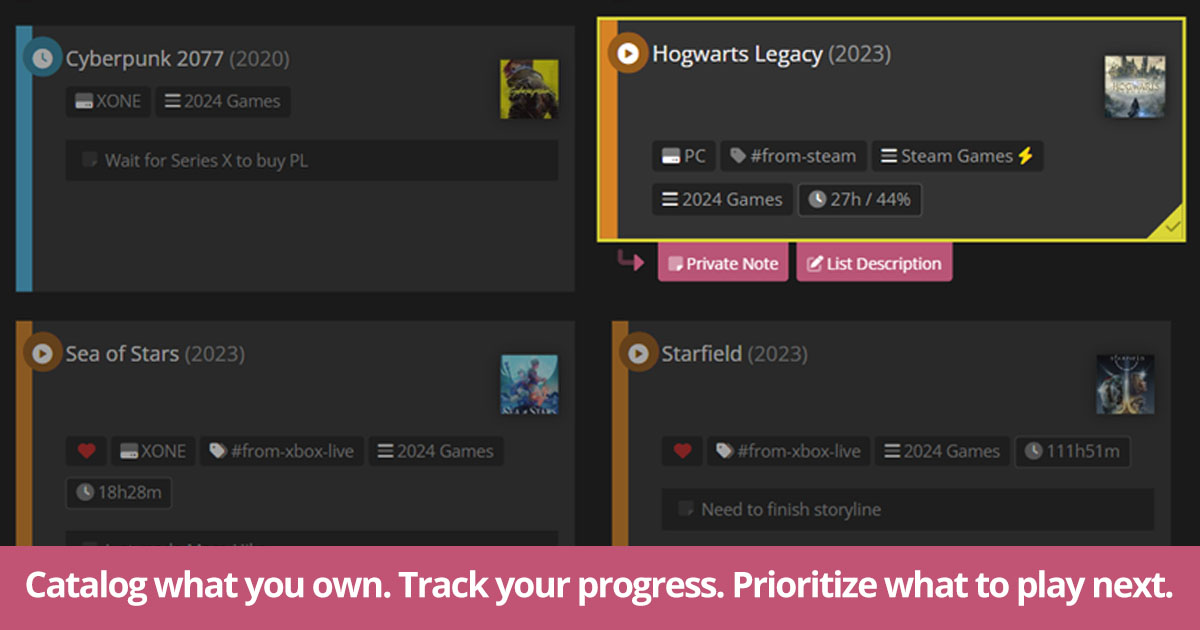
User reviews (0)