Website profiles · Technology insights · Alternatives

levity.ai

Levity is the hub for building and scaling AI automations, designed for complex logistics workflows.

No paid content found Multilingual
Visit website
Profile views 2 Outbound visits 0 Normal
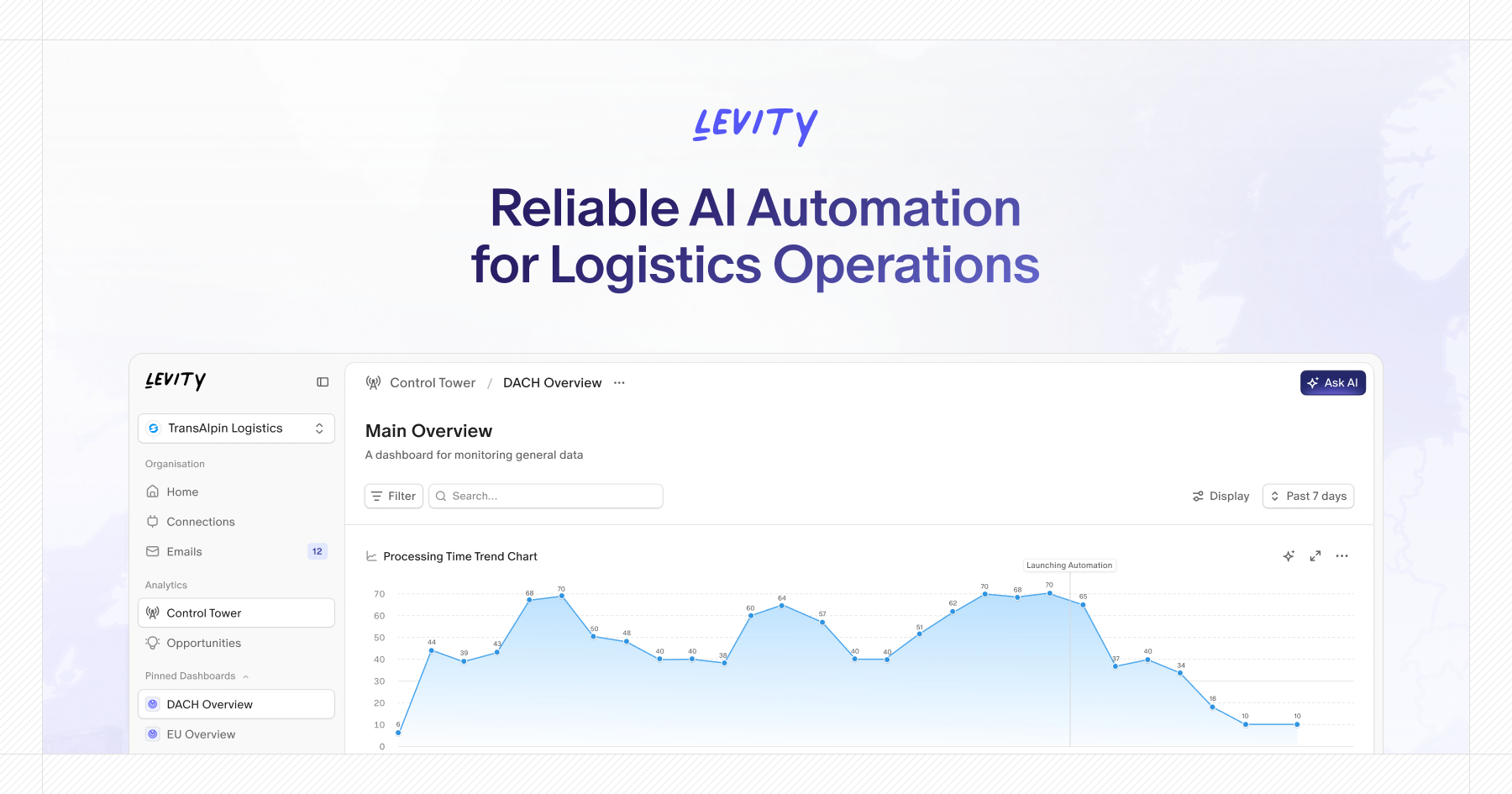
Levity Full homepage screenshot

At a glance

Category
Artificial Intelligence
Language
English
Paid-content signal
No paid content foundObserved
Registered
2020
Hosting
CloudflareInferred
HTTPS certificate trusted
PassedObserved
Last updated

Website review

This review may include AI-generated content and is not individually verified. Domain, certificate and other facts come from the observed data on this page.

What is Levity?

Levity is an AI automation platform for logistics and supply chain operations. Its central claim is that it doesn't just add AI on top of existing processes — it analyzes communication patterns first, then redesigns workflows so humans and AI run them together. The product is built around three stages, as described on its site: Analyze, Build, and Scale.

What it actually does

  • Analyze: Levity's Control Tower and Analytics dashboards monitor email traffic at scale. The page shows examples like daily incoming email volumes, emails processed over 30 days, and categorization by type — Track and Trace, Booking, Pricing & Quoting, Damage Claims, Customs, and General Inquiry. It also separates internal from external email.
  • Find opportunities: It identifies repetitive requests, handoffs, and bottlenecks across large email volumes, so teams can prioritize which workflows are worth automating.
  • Build: High-impact workflows are turned into production-grade AI automations.
  • Scale and govern: Visibility, human oversight, and continuous feedback loops are used to improve and expand automations over time.

There is also an "Ask AI" feature that lets users query operational data in natural language.

Who it's for

The obvious audience is operations, customer service, and digital transformation teams at logistics companies — freight forwarders, carriers, and supply chain organizations handling high volumes of email-based communication. The page references TransAlpin Logistics and a quote from Kevin Mangold Arias, Head of Corporate Digital Services, about uncovering clarity in areas the company previously couldn't measure.

Practical trade-off

The value proposition depends on email being a major communication channel. If a logistics operation runs mostly on EDI, APIs, or a TMS with structured data, the analysis layer has less to work with. If a large share of bookings, quotes, and track-and-trace requests arrive as unstructured email, the potential is much higher — but so is the upfront work of categorizing and validating those workflows before automation can be trusted.

Next step: Before scheduling a demo, count roughly how many operational emails your team handles per day and how many fall into repeatable categories. That number tells you quickly whether a communication-intelligence approach fits your operation.

How does Levity identify which logistics emails or workflows are worth automating?

Levity's approach is to start with measurement rather than assumption: you connect your operational inboxes, and its Control Tower dashboards surface what's actually arriving and repeating. The page shows incoming email volume over time, a breakdown by category (track and trace, booking, pricing and quoting, damage claims, customs, general inquiry), shipment-status subtypes (ETA updates, POD requests, exceptions), and an internal-versus-external split. From that picture, the platform flags automation opportunities — repetitive requests, handoffs, and bottlenecks — and lets you prioritise them by impact. You can also query the underlying operational data in natural language to explore a hypothesis before committing to a build.

What the signals actually tell you

  • Volume plus repetition points to work that pays back quickly: a category that arrives in the tens of thousands monthly and follows the same pattern is a stronger candidate than a rare, high-variance request.
  • Handoffs reveal friction between teams or systems, where an automation can remove a queue rather than just a click.
  • Bottlenecks show where incoming work outpaces the people processing it — useful for choosing what to automate first rather than what is easiest.
  • Internal versus external share matters for risk: customer-facing replies usually need tighter human review than internal routing.

A practical way to decide

Take one category, such as ETA updates. Check its monthly volume, how uniform the requests are, and what a correct response looks like. If the answer is largely templated and the data needed already lives in your TMS or tracking systems, it's a good first candidate. If each case requires judgement across several systems, start with drafting and human approval instead of full automation.

Levity's own framing is to redesign the work so humans and AI run it together, with visibility, human oversight and feedback built in — so the first automation doesn't have to be fully autonomous to be worth doing.

Where to look next

If your operation spans multiple regions or business units, compare dashboards across them before picking a pilot; a workflow that is noisy in one market may be trivial in another. For a broader view of how logistics teams approach this, see Levity.

Can Levity integrate with existing logistics tools like email systems or TMS platforms?

Yes. Levity is built around connecting into the tools logistics teams already use, and its page evidence explicitly lists email connections and a Control Tower that monitors inbox activity. The product is positioned as “Communication Intelligence for the global supply chain,” so email is not just a notification channel; it is a primary data source for analysis and automation.

What the integration picture looks like

  • Email systems: Levity connects to inboxes and processes high volumes of messages. The page shows dashboards tracking incoming emails, categories such as Track and Trace, Booking, Pricing & Quoting, Damage Claims, Customs, and General Inquiry, plus shipment status items like ETA updates, POD requests, and exceptions.
  • TMS and operational platforms: The page says Levity can be connected “seamlessly into your everyday tools,” but it does not name specific TMS vendors or list individual connectors in the supplied evidence. Treat TMS integration as a stated capability rather than a confirmed out-of-the-box connector list.
  • Dashboards and analytics: The Control Tower and Analytics views are part of the same environment, so integration is not only about moving data in and out. It is also about measuring automation impact, spotting repetitive requests, and finding bottlenecks across millions of emails.

A practical way to judge fit

If your team runs on a TMS plus shared inboxes, the useful question is not simply “does it integrate?” but “which workflows can it read, decide and act on?” For example, a Track and Trace request arriving by email may need shipment status from a TMS, a reply to the customer, and an internal exception handoff. Levity’s page evidence supports the email analysis and automation side of that flow, and describes human oversight and continuous feedback for governance. The TMS side depends on the specific connection available during implementation.

For a concrete next step, list your top three email-driven workflows and the systems each one touches. Then ask Levity which of those systems it connects to natively, which require an API or middleware, and what the human review step looks like before an automation replies or updates a record. That will tell you more than a general connector count.

How does Levity ensure AI automations remain reliable and accurate in production?

Levity's answer to reliability is operational rather than purely technical: it treats accuracy as something you monitor and correct continuously, not something you certify once at launch. On its own site, the product is framed as a "Control Tower" for logistics communication, with governance, human oversight and feedback loops named as the way automations are improved and scaled.

The reliability mechanisms it describes

  • Analytics before automation. Levity's "Analyze" stage surfaces repetitive requests, handoffs and bottlenecks across large volumes of email, so you decide what to automate based on measured patterns rather than guesswork. Its example dashboards break traffic down by category (track and trace, booking, pricing and quoting, damage claims, customs, general inquiry) and by shipment status (ETA updates, POD requests, exceptions).
  • Production-grade workflows. The "Build" stage is explicitly about turning high-impact workflows into automations that run reliably in production, as opposed to prototypes or side experiments.
  • Governance and human oversight. The "Scale" stage covers visibility, human review and continuous feedback, which is how corrections get fed back into the system over time.
  • Native fit with existing tools. Levity positions itself as connecting into the tools teams already use, which reduces the failure modes that come from moving work into a separate silo.

Where the trade-off sits

Human-in-the-loop review is what makes accuracy defensible in high-stakes logistics tasks such as customs or damage claims, but it also caps throughput: someone still has to check the edge cases. The practical question is not "is the AI always right" but "which categories are safe to run straight through, and which need a reviewer." Levity's category and exception breakdowns are the natural place to draw that line.

A concrete way to test this

Take one high-volume, low-ambiguity category, such as ETA updates or POD requests, and run it for a month with review on every output. Compare the reviewer's corrections against the category dashboard, then loosen oversight only on the sub-types that stayed clean. Keep exceptions, customs and claims under review until the correction rate is low and stable.

For context on how this compares with other approaches to document and email automation, see UiPath for broader RPA-style orchestration and Zapier for lighter tool-to-tool connections.

What types of logistics email requests can Levity automate, such as track and trace or booking?

Levity is aimed at logistics inboxes where the same request types arrive repeatedly and are handled by hand. On the page, the email categories it highlights are Track and Trace, Booking, Pricing & Quoting, Damage Claims, Customs, and General Inquiry, with shipment-related subtypes such as Shipment Status, ETA Updates, POD Requests, and Exceptions. So yes, track and trace and booking are both in scope, alongside quoting, claims and customs work.

What that means in practice

A freight forwarder's shared inbox typically mixes several of these in one thread. Levity's pitch is to first analyse historical email to see which categories dominate and where handoffs stall, then build automations for the highest-impact ones. The Control Tower view is where that monitoring and human oversight sits.

Practical examples mapped to the categories above:

  • Track and trace: status requests, ETA updates, proof-of-delivery requests, exception notifications.
  • Booking: new booking requests and confirmations routed to the right team or system.
  • Pricing & quoting: rate requests that need standard responses versus those needing a human quote.
  • Damage claims and customs: structured intake that collects the missing details before a person takes over.

How to choose where to start

Pick the category that is both high-volume and low-variation. Track and trace and POD requests usually fit because the answer is largely a data lookup; damage claims and customs often need judgement, so they suit assisted rather than fully automated handling. Use the analytics view to confirm volume per category before committing.

If you want to compare approaches, established logistics email tools include Shippeo for visibility data and UiPath for broader process automation; the trade-off is that Levity is positioned specifically around communication-heavy supply chain workflows rather than general RPA.

How does Levity provide human oversight and continuous improvement for AI automations?

Levity treats human oversight as part of the workflow rather than a separate review queue. Its Control Tower is described as a way to "govern, improve, and scale AI automations through visibility, human oversight, and continuous feedback" — so the same place where you monitor automation impact is also where you inspect and correct it.

What that looks like in practice

  • Visibility first. Control Tower dashboards track incoming email volume and how it breaks down by category (track and trace, booking, pricing and quoting, damage claims, customs, general inquiry) and by shipment status (ETA updates, POD requests, exceptions). You can see what the AI handled and where exceptions cluster before deciding what to change.
  • Human oversight at the point of uncertainty. The page pairs automation with human oversight as a stated capability, which in a logistics inbox typically means routing low-confidence or unusual cases to a person rather than letting them fail silently.
  • Continuous feedback. Feedback from those reviews is meant to feed back into the automations, so recurring corrections become improvements instead of one-off fixes.
  • Ask AI for investigation. A natural-language query layer lets an operations lead ask questions about the data — useful when a spike in exceptions needs a cause, not just a number.

Where this matters most

Consider a freight forwarder handling a few hundred thousand emails a month. Track-and-trace requests are highly repetitive and safe to automate; damage claims and customs exceptions carry financial and compliance risk. A sensible split is to let the AI run the repetitive categories end to end, while damage claims get a mandatory human check before any reply goes out. Control Tower then tells you whether that check is catching real problems or just adding delay.

Decision criterion

If your team can't say which email categories are growing, which are handled automatically, and who reviews the exceptions, oversight is theoretical. Start by measuring those three things for one month, then automate only the categories where you can already describe the correct human response.

For a broader view of AI in logistics operations, Levity describes its own approach on its site.

Related questions

More questions →
What kinds of logistics workflows can Levity automate?

Levity targets high-volume, email-driven logistics communication — the kind of work where thousands of repetitive requests flow through shared inboxes every day. Based on its own product materials, the platform is built around a set of named email categories: Track and Trace, Booking, Pricing & Quoting, Damage Claims, Customs, and General Inquiry, with shipment-specific scenarios including Shipment Status, ETA Updates, POD Requests, and Exceptions. If your operation handles these request types at scale, Levity is designed for that shape of work. If your workflows are low-volume or not email-centric, the fit is weaker.

The workflow categories Levity names

Levity's dashboard groups incoming email into categories, which gives a concrete picture of what it expects to process:

Category Typical logistics task
Track and Trace Locating shipments, answering "where is my cargo"
Booking New shipment bookings and confirmations
Pricing & Quoting Rate requests and quote responses
Damage Claims Reporting and processing damaged cargo
Customs Documentation and clearance questions
General Inquiry Everything that doesn't fit a defined bucket

A second layer of categories covers shipment-level events: Shipment Status, ETA Updates, POD Requests, and Exceptions. These are the recurring touchpoints where a customer, carrier, or partner needs a status answer or a document.

Why these categories are the automation target

The common thread is repetition with variation. A Track and Trace email and an ETA update request look similar but differ in shipment reference, language, and urgency. Levity's stated approach is to find "repetitive requests, handoffs, and bottlenecks at scale" — meaning it first measures which categories dominate your inbox, then turns the highest-impact ones into automations.

The scale in Levity's own example is large: a dashboard showing 8,240,312 emails processed in 30 days, with daily incoming volume charted in the hundreds of thousands. That's the regime the product is built for — global supply chain operations where manual triage doesn't scale.

How the workflow actually runs

Levity describes three stages, and each maps to a different kind of work:

  1. Analyze — Connect inboxes and let the system categorize incoming email. The Control Tower dashboard shows volume by category, internal vs. external split, and trends over time. You can also "chat with your data" in natural language to explore operational patterns.
  2. Build — Turn the high-impact categories into production automations. This is where a Track and Trace or POD Request workflow becomes something the system handles rather than a person.
  3. Scale — Govern and improve automations through visibility, human oversight, and continuous feedback. The point is that humans stay in the loop for exceptions and quality control.

Where Levity fits — and where it doesn't

Levity is a reasonable fit when:

  • Your logistics communication runs primarily through email at high volume
  • Requests fall into recurring categories rather than one-off projects
  • You have shared inboxes with handoffs between teams or regions
  • You need visibility into what's actually arriving before automating it

It's a weaker fit when:

  • Volume is low enough that manual handling isn't a bottleneck
  • Workflows aren't email-driven (e.g., pure API or EDI integration without a communication layer)
  • Requests are highly bespoke with little repetition

A practical way to decide

Before committing, the useful test is whether you can name your top three email categories and roughly how many arrive per day. Levity's own framing — "don't bolt AI onto chaos" — suggests the first value is measurement: seeing which categories dominate and where handoffs stall. If you can't yet describe your inbox in those terms, the Analyze stage is where you'd start. If you already know your Track and Trace or POD Request volume is in the thousands per day, that's the workflow to automate first.

How to Get Started with Levity

Levity is a communication intelligence platform for logistics operations, and the site's own call to action is Schedule demo — that is the documented entry point for getting started. The page also offers Read case study links and Learn more links for its analytics features, so you can evaluate the platform before committing to a conversation. Everything below is drawn from what the site actually shows; pricing and sign-up terms are not stated on the page, so treat them as unknown until you ask.

What you can do before scheduling a demo

The homepage is structured around three stages — Analyze, Build, and Scale — and each stage has material you can review on your own.

1. Read the customer case studies

The page includes Read case study links, including one from TransAlpin Logistics Organisation. A quoted customer, Kevin Mangold Arias (Head of Corporate Digital Services), describes uncovering "clarity in areas we previously couldn't measure" and unlocking automation "where we never thought it was possible."

Use these to judge fit: if your operation resembles a global logistics organization with high email volume, the case material is the most concrete evidence available on the page.

2. Explore the Analyze capabilities

The Analyze section describes discovering automation potential "across millions of emails by spotting repetitive requests, handoffs, and bottlenecks at scale." Three Learn more links sit under it:

Feature What the page says it does
Analyze your Inboxes Track operational performance and automation impact in real time
Chat with your Data Ask questions and explore operational data using natural language
Find Automation Opportunities Identify and prioritize high-impact workflows worth automating

These are the features to ask about first if your goal is understanding where automation would pay off.

3. Understand what the Control Tower shows

The product screenshots on the page depict a Control Tower interface with a Main Overview dashboard. Visible elements include:

  • Incoming Emails (Daily) — a line chart with a selectable window (1, 7, 14, 21, 28 days)
  • Emails processed last 30 days — shown as 8,240,312 emails in the example
  • Emails by Category — a donut chart breaking down Track and Trace, Booking, Pricing & Quoting, Damage Claims, Customs, and General Inquiry
  • Shipment Status — ETA Updates, POD Requests, Exceptions
  • Internal vs. External Emails — a monthly stacked view
  • Ask AI — a natural-language search box

If those categories match the email traffic your team handles, the dashboard is a reasonable preview of what you would be monitoring.

What happens after the demo

The Build stage is described as turning "high-impact workflows into production-grade AI," and the Scale stage covers governing and improving automations "through visibility, human oversight, and continuous feedback." The page also states Levity connects "seamlessly into your everyday tools," though it does not name specific integrations — ask for the integration list during the demo.

A useful way to prepare: bring a sample of your own inbox categories and volumes. The page's framing is "Don't bolt AI onto chaos. Rewire your operations," which signals that Levity positions itself as a redesign of the workflow rather than a tool layered on top of existing processes. Expect the conversation to focus on which workflows to rewire first.

Common sticking points

  • No self-serve signup is shown. The only documented entry point is Schedule demo, so plan for a sales conversation rather than immediate hands-on access.
  • Pricing is not published. The page contains no pricing signals, so cost and contract terms are open questions.
  • Integration specifics are vague. "Connect Levity seamlessly into your everyday tools" is the extent of what the page says; verify your actual stack during evaluation.
  • The metrics shown are illustrative. Figures like 8,240,312 emails are dashboard examples, not benchmarks for your operation.
How Levity builds and governs reliable AI automations

Levity builds reliability by treating automation as a redesign of work rather than an add-on: it first finds high-impact workflows in real inbox data, then turns them into production-grade AI that runs with visibility, human oversight, and continuous feedback. This approach fits teams running high-volume, complex communication workflows — the site positions it for global supply chain and logistics operations — where errors are costly and volume makes manual review impractical. If your workflows are low-volume or purely internal, the governance layer described here is more than you need.

The reliability model: analyze, build, then govern

Levity's own framing is a three-stage loop — Analyze, Build, Scale — with governance running across all three rather than bolted on at the end. The site's headline makes the intent explicit: "Don't bolt AI onto chaos. Rewire your operations."

Analyze: find workflows worth automating

Before anything is automated, Levity surfaces where automation actually pays off. Per the site, Control Tower lets you "discover automation potential across millions of emails by spotting repetitive requests, handoffs, and bottlenecks at scale."

The concrete capabilities listed:

  • Analyze your inboxes — "Track operational performance and automation impact in real time."
  • Chat with your data — "Ask questions and explore operational data using natural language."
  • Find automation opportunities — "Identify and prioritize high-impact workflows worth automating."

The dashboard evidence shows what this looks like in practice: incoming email volume tracked daily, emails processed over a rolling 30-day window (8,240,312 in the example shown), and a breakdown by category — Track and Trace, Booking, Pricing & Quoting, Damage Claims, Customs, General Inquiry — plus a shipment-status split (ETA Updates, POD Requests, Exceptions) and an internal vs. external ratio.

Why this matters for reliability: you can only govern what you can measure. Categorizing and counting requests before automating establishes the baseline that later proves whether an automation is working or drifting.

Build: turn workflows into production-grade AI

The Build stage is described as: "Build and run automations reliably by turning high-impact workflows into production-grade AI." The emphasis on production-grade is the reliability claim — the output is meant to run in live operations, not as a pilot.

Scale: govern, improve, and extend

The Scale stage is where governance lives: "Govern, improve, and scale AI automations through visibility, human oversight, and continuous feedback." Three mechanisms are named, and each addresses a different failure mode:

Mechanism What it addresses
Visibility You can see what automations are doing and how they perform
Human oversight A person can intervene when the AI is uncertain or wrong
Continuous feedback Errors and edge cases feed back into improvement

Connecting into existing tools

Reliability also depends on where the automation runs. Levity states it will "connect seamlessly into your everyday tools," so automations operate inside the systems teams already use rather than in a separate console. The site does not list specific integrations in the available material, so treat the exact connector set as something to confirm during a demo.

What the evidence supports — and what to verify

Supported by the site:

  • A three-stage model (Analyze, Build, Scale) with governance across it
  • Inbox analytics, natural-language querying of operational data, and opportunity identification
  • Categorization of logistics email types (Track and Trace, Booking, Pricing & Quoting, Damage Claims, Customs, General Inquiry)
  • Visibility, human oversight, and continuous feedback as the governance pillars
  • Seamless connection into everyday tools (specific tools not enumerated)
  • A stated focus on global supply chain / logistics communication

Not specified in the available material — ask directly:

  • Pricing and any plan or login restrictions
  • The full list of supported integrations
  • Accuracy thresholds, SLAs, or how "production-grade" is measured
  • Deployment model and data-handling terms

A practical way to evaluate it

If you are assessing Levity for a high-volume inbox, use the Analyze stage as your own test:

  1. Bring a real inbox sample. The value of the analytics stage depends on your actual email mix, not a demo dataset.
  2. Check the category breakdown against your own taxonomy. The example categories are logistics-specific; confirm they map to how your team actually routes work.
  3. Ask how a wrong automation is caught. The governance answer should name the visibility surface, the human review step, and how feedback changes the automation.
  4. Confirm the integration path for the tools your team already runs in.

The core idea worth taking away: reliability in this model comes from measuring before automating, keeping a human in the loop, and feeding outcomes back — not from the AI model alone.

What Is Levity and What Does It Do?

Levity is an AI automation platform built for logistics and supply chain operations. Its core promise is stated plainly on its homepage: "Don't bolt AI onto chaos. Rewire your operations." Rather than adding AI as another tool on top of existing processes, Levity positions itself as Communication Intelligence for the global supply chain — a system for analyzing high-volume operational communication (primarily email), finding repetitive patterns, and turning those patterns into production-grade AI automations that humans and AI run together.

If your team handles large volumes of inbound operational email — bookings, tracking requests, quotes, claims, customs questions — Levity is designed for that scenario. If your workflows aren't email- or communication-heavy, the fit is less obvious.

The problem Levity addresses

Logistics operations generate enormous volumes of unstructured communication. The homepage dashboard shows a representative scale: 8,240,312 emails processed in 30 days, with categories including Track and Trace, Booking, Pricing & Quoting, Damage Claims, Customs, and General Inquiry. Within those, subcategories like Shipment Status, ETA Updates, POD Requests, and Exceptions appear.

At that volume, manual triage breaks down. Requests get handed off repeatedly, bottlenecks form, and no one can measure where the work actually goes. Levity's framing is that the bottleneck isn't a lack of AI capability — it's that the underlying work was never redesigned to be shared between humans and AI.

How Levity works: three stages

Levity organizes its product around three stages, each with a distinct purpose.

Analyze — find automation potential

This stage surfaces what's actually happening across millions of emails. It includes:

  • Analytics / Control Tower — dashboards monitoring general email data, including incoming email volume over time, emails by category, and internal vs. external email splits.
  • Track your Inboxes — real-time visibility into operational performance and automation impact.
  • Chat with your Data — ask questions and explore operational data using natural language.
  • Find Automation Opportunities — identify and prioritize high-impact workflows worth automating.

The stated goal is to spot repetitive requests, handoffs, and bottlenecks at scale — including in areas the organization previously couldn't measure.

Build — turn workflows into production AI

Once opportunities are identified, Levity builds and runs automations by turning high-impact workflows into production-grade AI. The emphasis here is on reliability, not just prototyping.

Scale — govern and improve over time

The third stage covers governance: visibility into running automations, human oversight, and continuous feedback loops so automations improve rather than drift.

What makes Levity's approach distinctive

Two things stand out from the homepage positioning.

Redesign over replacement. Levity explicitly rejects treating AI "like another hire." The stated approach is to redesign the work so humans and AI can run it together. This matters for teams that have tried bolting a generic AI tool onto existing processes and found it created more chaos than it removed.

Integration into existing tools. Levity states it connects "seamlessly into your everyday tools," rather than requiring teams to work inside a separate system.

Evidence from a customer

The homepage includes a quote from Kevin Mangold Arias, Head of Corporate Digital Services, describing that Levity "helps us uncover clarity in areas we previously couldn't measure and unlock automation where we never thought it was possible," adding that the team "understands the complexity of a global organization."

That's a vendor-published testimonial, so treat it as directional rather than independent verification — but it aligns with the Analyze-stage value proposition: measurement first, automation second.

Who should consider Levity

Levity is likely a fit if:

  • You operate in logistics, freight, or global supply chain and handle high volumes of operational email.
  • You have repetitive request types (tracking, booking, quoting, claims, customs) that consume staff time.
  • You need visibility into communication patterns before deciding what to automate.
  • You want human-in-the-loop automation rather than full replacement.

It's likely a weaker fit if your operational communication is low-volume, already well-structured, or not email-centric.

Getting started

The homepage offers a Schedule demo entry point rather than self-serve signup, which suggests an implementation-led onboarding. Pricing is not published on the page, so cost and access terms would need to be confirmed directly with Levity.

How Levity Helps Identify Automation Opportunities in Email Inboxes

Levity identifies automation opportunities by analyzing your email inboxes at scale, then surfacing the repetitive requests, handoffs, and bottlenecks worth automating. Its Control Tower and Analytics dashboards turn millions of emails into measurable categories and trends, and an Ask AI feature lets you query that operational data in natural language. This is aimed at teams running high-volume, complex logistics communication — for example, track-and-trace, booking, pricing, and customs requests — where manual triage hides where automation would pay off.

The problem it targets

In logistics operations, automation potential is usually invisible. Requests arrive as unstructured emails, get forwarded between people, and stall at handoffs. Levity's stated approach is to not "bolt AI onto chaos" but to first measure the work, then redesign it so humans and AI run it together. The identification step is what makes that possible: you can't prioritize a workflow you can't see.

How the discovery process works

1. Analyze inboxes at scale

Levity's Analytics layer is described as discovering automation potential "across millions of emails by spotting repetitive requests, handoffs, and bottlenecks at scale." The dashboard shown in the source material monitors general email data, including:

  • Incoming emails (daily) — a line chart tracking volume over time
  • Emails processed last 30 days — a headline count (the example shows 8,240,312 emails)
  • Emails by category — a donut chart breaking volume into types such as Track and Trace, Booking, Pricing & Quoting, Damage Claims, Customs, and General Inquiry
  • Shipment status sub-types — ETA Updates, POD Requests, and Exceptions
  • Internal vs. external emails — a monthly breakdown showing the share of internal versus external communication

This categorization is the core mechanism: once email volume is grouped by request type, you can see which categories are large, repetitive, and therefore candidates for automation.

2. Track operational performance in real time

The Control Tower view is described as tracking operational performance and automation impact in real time. This matters for prioritization because it shows not just what's coming in, but how the operation is responding — so you can compare categories and spot where volume and manual effort are both high.

3. Ask questions in natural language

Ask AI (also labeled "Chat with your Data") lets you ask questions and explore operational data using natural language. Instead of building a report, you can query the same email data directly — useful for testing a hypothesis like whether a specific request type is growing or concentrated in one region.

4. Find and prioritize opportunities

Levity's Find Automation Opportunities capability is described as identifying and prioritizing high-impact workflows worth automating. This is the output of the discovery process: a ranked shortlist rather than a raw data dump.

From discovery to running automation

Discovery is the first of three stages in Levity's model:

Stage What happens
Analyze Discover automation potential across millions of emails by spotting repetitive requests, handoffs, and bottlenecks
Build Turn high-impact workflows into production-grade AI automations
Scale Govern, improve, and scale automations through visibility, human oversight, and continuous feedback

The Analyze stage is what answers "where should we automate?" — and it feeds directly into Build, so the workflows you choose are grounded in measured email volume rather than guesswork.

What this means in practice

If you're evaluating whether Levity fits, the relevant question is whether your automation bottleneck is knowing where to start. Levity's discovery layer is designed for teams with large email volumes and many request categories, where the repetitive work is real but not obvious from the inbox alone. The example dashboard in the source material — 8.2M emails categorized across track-and-trace, booking, pricing, customs, and claims — illustrates the scale it's built for.

For a concrete test: take one high-volume category (for example, Track and Trace or POD Requests), check how it splits between internal and external senders, and ask whether the repetitive portion could be handled by an automation. Levity's Analytics and Ask AI are the tools for answering that before you commit to building.

Note that the source material describes capabilities and shows dashboard examples but does not publish pricing or plan details, so cost and access terms would need to be confirmed directly with Levity.

Website Overview

An established domain and managed infrastructure suggest continuity of operations and may support dependable delivery, although neither guarantees service quality. Several search or sharing settings need attention. Together they may make snippets, preview images or preferred URLs less consistent across platforms.

Domain and Registration

Registered in 2020, this domain has about 6 years of history. That suggests continuity, although ownership and purpose may have changed. Transfer-protection status is present, helping reduce the risk of unauthorized domain transfers. The registrar is NameCheap, Inc., a widely used domain service provider. Registration contact information is publicly available through RDAP. The domain uses the common .ai extension, which is not an independent safety signal.

DNS and Email

Nameservers are provided by Cloudflare, indicating managed DNS hosting. MX records point to the Google Workspace email service. No CNAME was found; the observed records resolve directly to addresses. SPF and DMARC are configured. DKIM status is unknown. TXT records include verification markers for Google, Apple, Meta, Microsoft. Such markers may also remain after a service stops being used.

TLS and Certificates

The public key uses EC with 256 bits. The server supplied a complete certificate chain. No organization name is present in the certificate; the available fields are consistent with domain validation. The certificate was issued within the Google Trust Services cloud or CDN ecosystem. The certificate's total validity is about 90 days, consistent with a short renewal cycle.

HTTP and Browser Security

The response lacks these common security headers: CSP. CORS permits any origin to read this response. This is common for public resources; sensitive responses need narrower handling. No X-Powered-By header was found, reducing one common source of backend fingerprinting information. The cf-ray response header indicates a CDN or caching proxy in the delivery path. No obvious internal addresses or debug information were found in the headers.

Technology Stack Analysis

The public page identifies Next.js, Cloudflare without precise versions, leaving fewer clues for version-specific scanning.

Search and Social Sharing

The canonical URL points to another host: https://levityai.pages.dev/en. Search engines may consolidate indexing signals there. Open Graph is partially configured; og:type is missing. Twitter Card metadata is configured. JSON-LD includes Organization data, helping describe the organization as an entity. The page declares 2 language or regional alternatives using hreflang.

Hosting and Email

DNSCloudflare
HostingCloudflare
EmailGoogle Workspace
Approximate IP geolocation (inferred; a CDN or proxy may differ from the origin server) Location unknown Inferred 104.26.2.182

Registration details

RDAP / WHOIS

RegistrarNameCheap, Inc.
Registered2020-03-26
Expires2028-03-26
Domain statusclient transfer prohibited
Nameserversjames.ns.cloudflare.com、kate.ns.cloudflare.com
DNSSECunsigned

DNS records

DNS

TypeNameValueTTLPriority
Alevity.ai104.26.2.182300—
Alevity.ai104.26.3.182300—
Alevity.ai172.67.74.174300—
AAAAlevity.ai2606:4700:20::681a:2b6300—
AAAAlevity.ai2606:4700:20::681a:3b6300—
AAAAlevity.ai2606:4700:20::ac43:4aae300—
MXlevity.aismtp.google.com3001
NSlevity.aijames.ns.cloudflare.com86400—
NSlevity.aikate.ns.cloudflare.com86400—
TXTlevity.aiMS=ms98272184300—
TXTlevity.aiSendinblue-code:068c17284acefec36a0fce2f543b642a300—
TXTlevity.aianthropic-domain-verification-3dqy39=VV9X34s5Kyqw7L1q2AH53wXTU300—
TXTlevity.aiapple-domain-verification=lz10DAfWIbdwTZoV300—
TXTlevity.aiattio-domain-verification=5N8U5DKTPFTTM6AVZRC4AWHN300—
TXTlevity.aidetectify-verification=535bdeac7c4bfda1c08e8974fdf07075300—
TXTlevity.aifacebook-domain-verification=o92zq80md1kdg1h4mn45nyf2wewtii300—
TXTlevity.aigoogle-site-verification=D-5R8WfmhaReU9T0xgCiuYuIT_4aRxXiu85cr4hN3-o300—
TXTlevity.aigoogle-site-verification=TqPhOB_-qHic5hfpEORMhNIVA7q6clvkeViYi8SXYLw300—
TXTlevity.aigoogle-site-verification=et63Aj-YXqHa2voOonE3YoJ2PxrA0GfrUo0sxXzBbRc300—
TXTlevity.aigoogle-site-verification=fvGr60udMRd7VUlxj4f2OQ6mTkGaI1SUOs1pcjiBokw300—
TXTlevity.aigoogle-site-verification=tdFeyU7V5Uury6GBCXMy2d1eISx09ne2a5go21K2IUc300—
TXTlevity.aihubspot-developer-verification=YzE5MWQ0MmItMzU5ZS00OTFhLTgwYWYtNWFjNjNmNzg5MzNl300—
TXTlevity.aiv=spf1 include:_spf.google.com ~all300—
DMARC_dmarc.levity.aiv=DMARC1; p=reject; rua=mailto:[email protected]300—

TLS and certificates

TLS / SSL

AssessmentNormal configuration
Supported protocolsTLSv1.2、TLSv1.3
Negotiated protocolTLSv1.3
Certificate subjectlevity.ai
IssuerGoogle Trust Services
Valid until2026-12-04T02:32 · Remaining when checked: 48 days
Verification detailsCertificate trust: Passed · Hostname match: Passed

HTTP response headers

HTTP

HeaderValue
content-typetext/html; charset=utf-8
cache-controlpublic, max-age=0, must-revalidate
servercloudflare
strict-transport-securitymax-age=31536000; includeSubDomains
x-frame-optionsDENY
x-content-type-optionsnosniff
referrer-policystrict-origin-when-cross-origin
permissions-policycamera=(), microphone=(), geolocation=(), payment=()
access-control-allow-origin*

Identified technologies

Next.jsCloudflare

Pages, Search and Sharing

Meta descriptionLevity is the hub for building and scaling AI automations, designed for complex logistics workflows.
Canonical URLhttps://levityai.pages.dev/en
LanguageEnglish (default) · Multilingual
Twitter Cardsummary_large_image
googlebot 1 allowed · 0 disallowed
  • Allow/
bingbot 1 allowed · 0 disallowed
  • Allow/
applebot 1 allowed · 0 disallowed
  • Allow/
duckduckbot 1 allowed · 0 disallowed
  • Allow/
gptbot 1 allowed · 0 disallowed
  • Allow/
oai-searchbot 1 allowed · 0 disallowed
  • Allow/
chatgpt-user 1 allowed · 0 disallowed
  • Allow/
claudebot 1 allowed · 0 disallowed
  • Allow/
claude-user 1 allowed · 0 disallowed
  • Allow/
claude-searchbot 1 allowed · 0 disallowed
  • Allow/
perplexitybot 1 allowed · 0 disallowed
  • Allow/
perplexity-user 1 allowed · 0 disallowed
  • Allow/
google-extended 1 allowed · 0 disallowed
  • Allow/
applebot-extended 1 allowed · 0 disallowed
  • Allow/
amazonbot 1 allowed · 0 disallowed
  • Allow/
All bots 1 allowed · 0 disallowed
  • Allow/

User reviews (0)

  • No reviews yet.