

 Paid content
 Visit website
 Updated: 2026-09-28 03:16
 Language: English (default)
 Access: Normal
 Profile views 8
  Outbound visits 2
 Website Review
What is LiteLLM?
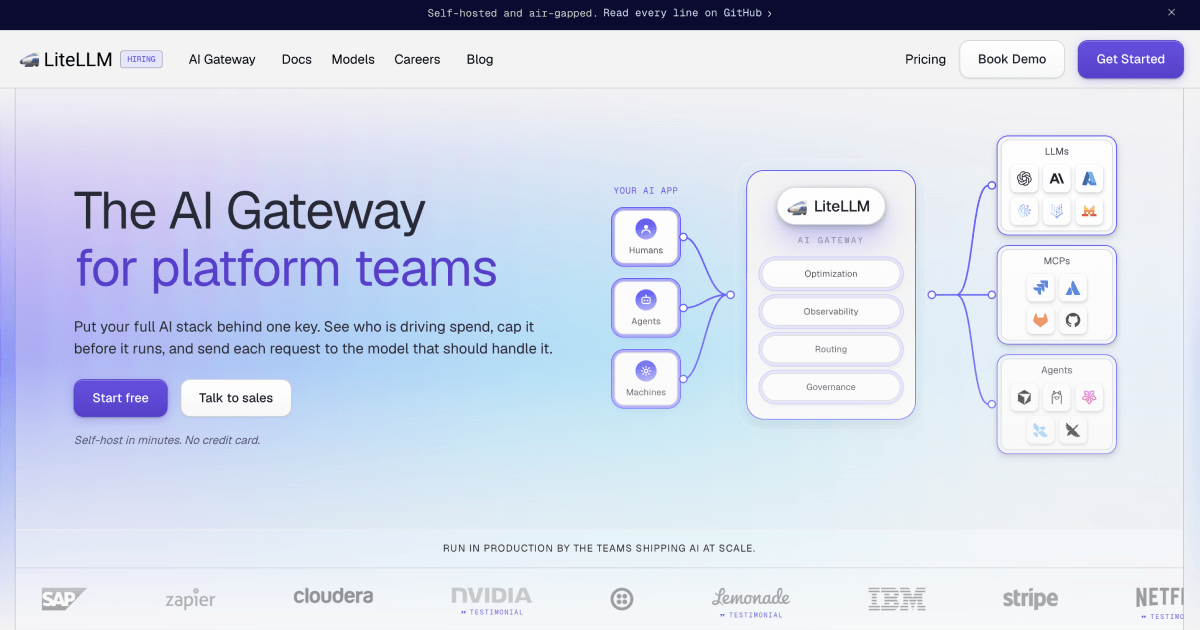
LiteLLM is an open-source AI gateway: a self-hosted proxy that sits between your applications and many model providers, exposing them through a single OpenAI-compatible API. Instead of each team managing separate provider keys, SDKs and contracts, requests go through one endpoint with one login, and the gateway handles key management, routing, spend tracking and budgets.
It is aimed primarily at platform and infrastructure teams who need to give a whole organisation access to models without becoming a bottleneck for every new integration.
What it actually does
- Unified access: one OpenAI-compatible API in front of 140+ providers and 1,800+ models, so swapping a backend model is a configuration change rather than an application code change.
- Governance and cost control: virtual keys scoped by team, project or app, with per-key spend and budget visible in one place — the product page shows keys with figures like spend against a budget, which is the core workflow.
- Routing: send each request to the model that should handle it, rather than hard-coding one provider per feature.
- Observability: see who is driving spend and what every request is doing.
- Broader stack: agents and MCP servers can be reached through the same gateway, not just chat completions.
- Deployment: self-hosted in your own infrastructure, including air-gapped environments, so keys and audit trails stay with you.
Who it suits, and the trade-off
| If you are… | LiteLLM is a good fit when… | Watch out for |
|---|---|---|
| A platform team serving many internal teams | You want one key, one login and central budgets instead of per-team provider accounts | You take on running and upgrading the gateway yourself |
| An app team shipping fast | You want day-zero access to new models without code changes | You still need to configure routing and fallbacks sensibly |
| A regulated or security-sensitive org | You need self-hosting and your own audit trail | Self-hosting means you own availability and capacity planning |
The trade-off is the usual one for a self-hosted gateway: you gain control, portability and a single place to cap spend, but you own the operational work. The page claims sub-millisecond overhead and deployment "in an afternoon," which is plausible for a straightforward proxy setup and less so once you add SSO, budgets and many teams.
A concrete scenario
A platform engineer at a 300-person company gets requests for three different model providers plus an internal fine-tuned model. Without a gateway, that is three procurement and security reviews and three sets of keys. With LiteLLM, they stand up the proxy, connect the providers, issue one virtual key per team with a monthly budget, and developers point their existing OpenAI SDK at the gateway URL. When a cheaper model appears for a coding task, the change is a routing rule — the AT&T quote on the page describes coding costs falling by as much as 56% after routing through LiteLLM, which is that kind of switch in practice.
Next step
Decide based on one question: do you need central visibility and caps across more than one model provider or team? If yes, start by self-hosting the gateway in a staging environment, connect two providers, and issue one scoped key with a low budget to confirm the spend tracking works before rolling it out. Compare with a hosted alternative such as OpenRouter if you would rather not operate the proxy yourself, and check LiteLLM for the current plan details.
How do I self-host LiteLLM in my own infrastructure?
Self-hosting LiteLLM means running the gateway inside your own network or cloud account, so your model calls, API keys and spend data stay on infrastructure you control. LiteLLM describes itself as an open-source AI gateway that puts your full AI stack behind one OpenAI-compatible key, and it says you can self-host anywhere, including air-gapped environments. The page also claims deployment can be done "in an afternoon" and that the proxy adds sub-millisecond overhead. Treat those as the vendor's own claims rather than independently verified facts.
What self-hosting gives you
- One endpoint for many providers. LiteLLM states it supports 140+ providers and 1,800+ models behind an OpenAI-compatible API, so application code can keep calling the same interface while you change the model behind it.
- Central key and budget control. The product page shows virtual keys tied to teams, with spend tracked against a budget (for example, a key showing spend against a $10,000 cap). That is the practical reason platform teams self-host: they can see and cap usage per team or project.
- Your own secrets and audit trail. The page's phrase "your keys, your infra, your audit trail" points to using your existing secret manager rather than handing credentials to a third party.
- Access to more than LLMs. The gateway also fronts agents and MCP servers, not just chat models, which matters if your internal tooling already includes those.
A realistic first deployment
A common pattern is to run the proxy as a container behind your existing ingress or API gateway, point it at your provider keys (or your self-hosted model endpoints), and issue virtual keys to teams.
- Stand up the gateway in a test namespace or VPC with no public exposure.
- Configure one or two providers and one internal or fine-tuned model to confirm routing works.
- Create a virtual key with a small budget and confirm spend shows up in the dashboard.
- Add SSO and per-team scoping before opening it to the wider organisation.
- Only then add routing rules, fallbacks and MCP or agent endpoints.
Trade-offs to weigh
| Consideration | Self-hosted | Hosted gateway |
|---|---|---|
| Data and keys | Stay in your environment | Pass through a vendor |
| Operational load | You run upgrades, scaling, monitoring | Vendor handles it |
| Air-gapped use | Possible, per the vendor | Not possible |
| Time to first request | Longer setup, then fast iteration | Fastest start |
The main cost of self-hosting is not the install; it is owning uptime, version upgrades and capacity planning for a component that every AI feature now depends on. If you have a platform team and compliance requirements around model traffic, that trade is usually worth it. If you are a small team without on-call coverage, a hosted option may be the better starting point.
Next step
Read the deployment and configuration documentation on LiteLLM and check the benchmark page before you commit, so you can confirm the overhead claim against your own latency budget. Then run the smallest possible pilot: one provider, one internal key, one budget cap.
How does LiteLLM track and cap LLM spending per team or API key?
LiteLLM puts spend tracking and budget enforcement at the gateway layer, so limits apply per team, per project, or per API key rather than per application. You create a virtual key, assign it to a team, and set a budget; the gateway records the cost of every request made with that key and blocks or flags requests once the budget is reached.
What the page shows
The keys table in the product view lists each key with its team, last activity, and a spend/budget figure — for example, a key on the platform-eng team at $4,182.55 of a $10,000 budget, and a data-science key at $6,740.15. That is the core mechanic: usage accumulates against a named key, and the budget column tells you how close it is to the cap. The page also frames this as seeing "who is driving spend, cap it before it runs," and pairs it with governance, observability, and routing as the four gateway functions.
How the pieces fit together
- Virtual keys are the unit of control. Each key can be scoped to a team, project, or app, and carries its own spend counter and budget.
- Teams group keys so a department can be given a shared ceiling, with members and multiple keys under it.
- Routing decides which model handles a request, which matters for cost because the same prompt can be sent to an expensive frontier model or a cheaper one.
- Observability is what makes the numbers trustworthy — the spend figures come from request-level logging through the gateway, not from provider invoices arriving a month later.
Practical scenario
A platform team at a mid-size company issues one key per internal app. The coding assistant gets a generous budget; a research notebook gets a small one. When the notebook key hits its ceiling, the gateway stops serving it instead of the overage landing on a shared corporate bill. If a team needs more, an admin raises the budget on that key — no code change, no new provider contract.
Trade-offs to weigh
Central enforcement only covers traffic that actually goes through the gateway. If developers can still call a provider directly with their own credentials, your caps are advisory. Cost accuracy also depends on the gateway knowing each model's price; for internal, fine-tuned, or self-hosted models behind the same key, you will likely need to supply or confirm the cost data yourself. And a hard cap is a blunt instrument — a hard-blocked key during a demo is worse than an alert, so decide per key whether the limit should block or notify.
Next step
Start with one non-critical team, give it a modest budget, and watch the spend column for a week before rolling limits out to production keys. That tells you whether your per-request cost assumptions match reality before anyone is cut off.
For comparison, gateways with similar per-key governance exist elsewhere, such as OpenRouter and Portkey, though their models of self-hosting and control differ from a self-hosted gateway like LiteLLM.
Can LiteLLM route requests to different models based on cost or performance?
Yes. Routing is a core part of what LiteLLM is built to do. The gateway sits between your applications and the model providers, so you can send each request to the model that should handle it rather than hard-coding a single backend. The page describes routing alongside observability, governance and optimization, and notes that you can swap models without changing app code — the decision lives in the gateway, not in your application.
How routing decisions are typically made
- Cost-based: Send routine, high-volume traffic to cheaper models and reserve expensive frontier models for requests that need them. Spend tracking and budget caps per key, team or project give you the data to set those thresholds and the guardrails to enforce them.
- Performance or capability-based: Route by task type, latency needs, context length, or whether the request involves tool use or an agent. Requests go to the model best suited to that job.
- Failover: If a provider is down or rate-limited, the gateway can fall back to another model or provider, which matters when you depend on a single vendor.
- Model swaps without code changes: Because everything sits behind one OpenAI-compatible API, changing the target model is a configuration update. Okta's Dennis Henry is quoted on the page making exactly this point — no code changes, procurement cycles or repeat security reviews.
The page also notes sub-millisecond overhead and day-zero support for new models, so routing logic doesn't force you to wait before adopting a newly released model.
A practical scenario
A platform team serves an internal coding assistant. Simple autocomplete requests route to a small, fast model; complex refactors route to a stronger one; if the primary provider degrades, traffic fails over automatically. A dashboard view of spend by team or key shows which group is driving cost, and a budget cap stops a runaway integration before month-end. AT&T's Mark Austin is quoted saying costs on some advanced tasks such as coding fell by as much as 56% after adopting the router.
What to weigh
Routing helps most when you have mixed workloads, multiple providers, or cost pressure. It adds less value if you use one model for one narrow task. The main trade-offs are operational: you're running (or paying for) a gateway in the request path, and routing rules need tuning and review as your workloads change. Self-hosting keeps keys, infrastructure and audit trails under your control, which is often the deciding factor for regulated teams.
Next step: List your distinct request types, assign a target model and a fallback to each, then check whether per-key spend tracking gives you the visibility to validate the choices. Compare against alternatives such as OpenRouter if you mainly want a hosted multi-model endpoint, or Portkey for a gateway with a similar positioning.
How do I set up SSO and scoped access for multiple teams using LiteLLM?
Set up SSO and per-team scoping in LiteLLM by treating the gateway as the single entry point for model access: you configure SSO once, then create teams and virtual keys whose budgets and model permissions differ by team. LiteLLM's page describes "one login with SSO, scoped by team, project, or app," plus virtual keys with per-key spend and budget tracking, so the work is mostly configuration in the gateway rather than code changes in each app.
A practical setup order
- Stand up the gateway first. LiteLLM advertises self-hosting in minutes and sub-millisecond overhead, so deploy it in your own infrastructure before touching identity. Its "your keys, your infra, your audit trail" positioning matters here: SSO decides who gets in, but the gateway holds the provider credentials.
- Connect your identity provider. Point LiteLLM at your existing IdP so login is centralized. Because the product works with "the secret manager you already run," you can keep provider API keys out of application code and out of team members' hands.
- Create one team per group. Teams are the natural unit for scoping. A platform-engineering team, a data-science team and a product team should each be a separate team rather than one shared key with informal rules.
- Issue virtual keys per team (or per project/app). The page's key table shows exactly this pattern: keys labelled by team, with last-active time and a spend/budget figure such as a four-figure spend against a larger cap. Give each key a budget ceiling so a runaway job hits a wall instead of your invoice.
- Restrict which models each team can reach. Routing and governance are listed as gateway functions, so you can allow a data-science team the expensive frontier models while limiting a general team to cheaper defaults.
- Route, don't rewrite. Because applications call one OpenAI-compatible API, changing a backend model is a gateway configuration update. Okta's Dennis Henry is quoted on the page making this point directly: switching backends needs no code changes, procurement cycles or repeated security reviews.
What each control actually buys you
| Control | Question it answers | Typical owner |
|---|---|---|
| SSO login | Who may use the gateway at all? | IT / identity |
| Team | Which group does this access belong to? | Platform team |
| Virtual key | Which app or project is spending this? | App owner |
| Budget cap | When does spend stop? | Finance + platform |
| Model allow-list | Which models may this team call? | Platform team |
A concrete scenario
A 200-person company onboards three teams. The platform team gets a key with access to internal fine-tuned models and a moderate cap. Data science gets frontier models and a larger cap, because their experiments are the expensive ones. A customer-facing app gets a narrow allow-list and a hard cap sized to its traffic. When a new model ships, the platform team adds it in the gateway and grants it to data science — no redeployment, and the app team's permissions are untouched.
Decisions to make before you start
- Team or project as the scoping unit? Teams suit people; projects suit software. Most organizations need both, with keys attached to the narrower one.
- One key per team or per app? Per-app keys give cleaner spend attribution, which is what makes the budget column meaningful.
- Hard cap or alert? A cap protects the budget; an alert preserves developer trust. Consider alerts first, then caps once you know normal usage.
- Central IdP groups or LiteLLM teams as the source of truth? Mapping IdP groups to teams keeps offboarding automatic.
For the exact configuration fields and SSO provider options, start with the documentation at LiteLLM and test with a single pilot team before opening access org-wide.
What overhead does LiteLLM add compared to calling LLM providers directly?
LiteLLM's headline claim is sub-millisecond overhead per request, so the gateway adds a thin hop rather than a full re-serialization layer. In practice, that number refers to the proxy's own processing time, not to everything you gain or lose by putting it in the path.
Where the real overhead shows up
| Layer | Direct-to-provider | Through LiteLLM |
|---|---|---|
| Request latency | Provider network + model time | Same, plus one extra network hop to your gateway |
| Auth and keys | Each app holds provider keys | One OpenAI-compatible key, gateway manages upstream keys |
| Model switching | Code change and redeploy | Config update at the gateway |
| Cost control | Per-app tracking, often manual | Per-key/team budgets and spend caps in the dashboard |
| Failure surface | Provider outage only | Provider outage plus gateway availability |
The trade-offs that matter
The latency delta is usually small relative to model inference time, but the operational delta is where LiteLLM earns its place: one login with SSO, scoped keys per team or project, and day-zero support for new models. The page evidence shows spend tracking per key (for example, a platform-eng key at $4,182.55 of a $10,000 budget), which is hard to replicate cleanly when every service calls providers directly.
The cost is that the gateway becomes a dependency. If it goes down, every model call goes down, so self-hosting and air-gapped deployment matter for teams that cannot tolerate that. Netflix's David Leen noted it saved "months of work," and Okta's Dennis Henry pointed out that switching backends needs no code changes or security reviews — those are the concrete wins, not raw speed.
Next step
Benchmark it against your own workload: send a representative sample of prompts through LiteLLM and directly to one provider, then compare p50 and p99 latency alongside your current key-management and spend-tracking effort. If the gateway hop is a small fraction of total request time and you are already juggling multiple providers or teams, the overhead is likely worth it. Compare with OpenRouter if you want a hosted routing layer rather than self-hosting.
 Hosting and Email
 GoDaddy
 Hosting
 Cloudflare
 Microsoft 365
 Location
 United States
 Pages, Search and Sharing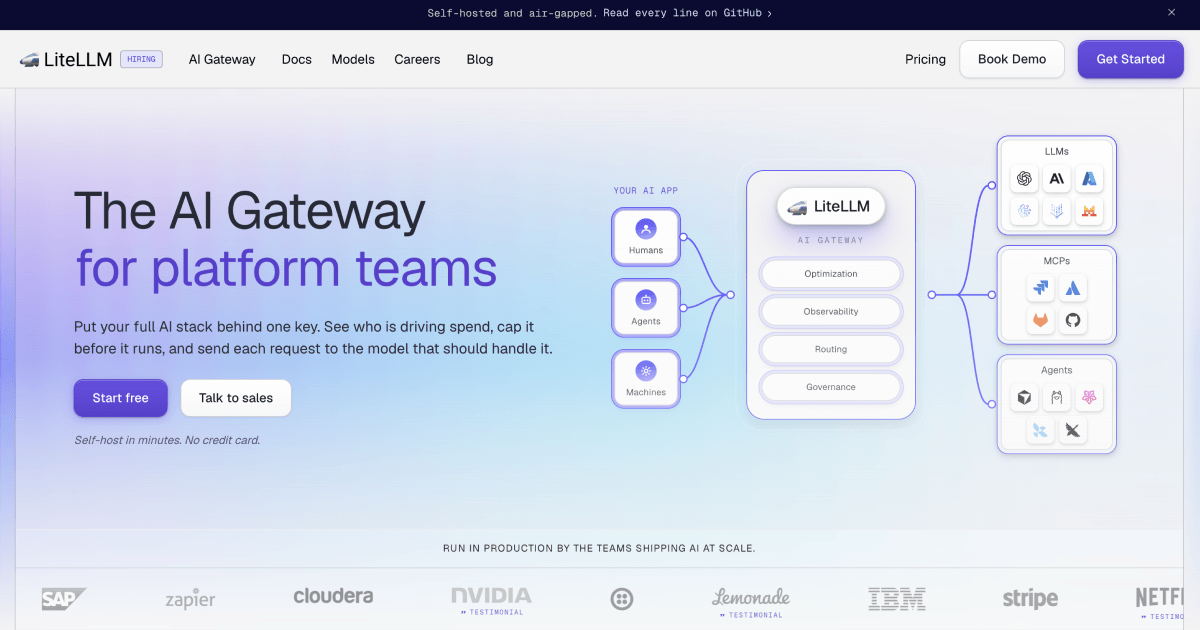


 All bots

 Registration details

 Identified technologies
User reviews (0)