
 简体中文
简体中文 English
Website review
This review may include AI-generated content and is not individually verified. Domain, certificate and other facts come from the observed data on this page.
What is My Solo Company?
My Solo Company is a website and booking tool for independent professionals who work by appointment. It gives you a professional page where clients can see your services and prices, book a free slot themselves, and get automatic reminders — so you spend less time on messages and scheduling. The setup is aimed at being quick: pick your text, photos and services, publish, and share your link.
Who it suits
The page lists wellness and beauty, coaching and consulting, home services, tradespeople, real estate, and creative professionals. The common thread is a one-person business where the calendar is the product. A massage therapist in Nantes is the example shown, with services, durations and prices listed and bookable online.
What you actually get
- A public page with your services, prices, photos and reviews, in English and French, optionally on your own domain
- Self-service booking around the clock, so clients pick a slot instead of exchanging messages
- A workspace with today's appointments and pending requests, on desktop and phone
- Automatic reminders, which matter most for reducing no-shows
- Client management and a way for clients to cancel or reschedule themselves
Trade-offs to weigh
A hosted tool like this trades control for speed. You get a working page and booking flow in minutes rather than weeks, but you accept the template's layout rather than designing your own site, and your booking data lives in someone else's system. If your business needs complex packages, multi-staff scheduling or deep customisation, a general website builder plus a separate scheduler may fit better. If you mainly need clients to find you and book without friction, the simpler route usually wins.
A useful next step: open the live demo page and try booking a slot as if you were a client. Note how many taps it takes, whether prices and durations are clear, and whether the confirmation and reminder flow would reassure a first-time client. Then decide whether that experience beats your current back-and-forth. The 14-day trial without a card is a low-risk way to test it with your real services.
For wider context on scheduling tools, see Calendly and Acuity Scheduling.
How do I create a professional booking page for my solo business?
For a solo business, the fastest route is a single hosted page that combines your services, prices, photos and a live booking calendar, so clients can find you and reserve a slot without messaging you first. My Solo Company is built around exactly that workflow: you pick text, photos and services, and the platform handles the layout.
What the page needs to do
- Explain the offer. Service names, durations and prices, plus one or two lines on what a session is like. The demo page for L'Atelier Sélène, a massage studio in Nantes, lists three treatments with duration and price next to each.
- Show availability. A calendar with real free slots, bookable 24/7. The demo shows time buttons such as 11:30, 14:30 and 16:00 rather than a request form.
- Let clients self-serve. Cancelling and rescheduling should be possible from the client side, so you are not the bottleneck.
- Keep you organised. Today's appointments, pending requests and your page in one workspace, on desktop and phone.
A realistic setup sequence
- Choose a web address, ideally your own name or business name.
- Add services with duration and price, and set your weekly hours, including weekends if you work them.
- Upload a photo and pick a primary colour so the page looks like you rather than a template.
- Publish, then share the link in your social profiles, email signature and Google Business listing.
- Test the booking flow yourself as a client before sending it to anyone.
Trade-offs to weigh
| Approach | Best for | Watch out for |
|---|---|---|
| Hosted page with built-in booking, as here | Solo practitioners who want one link and no maintenance | Less design freedom; you depend on the platform's features |
| Website builder plus a separate booking tool | Businesses needing a blog, shop or complex forms | Two systems to configure, and integrations can break |
| Social profile plus direct messages | Testing an idea before committing | No calendar, no reminders, constant back-and-forth |
Two practical checks before you commit: confirm the client-facing language options, since the demo page offers English and French, and confirm how automatic reminders work, because no-shows are the main cost for appointment-based solo work. My Solo Company offers a 14-day trial with no card required, so you can build the page and run a real booking through it before deciding. For comparison, Squarespace and Calendly represent the builder-plus-scheduler route, while Acuity Scheduling is a dedicated booking tool you would pair with a separate site.
How does online booking work for my clients?
Clients book themselves through your own My Solo Company page. You publish your services, prices and photos, share your page link, and clients pick a free slot in your availability — the page shows bookable times such as 11:30, 14:30 and 16:00 with a "New booking" confirmation appearing in your workspace. Booking runs 24/7, so the back-and-forth of messages to agree a time is replaced by a slot the client selects alone. The page also carries your location, service durations and prices (the demo page shows a Nantes studio with 1h treatments), plus a "Manage my appointments" route for clients who need to cancel or reschedule.
What the client sees, step by step
- They find your page through your link, your own domain, or search, and read your services, prices, photos and reviews.
- They choose a service and a free time slot.
- They confirm the booking; you see it as a new or pending appointment.
- They can later cancel or reschedule through the same page rather than contacting you directly.
What you manage on your side
Your workspace gathers today's appointments, pending requests and your page in one place, on desktop and phone. Automatic reminders are part of the setup, which is what reduces no-shows — the client gets a nudge without you sending anything. Note that reminders and confirmation messages are described for this product; the exact wording and timing are worth checking in a trial before you rely on them.
Who this suits
The page lists wellness and beauty, coaching and consulting, home services, tradespeople, real estate and creative professionals. It fits solo practitioners paid by appointment who want a booking page without building a website. It is less suited if you need complex multi-staff scheduling, deposits or insurance-claim handling, since the described feature set centres on a simple page plus bookings.
Practical next step
Open the live demo page (the L'Atelier Sélène example) and try booking a slot as a client would, then check the workspace view. The 14-day trial needs no card, so you can test the full loop — publish, share, receive a booking, cancel it — before committing. Compare with a general site builder if you mainly want a brochure site, or with a dedicated scheduling tool if booking is the only thing you need. For a broader look at small-business site options, see Wix and Squarespace; for booking-first tools, Calendly.
What tools does My Solo Company offer for managing clients and appointments?
My Solo Company bundles the client-facing and back-office basics that independent, appointment-based professionals usually stitch together from several tools. Based on the product's own page, the core pieces are:
- A professional page — your own site with services, prices, photos and reviews, available in English and French, optionally on your own domain.
- 24/7 online booking — clients pick a free slot themselves instead of messaging you back and forth.
- A workspace — today's appointments, pending requests and your page in one place, on desktop and phone.
- Client self-service — a "manage my appointments" area where clients cancel or reschedule.
- Automatic reminders — listed in the site description as part of the offering, aimed at reducing no-shows.
- Client management — also named in the description, though the visible page copy emphasises the booking and workspace views more than a detailed client database.
What this means in practice
The pitch is deliberately narrow: it is built for people who work by appointment — wellness and beauty, coaching and consulting, home services, tradespeople, real estate, creative professionals. If you are a massage therapist in a city like Nantes, the flow is: a client finds your page, reads your treatments and prices, books a slot, and later reschedules it themselves. You open your workspace in the morning and see the day's bookings and any pending requests.
The trade-off is depth. A general-purpose CRM will give you pipelines, custom fields, invoicing and marketing automation; this looks designed to cover the everyday loop of "be found, be booked, stay organised" without those extras. Similarly, if you need complex multi-staff scheduling or resource management, a dedicated booking platform may fit better — but it will also take longer to set up.
A useful next step
Open the live demo page linked from the site and walk through it as if you were a client booking a treatment. Then check whether the workspace view matches how you actually plan your day. If you run a solo practice and mostly need bookings to arrive without messages, this is likely enough; if you need invoicing, payments or a client history you can segment, confirm those exist before committing.
Two related tools worth comparing if you want more scheduling depth are Calendly for pure appointment booking and Squarespace if you would rather build a fuller website first and add scheduling on top.
Can My Solo Company send automatic appointment reminders?
Yes. My Solo Company lists automatic reminders as part of its core offer for independent, appointment-based businesses, alongside the professional page, online booking and client management. The pitch is that clients find you, book a free slot themselves, and then get reminded without you chasing them.
What that means day to day
- Fewer no-shows and less admin. If a client books at 11:30 on a Tuesday, the reminder goes out on your behalf rather than you copying details into a messaging app.
- One place to stay organised. The workspace shows today's appointments, pending requests and your page together, on desktop and phone, so you can check who has confirmed before your day starts.
- Client self-service. The demo page includes a "Manage my appointments" option for cancelling or rescheduling, which reduces the back-and-forth when plans change.
Practical considerations
Reminders work best when your booking rules are clear. Decide how far ahead clients can book, how late they can cancel, and whether you want a reminder at 24 hours, 2 hours, or both. Test the flow yourself as a client before sharing your link widely, and check that the wording sounds like you — the reminder is often the first message a new client reads carefully.
If you already use a separate calendar or accounting tool, check how bookings and client details move between them before committing, since the value of reminders depends on the booking data being accurate.
For a concrete example, the page's live demo shows how a wellness studio's services, prices and booking slots appear to clients, which is a useful way to judge the reminder and booking experience from the client's side. My Solo Company also offers a 14-day free trial with no card required, so you can test reminders with real bookings before paying. See My Solo Company for the current feature list and pricing.
How much does My Solo Company cost and is there a free trial?
My Solo Company advertises a 14-day free trial with no card required, and it publishes a pricing page at My Solo Company — but the supplied page evidence does not include the actual price figures. So the honest answer to "how much" is: check the pricing page directly before committing, because any number quoted elsewhere would be a guess.
What the trial actually means in practice
The trial language ("14 days free, no card required, ready in minutes") suggests you can build a page, publish it and take a real booking before paying anything. That matters most for the audience the product targets: solo appointment-based providers — massage therapists, coaches, consultants, home-service tradespeople, creative freelancers.
A sensible way to use 14 days: publish a page with two or three services and real prices, share the link with past clients, and see whether at least one person books without you chasing them. If bookings arrive, the paid tier is easy to justify; if not, the problem is your offer or audience, not the subscription.
What you're paying for
From the page evidence, the paid product bundles three things that are usually separate tools:
| Job | What My Solo Company shows |
|---|---|
| Presence | A professional page with services, prices, photos and reviews; English and French; optional own domain |
| Booking | 24/7 self-service slot selection, plus cancel/reschedule for clients |
| Running the day | Today's appointments, pending requests and your page in one workspace, desktop and phone |
Trade-off: you get speed and one login instead of a website builder plus a calendar plus a reminder tool. You give up deep customization and the specialist features a dedicated booking platform might offer. If you need a highly designed brand site or complex multi-staff scheduling, this is likely too simple; if you mainly need clients to stop messaging you to book, it fits.
Next step
Open the pricing page, note the billing period and whether the trial converts automatically, then compare it against one alternative you already know — for example Calendly for booking alone or Squarespace for a fuller website — and decide which gap costs you more: missing bookings or missing design control.
 Cloudflare
 Google Workspace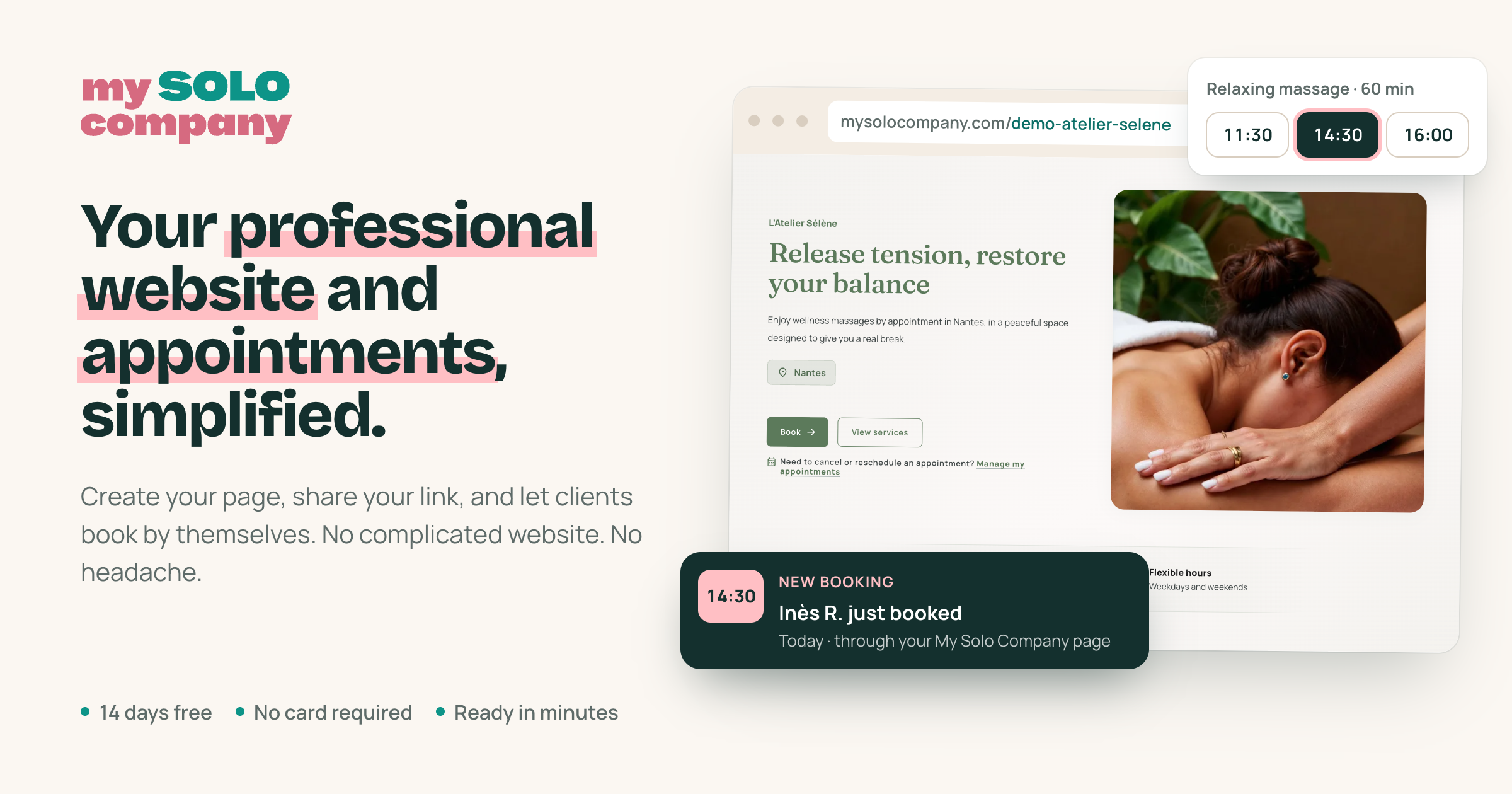

User reviews (0)