Website profiles · Technology insights · Alternatives

namespyai.com

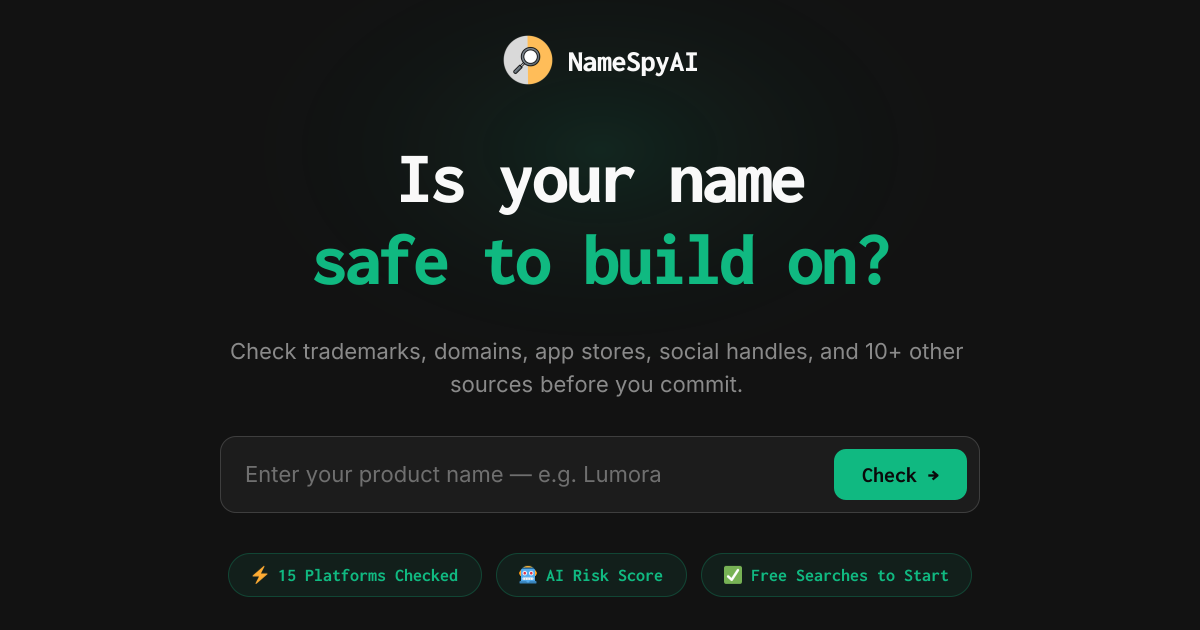
Check your startup or product name across trademarks, domains, app stores, social handles, and 10+ other sources before you commit.

Paid content
Visit website
Profile views 0 Outbound visits 0 Normal
NameSpyAI Full homepage screenshot

At a glance

Category
Social & Community
Language
English
Paid-content signal
Paid contentObserved
Registered
2026
Hosting
VercelInferred
HTTPS certificate trusted
PassedObserved
Last updated

Website review

This review may include AI-generated content and is not individually verified. Domain, certificate and other facts come from the observed data on this page.

What is NameSpyAI?

NameSpyAI is a name-availability checker for founders, indie developers and small teams naming a product, app or company. Instead of opening a dozen tabs, you enter a candidate name and get one report covering domains, app stores, social handles and trademarks — the site describes it as 15 sources per check — plus an AI risk score that flags likely conflicts.

What it actually does

  • Trademark scanning — surfaces possible trademark conflicts so you can decide whether to dig deeper or pick another name. The site claims 60% of names checked in a recent week had a possible trademark conflict, which is a useful reminder that this is a screening step, not legal clearance.
  • Domain checks — shows whether the obvious extensions are free, parked or taken. The founder's own story is the common failure mode: falling for a name, then finding the .com already squatted.
  • App store and social handle checks — catches the "one with your name is already live" problem before you build a brand around it.
  • A shareable report — the site shows a live example report rather than a mock-up, so you can judge the output format before spending anything.

Who it suits

It fits solo builders and small teams validating several names in a short session — the kind of person who would otherwise check domains manually and skip trademarks entirely because it feels like a headache. It suits less well anyone who needs a formal legal opinion; a trademark attorney or a proper register search is the right tool when the stakes are high.

How to use it well

Run three to five shortlisted names rather than one. A single "safe" result tells you little; comparing several shows which name has the cleanest domain and handle situation, which usually matters more day to day than a marginal trademark difference. For anything you plan to invest real money in, treat the report as a filter and confirm the trademark position with a qualified professional in your target markets.

Related official resources worth checking alongside it: USPTO for US trademark records, EUIPO for EU marks, and ICANN for how domain registration and disputes work.

How does NameSpyAI check if a business name is available?

NameSpyAI runs a single search that sweeps a name across roughly 15 sources at once, then returns a live availability report. According to the site, those sources include trademarks, domains, app stores, social handles and “10+ other sources,” and each report also carries an AI risk score — the sample report shown is labeled “Safe” with a full 15-source check and a trademark check.

What a single check covers

Source type What it tells you
Trademarks Whether a possible trademark conflict exists
Domains Which domains tied to the name are already registered
App stores Whether an app with that name is already live
Social handles Whether the handle is taken across platforms
Other sources Additional availability signals beyond the four above

The output is framed as a snapshot of what is already taken, not a legal clearance. A “Safe” score means the scan surfaced no obvious conflict, which is a starting signal rather than a guarantee — trademark registers and common-law use are messy, and a real attorney review is still the step that protects you.

What the experience looks like

Reviews on Product Hunt describe the appeal as speed and consolidation. One reviewer, Ma Joann Secojen Elican, said it checked many domains and socials faster than doing them one by one and made trademark scanning feel less like a headache. Another, Jeeeer k, noted the result is a detailed summary of the search. My read: the real value is replacing a scattered afternoon of tab-hopping with one report you can scan in seconds, which matters most when you are cycling through several candidate names rather than committing to one.

A practical way to use it

If you are naming a product, run three to five finalists through a check before you get attached to any of them. Treat a conflict as a reason to move on, and treat a clean result as permission to spend money on a lawyer’s trademark search — not as a substitute for it. The site offers free searches to start, with no credit card required, so testing a shortlist costs you nothing but the few minutes it takes.

For domain-specific digging after the scan, pair it with a registrar’s own search and the USPTO’s trademark database at USPTO.

What can I do if my desired name is already taken?

If your first-choice name is already taken, treat it as a routing decision rather than a dead end: work out what is taken, then choose the cheapest fix. NameSpyAI is built for exactly this moment — it runs one search across trademarks, domains, app stores, social handles and 10+ other sources, so you can see the full picture in one report instead of discovering problems one at a time. Its own framing is blunt about the cost of skipping this: a squatted .com quoted at thousands, an App Store rejection, a trademark letter in month six, or settling for a handle like @your_brand_app2. The site also reports that 60% of names checked in a recent week had a possible trademark conflict, which is a useful reminder that "taken" is often partial, not total.

Match the fix to what's actually occupied

What's taken Practical options Trade-off
Domain only Add a modifier (get, try, hq, app), use a different TLD, or buy from the owner Modifiers weaken recall; buying can be expensive
Social handle Pick a consistent variant across platforms, or a slightly different spelling Inconsistent handles fragment your audience
App store listing Differentiate the display name or pick a new name Store search and brand recognition both suffer
Trademark in your class Rename, or narrow to a different goods/services class with legal advice Class conflicts are the ones worth paying a lawyer for
Everything Rename now, before you print anything Painful early, far cheaper than a rebrand later

A workable sequence

  1. Confirm the conflict is real and in your category — a similar name in an unrelated industry usually matters less than an identical mark in yours.
  2. Test two or three fallback names the same way, so you are comparing options rather than grieving one.
  3. If the blocker is a registered trademark in your class, get a qualified opinion before you spend on design, packaging or a domain.
  4. Lock the domain and the main handles the same day you decide, then move on.

For a founder scenario: you have a landing page, a logo draft and 40 waitlist signups under a name whose .com is parked and whose trademark filing sits in your exact class. The right move is to rename while 40 people is still a small number to email.

As a next step, run your top two alternatives through the same check and compare the reports side by side rather than judging names on vibes. NameSpyAI offers a small number of free searches with no credit card, and publishes a live sample report on NameSpyAI if you want to see the format before committing. For formal trademark clearance in your jurisdiction, the authoritative free starting point is USPTO in the US, or your national registry elsewhere.

Is NameSpyAI's trademark check reliable for legal purposes?

NameSpyAI's trademark check is best understood as a screening tool, not a legal opinion. It scans for potential conflicts and flags risk, but it does not replace a formal clearance search or an attorney's judgment.

What the check actually does

The site describes each report as a live availability scan across trademarks, domains, app stores, social handles and other sources — the sample report is described as covering 15 sources with a trademark check and an AI risk score. That framing matters: the output is a possible conflict signal. The homepage states that 60% of names checked in a recent week had a possible trademark conflict, which is a flag for further investigation, not a determination that a name is legally blocked or clear.

Where it helps

  • Early screening. Before you fall in love with a name, a 15-second scan can surface obvious collisions you would otherwise find months later.
  • Prioritising candidates. If you have five shortlisted names, a risk score helps you decide which ones deserve a paid attorney search.
  • Adjacent checks in one pass. Trademark risk rarely travels alone; a taken .com or handle is a practical problem even when the mark itself is clean.

Where it is not enough

A reliable legal clearance depends on factors a scan cannot settle: the specific goods and services classes you will operate in, whether an existing mark is actually in use, geographic scope, common-law rights, and how similar marks are judged in your jurisdiction. An AI risk score is a heuristic, not an examiner's reasoning. For anything you intend to invest real money in — a company name, a product line, a brand you will register — treat the report as a first filter and commission a proper search through a qualified trademark attorney.

A practical decision rule

Use NameSpyAI when the cost of a bad name is low and reversible, or when you need to narrow a list cheaply. Do not rely on it alone when the name will anchor a registered trademark, a funded company, or packaging you cannot change. The founder's own framing supports this: the tool exists so you do not waste an afternoon checking manually, and it "has paid for itself" if it saves a single rebrand — a screening pitch, not a legal one.

Next step: run your top two or three candidates through the checker, then take the one with the cleanest report to an attorney for a formal clearance search in your target classes and countries. For background on how trademark rights work generally, see USPTO and, for UK filings, GOV.UK.

How much does NameSpyAI cost and what do I get for free?

NameSpyAI uses a pay-as-you-go model built around credits, and the free entry point is 60 credits with no credit card required. The homepage also advertises "3 free searches" alongside the Google sign-in option, so the most reliable way to confirm what a search costs in credits is the pricing page itself: NameSpyAI Pricing.

What the free allowance covers

Each check is a live availability report across domains, app stores, social handles, trademarks, and other sources — the site describes a report spanning 15 sources with a trademark check and an AI risk score. So the free credits are not a stripped-down preview; they let you run the same kind of report on a small number of candidate names.

How to spend it well

Treat the free credits as a shortlist filter, not a final clearance:

  • Generate 5–10 candidate names before you spend anything.
  • Run the ones you actually like, then compare conflict signals side by side.
  • Only pay for deeper checks on the one or two names you would genuinely build on.

What to verify before paying

The page shows a "Simple, pay-as-you-go pricing" section but no figures in the material available, so check the pricing page for current credit bundles and per-search cost. If you need formal trademark clearance for a commercial launch, a paid availability report is a screening step — a trademark attorney's search is the separate, more authoritative layer.

Can NameSpyAI check social media handles and app store names?

Yes. NameSpyAI is positioned as a single availability check that covers social handles, app store names, domains and trademarks together, so you don't have to open each platform separately. The site's own description says it checks "trademarks, domains, app stores, social handles, and 10+ other sources," and the sample report is described as covering 15 sources with a trademark check and an AI risk score.

What that means in practice

For a founder or indie builder naming a product, the useful part is the combination rather than any single lookup:

Check Why it matters before you commit
Social handles Prevents settling for a mangled handle like @your_brand_app2
App store names Catches an existing live app that would block or confuse your listing
Domains Surfaces whether the matching .com is taken or being resold
Trademarks Flags a possible conflict before a dispute letter arrives

The page claims 60% of names checked in the previous week had a possible trademark conflict, which is a signal about how often this step changes the decision rather than a guarantee about your name.

Whose experience this is

Reviewer Ma Joann Secojen Elican, writing on Product Hunt, said the tool checked many domains and socials faster than doing them one by one, and that trademark checking "always felt like a massive headache" but became easier to scan in one pass. A second Product Hunt reviewer, Jeeeer k, described getting a detailed summary of the search. Both are user impressions of speed and convenience; they don't tell you how authoritative the trademark result is.

My practical read

Treat the report as a fast first filter, not a legal clearance. A combined scan is genuinely valuable early, when you're comparing three or four candidate names and want to eliminate the obvious losers in minutes. It's less suited to being the final word: if a name survives the scan and you're about to spend real money on branding, packaging or a launch, have a trademark attorney review the specific classes and jurisdictions you'll operate in. The AI risk score is a triage aid for that conversation, not a substitute for it.

Next step

Run your top two or three candidates rather than just your favourite — comparing reports side by side shows which name has the cleanest path across handles, stores and domains. The site offers a few free searches without a credit card, and a sample report you can view before committing.

Related questions

More questions →
How to Check a Trademark Name Before You Commit

To check a trademark name, run a knockout search for identical and similar marks in the classes that match your goods or services, then check domains, app stores, and social handles for the same name. Do this before you print packaging, file incorporation papers, or buy a domain. A knockout search tells you whether a name is worth pursuing; it is not a legal clearance opinion, and a trademark attorney should review anything you plan to invest in heavily.

What you are actually checking

A trademark check answers a different question than a business-name or domain check.

  • Trademark: whether someone already has rights to a confusingly similar mark for related goods or services.
  • Company registration: whether a state will let you form an entity under that name. This does not grant trademark rights and does not stop an existing mark owner from objecting.
  • Domain: whether the .com or another extension is available or parked. Availability says nothing about trademark risk.
  • App store and social handles: whether the name is already in use where your customers will look for you.

You can pass the company-registration and domain checks and still receive a cease-and-desist letter in month six. That is the scenario a trademark check is meant to catch early, when renaming is still cheap.

Step 1: Search the trademark registers

Start with free official databases:

  • USPTO TESS (Trademark Electronic Search System) for US marks, including pending applications and registrations.
  • WIPO Global Brand Database for international marks across multiple registers.
  • EUIPO eSearch if you will sell in the EU.

Search more than the exact name:

  1. Enter the exact name.
  2. Search obvious variants: singular/plural, one word vs. two, common misspellings, phonetic equivalents.
  3. Search the distinctive element alone if your name combines a generic word with a made-up one.

Expected result: a list of live and dead marks. Dead marks matter less, but a recently abandoned application can still signal a prior user with common-law rights.

Match the class, not just the name

Trademarks are registered by class (Nice Classification). The same name can coexist in unrelated classes — a "Brightloop" coffee brand and a "Brightloop" software tool may not conflict. So after you find a similar mark, check its class against your product:

  • Class 9: software, electronics
  • Class 25: clothing
  • Class 35: advertising, business services
  • Class 42: software as a service, tech services

If a similar mark sits in your class or a related one, treat it as a real conflict. If it sits in a clearly unrelated class, note it but keep going.

Step 2: Check domains, app stores, and handles

Trademark clearance is necessary but not sufficient. A name that clears the registers can still be unusable if the .com is squatted at $8,000 or the app store already hosts a product with that name.

Check, at minimum:

  • The .com plus the extensions your audience uses (.io, .co, .ai).
  • Apple App Store and Google Play for existing apps.
  • Handles on the platforms you will actually use.

Tools like NameSpyAI run these checks together with a trademark scan and return a single availability report across roughly 15 sources, including an AI risk score. Its site reports that 60% of names checked in a recent week had a possible trademark conflict, and it offers 3 free searches with no credit card. That kind of aggregate check is useful for speed; still confirm anything that looks risky against the official register yourself.

Step 3: Record what you found

Keep a simple log so a later attorney review or a dispute has a paper trail:

Field Example
Name searched Brightloop
Date 2025-06-01
Registers checked USPTO TESS, WIPO
Similar marks found "Brightloop" Class 9, live
Classes compared 9, 42
Domains .com taken, .io available
App stores / handles No app; @brightloop taken
Decision Conflict in Class 9 — rename

Step 4: Decide, then get a real opinion

  • No similar marks in your class, domains and handles mostly free: proceed, but re-check before launch and consider filing your own application.
  • Similar mark in an unrelated class only: usually workable; document why you think the classes are unrelated.
  • Similar mark in your class or a related one: treat it as a conflict and pick another name. This is the case where a rebrand later costs far more than the check now.
  • Anything ambiguous: hand your log to a trademark attorney for a formal clearance opinion before you commit spend.

Common sticking points

  • Searching only the exact spelling. Confusing similarity covers sound and appearance, so variants matter.
  • Ignoring pending applications. A filed-but-not-yet-registered mark can still block you.
  • Trusting a domain purchase as clearance. Buying the .com does not create trademark rights over an earlier user.
  • Skipping the class check. A scary-looking hit in an unrelated class is often a false alarm; a quiet hit in your own class is the real problem.
  • Treating a tool's risk score as legal advice. Use it to triage, not to decide a close call.
How to Check If a Name Is Trademarked Before You Use It

To check whether a name is trademarked, search the official trademark registers for the countries where you'll sell, using the exact name plus close spelling and sound-alike variants, and filter results by the goods or services class you actually offer. A name is only "taken" in the classes where someone holds a live registration or pending application for similar goods or services — the same word can be free in one class and blocked in another. This guide covers the registers to use, how to read what you find, and when a search result means you should pick a different name.

Step 1: Define what the name will cover

Trademark rights are tied to specific goods and services, grouped into numbered classes under the Nice Classification. Before searching, write down:

  • What you're selling (a SaaS tool, a coffee brand, an apparel line)
  • Which classes that maps to (e.g., class 9 for software, class 25 for clothing, class 30 for coffee)
  • Which countries or regions you'll actually sell in — trademark rights are territorial, so a US registration doesn't block someone in the EU

This step decides which registers matter and which results you can ignore. A clothing brand and a software company can often both use the same word because they sit in different classes.

Step 2: Search the official trademark databases

Use the free government and intergovernmental registers rather than relying on a single commercial tool. The main ones:

Register Coverage Notes
USPTO TESS / Trademark Search United States Federal registrations and applications
EUIPO eSearch European Union Covers EU trade marks
WIPO Global Brand Database International / multi-office Aggregates many national registers in one search
UKIPO, IP Australia, CIPO, etc. Individual countries Use for markets outside the US/EU

Search each register with:

  1. The exact name
  2. Common spelling variants (e.g., "scroll" vs "skroll")
  3. Phonetic equivalents — marks are refused or opposed for confusing similarity in sound, not just spelling
  4. Wordmark and logo/figurative marks separately, since a name can be protected as a design even if the plain word isn't registered

For each hit, open the record and note the status, the class(es), the owner, and the filing/registration dates.

Step 3: Read the results correctly

Not every search hit is a conflict. Check these fields:

  • Status — "Registered" and "Pending/Application" are live risks. "Dead," "Abandoned," or "Cancelled" marks generally no longer block you, though common-law rights can still exist.
  • Class — does the registration cover goods or services similar to yours? A mark in an unrelated class is usually not a conflict.
  • Goods/services description — read the actual wording, not just the class number. "Software for medical billing" is narrower than "software."
  • Owner and dates — a large company with a broad portfolio may enforce aggressively even outside its exact class.
  • Territory — a registration in a country you don't sell in doesn't stop you there.

Record the serial/registration number, status, class, and a screenshot or PDF of each relevant result. This is your evidence if you later need a lawyer's opinion or want to show you searched in good faith.

Step 4: Check availability beyond trademarks

A trademark search is necessary but not sufficient. The same name can be blocked by a domain, an app store listing, or a social handle even when no trademark exists. Tools like NameSpyAI run a name through trademarks, domains, app stores, social handles, and other sources in one report — its site notes that 60% of names checked in a recent week had a possible trademark conflict, and it offers a small number of free searches before paid, pay-as-you-go credits. Whether you use a tool or check manually, cover:

  • The .com and your target country domains
  • Apple App Store and Google Play listings
  • Handles on the platforms you'll actually use
  • Company registries if you're forming a legal entity

Step 5: Decide, and know when to get help

  • No live marks in your classes and territories, and the domains/handles are free — the name looks usable; proceed and consider filing your own application.
  • A pending or registered mark in a similar class — treat it as a conflict. Rename, or get a lawyer's clearance opinion before spending on branding.
  • Only dead marks or unrelated classes — usually fine, but common-law (unregistered) rights can still exist in some countries, so keep your search records.

A free search is a screening step, not legal clearance. If you're investing in a brand, packaging, or a launch, have a trademark attorney review the results — they can assess likelihood of confusion, common-law exposure, and filing strategy, which a database search alone can't.

Common pitfalls

  • Searching only the exact spelling and missing phonetic equivalents
  • Ignoring the class and treating any hit as a blocker, or any miss as safe
  • Checking only your home country when you sell internationally
  • Assuming a dead mark means the name is free — common-law rights may persist
  • Skipping domains, app stores, and handles because the trademark search came back clean
How to Check If a Product Name Is Available Before You Commit

A complete availability check means verifying your name across four channel groups — trademarks, domains, app stores, and social handles — before you print it on anything. The order matters: check trademarks and the .com first, because a conflict there is the most expensive to fix and the most likely to force a rename. Tools like NameSpyAI run all of these in one report, but you should still understand what each result means so you can decide whether a conflict is fatal or workable.

What "available" actually means

A name is rarely available everywhere. In practice you are looking for the absence of blocking conflicts, not a perfect score.

Channel What counts as a conflict How hard to fix
Trademark An existing registration or pending application in your product category that is identical or confusingly similar Very hard — can force a rebrand or legal exposure
Domain The .com is registered (especially by a squatter) Medium — buy it, change suffix, or add a word
App stores An app with the same or near-identical name already live Medium — stores reject duplicates and near-duplicates
Social handles The handle is taken on the platforms you plan to use Easy — but a mismatched handle weakens branding

The practical rule: a trademark conflict in your category is a stop signal. A taken .com or handle is a cost you can usually absorb.

Step 1: Check the trademark first

This is the step people skip, and it is the one that causes the worst outcome — a dispute letter months after launch.

  1. Search your national trademark database (USPTO in the US, EUIPO in the EU, IPO in the UK) for the exact name and close variants.
  2. Note the class each result is registered under. Trademarks are class-specific: a name registered for clothing may not block a software product, but a name registered in your software class almost certainly does.
  3. Look for both registered marks and pending applications — a pending application can still mature into a blocking right.
  4. Treat "identical name, same class" as high risk, "similar name, same class" as medium risk, and "identical name, unrelated class" as low risk but worth a second look.

NameSpyAI's own reporting notes that 60% of names checked in a recent week had a possible trademark conflict, so a clean trademark result is the exception, not the default. If your name shows a conflict, assume you need to change it unless a professional tells you otherwise.

Step 2: Check domains

  1. Check the .com first — it is the default people type and the one that signals legitimacy.
  2. Then check the suffixes that fit your market: .io, .ai, .co, .app, or your country code.
  3. If the .com is taken, look at how it is taken. An active business using it is a different problem from a parked page with a "make an offer" price. Parked domains are negotiable; a live competitor is not.

A taken .com is not automatically disqualifying, but it means you will either pay for it, use a different suffix, or accept that some traffic leaks to someone else.

Step 3: Check app stores

If you plan to ship a mobile app, search the App Store and Google Play for your name before you commit.

  • An exact-name app already live is a near-certain rejection for a duplicate listing.
  • A near-identical name (for example, "FillFast" vs "Fill2Fast") can also trigger rejection or confusion.
  • Check the developer name too — if a well-known publisher already owns the space, your listing competes for the same search terms.

Step 4: Check social handles

Check the handles you actually intend to use — usually the same string across X, Instagram, LinkedIn, TikTok, and YouTube.

  • Consistent handles across platforms matter more than having every single platform.
  • If your exact handle is taken, decide early whether you will use a variant (like @yourbrand_app) or pick a different name. A variant handle is a permanent branding compromise, so weigh it against the cost of renaming now.

Running it as one check

Doing these four steps by hand across 15+ sources is where most people give up halfway. A product name availability checker automates the sweep and returns a single report.

With NameSpyAI specifically:

  1. Enter your candidate name.
  2. The report covers domains, app stores, social handles, and trademarks — the site describes it as 15 sources with a trademark check and an AI risk score.
  3. Read the risk score as a triage signal, not a verdict: use it to decide which conflicts to investigate manually.
  4. Verify anything the report flags as a conflict against the primary source (the trademark database, the live app listing) before you act on it.

The site offers 3 free searches with no credit card and Google sign-in, and describes its pricing as pay-as-you-go. Check the pricing page for current credit costs before you rely on a specific number.

When your name is taken: your options

  • Rename now. Cheapest option if you have not launched. The earlier you switch, the less it costs.
  • Add a modifier. "FillFast" → "FillFast Pro" or "GetFillFast." Works for domains and handles, but does not resolve a trademark conflict in your class.
  • Change the suffix. Keep the name, take the .io or .co. Acceptable for developer tools and some SaaS; weaker for consumer brands.
  • Buy the domain. Fine if the price is reasonable and there is no trademark problem. Do not buy a domain for a name that has a trademark conflict — you will lose both.
  • License or coexist. Only realistic with professional advice and a genuinely different class or market.

Common traps

  • Checking only the .com and calling it done. Trademarks and app stores are where the expensive surprises live.
  • Assuming a clean domain means a clean name. Domain availability says nothing about trademark rights.
  • Ignoring pending trademark applications because they are not yet registered.
  • Trusting a single automated score without opening the underlying results.
  • Falling in love with a name before checking it — the founder's note on NameSpyAI describes exactly this: an afternoon lost to a name that was already squatted and taken on the handles.

Run the check before you get attached. Fifteen seconds of verification is cheaper than a rebrand in month six.

What Does a Domain Name Checker Actually Check?

A domain name checker verifies whether the domain(s) tied to a name you're considering are already registered — and a good one checks far more than the .com. On NameSpyAI, a single search returns a live availability report across domains, app stores, social handles, and trademarks (15 sources total), so you can see whether a name is actually free to build on before you commit. Use this kind of check when you're naming a startup, product, or brand and want to avoid a rebrand later; skip it only if the name is throwaway and you don't care about the .com, handles, or a trademark conflict.

What gets checked beyond the .com

Most people type a name into a registrar and stop at the .com. That's the narrowest possible check. A broader name-availability scan covers several categories at once:

Category What it tells you Why it matters
Domains Whether the .com and other TLDs are registered The .com is what customers type and what squatters resell
Social handles Whether @yourbrand exists on major platforms A taken handle forces awkward variants like @your_brand_app2
App stores Whether an app with that name is already live Store rejection or a name clash blocks launch
Trademarks Whether a possible trademark conflict exists A dispute letter can arrive months in

NameSpyAI's own reporting notes that 60% of names checked in a recent week had a possible trademark conflict — which is the point: the domain is only one of several things that can be taken.

How to run a check and read the report

The flow is short by design. Checking takes about 15 seconds, versus the manual alternative of opening a registrar, then each social platform, then an app store, then a trademark database one by one.

  1. Enter the name you're considering (the product, startup, or brand name).
  2. Run the search. NameSpyAI returns a live availability report across its 15 sources rather than a cached or mock result.
  3. Read the report by category. Look at domains first, then handles, app stores, and the trademark check.
  4. Check the risk score. Reports include an AI risk score — the sample report shown on the site is rated "Safe."
  5. Decide. If the .com, key handles, and trademark check are clear, the name is safe to build on. If not, iterate before you print anything.

You can see a real report (not a mock-up) on the site before running your own, and browse other people's name reports to get a feel for how results read.

Why checking early prevents expensive fixes

The failure modes are all slow and costly to undo:

  • Someone owns your .com and wants thousands of dollars for it.
  • The App Store rejects your app because a name is already live.
  • A trademark dispute letter arrives in month six.
  • @yourbrand is taken, so you settle for a worse handle.

Each of these takes months to fix once you've committed — and a rebrand touches your domain, logo, handles, and any printed material. A 15-second check up front is the cheap version of that problem.

Where domain availability fits in a broader check

Domain availability is one input into name availability, not the whole answer. A name can have a free .com and still be unusable because a trademark is registered or an app store name is taken. Treat the check as a stack:

  • Domains — can you own the address people will type?
  • Social handles — can you own the identity people will follow?
  • App stores — can you ship under this name?
  • Trademarks — can you use this name without a conflict?

NameSpyAI bundles all four into one report, which is the practical reason to use a combined checker instead of four separate lookups.

Common pitfalls

  • Confusing a parked domain with an available one. A page that loads but shows ads or "for sale" is registered — not free. Availability means unregistered.
  • Treating a taken handle as a blocked brand. A handle being taken is a signal to check further, not automatically a dealbreaker — but it does mean you won't get the clean @yourbrand.
  • Stopping at the .com. Other TLDs and the trademark check can still sink a name.
  • Assuming a clear domain means a clear name. Trademark conflicts are the most common issue in NameSpyAI's own reporting, and they don't show up in a registrar search.

Getting started

NameSpyAI offers 3 free searches with no credit card required and sign-in via Google, and pricing is pay-as-you-go with a free credit offer on the site. If you want to see the output format first, open a sample report or browse existing name reports before running your own.

How to Check Business Name Availability Before You Commit

Business name availability means the name is clear across every channel you'll actually use — domain, trademark, app stores, and social handles — not just that the .com is free. Run the check before you print anything, register anything, or tell customers. NameSpyAI's own data point makes the stakes concrete: 60% of names checked on the site last week had a possible trademark conflict, and a single check covers 15 sources in about 15 seconds.

Step 1: Shortlist 3–5 candidate names

Don't fall in love with one name before checking it. Pick a few variants (different spelling, different suffix, a compound word) so you have somewhere to go when one fails. The founder's note on NameSpyAI describes exactly this trap: wasting an afternoon manually checking a name, only to find the .com squatted and the handles taken.

Step 2: Check the domain

Look for the exact-match .com first, then your country TLD and one or two common alternatives (.io, .co).

  • Available at standard registration price → clear.
  • Registered but parked → treat as a conflict. The site's own example: someone owns your .com and wants $8,000 for it.
  • Registered and actively used by another business → hard stop, especially in your industry.

A domain checker that queries many TLDs at once saves the one-by-one tab grind that reviewers on Product Hunt specifically called out as the painful part.

Step 3: Check trademarks

This is the step most founders skip, and it's the one that generates demand letters. "How to check if a name is trademarked" is really two checks:

  1. Search your relevant trademark registry (e.g., USPTO for the US) for the exact name and close variants, in the classes that match your goods or services.
  2. Look for confusing similarity, not just identical strings — same sound, same commercial impression, same market.

A name can be legally usable in one class and blocked in another, so match the search to what you'll actually sell. This is general information, not legal advice; for a name you're heavily investing in, a trademark attorney's clearance search is the safer route.

Step 4: Check app stores

If you'll ship an app, search the App Store and Google Play for the exact name and near-matches. An existing live app with your name means rejection or forced renaming — the site lists "the App Store rejects your app, one with your name is already live" as a typical failure.

Step 5: Check social handles

Search the exact handle on the platforms you'll actually post to. If @yourbrand is taken and you settle for @your_brand_app2, you've already lost brand consistency. Decide up front which platforms are non-negotiable.

What each channel tells you

Channel Clear signal Conflict signal
Domain Exact .com registrable at list price Parked, for sale, or in active use
Trademark No confusingly similar mark in your class Existing or pending mark in a related class
App stores No live app with the name Same or near-identical app already published
Social handles Exact handle free on key platforms Handle taken, forcing a modified version

Step 6: Record the results and decide

Log each candidate against all four channels in one table. Then:

  • All clear → proceed, and register the domain and handles the same day.
  • One soft conflict (e.g., a dormant handle) → decide whether the compromise is acceptable before committing.
  • Trademark or active-use conflict → drop the name. Fixing it later costs months, per the site's own framing: each problem "takes months to fix," while checking takes 15 seconds.

Doing it in one pass

Manual checking works but is slow and easy to do inconsistently. A product name availability checker like NameSpyAI runs domains, app stores, social handles, trademarks, and 10+ other sources in a single report with an AI risk score — the sample report on the site covers 15 sources. It offers 3 free searches with no credit card and Google sign-in, and pay-as-you-go pricing if you're checking many candidates. Whether you use a tool or do it by hand, the order above is what matters: shortlist, then domains, trademarks, app stores, and handles, then decide.

Website Overview

Page metadata, canonical configuration and social previews work together to provide more consistent search and sharing presentation.

Domain and Registration

The domain was registered less than a year ago and has limited historical evidence to assess. Transfer-protection status is present, helping reduce the risk of unauthorized domain transfers. The registrar is NameCheap, Inc., a widely used domain service provider. The domain uses the common .com extension, which is not an independent safety signal.

DNS and Email

The lowest TTL is 60 seconds, supporting rapid record changes at the cost of more frequent lookups. Nameservers are provided by Namecheap, indicating managed DNS hosting. MX records point to the Zoho Mail email service. SPF and DMARC are configured. DKIM status is unknown. TXT records include verification markers for Google. Such markers may also remain after a service stops being used.

TLS and Certificates

The certificate uses an RSA 2048-bit public key, offering broad client compatibility. The server supplied a complete certificate chain. No organization name is present in the certificate; the available fields are consistent with domain validation. The certificate was issued by Let's Encrypt, commonly associated with automated certificate services. The certificate's total validity is about 89 days, consistent with a short renewal cycle.

HTTP and Browser Security

X-Powered-By exposes backend information: Next.js. The response lacks these common security headers: CSP, X-Content-Type-Options, Referrer-Policy, Permissions-Policy, clickjacking protection. No obvious internal addresses or debug information were found in the headers. The Server header contains the custom value Vercel. No explicit CDN or WAF marker was found in the response headers.

Technology Stack Analysis

The public page identifies Next.js, Vercel without precise versions, leaving fewer clues for version-specific scanning.

Search and Social Sharing

Twitter Card metadata is configured. The title has 42 characters, within a common display range. A meta description is present, with 131 characters. The observed directives allow indexing and link following. No Generator meta tag is publicly exposed.

Hosting and Email

DNSNamecheap
HostingVercel
EmailZoho Mail
Approximate IP geolocation (inferred; a CDN or proxy may differ from the origin server) United States flagUnited States Inferred 216.150.1.193

Registration details

RDAP / WHOIS

RegistrarNameCheap, Inc.
Registered2026-06-07
Expires2027-06-07
Domain statusclient transfer prohibited
Nameserversdns1.registrar-servers.com、dns2.registrar-servers.com
DNSSECunsigned

DNS records

DNS

TypeNameValueTTLPriority
A320b9c1ea339918f.vercel-dns-017.com216.150.1.193300—
A320b9c1ea339918f.vercel-dns-017.com216.150.16.193300—
MXnamespyai.commx.zoho.in6010
MXnamespyai.commx2.zoho.in6020
MXnamespyai.commx3.zoho.in6050
NSnamespyai.comdns1.registrar-servers.com1800—
NSnamespyai.comdns2.registrar-servers.com1800—
TXTnamespyai.comgoogle-site-verification=fbkB3iYlAus_PfHMaPvBVI5TDnBbPUqEVSfYJbdvNZI1799—
TXTnamespyai.comv=spf1 include:zoho.in ~all1799—
TXTnamespyai.comzoho-verification=zb90271180.zmverify.zoho.in1799—
CNAMEwww.namespyai.com320b9c1ea339918f.vercel-dns-017.com1799—
DMARC_dmarc.namespyai.comv=DMARC1; p=none; rua=mailto:[email protected]; ruf=mailto:[email protected]; sp=none; adkim=r; aspf=r1799—

TLS and certificates

TLS / SSL

AssessmentNormal configuration
Supported protocolsTLSv1.2、TLSv1.3
Negotiated protocolTLSv1.3
Certificate subjectwww.namespyai.com
IssuerLet's Encrypt
Valid until2027-01-05T07:09 · Remaining when checked: 83 days
Verification detailsCertificate trust: Passed · Hostname match: Passed

HTTP response headers

HTTP

HeaderValue
content-typetext/html; charset=utf-8
cache-controlpublic, max-age=0, must-revalidate
serverVercel
strict-transport-securitymax-age=63072000

Identified technologies

Next.jsVercel

Pages, Search and Sharing

Meta descriptionCheck your startup or product name across trademarks, domains, app stores, social handles, and 10+ other sources before you commit.
Canonical URLhttps://www.namespyai.com
LanguageEnglish (default)
Twitter Cardsummary_large_image
All bots 1 allowed · 3 disallowed
  • Allow/
  • Disallow/api/
  • Disallow/dashboard/
  • Disallow/auth/

User reviews (0)

  • No reviews yet.