Website profiles · Technology insights · Alternatives

notix.co

Notix is a free web push notifications service for audience re-engagement. Works both with desktop and mobile devices.

Paid content
Visit website
Profile views 7 Outbound visits 1 Normal
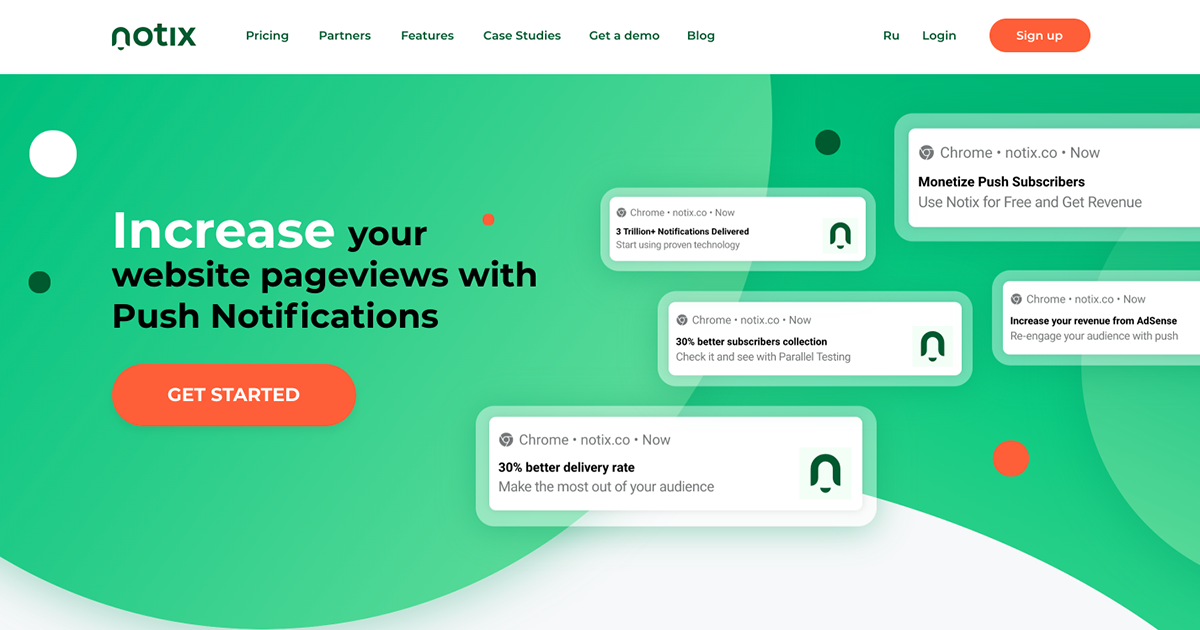
Notix Full homepage screenshot

At a glance

Category
Marketing
Language
English
Paid-content signal
Paid contentObserved
Registered
2020
Hosting
Qrator Labs CZ s.r.o.Inferred
HTTPS certificate trusted
PassedObserved
Last updated

Website review

This review may include AI-generated content and is not individually verified. Domain, certificate and other facts come from the observed data on this page.

What is Notix?

Notix is a web push notification service for re-engaging website visitors. It sends browser-based alerts to desktop and mobile devices, and also supports in-app notifications for mobile apps. The pitch is straightforward: instead of waiting for people to return on their own, you send them timely updates, news or offers, with the goal of increasing pageviews and retention.

What it does

  • Web push across devices: Notix supports multiple browsers on both desktop and mobile, so subscribers can receive alerts without installing an app.
  • Audience segmentation: You can split subscribers by custom parameters to target messages more precisely.
  • Flexible subscription prompts: The opt-in prompt can be delayed or customised rather than shown immediately.
  • Scheduling by timezone: Messages can be sent in each user's local time, which matters if your audience is spread across regions.
  • Real-time statistics: Delivery and engagement metrics update as campaigns run.
  • Migration and parallel testing: You can move subscribers from another provider, or run Notix alongside your current service to compare results.
  • Developer and integration options: API integration, a WordPress plugin, RSS-to-push via Zapier, and emoji support are listed.

Who it is for

The page names website owners and webmasters, affiliates and media agencies, and online businesses. In practice, the clearest fit is a publisher or content site that already has steady traffic but wants more repeat visits; an affiliate or media buyer running high-volume campaigns; or a business that wants to bring people back for time-sensitive offers. If you have no meaningful web traffic yet, push notifications have little to work with.

Trade-offs to weigh

Push notifications are permission-based, so list quality depends on how you ask. Aggressive prompts can grow the list quickly but annoy visitors and reduce long-term engagement. Notix offers controls such as delayed or custom prompts, and segmentation, which help — but the strategy still matters more than the tool. Also consider that web push is a crowded channel; subscribers may already be receiving alerts from other sites, so relevance and frequency discipline are essential.

A practical next step: check the pricing page at Notix to confirm current plan limits, then run a small parallel test against your existing provider using the same content and send times. Compare click-through rate and unsubscribe rate, not just list growth. If you run WordPress, the plugin is the fastest way to trial it; if you need custom logic, the API is the relevant path.

How much does Notix cost and what subscription plans are available?

Notix's own site does not publish specific prices or named subscription tiers on the page describing the service. It presents itself as a free web push notifications service, and it links to a separate pricing page for plan details, so any exact figure or tier name should be checked there rather than assumed from the overview.

What the page does confirm

  • The service covers desktop, mobile and in-app push notifications.
  • It lists audience types including website owners and webmasters, affiliates and media agencies, and online businesses.
  • Features that commonly affect plan level include audience segmentation, parallel testing, real-time statistics, database migration, flexible subscription prompts, API integration and a WordPress plugin.
  • Push monetization is described as available "upon request," which usually signals a commercial arrangement rather than a standard self-serve tier.

How to judge the plans

Because no numbers are stated here, treat the pricing page as the source of truth and compare plans on the things that actually change cost:

What to check Why it matters
Subscriber volume Push pricing is usually tied to how many subscribers you store or message
Notifications sent per month Heavy senders can hit limits that light senders never see
Segmentation and testing Useful for media and affiliate audiences, sometimes gated to higher plans
Monetization option If you want to earn from subscribers, confirm it is included and on what terms
Migration support Moving an existing subscriber base can be a one-off cost or a premium service

Practical next step

Decide your monthly active subscriber count and desired sends first, then match those two numbers against the plans on Notix. If monetization is part of your goal, ask directly whether it is included or requires a separate agreement, since the overview only says it is available on request.

How do I migrate my existing push notification subscribers to Notix from another provider?

Notix lists database migration from another service as a supported capability, so you can move an existing subscriber base rather than rebuild it from zero. The practical path is to keep your current provider running while Notix imports your subscribers, then switch sending over once delivery and click numbers look right. Notix explicitly offers a parallel testing option for exactly this comparison, which is the safest way to judge the migration before committing.

What the migration involves

  • Subscriber transfer. Notix states you can move your subscribers from your current provider, which preserves the audience you have already paid to acquire.
  • Parallel running. Run Notix alongside your existing provider to compare delivery rates and CTR before fully switching.
  • Flexible subscription prompts. Prompts can be delayed by seconds or custom-designed, so returning visitors see something consistent with your site rather than a jarring new opt-in.
  • Segmentation and timezone sending. Once subscribers are in, you can segment by custom parameters and deliver in each user's timezone, which matters if your old provider handled timing differently.

A sensible sequence

  1. Export or connect your current subscriber list through Notix's migration process.
  2. Keep your old provider live and enable parallel testing.
  3. Send a comparable campaign through both and compare delivery and clicks.
  4. Move your subscription prompt and WordPress plugin setup to Notix if you use WordPress.
  5. Retire the old provider once metrics hold steady.

Trade-offs to weigh

Migration is most valuable for sites with a large, hard-won audience; for a small list, rebuilding opt-ins may be simpler than coordinating two systems. Parallel testing also means running two dashboards and two sets of prompts temporarily, which takes staff time. If your old provider's subscribers were collected under different consent terms, check that the transfer complies with your own privacy commitments before importing.

For a concrete case: a shopping guide blog using push notifications reached 220k subscribers and a 40% ROI lift, according to a case study Notix shares from its partners. That kind of volume is where migration pays off, since re-acquiring those subscribers through fresh prompts would be far slower than transferring them.

Your next step is to open Notix and ask their team directly how the migration handles your current provider and consent records, since the mechanics depend on which service you are leaving.

Can I test Notix alongside my current push notification provider before switching?

Yes. Notix explicitly lists a "parallel testing option" that lets you run Notix alongside your current push notification provider to compare results before committing to a full switch.

How to read that claim practically

Parallel testing usually means both services are active on the same site at the same time, so you can compare delivery rate, click-through rate, and subscriber growth under similar conditions. Notix also lists "database migration from another service," which suggests the intended path is: test first, then move existing subscribers over if the numbers hold up.

A few things worth deciding before you start:

  • What "better" means for you. Pick one or two metrics in advance — for example, delivery rate or CTR — rather than judging on overall feel.
  • Whether you can run two prompts at once. Two subscription prompts on the same page can cannibalize each other, so you may need to split traffic by page or by audience segment instead.
  • How long the test runs. Short tests can be skewed by a single campaign, so a few weeks across comparable content gives a fairer read.
  • What happens to your subscriber list. If Notix wins, you'll want the migration path confirmed before you disable the old provider, so you don't lose the audience you built.

Who this suits

This is most useful for publishers, affiliates, and media agencies with an existing push list who don't want to gamble on a switch. If you're starting from zero subscribers, the parallel test matters less — you'd simply be evaluating Notix on its own.

For a concrete scenario: a shopping-guide blog with a few hundred thousand subscribers could keep its current provider running on half its article templates and put Notix on the other half, then compare CTR after a month. Notix's own case-study section references a shopping-guide blog result, so that kind of site is clearly a target audience.

Next step

Check the pricing page at Notix to confirm what the parallel testing option includes on your plan, and ask support directly whether both services can run on the same domain simultaneously without prompt conflicts. Also worth comparing against established alternatives such as OneSignal if you want a second benchmark before deciding.

How can I monetize my push notification subscribers with Notix?

Notix is primarily a web push notification service for re-engaging an audience, but it also lists push monetization as a capability: you can monetize your subscribers upon request while still using Notix to send your own content. That phrasing matters — it suggests monetization is arranged through Notix rather than being a self-serve ad network you simply switch on. If earning from your subscriber list is the goal, the practical first step is to contact Notix and ask exactly how their monetization program works: what ad formats appear in your notifications, how revenue is calculated, what content restrictions apply, and whether you can control frequency or exclude certain segments.

Who this suits

  • Publishers and bloggers with an existing notification audience who want a second revenue stream without selling directly to advertisers.
  • Affiliates and media agencies, which Notix names as an intended audience alongside website owners and online businesses.
  • Sites already sending their own pushes, since monetization is positioned as running alongside your content rather than replacing it.

What supports monetization

Notix's page evidence points to several features that make monetization more workable rather than just possible:

  • Audience segmentation — target offers by custom parameters instead of blasting everyone.
  • Send messages in users' timezone — relevant for offers where timing affects click-through.
  • Real-time statistics — monitor delivery and performance as campaigns run.
  • Parallel testing — run Notix alongside your current provider to compare results before committing.
  • RSS feeds via Zapier and triggered push — useful for keeping a steady content cadence, which protects subscriber trust while monetized messages are mixed in.
  • Database migration — move subscribers from another provider if you're switching.

The trade-off to weigh

Monetized notifications compete with your own messages for the same attention. A subscriber who opted in for news may unsubscribe if the balance tips too far toward promotions, and unsubscribes are hard to reverse. Treat monetization as a share of sends, not the whole stream, and watch unsubscribe and click rates per segment rather than only revenue.

A concrete next step

Pick one high-engagement segment, ask Notix what monetization options fit it, and run a limited test while tracking clicks and unsubscribes separately from your editorial sends. If you want a second opinion on whether push monetization fits your audience size and niche, compare how other push platforms describe their monetization programs — for example OneSignal or PushEngage.

What types of websites and businesses benefit most from using Notix?

The clearest beneficiaries are content publishers, e-commerce stores, and affiliate or media-buying operations that already attract repeat visitors and want to bring them back without paying for every return visit. Notix is built around web push notifications for desktop and mobile browsers, so it suits sites where people read, browse, or shop in short sessions and might otherwise forget to return. Its own audience list names website owners and webmasters, affiliates and media agencies, and online businesses — a fair summary of who the tool is aimed at.

Who gets the most value

  • News, blog, and guide publishers. A shopping-guide blog case study on the site reports 220k subscribers and a 40% ROI lift, which is the kind of result that depends on a steady flow of new articles. If your editorial calendar is active, push can work like a lightweight re-engagement channel alongside email.
  • E-commerce and online businesses. On-site notifications can catch shoppers during a visit, while triggered and RSS-based messages can bring them back for restocks, deals, or new arrivals. Segmentation and timezone scheduling matter most here, since a poorly timed alert is easy to ignore.
  • Affiliates and media agencies. These teams often run many sites and care about delivery rate, click-through rate, and monetization. Notix offers push monetization on request, which lets a publisher earn from subscribers while still sending its own content.
  • Sites with an existing push provider. Parallel testing and database migration are both listed, so a business already using another service can compare results before committing.

When it is a weaker fit

If your audience is mostly one-time visitors, or your content is highly personal and low-frequency, push notifications may struggle to build a large enough subscriber base. The same applies if you cannot commit to sending regular, relevant messages; a dormant subscriber list produces little value. Notix supports in-app notifications as a newer option, but that only helps if you also have a mobile app.

A practical next step is to check your returning-visitor share and how often you publish or promote something new. If both are healthy, start with a small segment, test a few message types, and compare delivery and click rates before migrating your whole list.

Related questions

More questions →
What Is Notix and What Does It Do?

Notix is a web push notifications service for re-engaging an audience you already have. It sends browser-based notifications to desktop and mobile devices, plus in-app notifications, so a website can bring visitors back without relying on email. It is aimed at website owners and webmasters, affiliates and media agencies, and online businesses.

The core job is retention and repeat traffic: instead of waiting for someone to remember your site, you push a short message to their device and pull them back to a page. Notix also supports monetizing those subscribers on request, alongside sending your own content.

What Notix actually does

Notix handles the delivery layer of push notifications. You collect subscribers through a prompt on your site, then send them messages that appear as browser or app notifications.

  • Web push on desktop and mobile — multiple browsers are supported on both device types, so the same campaign can reach users across environments.
  • In-app notifications (marked NEW) — extends the same retention effort into mobile apps rather than stopping at the browser.
  • On-site notifications — catch readers with updates while they are still on your website, not only after they leave.
  • Audience segmentation — target groups based on custom parameters instead of blasting every subscriber.
  • Push monetization — monetize subscribers on request while still using Notix for your own sends.
  • Real-time statistics — track delivery and other metrics as they happen, with no reporting delay.
  • Timezone-aware sending — deliver messages in each user's local timezone so they arrive at a suitable hour.

Who it is built for

The site names four audience types, and they map to fairly different use cases:

Audience Typical use
Website owners & webmasters Recover returning visitors and lift pageviews
Affiliates & media agencies Push content and offers to large subscriber bases
Online businesses Retention, updates, and re-engagement
Developers API integration and workflow automation via the SAAS

If your goal is purely transactional email or SMS, this is a different channel. Notix is specifically about browser and app notifications.

Features worth knowing before you choose

Beyond basic sending, several capabilities affect how much work setup and migration take:

  • Flexible subscription prompts — control prompt timing from delays in seconds to custom designs, which matters because an aggressive prompt can hurt opt-in quality.
  • Database migration — move existing subscribers over from your current provider rather than rebuilding an audience from zero.
  • Parallel testing — run Notix alongside your current provider to compare results before committing.
  • WordPress plugin — install on a WordPress site in a few clicks.
  • API integration — automate workflows programmatically.
  • Triggered push — send personalized notifications based on individual scenarios.
  • RSS feeds — turn a feed into push notifications via Zapier.
  • Content recommendations — promote content matched to user interests.
  • Emoji support — make messages more visually noticeable.

The site also claims a 30% better delivery rate and states it engages 1B+ users daily. Treat vendor-reported figures as claims to verify in your own parallel test rather than as guaranteed outcomes.

How to evaluate it for your site

  1. Confirm your channel fits. If your audience is on desktop and mobile browsers, web push applies. If you need in-app reach, check the in-app option.
  2. Check the pricing page at notix.co/pricing for current plan terms before assuming cost — the site links a Pricing page, but plan details are not specified in the material available here.
  3. Run a parallel test. Use the built-in parallel testing option to send through Notix and your current provider at the same time, then compare delivery and click-through.
  4. Plan the migration. If results look good, use database migration to move subscribers instead of asking them to opt in again.
  5. Tune the prompt. Start with a reasonable delay and a clear value message, then adjust based on opt-in rate.

Common questions

Is it only for websites? No. It covers desktop, mobile, and in-app notifications, so mobile apps are in scope as well.

Can it replace my current push provider? It is designed to, via database migration, but the parallel testing option exists precisely so you can compare before switching.

Does it handle monetization? Yes, push monetization is available on request, and you can still send your own content alongside it.

Do I need to code? Not necessarily — there is a WordPress plugin for quick installs. Developers who want automation can use the API instead.

The practical decision comes down to whether push is a channel your audience will accept and whether you want migration, testing, and monetization handled in one place. If so, start with a parallel test and let your own delivery and click numbers decide.

What Features Does Notix Offer for Audience Engagement and Monetization?

Notix is a web push notification service that works across desktop, mobile, and in-app channels, and its feature set splits into two practical goals: getting more out of the audience you already have, and earning from it. The engagement side covers audience segmentation, timezone-based sending, triggered push, RSS-to-push, content recommendations, and flexible subscription prompts. The monetization side covers push monetization on request plus real-time statistics to track delivery and click performance. If you run a website, affiliate operation, or online business and want to re-engage visitors without building the infrastructure yourself, these are the capabilities to evaluate.

Engagement features

Audience segmentation and targeting

Notix lets you segment audiences based on custom parameters, which means targeting is not limited to "everyone who subscribed." You can group subscribers by the attributes you define and send different messages to different groups. This matters when a single broadcast would be irrelevant to part of your list.

Send in the user's timezone

Messages can be delivered in each subscriber's own timezone. Instead of picking one send time for a global audience, the system reaches people at the hour that suits them. This is a direct lever on open and click rates for audiences spread across regions.

Triggered push

Triggered notifications fire according to individual scenarios rather than a fixed schedule. You define the scenario, and the push follows the user's behavior or state. This is the feature to use when a one-time broadcast is too blunt and the message should depend on what a specific user does.

RSS feeds to push

You can turn an RSS feed into push notifications via Zapier, so new items in the feed become pushes automatically. For publishers and news-driven sites, this removes the manual step of writing a push for every new post.

Content recommendations

Notix can promote content matched to users' interests to drive deeper engagement. Rather than pushing the same article to everyone, recommendations aim at what each subscriber is more likely to click.

Flexible subscription prompts

Subscription prompts can be configured with delays measured in seconds up to fully custom designs. The opt-in prompt is the first conversion in the funnel, so controlling when and how it appears affects how many subscribers you collect.

On-site notifications

On-site notifications catch readers and customers with updates and news while they are on your website. This is a separate surface from standard web push and works for visitors who are already present.

In-app notifications

In-app push is marked as new and extends retention efforts through mobile app notifications. If you have a mobile app alongside your website, this adds a channel beyond browser push.

Monetization and measurement features

Push monetization

Notix offers push monetization on request, which can run alongside your own content sends. In other words, you can monetize subscribers while still using Notix to distribute your own messages, rather than choosing one or the other.

Real-time statistics

All metrics are tracked with no delays, and you can monitor the delivery process as it happens. This is useful for catching delivery problems during a send instead of after it finishes.

Delivery performance

Notix states a 30% better delivery rate, delivering more and achieving higher CTR on each notification sent. Treat this as the vendor's own claim and verify it against your own numbers, which the parallel testing option below is designed for.

Operational and integration features

Feature What it does
Multiple browser support Works on both mobile and desktop devices
Parallel testing Test Notix alongside your current provider to compare results
Database migration Move subscribers to Notix from your current provider
API integration Workflow automation via the Notix SaaS for developers
WordPress plugin Install Notix on your site in a few clicks
Emoji support Make messages more eye-catching

Who each feature fits

  • Website owners and webmasters: flexible subscription prompts, on-site notifications, and RSS-to-push cover the basics of collecting and re-engaging an audience.
  • Affiliates and media agencies: audience segmentation, timezone sending, and push monetization are the relevant levers.
  • Online businesses: triggered push and content recommendations support behavior-driven messaging rather than blanket broadcasts.
  • Developers: API integration and the WordPress plugin reduce setup work.

How to decide

Start with the goal. If the problem is reach, look at delivery rate, timezone sending, and subscription prompts. If the problem is relevance, look at segmentation, triggered push, and content recommendations. If the problem is revenue, look at push monetization and real-time statistics. If the problem is switching cost, the parallel testing and database migration features exist specifically to let you compare Notix against your current provider before committing.

Pricing and plan details are not covered here; check the Notix pricing page for current terms.

Which devices and browsers does Notix support for push notifications?

Notix supports web push notifications on both desktop and mobile devices, across multiple browsers, and adds in-app notifications as a separate channel for mobile apps. If your audience reaches your site from a mix of phones, tablets, and computers, Notix is built to cover that spread rather than locking you to a single platform. The exact browser list isn't published on the page, so treat "multiple browsers" as the supported claim and verify your specific targets during setup.

Device coverage

Notix states its web push works with desktop and mobile devices. The page shows previews of two real notification surfaces:

  • Android subscription window and push notification — the opt-in prompt and the delivered alert as they appear on Android.
  • Windows push alert — the desktop notification style on Windows.

The site also lists "Browsers supported" as a category, and the technology section says multiple browsers are supported on both mobile and desktop. That means the same campaign can reach a subscriber who opts in on a phone and another who opts in on a laptop.

Browser support

The page confirms multi-browser support but does not name individual browsers in the supplied content. Two practical implications:

  • Plan for the major engines. Web push depends on the browser's push service, so coverage generally follows browsers that implement the Push API. Confirm the specific versions your traffic uses before committing.
  • Test before migrating. Notix offers a parallel testing option, which lets you run it alongside your current provider and compare delivery and click-through before switching.

In-app notifications (new channel)

Beyond web push, Notix offers In-App (NEW!) notifications, described as a way to expand retention efforts through mobile app notifications. This is a distinct channel from web push: it targets users inside your own mobile app rather than a browser session. If you run both a website and an app, you can combine web push for site visitors with in-app messages for app users.

What else rides on the same infrastructure

Device and browser support is the entry point; these features determine what you can do once subscribers are reachable:

Feature What it does
On-site notifications Catch visitors with updates while they're on your site
Audience segmentation Target groups by custom parameters
Timezone sending Deliver at each subscriber's suitable local time
Triggered push Send notifications based on individual scenarios
RSS feeds Turn a feed into push notifications via Zapier
WordPress plugin Install Notix on a WordPress site in a few clicks
API integration Automate workflows for developers
Emoji support Make messages more visual

Notix also claims a 30% better delivery rate and says it engages 1B+ users daily — vendor figures, useful as positioning rather than as a guarantee for your list.

How to confirm your setup works

  1. Install the opt-in prompt on your site (via the WordPress plugin or API integration).
  2. Subscribe from each device type you care about — at least one Android phone, one iPhone, and one desktop browser.
  3. Send a test notification and check that it arrives on each.
  4. Use parallel testing to compare Notix delivery against your existing provider on the same audience segment.
  5. Check real-time statistics to see delivery as it happens and catch gaps early.

Common snags: a subscriber who opted in on desktop won't automatically receive notifications on their phone unless they opt in there too, and browser-level notification permissions can be revoked by the user at any time.

Who this fits

Notix suits website owners, webmasters, affiliates, media agencies, and online businesses whose audiences arrive from a mix of desktop and mobile browsers. If your users are concentrated in one browser or one device type, confirm that specific environment first. If you also run a mobile app and want a retention channel inside it, the in-app option is worth evaluating alongside web push.

How to Install Notix on Your Website

You can install Notix on your website in two main ways: through the WordPress plugin (a few clicks, no coding) or through API integration (for custom workflows and developers). The right choice depends on your platform — WordPress sites should use the plugin, while custom or non-WordPress sites need the API route. Notix supports both desktop and mobile browsers, and also offers in-app notifications for mobile apps.

Before You Start

Confirm two things:

  • Your platform. If your site runs on WordPress, the plugin is the fastest path. If not, you'll use the API integration.
  • Your goal. Sending your own content, segmenting audiences, or monetizing subscribers — Notix supports all three, but the setup steps below focus on getting the service connected first.

Option 1: Install via the WordPress Plugin

This is the "several clicks" path described by Notix.

  1. Get the plugin. Notix provides a WordPress plugin that installs the service on your site.
  2. Install and activate it in your WordPress admin, the same way you'd add any plugin.
  3. Connect your Notix account so the plugin can talk to the service.
  4. Configure your subscription prompt — you can set delays in seconds and customize the design.
  5. Verify it works. Load your site in a supported browser and confirm the subscription prompt appears as configured.

Expected result: Visitors on desktop and mobile browsers can subscribe, and you can begin sending push notifications from your Notix dashboard.

Option 2: Install via API Integration

Notix offers a SAAS option for developers, with API integration for workflow automation. This is the route for non-WordPress sites or anyone who wants programmatic control.

  1. Set up your Notix account and locate your integration credentials.
  2. Integrate the API into your site so it can register subscribers and receive push events.
  3. Define your subscription prompt behavior — timing and design are configurable here too.
  4. Test delivery on both desktop and mobile browsers before going live.

Expected result: Your site collects subscribers through your own implementation, and you can automate sending through the API.

What You Can Configure After Install

Feature What it does
Flexible subscription prompts Set delays from seconds to custom designs
Audience segmentation Target subscribers by custom parameters
Triggered push Send personalized notifications per individual scenario
RSS feeds Turn your RSS feed into push notifications via Zapier
Emoji support Make messages more eye-catching
Real-time statistics Track metrics with no delays
Parallel testing Run Notix alongside your current provider to compare
Database migration Move subscribers over from your current provider
Push monetization Monetize subscribers on request while still sending your own content

Common Sticking Points

  • Prompt timing feels wrong. The delay is configurable — adjust it rather than accepting the default.
  • You're switching providers. Notix supports database migration from another service, so you don't have to rebuild your subscriber list.
  • You want to compare before committing. The parallel testing option lets you run Notix next to your existing provider.
  • You're not on WordPress. Skip the plugin and go straight to API integration.

Which Path Should You Choose?

  • Choose the WordPress plugin if your site runs on WordPress and you want the fastest setup with no development work.
  • Choose API integration if you're on a custom platform, need workflow automation, or want programmatic control over sending.

Either way, the service works across desktop and mobile browsers, with in-app notifications available as a newer addition for mobile apps.

Can Notix Be Tested Alongside Your Existing Push Notification Provider?

Yes. Notix lists a parallel testing option that lets you run it at the same time as your current push provider, so you can compare results before committing to a switch. It also supports database migration from another service, which means your existing subscribers can be moved over rather than rebuilt from scratch. The main condition to check first is whether your current setup and Notix can both run on the same site without conflicting subscription prompts.

What parallel testing actually involves

Parallel testing means Notix runs alongside your existing provider instead of replacing it immediately. Both services collect and send notifications during the test window, and you compare performance before deciding.

Notix describes this as a way to "test NOTIX together with your current provider to see the difference." The comparison points the site highlights are:

  • Delivery rate — Notix claims a 30% better delivery rate, which is exactly the kind of number parallel testing is meant to verify for your own audience.
  • Click-through rate (CTR) — measured per notification sent.
  • Real-time statistics — Notix reports metrics with no delays, so you can monitor the delivery process as it happens rather than waiting on batch reports.

Because both providers are live at once, you get a side-by-side view on the same traffic instead of comparing against historical numbers from a different period.

Migration is part of the same decision

Switching risk usually comes from two places: losing subscribers and losing performance. Notix addresses the first directly with database migration from another service — you move your existing subscribers to Notix from your current provider. That removes the "start from zero" problem that makes many teams avoid testing a new push vendor at all.

If migration is available, a practical sequence is:

  1. Run Notix in parallel and confirm delivery and CTR on your real audience.
  2. Migrate the subscriber database once you decide to proceed.
  3. Keep the old provider running until the migrated list is confirmed active.

What to check before you start

Parallel testing only works cleanly if the two services don't fight over the same opt-in moment. Before testing, confirm:

  • Subscription prompts — Notix supports flexible prompts, from delays in seconds to custom designs. You'll want the two providers' prompts configured so they don't stack on the same page load and confuse visitors.
  • Platform coverage — Notix works on desktop, mobile, and in-app, and supports multiple browsers on both mobile and desktop devices. Match this against what your current provider covers so the comparison is fair.
  • Integration path — Notix offers a WordPress plugin for several-click installation, plus API integration for workflow automation. Pick the path that matches your stack; a plugin install is faster to set up for a test than a custom API build.
  • Audience segmentation — Notix supports segmenting audiences by custom parameters. If you want to compare performance on a specific segment rather than your whole list, set this up before the test begins.

Where the comparison is most useful

Parallel testing pays off most when you have a clear metric you're trying to improve. Notix's own framing points to delivery rate and CTR as the headline numbers, and it also lists push monetization (monetizing subscribers on request) and sending messages in users' timezones as features you might want to evaluate.

A reasonable test design is to pick one or two of these — say, delivery rate and CTR on the same content — and run both providers long enough to get a stable sample. The site's case study material (for example, a shopping guide blog reaching 220k subscribers and +40% ROI) shows the kind of outcome Notix promotes, but your own parallel test is what tells you whether those results transfer to your audience.

The bottom line

Notix is built to be tested against an incumbent rather than only swapped in blind: parallel testing, database migration, and real-time stats all support a low-risk evaluation. The decision comes down to whether your site can run two push services at once without prompt conflicts, and whether the delivery and CTR numbers from your own parallel test justify the move.

Website Overview

An established domain and managed infrastructure suggest continuity of operations and may support dependable delivery, although neither guarantees service quality. Page metadata, canonical configuration and social previews work together to provide more consistent search and sharing presentation.

Domain and Registration

Registered in 2020, this domain has about 6 years of history. That suggests continuity, although ownership and purpose may have changed. Transfer-protection status is present, helping reduce the risk of unauthorized domain transfers. The domain uses the common .co extension, which is not an independent safety signal.

DNS and Email

The lowest TTL is 60 seconds, supporting rapid record changes at the cost of more frequent lookups. Nameservers are provided by Amazon Route 53, indicating managed DNS hosting. MX records point to the Microsoft 365 email service. No CNAME was found; the observed records resolve directly to addresses. SPF and DMARC are configured. DKIM status is unknown.

TLS and Certificates

The certificate issuer is Sectigo Limited, a commercial certificate authority. The certificate uses an RSA 2048-bit public key, offering broad client compatibility. The server supplied a complete certificate chain. No organization name is present in the certificate; the available fields are consistent with domain validation. The certificate is valid for about 381 days in total, with 117 days remaining.

HTTP and Browser Security

The response lacks these common security headers: X-Content-Type-Options, Permissions-Policy. No X-Powered-By header was found, reducing one common source of backend fingerprinting information. No obvious internal addresses or debug information were found in the headers. The Server header contains the custom value QRATOR. No explicit CDN or WAF marker was found in the response headers.

Technology Stack Analysis

The public page identifies WPML ver:4.9.6 stt:1,42,2;, WordPress, jQuery, Google Tag Manager without precise versions, leaving fewer clues for version-specific scanning.

Search and Social Sharing

The Generator tag identifies WPML ver:4.9.6 stt:1,42,2;, making the publishing system easier to fingerprint. Twitter Card metadata is configured. JSON-LD includes Organization data, helping describe the organization as an entity. The title has 63 characters, within a common display range. A meta description is present, with 118 characters.

Hosting and Email

DNSAmazon Route 53
HostingQrator Labs CZ s.r.o.
EmailMicrosoft 365
Approximate IP geolocation (inferred; a CDN or proxy may differ from the origin server) Czechia flagCzechia Inferred 185.104.210.16

Registration details

RDAP / WHOIS

RegistrarURL Solutions Inc.
Registered2020-02-26
Expires2027-02-26
Domain statusclientTransferProhibited https://icann.org/epp#clientTransferProhibited
Nameserversns-1172.awsdns-18.org、ns-1641.awsdns-13.co.uk、ns-391.awsdns-48.com、ns-633.awsdns-15.net
DNSSECunsigned

DNS records

DNS

TypeNameValueTTLPriority
Anotix.co185.104.210.16900—
MXnotix.conotix-co.mail.protection.outlook.com360010
NSnotix.cons-1172.awsdns-18.org172800—
NSnotix.cons-1641.awsdns-13.co.uk172800—
NSnotix.cons-391.awsdns-48.com172800—
NSnotix.cons-633.awsdns-15.net172800—
TXTnotix.coMS=ms8457687560—
TXTnotix.coOSSRH-9096660—
TXTnotix.cogoogle-site-verification=zQTxg14MohKzGeOO6u61D6miwVCgiJQnvW_ryltkczk60—
TXTnotix.cov=spf1 include:spf.protection.outlook.com include:_spf.elasticemail.com ip4:34.246.46.18/32 ip4:52.16.48.188/32 include:spf.mandrillapp.com include:servers.mcsv.net exists:%{i}._spf.mta.salesforce.com a -all60—
DMARC_dmarc.notix.cov=DMARC1; p=quarantine; rua=mailto:[email protected]300—

TLS and certificates

TLS / SSL

AssessmentNormal configuration
Supported protocolsTLSv1.2、TLSv1.3
Negotiated protocolTLSv1.3
Certificate subject*.notix.co
IssuerSectigo Limited
Valid until2027-02-05T23:59 · Remaining when checked: 117 days
Verification detailsCertificate trust: Passed · Hostname match: Passed

HTTP response headers

HTTP

HeaderValue
content-typetext/html; charset=UTF-8
serverQRATOR
strict-transport-securitymax-age=31536000; includeSubDomains; preload
content-security-policyframe-ancestors 'self';
x-frame-optionsSAMEORIGIN
x-content-type-optionsnosniff, nosniff
referrer-policyno-referrer-when-downgrade

Identified technologies

WPML ver:4.9.6 stt:1,42,2;WordPressjQueryGoogle Tag Manager

Pages, Search and Sharing

Meta descriptionNotix is a free web push notifications service for audience re-engagement. Works both with desktop and mobile devices.
Canonical URLhttps://notix.co/
LanguageEnglish (default)
Twitter Cardsummary_large_image

No robots.txt found

User reviews (0)

  • No reviews yet.