
 简体中文
简体中文 English
Website review
This review may include AI-generated content and is not individually verified. Domain, certificate and other facts come from the observed data on this page.
What is OpenDyslexic?
OpenDyslexic is a free, open-license typeface designed to counter some common symptoms of dyslexia. It is a font, not an app or a reading program: you install or embed it, then set text in it wherever you read or publish.
Who it is for and where it fits
- Individual readers who find standard fonts visually unstable can try it in their browser, e-reader or documents as a reading aid.
- Teachers and schools can use it in handouts, slides and reading material without licensing costs, since the current version uses the SIL Open Font License.
- Designers and developers can bundle it into websites, ebooks, apps and printed books, including commercial projects, under that license.
- Publishers can offer it as an optional reading font alongside a default typeface.
Trade-offs to weigh
OpenDyslexic's distinctive letterforms are the point, but they also make pages look unlike conventional typography, which matters for brand-heavy or long-form layouts. Dyslexia is highly individual, so the practical test is personal: read a paragraph in OpenDyslexic and the same paragraph in your usual font, and keep whichever you finish more comfortably. Offering it as a toggle rather than a forced default respects readers who prefer other fonts.
A sensible first step is to download it from OpenDyslexic, try it on a page you actually read daily, and check the license terms before embedding it in a product.
How does OpenDyslexic help people with dyslexia read more easily?
OpenDyslexic is a typeface built to counter some of the visual symptoms commonly reported by dyslexic readers. Its letterforms are deliberately weighted and shaped so that individual characters are harder to flip, rotate or confuse with one another — for example, letters carry a heavier bottom edge and distinct internal shapes, which gives the eye a stronger anchor for orientation. The aim is not to "cure" dyslexia but to reduce the moment-to-moment ambiguity that can slow reading down.
What it does in practice
- Distinct letter shapes. Similar-looking characters (b, d, p, q; m and n) are drawn with differences in weight and form that make them easier to tell apart at a glance.
- Bottom-weighted strokes. A thicker base on each glyph helps the reader's eye keep letters upright, which matters when lines of text start to visually "swim" or swap.
- Open, generous spacing. The design gives letters more internal space and clearer separation, reducing the crowding effect that some readers find tiring.
- Consistent rhythm. Because the letterforms are intentionally unusual, the reader relies less on pattern-guessing and more on actually decoding each character — useful for early or struggling readers, though some experienced readers find the novelty slows them at first.
Who it suits, and the trade-offs
It tends to work best as a setting choice — a font you switch on for a document, browser, e-reader or app when default fonts feel effortful. Children learning to decode letters, adults who fatigue quickly, and anyone who notices letters flipping or blurring are the clearest beneficiaries. The trade-off is aesthetic and habitual: the typeface looks unlike conventional text, so long-form reading speed may dip before it settles, and not every dyslexic reader finds it helpful — responses vary from person to person. It is also a single intervention, not a substitute for structured literacy support, larger text sizes, line spacing or text-to-speech.
A useful next step
Try it as a controlled experiment rather than a permanent switch: set the same short passage in OpenDyslexic and in your usual font, read each aloud or time yourself, and note where your eyes catch or backtrack. Keep it if the difference is real for you; drop it if not. The font is free to use for personal, educational, commercial and web projects under an open licence, so testing costs nothing. You can get it from OpenDyslexic. For broader reading-support tools and accessibility guidance, Boston College and Reading Rockets publish practical material on dyslexia-friendly text.
Can I use OpenDyslexic in a commercial project or on my website?
Yes. OpenDyslexic's current release uses the SIL Open Font License (SIL-OFL), and the project explicitly lists commercial use, business use, education, books, e-book readers, applications and websites among permitted purposes. There are no mandatory fees; donations via Itch.io or Patreon are optional.
What that means in practice
- Website use: You can self-host the font files and reference them with
@font-face, or bundle them with an app. The OFL permits embedding and redistribution, including inside commercial products. - Products and print: Books, e-readers, apps and branded materials are covered. You don't need to ask permission or pay a licence fee.
- OFL conditions to respect: If you redistribute modified font files, keep them under the OFL and don't use the reserved name "OpenDyslexic" for modified versions. You also can't sell the font files on their own as a font product. These are standard OFL terms, not extra restrictions from this project.
A useful next step
Before shipping, download the latest build from OpenDyslexic and include the licence file alongside the font in your project. Then test it on real pages: OpenDyslexic is a dyslexia-oriented typeface, not a universal readability upgrade, so compare it with your default font using actual users or a quick readability check. If your site already uses a system font stack, adding OpenDyslexic as a user-selectable option is often a better fit than replacing the default for everyone.
How do I download and install OpenDyslexic on my computer or e-reader?
Download OpenDyslexic from the official site, OpenDyslexic. The font is free under the SIL-OFL license, so you can install it on a computer, use it in documents, or embed it in an e-reader or app without paying. On the site, follow the download link; donations through Itch.io or Patreon are optional.
On a computer
- Download the font files. You will usually get a
.otfor.ttffile (and sometimes a.wofffor web use). - Install it through your system's font manager:
- Windows: right-click the font file and choose Install (or Install for all users).
- macOS: open the file in Font Book and click Install Font.
- Linux: copy it into
~/.local/share/fonts/and runfc-cache -f.
- Restart open apps, then select OpenDyslexic in the font menu of your word processor, browser settings or PDF reader.
On an e-reader
Most dedicated e-readers accept sideloaded fonts, but the steps vary:
- Kobo: connect by USB, copy the font files into the
fontsfolder on the device, then choose the font in the reading settings. - Kindle: newer models support adding fonts by USB; copy files into the
fontsfolder at the top level of the drive. - Other readers and apps: check whether the reading app has a "custom font" or "add font" option; if not, the font may not be usable there.
Practical notes
- Install the regular, bold and italic files if offered, so emphasis in text still displays correctly.
- If a website does not let you change fonts, a browser extension or reader mode that applies a custom font can help.
- Test it on a page you find difficult first; the typeface is designed to reduce some dyslexia symptoms, but individual results vary.
A sensible next step is to download the current release, install the regular weight, and compare a paragraph in OpenDyslexic with your usual font before changing settings system-wide.
Is OpenDyslexic really free, and how can I donate to support it?
Yes. OpenDyslexic is free to use, with no mandatory fees. Its newest version uses the SIL-OFL license, which permits personal, business, educational, commercial, book, ebook reader, application, and website use. Donations are optional.
How to donate
- One-time donation: available when you download OpenDyslexic from Itch.io; you can choose any amount.
- Ongoing support: a Patreon subscription helps cover continuing costs.
- Other methods: the site says to email for alternative donation arrangements.
Practical takeaway
For a school, indie app, or commercial publication, the license is the relevant part: you can adopt the typeface without paying or asking permission, though crediting and license terms still apply as with any open font. If you want to support the project, a one-time Itch.io donation is the simplest route; a Patreon subscription suits anyone who wants to fund ongoing maintenance.
To decide, check whether your project can comply with the SIL-OFL terms, then download from the official site: OpenDyslexic.
How can I report a bug or request a new feature in OpenDyslexic?
Report bugs and feature requests through the project's source-code forge: OpenDyslexic's development is hosted on the Hackers.town Forgejo instance, and the site invites users to "help by sharing bugs or requests" there. That is the official channel named on OpenDyslexic.
What to include
- The font version you are using and where you downloaded it (the site notes builds are distributed via Itch.io).
- Your environment: operating system and the app, browser, or e-reader where the problem appears.
- A minimal reproduction: the specific characters, words, or glyphs affected, ideally with a screenshot.
- For feature requests: the reading problem you want solved and the scripts or languages involved, since typeface changes can affect many glyphs at once.
Practical next step
Check the forge's existing issues before filing, so a duplicate doesn't split the discussion. If the problem is a rendering glitch in one app but not another, say so explicitly—it helps the maintainer tell a font bug from a platform bug.
For general contact or donation questions rather than technical issues, the site lists a support email and social account; keep those separate from bug reports so the technical tracker stays useful.
 Cloudflare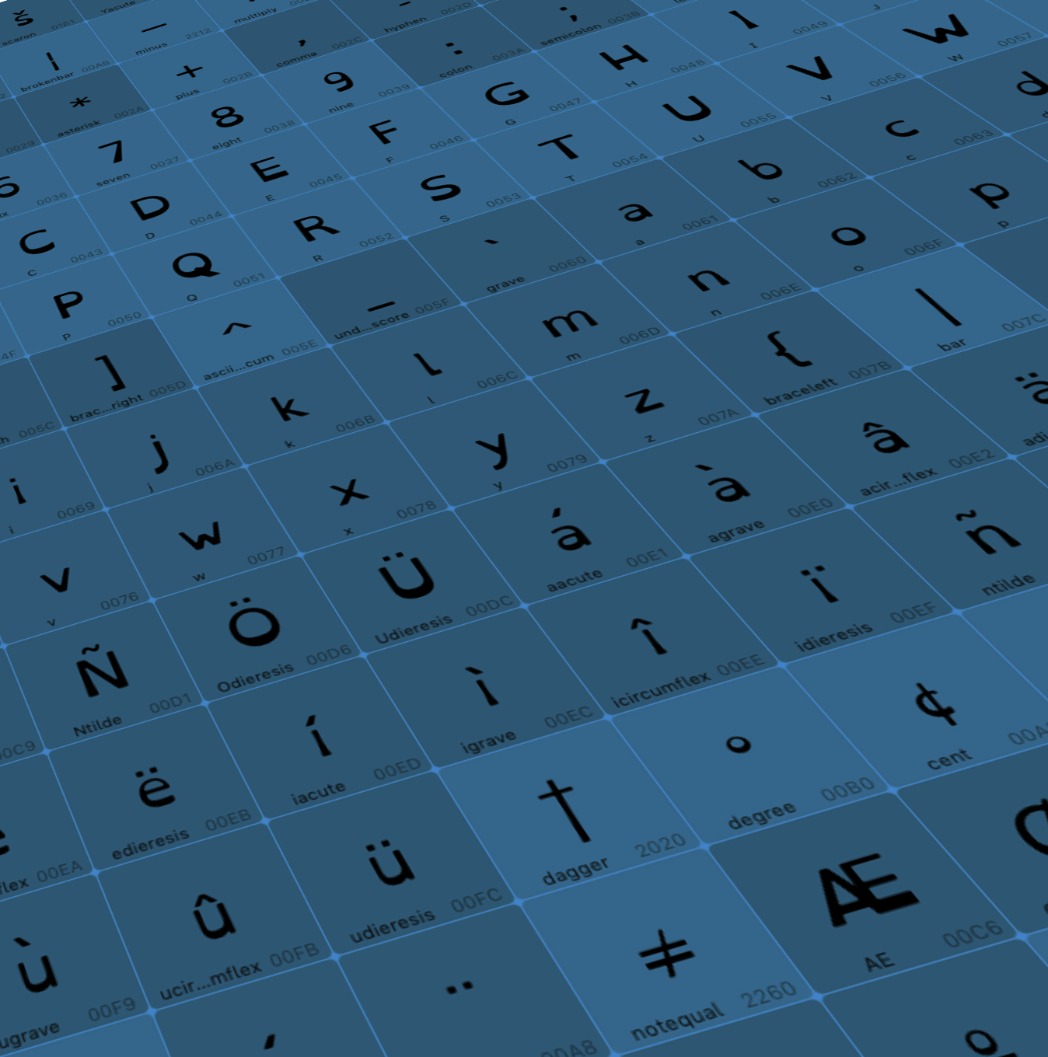
User reviews (0)