Website profiles · Technology insights · Alternatives

privategpt.dev

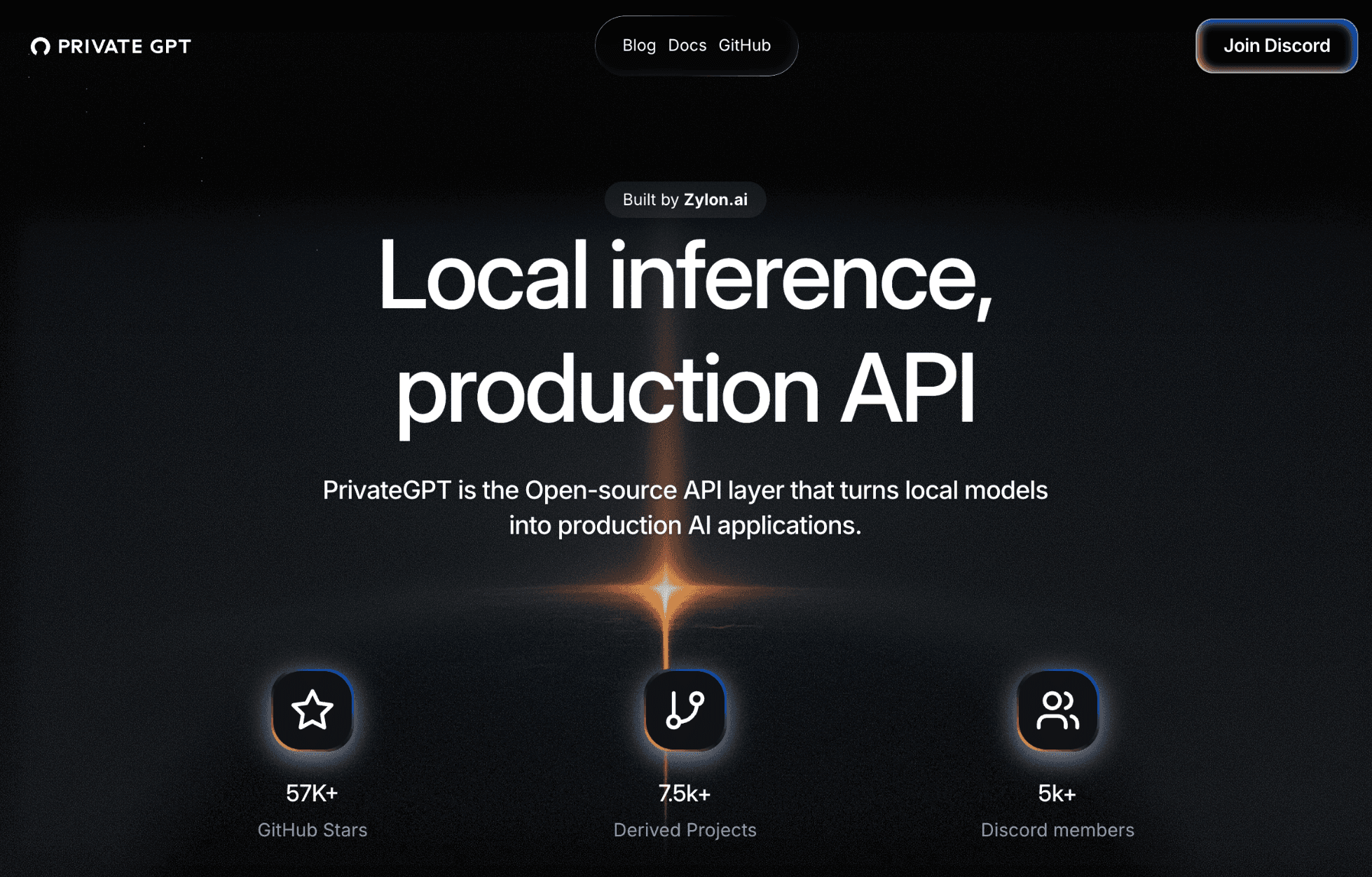
PrivateGPT is the Open-source API layer that turns local models into production AI applications.

No paid content found
Visit website
Profile views 10 Outbound visits 5 Normal
PrivateGPT.dev Full homepage screenshot

At a glance

Category
Development
Language
English
Paid-content signal
No paid content foundObserved
Registered
2023
Hosting
Amazon.com, Inc.Inferred
HTTPS certificate trusted
PassedObserved
Last updated

Website review

This review may include AI-generated content and is not individually verified. Domain, certificate and other facts come from the observed data on this page.

What is PrivateGPT.dev?

PrivateGPT.dev is the home of PrivateGPT, an open-source API layer for running AI applications on local models. Its pitch is that loading a model onto your own machine is the easy part; the harder work is the surrounding plumbing — message handling, document ingestion, retrieval, citations, embeddings and tool calls. PrivateGPT packages those as a developer-facing API, with a built-in workbench UI for testing rather than as the main product.

What it provides

  • A messages API with streaming, async processing and token counting
  • File and artifact ingestion, so documents can be used as context
  • Retrieval with citations for source-grounded answers
  • Structured data access for databases, CSVs and tabular data
  • Embeddings and orchestration across retrieval, tools and model calls
  • Custom tools and MCP support for agent-style workflows

Who it suits

Developers building private AI products who want to avoid rebuilding backend primitives, and teams that need data to stay on their own infrastructure. It is less relevant if you are happy with hosted APIs or only need a chat interface.

Practical notes

PrivateGPT follows the Claude API model and works with local OpenAI-compatible providers, so tools that speak that format can point at it. The page lists Ollama, llama.cpp, vLLM and LocalAI as compatible model servers, and coding assistants such as Claude Code, OpenCode, VS Code and Cline as client tools. It also mentions connecting to trusted online providers via n8n for automation.

A reasonable next step is to check the docs and GitHub repository, then test the workbench UI against one local model before committing to it as your backend.

How do I set up PrivateGPT with Ollama or another local model server?

PrivateGPT is designed to sit between your local model server and your application, so setup is mainly about pointing PrivateGPT at Ollama (or another OpenAI-compatible server) and then using PrivateGPT's own API rather than the model server's API directly.

In practice, the flow looks like this:

  1. Run your local model server. Start Ollama (or llama.cpp, vLLM, LocalAI) and confirm it answers requests on its local port. Pull or load the model you intend to use.
  2. Configure PrivateGPT to use that server. PrivateGPT's docs cover the model configuration; the key idea from the product page is that it works with OpenAI-compatible local providers, so you supply the server's base URL and the model name rather than a cloud API key.
  3. Start PrivateGPT and test through its API. The Messages API is the actual product surface — it supports streaming, async processing, and token counting. Use the built-in /ui workbench first to confirm the model responds and to inspect the raw API requests.
  4. Add the higher-level pieces you need. File and artifact ingestion, retrieval with citations, structured data access, embeddings, and custom tools/MCP are all exposed through the same PrivateGPT layer, so you configure them once rather than wiring each one to the model server separately.

A useful decision criterion: if you only need raw chat completions against a local model, calling Ollama directly is simpler. Choose PrivateGPT when you want retrieval with source-grounded citations, document ingestion, and tool orchestration behind one API — that is the layer it adds.

For the exact config keys and supported model-server options, check the official documentation at PrivateGPT and the project repository, since those details change between releases.

Can PrivateGPT power coding assistants like Cline or VS Code without sending data to the cloud?

Yes. PrivateGPT is designed as a local API layer, so a coding assistant can talk to it while your prompts, code and retrieved context stay on your own infrastructure. The page explicitly lists Claude Code, OpenCode, VS Code and Cline under developer tools, and notes that any tool working with a local OpenAI-compatible provider also works with PrivateGPT.

How it fits together

  • PrivateGPT runs as the API layer in front of a local model server such as Ollama, llama.cpp, vLLM or LocalAI.
  • Your editor extension or CLI assistant points at that local endpoint instead of a cloud provider.
  • The page describes a messages API with streaming, async processing and token counting, plus file ingestion, retrieval with citations, embeddings and custom tools/MCP.
  • A built-in /ui workbench is described for testing, demos and inspecting API requests.

Practical caveats

"Local" describes where inference and data handling happen, not automatic privacy. Your setup is only as private as its weakest link:

  • If a tool or MCP integration is configured to reach an online provider, that traffic leaves your machine.
  • Model downloads, package installs and telemetry from your editor or plugins are separate channels.
  • Retrieval over a large codebase needs enough local compute and memory to stay responsive.

A sensible first test

Pick one assistant (for example Cline in VS Code), point it at your PrivateGPT endpoint, disable any cloud fallback, then check the workbench request log while you ask a question about a private file. If the request and the answer both appear locally and the file content never leaves, you have a working private coding setup; if a cloud call shows up, fix that integration before trusting the workflow.

How does PrivateGPT's RAG with citations work for ingesting private documents?

PrivateGPT handles private document ingestion and citation-backed retrieval as one pipeline: you upload files, it processes and stores them as context, and the API returns answers grounded in those sources with citations. The page describes this as "Retrieval with citations — build RAG experiences with source-grounded answers and citation support," alongside "File & artifact ingestion" for uploading and processing documents and artifacts. So citations are a first-class part of the retrieval response, not something you bolt on afterward.

In practice, the flow looks like this:

  1. Ingest — send documents through the file/artifact ingestion endpoint. This is where parsing and chunking happen.
  2. Embed and store — the embeddings and orchestration layer coordinates embedding, retrieval and model calls behind a single local API.
  3. Query — you call the messages API, which supports streaming, async processing and token counting.
  4. Answer with sources — the response is grounded in retrieved chunks, with citations pointing back to the source material.

Because PrivateGPT follows the Claude API model, the request/response shape should feel familiar if you've worked with Claude-style APIs. Any tool that works with a local OpenAI-compatible provider also works with PrivateGPT, so existing RAG clients can often point at it with minimal changes.

Where this fits and where it doesn't

Situation Fit
Internal knowledge base over confidential PDFs/CSVs Strong — ingestion, retrieval and citations come built in
Regulated work where documents can't leave your infrastructure Strong — local inference is the design premise
Quick prototype to inspect retrieval quality Useful — the built-in /ui workbench lets you test and inspect API requests
Simple one-off question against a single file Overkill — a direct model call may be enough
Need fully managed hosting and zero ops Weaker — this is a self-hosted, open-source API layer

A concrete scenario

A legal team has 4,000 contracts it cannot send to a cloud provider. An engineer runs a local model through Ollama or vLLM, ingests the contracts via PrivateGPT's file ingestion, and exposes a messages endpoint to an internal chat UI. When a paralegal asks "which contracts auto-renew after 24 months?", the answer comes back with citations to the specific clauses, so the paralegal can verify rather than trust. The workbench UI doubles as a demo for stakeholders before any frontend is built.

Decision criterion

Choose PrivateGPT's citation-based RAG when source traceability and data locality are both hard requirements. If you only need locality, a bare local model server suffices; if you only need traceability, a cloud RAG service works. The combination is the reason to adopt this layer.

Next step: read the docs and try the /ui workbench with a handful of your own documents before wiring up the API — it's the fastest way to judge whether the citation quality meets your bar. The project is open source on GitHub, and the page notes a large community around it, so examples and derived projects are easy to find.

How does PrivateGPT compare to Zylon for building private AI applications?

PrivateGPT.dev is the open-source API layer built by Zylon.ai, so the comparison isn't really "PrivateGPT vs. Zylon" as two competing products — it's more like comparing an open-source project to the company that maintains it. The site's own comparison table ("PrivateGPT vs Zylon") suggests Zylon offers a hosted or commercial layer on top of the same foundation.

What PrivateGPT gives you on its own

Based on the site, PrivateGPT is positioned as the API, not the UI. The built-in workbench at /ui is for testing and demos; the actual product is the API, which follows the Claude API model. Its stated building blocks include:

  • A messages API with streaming, async processing, and token counting
  • File and artifact ingestion for document context
  • Retrieval with citations for source-grounded RAG answers
  • Structured data access for databases, CSVs, and tabular data
  • Embeddings and orchestration behind one local API
  • Custom tools and MCP for agents and integrations

It's designed to work with any tool that speaks to a local OpenAI-compatible provider, and the site lists Ollama, llama.cpp, vLLM, and LocalAI as supported local model servers.

How to think about the trade-off

The practical question is how much backend work you want to own. If your team is comfortable running local model servers, wiring up retrieval, and maintaining the API layer yourself, the open-source route keeps everything under your control and avoids cloud API dependency. If you'd rather not maintain that plumbing — or you need support, SLAs, or a managed deployment — a commercial offering from the same team is the natural alternative. The site doesn't publish pricing details, so you'd need to check directly with Zylon for that side of the comparison.

A concrete decision criterion

Ask one question: who runs the infrastructure and handles upgrades? If the answer is "our engineers," start with the open-source project and its docs. If the answer is "we'd rather pay someone," evaluate the commercial option. Either way, the API surface is the same foundation, so you're not locked into a different architecture by choosing one path first.

A useful next step: check the project's GitHub repository and documentation at GitHub to confirm current model-server support and API compatibility before committing.

What can I build with the PrivateGPT API and workbench UI?

PrivateGPT gives you two layers to build with: a local API that follows the Claude API model, and a built-in workbench UI at /ui for testing and inspecting requests. The API is the product; the UI is for demos, internal pilots and debugging.

What the API supports

  • Messages API — streaming, async processing and token counting, so you can build chat-style apps without writing your own inference plumbing.
  • File and artifact ingestion — upload documents and use them as context in private workflows.
  • Retrieval with citations — RAG experiences where answers point back to sources.
  • Structured data access — databases, CSVs and tabular data through the same layer.
  • Embeddings and orchestration — coordinate embeddings, retrieval, tools and model calls behind one local API.
  • Custom tools and MCP — agents and integrations running on local MCP servers or connected to providers you choose, such as n8n.

Concrete things you could build

A private document Q&A assistant for a legal or HR team, where citations matter and documents cannot leave the network. An internal coding assistant wired into Claude Code, VS Code, Cline or OpenCode, pointed at a local model server. A data-exploration tool that answers questions over CSVs and databases. An automation flow in n8n that calls local models for sensitive steps. Or a customer-facing product where you control the backend rather than renting one.

Choosing between the API and the workbench

Need Use
Ship a feature or product The API
Demo, pilot or inspect raw requests The /ui workbench
Test citations and retrieval quality Workbench first, then API
Integrate with existing dev tools The API, via an OpenAI-compatible provider

Practical next step

If you already run Ollama, llama.cpp, vLLM or LocalAI, start by pointing your existing tooling at PrivateGPT — anything that works with a local OpenAI-compatible provider should work. Then open /ui to confirm retrieval and citations behave before you write application code. For background, see GitHub and the project's docs at PrivateGPT.dev.

One trade-off worth weighing: you take on model hosting, hardware and upgrades yourself. That is the point — no cloud dependency — but it is real operational work, not a free lunch.

Related questions

More questions →
What Is PrivateGPT.dev?

PrivateGPT.dev is the home of PrivateGPT, an open-source API layer that turns local models into production AI applications. It is built by Zylon.ai and is aimed at developers who want to run models locally but need more than raw inference: a set of higher-level building blocks for building real applications. If you only need to chat with a local model, you probably don't need it. If you're building a private AI product and don't want to rebuild the same backend primitives or depend on cloud APIs, it's designed for that job.

The core idea

Running a model locally is only the first step. To build a useful AI application you also need messaging, document ingestion, retrieval, embeddings, tool calls, and orchestration. PrivateGPT packages these as an open-source API that follows the Claude API model, so the API — not a demo app — is the actual product.

The project reports 57K+ GitHub stars, 7.5k+ derived projects, and 5k+ Discord members, which gives a rough sense of how widely it has been adopted and forked.

What it gives you

Building block What it does
Messages API Standard messages API with streaming, async processing, and token counting
File & artifact ingestion Upload, process, and use documents and artifacts as context
Retrieval with citations Build RAG experiences with source-grounded answers and citation support
Workbench UI Built-in /ui for testing, demos, internal pilots, and inspecting API requests
Structured data access Work with databases, CSVs, and tabular data through the same API layer
Embeddings & orchestration Coordinate embeddings, retrieval, tools, and model calls behind one local API
Custom tools & MCP Secure AI workflows, integrations, and agents on local MCPs or trusted online providers (e.g. n8n)

How it fits your local stack

Any tool that works with a local OpenAI-compatible provider will also work with PrivateGPT, according to the project. That makes it a drop-in private backend for workflows you may already have:

  • Claude-compatible workflows — use PrivateGPT as the private backend for Claude-style local workflows and API patterns.
  • Developer tools — connect coding assistants such as Claude Code, OpenCode, VS Code, and Cline.
  • Automation platforms — power private AI workflows through tools like n8n and internal automation systems.
  • Local model servers — run models with Ollama, llama.cpp, vLLM, LocalAI, or another OpenAI-compatible server.

When to choose it

Choose PrivateGPT when you want a production-oriented API layer over local models and would otherwise spend time rebuilding messaging, ingestion, retrieval, and orchestration yourself. Skip it if a single local model endpoint already covers your needs, or if you're committed to a cloud-only stack and don't need a private backend.

To go further, the project points to its docs and GitHub repository as the starting points for setup and integration details.

What Is OpenAPI-Generated API Documentation and How Does It Work?

OpenAPI-generated API documentation is reference documentation that is produced automatically from an OpenAPI description file rather than written by hand. You write (or generate) a machine-readable specification of your API — endpoints, parameters, request bodies, responses, schemas, and auth — and a documentation tool reads that file and renders a browsable, often interactive reference site. The spec becomes the single source of truth; the docs become a build artifact.

This differs from manually written docs in one fundamental way: with hand-written docs, the prose is the source of truth and the API is described separately. With spec-driven docs, the API description is the source, and every page, table, and code sample is derived from it.

How the workflow actually runs

A typical spec-driven documentation pipeline has five stages:

  1. Author or generate the spec. You either write an OpenAPI document by hand (YAML or JSON), or generate it from code annotations, framework metadata, or a design-first editor. Design-first means the spec is written before implementation; code-first means it is extracted from existing code.
  2. Validate and lint. The spec is checked against the OpenAPI schema and against style rules — consistent naming, required descriptions, no undocumented 4xx responses, no orphaned schemas.
  3. Bundle and transform. Multi-file specs are combined, $ref pointers are resolved, and the document is optionally split into per-tag or per-version outputs.
  4. Render. A documentation tool converts the spec into HTML: an endpoint list, a sidebar of operations, parameter tables, response schemas, and a "try it" console.
  5. Publish and version. The rendered site is deployed, and each API version gets its own snapshot so consumers can read docs matching the version they call.

Steps 2 through 5 are usually automated in CI. If the spec fails validation, the docs build fails — which is the point.

Spec-driven vs. hand-written documentation

Dimension OpenAPI-generated Hand-written
Source of truth The spec file The prose
Consistency with the API High, if the spec is accurate Drifts as the API changes
Effort per endpoint Low after setup Repeated for every endpoint
Narrative and tutorials Weak; needs separate pages Strong
Code samples Generated per language from schemas Written and maintained manually
Customization Bounded by the tool's templates Unlimited
Failure mode Accurate spec, poor docs, or stale spec Beautiful docs that describe an API that no longer exists

The practical conclusion most teams reach: generate the reference, write the guides. Reference material is repetitive and mechanical, which is exactly what generation is good at. Conceptual explanations, migration notes, and tutorials carry judgment that a spec cannot express.

What you get out of the box

Generated reference pages commonly include:

  • An operation list grouped by tag or path, with HTTP method and path.
  • Parameter tables showing name, location (path, query, header, cookie), type, required flag, and description.
  • Request and response schemas rendered as expandable trees, including nested objects and arrays.
  • Authentication details pulled from the securitySchemes section.
  • Interactive request consoles that let a reader send a real call from the browser.
  • Generated code samples in several languages, derived from the same schemas.
  • Multiple output formats, such as a static site, a single HTML file, or a mock server.

Because all of these come from one document, changing a field name in the spec updates the parameter table, the schema tree, and every code sample at once.

Where spec-driven documentation breaks down

Generation is not free. The trade-offs are real:

Spec quality becomes documentation quality. A field with no description produces a table row with an empty cell. A vague summary produces a vague heading. Tools can enforce presence of descriptions via linting, but they cannot enforce that the description is useful.

Customization has limits. If you need a page that does not map to an OpenAPI concept — a conceptual overview, a pricing explanation, a comparison of two endpoints — you write it outside the generator and link to it.

Not everything is expressible. Webhooks, streaming responses, long-polling behavior, and complex multi-step flows are awkward or impossible to describe fully in OpenAPI. Those need prose.

The spec can go stale. If the spec is maintained separately from the implementation, it drifts just like hand-written docs. The mitigation is to generate the spec from code, or to test the implementation against the spec in CI.

Interactive consoles need care. A "try it" button that hits a production API with real credentials is a security and rate-limit problem. Point it at a sandbox, or disable it.

Deciding whether to adopt it

Adopt spec-driven reference documentation if most of these are true:

  • Your API has more than a handful of endpoints, or changes frequently.
  • You ship client SDKs or code samples in more than one language.
  • Multiple teams consume the API and need a consistent, always-current reference.
  • You already have, or are willing to maintain, an OpenAPI description.

Stay with hand-written docs, or a hybrid, if:

  • Your API is small and stable, and the reference fits on one page.
  • Your documentation is mostly conceptual and contains little endpoint-level detail.
  • You cannot commit to keeping the spec in sync with the implementation.

A reasonable middle path: generate the reference from the spec, and hand-write the getting-started guide, authentication walkthrough, and error-handling page. Link the two directions so readers can move from concept to endpoint and back.

A minimal starting checklist

  1. Produce one valid OpenAPI document for a single API version.
  2. Add a linter with rules for descriptions, operation IDs, and error responses.
  3. Wire the docs build into CI so a failing spec fails the build.
  4. Render the reference and review it as a reader, not as the author.
  5. Write the two or three conceptual pages the generator cannot produce.
  6. Version the published docs alongside the API version.

The core idea is simple: describe the API once, in a format both machines and humans can read, and let the reference documentation fall out of that description. Everything else — tooling, hosting, interactivity — is a detail on top of that decision.

What Are Open-Source UI Element Libraries and How Do They Differ From UI Frameworks?

An open-source UI element library is a collection of individual, ready-made interface pieces—buttons, cards, inputs, toggles, loaders—that you copy into your own project and adapt. A UI framework, by contrast, is a structured system of components, conventions, and often a theming layer that governs how your whole interface is built. The practical difference: an element library gives you a snippet; a framework gives you a way of working. If you need a polished button in ten minutes, reach for the element library. If you're building a 40-screen product with a team, you probably want the framework.

What "open-source UI element library" actually means

The term gets used loosely, so it helps to separate the parts:

  • Open-source: the code is publicly available, and the license tells you what you may do with it—copy, modify, redistribute, or use commercially.
  • UI element: a single, self-contained piece of interface, usually small enough to read in one sitting. A button with hover states, a pricing card, a search field.
  • Library: a browsable, searchable collection of those elements, typically contributed by many different people.

On a site like Uiverse, elements are shared by a community and written in plain CSS or Tailwind. You find one you like, copy the markup and styles, paste them into your project, and adjust colors, spacing, and text to fit. There's no package to install and no build step required—which is exactly the appeal, and also the source of most of the confusion.

Element library vs. UI framework: the core differences

Dimension Open-source UI element library UI framework / design system
Unit of reuse A single snippet you copy A component you import or call
Installation None; paste into your code Package install, config, sometimes a provider
Consistency Depends on you; each element may look different Enforced by shared tokens and APIs
Theming Manual edits per element Central theme/config file
Updates You own the copy; no upstream updates Version bumps bring fixes and changes
Accessibility Varies per contributor; must be checked Usually tested and documented
Best for Prototypes, landing pages, small sites, one-off needs Multi-page apps, teams, long-lived products
Learning curve Low—read the CSS Higher—learn the API and conventions

The table isn't a verdict. It's a map of trade-offs. Element libraries win on speed and freedom; frameworks win on consistency and maintenance.

Licensing and attribution: what to check before you paste

This is where people get into trouble, and it's worth slowing down for.

  1. Find the license. Every element or collection should state one. Common open-source licenses include MIT, Apache-2.0, and BSD. Some projects use copyleft licenses like GPL, which can impose obligations if you redistribute your code.
  2. Understand what the license permits. MIT and Apache-2.0 are permissive: you can typically use the code in commercial and closed-source projects. Copyleft licenses may require you to release derivative source under the same terms.
  3. Check attribution requirements. Permissive licenses usually require you to keep the copyright notice and license text somewhere in your project. That's a real obligation, not a formality.
  4. Look for per-element terms. On community sites, the site's overall terms and the individual contributor's stated wishes may differ. If a contributor asks for credit, honor it.
  5. When in doubt, ask or avoid. If a snippet has no license at all, you don't have clear permission to reuse it. Treat "no license" as "not open source," even if the code is publicly visible.

This article is general information, not legal advice. For commercial products with real exposure, have someone qualified review the licenses you're relying on.

How to use a community element in your project: a practical workflow

Here's a repeatable process that avoids most of the usual mess.

1. Start from a real need, not a browsing session

Decide what you need first—"a compact primary button with a loading state"—then search. Browsing aimlessly produces a pile of pretty snippets that don't fit together.

2. Copy the smallest version that works

Take the markup and the styles. Strip anything you don't need: demo wrappers, extra animations, decorative layers. Less code means fewer surprises.

3. Convert it to your conventions

If your project uses design tokens or CSS variables, replace hard-coded values:

/* Before: hard-coded */
.button { background: #4f46e5; border-radius: 8px; }

/* After: token-based */
.button { background: var(--color-primary); border-radius: var(--radius-md); }

This one step is what keeps a copied element from looking like a foreign object in your UI.

4. Check accessibility before you ship

Community elements vary widely here. Verify at minimum:

  • Keyboard focus is visible and the element is reachable by Tab.
  • Color contrast meets WCAG AA (4.5:1 for normal text).
  • Interactive elements use semantic HTML (<button>, not a clickable <div>).
  • Form inputs have associated labels.
  • Motion respects prefers-reduced-motion.

5. Test in context

Paste it into a real page with real content. Long labels, small screens, and dark mode break more copied elements than anything else.

6. Note where it came from

Keep a short comment or an internal credits file: source, license, date. Future you—and your legal reviewer—will be grateful.

Where element libraries genuinely shine

  • Prototypes and demos: you need something clickable today, not a design system.
  • Landing pages and marketing sites: a handful of distinctive elements, each custom.
  • Filling gaps: your framework lacks one specific component, and you don't want to build it from scratch.
  • Learning: reading well-made CSS is one of the fastest ways to improve.
  • Small projects: a personal site doesn't need a theming architecture.

Where they fall short

  • Consistency at scale: ten elements from ten contributors rarely look like one product.
  • Maintenance: you own every copy. When your design changes, you edit each one.
  • Accessibility debt: you inherit whatever the contributor did or didn't do.
  • No upstream fixes: a bug fixed in the original won't reach your copy.
  • Integration friction: different naming conventions, different units, different assumptions about resets.

When to choose which

Choose an element library when the scope is small, the timeline is short, or you need a few distinctive pieces rather than a whole system.

Choose a framework or design system when multiple people build multiple screens over months, when consistency is a product requirement, or when accessibility and theming need to be guaranteed rather than checked.

A hybrid works well for many teams: adopt a framework for the structural components—forms, navigation, layout—and borrow individual elements for the places where you want personality. Just route every borrowed element through the same token and accessibility checks, so it lands as part of your system rather than beside it.

The short version: open-source UI element libraries are a fast, flexible way to get good-looking interface pieces into a project. They are not a substitute for a design system, and the license and accessibility details are the part worth reading carefully.

How Does PrivateGPT Relate to Zylon?

PrivateGPT is built by Zylon.ai. The privategpt.dev site states this directly ("Built by Zylon.ai") and also carries a section heading titled "PrivateGPT vs Zylon," which signals that the two names refer to related but distinct things: PrivateGPT is the open-source API layer, while Zylon is the company behind it. If you only need the short answer, that is the relationship — an open-source project maintained by a commercial company.

What the page actually says

Two pieces of evidence on privategpt.dev establish the link:

  • The footer/header area includes the line "Built by Zylon.ai."
  • One of the page's section headings is "PrivateGPT vs Zylon," implying the site itself treats them as comparable-but-separate entities worth distinguishing.

The site describes PrivateGPT as "the Open-source API layer that turns local models into production AI applications," and notes it is "Built by Zylon.ai." So the project is presented as an open-source artifact, and Zylon is presented as its origin.

Why a "vs" section exists at all

A "PrivateGPT vs Zylon" heading is a common pattern when an open-source project and its commercial sponsor share overlapping functionality. Readers encountering both names reasonably ask:

  • Is PrivateGPT the free/open version and Zylon the paid/hosted version?
  • Are they the same product under two names?
  • Which one should I use for a given task?

The page does not, in the evidence available, spell out a full feature-by-feature comparison or pricing distinction. It only signals that the comparison is worth making. That means the "vs" framing is a pointer, not a verdict — you should not assume from the heading alone that one is strictly a paid tier of the other.

What you can conclude

Question What the page supports
Who makes PrivateGPT? Zylon.ai ("Built by Zylon.ai")
Is PrivateGPT open source? Yes — described as "the Open-source API layer"
Are they the same thing? No — the page frames them as a comparison ("PrivateGPT vs Zylon")
Is Zylon a paid product? Not stated in the available page evidence

How to confirm the exact relationship

Because the page evidence stops at the "Built by Zylon.ai" line and the "PrivateGPT vs Zylon" heading, the precise division of labor (open-source core vs. commercial offering, support, hosting, or enterprise features) is not fully documented here. To get an accurate answer:

  1. Check the Docs link on privategpt.dev for architecture and licensing details.
  2. Check the GitHub repository (the page cites 57K+ stars) for the maintainer organization and license.
  3. Look at Zylon.ai directly for how it positions its commercial product relative to the open-source project.

Treat the "PrivateGPT vs Zylon" heading as a prompt to investigate, not as a complete explanation. The one fact the page states unambiguously is authorship: PrivateGPT is built by Zylon.ai.

Which Local Models and Developer Tools Work with PrivateGPT?

PrivateGPT works with any local model server that exposes an OpenAI-compatible API, and with any developer tool that can point at an OpenAI-compatible provider. That means you don't have to swap out your existing local stack to use it — Ollama, llama.cpp, vLLM, LocalAI, and similar servers are all listed as compatible, and tools like Claude Code, OpenCode, VS Code, Cline, and n8n can connect through the same interface.

The practical condition is compatibility, not a specific vendor list: if your model server or tool speaks the OpenAI-compatible protocol, PrivateGPT's API layer can sit in front of it.

What PrivateGPT actually is

PrivateGPT is described as an open-source API layer that turns local models into production AI applications. It follows the Claude API model, so the API — not the UI — is the product. A built-in /ui workbench exists for testing, demos, internal pilots, and inspecting API requests, but the intended use is programmatic.

It's built by Zylon.ai and reports 57K+ GitHub stars, 7.5k+ derived projects, and 5k+ Discord members.

Supported local model servers

PrivateGPT runs your models through servers you already use. The site names these explicitly:

Local model server Role
Ollama Run local models behind the PrivateGPT API
llama.cpp Run local models behind the PrivateGPT API
vLLM Run local models behind the PrivateGPT API
LocalAI Run local models behind the PrivateGPT API
Other OpenAI-compatible providers Same, as long as they expose an OpenAI-compatible API

The rule stated on the site is broad: any tool that works with a local OpenAI-compatible provider will also work with PrivateGPT. So the list above is illustrative, not exhaustive.

Developer tools that connect

PrivateGPT can serve as the private backend for Claude-style local workflows and API patterns. The site lists these tools as connectable:

  • Claude Code — coding assistant
  • OpenCode — coding assistant
  • VS Code — editor
  • Cline — coding assistant
  • Other local AI tools — anything that can target an OpenAI-compatible provider

Because PrivateGPT follows the Claude API model, Claude-compatible workflows are a first-class use case: you can keep the API patterns you already use and point them at a local backend instead of a cloud one.

Automation platforms

PrivateGPT also powers private AI workflows through automation tools:

  • n8n — connect PrivateGPT to automation pipelines
  • Internal automation systems — the same OpenAI-compatible interface applies

Custom tools and MCP support are built in, so workflows and agents can run on top of local MCPs or connect to online providers you trust.

What you get beyond model routing

Connecting a model server is only the first step. PrivateGPT supplies the higher-level building blocks so you don't rebuild backend primitives:

  • Messages API — streaming, async processing, token counting
  • File & artifact ingestion — upload and use documents as context
  • Retrieval with citations — RAG with source-grounded answers
  • Structured data access — databases, CSVs, tabular data through the same API
  • Embeddings & orchestration — coordinate embeddings, retrieval, tools, and model calls behind one local application API
  • Workbench UI — the built-in /ui for testing and inspecting requests

How to decide

If your goal is to avoid reconfiguring your local stack, the check is simple:

  1. Confirm your model server is OpenAI-compatible. If it is (Ollama, llama.cpp, vLLM, LocalAI, or similar), it can back PrivateGPT.
  2. Confirm your tool can target an OpenAI-compatible provider. If it can (Claude Code, OpenCode, VS Code, Cline, n8n, or internal systems), it can connect.
  3. Decide whether you need the higher-level layer. If you only need raw inference, your model server alone may suffice. If you need ingestion, retrieval with citations, structured data access, and orchestration behind one API, PrivateGPT is the layer that provides them.

The main caveat: the compatibility guarantee is protocol-based. A tool or server that doesn't speak the OpenAI-compatible interface isn't covered by the "any tool" statement, so verify that before committing.

Website Overview

Page metadata, canonical configuration and social previews work together to provide more consistent search and sharing presentation. An active inbound-mail setup with incomplete authentication may leave the domain more open to impersonation. Provider hosting alone does not close that gap.

Domain and Registration

Transfer-protection status is present, helping reduce the risk of unauthorized domain transfers. The domain has about 3 years of registration history; its current configuration provides more context than age alone. The registrar is Namecheap Inc., a widely used domain service provider. The domain uses the common .dev extension, which is not an independent safety signal.

DNS and Email

The observed email authentication setup is incomplete: DMARC is missing. Nameservers are provided by Namecheap, indicating managed DNS hosting. MX records point to the registrar-servers.com email service. No CNAME was found; the observed records resolve directly to addresses. DNSSEC signatures were not detected, so this additional DNS authenticity protection is not confirmed.

TLS and Certificates

The public key uses EC with 256 bits. The server supplied a complete certificate chain. No organization name is present in the certificate; the available fields are consistent with domain validation. The certificate was issued by Let's Encrypt, commonly associated with automated certificate services. The certificate's total validity is about 89 days, consistent with a short renewal cycle.

HTTP and Browser Security

The response lacks these common security headers: CSP, Referrer-Policy, Permissions-Policy, clickjacking protection. No X-Powered-By header was found, reducing one common source of backend fingerprinting information. No obvious internal addresses or debug information were found in the headers. The Server header contains the custom value Framer/26fa766. No explicit CDN or WAF marker was found in the response headers.

Technology Stack Analysis

The public page identifies Framer d1ca0bd, Google Analytics without precise versions, leaving fewer clues for version-specific scanning.

Search and Social Sharing

The homepage has an indexing or crawling restriction, which may limit search visibility. The Generator tag identifies Framer d1ca0bd, making the publishing system easier to fingerprint. Twitter Card metadata is configured. The title has 14 characters, within a common display range. A meta description is present, with 96 characters.

Hosting and Email

DNSNamecheap
HostingAmazon.com, Inc.
Emailregistrar-servers.com
Approximate IP geolocation (inferred; a CDN or proxy may differ from the origin server) United States flagUnited States Inferred 35.71.142.77

Registration details

RDAP / WHOIS

RegistrarNamecheap Inc.
Registered2023-10-16
Expires2027-10-16
Domain statusclient transfer prohibited
Nameserversdns1.registrar-servers.com、dns2.registrar-servers.com
DNSSECunsigned

DNS records

DNS

TypeNameValueTTLPriority
Aprivategpt.dev35.71.142.771799—
Aprivategpt.dev52.223.52.21799—
MXprivategpt.deveforward1.registrar-servers.com180010
MXprivategpt.deveforward2.registrar-servers.com180010
MXprivategpt.deveforward3.registrar-servers.com180010
MXprivategpt.deveforward4.registrar-servers.com180015
MXprivategpt.deveforward5.registrar-servers.com180020
NSprivategpt.devdns1.registrar-servers.com1800—
NSprivategpt.devdns2.registrar-servers.com1800—
TXTprivategpt.devv=spf1 include:spf.efwd.registrar-servers.com ~all1800—

TLS and certificates

TLS / SSL

AssessmentNormal configuration
Supported protocolsTLSv1.2、TLSv1.3
Negotiated protocolTLSv1.3
Certificate subjectprivategpt.dev
IssuerLet's Encrypt
Valid until2026-11-11T06:38 · Remaining when checked: 37 days
Verification detailsCertificate trust: Passed · Hostname match: Passed

HTTP response headers

HTTP

HeaderValue
content-typetext/html
cache-controlpublic, max-age=0, must-revalidate
serverFramer/26fa766
strict-transport-securitymax-age=31536000
x-content-type-optionsnosniff

Identified technologies

Framer d1ca0bdGoogle Analytics

Pages, Search and Sharing

Meta descriptionPrivateGPT is the Open-source API layer that turns local models into production AI applications.
Canonical URLhttps://privategpt.dev/
LanguageEnglish (default)
Twitter Cardsummary_large_image
All bots 1 allowed · 0 disallowed
  • Allow/

User reviews (0)

  • No reviews yet.