Website profiles · Technology insights · Alternatives

projectwallace.com

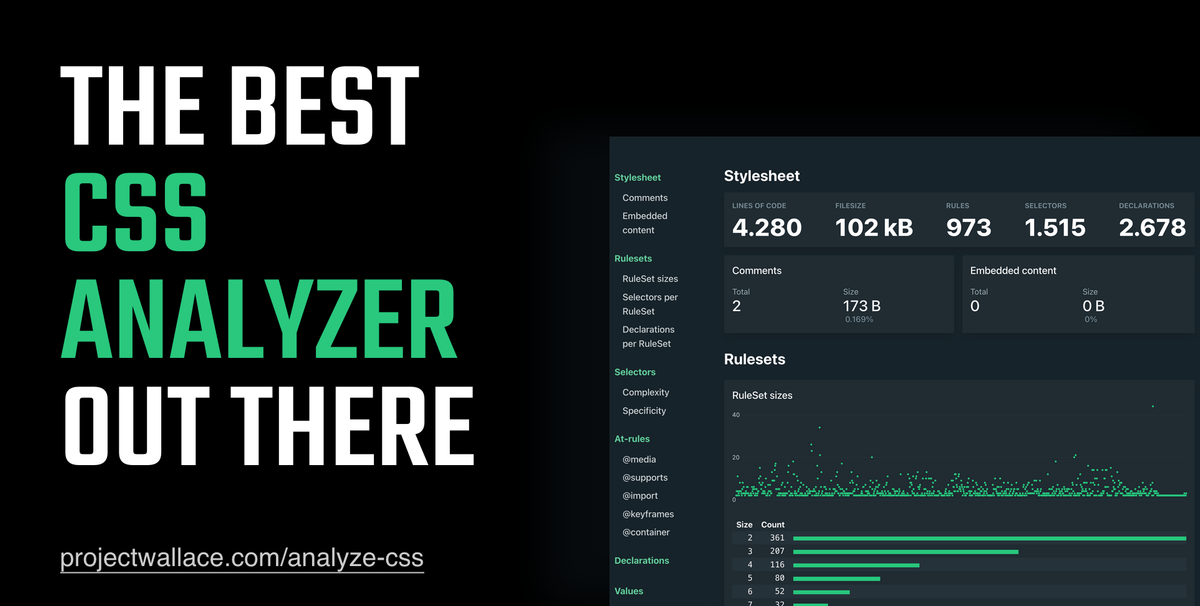
The best CSS Analyzer on the web. Check your CSS complexity, specificity, performance, design tokens and much more.

No paid content found
Visit website
Profile views 6 Outbound visits 1 Normal
Project Wallace Full homepage screenshot

At a glance

Category
Data & Analytics
Language
English
Paid-content signal
No paid content foundObserved
Registered
2016
Hosting
NetlifyInferred
HTTPS certificate trusted
PassedObserved
Last updated

Website review

This review may include AI-generated content and is not individually verified. Domain, certificate and other facts come from the observed data on this page.

What is Project Wallace?

Project Wallace is a web-based CSS analyzer. You paste in a URL or raw CSS, and it returns an x-ray of the stylesheets: how many unique colors you actually have, how complex your selectors are, which custom properties are declared but never used, and how your cascade layers are structured. Its stated purpose is to surface the "big picture" that component-level reviews miss — the systemic drift that accumulates across an entire codebase.

What it looks at

  • Full stylesheet analysis: every selector, media query and property counted and visualized.
  • A quality score: a single rating derived from specificity distribution, redundancy, selector complexity and best practices.
  • Design token audit: colors, font sizes, shadows and spacing values extracted and grouped, so you can see where a design system is consistent and where it has quietly diverged.
  • Custom property inspector: which --variables are declared, which are used, and which are orphaned.
  • Cascade layers: a visualizer for @layer order, nesting and specificity implications.
  • Standalone utilities: prettifier, minifier, diff viewer and coverage inspector, usable without an account.

Who it suits

A front-end or design-systems engineer inheriting a large, long-lived stylesheet is the clearest fit: the tool answers "how bad is it, and where?" before a refactor. A design-systems lead auditing whether tokens are actually honored across a codebase gets the token and custom-property views. Someone doing a one-off cleanup — minifying a file, diffing two stylesheets, checking unused CSS — can use the standalone tools without committing to the analyzer.

Trade-offs to expect

This is static analysis of CSS, not a runtime performance profile; it tells you about the shape and health of your styles, not how fast a page paints. A quality score is a heuristic — useful as a trend line across audits, less useful as an absolute verdict, since a deliberately complex selector can be correct. And the value scales with codebase size: on a 200-line stylesheet, most findings will be obvious by eye.

A practical next step: run the analyzer on your main stylesheet and note the total unique color count. If it is far above your intended palette, start there — duplicate and off-brand colors are usually the cheapest systemic fix, and the token audit shows exactly which values to consolidate. For a second opinion on unused CSS and coverage, PurgeCSS approaches the same problem from the build-tool side.

How do I use Project Wallace to analyze my CSS?

Paste your CSS, or a URL, into Project Wallace and read the analyzer output. The site is built around a single workflow: give it a stylesheet or a live page, then work through the views it generates — full analysis, quality score, design tokens, custom properties, and cascade layers. There is no setup to describe beyond that, and the standalone tools (prettifier, minifier, diff viewer, coverage inspector) are separate, paste-and-go utilities for one-off jobs.

A practical way to work through it

  1. Start with the full analysis to see counts and structure: selectors, media queries, properties. This is the aerial view the page promises, and it's where you spot the scale of the problem before judging it.
  2. Check the quality score next. Treat it as a triage signal, not a verdict. A low score tells you where to look; it does not tell you which specific rule to change.
  3. Audit design tokens to find drift. This is the most immediately actionable view: near-duplicate colors, diverging font stacks, and spacing values that should have been one token.
  4. Inspect custom properties to separate declared from used. Orphaned declarations are safe cleanup candidates; properties used once are usually fine.
  5. View cascade layers if you use @layer, to confirm order and nesting match your intent.

Who gets the most out of it

The clearest fit is a team that reviews components individually but never reviews the whole stylesheet collection — exactly the blind spot the site describes. A front-end lead preparing a design-system cleanup, or someone inheriting a legacy codebase, can turn the token and custom-property views into a concrete worklist. A solo developer on a small project will find the quality score interesting but the token audit more useful.

Deciding what to act on

Prioritize by blast radius rather than by score alone:

Finding Usually worth fixing when Often safe to ignore when
Duplicate or near-duplicate colors They appear across many components They're a deliberate one-off
Diverging font stacks More than two or three exist Variation is intentional per surface
Orphaned custom properties Nothing references them They're part of a public theming API
High specificity Overrides are the norm, not the exception The codebase is small and stable

One caveat: a URL-based analysis reflects what the page actually serves, including third-party CSS you may not control. If you want to judge your own code, paste the raw source instead.

A useful next step is to run the analysis once, save the token list, then re-run it after your next cleanup pass and compare. Drift is easier to see as a trend than as a single snapshot. For broader context on CSS tooling, MDN Web Docs documents the underlying features these views inspect.

What specific metrics does Project Wallace provide to identify CSS bloat and inconsistencies?

Project Wallace focuses on codebase-wide patterns rather than single-file linting. Its analyzer reports concrete counts and distributions that expose bloat and inconsistency: unique color values (including duplicate colors in different formats), competing font stacks, embedded image weight, selector complexity, specificity distribution, and redundancy. The quality score combines those signals into one number, while the design token audit groups colors, font sizes, shadows, and spacing values so drift is visible. The custom property inspector shows which properties are declared, used, or orphaned, and the cascade layer visualizer maps @layer order, nesting, and specificity implications. Standalone utilities such as the CSS prettifier, minifier, diff viewer, and coverage inspector support one-off fixes.

A practical next step is to run the analyzer on a real stylesheet, then sort the token audit by frequency and look at the long tail — the colors or font sizes used once or twice usually reveal the inconsistencies. Compare that list against the specificity distribution: if the outliers cluster in a few components, the bloat is local; if they are spread across the codebase, the design system itself needs attention. For teams already using a design-token pipeline, the custom property inspector is the quickest way to find orphaned declarations before they become dead weight.

Can Project Wallace help me audit design tokens and custom properties in my CSS?

Yes. Project Wallace is built for exactly this kind of audit. Its Design token audit extracts every color, font-size, shadow and spacing value from your stylesheets and groups them, so you can see where a design system is consistent and where it is drifting. A separate Custom property inspector traces each CSS custom property, showing which are declared, which are actually used, and which are orphaned.

What the audit surfaces in practice

The tool's own framing is about scale: palettes that quietly grow to 140+ unique values, duplicate blues in different formats, opacity hacks, and font stacks that diverge across a codebase. That is the useful part of a token audit — not finding one bad value, but seeing the count and the duplicates at a glance.

For custom properties specifically, the declared-versus-used split is the practical win. An orphaned --brand-500 that nothing references is dead weight and a sign that a rename or refactor was left half-finished.

How to run it

You can paste a URL or raw CSS, and the page describes results in seconds. A realistic workflow:

  1. Start with your compiled stylesheet, since that reflects what ships.
  2. Run the token audit and sort by frequency — the long tail of one-off values is usually the drift.
  3. Run the custom property inspector and list properties with zero usages.
  4. Fix the obvious orphans and duplicates first; they are low-risk and shrink the surface for everything else.

Where it fits in a wider review

Project Wallace is a code-level analyzer, not a design tool. It will tell you that you have 47 shades of gray; it will not tell you which one is the brand gray. Pair it with your token source of truth, and treat the audit as a diff against that source. Related free utilities you may already use include CSS Stats for high-level selector and declaration counts, and Stylelint if you want the same rules enforced continuously in CI rather than checked on demand.

The trade-off is scope: this is a snapshot of one stylesheet or URL at a time, so for a large multi-package repo you will need to decide which build artifact represents your system before the numbers mean anything.

What standalone CSS tools does Project Wallace offer, such as a prettifier or minifier?

Project Wallace offers several standalone, no-signup browser tools for everyday CSS chores. From the page evidence, the listed tools are:

  • CSS prettifier
  • CSS minifier
  • CSS diff viewer
  • Coverage inspector
  • Specificity tool (the excerpt is cut off at "Speci...", so treat the exact name as unconfirmed)

These are positioned as one-off utilities: paste your CSS, get the job done, with no signup or paywall mentioned.

How they fit into a workflow

Use the standalone tools when you need a quick, single-purpose result rather than a full report. For example, a developer reviewing a pull request can run a CSS diff viewer to see exactly what changed between two stylesheet versions, or use a coverage inspector to spot rules that no longer match anything. The prettifier and minifier serve the opposite ends of the same file: one for readable formatting before review or commit, the other for a compact output when shipping. A specificity tool helps settle the "why is this override winning?" question without manually counting selector weights.

The broader analyzer is the different choice: it produces the full x-ray, including the opinionated quality score, design token audit, custom property inspector and cascade layer visualizer. Reach for the standalone tools when the task is narrow and immediate; reach for the analyzer when the question is about the whole codebase.

A practical decision rule

If you can name the single transformation or check you want, start with the matching standalone tool. If you cannot yet name it, or you suspect the problem is systemic, run the full analysis first and let the results point you to the right fix.

How does Project Wallace's CSS quality score work and what does it measure?

Project Wallace's quality score condenses several structural signals about a stylesheet into one number, then leaves the underlying detail visible so you can act on it. According to the site, the score is built from specificity distribution, redundancy, selector complexity, and recognized CSS best practices. In practice that means it is a heuristic health indicator, not a spec-compliance score: it responds to how your CSS is written and organized, not to whether the browser renders it correctly.

What the score draws on

  • Specificity distribution — whether selectors cluster at low specificity or pile up into the mid-to-high range where overrides become normal. A broad spread with a heavy tail usually signals "specificity wars."
  • Redundancy — duplicated declarations, near-identical rules, and repeated values that could collapse into shared tokens or utilities.
  • Selector complexity — long descendant chains, deep nesting, and compound selectors that are harder to reuse and reason about.
  • Best-practice signals — the opinionated layer of the score, based on patterns the tool treats as healthy or risky.

What it does not measure

The score won't tell you whether your layout is correct, whether your accessibility contrast passes, or whether your CSS matches your design intent. A small, tidy stylesheet and a large, disciplined one can both score well; a large codebase with a few systemic leaks can score poorly even if every individual component looks fine. Treat the number as a triage pointer, not a verdict.

How to use it in a real workflow

Imagine you inherit a five-year-old design system. Component reviews pass, but the bundle keeps growing and colors keep multiplying. Run the analyzer, read the score, then work backward through the dimensions it flags: if specificity is the problem, audit override chains before touching tokens; if redundancy dominates, look for duplicated custom properties and font stacks first. The score tells you where to start, not what to delete.

As a next step, pair the score with the design-token audit and custom-property inspector on the same page — those give you the concrete list of drifting values behind the number. The site notes the analyzer accepts either a URL or raw CSS, which makes it easy to compare a before-and-after snapshot after a cleanup pass.

Related questions

More questions →
What CSS Metrics and Aspects Can Project Wallace Analyze?

Project Wallace analyzes a full CSS codebase across four main areas: overall structure (selectors, media queries, properties), code quality (a scored assessment based on specificity, redundancy, and selector complexity), design tokens (colors, font sizes, shadows, spacing), and custom properties plus cascade layers. You can run it by pasting a URL or raw CSS, and the results come back as a complete "x-ray" of your stylesheets in seconds.

Full CSS analysis: structure and complexity

The core analyzer surfaces, counts, and visualizes every selector, media query, and property in your stylesheets. The stated goal is to show the "true structure and complexity" of your CSS — the kind of big-picture view that gets lost when teams review components individually but never review all stylesheets together.

This matters because CSS problems tend to compound invisibly. The site describes the pattern directly: colors multiply quietly (a clean palette becoming 140+ unique values, off-brand grays, duplicate blues in different formats, forgotten opacity hacks), specificity creeps upward with each quick fix, and design systems drift as tokens get duplicated and font stacks diverge.

Code quality score

Project Wallace produces a single, actionable quality score for your CSS health. According to the site, the score is based on:

  • Specificity distribution — how spread out and how high your selector specificity runs
  • Redundancy — duplicated or repeated declarations and values
  • Selector complexity — how convoluted individual selectors are
  • Proven best practices — general CSS conventions

The value of a single score is triage: it gives you one number to track over time rather than a wall of raw counts.

Design token audit

The token audit extracts and groups every color, font-size, shadow, and spacing value it finds. The output shows where your design system is consistent and where it is quietly drifting — for example, the "47 shades of gray" or "12 competing font stacks" scenarios the site uses to illustrate the problem.

Use this when you need to answer questions like: how many unique colors actually ship in this codebase, and which ones are off-palette?

Custom properties and cascade layers

Two more focused views round out the analysis:

Feature What it shows
Custom property inspector Every CSS custom property — which are declared, which are used, and which are orphaned across your stylesheets
@layer visualizer The structure, order, and nesting of your @layer declarations, plus their specificity implications

The custom property view is useful for finding dead variables after a refactor. The layer visualizer is useful when you have adopted @layer and need to confirm the cascade order matches your intent.

Standalone tools (no signup, no paywall)

Beyond the analyzer, the site offers one-off tools for everyday CSS work. The page states these require no signup and no paywall — just paste your CSS:

  • CSS prettifier
  • CSS minifier
  • CSS diff viewer
  • Coverage inspector

How to choose which view to use

  • Auditing an unfamiliar or inherited codebase → start with full CSS analysis, then the quality score for a baseline number.
  • Cleaning up a design system → design token audit first, then the custom property inspector for orphaned variables.
  • Debugging cascade conflicts → the @layer visualizer, especially if overrides have become the norm rather than the exception.
  • Quick one-off formatting or comparison → the standalone tools, which need no account.
Core Analyzer vs. Standalone Tools on Project Wallace

Project Wallace splits its offering into two layers: the core analyzer, which produces a full-codebase audit of your CSS, and a set of standalone tools, which are single-purpose utilities you run on a snippet of CSS. Choose the core analyzer when you need to understand systemic problems across an entire stylesheet — color drift, specificity creep, design token duplication. Choose the standalone tools when you just need one job done right now, like formatting, minifying, or diffing CSS. The standalone tools are described as requiring no signup and no paywall, so they work as quick, disposable utilities.

What the core analyzer does

The core analyzer takes a URL or raw CSS as input and returns a complete "x-ray" of the stylesheets, covering every selector, media query, and property. It surfaces, counts, and visualizes the structure and complexity of your CSS. Its purpose is the aerial view: the big picture that component-level review misses.

It bundles several analysis views:

View What it reveals
Full CSS analysis Every selector, media query, and property, counted and visualized
Code quality score A single score based on specificity distribution, redundancy, selector complexity, and best practices
Design token audit Every color, font-size, shadow, and spacing value, extracted and grouped to show consistency or drift
Custom property inspector Which custom properties are declared, used, or orphaned
Cascade layer visualizer Order, nesting, and specificity implications of @layer declarations

The problems it targets are the ones that accumulate invisibly: a palette that grows from clean to 140+ unique values, specificity that creeps upward with each quick fix, and design tokens that duplicate until the bundle balloons. These are system-level issues, which is why the analyzer works on the whole codebase rather than a single file.

What the standalone tools are

The standalone tools are one-off utilities for everyday CSS work. The site lists:

  • CSS prettifier
  • CSS minifier
  • CSS diff viewer
  • Coverage inspector
  • Specificity tool (listed as "Speci…" in the source)

Each does one thing. You paste CSS, you get a result. They are positioned explicitly as no-signup, no-paywall tools — the framing is "paste your CSS and get your job done," not "set up an account and run an audit."

How to choose

Use the core analyzer when:

  • You need to know whether your design system is drifting across the whole codebase.
  • You suspect specificity problems or redundant selectors but can't see the pattern locally.
  • You want a quality score or a token audit as a starting point for cleanup.

Use the standalone tools when:

  • You have a concrete, single-step task: format this CSS, shrink this file, compare two versions, check what's unused.
  • You don't want to sign up or commit to a workflow.
  • You're working on a snippet rather than a whole project.

The two layers don't compete. The standalone tools handle the routine edits; the core analyzer handles the diagnosis that routine edits can't reveal. A practical sequence is to run the standalone tools during day-to-day work, then run the core analyzer periodically to catch the drift those small edits introduce.

What Problems Does Project Wallace Help Teams Solve?

Project Wallace helps teams find and fix the systemic problems that accumulate in a CSS codebase but stay invisible in day-to-day component work. It is aimed at the gap the site itself describes: "Every team reviews components. Nobody reviews all stylesheets." If your team reviews individual components but never audits the whole stylesheet, Project Wallace is built for exactly that blind spot. You use it by pasting a URL or raw CSS and getting an analysis of the full stylesheet in seconds.

The core problem: nobody reviews the whole stylesheet

CSS grows in every direction, and the big picture becomes invisible. Small inconsistencies compound over time into systemic problems that hide in plain sight. Project Wallace frames this as a missing "aerial view" of your entire CSS codebase — the view that component-level review never produces.

Specific problems it surfaces

Color palette bloat and duplicate values

What starts as a clean palette can become 140+ unique values: off-brand grays, duplicate blues in different formats, and opacity hacks nobody remembers. The design token audit extracts and groups every color, font-size, shadow, and spacing value so you can see where the palette has multiplied.

Specificity wars and override patterns

Every quick fix adds another layer. Before long, selectors fight each other and overrides become the norm instead of the exception. Project Wallace analyzes specificity distribution and selector complexity, and its cascade layer visualizer shows the order, nesting, and specificity implications of your @layer declarations.

Design system drift and token duplication

Tokens get duplicated, custom properties multiply, and font stacks diverge — the site's example is 12 competing font stacks across a codebase. The custom property inspector traces every CSS custom property to show which are declared, which are used, and which are quietly orphaned.

Performance issues like large embedded images

Embedded assets add weight that's easy to miss in review. The site cites 2MB of embedded images as an example of what the analyzer can reveal.

How the analysis is organized

Capability What it addresses
Full CSS analysis Every selector, media query, and property surfaced, counted, and visualized
Opinionated quality score A single score based on specificity distribution, redundancy, selector complexity, and best practices
Design token audit Colors, font sizes, shadows, and spacing extracted and grouped
Custom property inspector Declared vs. used vs. orphaned custom properties
@layer visualizer Cascade layer order, nesting, and specificity implications

When this fits your team

Project Wallace is most useful when you need a codebase-wide view rather than a per-component check — for example, before a design system review, when a bundle has grown unexpectedly, or when overrides have become routine. For one-off tasks, the site also offers standalone tools (CSS prettifier, minifier, diff viewer, coverage inspector) that it describes as requiring no signup and no paywall. Note that this description applies to those standalone tools; the page evidence does not state pricing or login terms for the full analyzer, so treat those as unconfirmed.

What Is Project Wallace? A CSS Analytics Tool for Auditing Entire Stylesheets

Project Wallace is a web-based CSS analyzer that gives you an "aerial view" of an entire stylesheet or codebase rather than a single component. You paste a URL or raw CSS, and it returns a full x-ray of your styles: colors, typography, specificity, custom properties, cascade layers, and an overall quality score. It's most useful when your CSS has grown large enough that no one person can see the whole picture — the tool's own framing is that "every team reviews components, nobody reviews all stylesheets."

What problem it targets

The site describes a specific failure mode: CSS grows in every direction, and the big picture becomes invisible. Small inconsistencies compound into systemic problems that hide in plain sight. It names three concrete symptoms:

  • Colors multiply quietly — what started as a clean palette becomes 140+ unique values, with off-brand grays, duplicate blues in different formats, and forgotten opacity hacks.
  • Specificity creeps upward — each quick fix adds another layer until selectors fight each other and overrides become the norm.
  • Design systems drift silently — tokens get duplicated, custom properties multiply, font stacks diverge, and nobody notices until the bundle is 300kb and design review falls apart.

The value proposition is detection: catching drift and complexity before they become system-level debt.

Core capabilities

Capability What it does
Full CSS analysis Surfaces, counts, and visualizes every selector, media query, and property to show true structure and complexity
Opinionated quality score A single actionable score for CSS health, based on specificity distribution, redundancy, selector complexity, and best practices
Design token audit Extracts and groups every color, font-size, shadow, and spacing value to show where the design system is consistent and where it drifts
Custom property inspector Traces every custom property to show which are declared, which are used, and which are orphaned
@layer visualizer Visualizes cascade layer structure — order, nesting, and specificity implications of @layer declarations

Standalone tools

Project Wallace also offers one-off tools for everyday CSS work. The site states these require no signup and no paywall — you paste your CSS and get the job done. Listed tools include:

  • CSS prettifier
  • CSS minifier
  • CSS diff viewer
  • Coverage inspector
  • Specificity (listed as "Speci…" in the source)

When to use it

Reach for Project Wallace when you need to audit an existing stylesheet rather than write new CSS — for example, before a design-system migration, when a bundle has grown unexpectedly large, or when you suspect token drift but can't see it by reading individual files. If you only need to format, minify, or diff a snippet, the standalone tools cover that without an account.

The site notes it is "trusted by the pros," though it doesn't name specific users in the available material. Pricing and login requirements for the core analyzer aren't specified in the source, so treat those as unconfirmed rather than assuming free access.

How to Analyze Your CSS with Project Wallace

Project Wallace analyzes a stylesheet by taking either a URL or raw CSS as input, then returning a full "x-ray" of that code: every selector, media query, and property is surfaced, counted, and visualized, alongside reports on colors, typography, specificity, custom properties, and cascade layers. You can use it for a one-off audit of a single file or a whole site's stylesheets. The standalone tools (prettifier, minifier, diff viewer, coverage inspector) require no signup, while the core analyzer and specialized reports are the main product surfaces described on the site.

What you can analyze

The tool is built around the idea that CSS problems are systemic — nobody reviews all stylesheets, so inconsistencies compound invisibly. Its analysis targets those system-level issues:

Area What it surfaces
Full CSS analysis Every selector, media query, and property — counted and visualized
Code quality A single score based on specificity distribution, redundancy, selector complexity, and best practices
Design tokens Every color, font-size, shadow, and spacing value extracted and grouped
Custom properties Which are declared, which are used, which are orphaned
Cascade layers Order, nesting, and specificity implications of @layer declarations

The site frames the payoff in concrete terms: spotting 47 shades of gray in your tokens, 12 competing font stacks, specificity wars, or 2MB of embedded images.

Step-by-step: running an analysis

  1. Choose your input. You can paste a URL or your raw CSS. A URL lets the analyzer fetch the live stylesheets; raw CSS is useful when the file isn't publicly reachable or you want to test a single file in isolation.
  2. Submit it to the analyzer. From the site's "Analyze your CSS" entry point, the tool processes the stylesheets and returns results "in seconds."
  3. Read the core report first. Start with the full CSS analysis to see structure and complexity — the counts of selectors, media queries, and properties tell you how large the surface area is before you dig into specific problems.
  4. Check the quality score. The opinionated score compresses specificity distribution, redundancy, and selector complexity into one number. Treat it as a triage signal: a low score tells you where to look, not what the fix is.
  5. Audit design tokens. Review the grouped colors, font sizes, shadows, and spacing. This is where drift shows up — duplicate blues in different formats, off-brand grays, opacity hacks.
  6. Inspect custom properties. Compare declared vs. used vs. orphaned properties. Orphaned declarations are dead weight you can usually remove.
  7. Visualize cascade layers if you use @layer, to confirm the order and nesting match your intent.

Verifying the results

The tool's output is descriptive, so verification means cross-checking against your source:

  • Pick a token the audit flags as duplicated and search your codebase for both values — if they render identically, you have a real consolidation candidate.
  • For orphaned custom properties, grep for var(--name) to confirm nothing references them before deleting.
  • For specificity concerns, test the flagged selectors in your browser's devtools to see which rules actually win.

Common sticking points

  • A URL only captures what's served. Stylesheets injected at runtime by JavaScript, or those behind authentication, won't appear. Paste raw CSS instead in those cases.
  • A quality score is a heuristic, not a verdict. The site describes it as "opinionated" and based on best practices — a low score on a legacy codebase may be expected and not worth chasing to zero.
  • Token counts include formats. The same color written as hex, rgb(), and a named color can appear as separate values, so deduplicate by rendered value, not by string.
  • Standalone tools are separate from the analyzer. The prettifier, minifier, diff viewer, and coverage inspector are one-off utilities with no signup and no paywall; don't expect them to feed results into the main analysis.

When this is the right tool

Use Project Wallace when you need an aerial view of an entire codebase's CSS rather than a review of one component — the scenario the site describes as the "blind spot" where small inconsistencies become systemic debt. For a single formatting or minification task, the standalone tools are faster. The site does not publish pricing details for the core analyzer, so check the site directly if cost matters for your decision.

Website Overview

An established domain and managed infrastructure suggest continuity of operations and may support dependable delivery, although neither guarantees service quality. Page metadata, canonical configuration and social previews work together to provide more consistent search and sharing presentation.

Domain and Registration

Registered in 2016, this domain has about 10 years of history. That suggests continuity, although ownership and purpose may have changed. Transfer-protection status is present, helping reduce the risk of unauthorized domain transfers. The domain uses the common .com extension, which is not an independent safety signal.

DNS and Email

The observed email authentication setup is incomplete: DMARC is missing. Nameservers are provided by NS1, indicating managed DNS hosting. MX records point to the improvmx.com email service. No CNAME was found; the observed records resolve directly to addresses. DNSSEC signatures were not detected, so this additional DNS authenticity protection is not confirmed.

TLS and Certificates

The public key uses EC with 256 bits. The server supplied a complete certificate chain. No organization name is present in the certificate; the available fields are consistent with domain validation. The certificate was issued by Let's Encrypt, commonly associated with automated certificate services. The certificate's total validity is about 89 days, consistent with a short renewal cycle.

HTTP and Browser Security

The response lacks these common security headers: CSP, Permissions-Policy. No X-Powered-By header was found, reducing one common source of backend fingerprinting information. No obvious internal addresses or debug information were found in the headers. The Server header contains the custom value Netlify. No explicit CDN or WAF marker was found in the response headers.

Technology Stack Analysis

The public page identifies SvelteKit, Netlify without precise versions, leaving fewer clues for version-specific scanning.

Search and Social Sharing

The title has 31 characters, within a common display range. A meta description is present, with 115 characters. The observed directives allow indexing and link following. No Generator meta tag is publicly exposed. A viewport declaration is present, providing a basis for mobile layout.

Hosting and Email

DNSNS1
HostingNetlify
Emailimprovmx.com
Approximate IP geolocation (inferred; a CDN or proxy may differ from the origin server) United States flagAshburn, Virginia, United States Inferred 18.208.88.157

Registration details

RDAP / WHOIS

RegistrarKey-Systems GmbH
Registered2016-02-11
Expires2027-02-11
Domain statusclient transfer prohibited
Nameserversdns1.p01.nsone.net、dns2.p01.nsone.net、dns3.p01.nsone.net
DNSSECunsigned

DNS records

DNS

TypeNameValueTTLPriority
Awww.projectwallace.com18.208.88.157120—
Awww.projectwallace.com98.84.224.111120—
MXprojectwallace.commx1.improvmx.com360010
MXprojectwallace.commx2.improvmx.com360020
NSprojectwallace.comdns1.p07.nsone.net3600—
NSprojectwallace.comdns2.p07.nsone.net3600—
NSprojectwallace.comdns3.p07.nsone.net3600—
NSprojectwallace.comdns4.p07.nsone.net3600—
TXTprojectwallace.comv=spf1 include:spf.improvmx.com ~all3600—

TLS and certificates

TLS / SSL

AssessmentNormal configuration
Supported protocolsTLSv1.2、TLSv1.3
Negotiated protocolTLSv1.3
Certificate subject*.projectwallace.com
IssuerLet's Encrypt
Valid until2026-12-25T13:31 · Remaining when checked: 76 days
Verification detailsCertificate trust: Passed · Hostname match: Passed

HTTP response headers

HTTP

HeaderValue
content-typetext/html; charset=UTF-8
cache-controlpublic,max-age=0,must-revalidate
serverNetlify
strict-transport-securitymax-age=31536000
x-frame-optionsDENY
x-content-type-optionsnosniff
referrer-policystrict-origin-when-cross-origin

Identified technologies

SvelteKitNetlify

Pages, Search and Sharing

Meta descriptionThe best CSS Analyzer on the web. Check your CSS complexity, specificity, performance, design tokens and much more.
Canonical URLhttps://www.projectwallace.com/
LanguageEnglish (default)
Twitter CardNot detected
All bots 1 allowed · 0 disallowed
  • Allow/
gptbot 0 allowed · 1 disallowed
  • Disallow/

User reviews (0)

  • No reviews yet.