Website profiles · Technology insights · Alternatives

rackword.com

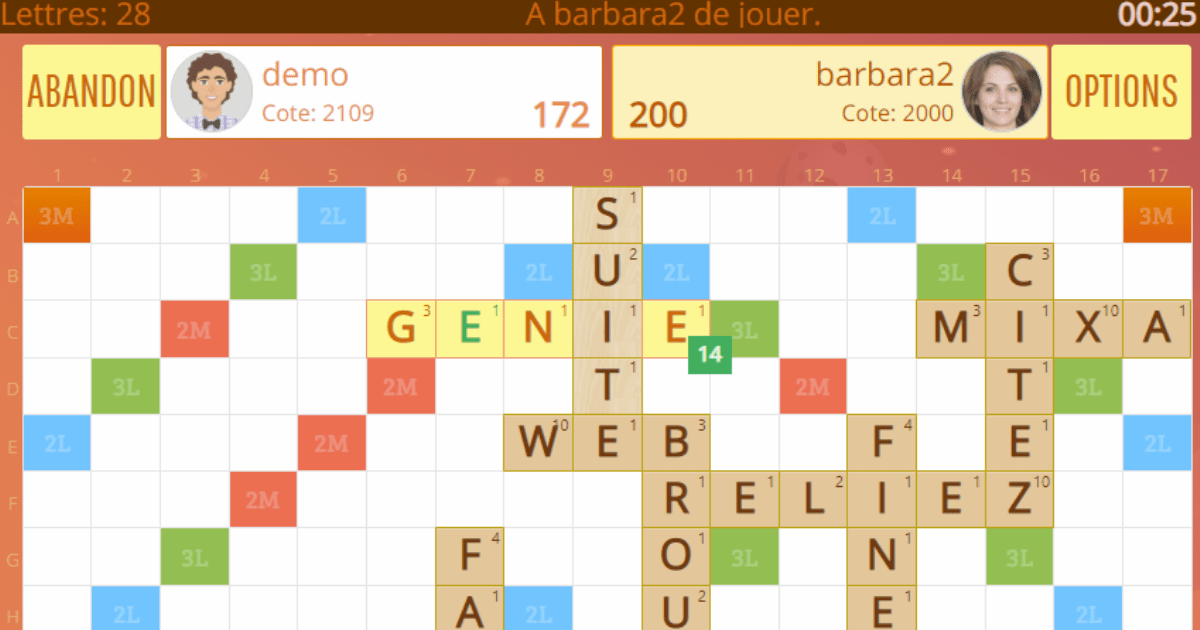
Rackword is a free multiplayer word game that combines strategy and word mastery. Play in real time against the computer, your friends and other players. Improve your vocabulary and make new friends.

No paid content found
Visit website
Profile views 0 Outbound visits 0 Normal
Rackword Full homepage screenshot

At a glance

Category
Games & Board Games
Language
English
Paid-content signal
No paid content foundObserved
Registered
2012
Hosting
CloudflareInferred
HTTPS certificate trusted
PassedObserved
Last updated

Website review

This review may include AI-generated content and is not individually verified. Domain, certificate and other facts come from the observed data on this page.

What is Rackword?

Rackword is a free real-time online word game in which you form words on a game board from the letters you are dealt, and the player with the most points at the end wins. According to the site, it is played in a browser with no download and offers multiplayer games for 2 to 4 players, including a 2-vs-2 team mode, plus play against the computer.

What sets it apart

  • Short, live turns: each turn lasts between 30 seconds and 2 minutes, and games typically finish in a few minutes rather than stretching over days.
  • Several game boards: the site says this is meant to disrupt habitual play and software assistance.
  • Rating and statistics: your rating is calculated after each game, with detailed progress statistics and a ranking.
  • Low-friction access: free registration, or play as a guest from the login page; a mobile app is also offered.

A practical example: someone with a 15-minute break can join a 4-player game, play it to completion, and see their rating shift, which suits casual players better than correspondence-style word games. Someone who wants deep, turn-by-turn study of a single board may find the pace and board variety less satisfying.

As a next step, try a guest game against the computer first to learn the board and timing before joining rated multiplayer matches.

How do I start playing Rackword without creating an account?

You can start a game as a guest straight from the login page: Rackword's FAQ says the login page offers both account creation and a "play without registration as a guest" option, so no download or signup is required to get into a match. From there, the site describes real-time games with turns of 30 seconds to 2 minutes, for 2 to 4 players or 2-vs-2 teams, so your first session can be a quick solo-style trial against the computer or a live game with others.

A practical first step

  1. Open the login page and choose the guest option rather than "Sign up for free."
  2. Pick a short turn timer (30 seconds) for your first game so you learn the board quickly.
  3. Try a 2-player game against the computer before joining a multiplayer table, since the site says several different board types are used.

Guest vs. registered: what changes

Guest play Free account
Access Immediate from the login page Requires email activation
Progress and rating Not described for guests Detailed statistics and a rating computed after each game
Social features Not described Community, friends, rankings

The trade-off is clear: guest mode gets you playing in seconds, but the rating, statistics and community features the site advertises are tied to having an account. If you only want to test whether the word-forming format suits you, stay a guest; if you want to track improvement or compare yourself with opponents, register once you've decided you like it.

For a sense of how the format compares with other word games, Scrabble and Wordfeud are established alternatives, though their rules and account requirements differ from Rackword's.

Can I play Rackword on my phone or tablet?

Yes. Rackword runs directly in your browser, so it works on a phone or tablet without downloading anything. The site also notes that mobile apps are available from Google Play and the Apple Store if you prefer an installed version. You can create an account or play as a guest from the login page.

What this means in practice

  • No-install route: Open Rackword in your mobile browser, sign in or choose guest play, and join a game. This is the simplest option if you are on a borrowed device or want to try it before registering.
  • App route: Install the mobile app if you expect to play regularly and want quicker access than loading a browser page each time.
  • Account choice: A guest session is fine for a casual test game. A free account makes more sense if you want your progress, statistics and ranking tracked, since those features depend on having a persistent profile.

A quick decision guide

Situation Better choice
Trying the game once Browser, guest mode
Playing on a tablet at home Browser or app, either works
Tracking rating and stats over time Free account
Wanting the game one tap away Mobile app

Because turns last 30 seconds to 2 minutes and games typically finish in a few minutes, a phone is a practical fit for a short session—though a tablet gives you a larger board to read, which helps when scanning letter placements. As a next step, open the game page on your device, start a guest game to confirm the board is comfortable to use, then register if you plan to return.

How does the team 2 vs 2 mode work in Rackword?

Rackword's team 2 vs 2 mode is a cooperative variant in which two pairs of players compete on the same board, combining word-building with shared strategy. According to the game's own description, it is one of the multiplayer formats offered alongside free-for-all games of up to four players, and it is presented as a mode that "combines strategy and cooperation." The site does not spell out the finer mechanics—such as whether teammates see each other's letter racks, share a score, or take turns in a fixed order—so treat those details as unconfirmed until you see them in play.

What the mode implies in practice

  • Shared planning matters more than raw vocabulary. In a two-player team, deciding together where to place words and which letters to save for a stronger follow-up is likely to matter as much as finding long words.
  • Turn time is short. The site states turns run from 30 seconds to 2 minutes, so team coordination has to happen quickly rather than through lengthy discussion.
  • Games finish in minutes, not days. Rackword is real-time, so a team match is a short session rather than a correspondence game.

A concrete scenario

Suppose you and a friend want to play together against another pair. You would both create free accounts (or join as a guest), enter a 2 vs 2 match, and use the short turn clock to agree on placements. If you prefer individual competition, the free-for-all format with up to four players is the closer fit.

How to decide

Choose 2 vs 2 if you enjoy discussing moves and covering each other's weak spots; choose free-for-all if you want a purely individual ranking. To confirm the exact team rules before committing, the most reliable next step is to read the "How to play" page on Rackword or start a single team game and observe how turns and scoring are handled.

How is my Rackword rating calculated after each game?

The site says your rating is evaluated and recalculated at the end of each game, letting you compare yourself with opponents, but it does not publish the formula. So the honest answer is: Rackword tells you that a rating is computed after every game and shown in your detailed statistics and ranking, yet it doesn't explain the math on the page provided.

What this means in practice

  • Treat the rating as an outcome-based score: it moves after each finished game, not during play.
  • Because the exact inputs aren't stated, don't assume it only reflects wins. Opponent strength, score margin, team versus free-for-all mode, or number of players could plausibly matter.
  • Rankings and statistics are the place to watch the number change; comparing your rating before and after a match is the most reliable way to learn its behavior.

A practical way to find out

Play a short series of games and note three things each time: your rating before, your rating after, and the opponents' ratings. If beating stronger opponents moves you more than beating weaker ones, the system likely weighs opponent strength. If 2 vs 2 team games move you differently from 4-player free-for-all, mode is a factor. A handful of logged games will tell you more than any guess.

If you want the precise rule, the in-game "How to play" page or the site's blog are the natural places to look, since the FAQ covers account setup and platforms rather than rating mechanics.

Why does Rackword offer multiple game boards?

Rackword offers several game boards to break automatisms and make cheating or helper software less useful. A fixed board rewards memorized high-scoring openings and letter placements; varying the board forces players to read the layout fresh each game, so word knowledge and tactical judgment matter more than rehearsed patterns.

What this changes in practice

  • For casual players: each game feels less like repeating the same opening sequence, which keeps short sessions (turns of 30 seconds to 2 minutes, games typically finishing in minutes) more varied.
  • For competitive players: ratings and statistics still track progress, but opponents cannot lean on board-specific memorization, so results reflect adaptable play.
  • For team games (2 vs 2): a new board each time means cooperation and strategy have to be worked out on the spot rather than copied from a known script.

The trade-off is that regulars lose the comfort of a familiar board and must re-scan premium squares every game. If you are new, treat the first few turns as a board-reading exercise before chasing big scores; if you mainly want to drill vocabulary, a single stable board might suit you better, while Rackword's approach favors players who enjoy adapting.

Related questions

More questions →
Crosswords: What They Are and How to Solve Your First Puzzle

A crossword is a word puzzle built on a grid of white and black squares. You fill the white squares with letters, using numbered clues that point to answers running across (left to right) and down (top to bottom). Each answer's first letter sits in the same numbered square as its clue, so across and down answers cross and confirm each other. This guide explains the structure, the main clue types, how crosswords differ from sudoku, and a beginner method for finishing a simple puzzle.

The basic structure of a crossword

Every crossword shares the same skeleton:

  • Grid: a square or rectangular arrangement of cells. White cells hold letters; black (or shaded) cells block answers and separate words.
  • Numbering: cells that begin an across or down answer get a number, assigned left to right, top to bottom. A single cell can start both an across and a down answer, which is why the same number appears in both clue lists.
  • Clue lists: usually split into "Across" and "Down." A clue like 1 Across tells you where the answer begins and which direction it runs.
  • Answer length: many puzzles show the letter count, e.g. (5), so you know how many cells to fill.

The crossing letters are the puzzle's built-in error check: if an across answer and a down answer share a cell but disagree, at least one is wrong.

How to read clues and numbering

Take a clue numbered 3. Look for the cell marked 3. If the clue is listed under Across, the answer runs rightward from that cell; if under Down, it runs downward. Fill letters one cell at a time.

A quick way to start: scan for the clues you're most confident about, fill those, then use the letters they place to attack the clues that cross them.

Common clue types

Clue type What it does Example pattern
Direct definition States the meaning plainly "Feline pet" → CAT
Synonym Gives a near-match word "Happy" → GLAD
Fill-in-the-blank Quotes a phrase with a gap "___ upon a time" → ONCE
Abbreviation Uses a standard short form "Doctor (abbr.)" → DR
Wordplay / pun Relies on double meaning "Bank deposit" → SILT (river bank)

Beginners usually do best by trusting direct definitions and fill-in-the-blanks first, then working toward wordplay clues once letters are in place.

Crosswords vs. sudoku and other puzzles

These are often grouped together but test different skills:

  • Crossword: language and general knowledge; answers are words; correctness is checked by crossing letters.
  • Sudoku: logic and number placement; you fill digits 1–9 so each row, column, and box contains each digit once. No word knowledge is needed.
  • Riddles and brain teasers: usually a single question with a clever answer, not a filled grid.

If you enjoy vocabulary and trivia, start with crosswords. If you prefer pure deduction with no language requirement, sudoku is the closer match.

Beginner steps for your first crossword

  1. Pick an easy puzzle. Look for one labeled "easy" or "beginner," often with a smaller grid.
  2. Read all the clues once. Note the ones you can answer immediately.
  3. Fill the easy ones. Start with fill-in-the-blank and direct-definition clues.
  4. Work the crossings. Use letters already placed to guess crossing answers.
  5. Check conflicts. If two answers disagree in a shared cell, revisit both.
  6. Use the letter count. Match your answer's length to the number in parentheses.
  7. Finish and verify. Every across and down answer should read as a real word or phrase.

Common sticking points: overthinking a clue when the answer is literal; ignoring the letter count; and filling a guess you're unsure of, which then corrupts several crossing answers. When stuck, erase the uncertain word rather than building on it.

Where to find crosswords online

Free daily crosswords appear on many newspaper and puzzle sites, and the site hosting this guide, Daily SUDOKU Puzzles (sudoku.friko.net), lists crosswords among its puzzle keywords alongside sudoku, numbers, and online games. Its stated tools focus on sudoku — generating random puzzles, solving given or generated ones, and supporting solution and print — so treat it as a sudoku resource that also references crosswords, and look for a dedicated crossword section if you want word puzzles specifically. For crosswords, check newspaper puzzle pages and dedicated crossword sites, and confirm whether a puzzle is free or requires an account before you start.

How to Play Rackword: A Free Real-Time Multiplayer Word Game

Rackword is a free browser-based multiplayer word game where you form words on a game board using the letters you are dealt, and the player with the most points when the game ends wins. You can start by creating a free account and activating it through the confirmation email, or by playing as a guest from the login page — no download is required on PC, mobile, or Facebook. It suits players who want a complete word game in a few minutes rather than a correspondence-style match that stretches over days.

What You Need Before You Start

  • A browser on a PC or mobile device, or the Facebook version. Mobile apps are also available from Google Play and the Apple Store if you prefer an installed app.
  • An email address only if you want a registered account. Guest play is offered from the login page, so you can try the game before committing to registration.
  • No software installation for the browser version.

How to Start Playing

  1. Create an account (optional but recommended for progress tracking). From the game page, use the "Sign up for free" link. Registration is free.
  2. Activate the account. Open the email you receive after signing up and click the activation link. You cannot sign in with a fully functional account until this step is done.
  3. Sign in — or skip registration. On the login page you can either sign in with your activated account or choose to play without registration as a guest.
  4. Join or set up a match. Games run in real time with 2 to 4 players in free-for-all mode, or in a 2 vs 2 team mode. Turn time is configurable between 30 seconds and 2 minutes.
  5. Form words on the board. Use the letters assigned to you to build words on the game board. Your score accumulates as you play; the highest total at the end of the game wins.

Expected result: a complete match that typically finishes in a few minutes, with your rating calculated at the end if you are playing on a registered account.

Match Settings at a Glance

Setting Options What it means for you
Players 2–4 in free-for-all, or 2 vs 2 teams Team mode adds cooperation and shared strategy; free-for-all is every player for themselves
Turn time 30 seconds to 2 minutes Shorter turns reward fast word-finding; longer turns suit careful board planning
Board Several different game boards Boards rotate to break habitual patterns and counter helper or cheating software
Pace Real time, games usually end in minutes No waiting days for an opponent's move

Tracking Progress and Ranking

Registered players get detailed statistics on their progress. Rackword computes a rating at the end of each game, which lets you compare yourself against opponents and see how you are improving over time. This is the main practical reason to register rather than play as a guest: guest play gets you into a game quickly, but the rating and statistics are tied to an account.

Common Sticking Points

  • Cannot sign in after registering. Check that you clicked the activation link in the signup email first; the three-step flow on the site is create account, activate, then sign in.
  • Wanting to play immediately. Use the guest option on the login page instead of registering.
  • Expecting a slow, turn-based game. Rackword is real time with 30-second to 2-minute turns, so matches resolve in minutes — plan for short sessions rather than long ones.
  • Playing on a phone. The browser version works on mobile without download; the store apps are an alternative, not a requirement.

If you already enjoy classic word games and want real-time competition with up to four players plus a team variant, Rackword's free registration and guest access make it easy to test before you invest time in building a rating.

What Is Zomb's Lair and How Does It Make Classic PC Games Playable Today?

Zomb's Lair is a passion project that packages classic PC games for modern systems, aiming to remove the setup and compatibility hurdles that normally come with running old titles. It is aimed at players who want to revisit DOS, Amiga, and Windows 3.1-era games without configuring emulators or hunting down patches themselves. The site describes itself as dedicated to bringing old classics to a modern audience while eliminating the usual obstacles.

What Zomb's Lair Actually Is

Zomb's Lair is a curated collection site, not a store or a general abandonware archive. Its stated purpose is narrow and specific: revive classic PC games and make them run on current hardware with as little friction as possible.

The site's own framing places it in the "passion project" category — a personal effort rather than a commercial platform. Its keyword set points to the scope of that effort: Abandonware, Classic, PC, DOS, Amiga, Windows 3.1, Adventure, and RPG.

That combination tells you two things:

  • Era: the focus is on games from the DOS, Amiga, and early Windows periods, not the 2000s or later.
  • Genre lean: adventure and RPG titles appear to be a significant part of the catalog.

Which Platforms and Eras It Covers

The platform list is the clearest signal of what kind of "classic" this site means:

Platform What it implies
DOS 1980s–mid 1990s PC games, typically run through DOSBox or a similar layer
Amiga Commodore Amiga titles, which normally need a dedicated emulator
Windows 3.1 Early 16-bit Windows games, awkward to run on modern 64-bit Windows

These three platforms share a common problem: none of them run natively on a current machine. Each normally requires its own emulator, configuration file, or compatibility shim. That shared difficulty is exactly what the site positions itself against.

How It Removes the Usual Hurdles

The core promise is the elimination of "all of the hurdles that that normally entails." In practice, for this class of game, those hurdles usually include:

  1. Sourcing a working copy — finding a version that isn't corrupted, incomplete, or missing files.
  2. Installing an emulator — DOSBox, an Amiga emulator, or a Windows 3.1 environment.
  3. Configuring that emulator — mount commands, sound settings, CPU cycles, display scaling.
  4. Applying patches — copy protection removal, bug fixes, or compatibility patches.
  5. Getting it to launch — dealing with path issues, missing DLLs, or resolution problems.

A site that "eliminates" these hurdles is generally doing the packaging work for you: bundling the game with a pre-configured runtime so that the end user's job is reduced to downloading and launching. That is the mechanism to expect, and it is the main reason a project like this exists separately from a plain abandonware download page.

How It Relates to Abandonware

Abandonware is the term for old software that is no longer sold or supported by its rights holder. It is a descriptive label, not a legal category — copyright generally still applies unless the rights holder has explicitly released the work.

Zomb's Lair lists "Abandonware" among its own keywords, which places it in that ecosystem. If you want the general background on what abandonware means and how people approach playing it, that is a separate topic worth reading on its own. What matters here is the distinction:

  • A general abandonware archive typically gives you the raw game files and leaves setup to you.
  • Zomb's Lair positions itself as the layer that handles the setup, which is the whole point of the project.

What to Expect When Browsing or Downloading

Based on the site's own description and structure, a visit looks roughly like this:

  • You land on the main page and enter the site.
  • You browse a catalog organized around "Reborn Classics" — games that have been prepared to run on modern systems.
  • You pick a title and get a package that is intended to run without manual emulator configuration.

A few practical expectations to set:

  • The catalog is curated, not exhaustive. A passion project covers what its maintainer chooses to cover, so don't expect every DOS or Amiga game ever made.
  • Adventure and RPG titles are likely overrepresented, given the site's keyword profile.
  • "No hurdles" means reduced setup, not zero setup. You may still need to extract files, allow an executable through your antivirus, or adjust display settings.
  • Pricing and access terms are not stated in the available site information. Don't assume the site is free, paid, or login-gated — check the site itself before planning around any of those.

Who This Is For

Zomb's Lair is a good fit if you:

  • Want to play a specific DOS, Amiga, or Windows 3.1 game and don't want to learn emulator configuration.
  • Prefer a curated, tested package over assembling files and patches yourself.
  • Are comfortable downloading and running executables from a third-party site.

It is a poor fit if you:

  • Want a comprehensive archive of every title from those platforms.
  • Prefer to control your own emulator setup and configuration.
  • Need clear licensing or provenance information before downloading.

The short version: Zomb's Lair is a packaging and compatibility project for classic PC games, and its value is in the setup work it does on your behalf. Whether that trade-off suits you depends on how much you'd rather configure DOSBox yourself.

What Is Britannica Online and How Do You Use It for Research?

Britannica Online is the web version of the Encyclopaedia Britannica: a general-reference platform with fact-checked articles, biographies, videos, and images written or reviewed by named experts. It works best as a starting point for research—use it to build background and vocabulary on a topic, then follow its citations and "Further Reading" links to primary and scholarly sources. Some content is free to read; other features sit behind a Britannica Premium subscription, so expect a mix of open and gated material rather than assuming everything is either free or paid.

What Britannica Online actually contains

The site describes itself as a fact-checked online encyclopedia with hundreds of thousands of objective articles, biographies, videos, and images from experts. In practice that means several content types you can use differently:

  • Encyclopedia articles — overviews of people, places, events, concepts, and disciplines.
  • Biographies — profiles of notable figures, useful for quick factual grounding.
  • Videos and images — media that can clarify a concept or give you a visual reference point.
  • Dictionary and thesaurus entries — short definitions and word relationships, handy for pinning down terminology before you search deeper.

Because it is a general encyclopedia, its strength is breadth and reliability of overview, not depth on narrow research questions. Treat it as orientation, not as your final source.

Free access vs. Britannica Premium

Britannica mixes open pages with subscription-gated ones. The site surfaces SUBSCRIBE and Subscribe to Britannica Premium links in its navigation, login box, and page footers, which signals that a meaningful portion of the experience is tied to a paid membership.

What this means for you:

  • You can generally read many articles and use basic search without paying.
  • Premium membership is the mechanism the site uses to unlock additional content and features.
  • The exact boundary between free and premium content isn't fixed per article, so check whether a specific page is gated before you plan your research around it.

If you hit a paywall on a page you need, note the citation and look for the same information in a library database or an open scholarly source.

How to use it for research

1. Start with search, then narrow by topic

Enter your topic in the search bar. If results are too broad, browse by subject area to see how the encyclopedia organizes the field—this often reveals sub-topics and related terms you hadn't considered. Expected result: a shortlist of relevant articles and a clearer map of the topic.

2. Read for orientation, not citation

Use the opening sections to get definitions, key dates, and the main debates. Write down unfamiliar terms and names as you go—these become your next search queries in more specialized sources.

3. Check authorship and review

Britannica articles are attributed to contributors and reviewed by editors. Look for the author byline and any listed credentials. An article with a named expert and an editorial review is a stronger background source than an unattributed page.

4. Check the update date

Reference topics change—especially science, technology, politics, and law. Find the "last updated" or publication date and judge whether the information is current enough for your question. For fast-moving fields, an older article may still be useful for history but not for current facts.

5. Follow the citations and further reading

This is the highest-value step. Britannica articles typically point to external sources. Use those references to reach primary documents, scholarly articles, and books. Your final paper should cite those deeper sources, with Britannica credited only as background.

6. Verify anything you'll rely on

Cross-check key facts against at least one independent source. Encyclopedias are reliable for consensus overviews, but a single reference work shouldn't be your only support for a contested or high-stakes claim.

Evaluating a Britannica article: quick checklist

Check What to look for Why it matters
Authorship Named contributor with relevant expertise Signals subject-matter reliability
Editorial review Editor or review credit Indicates fact-checking
Update date Recent "last updated" for current topics Prevents using outdated facts
Citations References and further reading Gives you a path to deeper sources
Scope Overview vs. narrow detail Tells you if it's the right tool for the question
Access Free page or premium-gated Affects whether you can use it now

Common pitfalls

  • Citing an encyclopedia as a primary source. Use it for background, then cite the sources it points to.
  • Assuming everything is free. Subscription prompts appear throughout the site, so verify access before building a plan around a specific page.
  • Ignoring the date. A well-written article can still be out of date for your question.
  • Stopping at the overview. The real research value is in the references, not the summary.

When Britannica is the right tool—and when it isn't

Use it when you need a reliable, citable overview, a quick biography, or a way to learn the vocabulary of an unfamiliar field before diving into databases.

Skip it when you need original data, cutting-edge findings, or deep specialist analysis. For those, go straight to scholarly databases, journals, and primary documents—using Britannica only to frame your search terms.

How Does Real-Time Collaborative Drawing Work in a Browser Tool?

Real-time collaborative drawing means two or more people draw on the same canvas at the same time and see each other's strokes appear immediately, without saving, sending, or refreshing anything. In a browser tool like Sora's FizzPaint, this works through a Live mode: you open the tool, switch to Live, and share the session link with others. No account is needed — the page states this directly. The catch is that "real-time" only covers what happens inside that shared session; anyone who isn't in it sees nothing.

What "real-time" actually means here

The tool's own description is the clearest definition available: "A collaborative drawing tool where everyone draws on the same canvas in real-time." Three things follow from that:

  • One canvas, not copies. There is no per-person layer or private draft. Every stroke lands on the shared surface.
  • Instant visibility. You see a change as it happens rather than after a sync step.
  • Session-scoped. The shared state belongs to the live session, so joining is what grants you access to it.

This is different from the common "collaboration" pattern where each person edits their own copy and changes merge later. Here the merge is continuous.

How to start drawing together

  1. Open the tool in your browser. The page loads with Solo and Live options plus an About panel — no sign-up wall appears in the page content.
  2. Switch to Live mode. This is the collaborative state; Solo is the single-player state.
  3. Share the session link with the people you want to draw with. They open it in their own browser.
  4. Draw and watch. Each participant picks a brush and draws; strokes from everyone appear on the same canvas as they happen.

The expected result is a single canvas that multiple cursors and brushes are feeding at once. If you're the only one in Live mode, it behaves like a normal drawing surface — the difference only shows up when a second person joins.

Solo vs. Live: which to use

Solo mode Live mode
Participants One Multiple, on one shared canvas
Visibility of changes Only you Everyone in the session, as they happen
Best for Practicing strokes, testing brushes and FX, working out a line boil look Drawing together, passing the canvas around, group sketches
Account needed No No

Use Solo when you want to experiment without anyone else's marks landing on your work — for example, dialing in a brush or checking how the line boil effect reads before committing to a shared drawing. Use Live when the point is the shared surface itself.

What to expect with several people drawing

Everyone draws with the same brush and FX set, and the line boil effect applies to the canvas as a whole rather than to one person's strokes. That has two practical consequences:

  • Style collisions are visible. If one person draws clean lines and another uses a heavy boil, both appear on the same surface. Agree on a look first if you want a coherent result.
  • The canvas gets busy fast. With multiple people drawing simultaneously, strokes overlap in ways you can't fully control. This is the nature of a shared surface, not a bug.

If you want to see how a boil effect behaves under that kind of traffic, a useful test is to have two people draw the same simple shape at the same time and compare how the lines interact.

Common snags

  • "I'm drawing but nobody sees it." Check that you're in Live mode, not Solo. Solo work stays local to you.
  • "The other person can't get in." They need the session link, not just the tool's address. Sharing the base URL puts them in their own session.
  • "Strokes appear late or unevenly." Real-time delivery depends on each participant's connection. A slow link on one side shows up as delayed strokes for that person.
  • Browser requirements. The tool runs in the browser, so a current browser and a stable connection are the baseline. The page content doesn't specify a supported-browser list, so if something fails to load, trying an up-to-date browser is the reasonable first move rather than a documented fix.

The short version

Real-time collaborative drawing in this tool is one shared canvas, one Live session, one link, and no account. Pick Solo to work alone, Live to work together, and expect the shared surface to reflect everyone's brushes and the canvas-wide line boil at once.

Website Overview

An established domain and managed infrastructure suggest continuity of operations and may support dependable delivery, although neither guarantees service quality. Several search or sharing settings need attention. Together they may make snippets, preview images or preferred URLs less consistent across platforms.

Domain and Registration

Registered in 2012, this domain has about 14 years of history. That suggests continuity, although ownership and purpose may have changed. Transfer-protection status is present, helping reduce the risk of unauthorized domain transfers. The registrar is Cloudflare, Inc., a widely used domain service provider. The domain uses the common .com extension, which is not an independent safety signal.

DNS and Email

Nameservers are provided by Cloudflare, indicating managed DNS hosting. MX records point to the Cloudflare Email Routing email service. No CNAME was found; the observed records resolve directly to addresses. SPF and DMARC are configured. DKIM status is unknown. TXT records include verification markers for Google, Meta. Such markers may also remain after a service stops being used.

TLS and Certificates

The public key uses EC with 256 bits. The server supplied a complete certificate chain. No organization name is present in the certificate; the available fields are consistent with domain validation. The certificate was issued within the Google Trust Services cloud or CDN ecosystem. The certificate's total validity is about 90 days, consistent with a short renewal cycle.

HTTP and Browser Security

X-Powered-By exposes backend information: PHP/8.4.26, PleskLin. The response lacks these common security headers: HSTS, X-Content-Type-Options, Referrer-Policy, Permissions-Policy. The cf-ray response header indicates a CDN or caching proxy in the delivery path. No obvious internal addresses or debug information were found in the headers. The Server header identifies cloudflare without an exact version.

Technology Stack Analysis

The public page identifies jQuery, Google Tag Manager, Cloudflare, PHP without precise versions, leaving fewer clues for version-specific scanning.

Search and Social Sharing

The meta description has 199 characters and may be shortened in search results. No homepage canonical URL was detected. If duplicate URLs exist, consolidation may be less explicit. The title has 63 characters, within a common display range. The observed directives allow indexing and link following. No Generator meta tag is publicly exposed.

Hosting and Email

DNSCloudflare
HostingCloudflare
EmailCloudflare Email Routing
Approximate IP geolocation (inferred; a CDN or proxy may differ from the origin server) Location unknown Inferred 104.26.2.8

Registration details

RDAP / WHOIS

RegistrarCloudflare, Inc.
Registered2012-04-28
Expires2027-04-28
Domain statusclient transfer prohibited
Nameserversmeera.ns.cloudflare.com、rick.ns.cloudflare.com
DNSSECunsigned

DNS records

DNS

TypeNameValueTTLPriority
Awww.rackword.com104.26.2.8300—
Awww.rackword.com104.26.3.8300—
Awww.rackword.com172.67.72.4300—
AAAAwww.rackword.com2606:4700:20::681a:208300—
AAAAwww.rackword.com2606:4700:20::681a:308300—
AAAAwww.rackword.com2606:4700:20::ac43:4804300—
MXrackword.comroute1.mx.cloudflare.net30021
MXrackword.comroute2.mx.cloudflare.net30022
MXrackword.comroute3.mx.cloudflare.net30060
NSrackword.commeera.ns.cloudflare.com86400—
NSrackword.comrick.ns.cloudflare.com86400—
TXTrackword.comfacebook-domain-verification=fgk6s8jmpqdevbaiap77wu7znapweq120—
TXTrackword.comgoogle-site-verification=HwPOZfOvzKC-ejawuSKd1kdaCNT7o4oEWSiimz3n07g120—
TXTrackword.comgoogle-site-verification=MDdgODJqT7sOcjhi7jDYmS4BHU9EkltXjrsfA3dPqMc120—
TXTrackword.comgoogle-site-verification=tedOsQKViSvDAzwJZyglSJKb-bxOsMydj2pzY6Ivx48120—
TXTrackword.comv=spf1 include:_spf.mx.cloudflare.net include:ammxsend.netdvh.com include:_spf.mail.yahoo.com -all120—
DMARC_dmarc.rackword.comv=DMARC1; p=none; rua=mailto:[email protected],mailto:[email protected]300—

TLS and certificates

TLS / SSL

AssessmentNormal configuration
Supported protocolsTLSv1.2、TLSv1.3
Negotiated protocolTLSv1.3
Certificate subjectrackword.com
IssuerGoogle Trust Services
Valid until2027-01-13T21:06 · Remaining when checked: 87 days
Verification detailsCertificate trust: Passed · Hostname match: Passed

HTTP response headers

HTTP

HeaderValue
content-typetext/html; charset=UTF-8
servercloudflare
content-security-policyframe-ancestors 'self' rackword.com *.rackword.com apps.facebook.com www.facebook.com facebook.com
set-cookieRedacted

Identified technologies

jQueryGoogle Tag ManagerCloudflarePHP

Pages, Search and Sharing

Meta descriptionRackword is a free multiplayer word game that combines strategy and word mastery. Play in real time against the computer, your friends and other players. Improve your vocabulary and make new friends.
Canonical URLNot detected
LanguageEnglish (default)
Twitter CardNot detected
All bots 0 allowed · 1 disallowed
  • Disallow/game

No sitemaps found

User reviews (0)

  • No reviews yet.